

Reviewer:
Dennis
Provided by: AOpen
Firmware: version 1.11
Manufactured: July 2003
As part of the Acer group AOpen manufactures a wide range of computer
components. From motherboards to computer monitors and from graphic cards to
communication solutions. A product group that AOpen is also active in is the
optical storage group, which of course includes CD-ROM, CD-RW and DVDRW
drives.
 At the beginning of this year AOpen unveiled their first
DVD recorder, the DVRW2412Pro, a 2.4x DVD+R recorder which was based on the
Ricoh MP5125A DVD recorder. About six months later AOpen announced their second
DVD recorder, the DRW4410. AOpen's second DVD recorder also supports the
DVD+R(W) recording format only and can write both DVD+R and DVD+RW media at 4x.
The DVD recorder can of course also be used to write CD-R(W) media with and it
can do so at 24x for CD-R and 10x for CD-RW.
Today, thanks to AOpen, we'll be looking at the DRW4410 drive. Since the
drive was released several months ago it will be interesting to see if, despite
its age, it can keep up with today's DVD recorders. Keep on reading to find out
if this is the case!
Test Machine:
For the tests we'll be using the following configuration:
Hardware:- Motherboard: GigaByte GA-7VAXP
- Processor: AMD AthlonXP 2100+
- RAM: 512MB (PC2700)
- GFX: ASUS V8200 (GeForce 3 Ti200)
- Hard Disks: DiamondMax 40+30GB (7200rpm)
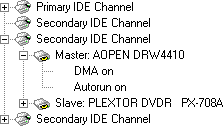
The AOpen DVD recorder was hooked up as Master to the (onboard) secondary
IDE-controller and identifies itself as "AOPEN DRW4410". DMA (Direct
Memory Access) and autorun were enabled for every device.
Used Software:
The Dutch Windows XP Professional (SP1) operating system is installed on our
test machine. We'll be using the following software to perform the various
tests:
- Ahead InCD v3.5.24.0 /
v4.0.5.6
- Ahead Nero
Burning Rom v5.5.10.42
- Ahead Nero
CD/DVD Speed v2.02.11
- Ahead Nero
InfoTool v2.00
- Elaborate Bytes
CloneCD v4.2.0.2
- Exact Audio
Copy v0.9 beta 4
- Kris Schoofs' DVD
Plus Identifier v2.4
- Plextor
PlexTools Professional v2.07
we'll take a look at the drive's package, the drive itself and its
specifications and features.
As always we're going to start our review by checking out the contents of the
retail package AOpen send to
us. In the box of the DRW4410 DVD recorder we can find the following items:

- AOpen DRW4410 drive
- User's Guide (five languages)
- Optical internal drive easy installation guide
- Mounting screws, audio cables
- Bonus DVD containing;
- Acrobat Reader (v5.1)
- Manuals (PDF-documents)
- NeoDVD
- Nero;
- Nero Burning ROM v5.5
- InCD v4
- EasyWrite Reader
- Nero Burn Rights
- Nero Media Player
- Nero Burning ROM v5.5
- PowerDVD XP 4.0
- Ulead VideoStudio 7 SE DVD
- Acrobat Reader (v5.1)
- One blank 52x Ritek 700MB CD-R disc
- One blank 12x unknown 700MB CD-RW disc
- One blank 4x Ricoh 4.4GB DVD+R disc
- One blank 2.4x Ricoh 4.4GB DVD+RW disc
When looking at the package of the AOpen DRW4410 drive we must say that AOpen
has put together an excellent selection of software and hardware. The only items
we missed in the package were an IDE flat cable and perhaps some 4x compatible
DVD+RW media (but we know that this type of media is, at the moment, very hard
to come by). Other than that the package contents were superb since we haven't
seen many drives being shipped with a complete selection of recordable media and
a DVD full of extra software.
The Drive:
The AOpen DRW4410 drive has a white colour and a big AOpen logo on its tray
with underneath that the DVD+RW/+R text. On the drive tray we can also find a
'JustLink' logo, a DVD+ReWriteble logo and a 'High-Speed ReWriteable' logo:

As you can see the AOpen drive has one LED and a round eject button. There's
no headphone jack and volume control button located on the drive. When we look
at the back of the drive we can see the usual connections:

One the back of the drive we find the usual IDE and power connectors, the
Master/Slave/CableSelect jumpers and the audio output connectors. When we take a
look at the label on the drive we can see that our DRW4410 drive was
manufactured in July of this year:

Software:
When inserting the Bonus DVD in the AOpen drive we see the following menu
with which we can install the various software packages that are located on the
DVD:

 We were pleased to see that the AOpen drive was shipped
with a copy of Ahead's CD/DVD mastering software, Nero Burning Rom. A while ago
Ahead released their Nero 6 software but the AOpen drive is shipped with a copy
of the Nero Burning ROM 5.5 software. For our review we'll be using Nero Burning
ROM version 5.5.10.42.
 Ahead's packet writing software InCD 4 is also located on
the AOpen Bonus DVD. With InCD you can format a CD-RW or DVD±RW disc and use it
as a large floppy disc. InCD also supports the 'Mount Rainier' (CD-MRW) format
and when you want to access a CD-MRW disc on a system that doesn't support this
format, Ahead's EasyWrite Reader plug-in is also present on the DVD-ROM. Other
tools located on the DVD-ROM are NeroMediaPlayer and Nero BurnRights (allows an
administrator to setup user accounts under Windows XP/2000 so that users without
administrative rights can burn CDs with Nero).
 The AOpen drive can of course be used to play DVD movies
with. On the Bonus DVD we can find a copy of Cyberlink's PowerDVD XP 4.0
software. PowerDVD is a complete solution for viewing DVD movies on your
computer.
 The next software package on the Bonus DVD Ulead's
VideoStudio 7 software. With VideoStudio 7 you can edit your videos and share
them with others on tape, DVD, Video CD and the Internet.
 Video in, DVD out; it's that simple. neoDVD's intuitive
user interface is designed to make all the features easy to access and simple to
implement. With the neoDVD software that's located on the AOpen Bonus DVD you
can capture, author and copy DVDs in a simple process.
Drive Specifications:
Let's begin with a listing of the drive's specifications as listed on the
AOpen website:
(Read,Play), CD-ROM, CD-ROM XA, CD-R, CD-RW, CD-I, Photo-CD, Video CD, CD
Extra, CD-G (Read), CD Text, DVD+RW/+R, DVD-RW (Read,Play), DVD-ROM
(Read), DVD-Video (Play)
(detected with Nero InfoTool)
RAW SAO 16, RAW SAO 96, RAW DAO 96
Technology
The table above gives us a general idea of what we can expect from the AOpen
drive. Let's continue with a screenshot of the DRW4410's specifications as
detected with Nero InfoTool:

Nero InfoTool reports us that the AOpen drive has firmware 1.11 installed and
has a built-in 2MB buffer. The drive can read all types of media, except for
DVD-RAM. When it comes to writing various types of media the DRW4410 can only
record to CD-R(W) and DVD+R(W) media. The Mount Rainier format is unfortunately
not supported. From the InfoTool screenshot we can also see that the AOpen drive
is an RPC II (Regional Playback Control) DVD reader. This
means that the drive has been set to play region 2 DVDs (Europe) and has four
region changes left. After the last change the drive will be locked to the last
used region. This was done by motion picture studios to control the release of
movie titles in each world region. This lock can then be reset four times by the
manufacturer of the drive.
Drive Features:

Buffer Underrun Protection -
JustLink:
Nero reports us that the AOpen DRW4410 drive supports the JustLink buffer
underrun prevention technology developed by the Japanese Ricoh company. When
the, in this case 2MB, buffer of the recorder falls beneath a certain level, it
will stop recording as of a specific location on the CD. The recorder then
continues attempting to receive data from the PC to refill the buffer. As soon
as the buffer has been refilled, the recorder will start recording again.
JustSpeed:
Just Speed is a new technology developed independently by Ricoh. AOpen
CD-R/RW drive features JustSpeed technology to reduce disc errors such as
insufficient power in writing and servo follow error. The mechanism controls the
maximum writing speed by:
- using the ATIP (Absolute Time In Pre-groove) information (which contains
maker name, model number, etc. pre-recorded on disc),
- performing test writing to the OPC area at the inner circumference of the
disc
- getting the status of the servo follow check of the outer circumference of
the disc (checking of track shift due to lack of precision in cutting of the
disc itself)

A combination of the above (1), (2), and (3) enables better certainty in
high-speed writing, while offering support to discs where maximum writing speed
cannot be obtained from the ATIP information.
From the Nero Burning ROM screenshot we can see that both JustLink and
JustSpeed can be disabled for the AOpen drive.
Recording Methods:
Let's take a look at the DRW4410's CD-R and CD-RW write performance when
using Nero CD-DVD Speed. We'll also take a look at the AOpen's DVD+R(W)
recording performance:
CD-Recordable Media:

From the produced graph we can clearly see that the AOpen DRW4410 drive uses
the Z-CLV recording method when writing CD-R media. This resulted
in an average write speed of 22.22x. This average write speed is a little
lower than we saw on the Sanyo CRD-BPDV2 DVD recorder (22.66x).
CD-ReWriteable Media:

There isn't much to say about the AOpen's re-write performance. The drive
starts writing at 10x and stays at this speed throughout the entire disc.
DVD+R(W) Media:

There also isn't much to say about the AOpen's DVD+R(W) performance. The
drive starts writing at 4x and stays at this speed throughout the entire disc.
Since the DRW4410 can record DVD+R and DVD+RW media at the same speed (4x), the
recording graphs for DVD+R and DVD+RW media will look exactly the same.
the next page we'll take a look at the AOpen DRW4410's read performance with all
types of media.
In this part of our AOpen DRW4410 (DVD+R) review we'll test how fast the
drive can read various media, including audio CDs and DVD media. As we already
mentioned before, the AOpen drive can read CD media at 40x while DVD media can
be read at 8x. Let's see if this is indeed the case.
Pressed Discs:
For the transfer rate tests we used a pressed CD-ROM containing the PlexTools
software (v1.05) which was exactly 74 minutes (333.000 sectors) long. Below you
can see the produced Nero CD-DVD Speed graph:

From the produced graph you can see that the AOpen drive had no problems
reaching the claimed read speed of 40x. When we look at the drive's seek times
and compare them to some of the other drives we've reviewed we can see that the
AOpen drive has the highest seek times but they're within the drive's specs
(<120ms random stroke):
| Pressed Discs | Average Read Speed | Start Read Speed | End Read Speed | Seek Times Random | Seek Times 1/3 | Seek Times Full |
| AOpen DRW4410 | 30.42x | 17.41x | 40.22x | 115ms | 126ms | 213ms |
| Plextor PX-504A | 29.62x | 17.44x | 39.09x | 110ms | 113ms | 188ms |
| Plextor PX-708A | 31.40x | 18.48x | 41.45x | 98ms | 116ms | 175ms |
| Sanyo CRD-BPDV2 | 29.30x | 16.33x | 38.71x | 85ms | 102ms | 177ms |
CD-Recordable Discs:
For the transfer rate tests with CD-Recordable Media we used a back-up (CD-R)
of the PlexTools software disc. The used disc was a 'That's Write' CD-R
certified up to 16x writing and manufactured by Gigastorage. Here are the
results:

The graph shows us that the AOpen drive again had no problems reaching its
rated read speed of 40x. Its seek times were pretty close to the ones we saw
with the pressed media:
| CD-R Discs | Average Read Speed | Start Read Speed | End Read Speed | Seek Times Random | Seek Times 1/3 | Seek Times Full |
| AOpen DRW4410 | 30.54x | 17.77x | 40.19x | 117ms | 113ms | 212ms |
| Plextor PX-504A | 30.67x | 18.35x | 40.31x | 116ms | 119ms | 174ms |
| Plextor PX-708A | 31.48x | 18.83x | 41.37x | 95ms | 111ms | 164ms |
| Sanyo CRD-BPDV2 | 30.31x | 16.20x | 39.92x | 114ms | 115ms | 204ms |
CD-ReWriteable Discs:
To test the transfer rate with CD-RW discs we once again used the "PlexTools
v1.05" disc only this time we read from a CD-ReWriteable disc. The used disc was
a 'Plextor High Speed CD-RW' disc. Below you can see the produced graphs with
Nero CD-DVD Speed again:

When it came to reading CD-RW media the AOpen again performed well as it had
no problems reaching 40x reading. In fact, the drives read performance with
CD-RW media was better than the drive's performance with pressed and CD-R media.
The drive's seek times were however not that impressive as you can see in the
table below (remember, lower seek times are better):
| CD-RW Discs | Average Read Speed | Start Read Speed | End Read Speed | Seek Times Random | Seek Times 1/3 | Seek Times Full |
| AOpen DRW4410 | 31.15x | 17.86x | 41.24x | 118ms | 133ms | 192ms |
| Plextor PX-504A | 26.08x | 15.34x | 34.45x | 113ms | 124ms | 178ms |
| Plextor PX-708A | 31.46x | 18.47x | 41.55x | 109ms | 116ms | 183ms |
| Sanyo CRD-BPDV2 | 30.59x | 16.97x | 40.44x | 84ms | 103ms | 175ms |
Audio - Digital Audio Extraction:
To test the AOpen's digital audio extraction performance we again used Nero
CD-DVD Speed to do a transfer rate test. The audio disc we used was of a
slightly larger size than in our previous tests (77 minutes). In the graph below
you can see the performance of the DVD-recorder:

And once again the AOpen drive showed good performance as the drive had no
problems reaching 40x and going faster than that. The AOpen DRW4410's seek times
were pretty similar as we've saw with the previous tests. They're within
specifications but not very good when we compare them to results we achieved
with other DVD recorders:
| Audio Discs | Average Read Speed | Start Read Speed | End Read Speed | Seek Times Random | Seek Times 1/3 | Seek Times Full |
| AOpen DRW4410 | 30.86x | 17.67x | 40.86x | 118ms | 135ms | 218ms |
| Plextor PX-504A | 25.87x | 15.35x | 34.09x | 110ms | 119ms | 177ms |
| Plextor PX-708A | 31.84x | 18.90x | 41.98x | 97ms | 117ms | 181ms |
| Sanyo CRD-BPDV2 | 30.72x | 18.24x | 40.21x | 84ms | 103ms | 208ms |
As a final test we used PlexTools to extract the audio disc to our hard disk. We also tested the drive's performance using Exact Audio Copy (EAC) in Secure Mode (for some reason we're unsure of the AOpen drive didn't work very well with EAC's Burst Mode so that's why we used the PlexTools software instead). According to EAC the DRW4410 does not cache the audio data but the drive does have an accurate stream and it can report C2 error information. |  |

PlexTools Professional

Exact Audio Copy - Secure Mode
And once again we see a good performance from the AOpen drive. Extracting the
audio tracks at 40x was no problem using the PlexTools software and when using
the drive with the EAC software and its Secure Mode the AOpen also showed a very
good result (compare the drive's average secure read speed of 11x to the Sanyo
CRD-BPDV2's average read speed of 7.7x for instance).
Audio - Advanced DAE Quality Test:
As always, to conclude our CD media read tests we did an 'Advanced DAE
Quality Test' with Nero CD-DVD Speed. You can see the produced results
below:

The AOpen once again showed a very decent result. The DRW4410's average read
speed of 28.75x was slower than the Plextor PX-708A drive (30.10x) but it
was faster than the Plextor PX-504A (24.38x average) and the Sanyo CRD-BPDV2
(28.64x average). Last but not least the Advanced DAE Quality Test shows us that
the AOpen drive can read SubChannel Data and CD-Text.
DVD - DVD-Video:
For our DVD reading tests we're going to start with a DVD-Video read test of
a single-layered and double-layered DVD disc. Keep in mind that a low read speed
has no effect on the drive's performance when playing a DVD. The drive's read
speed is only important when you, for example, want to rip a DVD disc to your
hard disk.


As you can see from the produced graphs the AOpen drive can read the
DVD-Video discs at a maximum speed of 8x. From the second graph you can also see
that the AOpen drive had some problems reading the double-layered DVD. When
looking at the drive's seek times we feel that these should be improved because
186ms (SL) and 170ms (DL) are not within the drive's specifications of
140ms.
| DVD Video | Average Read Speed (SL) | Start Read Speed (SL) | End Read Speed (SL) | Average Read Speed (DL) | Start Read Speed (DL) | End Read Speed (DL) |
| AOpen DRW4410 | 6.12x | 3.40x | 8.17x | 4.74x | 3.37x | 8.01x |
| Plextor PX-504A | 3.73x | 2.07x | 4.98x | 3.43x | 1.91x | 1.96x |
| Plextor PX-708A | 9.01x | 5.00x | 12.04x | 6.03x | 3.37x | 8.03x |
| Sanyo CRD-BPDV2 | 8.77x | 4.15x | 11.70x | 4.28x | 3.45x | 3.88x |
DVD - DVD+R(W):
To test the AOpen's read performance with DVD+R and DVD+RW media we simply
copied 4.4GB to an empty DVD+R and DVD+RW disc. Below you can see the
results:


When it came to reading DVD+R(W) media the AOpen DRW4410 drive performed very
well as it was the fastest drive we've reviewed. But, unfortunately, the drive's
seek times were again a little disappointing:
| DVD +R(W) | Average Read Speed (+R) | Start Read Speed (+R) | End Read Speed (+R) | Average Read Speed (+RW) | Start Read Speed (+RW) | End Read Speed (+RW) |
| AOpen DRW4410 | 6.16x | 3.38x | 8.24x | 6.17x | 3.39x | 8.25x |
| Plextor PX-504A | 3.77x | 2.08x | 5.04x | 3.37x | 1.88x | 1.72x |
| Plextor PX-708A | 6.05x | 3.33x | 8.10x | 6.07x | 3.34x | 8.11x |
| Sanyo CRD-BPDV2 | 4.01x | 2.64x | 4.02x | 4.02x | 2.65x | 5.77x |
DVD - DVD-R(W):
To test the AOpen's read performance with DVD-R and DVD-RW media we again
copied roughly 4.4GB to an empty DVD-R and DVD-RW disc. Below you can see the
results again:


Although there were some small problems when reading the DVD-R media, the
AOpen once again showed a very good performance. But, as we've seen before, the
drive's seek times could be a lot better. The seek times we got when reading the
DVD-RW media were within the drive's specs but the DVD-R seek times were
not.
| DVD -R(W) | Average Read Speed (-R) | Start Read Speed (-R) | End Read Speed (-R) | Average Read Speed (-RW) | Start Read Speed (-RW) | End Read Speed (-RW) |
| AOpen DRW4410 | 6.04x | 3.42x | 8.10x | 6.16x | 3.40x | 8.25x |
| Plextor PX-504A | 3.76x | 1.89x | 5.04x | - | - | - |
| Plextor PX-708A | 6.00x | 3.37x | 8.04x | 6.06x | 3.34x | 8.11x |
| Sanyo CRD-BPDV2 | 4.02x | 3.06x | 4.02x | 4.02x | 3.20x | 4.02x |
So far for the
reading part. Now let's check out the most important part, writing recordable
CDs and DVDs...
During the introduction we already mentioned that the AOpen DRW4410 is not
the newest drive around. But, the drive has some decent recording speeds on
board, including 24x CD-R and 4x DVD+R recording. On this page of our review
we'll see what these recording speeds mean when writing data compilations.
Writing Data CD-R:
For our CD-R data writing tests we simply set up a new compilation of 700MB
using the Nero Burning Rom 5.5 software. We used the DAO (Disc At
Once) writing method. The disc was finalized and set-up as a
non-multisession disc. In the screenshot below you can see the burn process
completed successfully:

As you can see from the screenshot, the burn process was completed in
4 minutes and 14 seconds. This recording time is a little slower
than we saw on the Sanyo CRD-BPDV2 DVD recorder (4m:03s), but it's still fast
enough for people who only record an occasional CD or two.
CD-R Write Quality:
In the graphs below, produced with the PlexTools Professional software and a
Plextor Premium drive, you can see an overview of errors occurring during the
read process. Please note that every burned disc will always have C1
errors. These are errors that are corrected by the drive and they will not
affect the disc in a bad way as long as their amount is limited. C2 errors are
however very bad for a disc and are harder to read and correct. When there are
CU errors present on the disc it means you have bad burned disc and it can't be
read in the test drive you're using as a reader.
Also keep in mind that the number of C1/C2/CU errors depends on a number of
different factors. The combination of software, hardware and read speed have an
effect on the results. Since we're using different software in this review and a
different drive for reading the disc, the results may be (a little) different
than when using other software like, for instance, Lite-On's WSES software.
Nevertheless all programs will give you a good idea of the quality of the
written disc.

AOpen - 52x certified - 24x
write
| Manufacturer: | Ritek |
| Code: | 97m15s17f |
| Disc Type: | CD-R |
| Recording Layer: | Dye Type 7: Short Strategy (Phthalocyanine) |
| Capacity: | 79:59.70 (702MB) |
| Certified Speed: | 52x |
| Write Speed: | 24x |
| Write Time: | 4m:12s |
| C1 Average/Sec: | 0.4 |
| C2 Average/Sec: | 0.0 |
| CU Average/Sec: | 0.0 |
The AOpen (Ritek) disc that came with the DRW4410 drive was recorder with
excellent quality. There were hardly any C1 errors (0.4 average) and there were
no C2/CU errors on the disc.

Maxell - 48x certified - 24x
write
| Manufacturer: | MPO |
| Code: | 97m25s07f |
| Disc Type: | CD-R |
| Recording Layer: | Dye Type 7: Short Strategy (Phthalocyanine) |
| Capacity: | 79:59.00 (703 MB) |
| Certified Speed: | 48x |
| Write Speed: | 24x |
| Write Time: | 4m:17s |
| C1 Average/Sec: | 5.3 |
| C2 Average/Sec: | 0.0 |
| CU Average/Sec: | 0.0 |
The Maxell (MPO) discs had a lot more C1 errors than we saw on the AOpen disc
but their amount is not too high. There were no C2/CU errors on the disc and
thus overall the disc was recorded well.

Imation - 48x certified - 24x
write
| Manufacturer: | CMC Magnetics |
| Code: | 97m26s66f |
| Disc Type: | CD-R |
| Recording Layer: | Dye Type 6: Short Strategy (Phthalocyanine) |
| Capacity: | 79:59.71 (703 MB) |
| Certified Speed: | 48x |
| Write Speed: | 24x |
| Write Time: | 4m:12s |
| C1 Average/Sec: | 3.9 |
| C2 Average/Sec: | 0.0 |
| CU Average/Sec: | 0.0 |
The Imation media, manufactured by CMC Magnetics, had a lower amount of C1
errors than we saw on the previous Maxell discs. So, since there were again no
C2/CU errors on the disc, this is another well recorded disc.

MAM-E - 48x certified - 24x
write
| Manufacturer: | Mitsui |
| Code: | 97m27s58f |
| Disc Type: | CD-R |
| Recording Layer: | Dye Type 8: Short Strategy (Phthalocyanine) |
| Capacity: | 79:59.74 (703MB) |
| Certified Speed: | 48x |
| Write Speed: | 24x |
| Write Time: | 4m:14s |
| C1 Average/Sec: | 8.3 |
| C2 Average/Sec: | 0.0 |
| CU Average/Sec: | 0.0 |
With an average C1 error count of 8.3 the MAM-E media had the highest amount
of C1 errors. As you can see from the graph the amount of C1 errors decreases
throughout the disc. Once again, there were no C2/CU errors on the disc so
overall the AOpen DRW4410 showed good performance when it comes to CD-R
recording quality.
Writing Data DVD+R:
To test the AOpen's performance when writing DVD media we set up a new
UDF/ISO compilation of roughly 4400MB in Nero Burning ROM and started the
recording process:

The AOpen DRW4410 drive completed the recording process in 15 minutes
and 22 seconds. This is not the fastest time we've seen since we when we
write the same compilation with a Plextor PX-708A DVD recorder it only needed
14m:32s (when recording at 4x of course). The Sanyo CRD-BPDV2 recorder needed
14m:59s to record the same data compilation so overall the AOpen drive was the
slowest 4x DVD+R recorder I've reviewed.
DVD+R Write Quality:
Unfortunately the only method of testing the write quality of a DVDR disc is
by using the Kprobe software. The problem however is that Kprobe requires a
Lite-On DVD-ROM drive to measure the errors on the DVD disc and I unfortunately
don't own a Lite-On DVD-ROM drive. So, in order to somewhat test the write
quality of the recorded DVD disc I simply watched them on a few standalone DVD
players. I also played the DVDs in my very picky Xbox console and all discs
played perfectly.
it's time to check the drive's re-write performance...
Besides supporting 4x DVD+R recording the AOpen drive can also write DVD+RW
media at 4x. On this page of our review we'll see what these speeds mean when
writing normal data compilations and when using the packet writing method.
Re-Writing Data:
For our CD-RW data re-writing tests we set up a new compilation of 650MB
using the Nero Burning Rom 5.5 software. We used the DAO (Disc At
Once) writing method. In the screenshot below you can see the burn
process completed successfully:

As you can see our data compilation was written in 8 minutes and
14 seconds. This was about 7 seconds slower than the Sanyo CRD-BPDV2
drive. For our next DVD+RW test we set up a new DVD-ROM compilation of about
4.4GB. We again used the DAO writing method and started the write process:

The total compilation was written in just under 15 minutes. This
recording time is about 9 to 10 minutes shorter than when recording at 2.4x
(which is what most DVD+RW drives currently support). When we compare the AOpen
write time to the Plextor PX-708A which also supports 4x DVD+RW recording, the
AOpen again needs a bit more time, about 17 seconds, to complete the
compilation.
Packet Writing:
For our packet writing tests we used Ahead's InCD 4 software and tested both
the AOpen's CD-RW and DVD+RW performance. For our first test we set-up a test
folder with random data measuring roughly 400MB in size. After formatting was
complete we measured the time it took for the drive to write the test data. In
the table below we've summed up our results:
| CD-RW Packet Writing | InCD 4 Formatting 650MB | InCD 4 Copying 400MB | Average Write Speed |
| AOpen DRW4410 | 8m:55s | 10m:26s | 5.11x |
If you've read some of our previous reviews where we used the InCD 4 software
you'll know that we have often seen strange results when looking at the
recording times and speeds. The AOpen drive can re-write data at 10x but with
InCD 4 we only achieved an average packet writing speed of 5.11x. So, to check
if the InCD 4 software was the problem we simply uninstalled InCD 4 and replaced
it with Ahead's InCD 3 software. In the table below you can see the new
results:
| CD-RW Packet Writing | InCD 3 Formatting 650MB | InCD 3 Copying 400MB | Average Write Speed |
| AOpen DRW4410 | 12m:20s | 6m:03s | 7.53x |
As you can see from the results the AOpen DRW4410 now achieved an average
packet writing speed of 7.53x but strangely enough, the formatting of the CD-RW
disc took (much) more time. Let's continue with the drive's DVD+RW packet
writing performance. We've included the write times when using InCD 3 and 4:
| DVD+RW Packet Writing | InCD Formatting 4.4GB | InCD Copying 4.4GB | Average Write Speed |
| AOpen DRW4410 InCD 4 | 0m:39s | 25m:47s | 2.2x |
| AOpen DRW4410 InCD 3 | 1m:10s | 19m:28s | 2.9x |
| Sanyo CRD-BPDV2 InCD 3 | 1m:02s | 25m:28s | 2.2x |
And again we can see quite a big difference when using InCD 3 or 4. When
using InCD 4 the DVD+RW disc is formatted faster but writing to it takes more
time. When using InCD 3 it's the other way around although an average packet
writing speed of 2.9x when using InCD 3, is not very fast for a 4x DVD+RW drive.
Because the AOpen drive does not support the Mount Rainier format this concludes
our re-write tests.
for some advanced testing...
For our final (advanced) tests we're going to test how the AOpen drive
performs when reading and writing data and audio copy-protections. Besides that
we'll also check if the drive can overburn and if it can handle 8cm discs. Let's
start with the data copy-protections:
Copy-Protected Data:
For our copy-protected data tests we used CloneCD to read and write several
popular copy-protections. In the picture below you can see that the AOpen
DRW4410 is fully supported by CloneCD:

The AOpen drive supports the DAO-RAW96 recording mode which basically means
that the drive can write uncorrected data and SubChannel Data. In the table
below we've summed up all of our results and after the table we will clarify our
results:
| Protected Data | Game Title | Protection (version) | Read Time | Back-up Works |
 | Desperados | LaserLock | 8m:25s | Yes |
 | The Sims: House Party | SafeDisc v2.10.030 | 6m:25s | Yes |
 | Mafia: The City Of Lost Heaven (CD1) | SafeDisc v2.70.030 | 7m:21s | Partially |
 | Neverwinter Nights (CD3) | SecuRom v4.76.00.0051 | 2m:21s | Yes |
 | Final Fantasy VIII (CD1) | PlayStation LibCrypt | 2m:22s | Yes |
The AOpen DRW4410 drive performed very well in our data copy-protection
tests. The drive was able to read all discs in an acceptable time and did
especially well with the LaserLock disc since that protection often needs a lot
of time to be read. When it came to writing the protections the AOpen drive also
performed pretty well but it was too bad it needed CloneCD's weak sector
amplification for newer SafeDisc 2 versions to make a fully working back-up.
Copy-Protected Audio:
For the copy-protected audio discs we used the Exact Audio Copy (EAC)
software. We simply inserted the audio discs in the drive and waited if the
drive could recognize the disc and if so, could extract the audio tracks. In the
table below we've summed up our results. Note that before we did any of these
tests we disabled the 'Auto Insert Notification' for the AOpen drive:
| Protected Audio | Audio Title | Protection (version) | Exact Audio Copy |
| Shakira - Laundry Service | Key2Audio version 2 | Failed to recognize disc | |
| Celine Dion - A New Day Has Come | Key2Audio version 3 | Failed to recognize disc | |
| Bitte Ein Beat! - Beat 5 | Cactus Data Shield 200 | Failed to recognize disc | |
| Yorin FM - Hitzone 21 | Doc.loc | Failed to recognize disc | |
Well what can we say? After the AOpen's good performance with data
copy-protections it was disappointing to see the drive failing with all our
audio copy-protections. The DRW4410 drive simply failed to recognize any
discs.
Overburning:
For our overburning test we, as always, used the Nero CD-DVD Speed software
and started the test. According to the CD-DVD Speed software the AOpen drive can
almost fully overburn up to 98 minutes:

To test if the results we got from Nero CD-DVD Speed were correct we used the
Nero 5.5 software to set up a new audio compilation of 98 minutes. Unfortunately
the burn process failed:

When we lowered the compilation size to roughly 93 minutes the disc was
recorded successfully. Notice that the recording speed was 12x with this
particular CD-R brand. We of course checked if overburning was limited to 12x
but it wasn't since when we recorded 704MB to a 48x CD-R with overburning
enabled, the recording speed was 24x:

GigaRec/99 Minute Discs:
GigaRec is a new technology that was introduced with the
Plextor Premium drive (and as of yet this is the only drive that supports this
technique). In short GigaRec allows you to expand the capacity of a normal 80
minute (700MB) CD-R disc up to 111 minutes (or almost 1GB of data). GigaRec has
different rates and for our next test we used a GigaRec disc that was recorded
with the highest setting, 1.4x, which means that there is 113 minutes of
audio on a standard 80 minute disc:

Although the AOpen DRW4410 drive detected the wrong disc size (177 minutes)
it was able to read the complete disc! So, in theory reading back our freshly
created 93 minute CD-R should be no problem for the drive:

The AOpen drive could indeed read the disc but as you can see from the
produced graph the drive lowered the read speed to a safe 8x.
8cm Discs:
For our final test we'll, as always, test if the AOpen drive can read and
write 8cm discs. For our write test we used Nero Burning Rom 5.5 and after that
we used Nero CD-DVD Speed to do another transfer rate test. As expected, both
tests were completed without a problem:

That concludes our AOpen DRW4410 review! Let's go to our final words
and conclusions...
Positive:
- Supports 4x recording to DVD+R and DVD+RW media
- Excellent hardware/software package
- Supports 'JustLink' and 'JustSpeed' technology
- Good CD and DAE (audio) read speeds
- Excellent DVD read speeds
- Supports overburning up to 98 minutes and can read 'GigaRec' discs (but
read speed slows down to 8x)
- Supports DAO-RAW writing
- Supports reading and writing of 8cm discs
- Supports reading and writing of CD-Text information
- Supports reading and writing of full SubChannel Data
Negative:
- Only 2MB data buffer
- Seek times with CD/DVD media could be improved
- Write times could be a little faster
- Needs 'weak sector amplification' for newer SafeDisc 2 versions
- Poor read performance with copy-protected audio discs
Conclusion:
| | During the introduction of this review we already mentioned that the AOpen DRW4410 was not the latest DVD recorder available today. Our test drive was manufactured about four months ago (July) but despite the drive's age, it showed a pretty good overall performance during our tests. |
When it came to reading media the AOpen performed very well as it could read
pressed CD, CD-R and CD-RW media all at maximum speed of 40x. Reading audio
discs was also no exception and although the AOpen drive was not the fastest
drive we've reviewed when it came to DAE, it was still able to beat several
other drives. The AOpen drive can of course also be used to read DVD media with
and although a top read speed of 8x for DVD-Video discs is not very impressive,
the fact that the drive could also read DVD-R(W) and DVD+R(W) discs at this
speed, was rather impressive. The only negative thing about the AOpen
drive when it came to read performance, were its high seek times. These were
often very high and especially the seek times with DVD media were often way
higher than the drive's specifications.
The most important thing about a DVD recorder is of course its recording
performance to DVDR(W) and CD-R(W) media. Unfortunately the AOpen drive is not a
dual format recorder as it only supports the DVD+R(W) format. During our review
we saw that the AOpen drive was not the fastest 4x DVD+R recorder on the planet
as it often needed more time than other recorders we've reviewed to write a data
compilation of 4.4GB. Luckily the drive's 4x DVD+RW recording speed makes up for
this a little, although the drive's 4x DVD+RW write times were slower than the
Plextor PX-708A drive for example. The DRW4410 can of course also be used to
write CD media with. The drive's 24x recording speed for CD-R media is good
enough for people that don't have to burn a lot of CD's. It was too bad the
AOpen drive only supported 10x CD-RW recording speeds. When it came to write
quality the AOpen did perform pretty well as it was able to write all our test
discs without creating a single error.
When we did our usual advanced tests we were initially impressed by the drive
as it was able to read all the protected data discs very fast. It also performed
pretty well when writing these discs and it was too bad the drive needed 'weak
sector amplification' to back-up the newer SafeDisc copy-protection. Another
thing that disappointed us was the DRW4410's performance when reading protected
audio discs. The drive simply failed to recognize any disc and we really hope
that AOpen can improve the drive in this area. Luckily, when we did the
remaining advanced tests the drive performed well again as it could overburn to
around 98 minutes according to Nero CD-DVD Speed and the AOpen drive was able to
read the full 113 minutes of our GigaRec disc (although the drive did slow down
to a safe 8x to read the complete disc). Last but not least, reading SubChannel
Data, CD-Text and 8 cm media were also no problem for the drive.
The AOpen DRW4410 drive can be found online for as low as $ 143. Overall we
think this is not a bad deal. We'll of course leave it up to you to decide if
you can live with the drive's negative points.















