
 |
Review: Asus DRW-1612BL |
ASUS USA was kind enough to send us their latest Multi Function (X Multi) DVD Burner: the Asus DRW-1612BL internal IDE drive. ASUS' newest DVD burner incorporates DVD-RAM recording, creating a true DVD Multi drive. Single layer 4.7GB DVD burning is supported at 16X max. Double Layer and Dual Layer Recording speed is 8X max. DVD Rewriteable speeds are 8X max for DVD+RW and 6X max for DVD-RW respectively. DVD-RAM recording is supported at 12X max. Very fast 48X max CD-R burning and 32X max CD-RW.
In this article we will show the performance of the DRW-1612BL by running the drive through many tests on a considerable amount of various CD/DVD media.
Corporate Information:
We took a quick look at the company information found at ASUS web pages:

ASUS, a technology-oriented company blessed with one of the world's top R&D teams, is well known for high-quality and innovative technology. As a leading provider of 3C (computers, communications and consumer electronics) total solutions, ASUS offers a complete product portfolio to compete in the new millennium.
In 2005, ASUS shipped 52 million motherboards, which means one out of every 3 desktop PCs sold last year was powered by an ASUS motherboard. If we line them up side by side, the length will be longer than the distance from New York to San Francisco.
ASUS products' top quality stems from product development. Besides innovating cutting-edge features, ASUS engineers also pay special attention to EMI (electromagnetic interference), thermal, acoustics and details that usually go unnoticed to achieve complete customer satisfaction. ASUS notebooks are the first TCO'99-certified notebooks worldwide. The requirements for this honour include radiation emission control, energy (battery consumption), ecology (environment friendly) and ergonomics.
To succeed in this ultra-competitive industry, great products need to be complimented by speed-to-market, cost and service. That's why all 58,000 employees of ASUS strive for the "ASUS Way of Total Quality Management" to offer the best quality without compromising cost and time-to-market while providing maximum value to all customers through world-class services.
ASUS won 1706 awards in 2005 from the world's most respected IT media and organizations. Business Week ranked ASUS amongst its "InfoTech 100" for eight straight years. The readers of Tom's Hardware Guide, the world's largest IT website, selected ASUS as the best maker of motherboards (4 consecutive years) and graphics cards (two consecutive years). Furthermore, the company took home the prestigious "National Award of Excellence" presented by the Ministry of Economics Affairs and Germany's Industrie Forum (iF) Gold Award for industrial design excellence.

Drive Overview:
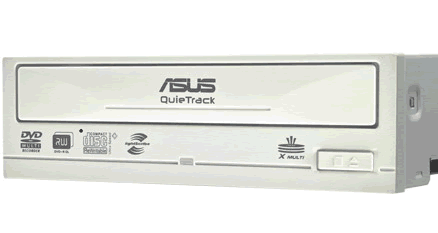
Asus’ newest Internal IDE drive supports all available DVD formats including single layer 4.7GB DVD±R /±RW, 8.5 GB Double/Dual Layer DVD±R DL, and DVD-RAM discs. The drive also supports CD-R discs at 48X CD-R / 32X CD-RW.
- Max. 16X DVD±R / 8X DVD+RW / 6X DVD-RW / 8X DVD±R (DL)
- Max. 48X CD-R / 32X CD-RW
- Max. 16X DVD-ROM / 48X CD-ROM
- Max: 12X DVD-RAM Write / Read
Drive specifications:
Now let us take a look at the detailed specifications of the Asus DRW-1612BL.
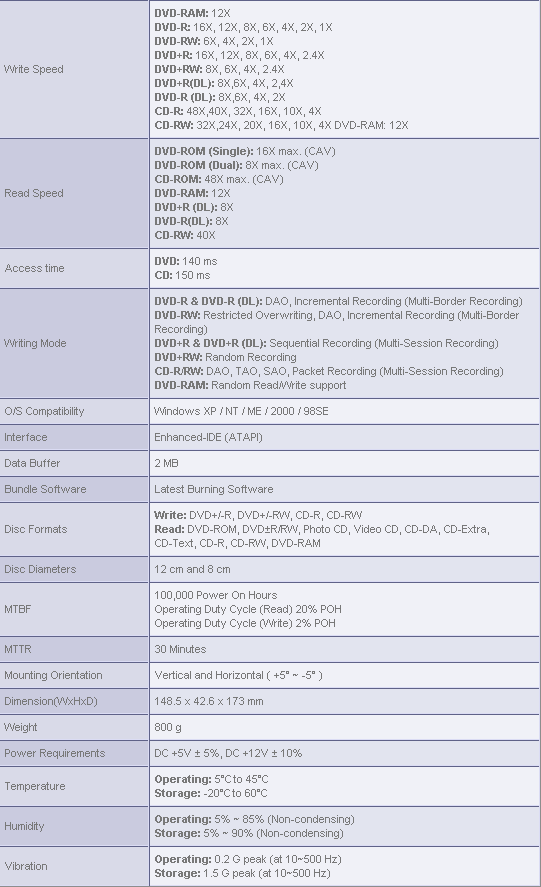
Drive Technology
LightScribe:
LightScribe Direct Disc Labeling technology that offers consumers and businesses a simple, no-hassle way to burn professional, silk-screen quality labels on their CDs and DVDs.

FlextraLink™:
Built-in FlextraLink™ prevents users from buffer underrun problems and eliminates the creation of unusable discs. Throughout the recording process, FlextraLink™ consistently monitors the data buffer status to ensure best recording quality under high-speed operation.

FlextraSpeed™:
Built-in FlextraSpeed™ and AI Auto Speed Adjustment Tech. enhance accuracy and reliability when reading / writing / re-writing across a broad range of certified media in different formats. FlextraSpeed™ continuously monitors the recording media and sets the optimal writing speeds to ensure best recording quality. The ASUS proprietary FlextraSpeed™ occupies minimal system resources so the PC remains full operational and available for other applications even during recording process.
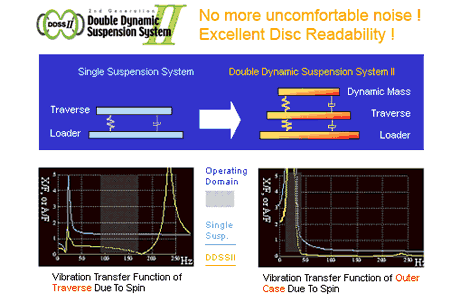
Superior Stability with DDSSII:
The DDSSII technology is designed to minimize the vibration caused by the spindle motor and resonance between components as well as the drive and PC cases. The ASUS patented DDSSII stabilizes, both horizontally and vertically, the pick-up head, achieving more precise tracking and focusing, while reducing vibration and noise caused by high-revolution spindle motors.
Test machine
For this review we will be using a computer with the following configuration:
Test Machine:
Processor: AMD Opteron(tm) Processor 165 @ 2.7GHz
RAM: 2x 1GB G.SKILL Extreme Series 2GBZX @ 250MHz
Motherboard: eVGA / Jetway 939GT4-SLI
Graphic Card: eVGA 7900GT 512 KO with Zalman vf900 @ 650/1600
Sound: Onboard AC97
Hard Disk: 2x 200GB SATA Maxtor, 1x 320GB SATA Seagate
Optical Drives: Lite-On LH-18A1P, ASUS DRW-1612BL, BenQ DW1655, LITE-ON LTR-52327S
Windows XP Professional with Service Pack 2 is installed on this machine.
We will be using the following software in this review:
- Nero 7.5.1.1 Ultra Edition Enhanced
- Nero CD/DVD Speed
- Nero InfoTool 4.0.3.0
- K-Probe v2.5.2
Installation and Supported Features:
The installation was flawless; we hooked the drive up as the primary master using a standard 80-wire Ultra133 EIDE ribbon cable
Here is the Nero InfoTool output for drive and the supported features
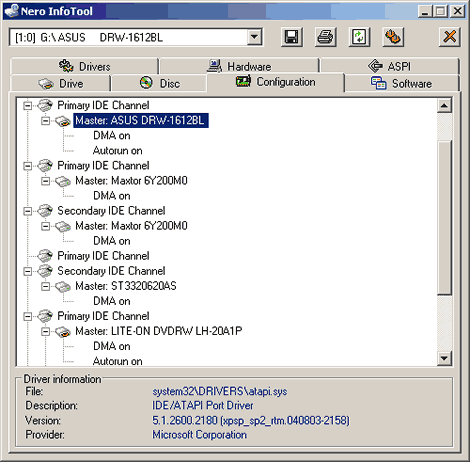

Let’s head to the next page where we will run through What’s Inside the Box.
What’s inside the Box?
On this page let’s take look at what’s in the box, the included software and some screen shots of the drive, box and extras.

As we can see, the retail package contains most everything you need to get started, we have in the retail box the Asus DRW-1612BL internal IDE drive, Nero OEM Suite 2 V6.6.1.6f with Lightscribe support and a ASUS firmware update utility (for this review however we will be using Nero 7.5.1.1 Ultra Edition Enhanced), mounting screws, Multi-Language Quick Installation Guide and a ASUS CD case with a blank Verbatim Lightscribe CD and DVD.
Next let’s take a look at the details on the retail box:

Box Front

Box Rear


Box Left and Right


Box Top and Bottom
Now let’s take a look at the drive itself:

Front
Back

Drive Sticker

Bottom

Drive Right

Drive Left

Rear

PCB
On the next page we will take a look at the Disc Writing Technology of the Asus DRW-1612BL
Disc Writing Technology:
Now let's take a closer look at the writing technology of the Asus DRW-1612BL:
CD-Recordable:

The Asus DRW-1612BL uses CAV, (Constant Angular Velocity), to write at its maximum speed of 48X, this gives an average speed of 35.74x.
For comparison we have made the following table:

As we can see from our chart the Asus DRW-1612BL has no problem holding its own when writing CD-R media.
32x CD-Rewritable:

The Asus DRW-1612BL uses Z-CLV 3-Zone (Zone-Constant Linear Velocity) to write CD-RW media at its maximum speed of 32x, this gives an average speed of 23.93x.
For comparison we have made the following comparison table:

As you can notice from the graph our Asus DRW-1612BL performs a little below average.
16X DVD+R Writing speed:

The Asus DRW-1612BL uses CAV (Constant Angular Velocity) to write DVD+R at the maximum supported speed of 16x. This gives an average write speed of 11.26x and a writing time of 6 minutes 12 seconds.
16X DVD-R Writing speed:

The Asus DRW-1612BL uses CAV (Constant Angular Velocity) to write DVD-R at the maximum supported speed of 16x. This gives an average write speed of 11.18x and a writing time of 6 minutes 19 seconds.
Let’s take a look at our comparison table:

As you can see from our graph the 16x speeds are a little slower on average than the competition.
8X DVD+RW writing speed:

The Asus DRW-1612BL uses Z-CLV (Zone-Constant Linear Velocity) to write DVD+RW at 8x. The average speed is 7.49x and total writing time is 8:39 minutes.
For comparison we have made the following table:

As you can see from our graph the 8x speeds are well below that of the competition.
6X DVD-RW writing speed:

The Asus DRW-1612BL uses CLV, (Constant Linear Velocity) to write DVD-RW at 6x. The average speed is 5.94x and the total writing time is 10 minutes and 35 seconds.
For comparison we have made the following table:

As you can see from our chart the Asus DRW-1612BL has no problem keeping up with the competition.
8X DVD+R DL writing speed:
The Asus DRW-1612BL supports 8x writing speed on DVD+R DL media.

The Asus DRW-1612BL uses Z-CLV (Zone Constant Linear Velocity) to write DVD+R DL media at 8x which gives an average write speed of 6.72x and a total write time of 18 minutes and 13 seconds.
4X DVD-R DL writing speed:
The Asus DRW-1612BL does supports 8x writing speed on DVD-R DL media but we did not have 8x DVD-R DL media at the time, so we are using a Ritek P01 4x DVD-R DL.

The Asus DRW-1612BL uses CLV, (Constant Linear Velocity) to write DVD-R DL media at 4x. The average speed is 3.89x and the total writing time is 28 minutes and 00 seconds
For comparison we have made the following table:

As you can see from our chart the Asus DRW-1612BL posts good time when writing both DVD+R DL 8x and DVD-R DL 4x.
5x DVD-RAM writing speed:
The Asus DRW-1612BL supports 12x writing speed on DVD-RAM media, we will also test 5x seeing this is more readily avaliable. To test the drives maximum write speed, we enable “Streaming.”

The Asus DRW-1612BL uses CLV (Constant Linear Velocity) to write DVD-RAM at its maximum speed of 5x. This resulted in an average write speed of 4.94x and a total write time of 11 minutes and 16 seconds.
For comparison we have made the following table:

As you can see from our chart the Asus DRW-1612BL posts a great burn time of 11m:16s when writing DVD-RAM at 5x.
12x DVD-RAM writing speed:
The Asus DRW-1612BL uses P-CAV (Partial Constant Angular Velocity) to write DVD-RAM at its maximum write speed of 12x. This gives an average write speed of 10.01x and a total write time of 5 minutes 54 seconds.
For comparison we have made the following table:

As you can see from our chart the Asus DRW-1612BL posts a good burn time of 5m:54s when writing DVD-RAM at 12x.
Book type (bitsetting):
The Asus DRW-1612BL supports bitsetting, and as default will write DVD+R, DVD+RW and DVD+R DL media with DVD-ROM book type, the drive does remember your Book Type setting so you won’t need to change it once you have it set.

With Nero CD-DVD Speed, we can see that the "Book Type" column in the Drive Settings area that all disc types are currently bitset to DVD-ROM. When a disc is inserted in the drive, the Disc Settings area will show the Book Type. Screenshot above shows that there is a DVD+R disc in the drive and it shows that "Current book type" is set to DVD-ROM.
We can also check if our discs are really written with DVD-ROM Book Type is by clicking on the Disc Info tab. This should look something similar to the following screen shot:

Summary – Write Technology:
Now let’s take a look at the summary of the Asus DRW-1612BL write technology and speed in the table:

As you can see from the chart the Asus DRW-1612BL is slightly below average. The drive however was able to reach all of its advertised speeds.
Disc Quality Scanning:
The Asus DRW-1612BL can perform Disc Quality Scanning using Nero CD-DVD Speed.

Scanned at 8x
For comparison here is a BenQ DW-1655 scan at 8x.

Let’s take a look at the Reading Performance…
Reading performance:
For the next tests we will use Nero CD/DVD-Speed to read various CD and DVD’s, including audio discs and DVD-media. As we already mentioned in the introduction, this drive supports:
- DVD-ROM : 16x
- CD-R/ROM: 48x
Pressed discs:
For this test we used an original pressed CD-ROM disc containing the World of Warcraft that is about 74 minutes in length.

The The Asus DRW-1612BL has no trouble reaching 48x.
Now let’s compare the result with other drives performance in the table below:

As you can see from our chart the Asus DRW-1612BL is one the faster drives and seek times are very low reading pressed CD-ROM.
CD-Recordable Discs:
For this test we used a Data CD-R that was made using Nero CD-DVD Speed “create data disc”. The disc we used was a Memorex 52x CD-R disc manufactured by CMC Magnetics burned at 48x.

The Asus DRW-1612BL only reached 40.05x when reading a full CD-R disc.
Now let’s compare the result to some other drives:
|
CD-R |
Average |
Start |
End |
Seek |
Seek |
Seek |
|
BenQ |
36.57x |
20.92x |
48.09x |
203ms |
233ms |
239ms |
|
Pioneer |
31.18x |
18.37x |
40.99x |
111ms |
121ms |
204ms |
|
Lite-On |
36.84x |
21.61x |
48.62x |
115ms |
126ms |
203ms |
|
LG |
35.63x |
20.79x |
47.16x |
110ms |
130ms |
190ms |
|
NEC |
35.60x |
29.74x |
47.01x |
134ms |
136ms |
210ms |
|
Samsung |
30.65x |
17.28x |
40.52x |
92ms |
90ms |
162ms |
|
Sony |
37.46x |
21.26x |
49.62x |
86ms |
92ms |
166ms |
|
LG |
32.26x |
18.07x |
42.75x |
133ms |
132ms |
197ms |
|
ASUS |
30.38x |
17.76x |
40.05x |
97ms |
108ms |
166ms |
The Asus DRW-1612BL was among the slowest drives when reading back full CD-Recordable discs but the seek times were the fastest.
CD-Rewritable discs:
We made another Data CD with Nero CD-DVD Speed “create data disc”, this time we are using a Verbatim DataLifePlus Ultra Speed+ (32X) CD-RW disc.

The Asus DRW-1612BL read the CD-RW discs back at 40.88x speed.
Now let’s compare the result to some other drives:
|
CD-RW |
Average |
Start |
End |
Seek |
Seek |
Seek |
|
BenQ |
31.36x |
17.47x |
41.46x |
105ms |
116ms |
250ms |
|
Pioneer |
24.96x |
14.60x |
33.01x |
105ms |
119ms |
195ms |
|
Lite-On |
36.84x |
21.61x |
48.62x |
115ms |
126ms |
203ms |
|
LG |
30.53x |
17.86x |
40.41x |
102ms |
115ms |
169ms |
|
NEC |
30.66x |
17.92x |
40.12x |
134ms |
141ms |
214ms |
|
Samsung |
30.65x |
16.43x |
40.44x |
91ms |
90ms |
163ms |
|
Sony |
31.50x |
17.77x |
41.78x |
93ms |
98ms |
174ms |
|
LG |
32.08x |
18.23x |
42.47x |
129ms |
135ms |
215ms |
|
ASUS |
30.84x |
17.59x |
40.88x |
97ms |
112ms |
178ms |
The Asus DRW-1612BL did a good job reading back a full CD-Rewritable disc and had the best seek times again.
Audio – Digital Audio Extraction
To test the digital audio extraction performance of the Asus DRW-1612BL we used Nero CD-DVD Speed to measure the transfer rate. The audio disc we used is 79 minutes in length (79:47.10).

The Asus DRW-1612BL reached and impressive 49.27x when reading a full pressed audio disc
Now let us compare the result to some other drives:
The Sony DRX-830U performed average on the Audio-CD with respectable seek times.

The Asus DRW-1612BL was among the fastest drives when reading the Audio-CD disc and the seek times were again the fastest.
Advanced audio – EAC test:
For our next test we used EAC (Exact Audio Copy) to test the drive’s audio extraction performance. As we can see from the screenshot below the drive supports accurate stream and C2 error information.

Here are the results produced by EAC:

Burst Mode

Secure Mode
The Asus DRW-1612BL performed very well in both burst mode but was slower in secure mode.
Advanced audio – DAE quality test:
For our next test we will use the “Advanced DAE Quality Test” feature in Nero CD-DVD Speed. The CD-R media we are using is 40x certified Memorex Music CD-R made by Ritek. (Thanks to Memorex USA for sending us this media.)


The extracting quality is excellent and the drive performed very well but it cannot read the leadin or leadout.
DVD reading performance:
Again, we will use Nero CD-Speed to measure the reading performance, this time for various types of DVD discs. The drive should read pressed single layer DVD-discs at 16X.
DVD – DVD-Video:
For our DVD reading performance tests we are going to start with a single and Double Layered DVD video discs. While only 1X speed is required to watch DVD movies, it’s useful to be able to read the discs at higher speeds if you’re going to extract (rip) the content of the disc to your hard drive.

DVD-Video Single Layer

DVD-Video Double Layer
The Asus DRW-1612BL reads a pressed DVD-Video at up to 16x for a Single Layer disc. However the drive only reads a Double Layer disc at 8x.
|
DVD |
Average |
Start |
End |
Average |
Start |
End |
|
BenQ |
11.86x |
6.59x |
15.79x |
9.01x |
5.03x |
12.00x |
|
Pioneer |
11.98x |
6.42x |
15.98x |
9.34x |
5.26x |
12.41x |
|
Lite-On |
12.19x |
6.61x |
16.29x |
9.23x |
5.13x |
12.33x |
|
LG |
7.64x |
4.28x |
10.18x |
6.17x |
3.45x |
8.20x |
|
NEC |
11.84x |
6.57x |
15.82x |
8.90x |
4.95x |
11.83x |
|
Samsung |
12.06x |
6.66x |
16.07x |
6.41x |
3.58x |
8.52x |
|
Asus DRW-1612BL |
12.05x |
6.68x |
16.07x |
6.15x |
3.44x |
8.10x |
The Asus DRW-1612BL performed very well with our DVD-Video Single Layer but was the slowest on the Double Layer read tests.
DVD+R and DVD+RW:
For this next test we used a Ritek 16x DVD+R and a Ritek 8x DVD+RW with 4.38GB of data. (Thanks to Ritek USA for sending us this media.) Below are the results:

DVD+R

DVD+RW

The drive reads DVD+R disc at 12x speed and the DVD+RW disc at 8x speed.
Now let’s see how it will perform on DVD-R/RW.
DVD–R and DVD-RW:
For this test we used a Ritek 16x DVD-R and a Ritek 6x DVD-RW with 4.38GB of data. (Thanks to Ritek USA for sending us this media.) Below are the results:

DVD-R

DVD-RW
The drive reads DVD-R disc at 12x speed and the DVD-RW disc at 8x speed.
|
DVD-R |
Average |
Start |
End |
Average |
Start |
End |
|
BenQ |
12.09x |
6.59x |
16.17x |
9.34x |
5.11x |
12.50x |
|
Pioneer |
9.36x |
5.18x |
12.51x |
6.24x |
3.46x |
8.34x |
|
Lite-On |
9.22x |
5.08x |
12.33x |
9.21x |
5.05x |
12.33x |
|
LG |
7.71x |
4.25x |
10.31x |
6.16x |
3.34x |
8.23x |
|
NEC |
11.97x |
6.58x |
16.01x |
9.78x |
5.37x |
13.07 |
|
Plextor |
7.47x |
4.10x |
9.99x |
5.96x |
3.27x |
7.97x |
|
ASUS |
9.11x |
5.04x |
12.18x |
6.21x |
3.42x |
8.31x |
Again the drive performed slow when reading DVD-R and DVD-RW discs.
DVD – DVD±R DL:
For this test we used a Verbatim 8x DVD+R DL and a Verbatim DVD-R DL disc both filled with 4.38GB of data. (Thanks to Verbatim USA for sending us these media.) Our test results are found below:

DVD+R DL

DVD-R DL
The drive reads DVD+R DL and DVD-R DL at 8x speed.
DVD – DVD-RAM:
In this test we are using a Maxell 12x DVD-RAM filled with 4.27GB of data. Our test results are found below:

DVD-RAM
The Asus DRW-1612BL reads DVD-RAM at 12x in 5:36 minutes without any problem.
Overall thoughts:
The Asus DRW-1612BL is not the fastest reader by any means but it should prove to be reliable.
Now it’s time to head on to a more interesting section: Writing Quality with CD-R and CD-RW discs…
The specifications of Asus DRW-1612BL state that the drive is able to write CD-R discs at 48x CD-RW discs at 32x. Let’s find out how the drive really performs in speed and quality.
Writing Quality with CD-R discs:
For our data writing tests, we simply set up a new compilation of about 702Mb using Nero Burning ROM software. Writing method used is DAO (Disc At Once), and the disc is set up as a non-multisession disc with “finalize disc” enabled. The screenshot below shows how long it takes to write a disc at the highest speed (48x):

The drive took 2 minutes and 52 seconds to write the disc at 48x. Let us see how this compares to other drives:
|
Nero Burning Rom |
Write |
Total |
|
BenQ |
48x |
2m:48s |
|
Lite-On |
48x |
3m:20s |
|
LG |
48x |
3m:07s |
|
NEC |
48x |
3m:05s |
|
Samsung |
48x |
2m:59s |
|
ASUS |
48x |
2m:52s |
Write Quality:
First we will test CD-R discs from different manufacturers. To really measure the write speed, we used the “create data CD” function in Nero CD-DVD Speed. The discs were written at the maximum speed that the drive supports. For the quality test, we will use K-Probe 2, a tool developed by a Lite-On employee. It runs under Windows and works with drives made by Lite-On. Also note that different drives and different reading speeds may affect the results obtained when scanning the discs. For our tests we used a Lite-On CD-RW SOHR-5239W drive with firmware 2$08 and the discs will be scanned at 48X speed.
A written CD-R disc will always have some C1 errors; C1 errors are easily corrected by the drive’s error correction capabilities. The next level of errors is C2, while C2 errors could also be corrected by most drive’s error correction capabilities; they are not wanted on a good quality disc. A good disc should not contain any C2 errors, and preferably have an average C1 error amount of below 2.0 for the best quality discs, or at least below 10.0 C1 average for good quality discs. After C2 errors, there are only un-correctable errors that will make a disc unusable.
In short, our analysis will be based on these guideline to determine the quality of the burned disc:
CD-R/RW quality scan guideline
|
Average C1 |
C2 |
Quality |
|
2 and lower |
0 |
Best |
|
10 and lower |
0 |
Good |
|
Above 10 |
exist |
Poor |
And below are the obtained results:


|
Brand: |
Taiyo Yuden Unbranded (Thanks to Rima.com for providing) |
|
Manufacturer: |
Taiyo Yuden Company Limited |
|
Code: |
97m24s01f |
|
Disc Type: |
CD-R |
|
Recording Layer: |
Cyanine |
|
Capacity: |
79:59.72 (703MB) |
|
Certified Speed: |
52x |
|
Write Speed: |
48x |
|
Write Time: |
3m:05s |
|
C1 Average/Sec: |
0.24 |
|
C2 Average/Sec: |
0.00 |
Taiyo Yuden media with it’s average C1 errors of 0.24 goes in the ”Best quality Discs” category.
Note: While this is an outstanding result the drive will not reach 48x with Taiyo Yuden CD-R media, we have tried three different brands with all the same results.
Below is an example:


|
Brand: |
Maxell |
|
Manufacturer: |
RiTEK Corporation |
|
Code: |
97m25s17f |
|
Disc Type: |
CD-R |
|
Recording Layer: |
Phthalocyanine |
|
Capacity: |
79:59.70 (703MB) |
|
Certified Speed: |
48x |
|
Write Speed: |
48x |
|
Write Time: |
2m:56s |
|
C1 Average/Sec: |
0.19 |
|
C2 Average/Sec: |
0.00 |
Maxell media – manufactured by RiTEK Corporation with its average C1 errors of 0.19 goes in the “best quality discs” category.


|
Brand: |
Memorex Music |
|
Manufacturer: |
RiTEK Corporation |
|
Code: |
97m15s17f |
|
Disc Type: |
CD-R |
|
Recording Layer: |
Phthalocyanine |
|
Capacity: |
79:59.73 (703MB) |
|
Certified Speed: |
40x |
|
Write Speed: |
32x |
|
Write Time: |
3m:21s |
|
C1 Average/Sec: |
2.19 |
|
C2 Average/Sec: |
0.00 |
Memorex Black media – manufactured by RiTEK Corporation with its average C1 errors of 2.19 goes in the “good discs” category.


|
Brand: |
Memorex Black |
|
Manufacturer: |
CMC Magnetics |
|
Code: |
97m26s66f |
|
Disc Type: |
CD-R |
|
Recording Layer: |
Phthalocyanine |
|
Capacity: |
79:59.72 (703MB) |
|
Certified Speed: |
48x |
|
Write Speed: |
48x |
|
Write Time: |
2m:58s |
|
C1 Average/Sec: |
2.91 |
|
C2 Average/Sec: |
0.0 |
Memorex Black media – manufactured by CMC Magnetics with its average C1 errors of 2.91 goes in the “good discs” category.


|
Brand: |
Sony |
|
Manufacturer: |
Sony |
|
Code: |
97m26s16f |
|
Disc Type: |
CD-R |
|
Recording Layer: |
Cyanine |
|
Capacity: |
79:59.74 (703MB) |
|
Certified Speed: |
48x |
|
Write Speed: |
24x |
|
Write Time: |
3m:58s |
|
C1 Average/Sec: |
0.38 |
|
C2 Average/Sec: |
0.0 |
Sony media – manufactured by Sony Corporation with its average C1 errors of 0.38 goes in the “best quality discs” category.


|
Brand: |
Verbatim |
|
Manufacturer: |
Mitsubishi Chemicals Corporation |
|
Code: |
97m34s23f |
|
Disc Type: |
CD-R |
|
Recording Layer: |
Cyanine |
|
Capacity: |
79:59.73 (703MB) |
|
Certified Speed: |
52x |
|
Write Speed: |
40x |
|
Write Time: |
3m:47s |
|
C1 Average/Sec: |
1.20 |
|
C2 Average/Sec: |
0.74 |
Verbatim media – manufactured by Mitsubishi Chemicals Corporation with its average C1 errors of 1.20 and C2 errors of .74 go in the “poor” category.


|
Brand: |
Staples Printable |
|
Manufacturer: |
Moser Baer India |
|
Code: |
97m17s06f |
|
Disc Type: |
CD-R |
|
Recording Layer: |
Phthalocyanine |
|
Capacity: |
79:59.74 (703MB) |
|
Certified Speed: |
52x |
|
Write Speed: |
48x |
|
Write Time: |
2m:48s |
|
C1 Average/Sec: |
0.67 |
|
C2 Average/Sec: |
0.0 |
Staples Printable media – manufactured by Moser Baer with its average C1 errors of 0.67 goes in the “best quality discs” category.
Writing Quality with CD-RW discs:
Due to requests from our readers, we will add a few write quality tests with re-writable media. Settings and testing procedures is the same as used earlier in this review, so you may want to go back and read them if you are unsure. All discs used for these tests are new and have not been written to before.


|
Brand: |
Verbatim |
|
Manufacturer: |
Mitsubishi Chemicals Corporation |
|
Code: |
97m34s25f |
|
Disc Type: |
Ultra Speed CD-RW 32x |
|
Recording Layer: |
Phase Change |
|
Capacity: |
74:43.00 (656.40MB) |
|
Certified Speed: |
32x |
|
Write Speed: |
32x |
|
Write Time: |
3m:40s |
|
C1 Average/Sec: |
22.70 |
|
C2 Average/Sec: |
0.06 |
Verbatim media - manufactured by Mitsubishi Chemicals Corporation with its C1 error average of 22.70 and C2 errors present; this media goes into the “poor” category.


|
Brand: |
Sony |
|
Manufacturer: |
Daxon |
|
Code: |
97m22s60f |
|
Disc Type: |
Ultra Speed CD-RW 24x |
|
Recording Layer: |
Phase Change |
|
Capacity: |
74:41.50 (656 MB) |
|
Certified Speed: |
4x |
|
Write Speed: |
4x |
|
Write Time: |
20m:15s |
|
C1 Average/Sec: |
0.98 |
|
C2 Average/Sec: |
0.00 |
Sony media – made by Daxon with its average C1 errors of 0.98 and no C2 errors goes in the “best quality discs” category.
Summary:
The Asus DRW-1612BL is an average CD-R Writer that will write CD-R media with good to excellent results, though its current problem with writing Taiyo Yuden at 48x will be an issue for many. The drive performed poorly on one CD-RW media but did a great job with the other.
But nevertheless, this is a DVD-Writer, so head on to next page and read about DVD-Writing performance and DVD media compatibility…
On the next page let’s take a look at the DVD+R/RW Writing Performance…
The specifications of this drive tell us that it should write DVD±R at 16x, DVD+RW at 8x, and DVD-RW at 6x. In this next section we will measure the write time for various types of DVD+R/RW and DVD-R/RW discs. We will also focus on write quality and media compatibility.
DVD+R/RW writing performance:
First, let us see how long of a time it needs to create a disc with Nero. We used Nero Burning Rom to set up a new UDF/ISO compilation containing 4480MB (4.36GB) of data, and started the write process. We used the Disc-At-Once write method.

DVD+R

DVD-R
The DVD+R disc was finished in 6 minutes and 8 second, while the DVD-R disc was finished in 6 minutes and 23 seconds. Below are the results.
|
Write DVD data discs |
DVD+R |
DVD-R |
|
Plextor |
6m:02s |
6m:27s |
|
Sony |
6m:09s |
5m:59s |
|
ASUS |
6m:08s |
6m:23s |
The Asus DRW-1612BL performed about average at DVD-R and DVD+R writing time in respect to 16x writing speed. Now let us see how the writing quality is.
Write quality:
You should first notice that this is not a scientific and professional way to test the discs. But according to our testing done in recent months, we would conclude that there is a clear link between the quality reported when scanning the disc and the playability of the disc in different devices. Also notice that different drives report different amounts of errors. K-Probe was designed to work with Lite-On DVD-Writers. So we recommend using a DVD-Writer from Lite-On, in this test we use Lite-On LH-18A1P DVD-Writer, as already said; remember that scans done with a Lite-On DVD-ROM or Lite-On combo drive can’t be compared with the results obtained with a Lite-On DVD-Writer. Also remember that different PI/PO ECC sum settings along with different reading speeds in K-Probe will affect the result, we use these settings; PI (Parity Inner) set to summarize 8 ECC blocks, PIF (Parity Inner Failures) set to summarize 1 ECC block, reading speed: 4X CLV (Constant Linear Velocity). Setting the PI sum to 8 and the PIF sum to 1 will give a result that we may compare to the standards for DVD+R/RW and DVD-R/RW.
But what is a good scan? That is a discussion that we don’t think will end soon, as different drives report different amount of errors, some players are more picky about media than others, and so on. But as a comparison we present you with a scan from two pressed DVD discs:

This scan above shows the results from a pressed, Single Layer DVD-Video disc (Crunch Yoga).

This next scan shows the result from a pressed Double Layer DVD-Video disc (Titanic Widescreen). Notice the error jump when shifting to the second layer (notice the error levels jump slightly from the end of the first layer to the beginning of the second layer).
If you read below you will see that both the pressed DVD-discs above are well within the standards.
If you want to look at the standards for yourself, download the ECMA 267 Standard for DVD-ROM, the ECMA 337 Standard for DVD+R/RW and the ECMA 338 Standard for DVD-R/RW at http://www.ecma-international.org. Here is some data from the ECMA standards (same for DVD-ROM, DVD-R/RW and DVD+R/RW):
Random errors:
A row of an ECC Block that has at least 1 byte in error constitutes a PI error. In any 8 consecutive ECC Blocks the total number of PI errors before correction shall not exceed 280.
Here we see that a PI error is defined as a row in an ECC block having 1 byte or more containing errors and that the sum of PI errors in 8 ECC blocks after each other should not exceed 280 PI errors.
But what is a row and what is an ECC block? Again we refer to the ECMA standards. We do not copy and paste everything, but if you’re interested, look in the ECMA standards. A row is 182 bytes long where the last 10 bytes contain PI (Parity Inner) information. An ECC block is 208 rows long where the last 16 rows contain the PO (Parity Outer) information. This gives us a maximum possible PI error amount of 208 errors per block and for 8 blocks after each other this sum is of course 8 times higher, giving a maximum possible amount of 1664 PI-8 errors. In practical use, a disc with 1664 PI-8 errors is unreadable.
According to our tests the specified max PI-8 sum of 280 for good discs seems to be a good guideline, as some readers have problems reading discs when the PI-8 errors is over 300 and most players starts to have problems when the PI-8 error level reaches 600 or more.
But what are the PIF errors that K-Probe reports? They are Parity Inner Failures, meaning errors left after PI correction. Only the ECMA 337 standard describes the Parity Inner Failures. So how is a Parity Inner Failure defined? Here is what the ECMA 337 states:
“If a row of an ECC Block as defined in 13.3 contains more than 5 erroneous bytes, the row is said to be “PI-uncorrectable”.”
In theory, an ECC block may in the worst case have 208 PIF since every ECC block is 208 rows long. But the ECMA 337 standard goes further and specifies the max amount of accepted PI Failures (uncorrectable errors) allowed on a good disc:
“In any ECC Block the number of PI-uncorrectable rows should not exceed 4.”
This means that when the PIF sum is set to 1, the maximum error value should not exceed 4. The theoretical maximum value for PIF is 208 errors.
But what makes a disc unreadable? A POF (Parity Outer Failure) error will make the disc unreadable, but K-Probe does not display the POF’s.
Notice that there are other aspects such as disc reflectivity, tracking errors and so on that also will affect the readability of a DVD disc – but for this we do not have measuring equipment available.
Also, another note is that we have scanned the discs at 4X CLV speed, by lowering the speed to 2X (DVD-R/RW)/2.4X (DVD+R/RW) or 1X the amount of reported errors may drop on some discs. We scanned at 4X CLV due to lower speeds taking too much time.
To see if there is a connection between the reported amount of errors and readability of the discs we also include the reading curve from a Lite-On LH-18A1P DVD-Writer which by default is able to read DVD±R media at 16x speed. A small speed reduction near the end is still accepted on good discs, but serious reading problems or reading failures is a bad sign.
Easier explanation on how to read the test results.
Maybe this got too technical, and you are wondering what to look for in KProbe reports?
Use this as a guideline for good discs:
- PI (Parity Inner): No larger areas on the disc should exceed 280 PI-8 errors, do not worry too much about high single spikes that exceed 280.
- PIF (Parity Inner Failures): No larger areas on the disc should exceed 4 PIF-1 errors, do not worry too much about high single spikes that exceed 4.
And as always: the lower is better. 
Also look at the reading curve; if it looks clean with no dips it should be good, a small slowdown near the end is accepted.
DVD+R media compatibility and write quality:
In these tests we will be using a Lite-On LH-18A1P drive along with K-Probe to measure the disc quality. We will also be using the Lite-On LH-18A1P along with Nero CD-DVD Speed for our read-back tests.


|
Brand: |
Verbatim – Thanks to Verbatim USA for providing this media. |
|
Manufacturer: |
Mitsubishi Chemicals Corporation |
|
Code: |
MCC 004 |
|
Disc Type: |
DVD+R |
|
Capacity: |
4482MB |
|
Certified Speed: |
16x |
|
Write Speed: |
16x |
|
Write Time: |
6m:10s |
|
PI-8 errors Average/Sec: |
00.67 |
|
PI-1 failures (PIF) Avg/Sec: |
0.01 |
Disc quality is Excellent and the Transfer Rate Test has a smooth curve.


|
Brand: |
Taiyo Yuden – Thanks to Rima.com for sending the media |
|
Manufacturer: |
Taiyo Yuden |
|
Code: |
YUDEN000T03 |
|
Disc Type: |
DVD+R |
|
Capacity: |
4482MB |
|
Certified Speed: |
16x |
|
Write Speed: |
16x |
|
Write Time: |
6m:06s |
|
PI-8 errors Average/Sec: |
10.92 |
|
PI-1 failures (PIF) Avg/Sec: |
0.05 |
The media burns with good results and the Transfer Rate test has a smooth curve.


|
Brand: |
Maxell – Thanks to Maxell USA for sending us this media |
|
Manufacturer: |
CMC |
|
Code: |
CMC MAG M01 000 (00) |
|
Disc Type: |
DVD+R |
|
Capacity: |
4482MB |
|
Certified Speed: |
16x |
|
Write Speed: |
16x |
|
Write Time: |
6m:04s |
|
PI-8 errors Average/Sec: |
7.30 |
|
PI-1 failures (PIF) Avg/Sec: |
0.04 |
The media burns with very good results with this hard to handle media and the Transfer Rate test has a smooth curve.


|
Brand: |
Memorex – Thanks to Memorex USA for sending us this media |
|
Manufacturer: |
Ricoh |
|
Code: |
RICOHJPN R03 004 (04) |
|
Disc Type: |
DVD+R |
|
Capacity: |
4482MB |
|
Certified Speed: |
16x |
|
Write Speed: |
16x |
|
Write Time: |
6m:07s |
|
PI-8 errors Average/Sec: |
4.61 |
|
PI-1 failures (PIF) Avg/Sec: |
0.02 |
The media burns with very good results and the Transfer Rate test has a smooth curve.


|
Brand: |
Ritek – Thanks to Ritek USA for sending us this media |
|
Manufacturer: |
Ridata |
|
Code: |
RITEK R04 001 (01) |
|
Disc Type: |
DVD+R |
|
Capacity: |
4482MB |
|
Certified Speed: |
16x |
|
Write Speed: |
16x |
|
Write Time: |
6m:01s |
|
PI-8 errors Average/Sec: |
14.42 |
|
PI-1 failures (PIF) Avg/Sec: |
0.01 |
The media burns with very good results and the Transfer Rate test has a smooth curve.


|
Brand: |
Sony – Thanks to Sony USA for sending us this media |
|
Manufacturer: |
Sony – Made in Japan |
|
Code: |
SONY D21 000 (00) |
|
Disc Type: |
DVD+R |
|
Capacity: |
4482MB |
|
Certified Speed: |
16x |
|
Write Speed: |
16x |
|
Write Time: |
6m:07s |
|
PI-8 errors Average/Sec: |
3.88 |
|
PI-1 failures (PIF) Avg/Sec: |
0.05 |
The media burns with very good results and the Transfer Rate test has a smooth curve.


|
Brand: |
Taiyo Yuden – Thanks to rima.com for sending us this media |
|
Manufacturer: |
Taiyo Yuden |
|
Code: |
YUDEN000 T02 000 (00) |
|
Disc Type: |
DVD+R |
|
Capacity: |
4482MB |
|
Certified Speed: |
8x |
|
Write Speed: |
8x |
|
Write Time: |
8m:52s |
|
PI-8 errors Average/Sec: |
1.11 |
|
PI-1 failures (PIF) Avg/Sec: |
0.00 |
The media burns with excellent results and the Transfer Rate test has a smooth curve.


|
Brand: |
Optodisc |
|
Manufacturer: |
Optodisc |
|
Code: |
OPTODISC R16 000 (00) |
|
Disc Type: |
DVD+R |
|
Capacity: |
4482MB |
|
Certified Speed: |
16x |
|
Write Speed: |
16x |
|
Write Time: |
6m:04s |
|
PI-8 errors Average/Sec: |
10.30 |
|
PI-1 failures (PIF) Avg/Sec: |
0.01 |
The media had higher PIE count at the end but still burned with Excellent results and the Transfer Rate test has a smooth curve.
DVD+ReWritable media:
The Asus DRW-1612BL supports writing to DVD+RW discs at maximum 8x speed.


|
Brand: |
Ritek – Thanks to Ritek USA for sending us the media. |
|
Manufacturer: |
Ricoh |
|
Code: |
RICOHJPN W21 001 (01) |
|
Disc Type: |
DVD+RW |
|
Capacity: |
4482MB |
|
Certified Speed: |
8x |
|
Write Speed: |
8x |
|
Write Time: |
8m:30s |
|
PI-8 errors Average/Sec: |
9.89 |
|
PI-1 failures (PIF) Avg/Sec: |
0.05 |
One PIE spike at the beginning but a very good burn and the Transfer Rate test has a smooth curve.


|
Brand: |
Verbatim – Thanks to Verbatim USA for sending us the media. |
|
Manufacturer: |
Mitsubishi Chemicals Corporation |
|
Code: |
MKM A02 000 (00) |
|
Disc Type: |
DVD+RW |
|
Capacity: |
4482MB |
|
Certified Speed: |
4x |
|
Write Speed: |
4x |
|
Write Time: |
15m:05s |
|
PI-8 errors Average/Sec: |
19.50 |
|
PI-1 failures (PIF) Avg/Sec: |
0.26 |
The media burns with good results and the Transfer Rate test has a smooth curve.


|
Brand: |
Sony – Thanks to Sony USA for sending us the media. |
|
Manufacturer: |
Ricoh |
|
Code: |
RICOHJPN W11 001 (01) |
|
Disc Type: |
DVD+RW |
|
Capacity: |
4482MB |
|
Certified Speed: |
4x |
|
Write Speed: |
4x |
|
Write Time: |
15m:38s |
|
PI-8 errors Average/Sec: |
8.55 |
|
PI-1 failures (PIF) Avg/Sec: |
0.15 |
The media burns with good results and the Transfer Rate test has a smooth curve.
On the next page let’s take a look at the DVD-R/RW Writing Performance...
DVD-R/RW Writing Performance:
In these tests we will be using a Lite-On LH-18A1P drive along with K-Probe to measure the disc quality. We will also be using the BenQ DW1655 along with Nero CD-DVD Speed for our read-back tests.


|
Brand: |
RIDATA – Thanks to Advanced Media/RiTEK USA for sending the media. |
|
Manufacturer: |
RiTEK Corp |
|
Code: |
RITEKF1 |
|
Disc Type: |
DVD-R |
|
Capacity: |
4489MB |
|
Certified Speed: |
16x |
|
Write Speed: |
16x |
|
Write Time: |
6m:18s |
|
PI-8 errors Average/Sec: |
9.54 |
|
PI-1 failures (PIF) Avg/Sec: |
0.28 |
The media burns with poor results and the Transfer Rate test has failed. We cannot recommend this media with this burner.


|
Brand: |
Taiyo Yuden unbranded (Thanks to Rima.com for providing the media) |
|
Manufacturer: |
Taiyo Yuden |
|
Code: |
TYG03 |
|
Disc Type: |
DVD-R |
|
Capacity: |
4489MB |
|
Certified Speed: |
16x |
|
Write Speed: |
16x |
|
Write Time: |
6m:18s |
|
PI-8 errors Average/Sec: |
22.40 |
|
PI-1 failures (PIF) Avg/Sec: |
0.02 |
The media burns with excellent results and the Transfer Rate test has a smooth curve.


|
Brand: |
Memorex – Thanks to Memorex USA for providing the media |
|
Manufacturer: |
CMC Magnetics |
|
Code: |
CMC MAG. AM3 |
|
Disc Type: |
DVD-R |
|
Capacity: |
4489MB |
|
Certified Speed: |
16x |
|
Write Speed: |
16x |
|
Write Time: |
6m:29s |
|
PI-8 errors Average/Sec: |
9.49 |
|
PI-1 failures (PIF) Avg/Sec: |
0.23 |
Quality scan shows high PIE and PIF results but the burn is OK and Transfer Rate test has a smooth curve.


|
Brand: |
Verbatim – Thanks to Verbatim USA for providing the media |
|
Manufacturer: |
Mitsubishi Chemicals Corporation |
|
Code: |
MCC 03RG20 |
|
Disc Type: |
DVD-R |
|
Capacity: |
4489MB |
|
Certified Speed: |
16x |
|
Write Speed: |
16x |
|
Write Time: |
6m:25s |
|
PI-8 errors Average/Sec: |
5.75 |
|
PI-1 failures (PIF) Avg/Sec: |
0.02 |
The media burns with excellent results and the Transfer Rate test has a smooth curve.


|
Brand: |
Taiyo Yuden unbranded (Thanks to Rima.com for providing the media) |
|
Manufacturer: |
Taiyo Yuden |
|
Code: |
TYG02 |
|
Disc Type: |
DVD-R |
|
Capacity: |
4489MB |
|
Certified Speed: |
8x |
|
Write Speed: |
8x |
|
Write Time: |
9m:18s |
|
PI-8 errors Average/Sec: |
1.63 |
|
PI-1 failures (PIF) Avg/Sec: |
0.01 |
The media burns with excellent results and the Transfer Rate test has a smooth curve.
DVD-ReWritable media:


|
Brand: |
Verbatim – Thanks to Verbatim USA for sending us this media. |
|
Manufacturer: |
Verbatim |
|
Code: |
MKM 01RW6X01 |
|
Disc Type: |
DVD-RW |
|
Capacity: |
4489MB |
|
Certified Speed: |
6x |
|
Write Speed: |
6x |
|
Write Time: |
10m:32s |
|
PI-8 errors Average/Sec: |
28.80 |
|
PI-1 failures (PIF) Avg/Sec: |
0.04 |
The media burns with good results and the Transfer Rate test has a smooth curve.


|
Brand: |
Ritek – Thanks to Ritek USA for sending us this media. |
|
Manufacturer: |
Ritek |
|
Code: |
RITEKW06 |
|
Disc Type: |
DVD-RW |
|
Capacity: |
4489MB |
|
Certified Speed: |
6x |
|
Write Speed: |
6x |
|
Write Time: |
10m:36s |
|
PI-8 errors Average/Sec: |
2.23 |
|
PI-1 failures (PIF) Avg/Sec: |
0.04 |
The media burns with good results but the Transfer Rate test has some trouble at the end, this can lead to trouble reading back data or make videos skip.
Moving on to next page you can read about DVD+R DL and DVD-R DL compatibility and Writing Performance...
DVD+R Double Layer writing speed and quality:
The Asus DRW-1612BL supports the DVD+R DL standard for writing Double Layer discs with a size around 8.5 GB at a writing speed of 8x.
Testing procedure:
We created an ISO Image from a pre-authored DVD-Video compliant file set, with a total on-disc size of nearly 8.5GB. We then wrote this image file using Nero Burning ROM 7. Below are the results:


|
Brand: |
Verbatim – Thanks to Verbatim USA for providing the media. |
|
Manufacturer: |
Mitsubishi Chemical Corp. (Singapore) |
|
Code: |
MKM 003 000 (00) |
|
Disc Type: |
DVD+R DL |
|
Capacity: |
8152MB |
|
Certified Speed: |
8x |
|
Write Speed: |
8x |
|
Write Time: |
18m:17s |
|
PI-8 errors Average/Sec: |
25.94 |
|
PI-1 failures (PIF) Avg/Sec: |
0.34 |
This media produced high PI max at 391 and a PIF max of 16 at the layer break, however the readback was smooth.


|
Brand: |
Ritek – Thanks to Ritek USA for providing the media. |
|
Manufacturer: |
Ritek |
|
Code: |
RITEK S04 001 (01) |
|
Disc Type: |
DVD+R DL |
|
Capacity: |
8152MB |
|
Certified Speed: |
8x |
|
Write Speed: |
6x Highest supported speed |
|
Write Time: |
21m:06s |
|
PI-8 errors Average/Sec: |
148.60 |
|
PI-1 failures (PIF) Avg/Sec: |
0.12 |
This media produced high PI max at 577, however the readback was smooth.
DVD-R Dual Layer writing speed and quality:
The Asus DRW-1612BL supports the DVD-R DL standard for writing Dual Layer discs with a size around 8.5 GB at a writing maximum speed of 8x.
Testing procedure: We created an ISO Image from a pre-authored DVD-Video compliant file set, with a total on-disc size of nearly 8.55GB. We then wrote this image file using Nero CD-DVD Speed. Below are the results:


|
Brand: |
Verbatim – Thanks to Verbatim USA for providing it. |
|
Manufacturer: |
Mitsubishi Kagaku Media (Singapore) |
|
Code: |
MKM 01RD30 |
|
Disc Type: |
DVD-R DL |
|
Capacity: |
8148MB |
|
Certified Speed: |
4x |
|
Write Speed: |
4x |
|
Write Time: |
28m:02s |
|
PI-8 errors Average/Sec: |
13.53 |
|
PI-1 failures (PIF) Avg/Sec: |
0.11 |
High PIF levels at the layer break, however the readback was smooth.


|
Brand: |
Ritek – Thanks to Ritek USA for providing it. |
|
Manufacturer: |
Ritek |
|
Code: |
RITEKP01 |
|
Disc Type: |
DVD-R DL |
|
Capacity: |
8148MB |
|
Certified Speed: |
4x |
|
Write Speed: |
4x |
|
Write Time: |
28m:05s |
|
PI-8 errors Average/Sec: |
64.40 |
|
PI-1 failures (PIF) Avg/Sec: |
1.09 |
High PIF and PIE levels after the layer break, however the readback was smooth.
Standalone DVD player compatibility:
We used the Asus DRW-1612BL to create DVD video discs on DVD+R DL media (Book Type: DVD-ROM) and DVD-R DL media (Book Type: DVD-R) and tested their playback on a standalone DVD player: Philips DVP-642 and a Mintek DVD-1600.
Compatibility results:
|
Brand |
Philips DVP-642 |
Mintek DVD-1600 |
|
Verbatim 8x MKM 003 |
OK |
OK |
|
Ridata 8x RITEK S04 |
OK |
OK |
|
Verbatim 4x MKM 01RD30 |
OK |
OK |
|
Ridata 4x RITEK P01 |
OK |
OK |
Moving on to next page you can read about DVD-RAM Performance...
To round off this review, we will run some advanced tests on the Asus DRW-1612BL.
DVD-RAM Performance:
Lets us take a look how the drive performs:


Maxell branded 12x media manufactured by Maxell.
Thanks to ExtremeMhz for providing this media.

Writing Maxell 12x without verification

Writing Maxell 12x with verification

Transfer Rate test
As we can see, the Asus DRW-1612BL writes 12x DVD-RAM without any problem, read back the disc at 12x speed in 5:36 minutes.


Maxell branded 5x media manufactured by Maxell.
Thanks to Maxell USA for providing this media.

Writing Maxell 5x without verification

Writing Maxell 5x with verification

Transfer Rate test
As we can see, the Asus DRW-1612BL writes 5x DVD-RAM without any problem, read back the disc at 5x speed in 10:59 minutes.
For those of you who are not familiar with DVD-RAM, you may probably think that something went wrong during the write process with the verification turned on, since the 3x and 5x media was written at 1.3x and 2x, respectively. But don’t worry, that is pretty normal for DVD-RAM discs. The reason for the lower writing speed is, the drive constantly reads back the data after writing it to verify that it’s written correctly. We can also call it a “bullet proof” writing/verify technique, with no data loss/errors.
On our next page we will perform the “Sheep test” with our DRW-1612BL…
The “Sheep Test”:
 For this test, we will use the sheep tests made by Alexander Noé. Why is it called sheep test? That’s because the logo of the first 1 to 1 copy program called CloneCD is a sheep. When looking at supported writers, you will notice that the feature list has sheep to indicate if a feature is supported or not.
In this case we are interested in the writer’s ability to backup/write weak sectors. Also called: “Correct EFM encoding of regular bit-patterns.”
- No sheep: Can’t backup any Safedisc 2 versions without the help of software tricks
- 1 Sheep: Can backup Safedisc 2 up to version 2.4x without software tricks
- 2 Sheep: Can backup Safedisc 2, including version 2.5x
- 3 Sheep: Can write all possible weak sectors, few if any writers could do this.
One of our forum moderators, Womble, has written a guide concerning the “Sheep Test” that can be found here.
|
Sheep Tests |
Reader: DW1655 |
Reader: DRW-1612L |
|
One Sheep Burner |
Yes |
Yes |
|
Two Sheep Burner |
Yes |
Yes |
|
Safedisc v2.90 |
Yes |
Yes |
|
Three Sheep Burner |
Yes |
Yes |
|
Three Sheep Burner |
No |
No |

The Asus DRW-1612BL is a “Three Seep Burner” that can successfully write Safedisc up to V2.90.
This concludes our Asus DRW-1612BL review, lets head on to the last page to read our Conclusion…
Positive:
- Very Quiet driver operation
- Drive Writes Lightscribe Discs
- Fast pressed CD-ROM and pressed Audio-CD Extraction
- Seek times are very good
- Good writing speed with both DVD+R DL 8x and DVD-R DL 4x
- Reads and writes DVD-RAM at 12x
- Reads Single Layer pressed DVD-Video at up to 16x
- Supports scanning for Disc Quality (PI/PO)
- Writing quality is good for CD-R, DVD+R/-R, DVD-RW
- Bitsetting is supported for DVD+R, DVD+RW and DVD+R DL (booktype DVD-ROM)
- Nero OEM Suite 2 V6.6.1.6f with Lightscribe support
- Three Sheep Burner
Negative:
- Drive tray is flimsy
- Slow CD-Recordable readback
- Problems writing at 48x with Taiyo Yuden CD-R media
- Reads Double Layer pressed DVD-Video disc at only 8x
Conclusion:

Let us summarize the most important positive and negative points below:
The main positive points: The Asus DRW-1612BL is called “Multi DVD Burner” since it supports recording on all available media formats including CD-R/RW, DVD±R/±RW, DVD±R Double/Dual Layer, and DVD-RAM.
The 16x DVD+R and DVD-R writing on our media produced good quality. The drive writes CD-R media very fast with very good quality. DVD-RAM read and write supports at 12x is a very nice feature. The Asus DRW-1612BL also supports disc quality scanning that can be use to report PI/PO errors.
The CD-ROM and Audio-CD extraction performance is very good.
The drives operation is very quiet; this is a big plus for us or anyone who appreciates a quite computer.
The main negative points: There are few issues that we would like to mention and see them improved. The Asus DRW-1612BL drive tray is very flimsy, after inserting a disc and pressing the button the tray has a slight bounce and the disc moves around, this can cause the disc to move off the tray and get stuck. While this never happened during our review it is very probable it will at some point.
Slow reading performance of Double Layer pressed DVD-Video disc at only 8x.
Final Thoughts: While the drive won’t break any speed records it did perform at its rated speeds with no problems.
To sum it all up, this is what we would say: “Asus DRW-1612BL is a good performing Internal Multi Format DVD Burner with Quiet Operation.”
By using our CD Freaks price grabber feature we found the retail Asus DRW-1612BL is listed at $46.47 (January 2007).
You may discuss/comment this review below or in this forum thread.
Thanks to:
 |
Maxell USA – For providing the media used in this review. |
 |
Memorex USA – For providing the media used in this review. |
 |
Rima.com USA – For providing Taiyo Yuden media used in this review. |
 |
Advanced Media/Ritek-USA – For providing the media used in this review. |
 |
Verbatim USA – For providing the media used in this review. |
 |
ExtremeMhz – For providing the Maxell 12x DVD-RAM media used in this review |















