
 |
Review: BenQ DW1620A Dual format, Double layer DVD-Writer Reviewer: OC-Freak Provided by: BenQ Firmware: B7L9 and B7M9 Manufactured: July 2004 |
It has been a while since last time we looked into a BenQ drive. The drive they sent us was their latest DVD-Writer; the BenQ DW1620A. The drive supports both DVD+R and DVD-R at 16x as well as double layer technology and is thus a very interesting drive. Let us see how it performs compared to some other drives.
Some BenQ history:
We took a quick look at the company information found at BenQ Europe's web pages:
The BenQ Group, formerly known as Acer Communications & Multimedia Group, is a global operation, employing over 14,760 people worldwide and with an annual turnover (2003) of US$ 3.6 billion. Its expertise encompasses: Communications, Imaging, Display technology, Digital media and Electro-optics products. As home, office, and entertainment merge with each other, BenQ will use these competencies to create networked digital lifestyle devices that will increasingly become part of our world.
BenQ is in a unique position to serve this newly emerging world. It owns more than 1,382 global patents. In addition to this, R&D is carried out in the Hsinchu Lab in, the
Suzhou
Software
Development
Center in , and the
Wireless
Technology
Center in
San Diego, . BenQ currently employs some 2,000 R&D specialists worldwide. It spends about 4% of its income on R&D.
For production, BenQ has facilities in , , , and . BenQ Suzhou is the flagship facility covering 600,000 sq. meters and employing over 6,000 people. Today that centre boasts an annual output capacity of 4 million colour monitors, 8 million keyboards, and 4 million scanners.
As you could see it's a large company with long history. But it's time to look at the specifications of the drive.
Drive specifications:
These are the specifications of this drive, found at the BenQ's webpage:
The specifications are very good, but we have seen drives offering 48x CD-Writing and reading as well as 4x Double Layer writing speed.
But let us continue this review and see how it really performs. First we will take a look at what we got.
What's inside the box?
Let us start out pretty easy with taking a look at what we got and what the box contained.

The drive we received was a retail drive that came in a nice looking box, but a nice box is not worth much '� so let us look at the content.

Notice that BenQ sent us some extra discs that are not a part of the retail bundle; to make sure that we do not miss anything we list what we got below:
This is what the Retail bundle consists of:
⋅ The drive itself
⋅ BenQ Software CD (Sonic recording software, intervideo software, booktype management tool, BenQ Q-Video 2.0 and manuals)
⋅ Quick installation guide
⋅ Quick start guide
⋅ Screws
⋅ Audio cable
⋅ IDE cable
⋅ 16x DVD+R disc (Philips)
This is what we got in addition to the Retail Bundle:
⋅ 2 pieces of Mitsubishi Double Layer 2.4x DVD+R discs
⋅ 2 pieces of Daxon 8x DVD-R capable of 16x recording speed.
⋅ 2 Pieces of That's 8x DVD-R capable of 16x recording speed.
⋅ 1 additional Philips 16x DVD+R disc
The bundle is very good and we only miss a thicker printed manual as well as maybe a ReWritable DVD disc in the bundle.
Now it's time to take a look at the drive itself:

The front is pretty strange looking, a lot of 'sharp" edges, at the same time it's pretty simple as it only has an eject button, a LED and an emergency eject hole.

Our sample was produced in and has a production date of July 2004.

On the back of the drive there are from the left: digital audio connector; analogue audio connector; pins and jumper to set the drive to cable select, slave or master; IDE connector, power connector.
Now, let us install the drive and check out the features and program bundle of this drive on the next page…
| Performance | DVD+R DL : Data Transfer / double layer write: 26.59 Mbit (2.4x) DVD+R/+RW : DVD-R/-RW : DVD ROM : CD : |
||||||||||||||||||||
| Interface | E-IDE/ATAPI | ||||||||||||||||||||
| Supported IDE mode | PIO mode 0/1/2/3/4 DMA mode 0/1/2 UDMA mode 0/1/2 |
||||||||||||||||||||
| Buffer Size | 2 Mbytes | ||||||||||||||||||||
| Writing Mode | DVD : DVD Data and Video CD : |
||||||||||||||||||||
| Disc Size | DVD : 120 mm disc CD : 80 and 120 mm discs |
Disc Formats | DVD : DVD+R 4.7GB, DVD+RW 4.7GB, DVD-R 4.7GB, DVD-RW 4.7GB (closed session) DVD Video, DVD-5, DVD-9, DVD-10, DVD-18 CD : |
Audio Performance | Signal-to-Noise ratio: 76 dB min. Number of stereo channels: 2 Analog audio line output: 0.75 VRMS at 470 Ohm Analog headphone output: 0.6 VRMS at 34 Ohm CD sampling frequency: 44.1 KHz |
Power Requirement | +5V ± 5%, ripple: 100mVpp +12V ± 10%, ripple: 200mVpp |
Environment Conditions | Operating temperature: 5°C~45°C (41°F~113°F) at humidity of 8-80% RH Non-operating temperature: -40°C~60°C (-40°F~140°F) at humidity: 5%~95% RH Non-operating humidity: 5%~95% RH |
Reliability Characteristics | MTBF: 50,000 POH Non-recoverable read error < 1 block in 1012 bits (CD and DVD) |
Physical Characteristics | Dimension: 146 X 42 X 198 mm (W x H x D) Weight: 1.0 Kg |
Firmware Update | Flash memory upgradeable | Panel Design | Front side: open/close button, read/write status indicator LED Rear side: 40-pin ATA-2 dual row flat-cable connector, 4-pin DC power connector, 3-position device jumpers, digital audio output and analog audio output |
OS Compatibility | Windows XP, 2000, Me, 98SE | Minimum System Requirement | IBM PC compatible Pentium III 550MHz CPU 128MB DRAM 100MB free HDD space for CD/DVD recording related software installation 1GB free HDD space for CD Image recording (10GB for DVD authoring) is recommended. |
Test machine:
For this review we will be using a computer with the following configuration:
Hardware:
⋅ Motherboard:
Gigabyte GA-8KNXP version 2.1 Limited Edition i875P
⋅ Processor: Intel Pentium 4 2,8GHz 800MHz FSB with Hyper Threading support.
⋅ RAM: 1Gb PC3500 DDR
⋅ GFX: ATI Radeon 9800 pro
⋅ Sound: SB Audigy 2
⋅ Hard disks: 2 x Hitachi Deskstar 7k250 160Gb S-ATA in RAID 0 on the i875P S-ATA RAID controller.
System set-up:

The BenQ DW1620A was connected as Primary Master and identified itself as BENQ DVD DD DW1620. DMA (Direct Memory Access) and autorun was enabled for all devices.
Software:
Windows XP professional is installed on the computer along with Service Pack 2 for windows XP. We will be using the following software in this review:
⋅ Ahead Nero Burning ROM version 6.3.1.25
⋅ Ahead Nero CD/DVD Speed v3.42
⋅ Ahead Nero InfoTool v2.27
⋅ DVD-Identifier 3.4
⋅ K-Probe v2.4.2
Installation and supported features:
We quickly installed the drive without any problems and here is a screenshot from Nero info tool:

Our drive came shipped with firmware B7C9, we updated the firmware version B7K9 for this review and later on we updated to B7M9 and re-ran some test where we had problems. The only drawbacks we could see are the inability to report C2 errors as well as missing Mt Rainier support along with a bit small buffer. A larger buffer would at least smoothen up the data transfer to the drive a bit on stressed systems.
Write Right Technologies
Since BenQ has already explained the technologies pretty good we are just doing a quick copy and paste from their webpage to show you how it works.
¨ High-Speed Signal Algorithm
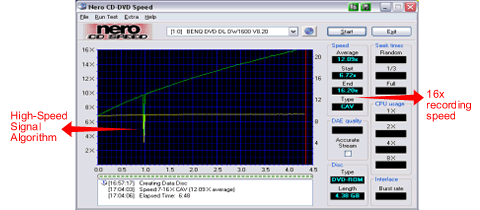
As writing speed is increased, signal loss becomes the key cause of a significant decrease in writing quality. BenQ's High-Speed Signal Algorithm manages the high EFM(Eight-to-Fourteen Modulation) frequency signal loss that often takes place at high-speed writing - ensuring superb writing quality.
¨ WOPC + BLER OPC
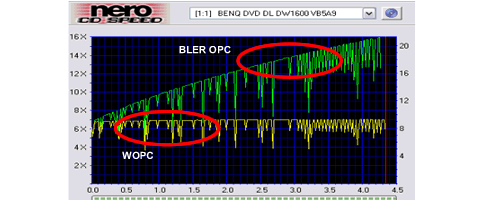
Unlike other drives which preset the writing power before the actual writing of data, the WOPC II (Walking Optimal Power Control) algorithm evaluates the writing quality constantly and adjusts the writing power accordingly in order to ensure the best possible writing quality over the entire disc.
The BLER OPC (Block Error Rate Optimal Power Control) further enhances the writing quality near the end of the disc, where the risk of warping is higher.
Tilt Control

Optimal reading and writing quality is obtained when the angle between the disc and the laser beam is 90 degrees. However, if a disc is warped, the laser beam many no longer be correctly positioned. BenQ's Tilt Control repositions the OPU (Optical Pickup Unit) to maintain the 90-degree angle between the disc and the laser beam in order to ensure the best writing quality.

¨ Sliding Cone Mechanism
With the unique Sliding Cone design, the disc position on the turntable is improved considerably. This greatly helps to reduce data access time and also to deliver superior reading and writing quality.
l Book Type Management
¨ The BenQ Book Type Management program allows you to freely choose a DVD+RW or DVD+R disc to be written as DVD-ROM book type, the most recognizable disc format for DVD layers. No longer will you need to worry about media backward compatibility problems with older model DVD players.

-
Black-Colored Tray
BenQ unique dark-colored tray efficiently minimizes jitters, and enhances readability and burning quality
Advanced testing features
With firmware B7M9 the BenQ DW1620A supports some advanced testing features. One of them is FE/TE testing with the BenQ Disc Doctor tool (not yet officially released while typing this).

How to use it '� insert a blank DVDR disc, choose the speed you normally write at (choosing the highest speed first may be a good idea to see if it's good for highest speed). The disc will not be written as this test will be done in simulation mode.
TE = Tracking Errors. Shows how well the drive follows the predefined track on the disc. A poor quality disc may have a poor defined track and will have problems when recording it. The TE error level (curve) should be as straight as possible on a good disc.
FE = Focus Error. Shows how well the drive is able to focus the laser on the disc. A correctly focused laser will make a correctly defined pit when writing and will give a good result. An incorrectly focused laser will give less good pits and the disc will have reduced readability and in the worst cases be unreadable. A poor/thin/low quality DYE (Chemicals used in the recording layer on the disc) is the most common reason for focus problems. Again the line should be as straight horizontally as possible.
The next tool we may use is Nero CD-Speed to check PIE/PIF errors as well as jitter.

Another useful feature if you are using CD-Speed to record the test disc is that you will also get the recording result shown. On this image you could see the recording speed of this disc as a white graph in the upper window as well as info on the drive used to record it. The result on the image is quite average, to demonstrate how the result from a poor disc will be we have included the following result as well.

Things to look close at: PO Failures, means uncorrectable errors and uncorrecta
Positive:
- Supports 2.4x DVD+R Dual Layer writing
- Supports 16x DVD+/-R speed.
- Supports 4x DVD+/-RW speed.
- Very fast writer, so far it holds the speed record.
- Impressive writing quality on most DVD+R media types
- Very good writing quality on most DVD-R media types
- Excellent CD-R writing quality.
- Supports Walking OPC technology to adjust writing strategy while writing.
- Supports DAO-RAW writing.
- Supports reading and writing of full SubChannel Data.
- Good reading speed with most types of media, including DVD-Video discs.
- Good seek times.
- Fast and perfect audio extraction, also with copy protected audio discs.
- Supports reading and writing 99 minutes CD-R discs.
- Supports bitsetting for all types of DVD+R/R DL/RW media and automatically sets booktype to DVD-ROM for all these media.
- Supports advanced disc quality testing (FE/TE, PIE/PIF/POF and Jitter)
- Good retail bundle
- Supports writing many 8x DVDR discs at 12x or 16x speed, unlike most other 16x writers.
Negative:
- Only 2.4x Double layer writing (a free upgrade to 4x DVD+R DL writing is promised in November!!)
- Questionable CD-RW writing quality
- Writing quality problems with some DVD+RW and DVD-RW discs.
- Reads DVDR/RW media at only 8x compared to 12x/16x for many other new drives.
- Does not
support
Mt.
Rainier. - Only a 'one sheep" writer, which gives it a disadvantage for backing up some newer PC games.
- The BenQ tools (firmware updater, bitsetting tool and disc doctor) crashes on some computer configurations.
Conclusion:
Overall the drive is very good and according to our tests it has few serious flaws, but let us look at the most positive and negative points.
The main positive points: First of all it uses CAV or P-CAV writing for all discs, making it faster than most other drives and in tests it is able to break the 6 minute barrier and the best result we obtained was 5 minutes and 47 seconds for a full DVD+R disc at 16x. It will be very interesting to see if any drive is able to beat this. And it also does this with excellent quality, much thanks to the Walking OPC technology. Add bitsetting and support for writing many 8x DVDR discs at 12x or 16x and you end up with a very good DVD-Writer. And it does also work great with CD-R discs. Add advanced testing features and a good retail bundle to this and you will end up missing few features at all.
The main negative points: There are hardly any big negative points, but we would like to see an improvement on DVDRW writing on some media types as well as an improvement on the BenQ programs so they work on every computer configuration.
To sum it all up, this is the best we could say: 'Excellent writing quality with almost every disc, a good retail bundle and advanced testing features '� what more do you want?". We like this drive so well that we bring out the big one and give it the 'Editors Choice award". It's well deserved and with the great engineer team over at BenQ we think the drive will just continue to be better and better with every firmware upgrade.

You may discuss/comment this review below or in this forum thread. This forum thread may also be used to ask quastions around this drive or request additional tests.
Thanks to:
Conrexx for providing the  media used in this review. Conrexx technology is the supplier of Traxdata media as well as other Ritek media brands for whole
Europe.
 For providing the That's Write media used in this review. That's Write focus on providing quality media at reduced prices in
Europe.
 For providing some of the Memorex media used in this review. Memorex is one of the largest providers of all types of media for larger parts of the world.
 For providing us with Mirror and Miflop Extreme media. Miflop media aims at providing both cheap (INFOSMART) and expensive (
Taiyo Yuden) quality media.
 For providing the RiData media used in this review. RiData is a Ritek brand and thus you are sure to get Ritek manufactured discs when buying RiData media.
 For providing the Daxon and BenQ media used in this review. Daxon manufacture high quality media for many large OEM customers lke BenQ and Sony.
 For providing the Verbatim DVD+R9 Double Layer media used in this review. Verbatim provides high quality media almost over the whole world.
Looking for CD and DVD-Media in Norway? Visit www.norwaydisc.no the Norwegian specialist on CD and DVD Media!
















