
 |
Review: BenQ DW1800 |
Introduction
A few months ago, we acquired a BenQ DW1800 drive in Asia. Finding BenQ drives in the United States has become challenging since the company stopped North American distribution of its brand of optical drives in 2006. It is unfortunate because BenQ drives have gained a very good reputation on this side of the Pacific, beginning with the success of the DW1600 series in 2004.
The three year history of Philips BenQ Digital Storage (PBDS), the optical-drive division of the larger Taiwanese company, BenQ Corporation, has been remarkably successful, with a rise from a 0% to a 12% market share of half-height DVD drives in the first two years. Unfortunately, we now must speak of PBDS in the past tense, but we hope it continues to do just as well under the new name.
The division's ownership has changed in mid-2006, when Lite-On IT Corporation has acquired the 49% stake in PBDS held by BenQ Corporation. The other 51% of the joint venture is still owned by Philips Electronics N.V. The new name is Philips Lite-On Digital Solutions Corporation (PLDS). The combination of Lite-On IT and PBDS, the former number 3 and 4 optical drive suppliers, into PLDS makes it the number 2 supplier, second in volume only to Hitachi-LG Data Storage (HLDS).
BenQ DW1800 is one of the first BenQ-branded drives that came out of PLDS, and while it exhibits a curious mix of features that we associate with both Lite-On and BenQ drives, it is undeniably a Lite-On device in a BenQ shell. BenQ DW1800 is a close mechanical, optical and electronic relative of Lite-On LH-18A1P. The two drives have almost identical features and differ only in their external appearance, firmware, and included software.
BenQ DW1800 reads and writes all DVD and CD formats: DVD+R/RW/DL, DVD-R/RW/DL, DVD-RAM, and CD-R/RW. Single-layer DVD+R and DVD-R are written at up to 18x, double-layer DVD+R DL and dual-layer DVD-R DL at up to 8x, DVD-RAM at up to 12x, CD-R at up to 48x, and CD-RW at up to 32x.
Corporate information

BenQ company logo and slogan
BenQ Group is headquartered in Taiwan but its manufacturing operations and sales and marketing offices are scattered throughout East Asia, North America and Europe.

BenQ headquarters, Taipei
BenQ Group's corporate information page begins with the following vision statement and summary:
Vision: Bringing Enjoyment and Quality to Life.
Group Overview: The BenQ Group is currently comprised of 10 companies that operate independently while sharing resources and leveraging synergies among them. BenQ Group 2006 revenues exceeded US$16.5 billion.
Group Companies: The BenQ Group companies include AU Optronics Corporation, the world's leading manufacturer of LCD panels; Darfon Electronics Corporation; Daxon Technology Inc; Wellypower Optronics Co., Ltd.; Raydium Semiconductor Corporation; Cando Corporation; Darwin Precisions Co., Ltd.; BenQ Corporation; BenQ Hospital and BenQ Guru Software Co., Ltd.
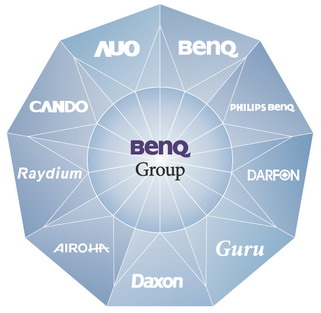
BenQ Group companies
Some of BenQ's milestones relevant to its optical-drive division are listed below.
BenQ Group Milestones:
- 1984 - Acer Peripherals Inc. established
- 1991 - Changes name to Acer Communications & Multimedia
- 2001 - Birth of the "BenQ" brand - Official company name becomes “BenQ Corporation”
- 2003 - Royal Philips Electronics and BenQ establish Philips & BenQ Digital Storage
- 2006 - Lite-On IT and BenQ form a strategic alliance in optical storage products
Learn more about BenQ Group by visiting the company website: http://www.benq.com/.
Learn more about BenQ storage products at the BenQ Global website: http://www.benq.com/products/Storage/.
Drive overview
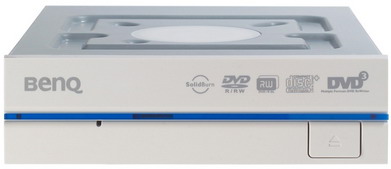
Beige retail drive
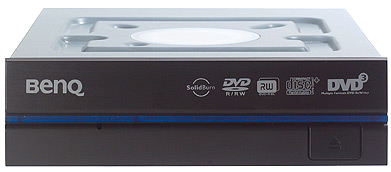
Black retail drive
BenQ DW1800 is a DVD burner capable of reading and writing DVD+R/RW/DL, DVD-R/RW/DL, DVD-RAM, and CD-R/RW formats.

Tray logos
In addition to the standard DVD-, DVD+ and CD logos, BenQ DW1800 displays BenQ's DVD3 logo that first appeared on DQ60, indicating triple-format DVD-R/DVD+R/DVD-RAM support, and the SolidBurn logo that made its debut on BenQ DW1640, indicating that the drive adjusts laser power for each individual piece of DVD media by performing brief test burns in the reserved area at the beginning and the unused area at the end of each blank disc.
Drive specifications
BenQ DW1800 specifications on BenQ website list the following:
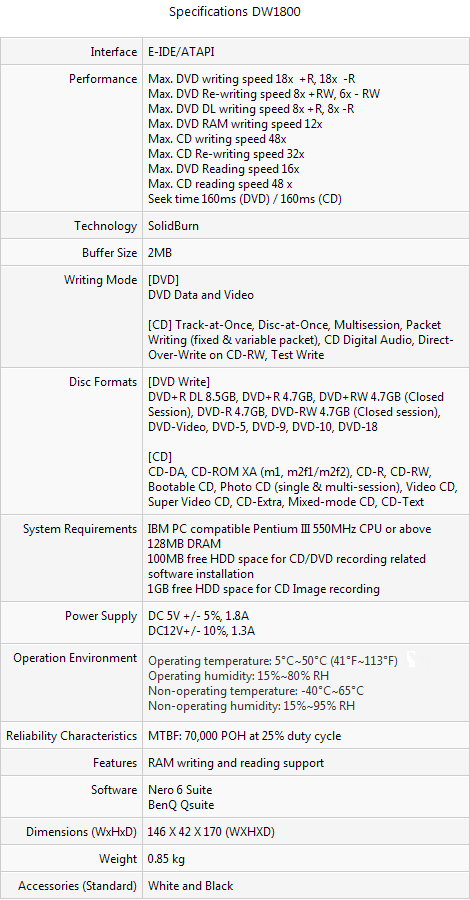
BenQ DW1800 uses the 33.3 MB/s ATAPI-4 ATA Packet Interface, also known as Ultra ATA/33 or Ultra DMA Mode 2.
ATAPI-4 specification recommends using of an 80-wire EIDE cable in order to work reliably at full speed. 80-wire EIDE cables have the same 40-pin connectors as 40-wire cables, but they can be easily recognized by higher wire density in the cable and differently colored (blue, grey, and black) connectors.
Retail package
The drive we are reviewing is a retail package. It includes the following:
- Internal 5.25" BenQ DW1800 drive
- BenQ DVD Re-Writer Software Disc (Ver. 2.5)
- Warranty and Product Registration Information booklet, for approximately 20 countries
- Hardware Quick Start Guide card with text in 22 languages: English, Norwegian, Finnish, Hungarian, Swedish, Danish, Greek, Serbian, Polish, Romanian, Czech, German, Dutch, Russian, Spanish, Portuguese, French, Chinese, Simplified Chinese, Japanese, Italian and Turkish
- Software Quick Start Guide booklet in 12 languages: English, French, German, Italian, Spanish, Portuguese, Dutch, Turkish, Chinese, Simplified Chinese, Japanese, and Korean
- Four mounting screws
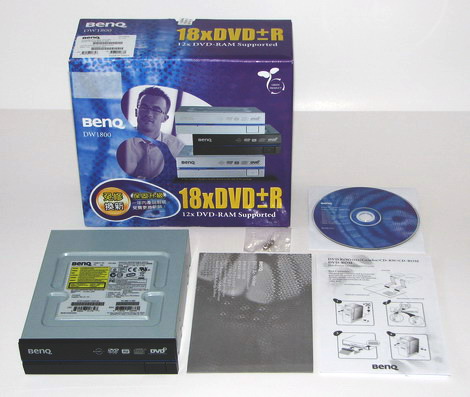
Retail box and its contents
BenQ-branded, retail-packaged drives come in one of three colors: black, beige, or silver. The color of the drive inside the package is indicated by a round red sticker with a white check mark, placed on the side of the box:
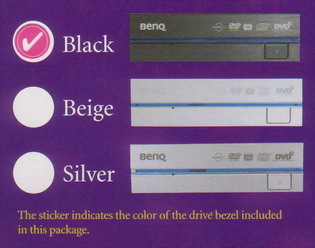
Color sticker
The front panel of the drive has the new look first seen in retail versions of BenQ DW1670. The plastic surface of the front of our drive is neatly textured, giving it a sophisticated look, not unlike black anodized finish on brushed metal. The tray cover occupies the entire upper half of the front, similarly to retail Pioneer drives; a welcome deviation from the traditional front cover layout.
A blue stripe of transparent plastic runs across the front, just under the tray cover, giving the drive a unique look. The LED activity light is located under the blue stripe, about 1/3 of the way from the left, and appears to be the usual green light that lights up during disc recognition, is off when a disc is inserted, and flashes during data transfers; typical Lite-On LED behavior all around.
The grey-colored company logo and various SolidBurn, DVD and CD logos indicating drive capabilities are arranged in the familiar fashion that hasn't changed since the days of BenQ DW1600. The eject button is unusually large but seems to fit well with the rest of the new layout.
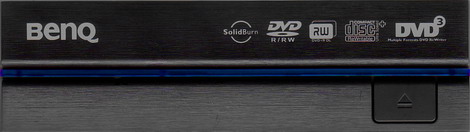
Front panel
Top view
The top cover of the drive has the easily recognizable indentations exclusive to BenQ designs since BenQ DW1640. BenQ's Air Flow Cooling System (AFCS) is quite effective at reducing the heating effects inside the drive enclosure during high-speed operation. It works be redirecting the airflow naturally created by fast rotation of the disc inside the drive, and also helps reduce disc resonance and chassis noise.
Thanks to AFCS and evidently less wind noise leaking through the front panel, BenQ DW1800 is a comparatively quiet drive when it is spinning the disc at maximum RPM. Spin-ups and spin-downs, however, are an entirely different affair, but we will get to that later.
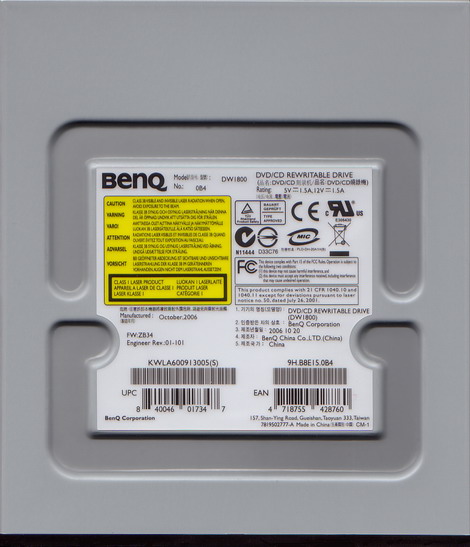
The sticker lists the drive model (DW1800-0B4 for the black retail drive), serial number, engineering revision (01-101), firmware revision installed at the factory (ZB34), manufacturing date (October 2006) and country (China) and power ratings (1.5A of each of the 5V and 12V DC). No less than one third of the sticker is devoted to various regulatory compliance logos and notices:
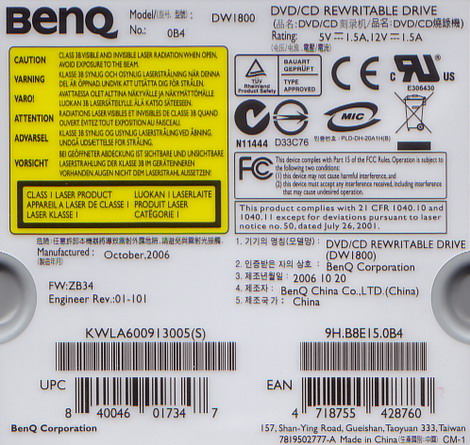
Drive sticker
Left, right, and bottom sides of the drive provide standard mounting holes for case or rail screws and attachment points for the removable front panel:
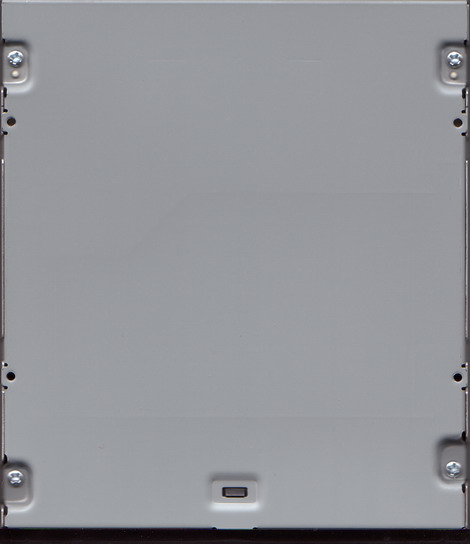
Bottom view
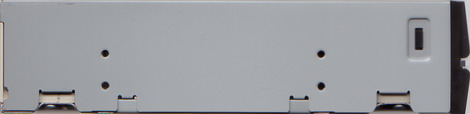
Left-side view
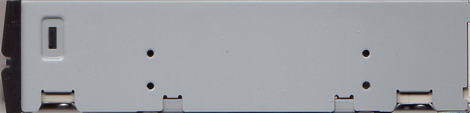
Right-side view
As you may have noticed in the pictures above, the two parts of the front panel are slightly angled and the middle part of the front protrudes forward a couple of millimeters farther than in more traditional, flat layouts.
DW1800's front panel is interchangeable with front panels of all recent Lite-On drives. However, the front panel's attachment points are different from earlier BenQ designs and make it non-interchangeable with front panels of BenQ DW1640, DW1650/55 or DW1670 drives.
The rear side houses the standard 4-pin DC power connector, a 40-pin EIDE/ATA connector, jumper pins that set the drive to IDE master, slave, or cable-select mode, and a four-pin analog audio connector:
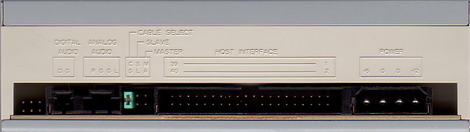
Rear view
The drive's electronics is based on a popular MediaTek chipset, MT1898E, also used in several other 18x and 20x BenQ/Lite-On/Philips and Samsung DVD drive designs:
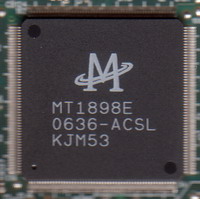
MediaTek MT1898E chip
Test machine
We will be using a computer with the following configuration:
Hardware

Controller and optical drives

BenQ DW1800 is connected to the secondary channel on the motherboard's ICH6 south bridge parallel ATA port.
It identifies itself as "BENQ DVD DC DW1800."
DMA (Direct Memory Access) is enabled, and connection mode is reported as Ultra DMA Mode 2:

Drive transfer mode
CD-DVD Speed reports burst rate of 26 MB/s, consistent with Ultra DMA Mode 2:

Burst rate (internal)
When BenQ DW1800 is installed in an external FireWire 400 (IEEE 1394a) enclosure, the burst rate is reported as a slightly higher 29 MB/s. This burst rate should allow trouble free 16x and 18x burns:

Burst rate (external)
Later, we will perform 16x and 18x test burns with BenQ DW1800 in an external enclosure.
Software
The computer is running Windows XP Professional SP2 (build 5.1.2600).
We will be using the following software:
- Nero CD/DVD Speed version 4.7.5.0 and 4.7.6.0b
- K-Probe version 2.5.2
- Nero Info Tool version 4.03
- Nero Burning ROM version 7.5.9.0
- Slysoft CloneCD 5.3.0.1
Installation
Drive installation was uneventful. We set the jumper to "cable select" and let the two drives sharing an ATA cable pick master and slave modes automatically.
Features
Feature summary
Nero InfoTool reports the following configuration and drive features:

Nero InfoTool report
The drive's hardware memory buffer used to ensure uninterrupted recording is the standard 2 MB. This amounts to less than 1/10th of a second worth of data at 18x DVD speed, but the drive has no problem maintaining full or nearly full buffer level at all speeds:

Buffer level in 18x DVD writing
In addition to expected functionality such as buffer underrun protection, BenQ DW1800 includes the following features specific to BenQ/Philips and Lite-On drives.
SolidBurn (BenQ/Philips feature)

Solidburn logo
SolidBurn is a combination of media learning and strategy memory that removes the need to frequently update firmware in order to support new DVD media codes or adjust strategies for already supported media.
Before a DVD burn, BenQ DW1800 spends an additional five to fifteen seconds to burn small amounts of test data at the beginning of the disc, in the power calibration area, and then also at the end of the disc, in the normally unused lead-out area that stretches for about 150-200 MB beyond the 4.37 GB used in DVD recording. The two test areas are then analyzed to determine the optimal laser power that minimizes error rates and jitter. This information is stored in the drive's memory for use in subsequent burns of the same media code.
The other function of SolidBurn is to detect the maximum acceptable writing speed for each media. For this, test data is burned at different speeds and analyzed for errors. Writing speeds that cause unacceptable error rates or jitter are rejected.
The nature of this feature also makes it possible, in combination with the BenQ QSuite utility, to overspeed individual discs to the exact maximum speed they are capable of.
SMART-X (Lite-On feature)
SMART-X is a firmware feature that adjusts CD and DVD reading speed according to the host's data transfer rate. When, during reading, the drive's buffer fills up because the host accepts data slower than it comes off the disc, disc rotation slows down. This lowers drive temperature and reduces noise. When the host increases its reading speed and the buffer empties up, the drive quickly spins up to match the new, higher data rate:

SMART-X in action
This behavior is especially welcome during movie viewing. When fast forwarding is followed by viewing at 1x speed, the drive spins down from the fast forward mode within a few seconds and the noise becomes inaudible.
Auto Balance System (ABS) (Lite-On feature)
Auto Balance System reduces disc vibration and noise during high-speed operation. This system consists of an enclosed, circular track just above the spindle that rotates together with the disc and allows several small steel balls to freely roll around the track. The balls serve as a counterweight, or a balancing mass by automatically moving into positions opposite to the unbalance vector of the disc. This is similar to using lead weights to balance car wheels and tires, except here the weights are self-adjusting.

Auto Balance System (ABS)
While steel balls are commonly used as counterweights in drives, Lite-On takes an additional step. This clever idea is described in U.S. Patent 6348747, entitled Method for controlling an auto-balancing system of the optic[al] disk in an optic[al] disk drive. The additional goal is to ensure that free movement of counterweights is not inhibited by friction, and it is achieved by adding micro vibration. Micro vibration is created by adding a high-frequency dither signal to the main command signal controlling rotation speed. The additional signal causes shaking that helps dislodge the counterweights and facilitates their proper positioning as the spindle accelerates.
You may have noticed that new Lite-On and BenQ drives make a very distinctive swishing or occasionally rattling noise when spinning up. While it may sound unpleasant, this is the ABS micro vibration at work, ensuring that the disc ends up better balanced and more stable at 10,000+ RPM needed for 18x burning.
Correct balancing also reduces the probability of a disc cracking and shattering inside the drive at high speed.
Air Flow Cooling System (AFCS) (BenQ feature)
Air Flow Cooling System accelerates and directs air circulation inside the drive to speed up heat elimination through the drive's steel housing:

Air Flow Cooling System (AFCS)
Walking Optimal Power Control (WOPC) (BenQ/Philips feature)
Walking Optimal Power Control (WOPC) is a method of finding the optimal laser power during writing. It relies on making stops during writing to seek back, sample the freshly recorded area and measure error rates and jitter. This information is then used by the firmware to make a decision on whether to increase or decrease power in order to improve disc quality.
The disc continues to rotate at fixed RPM during WOPC stops and the stops themselves are very short, a small fraction of a second each. Nevertheless, they are easily spotted as sharp downward spikes in the data rate curve plotted by CD-DVD Speed.
We have made two burns with identical media, 16x-certified Memorex DVD-R. With WOPC on, the burn took five seconds longer to complete:

Test burn, WOPC off

Test burn, WOPC on
Quality tests do not show significant differences in disc quality due to WOPC:

Test burn quality, WOPC off

Test burn quality, WOPC on
CD and DVD quality scanning
BenQ DW1800 supports C1/C2 quality scanning of CDs and PIE/PIF/jitter scanning of DVDs.
Two commonly used scanning utilities, Nero CD-DVD Speed and KProbe 2, both work with this drive and provide very similar results:

Quality scanning with Nero CD-DVD Speed

Quality scanning with KProbe 2
If you have a BenQ DW1800 and are scanning the discs you burn, please post your results in our forum thread devoted to this drive: Post your BenQ DW1800 scans and questions here.
Firmware update
Our drive came with firmware revision ZB34, but we have updated to version ZB35 when it became available:

Firmware flash (1 of 6)

Firmware flash (2 of 6)

Firmware flash (3 of 6)

Firmware flash (4 of 6)

Firmware flash (5 of 6)

Firmware flash (6 of 6)
Software
Software CD contents
The 'DVD Re-Writer Software Disc (Ver. 2.5)' provided with the retail version of the drive is the standard collection of software, utilities, and documentation BenQ includes with retail-packaged drives:

Software CD
The following software is included on the CD:
- Nero Suite version 6.6.0.19
- NeroVision Express version 3.1.0.16
- NeroVision ShowTime version 2.0.0.40
- Nero InCD version 4.3.23.0
- BenQ QSuite version 2.1
- Software documentation in 12 languages
Nero Suite 6.6 comes with 11 languages and includes Nero Burning ROM, BackItUp, SmartStart, CoverDesigner, Toolkit and other applications.

Software installer
BenQ QSuite
QSuite is an application that controls several useful features available in BenQ DVD writers.
A dialog that appears every time QSuite is started warns that it works only with selected BenQ drives and asks the user to take time and learn the drive's features controlled from QSuite. None of these features are potentially damaging, but some could lead to confusing behaviors (Test Write, for one, could look as drive malfunction if turned on inadvertently).

QSuite opening dialog
The Information tab of QSuite reports basic information on the selected drive and the disc in the drive, if one is inserted:

QSuite page 1 of 6
The Book Type tab displays book types to be assigned to each of the three types of DVD+ media as it's burned by the drive, and allows any of the three types to be changed to either DVD-ROM or the native type:

QSuite page 2 of 6
The WOPC tab offers an explanation of how WOPC (Walking Optimal Power Control) works and lets the user enable or disable it:

QSuite page 3 of 6
The Test Write tab provides controls to enable or disable writing simulation. This is a temporary setting; if enabled, simulation mode will revert to disabled state after the drive is powered down or the computer is rebooted.

QSuite page 4 of 6
The Solid Burn tab allows the user to disable or enable SolidBurn functionality. By default, SolidBurn is enabled for unknown media and disabled for media that is present in the drive's media tables. In the screenshot below, we have enabled SolidBurn for all media because this is required for overspeeding (described below):

QSuite page 5 of 6
The OverSpeed tab contains controls that disable or enable overspeeding. We have conducted a few overspeeding tests with BenQ DW1800 and their results are presented in the Advanced tests chapter of this review. The screenshot below shows overspeeding enabled for our tests:

QSuite page 6 of 6
CD writing performance
In the tests below, we will explore CD writing capabilities and performance of BenQ DW1800. We will use Nero CD-DVD Speed to write various types of CDs.
Summary
The following table lists all writing speeds and strategies used by BenQ DW1800 when writing CD media:

Some of these strategies are presented below and compared to strategies used by similar 18x drives.
48x CD-R
BenQ DW1800 uses a 22x-49x CAV (Constant Angular Velocity) strategy to write CD-R media at 48x.
Average speed is 37.37x and full-disc burn time is 2 minutes and 40 seconds:

48x CD-R writing

32x CD-RW
BenQ DW1800 uses a 16x-24x-32x Z-CLV (Zone-Constant Linear Velocity) strategy to write CD-RW media at 32x.
Average speed is 24.49x and full-disc burn time is 3 minutes and 32 seconds:

32x CD-RW writing

12x CD-RW
BenQ DW1800 uses a 10x CLV (Constant Linear Velocity) strategy to write 12x CD-RW media.
Average speed is 10.02x and full-disc burn time is 8 minutes and 27 seconds.

10x CD-RW writing
DVD writing performance
In the tests below, we will explore DVD writing capabilities and performance of BenQ DW1800. We will use Nero CD-DVD Speed to write various types of DVDs.
Summary
The following table lists all writing speeds and strategies used by BenQ DW1800 when writing DVD media:

Some of these strategies are presented below and compared to strategies used by similar 18x drives.
18x DVD+R
BenQ DW1800 uses an 8x-18x CAV (Constant Angular Velocity) strategy to write DVD+R media at 18x.
Average speed is 13.59x and full-disc burn time is 5 minutes and 20 seconds:

18x DVD+R writing

16x DVD+R
BenQ DW1800 uses a 7x-16x CAV (Constant Angular Velocity) strategy to write DVD+R media at 16x.
Average speed is 12.08x and full-disc burn time is 5 minutes and 51 seconds:

16x DVD+R writing
12x DVD+R
BenQ DW1800 uses an unusual 5x-12x P-CAV (Partial Constant Angular Velocity) strategy to write DVD+R media at 12x. Instead of beginning the burn at about 6.7x, the drive starts at about 5.4x and proceeds through most of the burn at a slower than normal rotational speed. As a result, the rate curve looks closer to a pure 5x-12x CAV than more common, faster 5x-12x P-CAV curves of other drives.
Average speed is 9.51x and full-disc burn time is a somewhat slow 7 minutes and 13 seconds:

12x DVD+R writing
8x DVD+R
BenQ DW1800 uses a slightly slower than normal 5x-8x P-CAV (Partial Constant Angular Velocity) strategy to write DVD+R media at 8x.
Average speed is 7.80x and full-disc burn time is a little on the slow side, at 8 minutes and 25 seconds:

8x DVD+R writing
8x DVD+RW
BenQ DW1800 uses a 6x-8x Z-CLV (Zone-Constant Linear Velocity) strategy to write DVD+RW media at 8x. Because the 6x zone extends as far as 1.6 GB, burn time is longer than with most drives that use a 6x-8x Z-CLV strategy.
Average speed is 7.19x and full-disc burn time is 8 minutes and 41 seconds:

8x DVD+RW writing

8x DVD+R DL
BenQ DW1800 uses a 4x-6x-8x Z-CLV (Zone-Constant Linear Velocity) strategy to write DVD+R DL media at 8x.
Average speed is 6.76x and full-disc burn time is 18 minutes and 6 seconds:

8x DVD+R DL writing

18x DVD-R
BenQ DW1800 uses an 8x-18x CAV (Constant Angular Velocity) strategy to write DVD-R media at 18x.
Average speed is 13.61x and full-disc burn time is 5 minutes and 28 seconds:

18x DVD-R writing

BenQ DW1800 is not the fastest 18x DVD burner, falling behind speed leaders by 20 or more seconds. Additional time is mostly spent in preparation for burning that sometimes takes as long as a minute before the burn begins.
16x DVD-R
BenQ DW1800 uses a 7x-16x CAV (Constant Angular Velocity) strategy to write DVD-R media at 16x.
Average speed is 12.09x and full-disc burn time is 5 minutes and 57 seconds:

16x DVD-R writing
12x DVD-R
BenQ DW1800 uses a 5x-12x P-CAV (Partial Constant Angular Velocity) strategy to write DVD-R media at 12x. It is nearly identical to the 12x DVD+R strategy described above.
Average speed is 9.53x and full-disc burn time is 7 minutes and 19 seconds:

12x DVD-R writing
8x DVD-R
BenQ DW1800 uses a 5x-8x P-CAV (Partial Constant Angular Velocity) strategy to write DVD-R media at 8x.
Average speed is 7.81x and full-disc burn time is 8 minutes and 32 seconds:

8x DVD-R writing
6x DVD-RW
BenQ DW1800 uses a 4x-6x Z-CLV (Zone-Constant Linear Velocity) strategy to write DVD-RW media at 6x.
Average speed is 5.71x and full-disc burn time is 11 minutes and 11 seconds:

6x DVD-RW writing

8x DVD-R DL
BenQ DW1800 uses a 4x-6x-8x Z-CLV (Zone-Constant Linear Velocity) strategy to write DVD-R DL media at 8x.
Average speed is 6.76x and full-disc burn time is 18 minutes and 46 seconds:

8x DVD-R DL writing

12x DVD-RAM
BenQ DW1800 uses a 6x-12x, 34-zone Z-CLV (Zone-Constant Linear Velocity) strategy to write DVD-RAM media at 12x, without verification.
Average speed is 10.05x and full-disc burn time is only 5 minutes and 45 seconds:

12x DVD-RAM writing without verification

With verification, average speed is 3.78x and full-disc burn time is a much longer 15 minutes and 1 second:

12x DVD-RAM writing with verification
5x DVD-RAM
BenQ DW1800 uses a 5x CLV (Constant Linear Velocity) strategy to write DVD-RAM media at 5x.
Average speed is 4.93x and full-disc burn time is 11 minutes and 16 seconds:

5x DVD-RAM writing
Book type (bitsetting)

BenQ DW1800 supports bitsetting, and is capable of writing all types of +R media, DVD+R, DVD+RW and DVD+R DL, with the DVD-ROM book type.
The drive comes preconfigured with all +R media set to be written with the DVD-ROM book type.
For more information about book types and bitsetting, see Increased compatibility: DVD bitsetting.
CD reading performance
In the tests below, we will explore CD reading capabilities and performance of BenQ DW1800. We will use Nero CD-DVD Speed to read various types of CDs.
Summary
The following table lists reading speeds and strategies used by BenQ DW1800 when reading CD media:

Some of these strategies are presented below.
CD-ROM
BenQ DW1800 reads CD-ROM at 20x-48x CAV (Constant Angular Velocity) speed.
With a pressed CD-ROM data disc, about 73 minutes in length, average speed is 34.10x and read time is 2 minutes and 15 seconds:

CD-ROM reading
CD-Audio
While only 1x speed is required to listen to sound stored on CD-Audio discs, it is useful to be able to read the discs at higher speeds when extracting the content of the disc to a hard drive.
BenQ DW1800 reads CD-audio at 20x-48x CAV (Constant Angular Velocity) speed.
With a 74-minute pressed CD-Audio disc, average speed is an impressive 34.88x and read time is 2 minutes and 13 seconds:

CD-Audio reading
CD-R
BenQ DW1800 reads CD-R at 21x-49x CAV (Constant Angular Velocity) speed.
Average speed is 36.97x and read time is 2 minutes and 16 seconds:

CD-R reading
CD-RW
BenQ DW1800 reads CD-RW at 15x-36x CAV (Constant Angular Velocity) speed.
Average speed is 26.22x and read time is 3 minutes even:

CD-RW reading
DVD reading performance
In the tests below, we will explore DVD reading capabilities and performance of BenQ DW1800. We will use Nero CD-DVD Speed to read various types of DVDs.
Summary
The following table lists reading speeds and strategies used by BenQ DW1800 when reading DVD media:

Some of these strategies are presented below.
DVD-ROM
BenQ DW1800 reads DVD-ROM at 7x-16x CAV (Constant Angular Velocity) speed.
With a pressed DVD-ROM data disc, about 2.7 GB in length, average speed is 10.48x and read time is 3 minutes and 25 seconds:

DVD-ROM reading
DVD-Video (DVD-5)
While only 1x speed is required to watch movies stored on DVD-Video discs, it is useful to be able to read the discs at higher speeds when extracting the content of the disc to a hard drive.
BenQ DW1800 reads single-layer DVD-Video at 7x-16x CAV (Constant Angular Velocity) speed.
With a pressed single-layer DVD-Video data disc, about 4.3 GB in length, average speed is 12.12x and read time is 4 minutes and 53 seconds:

DVD-Video (DVD-5) reading
DVD-Video DL (DVD-9)
BenQ DW1800 reads double-layer DVD-Video at 5x-12x CAV (Constant Angular Velocity) speed.
With a pressed double-layer DVD-Video data disc, about 7.8 GB in length, average speed is 9.09x and read time is 11 minutes and 38 seconds:

DVD-Video DL (DVD-9) reading
DVD+R
BenQ DW1800 reads DVD+R at 7x-16x CAV (Constant Angular Velocity) speed.
Average speed is 12.22x and read time is 4 minutes and 54 seconds:

DVD+R reading
DVD+RW
BenQ DW1800 reads DVD+RW at 5x-12x CAV (Constant Angular Velocity) speed.
Average speed is 9.26x and read time is 6 minutes and 28 seconds:

DVD+RW reading
DVD+R DL
BenQ DW1800 reads DVD+R DL at 5x-12x CAV (Constant Angular Velocity) speed.
Average speed is 9.16x and read time is 11 minutes and 39 seconds:

DVD+R DL reading
DVD-R
BenQ DW1800 reads DVD-R at 7x-16x CAV (Constant Angular Velocity) speed.
Average speed is 12.20x and read time is 4 minutes and 54 seconds:

DVD-R reading
DVD-RW
BenQ DW1800 reads DVD-RW at 5x-12x CAV (Constant Angular Velocity) speed.
Average speed is 9.23x and read time is 6 minutes and 29 seconds:

DVD-RW reading
DVD-R DL
BenQ DW1800 reads DVD-R DL at 5x-12x CAV (Constant Angular Velocity) speed.
Average speed is 9.30x and read time is 11 minutes and 46 seconds:

DVD-R DL reading
DVD-RAM
BenQ DW1800 reads DVD-RAM at 6x-12x Z-CLV (Zone-Constant Linear Velocity).
Average speed is 10.23x and read time is 5 minutes and 36 seconds:

DVD-RAM reading
CD-R writing quality
In CD writing tests below, we will use Nero CD-DVD Speed to write CDs at the maximum speed supported by BenQ DW1800.
We will then test their quality using a Sony CRX230EE CD-RW drive (a Sony-branded version of Lite-On SOHR-5239S). Quality scans will be conducted at the maximum scanning speed of 48x, our standard speed for Lite-On CD scanning. (Note that using different scanning drives and speeds may dramatically alter results obtained in quality tests.)
In CD quality tests, the testing drive reports two types of errors: C1 errors and C2 errors.
In practice, a pressed or recorded CD will always have some C1 errors, but they are easily corrected by the drive's error correcting decoder.
C2 errors are the next level of errors. While C2 errors can also be corrected by drive, they are not wanted in a good quality disc. A good disc should not contain any C2 errors, and have an average C1 error amount below 2.0 to be considered a best-quality disc, or at least below 10.0 to be considered a good-quality disc.
Beyond C2 errors, there are uncorrectable errors that make a disc unreadable.
In the tests below, we will explore CD-R writing speed and quality of BenQ DW1800 with media from several manufacturers.
Verbatim 52x CD-R

Verbatim 52x CD-R

Quality test

Excellent quality with this Verbatim media.
Memorex 52x CD-R

Memorex 52x CD-R
(Thanks to Memorex USA for providing this media)

Quality test

Excellent burn quality.
Memorex Cool Colors 48x CD-R

Memorex Cool Colors 48x CD-R
(Thanks to Memorex USA for providing this media)

Quality test

Excellent burn quality, again.
Memorex Black 48x CD-R

Memorex Black 48x CD-R
(Thanks to Memorex USA for providing this media)

Quality test

Yes, this CD is indeed black, on both sides. We don't know what chemical compound was used to make it look black to humans, but the black dye apparently provides laser beam reflectivity sufficient for reading. The point is, these CDs work well and manage to look cool at the same time.
Memorex 40x Music CD-R

Memorex 40x Music CD-R
(Thanks to Memorex USA for providing this media)

Quality test

Impressive burn quality.
Office Depot 52x CD-R

Office Depot 52x CD-R

Quality test

No C2 errors but elevated C1 error levels. A good burn that should have no problems.
Summary
BenQ DW1800 is a very fast CD-R writer. It created high quality CD-R discs with all media types we tested.
CD-RW writing quality
In the tests below, we will explore CD-RW writing speed and quality of BenQ DW1800 with media from several manufacturers.
Verbatim DataLifePlus 32x CD-RW

Verbatim DataLifePlus 32x CD-RW
(Thanks to Verbatim USA for providing this media)

Quality test

A remarkably good burn for CD-RW media.
Memorex 24x CD-RW

Memorex 24x CD-RW
(Thanks to Memorex USA for providing this media)

Partial quality test

Transfer rate test (Sony CRX-230EE)

Transfer rate test (Lite-On SHM-165P6S)

This is what we call a coaster. Our reading drive, Lite-On SHM-165P6S, appears to be quite resilient to the onslaught of C2 errors, failing only around the 30-minute mark, while the CD-RW drive also used in this test (a Sony CRX230EE) gives up at around 12 minutes.
To be fair, some drives can burn this media but with very high C1 error levels (4+ million) and C2 error totals in the hundreds, so the failure above appears to be due to shortcomings of both the drive and the media.
Memorex 12x CD-RW

Memorex 12x CD-RW
(Thanks to Memorex USA for providing this media)

Quality test

Transfer rate test

Rising C1 error rates at the end may be a concern but they do not affect the readability of the disc. A good quality burn otherwise.
Memorex 4x CD-RW

Memorex 4x CD-RW
(Thanks to Memorex USA for providing this media)

Quality test

An excellent quality burn.
Summary
BenQ DW1800 is a fast CD-RW writer, capable of excellent burns with the right media.
One of the CD-RW media we tested consistently failed to produce a readable disc, with similarly ugly results in three trials with two different discs. Because this media (Memorex 24x CD-RW) has performed acceptably in other drives, we have to conclude that BenQ DW1800 lacks a proper writing strategy for it.
DVD+R writing quality
In DVD writing tests below, we will use Nero CD-DVD Speed to write DVDs at the maximum speed supported by BenQ DW1800.
We will use Nero CD-DVD Speed to write DVDs at the maximum speed supported by BenQ DW1800.
We will then test their quality using a Lite-On SHM-165P6S drive and KProbe 2, a software tool developed by a Lite-On employee. Quality scans will be conducted at the scanning speed of 4x, our standard speed for Lite-On DVD scanning. (Note that different scanning drives and speeds may dramatically alter results obtained in quality tests.)
In DVD quality tests, the testing drive reports two types of errors: PI (Parity Inner) errors (PIE) and PI failures (PIF).
In practice, a pressed or recorded DVD will always have some PI errors and PI failures. PI errors are easily corrected by the drive's error correcting decoder.
PI failures are the next level of errors. While PI failures are corrected by the second and last stage of the error correcting decoder, they are a more dangerous kind of errors because they can overwhelm the error correcting decoder if they occur in large enough numbers. A good-quality DVD should not contain PI errors above 280 or PI failures above 4.
Beyond PI failures, there are PO (Parity Outer) failures that are uncorrectable and make a disc unreadable.
To see if there is a connection between the reported amount of errors and the readability of discs we will include reading curves from Nero CD-DVD Speed transfer rate tests performed on a Lite-On SHM-165P6S drive. We will be looking for any drops in transfer rates which would indicate readability issues with the discs created by BenQ DW1800.
In the tests below, we will explore DVD+R writing speed and quality of BenQ DW1800 with media from several manufacturers.
Verbatim 16x DVD+R

Verbatim 16x DVD+R
(Thanks to Verbatim USA for providing this media)

Quality test

Transfer rate test

This high-quality media should have been a primary candidate for 18x overspeeding, and the quality of this test burn shows that it has, in all likelihood, a significant margin of safety that would allow to burn faster than 16x.
Still, it is hard to argue with a nearly perfect 16x burn.
Sony 16x DVD+R

Sony 16x DVD+R

Quality test

Transfer rate test

One of the few media codes this drive is set up to overspeed out of box, SONY D21 shows an excellent result at 18x.
Taiyo Yuden 16x DVD+R

Taiyo Yuden 16x DVD+R
(Thanks to Rima.com for providing this media)

Quality test

Transfer rate test

Another excellent result at 18x, as expected from Taiyo Yuden media.
Maxell 16x DVD+R

Maxell 16x DVD+R
(Thanks to Maxell USA for providing this media)

Quality test

Transfer rate test

An excellent burn that should have no difficulties during reading.
Memorex 16x DVD+R

Memorex 16x DVD+R
(Thanks to Memorex USA for providing this media)

Quality test

Transfer rate test

A pretty good burn, with a peculiar but harmless cluster of PI errors toward the end of the disc.
Imation 16x DVD+R

Imation 16x DVD+R

Quality test

Transfer rate test

OPTODISC R16 is explicitly restricted to 6x in BenQ DW1800 firmware. This is surprising, given than this media burns very, very well at 16x in other drives.
Nevertheless, the 6x burn results in excellent quality, if you don't mind waiting a few extra minutes for it to complete.
Ridata 16x DVD+R

Ridata 16x DVD+R
(Thanks to Ritek USA | Advanced Media, Inc. for providing this media)

Quality test

Transfer rate test

An outstanding burn that compares favorably to another RICOHJPN R03 burn above.
Fujifilm 16x DVD+R

Fujifilm 16x DVD+R

Quality test

Transfer rate test

Extremely low PIF numbers indicate an excellent-quality disc.
Verbatim 8x DVD+R

Verbatim 8x DVD+R

Quality test

Transfer rate test

A wonderfully clean burn on old, now discontinued 8x media.
ESA 8x DVD+R

ESA 8x DVD+R

Quality test

Transfer rate test

A great burn on cheap but good media sold in the U.S. by Circuit City.
Fujifilm 8x DVD+R

Fujifilm 8x DVD+R

Quality test

Transfer rate test

An excellent result that we have come to expect from Taiyo Yuden media.
Maxell 8x DVD+R

Maxell 8x DVD+R

Quality test

Transfer rate test

Slightly elevated PIF levels, typical of MAXELL 002 media. A great burn.
Summary
BenQ DW1800 is an excellent DVD+R writer, producing consistently solid results with all media we tested.
DVD+RW writing quality
In the tests below, we will explore DVD+RW writing speed and quality of BenQ DW1800 with media from several manufacturers.
Verbatim 4x DVD+RW

Verbatim 4x DVD+RW
(Thanks to Verbatim USA for providing this media)

Quality test

Transfer rate test

The number of PI failures is surprisingly large but is consistent with how other drives burned this batch of discs.
PI failures are evenly distributed across the disc, and the transfer rate test is perfectly smooth, making this burn acceptable.
Memorex 8x DVD+RW

Memorex 8x DVD+RW
(Thanks to Memorex USA for providing this media)

Quality test

Transfer rate test

This is a great burn for a DVD+RW disc, indicating a good match of BenQ DW1800's writing strategy to the media.
Ridata 8x DVD+RW

Ridata 8x DVD+RW
(Thanks to Ritek USA | Advanced Media, Inc. for providing this media)

Quality test

Transfer rate test

Another very good high-speed DVD+RW burn.
Memorex 4x DVD+RW

Memorex 4x DVD+RW
(Thanks to Memorex USA for providing this media)

Quality test

Transfer rate test

Another good burn.
Maxell 4x DVD+RW

Maxell 4x DVD+RW
(Thanks to Maxell USA for providing this media)

Quality test

Transfer rate test

Slightly elevated PI failires but nothing out of the ordinary for a DVD+RW disc. A good burn of a widely used DVD+RW type.
Summary
BenQ DW1800 is a good DVD+RW writer, capable of excellent burns with the right media.
DVD-R writing quality
In the tests below, we will explore DVD-R writing speed and quality of BenQ DW1800 with media from several manufacturers.
Verbatim 16x DVD-R

Verbatim 16x DVD-R
(Thanks to Verbatim USA for providing this media)

Quality test

Transfer rate test

A very good result, but not surprising with this media because it is perfectly suited for high-speed burns.
Sony 16x DVD-R

Sony 16x DVD-R

Quality test

Transfer rate test

This quality media is highly compatible with many drives, and BenQ DW1800 is no exception, showing excellent quality at 18x.
Sony 16x DVD-R

Sony 16x DVD-R

Quality test

Transfer rate test

An excellent 18x burn, just as good as the Taiyo Yuden version of Sony's 16x -R media.
Taiyo Yuden 16x DVD-R

Taiyo Yuden 16x DVD-R
(Thanks to Rima.com for providing this media)

Quality test

Transfer rate test

Very similar to Sony-branded TYG03, an equally high quality burn.
Maxell 16x DVD-R

Maxell 16x DVD-R
(Thanks to Maxell USA for providing this media)

Quality test

Transfer rate test

A very good burn.
Memorex 16x DVD-R

Memorex 16x DVD-R
(Thanks to Memorex USA for providing this media)

Quality test

Transfer rate test

Here is a surprising performance with an underappreciated media.
Where other drives occasionally have problems with CMC's 16x -R media, BenQ DW1800 overspeeds it to 18x and achieves a remarkably good result.
Memorex 16x DVD-R
Memorex 16x DVD-R
(Thanks to Memorex USA for providing this media)

Quality test

Transfer rate test

Another example of Memorex 16x -R media, a disc found in the same packaging as the CMC disc above. (We have played the Memorex roulette and we seem to get Ritek media on Tuesdays.)
The drive offers no overspeed, but we find the quality of the standard 16x burn to be quite good.
Ridata 16x DVD-R

Ridata 16x DVD-R
(Thanks to Ritek USA | Advanced Media, Inc. for providing this media)

Quality test

Transfer rate test

And here we have the same RITEKF1 media as above but under Ritek's own brand, Ridata, this time.
The result is good again and similar in quality to the Memorex-branded version of this media. More PI errors and fewer PI failures, but well below amounts that would raise any readability concerns.
Fujifilm 16x DVD-R

Fujifilm 16x DVD-R

Quality test

Transfer rate test

A good quality burn. Compare to the Maxell-branded ProdiscF02 disc above.
Fujifilm 8x DVD-R

Fujifilm 8x DVD-R

Quality test

Transfer rate test

We have a winner: the best quality disc in all of our BenQ DW1800 tests.
These cheerfully colored 30-packs of Fujifilm DVDs were sold by Staples in the U.S. and were available in the flag colors of Brazil, or Gabon, or St. Vincent, or the Third Commando Brigade of the Royal Marines, or any other colors you wanted as long as they were yellow, green, and blue:


This media burned extremely well everywhere else we tried, and BenQ DW1800 does not disappoint either, producing its best burn.
Maxell 8x DVD-R

Maxell 8x DVD-R

Quality test

Transfer rate test

No surprise here. As good a burn as one might expect with this media: elevated average PIF levels but never high PIF maximums, always a consistent performance.
DW1800 burns this media at its certified speed, 8x, with expected results.
Memorex 8x DVD-R

Memorex 8x DVD-R

Quality test

Transfer rate test

A pretty good burn. PIE levels look elevated, but PIF numbers are very normal.
Memorex Pro Gold 8x DVD-R

Memorex Pro Gold 8x DVD-R
(Thanks to Memorex USA for providing this media)

Quality test

Transfer rate test

Pro Gold discs are made in France and contain a gold reflective layer sandwiched between the two 0.6 mm platters that constitute a DVD disc.
Burn quality is good. Hopefully, the discs will last the advertised one hundred years to justify the price tag but I am afraid none of us are going to be around to verify the claim.
TDK 16x DVD-R

TDK 16x DVD-R

Quality test

Transfer rate test

Not bad at all; a surprisingly good, clean burn. BenQ DW1800 likes this media.
Summary
BenQ DW1800 is a very good, sometimes excellent DVD-R writer, producing solid results with every DVD-R disc we tested.
DVD-RW writing quality
In the tests below, we will explore DVD-RW writing speed and quality of BenQ DW1800 with media from several manufacturers.
Verbatim 6x DVD-RW

Verbatim 6x DVD-RW
(Thanks to Verbatim USA for providing this media)

Quality test

Transfer rate test

BenQ DW1800 burns this high-speed Verbatim media quite remarkably for a 6x DVD-RW disc. PI failures are few and far between.
Ridata 6x DVD-RW

Ridata 6x DVD-RW
(Thanks to Ritek USA | Advanced Media, Inc. for providing this media)

Quality test

Transfer rate test

Burn quality is quite good for a high-speed DVD-RW disc.
TDK 4x DVD-RW

TDK 4x DVD-RW

Quality test

Transfer rate test

Burn quality is acceptable, but elevated PIE levels at the end of the disc manifest themselves in the transfer rate test which shows a slight reading problem at the end of the disc.
Maxell 2x DVD-RW

Maxell 2x DVD-RW
(Thanks to Maxell USA for providing this media)

Quality test

Transfer rate test

At 2x, this is by far the slowest of any media in this review, but with burn quality like this, the 30 minute wait may be worth it.
Summary
BenQ DW1800 is a good DVD-RW writer, producing good or excellent results with four types of DVD-RW media we tested.
DVD+R DL writing quality
In the tests below, we will explore DVD+R DL writing speed and quality of BenQ DW1800 with widely available media from two manufacturers.
Verbatim 2.4x DVD+R DL

Verbatim 2.4x DVD+R DL
(Thanks to Verbatim USA for providing this media)

Quality test

Transfer rate test

Verbatim 2.4x DVD+R DL media made in Mitsubishi's Singapore facility has a well-deserved reputation for high quality.
BenQ may have been too conservative to limit this media to 4x, but the results at 4x are quite spectacular, as you can see.
Verbatim 8x DVD+R DL

Verbatim 8x DVD+R DL
(Thanks to Verbatim USA for providing this media)

Quality test

Transfer rate test

There is a rise in PIE levels typical of MKM 003 from the 15-pack we use, but it is nothing to worry about. The transfer rate test shows perfect readability and PIF levels are remarkably low, always a sign of good quality media.
Memorex 2.4x DVD+R DL

Memorex 2.4x DVD+R DL
(Thanks to Memorex USA for providing this media)

Quality test

Transfer rate test

A good burn of a widely used DVD+R DL media type that can be trouble with other drives. Not only that, BenQ DW1800 manages to overspeed this media to 4x as well. We are very impressed.
Ridata 8x DVD+R DL

Ridata 8x DVD+R DL
(Thanks to Ritek USA | Advanced Media, Inc. for providing this media)

Quality test

Transfer rate test

A barely acceptable burn. Obvious quality problems throughout the second layer show in the transfer rate test as well.
Summary
From our limited testing, BenQ DW1800 appears to be a good DVD+R DL writer, capable of excellent burns with Verbatim media and quite good with the common 2.4x media from Ritek.
DVD-R DL writing quality
In the tests below, we will explore DVD-R DL writing speed and quality of BenQ DW1800 with media from two manufacturers.
Verbatim 8x DVD-R DL

Verbatim 8x DVD-R DL
(Thanks to Verbatim USA for providing this media)

Quality test

Transfer rate test

An absolutely great burn of high-speed DVD-R DL media.
Ridata 4x DVD-R DL

Ridata 4x DVD-R DL
(Thanks to Ritek USA | Advanced Media, Inc. for providing this media)

Quality test

Transfer rate test

This burn of DVD-R DL media proved to be unreadable about 20% into the second layer.
Summary
BenQ DW1800 failed to burn one out of two DVD-R DL discs we tried.
DVD-RAM writing performance
BenQ DW1800 supports reading and writing the DVD-RAM format.
DVD-RAM is a veteran among the three DVD formats. It is a ten-year old format, and it predates the DVD-R format by one year.
The DVD-RAM format is inherently more reliable than other DVD rewritable formats due to its superior error control, defect management, and the option of hardware data verification during writing.
DVD-RAM defect management provides data structures, stored on each disc, that allow unusable sectors to be relocated. It also allows the number of relocated sectors to grow over time, effectively reversing the negative effect of gradual media deterioration.
Looking at the recording side of a DVD-RAM disc, it is easy to notice that the data surface is very different from DVD+R and DVD-R discs. It has a pattern of small rectangles not seen on any other recordable DVD media:

DVD-RAM recording surface
The rectangles are embossed (pre-recorded) areas that contain addressing information and other sector header data. The data portions of track sectors cover the remaining bulk of the surface.
A 4.7 GB DVD-RAM disc is divided into 34 zones, each comprising 1,888 tracks. The number of sectors increases from 25 sectors per track in the innermost zone 0 to 59 sectors per track in the outermost zone 33. This track layout explains the pattern we see on the recording side of a DVD-RAM disc.
In our setup, running on Windows XP with a DVD-RAM driver installed, a DVD-RAM disc can be formatted in any of the following formats: FAT32, UDF 1.5, UDF 2.0, or UDF 2.5:

DVD-RAM format choices
Formatting a DVD-RAM disc takes only a few seconds:

DVD-RAM format confirmation

DVD-RAM format progress

DVD-RAM format complete
Once formatted, DVD-RAM appears as one of the drives among other storage devices:

DVD-RAM drive

DVD-RAM drive properties
Many operating systems (Mac OS X, Windows XP, Windows Vista) support DVD-RAM formatting, reading and writing directly, without the need to install any additional drivers or software. Once a DVD-RAM disc is formatted, it acts like a removable hard drive and all writing is done in the background. This means that you do not have to wait for the drive to finish writing and can continue working with applications while the DVD-RAM drive is doing the burning.
In the tests below, we will explore DVD-RAM writing by BenQ DW1800 with media from several manufacturers.
Maxell 12x DVD-RAM

Maxell 12x DVD-RAM
(Thanks to ExtremeMhz for providing this media)

Disc information
Disc creation test (without verification)

Transfer rate test (Lite-On SHM-165P6S)
Disc creation test (with verification)

Transfer rate test (BenQ DW1800)

12x DVD-RAM media is scarce and expensive but performs very well. BenQ DW1800 writes a full 12x DVD-RAM disc in 5 minutes and 45 seconds (without verification), and reads it back in 5 minutes and 36 seconds.
Please note how turning on data verification has slowed writing speed from an average of 10.05x to 3.78x. This is due to the drive constantly reading back the data after writing it, to verify that it has been correctly stored. It is a slow writing technique but in combination with the defect management mechanism of DVD-RAM it is as close to "bullet proof", in terms of preventing data loss, as one can get with optical media.
Maxell 5x DVD-RAM

Maxell 5x DVD-RAM
(Thanks to Maxell USA for providing this media)

Disc information
Disc creation test

Transfer rate test (Lite-On SHM-165P6S)

Transfer rate test (BenQ DW1800)

A trouble free 5x DVD-RAM experience. Good to see that 5x DVD-RAM is written using the faster 5x CLV strategy. However, reading is still done at 3x-5x P-CAV.
Memorex 3x DVD-RAM

Memorex 3x DVD-RAM
(Thanks to Memorex USA for providing this media)

Disc information

Disc creation test

Transfer rate test

A reliably working 3x DVD-RAM media.
Verbatim 3x DVD-RAM

Verbatim 3x DVD-RAM
(Thanks to Verbatim USA for providing this media)

Disc information

Disc creation test

Transfer rate test

This is the same Panasonic-manufactured media as above, this time Verbatim-branded.
Advanced DAE (Digital Audio Extraction) test
In this test, we will use the "Advanced DAE Quality Test" feature of Nero CD-DVD Speed.
The CD-R media is a 40x certified Memorex Music CD-R made by CMC:
Memorex 40x Music CD-R
(Thanks to Memorex USA for providing this media)
BenQ DW1800 shows only 32x as the maximum speed available with this media, and we create a 74-minute test disc at 32x:

DAE test disc creation

DAE (Digital Audio Extraction) test
The test shows that audio extraction quality is perfect, with a quality score of 100, and that the drive supports reading CD text, subchannel data and the lead-in. On-the-fly copying works at all speeds up to 16x.
The "Sheep Test"
In this test we will rate the drive with a certain number of sheep by using the sheep test program made by Alexander Noé.
Why sheep? That's because the official logo of the first 1-to-1 copy program called CloneCD is a sheep:

CloneCD logo
We are interested in the drive's ability to make exact copies of CDs by writing weak sectors. This feature is also known as "Correct EFM encoding of regular bit-patterns."
- 0 sheep: Can't backup any Safedisc 2 versions without software help.
- 1 Sheep: Can backup Safedisc 2 up to version 2.4x without software help.
- 2 Sheep: Can backup Safedisc 2, including version 2.5x.
- 3 Sheep: Can write all possible weak sectors, few if any writers can do this.
One of our forum moderators, Womble, has written a guide concerning the "Sheep Test" that can be found here.
CloneCD reports that BenQ DW1800 supports all features CloneCD tests for:

CloneCD report
Our sheep test indicates that BenQ DW1800 is a two-sheep burner capable of writing Safedisc CDs up to version 2.90:


Of the four files involved in the test, only sheep3.dat failed:

Safedisc version 3 is not supported
DVD reading and writing in an external enclosure
For the following test burns, we have placed BenQ DW1800 in an external FireWire 400 (IEEE 1394a) enclosure built around the Prolific PL3507 chipset:

IEEE 1394 device information
First, we have performed a transfer rate test to see if the connection is fast enough for full-speed DVD reading. It was:

DVD-R reading
Next, we tried a 16x DVD-R burn. It completed in 5 minutes and 57 seconds, the same time that it would have taken in an internal setup. The drive's buffer level was stable all the way to the end of the burn, demonstrating the drive's ability to communicate at 22 MB/s necessary to achieve the full 16x speed:

16x DVD-R writing
Disc quality was good, and the transfer rate test proceeded at full speed:

Quality test

Transfer rate test
Last, we tried a 18x DVD-R burn. It completed in 5 minutes and 27 seconds, only one second longer than it would have taken in an internal setup. The drive's buffer level fell to levels that necessitated several burn interruptions after speeds exceeded 17.3x:

18x DVD-R writing
Disc quality was not nearly as good as at 16x, but no readability problems were apparent in the transfer rate test:

Quality test

Transfer rate test
Overburning
Overburning is the practice of recording data beyond the stated capacity of optical media.
Optical discs typically contain some additional groove length at the end which some drives take advantage of, thus providing the ability to store slightly more data than the normal, stated capacity of the disc would allow. The additional groove length with address information encoded by either frequency or phase modulation is available on CD-R and DVD+R media, but not on DVD-R media which uses stamped land pre-pits for addressing.
To test the overburning capabilities of BenQ DW1800, we used the overburning test in Nero CD-DVD Speed.
In the first test, we used an 80-minute Memorex CD-R. The test was successful, demonstrating that BenQ DW1800 can burn beyond the stated capacity of a CD-R, albeit in this case only by slightly less than two minutes:

CD-R overburning
In the second test, we used a Memorex DVD+R. The test was unsuccessful, with BenQ DW1800 stopping the burn at the stated capacity of the DVD+R:

DVD+R overburning
Overspeeding
Overspeeding is the practice of recording optical media at higher than certified speeds.
Today, when virtually all DVD media is 16x certified, this feature is still useful for those who have old media. In practice, it allows 2.4x certified media to be written at 6x or 8x, 4x certified media - at 8x or 12x, and 8x certified media at 12x or 16x. This saves time and makes old discs useful again because, let's face it, 15 or 25 minutes to complete a burn sounds unbearably slow these days.
As we saw in the Features chapter of this review, BenQ DW1800's overspeeding is enabled by the QSuite application. We have conducted a few overspeeding experiments and the results are described below.
Memorex 8x DVD-R at 16x
In the first experiment, we tried to write an 8x certified Memorex DVD-R at 16x, and discovered that it not only worked, but worked pretty well.
Once overspeeding was enabled, the drive offered the entire range of speeds, from the slowest 2x to the fastest 18x:

Disc information
We picked 16x, and the drive obeyed:

Disc creation test
Disc quality turned out to be good:

Quality test
ESA 8x DVD+R at 16x
In the second experiment, we tried to write an 8x certified ESA DVD+R at 16x, and it failed to complete the burn:

Disc creation test
Verbatim 4x DVD+R at 8x and 12x
For the third experiment, we selected 4x certified Verbatim DVD+R media and tried to find the maximum speed it can tolerate. Having learned from the failure of the second experiment, we decided to thread cautiously and begin with a modest 8x, which is only double this media's certified speed.
Again, the drive offered us every possible writing speed, from 2.4x to 18x:

Disc information
We picked 8x first:

Disc creation test
Disc quality was very respectable, with low PIE levels:

Quality test
Encouraged, we asked for 12x, and received it:

Disc creation test
This time, PIE levels increased but PIF levels went down, with excellent overall quality achieved again:

Quality test
It was then time for 16x. We tried, but BenQ DW1800 wasn't going for it.
In order for overspeeding to be enabled, QSuite requires SolidBurn to be enabled as well, and this time SolidBurn detected, after its initial tests, that there would be a quality problem with our selected speed, and lowered it a notch to 12x:

Disc creation test
With the speed matching the speed of our previous disc, quality was similar as well:

Quality test
Sony 8x DVD-R at 16x
In the fourth experiment, we tried to write an 8x certified Sony DVD-R at 16x:

Disc creation test
It worked very well:

Quality test
Sony 8x DVD+R at 16x and 18x
In the fifth, and final, experiment, we tried to write an 8x certified Sony DVD+R at 18x:

Disc creation test
It was not exactly a disaster, as the burn completed properly, but quality-wise it was not something we would be comfortable with.
WOPC did its thing, as we can see in shifts of PIE and even PIF levels corresponding to power adjustment points. However, in the end it did not quite succeed:

Quality test
We didn't want to end the chapter with a borderline coaster burn, so we took another identical disc and wrote it 16x:

Disc creation test
Unfortunately, we got another mediocre burn:

Quality test
Conclusion
BenQ DW1800 seems to do a decent job of overspeeding, considering that other drives that attempted to overspeed all media brands had similarly mixed degrees of success.
Some of our results were quite good. For example, 4x certified Verbatim DVD+R burned very well at 12x two times in a row. This means cutting its burn time from 15 minutes to just over 7 minutes, not a small achievement.
Not all discs that succeeded in overburning were top-tier media. CMC MAG. AE1 has shown a good ability to overspeed, while YUDEN000 T02 was not nearly as successful, despite having a much better reputation.
Several of our experiments were misses. If you engage in overburning, we recommend keeping track of the results, so that you don't end up repeating the same mistakes. And consider sharing your findings, successful or not, with the rest of CD Freaks in our BenQ discussion forum, and in particular, the Post your BenQ DW1800 scans and questions here thread.
Conclusion

BenQ DW1800 (as well as its BenQ DW1680/DW2000 cousins and a handful of relatives among new Lite-On models) is one of the first products to come from the new Philips Lite-On Digital Solutions Corporation (PLDS). As such, it combines most of the features of previous BenQ and Lite-On designs while raising maximum speed to 18x. We are impressed by the fact that disparate technologies such as Lite-On's Auto Balance System (ABS) and BenQ's SolidBurn and Air Flow Cooling System (AFCS) have been so quickly combined in one mechanical and electronic design.
We appreciate the availability of QSuite for this MediaTek-based drive, and the continuation of the BenQ tradition of offering power users a means to tweak drive settings, speeds, and behaviors to their heart's content.
BenQ DW1800 is a versatile drive with a such an array of capabilities that it will perform all common CD- and DVD-related tasks, while also offering many possibilities to tinker with burning and scanning processes that can keep a CD Freak entertained for weeks.
Built with a MediaTek chipset, this drive is capable of the most commonly used sum-8 PIE and sum-1 PIF scanning, making it easy to determine the quality of recorded DVDs, which in turn allows us to predict longevity and readability of media.
Here is a summary of what we believe are important positive and negative points about BenQ DW1800:
Positive
- BenQ DW1800 reads, writes and scans both CD media types and all seven DVD media types
- Extensive additional functionality makes it a very versatile drive
- Good looks (all drives should be this beautiful)
- Good writing quality on almost all media types
- A "two sheep" CD writer
- Quality scanning with multiple CLV and CAV scanning speeds and jitter reporting
- Good CD reading speeds: 48x CD-R/CD-ROM/CD-Audio, 36x CD-RW
- Good DVD reading speeds: 16x DVD+R/DVD-R, 12x DVD+R DL/DVD-R DL, 12x DVD+RW/DVD-RW
- 12x DVD-RAM support enabled by the new MediaTek chipset
- Bitsetting readily available and on by default for all DVD+ media types
- SolidBurn adapts to uncommon media and automatically selects appropriate writing speeds
- Overspeeding means many old discs can be burned at 1.5 to 3 times their certified speed
- WOPC is a welcome addition in a MediaTek-based drive
- QSuite is indispensable for tinkering with settings that are never exposed in other brands of drives
- Official firmware updates from BenQ
- Enhanced firmware and firmware tools from the enthusiast community
- Did we mention good looks?
Negative
- An occasional, rare coaster with unusual media
- Lead-in times can reach 45 to 60 seconds, adding (probably unnecessary) time to all burns
- Auto Balance System (ABS) is a great idea but we found its swishing/rattling noise mildly irritating
Final thoughts
We admit, we were initially skeptical about this drive, believing that a MediaTek-based design could not rival previous, very successful Nexperia-based BenQ/Philips drives. But having spent many weeks testing it we were very favorably impressed by this device in the end.
Whether BenQ DW1800 rises to the level of BenQ DW1640/DW1650 is a matter of opinion. We feel that BenQ DW1800 exceeds BenQ DW1640/DW1650 in some respects while falling short in others. Please refer to the lists of positive and negative points above, they may help you form your own opinion on this topic.
CD Freaks forum participants frequently ask for a drive recommendation without providing exact requirements or describing which features are important to them. Given BenQ DW1800's versatility and feature completeness, it appears well suited to be a drive to recommend for practically any use. It may not be perfect at everything it does, but what it promises to do it does pretty darn well.
This is how we sum it up: "BenQ DW1800 is a comprehensive, all-around good performer; a great choice for a beginner, and sure to keep a CD Freak busy researching its features for a long time. We recommend it."
Where to buy
At the time of this review (early June of 2007), no new BenQ drives have been arriving to North America or Europe for many months.
However, Lite-On LH-18A1P, LH-20A1P, and other 18x and 20x Lite-On branded drives which are similar designs are easy to find and cost only $30-33 in the United States and €26-40 ($35-54) in Europe.
In Japan, BenQ DW1800 sells for ¥4400-5000 ($36-41).
It is also widely available and reasonably priced at NT1000-1260 ($30-38) in Taiwan.
Have a comment?
You are welcome to discuss this review or the drive in the comments below or in our forum thread: CDFreaks presents: BenQ DW1800 18x DVD Burner Review.
Acknowledgments
We thank the following companies for providing media used in this review:
 |
Maxell USA - For providing Maxell CD and DVD media used in this review. |
 |
Memorex USA - For providing Memorex CD and DVD media used in this review. |
 |
Rima.com - For providing Taiyo Yuden CD and DVD media used in this review. |
 |
Ritek USA | Advanced Media, Inc. - For providing Ridata DVD media used in this review. |
 |
Verbatim USA - For providing Verbatim CD and DVD media used in this review. |
 |
ExtremeMhz - For providing Maxell 12x DVD-RAM media used in this review. |















