
Cinematize 2 Pro Review
 |
Review: Cinematize 2 Pro Version: 2.0.0.1 Reviewer: Womble Provided By: Miraizon Review Date: November 2006 |
Introduction:
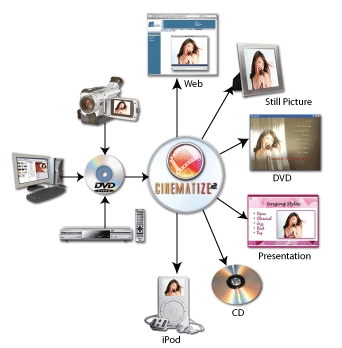
Cinematize 2 Pro has been designed so that you can easily take video, audio and still images from a DVD and put them into a webpage, a presentation, your iPod or just about whatever else you can think of to do with them.
Company Information:
Headquartered in the heart of Silicon Valley - San Jose, California, Miraizon was formed to deliver innovative, fun, and easy-to-use digital media software products to consumers. The company now offers two lines of products: Cinematize 2 and Cinematize 2 Pro. Cinematize 2 is a highly acclaimed DVD Movie Clip Extractor that has been used by tens of thousands of users from over 60 countries including both professionals and amateurs. From major Hollywood movie studios and TV networks to top art schools and advertising agencies, Cinematize 2 has an impressive list of customers. Cinematize 2 Pro is a new addition to the Cinematize 2 product family. It is the Ultimate DVD Re-Editing tool, making virtually any piece of an existing DVD available as source material for new DVD projects. Miraizon plans to introduce many more such useful products in the future.

The company name, Miraizon, is a combination of the Japanese word Mirai, which means future, and the English word horizon. Miraizon’s goal is to bring the future a step closer to you by introducing cutting-edge products.
Program Features:
Cinematize 2 gives your DVD collection a new life by turning it into a library full of exciting multimedia content. Now you can:
- Create a new DVD with your favourite movie scenes
- Watch movies or movie clips on your video iPod
- Edit your recorded TV programs
- Incorporate DVD movie clips into your presentations
- Create high-quality still pictures from DVD movies
- Share your home DVD movie clips on the web
- Extract video alone and add your favourite music
- Extract audio alone and burn it to a CD, or listen to it in iTunes or on your iPod
- and much more!
In Miraizon’s Own Words:
Cinematize 2 Pro is the Ultimate DVD RE-Editing tool that lets you extract any piece of a DVD, be it an audio track, a video track, a subtitle, or a piece from a menu for reuse in your new DVD projects. Expand your possibilities with powerful Pro features including multi-channel audio extraction, subtitle decoding to QuickTime and images, and custom QuickTime output configuration. Enhance your productivity with batch segment extraction and the ability to save setting presets. Enjoy higher performance with enhanced acceleration and Universal Binary support on Intel Mac machines.
Now lets take alook at the Test Machine and Software Requirements
Test Machine:
This product was tested on the following machine.
Hardware
- Processor – AMD Athlon X2 Dual Core 4400+
- Motherboard – Gigabyte GA-K8NXP-SLI
- Ram – 4Gb OCZ Platinum Dual Channel Kit DDR500
- Graphics Card – Gainward GeForce 7800GTX 256MB PCI-E
- Sound – RealTek AC97 Integrated Digital Audio
- Hard Drive 1 – Western Digital Raptor SATA 74Gb
- Hard Drive 2 – Maxtor Maxline III SATA 300Gb
- Optical Drive 1 – LiteOn 167T DVD-Rom
- Optical Drive 2 – LiteOn 52327S CD-RW
- Optical Drive 3 – NEC 3520A DVD-RW
Software
- Operating System – Windows XP SP2
- DVD Software – DVD Decrypter 3.1.5.0, AnyDVD 6.0.8.2
- Player Software – QuickTime 7.1, Windows Media Player 11, DivX Player 6.4
- Encoder Software – Dr DivX 2.0.0
- Codec – DivX 6.4
Movie
- DVD – Casino
Software Requirements:
The system requirements for the program are as follows,
- Operating System – Windows 2000 (SP4 or higher) or Windows XP (SP1 or higher)
- CPU – Pentium III 1Ghz or higher
- Memory – Windows 2000 requires 128Mb, Windows XP requires 256Mb
- Display – 16Mb Video Card and a Super VGA 800*600 monitor
- Sound Card – Optional
- Hard Drive – 20Mb Installation, 2Gb to 8Gb for extracted files
- Optical Drive - DVD-ROM drive
- Other – QuickTime 6.4 Minimum, QuickTime 7.03 for iPod movie output
Time for a Program Run Through
Program Run Through:
The program itself is very easy to use. It doesn’t come with any kind of copy protection removal program to get your DVD contents onto your hard drive so this is something that you will have to do yourself. Of course if you are using a homemade DVD then you can just copy the contents onto your hard drive for quicker use.
This is the first screen of Cinematize 2. The first thing that you will need to so is to Add your DVD files into the program. This is done by the Add button located at the bottom of the screen on the left. You then navigate to files and select the ones that you want to import.

Once done you then need to select which Video Title Set you want o work with. With some DVD’s there will be more than one as you could have the main feature and then separate smaller features on the same disc. One you are happy you need to click the Select File Group button located at the bottom on the right. Cinematize 2 will now import the movie so that you can play with it.

Once the DVD is loaded you will see the following screen. Here is where you select what part of the movie you want to use. If you movie has multi angles then you can also choose which angle to pick. You then select the start and end point of your new clip and then add it to the pool at the bottom. Once you have selected everything that you want to remove you move onto the Video tab.

Here you chose what you want to do with the video part of the DVD. If you don’t wasn’t a video just the audio then you can select no video.

As you can see the amount of codec’s available to you is quite extensive.

The Audio is the same as the Video. You can select the audio stream and then what you want to do with it.

If you want Subtitles with your video then you can select them here. There is also an option for none.

The final window is Output. Here you select what you want done with your file. Things like combining you audio and video are set here along with the Output Format.
Cinematize Pro will scan your system when it is launched to find all
components that are available. For example, if you have QuickTime
export components installed for DivX, WMV, XviD, 3ivx, etc you will see
these components show up in the Output Format menu.
By clicking on Custom Format under the Output Format box the list will change to show any QuickTime movie export components or plug-ins you might have installed on your system.

Giving your output file a simple name and clicking save will start the program off.

Here you can see the program extracting the required section from the DVD rip. After it is done it will synchronize the Video and Audio if you have selected both and encode to your desired output.

That is it. The program will now run through all of the segments that you have told it to do.
After this you can then place them onto your website or reauthorize them back onto another DVD. The choice is yours.
Lets take alook at the Tests and Results
Tests and Results:
To test out the program I picked 5 segments from the DVD to play with. I did a run through with the program to make sure everything worked correctly. I mixed them up from different parts of the disc. They included large segments that went across chapters and smaller segments that were less than a minute long.

I tried a number of different codec’s that were available to me and adjusted a few of the options such as video quality, subtitles included, outputting to an AVI stream and a few others.
A few of the tests can be seen below. For constancy these are all Segment 1 encodings.
Full Quality 4:2:2 Uncompressed With WAV Audio
- Medium Quality – 5120Mb
DV – Pal With WAV Audio And Subtitles
- Highest Quality – 1675Mb
- Medium Quality – 850Mb
- Minimum Quality – 480mb
DVCPRO – Pal With WAV Audio
- Medium Quality – 690Mb
Cinepak With WAV Audio
- Medium Quality – 450Mb
- Minimum Quality – 250Mb
Intel Indeo Video 4.4 With WAV Audio
- Medium Quality – 120Mb
Elementary Stream Video and Audio
- Medium Quality – 120Mb
MPEG 4 Video With WAV Audio
- Highest Quality – 250Mb
- Medium Quality – 135Mb
- Minimum Quality– 65Mb
Finally I took an AVI outputted file and ran it though a secondary encoder, Dr DivX 2.0.0 and compressed it down with the DivX 6.4 codec to make sure that if you wanted to use a different codec then it would in fact work.
All of the tests were completed successfully. The Video and Audio were synchronized and the new files played in the appropriate players.
Finally lets looks at the Positives and Negatives and the Conclusion
Positives and Negatives:
While using this program a number of points both positive and negative came up. These are listed below for easy reference.
Positives:
- Quick and easy to use
- Allows you to take any part of the DVD out as a separate smaller video or audio segment
- Can also make use of secondary angles and subtitles on the disc
- Can use plugins to enhance the functionality of the output formats
Negatives:
- Can’t individual setup each segment for different encodings in one session
- No estimated time or estimated needed space notices
Conclusion:
This is a very good application. It easily lets to do anything with the DVD that you want it to. If you wanted to remove on scene from a DVD for your presentation or home movie you can do. It will even allow you to take segments of Audio and output them without the video. This is great for songs that are found in movies.
Having said that you will need additional tools to first of all get your movie onto your hard drive without any copy protection to have that program can then play with it. So in addition to that you have to wonder about the legal side of this application. It does allow you to remove a song that you like from a movie DVD and put it onto your generic MP3 player. Is this then classed as stealing the song? I think that is one for the lawyers.
The final thing I find is that to me it feels little bit like a Mac program running in Windows rather than a program designed to everything that it can do in the windows environment. This isn’t a bad thing per say but just something that nags at me.
The price of Cinematize Pro 2 can be found on the website. At the time of going press it is priced as follows.
- Downloadable Version – Windows 2000 / XP – US$129.95
- Boxed Version - Windows 2000 / XP – US$149.95
- Backup CD-Rom Windows 2000 / XP – US$9.95
The price to me is not aimed so much at the general public but more to web developers. However if you are looking for a DVD movie clip extractor then this is certainly up there with the best.
Overall I would have to say that this is a great application if you want to encode to the QuickTime or Mac standards.
The Miraizon homepage can be found here.
The Cinematize homepage can be found here.















