
 |
Review: CORSAIR Flash Padlock |
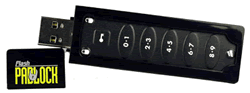
Corsair was kind enough to send us their Flash Padlock drive for review. The Flash Survivor has a storage capacity of 4GB and has a USB 2 host interface for connection to a PC or MAC.
In this review we will test the performance of the Flash Padlock 4GB USB flash drive.
Corsair Company Information


Products to Meet the Demands of Performance Computing
Corsair has been a leader in the design and manufacture of high-speed modules since 1994. Our focus has always been on supporting the special demands of mission-critical servers and high-end workstations, as well as the performance demands of extreme gamers. While maintaining this core focus, in recent years, we've also brought our expertise, technology leadership and legendary quality and reliability to memory and other technology products for the more mainstream consumer.
Memory That Meets The Toughest Demands
As a pioneer in high-speed module design, Corsair is a trusted supplier to many computer manufacturers. In high-density memory solutions, Corsair has always been one of the first suppliers to achieve advanced qualifications on Intel, Tyan and SuperMicro server platforms. We also work closely with other major server platform manufacturers to release product that is 100% compatible with their latest server products.
What Sets Corsair Apart?
With more high-speed experience than anyone in the industry, we know the importance of design features like tightly-controlled trace lengths, controlled impedances, clock trace design, unbroken power and ground planes, and selectively plated gold. Corsair Memory has developed an industry-wide reputation for quality, compatibility and performance.
Performance Memory For Enthusiasts
Our flagship memory products are the DOMINATOR™ line of performance memory, which is designed for the unique demands of the serious enthusiast community. Featuring patent-pending Dual-path Heat Exchange (DHX) technology, the DOMINATOR family maximizes on performance, minimizes on heat, all the while running with heighten reliability and stability. The DOMINATOR line has set world performance records and won numerous awards. Corsair’s mainstream performance memory solutions are the XMS family. The XMS family includes XMS2 DHX, featuring innovative DHX technology now in the mainstream; XMS Xpert, the first modules with real-time display of parametric data; XMS Pro Series, gaming memory with real-time activity LEDs; and XMS2, high-performance DDR2 modules with black heat spreaders. The XMS Family also includes DDR1 solutions in XMS, available in either black or platinum heat spreaders.
Our Value Select memory brings our quality and compatibility standards to cost-effective products for today's most popular desktops and laptops. Value Select is available in DDR1 and DDR2.
We also offer a large range of ultra-reliable server memory for mission-critical servers and high-performance clusters.
Flash Memory, Liquid Cooling and Power Supplies
Corsair has expanded beyond memory modules to offer performance liquid cooling units and blocks under our Corsair Nautilus brand and power supplies under our HX Series brand.
In addition, we offer a line of specialty Flash memory. From our ultra-rugged Flash Survivor™ family to the multi-award winning durable Flash Voyager™ family, Corsair has quickly established itself as an industry leader for USB drives.
What’s inside the box
Now it’s time to take a look at the drive itself and what the drive came shipped with.
Our package was the retail version.
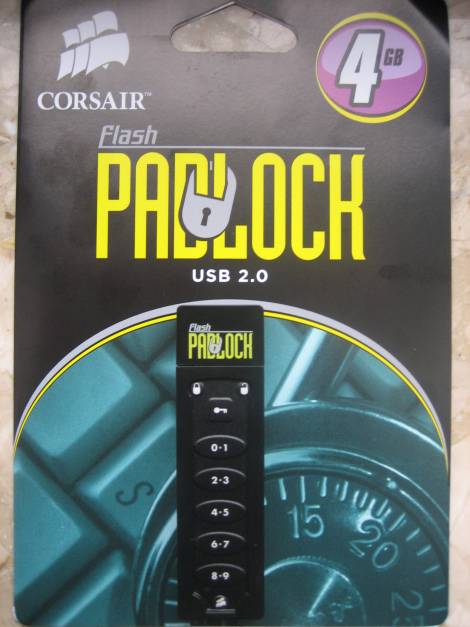
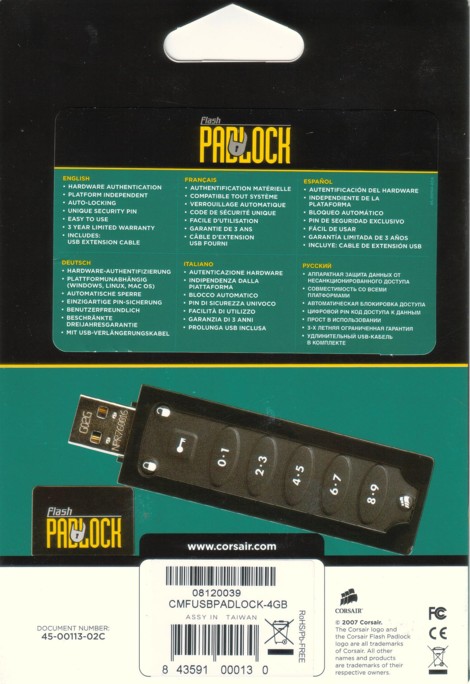
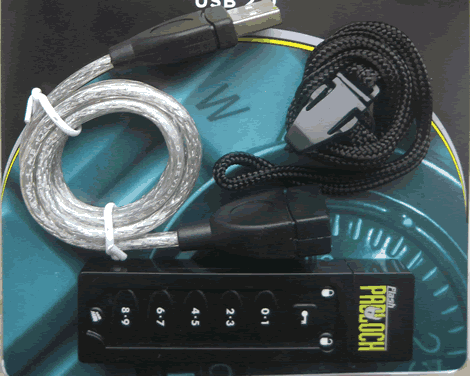
We can see that the Corsair Flash Survivor is supplied with a USB extension cable and dog tags included.
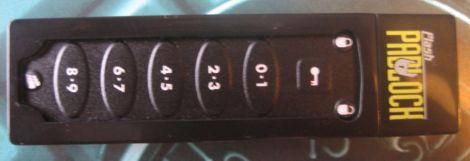
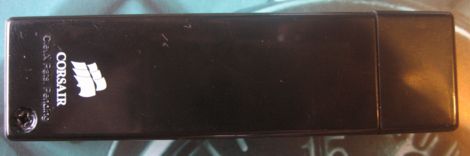
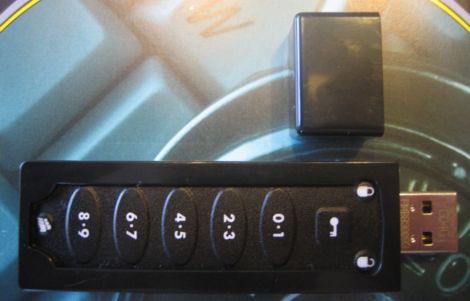
We can also see a single LED (Blue) right next to the thread which flashes when the drive is active. The flash drive itself is a little larger and weighs a little more than average flash drives due to the casing. On the left you can see a small rubber ring that makes this drive water resistant up to 200 meters.
Specifications and features

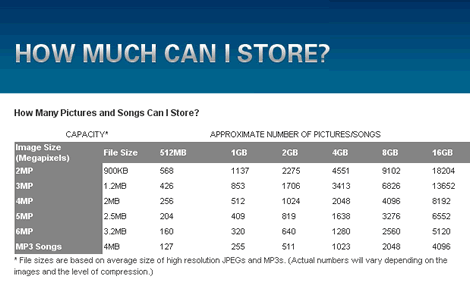
Drive capacity

Windows XP reports the drive has a usable capacity of 3.74 GB
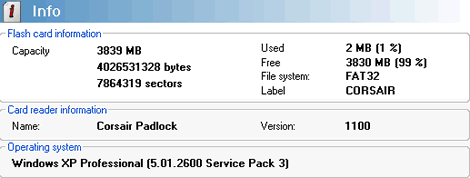
Here we have another report from Flash Memory Toolkit after writing data to the drive.
Test machine
For this review we will be using a computer with the following configuration:
Hardware:
· Motherboard: ASUSTeK P5K (Intel P35 chipset)
· Processor: Intel Core2 Quad Q6600 4x2.4GHz (G0 Stepping)
· RAM: 2048 MB DDR2 800 Corsair XMS2
· GFX: Leadtek GeForce 8500GT (512MB DDR2)
· Sound: Onboard Realtek ALC882 HD audio controller
· Hard disk 1: 500GB Seagate ST3500630AS 500GB SATAII
· Hard disk 2: 500GB Seagate ST3500820AS 500GB SATAII
· Case: Thermaltake Armor Big Tower Black
· PSU: BeQuiet Straight Power 600W
· Display: 20 inch Gericom LCD
· Operating System: Windows XP Professional SP3
Test applications
To test the performance of the Corsair Flash Padlock, we will be using the following test applications in this review.
· HD Tach
· H2benchw
Now let’s head to the next page where we will test out reading performance...
Reading Benchmark
For these tests, we will use HD Tune Pro 3 and will conduct reading benchmarks. As a reference we also tested the Maxell USB Retractor USB 2 flash drive, so we had some data to compare. We would like to point out that HD Tune Pro results may differ from one system to another and results could also be operating system dependent.
Maxell USB Retractor Reference test

Corsair Flash Padlock 4GB benchmark

We present the table below for comparison with other recently tested flash drives.

Looking at the read test, the Corsair Flash Padlock was the fastest drive. Access time can be rated average and the burst rate is very high.
To round off the reading benchmarks, we also include a test from HD Tach.

HD Tach reports a slightly higher average read speed than HD Tune Pro and a writing speed of 11.6MB/sec.
Writing and advanced benchmarks
For these tests we used H2benchw. H2benchw communicates with the Corsair Flash Voyager GT at low level and should therefore, at least in theory be, operating system independent. This test suite is capable of testing many aspects of a drive’s performance, including simulated real world tests.
We used the –a option (all tests) which depending on the drive’s capacity and speed will take over 2 hours to complete.
We will present performance graphs where available. Other test results will be presented in the form of tables.
Zone writing test

In our graph above, we can see that the Corsair Flash Padlock had an average writing speed of approximately 11MB/sec (see table for exact measurement).
Zone reading test

In our graph above, we can see that the Corsair Flash Padlock had an average reading speed of approximately 34MB/sec (see table for exact measurement).
H2benchw reading and writing test results and comparison tables
Below we can see the full reading and writing test results from H2benchw, in the form of tables which display the results of our review drive and, comparison results from other USB flash drives.
Below we can see the full text output from our H2benchw tests
Repetitive and sequential read/write tests

The Corsair Flash Padlock has a very good reading performance but it has also a bad writing performance.
Sustained transfer rate (block size: 128 sectors)
· Reading: average 22951.2, min 22252.0, max 23275.7 [KByte/s]
· Writing: average 20989.9, min 11304.1, max 21652.2 [KByte/s]

Again the Corsair Flash Padlock shows very good reading and very bad writing performance..
Random read/write access times

The seek times are excellent
Simulated application read/write tests

In our graph above, we can see how the Corsair Flash Padlock 4GB performed in our simulated application tests (see table for the combined index score).
We present the following table for comparison with other USB flash drives

Summary:
The Padocks reading performance is excellent but the drive seems to be a very slow writer compared to other USB Flash drives.
Let’s move on to the next page where we test file reading and writing performance...
File reading and writing performance tests
To test the file reading and writing performance of the Corsair Flash Padlock 4GB, we used the file benchmarking option in HD Tune Pro using various file sizes from 32KB to 512MB. The Corsair Flash Padlock 4GB was set to “optimised for quick removal” in device manager.
To understand what the file benchmarking graphs are showing, we present a short explanation.
The vertical axis of the graph shows the reading and writing speed of the device in Megabytes per second, with the blue colour showing reading performance and the orange colour showing writing performance.
The horizontal axis of the graph shows the file block size in Kbytes and, as we can see, various block sizes are used in the test.
A small block size is useful for making the most of the available storage space on the device (very small files take up less space). The downside of using a small block size is that performance suffers badly when larger files need to be stored or read from the device. Using a larger block size will use up more space on the device when very small files are being stored, however, using a larger block size will give much better performance when larger files have to be stored or read from the device.
Below are our obtained results.
.

32KB file size

1MB file size

4MB file size

8MB file size

64MB file size

512MB file size
Flash Memory Toolkit file benchmark
For our final file benchmark, we used Flash Memory Toolkit and ran the file benchmark.
Our result is shown below.

Summary
We can notice that as file size increases, the performance of the Corsair Flash Padlock flash drive also increases. This is exactly what we would expect from such a device. No problems to report and performance was in the range we could expect from previous benchmarks.
On the next page we will conduct some real world tests....
Real world copy tests
We will now conduct a few real world copy tests. These tests simulate what real people do with their drives. We will conduct both read and write tests, using one large single file and a multiple file copy of various file sizes.
We should point out that this is not a scientific way of measuring performance. These timings were taken with a stop watch and, we have also found after testing flash drives on many PC configurations and operating systems that these timings have more to do with differences in operating systems and setup than they do with the flash drive itself.
Because of the nature of these tests, we will not be comparing the results with other flash drives, as these results could be very inaccurate. They are presented only as a guide.
Multiple file copy writing test
For this test we copied the Nero Burning Rom install folder from our review PC’s C: drive to the Corsair Flash Padlock 4GB

Our test copy contained 1,915 files of various sizes with a combined capacity of 306MB.
Our result is below.

Single large file writing test
For this test we used a single CD ISO file which had been copied to the C: drive of our review PC. The file was then copied to the Corsair Flash Padlock 4GB.

Our test file was a 701MB ISO file
Our result is below.

Multiple file copy reading test
Before starting these tests, our review PC was rebooted to make sure the PC’s cache was cleared.
For this test, we copied the multiple files we had previously copied to the Corsair Flash Padlock 4GB to the desktop of review PC.

Our result is below.

Single large file reading test
For this test, we copied the single CD ISO file we had previously copied to the Corsair Flash Padlock 4GB to the desktop of review PC.

Our result is below.

Summary
Looking at the achieved results, the Corsair Flash Padlock offers an average writing speed and shows some excellent results when reading back the data.
Durability tests
In these tests we decided to test the durability of the Corsair Flash Padlock 4GB.
These tests are simple and non scientific, they merely mimic some of the silly things that users tend to do with these types of devices sometimes. Like, accidentally put them through a wash cycle in the washing machine, drop the device and, stand on the device.
Drop test
For this test, we dropped the Corsair Flash Padlock 4GB from carry height to a concrete door step and repeated this 25 times.
The Corsair Flash Padlock 4GB was then connected to our review PC once more and we can confirm that the drive still worked perfectly.
Wash cycle test
For this test, we placed the Corsair Flash Padlock 4GB into a pocket of my jeans and then inserted the jeans into the washing machine. The jeans were then washed on a 1 hour 10 minutes wash cycle at 60°C, rinsed, and then spun at 800RPM.
The Corsair Flash Padlock 4GB was then blow dried with a hairdryer and then connected back up to our review PC. We can confirm that the Corsair Flash Padlock 4GB was still working perfectly after this ordeal.
We decided to check the Corsair Flash Padlock 4GB after conducting these durability tests with HD Tune Pro’s error checking test.
The result is below.

As we can see in the above screenshot, the Corsair Flash Padlock 4GB has survived both our review testing procedures and our durability tests with flying colours. There are no errors on the device at all.
Security Feature
At the beginning of the review, when we presented you the features of the Corsair Flash Padlock 4GB we saw that this device has a nice looking security feature. Independent from computers and operating systems you should be able to easily lock your device by setting up a pin code via a numeric pad which is integrated in the device. At this stage of the review it’s time for us to take a closer look at this feature. Here is again a quote from the specifications of the unit:
Corsair’s Flash Padlock gives users the confidence of having a hardware-secured lock to protect their data on an USB drive. Featuring auto-lock hardware security, Flash Padlock is the best way to secure your data while on the go. This prevents any unauthorized access or “Brute Force” attack to the data on Flash Padlock. Users can program in a PIN, much like they do for an ATM machine, to lock/unlock their data. An easy to use keypad in conjunction with lock/unlock indicator lights makes the Flash Padlock highly intuitive to use. Lastly, the Flash Padlock is fully plug-and-play, and requires no software or drivers to work properly.

Corsair provides a very clear guide which describes how to setup and change a password and also on how to use the stick once a password is set. In our tests we found that it as easy to use as they describe. During out tests we found no problems with this security feature on different systems. Anyway, after doing some search on the web we found that it is very easy to break this kind of protection. Maybe not for the average Jo, but someone who really wants your data and who has at least a little technical knowledge.
So finally we can say that this security feature is a nice toy to play with, but if you really want to protect sensitive data you must use other protection features.
Conclusion
Positive:
· Good reading performance.
· Extension USB cable supplied.
· Neat and innovative security feature included
· 10 year limited warranty.
Negative:
· Relative huge dimensions
· Writing performance could be better
Conclusion:
Let us summarise the most important positive and negative points below:
The main positive points:
The Corsair Flash Padlock 4GB is a very good reader, even when we can’t compare different drives on different systems we can add that it was one of the fastest USB Flash drives
With its Padlock security System the Corsair Flash Padlock 4GB comes with an innovative security system which sure keeps the average Joe away from your data.
The main negative points:
We weren’t happy with the writing performance, in our benchmarks the drive was far away from the best performing drives.
Another negative point is the dimension of that device, compared to other USB Flash drives it is approximately 2 times thicker and for some people this could be a problem.
To sum up, this is what we would say:
“The Corsair Flash Padlock is a good reader which comes with an innovative security system. Not a must-have and not a no-go”.

We found the Corsair Flash Padlock 4GB flash drive at Geizhals.at priced at 20.94€.
You may comment on this review below or in this forum thread.
Thanks to:
|
|
EFD Software for providing the fully licensed versions of HD Tune Pro and Flash Memory Toolkit |
|
|
Simpli Software for HD Tach |
|
|
c’t Magazin for providing H2Benchw |

















