
 |
Preview: CyberLink PowerProducer 4 |
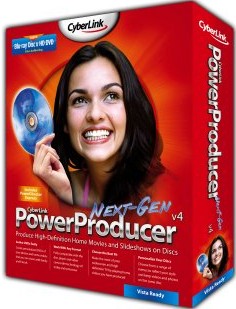
We at CDFreaks would like to present a review of PowerProducer 4 from CyberLink. PowerProducer 4 is a powerful software application that can produce High-Definition Home Movies and Slideshows on Discs. You can capture High-Definition videos and produce Blu-ray Discs, create HD DVDs and DVDs for playing on a home player, produce discs of your own widescreen (16:9) videos, enhance your videos with Magic Video Editing, personalize your discs with menus, music, and titles.
Company Information:
Let us take a look at some of the company information found at the Cyberlink Website:
Company Information
Founded in 1996, CyberLink Corp is the leader and pioneer in enabling digital multimedia on PCs and CEs. Backed by a group of high caliber software engineers, CyberLink owns its core codec and a number of patented technologies. Today, CyberLink has built a solid reputation for delivering high-quality, interoperable, and fast time-to-market solutions that keep our OEM partners on the leading edge. Our business partners include leaders in the IT industry: drive manufacturers, graphics card makers, and top-5 desktop and notebook brands.
CyberLink develops a range of award-winning digital media creation, playback, sharing, and enjoyment applications for home and business PC users worldwide. Our flagship products, CyberLink PowerDVD and PowerDirector, personify CyberLink's powerful but easy-to-use approach in enjoying high-definition movies and letting consumers achieve professional results from video, photo, and music projects with minimal effort.
CyberLink recently has garnered many industry accolades including being named as one of Forbe’s Asia's 200 Best Under a Billion companies, as one of Business Week's ”Asia's 100 Hot Growth Companies” and received the Best Product Software at RetailVision 2006.
CyberLink's products are the best-selling products in their respective categories in worldwide markets. In additional to distributing products through a global network of major retailers, CyberLink products are available at leading online etailers, direct from CyberLink.com, or bundled with PCs from top-tier vendors including Dell, HP, Lenovo, Acer, and Sony numbering 200 million shipments worldwide.
Today, CyberLink Software Solutions include:
Blu-ray Disc and HD DVD Solutions: CyberLink offers complete range of software to playback movie titles; capture, edit videos; author photo and video discs and burn all types of media to Blu-ray Discs and HD DVDs.
Digital Home Entertainment with focus on leading solutions to enabling TV on PCs and CEs, together with integrated solution for accessing and enjoying media within the digital home, including instant-on applications, Software DMA, Media server, TV server and a handful of plug-ins for Media Center PCs.
Mobile DTV Solution is one of CyberLink's major focus to enable TV on portable devices. With CyberLink's standard-agnostic player, CyberLink’s Mobile TV offers multi-band, and multi-standards to support the various mobile TV standards found in Europe, Asia and the US.
Media Collaboration is CyberLink's vision of extending media entertainment from PCs at home to anywhere via the web. Based on advanced streaming technologies and creative web applications, CyberLink enables new ways to enjoy media anytime, anywhere with friends and family.
With customers spanning from multi-national corporations to small/medium sized businesses and from power users to home users, CyberLink has enjoyed rapid and consistent growth leading to a record breaking IPO in October on the Taiwan Over The Counter Exchange (OTC: 5203). Currently, CyberLink is listed on the Taiwan Stock Exchange (ticker symbol: 5203.TW).
CyberLink's worldwide headquarters are in Taipei. To keep up with market demands, CyberLink has operations in North America, Europe and the Asia Pacific region including Japan. For more information, please visit CyberLink's website at www.cyberlink.com.
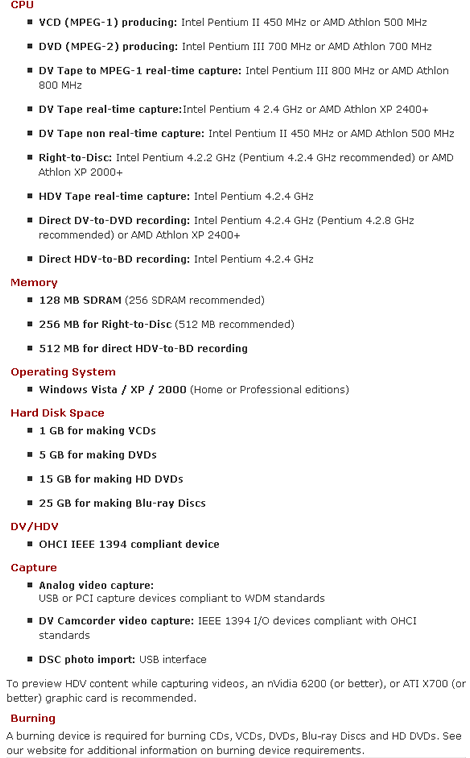
Software Specifications:
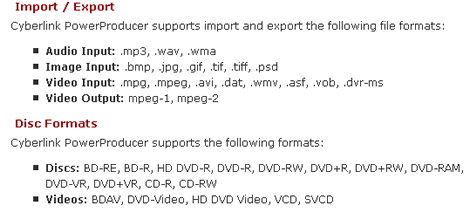
Supported Formats
Let’s take a closer look at the Software features.
- Imports video files and photos
- Captures from a DV or HDV camcorder
- Captures from a TV or VCR
- Captures from a web cam or digital camera
- Video and Picture Editing
- Cuts, merges and splits video clips
- Matches slide show length to background music duration
- Adds transitions to slide shows
- Creates disc menus with video thumbnails and background
- Sets chapters within video content
- Adds background music to disc menus
- Burns CDs, DVDs, HD DVDs and Blu-ray Discs
- Burns video right to disc from a variety of sources
- Erases discs that contain unwanted content
- Copies discs and burns discs from a disc image
Let’s head to the next page where we will take a look at software installation.
Page 2
Software installation
In this section we will take a quick look at the software installation.

Here we have a shot of our Main screen, PowerProducer, Trial Software, Free Utilities, Contact Us and Exit.

Clicking on PowerProducer we can choose either Install, read the User Guide, check out System Requirements or view the Introduction.

Clicking on the Install button will take us through the simple install menus that are pretty much basic for all windows installations so we won’t go into any further detail.

From our Main screen we have a few more options, one being Contact Us.

Under free utilities you can choose to install Acrobat reader and Internet Explorer 6

Trial software available on this disc is PowerDVD and Power2Go
Included in the retail package:
- Installation disc
- Printed user manual

Contents of the retail package.
Test machine:
For this review we will be using a computer with the following configuration:
Hardware:
- Motherboard: Asus P5K Deluxe
- Processor: Intel Core 2 Duo E6600 @ 3.7GHz
- RAM: 2x 1GB Patriot PC2-6400 DDR2
- Graphics Card: eVGA 7900GT 512 KO with Zalman vf900 @ 650/1600
- Sound: SoundMAX Digital HD Audio Onboard
- Hard disk: 2x 320GB – 1x 750GB SATA Seagate
- Television: Philips 27” 27PT6441/37
- Operating System: Windows XP Professional with SP2
Software:
- DivX Pro 6.5
- SimpleDivX 1.40.24
- TMPGEnc 4.0 Xpress
On the next page we will take a look at Authoring performance…
Page 3 Authoring performance tests
Authoring performance tests:
For this set of tests we will use both a DivX file of approximately 700 megabytes in size made using SimpleDivX 1.40.24 to rip a DVD to a high quality DivX file then taking that file and making a MPEG2 using TMPGEnc 4.0 Xpress to build a DVD compliant file set.

From our main screen we will choose to produce a Movie Disc.

Now we can choose what Format disc we want, the Disc Capacity and Aspect Ratio.

We then can import both our DivX and MPEG2 test file.

Now we can Cut, Split or Merge our Video.


We then have the option to make a Customized Menu for our DVD with many different pre-made Menus or we can build our own.

Now we can choose to set our Chapter length.

Now we are done editing our DVD and we have a few options, we can Burn to Disc, Save as Disc Image or Create a DVD Folder, we can also choose to do all of them or any combination, this is a great feature.
For this example we will Create a DVD Folder and Burn to Disc.

We can see that PowerProducer supports and uses our Dual Core processor.

After the process is completed we see the completion screen, we can choose to Play Disc, Return to Main Menu or Quit PowerProducer
PowerProducer does not have a forward running timer so we timed it manually. Our DivX file was authored in 24 minutes and 44 seconds. Our MPEG2 file was authored in 56 minutes and 52 seconds.


If we choose to go back to the main menu we have some other options, Right-to-Disc. Here we can write directly to disc from any supported input device such as a Camcorder or TV card.

If we found we made a mistake in our initial Movie Disc or wanted to add or delete content we can go back and use Edit Disc.

Sometimes we don’t have the time to finish our project so we can save it and the Open our Project later to finish it.


With Disc Utilities we can Erase a Disc, Copy a Disc, Burn Disc from Image, Save Disc Image and Burn Disc from DVD Folder
Next you can read the conclusion from our tests…
Conclusion:
While using PowerProducer 4 a number of things both positive and negative were noted. The main points are listed below
Positive:
- Very easy for anyone to use
- Simple installation
- Works with most popular video and picture file formats
- Intuitive menus and navigation
- Supports input from TV cards and Camcorders
- Good DVD menu templates and manual menu building
- Plenty of useful disc utilities
- Supports 16:9 and 4:3 aspect ratio
- Video and Audio quality are very good
- Supports both NTSC and PAL file formats
- HD and Blu-ray support
Negative:
- No subtitle support
- No forward counting timer when building a DVD, the counter counts backwards and is not accurate
 To sum it all up, this is what we would say: "PowerProducer v4 is a simple to use feature rich DVD authoring program that will allow anyone to take their video and picture files as well as video directly from a digital input device and author them to DVD with ease and very good quality.”
The suggested retail price is US$69.99 (Sept 2007).
You may discuss/comment this article below or in this forum thread.
Thanks to:
|
|
Cyberlink USA – For providing the software used in this review. |















