
 | Review: LG GSA-4040B multi DVD-Writer Reviewer: OC-Freak Firmware: A301 Manufactured: July 2003 |
This time we will take a look at the LG GSA-4040B Super multi DVD Writer. Since it supports DVD-RAM in addition to DVD+R/RW and DVD-R/RW it could in fact be called a triple format DVD-Writer. Our expectations for this DVD-Writer is very high, so let us see if it lives up to our expectations in this review.
Some LG facts:
This drive is made by LG/Hitachi, some time ago Hitachi and LG agreed on merging the optical division with each other. Below is some company information from the LG Website:
LG Electronics is a major global player in electronics & telecommunications, operating 72 subsidiaries around the world with over 55,000 employees worldwide. LGE focuses on Digital TV, CD-RW, DVD, CD-ROM, DVD-ROM Drives, PCs, Monitors, Mobile Handsets,CRTs and PDPs. LGE is strengthening core competencies even more to further its reputation as the "Digital Leader" in electronic products and equipment in the digital era.
| Corporate Name : LG Electronics Inc. | |
| Established : October 1, 1958 (As a private Company) | |
| Corporate Office | |
| LG Twin Towers | |
| Chairman & CEO : Mr. S.S.Kim | |
| Business Area Main Product | |
| Digital Display & Media Company | |
| Digital TV, PDP, Monitor, CD-ROM Drives, DVD-ROM Drives, CD Rewritable Recorder, VCR, DVD Player, Audio, Security System, Recording Media, Video Phone, PC Camera, Banking Automatic System , PCB | |
| Digital Appliance Company | |
| Air Conditioner, Refrigerator, Microwave Oven, Washing Machine, Vacuum Cleaner, Compressor for Air Conditioner, Compressor for Refrigerator | |
| Telecommunication Equipment & Handset Company | |
| TDX, STAREX, optical switching systems, Implementation of advanced IBS (Information Building System), System Integration (SI) service, etc. | |
| Number of Employees - 55,500(30,000 Domestic/ 25,500 Overseas) |
|
|
| LG Electronics' digital display and media products, already recognized for their cutting-edge technology, include digital TVs, flat-screen TVs, PCs, monitors, CD-ROM drives, CD-RW drives, DVD players, MP3 players, ACDRs, PC cameras and digital video phones. The company has held the top share of the world market for CD-ROM drives since 1998, and the company's CD-RW drives captured the leading market share (21%) in 2000. In step with industry trends, the company is continuing to come out with unique digital audio/video products with multiple functions supported by fusion technologies. |
 Sophisticated Digital Products to Usher in Home Networks
|
| |
| Early on, LG Electronics strengthened the competitiveness of its multimedia business by forging strategic alliances with such companies as IBM, Sony, Intel, Apple and Compaq. During 2000, an optical storage joint venture was established with Hitachi, and a strategic tie-up was concluded with JBL for digital audio products. In addition, a CRT joint venture is scheduled to be officially finalized with Philips Electronics in May 2001. LG Electronics will continue to strengthen its partnerships with the world's leading enterprises. |
According to this information we are dealing with a large company, with lots of tradition and experience. This makes our expectations even higher for this drive.
Drive specifications:
This is how LG presents their drive:
'For speed and versatility, look to the LG Super-Multi Drive. The GSA-4040B records data up to 4.7GB per side on DVD media and writes in all kinds of formats: DVD+R/+RW, DVD-R/-RW, DVD-RAM and CD-R/-RW. The Super-Multi also reads most DVD and CD formats, including DVD+R/+RW. This adds up to one Super versatile drive suitable for any application. Buffer Underrun Protection, Windows XP/2000/ME/98 compatibility and UltraDMA support ensure fast, reliable writing every time."
| Type | Internal, DVD+/-RW/CD-RW Drive |
| Transfer Rates: | |
| Write | CD-RW: 16x, 12x, 8x, 4x |
| Read | CD-ROM/CD-R: 32x Max. |
| Data Transfer Rate(Burst) | 16.67MB/sec (PIO Mode 4 or Multi-DMA Mode 2) |
| Access Time | DVD-ROM: 130ms (Typical) |
| Buffer Size | 2MB with SuperLink for |
| Interface | E-IDE/ATAPI |
| Loading | Motorized, Loading/Unloading Tray |
| Drive OS Compatibility |
|
| Supported Disc | Standard CD 12cm and 8cm(Horizontal Loading Only) |
| Supported Formats | DVD-ROM, DVD-R, DVD-RW, DVD+R, DVD+RW, DVD-RAM, CD-ROM, CD-ROM XA, CD-DA, CD-Extra, CD-Text, CD-R (Orange Book Part 2), and CD-RW (Orange Book Part 3), Supports Ultra Speed Disc Media, Reads Photo CD (Single and Multi-Session), Reads CD-I and Video CD |
| Mounting | Internal, Vertical, or Horizontal |
| Front Panel Controls/Indicators | Load/Eject, Busy LED, Emergency Eject Pinhole |
| Rear Panel Connections | Power, EIDE/ATAPI, Mode Selector Jumper, Audio Output |
| Authoring Tools Supplied | B's Recorder GOLD, B's Clip, B's DVD, DVD-RAM Driver, PowerDVD, Acrobat Reader |
| MPEG-2 Software | DVD Playback Software |
| MTBF | 100,000 POH |
| Size (WxDxH) | Standard Internal Half Height Drive Size |
| Weight | 2.0 lbs. (0.9kg) |
| Accessories Supplied | Two Drive IDE Cable |
| UPC#: | GSA-4040BI: 048231292290 (Retail) |
Compared to must of its competitors it seems like a clear winner, although there is a few drives that supports faster CD reading and writing speeds, these do lack the support of the DVD-RAM format. On the other hand very many direct competitors offers lower CD-Writing speeds than this drive. But let us not waste the whole day on talking, it's time to continue on if we should ever be able to see some nice test results from this drive.
Test machine:
For this review we will be using a computer with the following configuration:
Hardware:
⋅ Motherboard: Gigabyte GA-8KNXP with Intel i875P chipset.
⋅ Processor: Intel Pentium 4 2,8GHz 800MHz FSB with Hyper Threading support.
⋅ RAM: 1Gb PC3500 DDR
⋅ GFX: ATI Radeon 9800 pro
⋅ Sound: SB Audigy 2
⋅ Hard disks: 2 x Seagate Barracuda ATA IV 80Gb in RAID 0
System set-up:
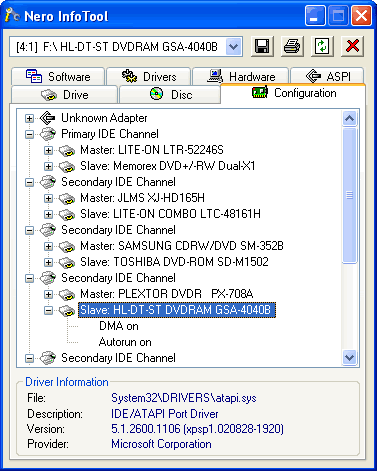
The LG GSA-4040B was connected as Primary Slave and identified itself as HL-DT-ST DVDRAM GSA-4040B, a rather cryptic name if you ask us. Both autorun and DMA (Direct Memory Access) was enabled for all devices.
Software:
Windows XP professional is installed on the computer along with Service Pack 1 for windows XP. We will be using the following software in this review:
⋅ B's clip v5.35
⋅ Ahead InCD v4.0.5.6
⋅ Ahead Nero Burning ROM version 6.0.0.19
⋅ Ahead Nero CD/DVD Speed v2.10 and v2.10.1 beta
⋅ Ahead Nero InfoTool v2.00
⋅ Slysoft CloneCD v4.3.1.7
⋅ Blindwrite suite v4.5.7
⋅ Exact Audio Copy v0.95 prebeta 3
⋅ K-Probe v1.1.26 and v1.1.23
The bundled programs will be installed and evaluated as well, but may no be used for the performance testing part of this review.
Head on to the next page and find out what the box we got contained…
What's inside the box?
On this page we will take a look at what the drive came shipped with and take a look at the drive and it's techniques.
Here is the box that contains the drive:

The box is made in a shiny black colour with a nice and clean layout. The box is a bit larger than most boxes containing optical drives, it also appears to be very solid. All in all the entire box gives quite a quality feeling.
But a nice box is not enough, there have to be something inside it, so we opened the box and took out the content of it:

As we could see the package is very complete, to be sure that nothing is left out we list the content of the box below:
Box content:
⋅ The drive itself
⋅ Owners manual
⋅ Declaration of conformity papers
⋅ Some warranty papers
⋅ A quick guide on how to use the included programs
⋅ IDE Cable
⋅ Audio Cable
⋅ 4 screws
⋅ Software CD containing:
⋅ BHA Gold5 Writing software
⋅ BHA Clip packet writing software
⋅ NeoDVD DVD-movie creation program
⋅ DVD-RAM driver
⋅ Acrobat reader
⋅ PowerDVD DVD Video player installation CD.
⋅ One Maxell DVD-RAM disc
A very impressive retail package, we can't find anything that we are missing, although a better manual would be preferred as the one included only contains the most basic things to get you started.
Now it's time to take a look at the drive itself:

Again one of the new designed fronts without headphone connector and volume knob. We are still not totally used to this and feels that the drive gets a bit naked and boring without it. Beside that the drive is pretty good and exclusive looking. The LED (Light Emitting Diode) is quite small compared to many other drives, not that it causes any problems as it is visible enough.

As we could see out from the sticker on the drive, our drive was manufactured in July 2003 at a factory in Korea. The model number is also clearly visible.

On the back of the drive there is the usual connectors, from the left there is: digital audio connector, analogue audio connector, pins and jumper to set the drive to cable select, slave or master, IDE connector and power connector.
The length and weight of this drive is about average for a DVD-Writer.
We quickly installed the drive without any problems and fired up Nero Info Tool to get an idea of which features this drive supports:

While the drive came shipped with firmware A104 we immediately updated the drive to the latest version available, version A301. It's getting closer to the day where we would find a drive with all checkboxes checked, but to bad this drive do not support Mount Rainier and reading CD+G discs. We do also feel that a buffer size of only 2Mb is quite small for a DVD-Writer and a larger buffer would have been nice
And another shot from Nero Burning ROM:

We do not really find anything alarming here either, but a larger buffer and Mount Rainier support would have been nice.
Now it's time to take a closer look at the write technology used by the LG GSA-4040B:
CD-Recordable:

The drive uses Zone-CLV(Zone-Constant Linear Velocity) to write at its maximum speed of 24X. The drive uses four zones to reach 24X; it starts out at a rather low speed of 12X, climbs to 16X, then to 20X and finally at the 46-minute mark it jumps to it's rated speed of 24X. This gives a rather low average speed of only 19,23X.
CD-ReWritable:

As we could see the drive uses Zone-CLV(Zone-Constant Linear Velocity) to write at its rated speed of 16X for Ultra speed CD-RW, Since there is only 2 zones, one at 12X and one at 16X the impact on the write speed is not that dramatic and the average write speed is 15,23X.
Included software:
Now it's time to look at the included software, and comment it if needed. Notice that we may not use the included software in our performance testing part of the review.
PowerDVD:

The drive includes Cyberlink's PowerDVD Media player to play DVD and VCD movies. PowerDVD is a good and widely used software DVD-player, so LG have done a wise choice when selecting to include PowerDVD with the drive.
We quickly installed all the included programs found on the application CD. Here is a snapshot from the installation menu on the application CD:

We have not used any of these programs before (except acrobat reader of course), but this does not mean that they are bad programs. J
B's recorder GOLD 5:
B's recorder GOLD 5 is the basic writing program included with this drive, to get an idea of which features this program supports we started it up:

Here we found the most used disc profiles and selecting one of them brought us to a CD-Creation wizard that was pretty easy to follow. But to give an idea of how the program looks when not using the wizard we closed the wizard:

We did not have any problems understanding how to use the program. We did also look at the options to see if there is any advanced hidden features:


In the drive options we found some useful settings. The 'Emphasize the reading compatibility" option is quite useful if you have a DVD drive that won't play the disc just because it is a DVD+R/RW disc, by enabling this option and having a drive that supports it - the disc won't be recognized as a DVD+R/RW by the player and be able to play. The latter option is quite useful as well if you have a ruined DVD+RW disc that can't be detected anymore, notice that this will destroy all the data that is on the disc. We also wrote a few discs with the program without any problems:

We feel that picking B's recorder GOLD 5 is not a bad choice as we got used to the program quite fast and did not encounter any problems while using it.
Included with B's recorder GOLD there is also a small audio player:

While pretty simple and without any fancy features it does the job and supports showing CD-TEXT for discs with CD-TEXT, unlike Winamp that do not show CD-TEXT.
B's CLIP:
B's CLIP is the packet-writing program of BHA. If you have used InCD you'll get used to this program pretty quick as well as it's basically the same layout:


We do not have any complaints here as the program is very easy to use, and looks almost identical to Ahead's InCD.
Included with B's Clip there is also a small utility to erase CD-RW and DVD RW discs:

Mediostream NeoDVD:
Mediostream's NeoDVD allows you to easily create your own DVD-movies out of your private movie files. We had no problems setting up a quick compilation ready to be written to the disc, it took us below 5 minutes to create this, so by using 5 minutes more the result could be quite good:

The program does the job it's meant for; creating DVD-Videos out of your private movie clips and thus we have nothing to complain about.
DVD-RAM driver:
The DVD-RAM drives is included to ease the use of DVD-RAM discs and contains two different small utilities:

The first is DVDForm to format the DVD-RAM disc; the disc may be formatted into UDF 1.5 and UDF 2.0 as well as FAT32! It's nice to have different options.


The seconds is Wptool to write protect the DVD-RAM disc, quite handy if you are worried about your kids 'accidentally" formatting/deleting data from your DVD-RAM disc.
All in all the software collection is quite complete and features most programs that could be useful in combination with your newly bought Super multi DVD-Writer.
Now that we have finished examining the drive bundle it's time to head on to next page, which is reading performance test…
Reading performance:
For these tests we will use Nero CD/DVD-Speed to read various CD and DVD's, including audio discs and DVD-media. As already mentioned in the introduction this drive sports a specified read speed of 12X for DVD's and 32X for CD's, except CD-RW that should be read at 24X. It's also quite interesting to see if it lives up to its specified read speed of 10X for DVD-R/RW and DVD+R/RW.
Pressed discs:
For this test we used a pressed CD-ROM disc containing PlexTools v1.08 that is exactly 74 minutes long. Below you will see the produced result:

The drive reached its rated speed of 32X at the end and the overall read speed is 24.57X. We compare it to other DVD-Writers in the table found below:
| Pressed | Average | Start | End | Seek | Seek | Seek |
| Plextor | 29.62x | 17.44x | 39.09x | 110ms | 113ms | 188ms |
| Plextor | 31.40x | 18.48x | 41.45x | 98ms | 116ms | 175ms |
| Sanyo | 29.30x | 16.33x | 38.71x | 85ms | 102ms | 177ms |
| Memorex | 24.82x | 15.10x | 32.70x | 120ms | 140ms | 275ms |
| LG | 24.57x | 14.68x | 32.24x | 101ms | 125ms | 183ms |
It could only be directly compared to the Memorex dual-X since the other 3 drives is able to read at 40X speed. Compared to the Memorex it comes out slightly behind at speed, but makes up for it by having better seek times than the Memorex.
CD-Recordable Discs:
For this test we made a copy of the original PlexTools v1.08 CD. The disc we used was a Verbatim 48X certified CD-R disc manufactured by Mitsubishi Chemicals corporation.

Nothing changes here and the result is about identical to reading an pressed disc. The usual comparison table is found below.
| CD-R Discs | Average | Start | End | Seek | Seek | Seek |
| Plextor | 30.67x | 18.35x | 40.31x | 116ms | 119ms | 174ms |
| Plextor | 31.48x | 18.83x | 41.37x | 95ms | 111ms | 164ms |
| Sanyo | 30.31x | 16.20x | 39.92x | 114ms | 115ms | 204ms |
| Memorex | 25.48x | 14.60x | 33.79x | 125ms | 145ms | 289ms |
| LG | 24.57x | 14.68x | 32.32x | 100ms | 137ms | 201ms |
We have nothing more to add as it places about identical in this test as in the pressed disc test. We can't complain as it reaches its specified speeds.
CD-ReWritable discs:
Again we made a copy of the original PlexTools v1.08 disc, this time we used a Verbatim High Speed (10X) CD-RW disc made by Mitsubishi Chemicals corporation.

As the specifications states the drive is locked at 24X for reading CD-RW discs, how this compares to other drives is found in the table below:
| CD-RW | Average | Start | End | Seek | Seek | Seek |
| Plextor | 26.08x | 15.34x | 34.45x | 113ms | 124ms | 178ms |
| Plextor | 31.46x | 18.47x | 41.55x | 109ms | 116ms | 183ms |
| Sanyo | 30.59x | 16.97x | 40.44x | 84ms | 103ms | 175ms |
| Memorex | 25.48x | 14.65x | 33.79x | 130ms | 151ms | 293ms |
| LG | 18.77x | 11.02x | 24.85x | 100ms | 133ms | 203ms |
Speed wise it lags behind the other drives since it's locked at 24x reading. On the other hand it's among the best at seek times.
Audio '“ Digital Audio Extraction:
To test the digital audio extraction performance of the LG GSA-4040B we again used Nero CD/DVD-Speed to measure the transfer rate. The audio disc we used is slightly larger than the disc used for the other tests, to be exact it's about 78 minutes long (77:56:58).

Again the drive is locked at 24x for reading. There is quite a few drives that reads audio at a lower speed than the maximum speed, so let us compare some drive in the table below:
| Audio | Average | Start | End | Seek | Seek | Seek |
| Plextor | 25.87x | 15.35x | 34.09x | 110ms | 119ms | 177ms |
| Plextor | 31.84x | 18.90x | 41.98x | 97ms | 117ms | 181ms |
| Sanyo | 30.72x | 18.24x | 40.21x | 84ms | 103ms | 208ms |
| Memorex | 25.24x | 14.90x | 33.29x | 122ms | 148ms | 299ms |
| LG | 18.60x | 10.95x | 24.50x | 98ms | 131ms | 227ms |
Well, due to its low reading speed of only 24X it places last again. The seek times is about average this time.
|
| |

Below is the results produced by EAC:

Burst mode

Secure mode
The drive performed as expected in the burst mode test and got an average speed of 17.5x, but in the secure mode test it actually impressed us by giving back an average speed of 15.9x, just slightly slower than for the burst mode test.
Advanced audio '“ DAE quality test:
Before we move on to testing DVD read speeds we will take a last audio test, this time we used the 'Advanced DAE Quality Test" feature in CD-Speed.

We got pretty disappointed when we saw that the drive failed pretty bad in this test. It's a long time since we last had a drive that did not get a perfect score of 100 in this test, and it's even longer since we had a drive to get such a low score as 75. Yes we did try with a new disc but the result stayed the same. Beside this it's only capable of doing on the fly copies up to 12X, but supports everything except reading data from the lead-out.
DVD reading performance:
Again we will use Nero CD-Speed to measure the reading performance, this time for various types of DVD discs. The drive should read pressed single layer DVD-discs at 12X and recordable DVD discs at 10X according to the specifications.
DVD '“ DVD-Video:
For our DVD reading performance tests we are going to start with a single and dual layered DVD video discs. While only 1X speed is required to watch DVD movies, it's useful to be able to read the discs at higher speeds if you're going to extract (rip) the content of the disc to your hard drive. Notice: Even if some of these discs contains DVD-Video they are identified as DVD-ROM discs for a reason or another, it's a disc issue and not a drive issue, we did several tests and this do not seem to affect the results of the tests in any way.


We can't complain as the drive reached its rated speed of 12X on the single layer disc. The dual layer disc was read at 8X Max speed. How this compares to other drives is found in the table below:
| DVD | Average | Start | End | Average | Start | End |
| Plextor | 3.73x | 2.07x | 4.98x | 3.43x | 1.91x | 1.96x |
| Plextor | 9.01x | 5.00x | 12.04x | 6.03x | 3.37x | 8.03x* |
| Sanyo | 8.77x | 4.15x | 11.70x | 4.28x | 3.45x | 3.88x |
| Memorex | 9.48x | 4.28x | 12.34x | 5.53x | 3.40x | 2.88x |
| LG | 9.19x | 5.05x | 12.30x | 6.13x | 3.44x | 8.14x* |
*Notice that newest version of CD-speed actually reports the highest speed as the end reading speed for the dual layer disc.
The drive performed very well in this test and was the winner except for the single layer disc where the Memorex Dual-X marginally beats it.
DVD '“ DVD+R(W):
For this test we used a Ritek 4X DVD+R and a Memorex 2.4X DVD+RW with about 4,4Gb of data. Below are the results:


The drive did not manage to reach the advertised speed of 10X, but is actually limited to 8X. 8X is not that bad compared to other drives found in the table below:
| DVD+R | Average | Start | End | Average | Start | End |
| Plextor | 3.77x | 2.08x | 5.04x | 3.37x | 1.88x | 1.72x |
| Plextor | 6.05x | 3.33x | 8.10x | 6.07x | 3.34x | 8.11x |
| Sanyo | 4.01x | 2.64x | 4.02x | 4.02x | 2.65x | 5.77x |
| Memorex | 4.66x | 2.59x | 6.24x | 4.67x | 2.60x | 6.41x |
| LG | 6.15x | 3.41x | 8.23x | 6.15x | 3.40x | 8.23x |
As we could see the drive outperformed all the other drives, nice work from LG on implementing such good reading capabilities of DVD media, to bad it do not read at its advertised speed of 10X.
DVD '“ DVD-R/RW:
For this test we used a Taiyo Yuden 4X DVD-R disc and a Ritek 1X DVD-RW disc filled with about 4,4Gb of data. Our test results are found below:


As we could see out from these graphs, the drive performed nearly the same with DVD-R/RW discs as with DVD+R/RW discs. Below is a comparison table:
| DVD-R | Average | Start | End | Average | Start | End |
| Plextor | 3.76x | 1.89x | 5.04x | - | - | - |
| Plextor | 6.00x | 3.37x | 8.04x | 6.06x | 3.34x | 8.11x |
| Sanyo | 4.02x | 3.06x | 4.02x | 4.02x | 3.20x | 4.02x |
| Memorex | 4.68x | 2.59x | 6.27x | 4.66x | 2.61x | 6.22x |
| LG | 6.23x | 3.45x | 8.31x | 6.14x | 3.39x | 8.21x |
Again it was able to outperform all of the other tested drives, and it did not have any problems with slowdowns etc that have plagued some other drives.
DVD - DVD-RAM:
Since this drive supports writing DVD-RAM discs it of course also supports reading them. There is very few drives supporting the DVD-RAM format, but we found two other drives to compare this drive with at least. The Maxell DVD-RAM disc we used is filled with about 4,3Gb of data.

The drive read the DVD-RAM disc at 3X CLV (Constant Linear Velocity), how this compares to the two other drives is found in the table below:
| DVD-RAM | Average | Start | End |
| LG | 3.01X | 3.01X | 3.02X |
| JLMS | 2.37X | 1.23X | 3.27X |
| Samsung | 2.07X | 1.49X | 1.94X |
Not much to say really, although all drives is limited to reading DVD-RAM discs at low speeds the LG GSA-4040B is the fastest reader out of the tested drives.
But now it's time to head on to a more interesting part: Writing CD-R discs….
The specifications of the LG GSA-4040B states that the drive
is able to write CD-R discs at 24x, and during the intro of this review we saw
that the drive used Z-CLV(Zone-Constant Linear
Velocity) to reach 24X, giving an average write speed of only 19.23x. Let
us find out how the drive really performs at speed and quality.
Writing Data CD-R discs:
For our data writing tests we simply set up a new
compilation of 700Mb using Nero Burning ROM software. Writing method used is DAO
(Disc At Once), and the disc is set up as a
non-multisession disc with finalize disc enabled. The screenshot below shows how
long time it takes to write a disc at the highest speed that is 24X:

The drive used 4 minutes and 56 seconds to write the disc at
24x, this is about what we could expect when we consider the low average speed
of 19.23x as a comparison the Memorex Dual-X used 5 minutes and 28 seconds when
writing at 16X. But speed is not everything, quality is even more important, so
let us take a look at the writing quality of this drive.
Write Quality:
We will test CD-R discs from a total of 11 different large
and not so large CD-R manufacturers. To really measure the write speed we used
the create data CD function in Nero CD-Speed, the discs was written at the
maximum speed that the drive supports. For the quality test we used K-Probe that
is a tool developed by a Lite-On Employee, it runs under windows and works with
drives made by Lite-On. Also note that different drives and different reading
speeds may affect the results obtained when scanning the discs. We used a
Lite-On LTR-52246S drive and scanned the discs at 48X speed. A written CD-R disc
will always have some C1 errors, C1 errors is easily corrected by the drives
error correction capabilities. The next level of errors is C2, while C2 errors
could also be corrected by most drives error correction capabilities, they are
not wanted on a good quality disc; a good disc should not contain any C2 errors
and preferably have an average C1 error amount of below 2.0 average or at least
below 5.0 average. After C2 errors there is only un-correctable errors that will
make a disc unusable.
Why wait any longer? Below are the obtained
results:

Brand: | Packard Bell |
Manufacturer: | CMC Magnetics |
Code: | 97m26s66f |
Disc Type: | CD-R |
Recording Layer: | Dye Type 6: Short Strategy |
Capacity: | 79:59.71 (703MB) |
Certified Speed: | 48x |
Write Speed: | 16X |
Write Time: | 5m:44s |
C1 Average/Sec: | 1.401 |
C2 Average/Sec: | 0.0 |
It's a bit disappointing to see that the drive only writes
these discs at 16x since CMC is a large and well-known manufacturer. A C1
average of 1.401 is a pretty average result for the CMC discs and is nothing to
be worried about.

Brand: | MMORE |
Manufacturer: | Moser Baer India |
Code: | 97m17s06f |
Disc Type: | CD-R |
Recording Layer: | Dye Type 6: Short Strategy |
Capacity: | 79:59.74 (703MB) |
Certified Speed: | 52x |
Write Speed: | 24X |
Write Time: | 4m:59s |
C1 Average/Sec: | 20.922 |
C2 Average/Sec: | 16.824 |
The good thing is that the drive wrote these discs at 24X
speed, but that is about the only good thing as well. The disc is actually
totally unreadable after the 70minute mark and this leads to sky-high amount of
C2 and C1 errors as well. Stay away from these disc if you have the LG GSA-4040B
drive.

Brand: | Verbatim Data Life |
Manufacturer: | Mitsubishi |
Code: | 97m34s23f |
Disc Type: | CD-R |
Recording Layer: | Dye Type 3: Long Strategy (Cyanine or |
Capacity: | 79:59.73 (703MB) |
Certified Speed: | 48x |
Write Speed: | 24x |
Write Time: | 4m:53s |
C1 Average/Sec: | 0.592 |
C2 Average/Sec: | 0.0 |
A C1 average of 0.592 is great and we recommend these discs
for use with this drive as they works at 24X and with great quality.

Brand: | Traxdata |
Manufacturer: | Ritek (JS Dye) |
Code: | 97m15s17f |
Disc Type: | CD-R |
Recording Layer: | Dye Type 7: Short Strategy |
Capacity: | 79:59.70 (703MB) |
Certified Speed: | 52x |
Write Speed: | 24x |
Write Time: | 4m:56s |
C1 Average/Sec: | 3.444 |
C2 Average/Sec: | 0.0 |
With an average of 3.444 C1 errors these discs is not among
the discs we recommend for this drive. On the other hand there were no C2 errors
so these discs will most likely not cause any problems either.

Brand: | Plextor |
Manufacturer: | Taiyo Yuden |
Code: | 97m24s01f |
Disc Type: | CD-R |
Recording Layer: | Dye Type 1: Long Strategy (Cyanine or |
Capacity: | 79:59.72 (703MB) |
Certified Speed: | 48x |
Write Speed: | 24X |
Write Time: | 4m:54s |
C1 Average/Sec: | 0.102 |
C2 Average/Sec: | 0.0 |
We like to call it the superiority of the Taiyo Yuden CD-R
discs. An average C1 error amount of 0.102 is simply outstanding. This is one of
the few discs that this drive wrote at 24X and with good quality.

Brand: | Memorex |
Manufacturer: | Prodisc |
Code: | 97m32s19f |
Disc Type: | CD-R |
Recording Layer: | Dye Type 9: Short Strategy |
Capacity: | 79:59.72 (703MB) |
Certified Speed: | 48x |
Write Speed: | 16X |
Write Time: | 5m:46s |
C1 Average/Sec: | 4.107 |
C2 Average/Sec: | 0.015 |
Again discs from a large and well-known manufacturer that is
limited to 16X writing. Maybe there is a reason for the speed to be limited
since the produced result is not among the best. With a few C2 errors and an
average C1 error amount of 4.107 we can hardly recommend these discs.

Brand: | Samsung |
Manufacturer: | Plasmon Data Systems, |
Code: | 97m27s18f |
Disc Type: | CD-R |
Recording Layer: | Dye Type 8: Short Strategy |
Capacity: | 79:59.74 (703MB) |
Certified Speed: | 48x |
Write Speed: | 24x |
Write Time: | 4m:53s |
C1 Average/Sec: | 7.984 |
C2 Average/Sec: | 0.0 |
The drive wrote these discs at 24X, but the produced result
is not good as the average C1 error level is 7.984. But thankfully there are no
C2 errors. Notice that these discs is of relatively low quality and do not work
very good in most writers.

Brand: | Sony |
Manufacturer: | Acer Media Technology / Daxon |
Code: | 97m22s67f |
Disc Type: | CD-R |
Recording Layer: | Dye Type 7: Short Strategy |
Capacity: | 79:59.74 (703MB) |
Certified Speed: | 48x |
Write Speed: | 24x |
Write Time: | 4m:52s |
C1 Average/Sec: | 4.027 |
C2 Average/Sec: | 0.0 |
Again one of the discs that contains a bit more C1 errors
than we prefer. These discs will most likely cause any problems as there is no
C2 errors, but still we don't recommend them.

Brand: | Princo |
Manufacturer: | Princo |
Code: | 97m27s28f |
Disc Type: | CD-R |
Recording Layer: | Dye Type 8: Short Strategy |
Capacity: | 79:59.74 (703MB) |
Certified Speed: | 48x |
Write Speed: | 12X |
Write Time: | 7m:10s |
C1 Average/Sec: | 1.714 |
C2 Average/Sec: | 0.0 |
Seems like LG knows the same as us; princo is low quality
discs. So LG limited the write speed to 12x for these discs. At 12x speed they
work ok with an average C1 amount of 1.714.

Brand: | Fujifilm |
Manufacturer: | Fuji Photo Film |
Code: | 97m26s45f |
Disc Type: | CD-R |
Recording Layer: | Dye Type 5: Short Strategy |
Capacity: | 79:59.73 (703MB) |
Certified Speed: | 52x |
Write Speed: | 16X |
Write Time: | 5m:46s |
C1 Average/Sec: | 0.390 |
C2 Average/Sec: | 0.0 |
To bad that the drive is limited to 16x for these excellent
manufactured CD-R discs. And they do work well as the average C1 error amount is
only 0.390. Highly recommended discs if you could live with a write speed of
only 16x.

Brand: | TDK Speed-X |
Manufacturer: | TDK Corp |
Code: | 97m15s05f |
Disc Type: | CD-R |
Recording Layer: | Dye Type 5: Short Strategy |
Capacity: | 79:59.74 (703MB) |
Certified Speed: | 48x |
Write Speed: | 16X |
Write Time: | 5m:47s |
C1 Average/Sec: | 2.8 |
C2 Average/Sec: | 0.0 |
While TDK is a well-known brand in larger parts of the world
their own manufactured CD-R discs may not be so well known, as they are mostly
only available in Europe. And as we see the result with these discs is not so
good with the LG. The amount of C1 errors is fine but there are some ugly C2
errors around the 70min mark. We can't recommend these discs for the LG
GSA-4040B.
That's all for now and we could conclude with that this
drive is among the worse drives when it comes to CD-R media compatibility and
write quality. If you are looking to buy CD-R media for this drive we recommends
Taiyo Yuden or Mitsubishi chemicals manufactured CD-R discs.
But after all it's a DVD-Writer so head on to next page
and read about DVD-Writing performance and DVD media
compatibility…
The specifications of this drive tells us that is should write both DVD-R and DVD+R discs at 4X speed. In this part we will measure the write time for various types of DVD-/+R discs. We do also focus on write quality and media compatibility.
DVD-Writing performance:
In this test we will measure the time for writing to both DVD-R and DVD+R discs. We used Nero burning Rom to set up a new UDF/ISO compilation containing 4483Mb of data and started the write process. We used the Disc-At-Once write method.

DVD+R

DVD-R
Out from these screenshots we could see that the LG GSA-4040B wrote the DVD+R in 14 minutes and 44 seconds, and the DVD-R in 14 minutes and 56 seconds. How this compares to other drives may bee seen in the table below:
| Write DVD data discs | DVD+R | DVD-R |
| Plextor PX-504A | 14m 13s | - |
| Sanyo CRD-BPDV2 | 14m 59s | 14m 54s |
| Memorex Dual-X | 14m 6s | 14m 49s |
| LG GSA-4040B | 14m 44s | 14m 56s |
Out from this table we could see that the drive is about as fast as Sanyo CRD-BPDV2. Basically it won't win a price for being the fastest 4X writer. But write speed is not everything, so let us look at media compatibility and write quality below.
Write quality:
You should first notice that this is not a scientific and professional way to test the discs. But according to our testing done the last two months we could conclude that there is a clear link between the quality reported when scanning the disc and the playability of the disc in different devices. Also notice that different drives reports different amounts of errors, K-Probe was designed to work with Lite-On DVD-Writers. So we recommend using a DVD-Writer from Lite-On, in this test we use a Lite-On LDW-411S DVD-Writer, as already said; remember that scans done with a Lite-On DVD-ROM or Lite-On combo drive can't be compared with the results obtained with a Lite-On DVD-Writer. Also remember that different PI/PO ECC sum settings along with different reading speeds in K-Probe will affect the result, we use these settings; PI/PO (Parity Inner/Parity Outer) Sum: 8 ECC, reading speed: 4X CLV (Constant Linear Velocity).
But what is a good scan? That is a discussion that we don't think will end soon as different drives reports different amount of errors, some players is more picky about media than others and so on. But as a comparison we present you with a scan from two pressed DVD discs:

This scan shows the results from a pressed DVD-ROM disc (Baldurs Gate DVD-ROM).

This scan shows the result from a pressed DVD-Video disk (Indiana Jones and the last crusade). Notice that only the first layer is scanned.
If you read below you will see that both the pressed DVD-discs is well within the standards.
Download the ECMA 267 Standard from http://www.ecma-international.org if you want to look at the standard for yourself. Here is some data from the ECMA 267 standard for pressed DVD discs:
13.4.2 Random errors
A row of an ECC Block (see clause 18) that has at least 1 byte in error constitutes a PI error. In any 8consecutive ECC Blocks the total number of PI errors before correction shall not exceed 280.
Here we see what a PI error is defined as a row in an ECC block having 1 byte or more containing errors. And that the sum of PI errors in 8 ECC blocks after each other should not exceed 280 PI errors.
But what is a row and what is an ECC block? Again we refer to the ECMA 267 standard. We do not copy and paste everything but if interested look at point 18 in the ECMA 267 standard. A row is 182 bytes long where the last 10 bytes contain PI (Parity Inner) information. An ECC block is 208 rows long where the last 16 rows contains the PO (Parity Outer) information. This gives us a maximum possible PI error amount of 208 errors per block and for 8 blocks after each other this sum is of course 8 times higher giving a maximum possible amount of 1664 PI errors. In practical use a disc with 1664 PI errors is unreadable.
Although this standard is for pressed DVD-ROM's we have found it to be a good guideline for recordable DVD media as well. And according to our test the specified max PI sum of 280 for good discs seems to be a good guideline, as some readers have problems reading discs when the PI failures is over 300 and most players starts to have problems when the PI failures reaches 600 or more.
For PO errors we have yet to find any standards describing how they are defined and how many PO errors that is acceptable for a good disc. And thus we do not focus on the PO errors in this test, but keep in mind that lower is always better.
Notice that there are other aspects such as disc reflectivity, jitter, tracking errors and so on that also will affect the readability of a DVD disc '“ but for this we do not have measuring equipment available.
To see if there is a connection between the reported amount of errors and readability of the discs we also include the reading curve from a JLMS XJ-HD165H DVD-ROM that seems to be pretty easy affected by the quality of a written disc.
DVD+R media compatibility and write quality:


| Brand: | Verbatim Data Life Plus |
| Manufacturer: | Taiyo Yuden |
| Code: | YUDEN000T01 |
| Disc Type: | DVD+R |
| Capacity: | 4483MB |
| Certified Speed: | 4x |
| Write Speed: | 4X |
| Write Time: | 5m:47s |
| PI Failures Average/Sec: | 184.503 |
| PO Failures Average/Sec: | 0.390 |
For this Taiyo Yuden DVD+R media it seems like the drive is not using the correct write strategy and thus leading to a less than excellent result. Both the reading curve and the K-probe scan show problems but the K-probe scans shows most problems in the beginning of the disc while the reading curve shows problem at the end, this may be because of the higher reading speed of the JLMS XJ-HD165H at the end.


| Brand: | Verbatim Data Life Plus |
| Manufacturer: | Mitsubishi Chemicals |
| Code: | MCC 002 |
| Disc Type: | DVD+R |
| Capacity: | 4483MB |
| Certified Speed: | 4x |
| Write Speed: | 4X |
| Write Time: | 14m:43s |
| PI Failures Average/Sec: | 21.228 |
| PO Failures Average/Sec: | 0.493 |
With these discs the result is pretty acceptable, but we could still see some tiny bumps in the reading curve where the error level is highest at the disc. But these discs should not cause you any trouble.


| Brand: | Arita |
| Manufacturer: | Ricoh / Ritek. |
| Code: | RICOHJPNR01 |
| Disc Type: | DVD+R |
| Capacity: | 4483MB |
| Certified Speed: | 4x |
| Write Speed: | 4X |
| Write Time: | 14m:42s |
| PI Failures Average/Sec: | 418.052 |
| PO Failures Average/Sec: | 5.934 |
Again the drive must use wrong write strategy to write as these discs works considerably better on most other DVD-Writers. Disappointing, but true as both K-Probe and the reading curve shows the same problem. Avoid discs with RICOHJPNR01 as the media code if you have an LG GSA-4040B writer.


| Brand: | BulkpaQ Generation 4 |
| Manufacturer: | Unknown |
| Code: | MEDIA ID001 |
| Disc Type: | DVD+R |
| Capacity: | 4483MB |
| Certified Speed: | 4x |
| Write Speed: | 4X |
| Write Time: | 14m:41s |
| PI Failures Average/Sec: | 376.875 |
| PO Failures Average/Sec: | 2.434 |
Again the K-Probe scan and the reading curve show the same thing; avoid these discs as much as possible. The result is really bad. Just to have that mentioned as well: First time we tried writing this disc type on the LG GSA-4040B the drive failed while writing.
DVD-R media compatibility and write quality:


| Brand: | Verbatim Data Life Plus |
| Manufacturer: | Taiyo Yuden |
| Code: | TYG01 |
| Disc Type: | DVD-R |
| Capacity: | 79:59.74 (4489MB) |
| Certified Speed: | 4x |
| Write Speed: | 4x |
| Write Time: | 5m:47s |
| PI Failures Average/Sec: | 1.684 |
| PO Failures Average/Sec: | 0.016 |
Now, this was something else! Both the K-Probe scan and the reading curve agree: The produced result with these discs is simply outstanding! The produced result is even better than for the original pressed discs according to K-Probe. Highly recommended discs for this drive.


| Brand: | Verbatim Data Life Plus |
| Manufacturer: | Mitsubishi Chemicals |
| Code: | MCC01RG20 |
| Disc Type: | DVD-R |
| Capacity: | 4489MB |
| Certified Speed: | 4x |
| Write Speed: | 4x |
| Write Time: | 14m:57s |
| PI Failures Average/Sec: | 55.316 |
| PO Failures Average/Sec: | 0.417 |
Again a disc type that is about middle of the tree when written by the LG GSA-4040B. The reading curve shows some problems at the end, maybe this have a connection with the increased amount of PO errors at the end of the disc.


| Brand: | Dysan |
| Manufacturer: | CMC Magnetics |
| Code: | CMCMAG.AF1 |
| Disc Type: | DVD-R |
| Capacity: | 4489MB |
| Certified Speed: | 4x |
| Write Speed: | 2x |
| Write Time: | 29m:38s |
| PI Failures Average/Sec: | 29.558 |
| PO Failures Average/Sec: | 0.267 |
There is no doubt this time either; there is a clear connection between the K-probe scan and the readability of a disc, the amount of errors increased at the end causing a slight slowdown in the reading curve. But all in all the result is pretty good. To bad these disc works at 2x only.


| Brand: | Datawrite/datasafe |
| Manufacturer: | Ritek |
| Code: | RITEKG04 |
| Disc Type: | DVD-R |
| Capacity: | 4489MB |
| Certified Speed: | 4x |
| Write Speed: | 4x |
| Write Time: | 14m:57s |
| PI Failures Average/Sec: | 41.882 |
| PO Failures Average/Sec: | 0.218 |
Again we could see that both K-Probe and the reading curve show most problems at the same place. Actually we expected that the result of these discs would better.


| Brand: | Datawrite redtop v2 |
| Manufacturer: | Infodisc? |
| Code: | INFOSMART01 |
| Disc Type: | DVD-R |
| Capacity: | 4489MB |
| Certified Speed: | 4x |
| Write Speed: | 2x |
| Write Time: | 29m:39s |
| PI Failures Average/Sec: | 14.678 |
| PO Failures Average/Sec: | 0.102 |
Although the K-probe scan show this disc to be of acceptable quality the reading curve shows that there is some reading problems at the end. Notice that we scanned at CLV in K-probe while the transfer rate test curve is CAV, and higher reading speed requires better quality. There may also be other problems such as jitter or tracking errors that we are unable to measure with our equipment. It's also limited to 2X writing on these discs as well.


| Brand: | Princo (type 1) |
| Manufacturer: | Princo |
| Code: | PRINCO |
| Disc Type: | DVD-R |
| Capacity: | 4489MB |
| Certified Speed: | 4x |
| Write Speed: | 4x |
| Write Time: | 14m:57s |
| PI Failures Average/Sec: | 15.977 |
| PO Failures Average/Sec: | 0.480 |
Here we could see that both the K-Probe scan and the reading curve agree, there are a few problems at the end. Actually the result with this disc is surprisingly good, as princo is known to be among the lowest quality discs available.


| Brand: | Princo (type 2) (small difference in the ADIP code) |
| Manufacturer: | Princo |
| Code: | PRINCO |
| Disc Type: | DVD-R |
| Capacity: | 4489MB |
| Certified Speed: | 4x |
| Write Speed: | 4x |
| Write Time: | 14m:56s |
| PI Failures Average/Sec: | 15.303 |
| PO Failures Average/Sec: | 0.819 |
There is only one reason why we include a second type of princo discs; to show the difference in quality of princo discs. These discs have a bit different ADIP and serial number, and according to our test results the quality of these discs is much lower than the other princo type we have. And we could see that the amount of errors is higher at the end. Actually the disc is so bad at the end that it's unreadable as the reading curve shows.


| Brand: | Unbranded, sold as AZO 4X Certified. |
| Manufacturer: | Unknown |
| Code: | VDSPMSAB01 |
| Disc Type: | DVD-R |
| Capacity: | 4489MB |
| Certified Speed: | 4x |
| Write Speed: | 2x |
| Write Time: | 29m:39s |
| PI Failures Average/Sec: | 57.890 |
| PO Failures Average/Sec: | 0.134 |
This is one of the few results where the K-Probe scan and the reading curve do not completely agree, the K-Probe scan shows most problems at the beginning while the reading curve shows most problems at the end. But they both agree on that these discs are not the best. The reading curve may be affected by other quality problems such as jitter or tracking errors that K-Probe do not measure. These discs are only supported at 2X writing.


| Brand: | One |
| Manufacturer: | Lead Data. |
| Code: | LEADDATA01 |
| Disc Type: | DVD-R |
| Capacity: | 4489MB |
| Certified Speed: | 4x |
| Write Speed: | 2x |
| Write Time: | 29m:38s |
| PI Failures Average/Sec: | 142.275 |
| PO Failures Average/Sec: | 0.449 |
As in most cases the reading curve and the K-Probe again agrees and shows problems at the same place. These discs also failed to work at 4X and are limited to 2X writing only.
That was all we had available for this time and we actually got a bit surprised by the results ourselves, and had expected better results, especially with Taiyo Yuden and Ricoh DVD+R media.
Notice that we had limited amount of media available due to limited amount of media available in Norwegian stores. Discs that we would like to include in our reviews: Maxell, pioneer, prodisc, and optodisc 4X certified DVD media. But currently discs from these manufacturers are not found in Norway.
As we could see the LG GSA-4040B do not have the best media compatibility available as only the most known manufacturers + the princo and bulkpaq discs worked at 4X. It's disappointing to see that it even fails with the CMC Magnetics discs and only wrote these at 2x, as CMC magnetics can't be called an unknown manufacturer.
This concludes our DVD-writing tests so head on to next page and read about the packet writing performance of this drive…
The LG
GSA-4040B supports writing Ultra-Speed CD-RW discs but only at 16X. It supports
writing DVD+RW discs at 2.4x and DVD-RW discs at 2X. And most important the
thing that sets it aside from the competition; it supports writing DVD-RAM discs
at 3X.
Re-Writing data:
For this test we set up a new compilation containing 650Mb
of data in Nero Burning ROM. We used the DAO (Disc At Once) writing method. In
the screenshot below you can see the burn process completed successfully.

The LG GSA-4040B used 5 minutes and 24 seconds for writing
the disc at 16X, let us compare this to some other writers; The Lite-On
LTC-48161H using CAV(Constant Angular Velocity) writing
tech used 4 minutes and 56 seconds to write the disc, the Plextor PX-708A which
uses P-CAV(Partial Constant Angular Velocity)
writing strategy used 3 minutes and 43 seconds to write the disc. It's actually
not much slower than the Lite-On due to the slow writing method of the Lite-On,
but it lags behind the plextor by about 1.5 minutes.
And here is the writing time for writing 4.4Gb of data to a
2X Verbatim DVD-RW disc:

The drive used 30 minutes and 11 seconds to write the disc
at 2X. Compared to the Memorex Dual-X (needed 28 minutes and 51 seconds to write
the disc) this is actually a bit slower.
And finally here is the writing time for writing 4.4Gb of
data to a 2.4X Traxdata DVD+RW disc:

The LG GSA-4040B used 23 minutes and 47 seconds to write the
disc, the Memorex Dual-X used 23 minutes and 6 seconds and the Sanyo CRD-BPDV2
used 23 minutes and 53s to write the same amount of data. This places the
Memorex between these two writers.
CD-RW
Packet writing:
Now it's time to take a look at the packet writing
performance of the LG GSA-4040B. We used Ahead's InCD 4 as well as the included
B's Clip software to format and write 401 MB (421 003 264 bytes) data
to the disc.
CD-RW packet writing performance:
Packet |
|
| Average |
Plextor | 4m:23s | 4m:35s | 9.9x |
LG | 6m:5s | 7m:0s | 6.68x |
LG | 10m:43s | 3m:39s | 12.82x |
As we could see the performance with Ahead's InCD 4 is not
that good, but in B's Clip the performance is considerably better. On the other
side InCD 4 uses very short time to format the disc. Since B's clip showed
better performance than InCD 4 we decided to continue using B's clip for the
rest of the tests.
DVD-RW/DVD+RW packet writing
tests:
DVD-RW | B's | B's | Average |
LG | 0m:17s | 32m 43s | 1.7x |
DVD+RW | B's | B's | Average |
LG | 0m:37s | 31m 39s | 1.7x |
In theory the performance should be higher, especially for
the DVD+RW disc, but in practical use this is what you could expect. At least
when using B's Clip packet writing program, other programs may perform
better.
DVD-RAM
performance:
This drive is one of few drives that
also supports the DVD-RAM format, and first we got surprised when we looked at
the recording side of the disc:

You could see a very fascinating pattern of darker spots,
supposedly these spots is used for calibration while writing and
reading.
But how do it perform while writing? To find this out we
first created a disc containing 4,2Gb of data in Nero burning ROM:

Since the drive used way to long time for 3X writing (37m
44s) we also used the create data disc function in Nero CD-Speed to
write:

And sure enough, the write speed is actually below 1.5X! At
first we thought there was something wrong, but after some reading about the
DVD-RAM format we realized that the reason for the low speed is that it
constantly reads back the data after writing it to verify that it's written
correctly. But still we think that advertising it as 3X is wrong since there is
no way to reach 3X in practical use, it should be more advertised as a 1,5X
DVD-RAM writer.
And then we used the included DVD-RAM driver/software and
formatted the disc to the UDF1.5 format:
DVD-RAM | Formatting | Writing | Average |
LG | 0m:3s | 38m | 1,35X |
Actually the result is not very much slower when using the
'packet writing" function. The advantage for DVD-RAM is when using it for
backup, as it's pretty safe due to the verifying function, for normal usage it's
to slow.
Before we round off this review, let us run the drive
through some advanced tests at next page…
To round off this review we will run some advanced tests on the LG GSA-4040B. These tests are: making backups of protected data and audio discs as well as an overburning test.
Copy protected data discs:
For this test we will use the new CloneCD 4.3.1.7 version and Blindwrite 4.5.7 for the newest protections, to make a backup of games containing some of the most popular copy protections. In the screenshot below we could see that the LG GSA-4040B supports all available write and read features in CloneCD:

The LG GSA-4040B supports DAO-RAW96 recording mode, which basically means it can write uncorrected data and subchannel data. Below are our results for all the tested games:

Motoracer 3 is protected with Tagé¨s, a protection that uses a very special sub channel protection. So far no drives have been able to backup this game successfully.

Flé¥klypa grand prix is a Norwegian game that is protected with CD Cops, again a very special protection that is added during the manufacturing process. So far no drives have been able to make a 100% working backup, a few drives in combination with a few media types may make a backup that works in a few drives.

Desperados: Wanted dead or alive is protected with Laserlok, a protection that takes very long time to read for most drives, but most drives is able to make working backups of this game.

The Diablo 2 expansion set is protected with SecuROM version 4.62.00 0100, a widely used protection scheme. Writers able to read and write subchannel data correctly should be able to backup this Game.

Grand Theft Auto: Vice city is protected with a newer version of SecuROM: namely version 4.84.69 0071. Very few (if any) writers could reliably make working backups of this protection.

Max Payne is protected with the very popular Safedisc protection; the version used on Max Payne is version 2.30.33. If a writer supports 'Almost correct EFM encoding of regular bit patterns" it will be able to backup this protection without problems. If it does not support this you need to enable the 'Amplify weak sectors" option in CloneCD. This is a software trick to make most writers able to backup most safedisc protected games with weak sectors.

Serious Sam is also protected with the very popular Safedisc protection; the version used on Serious Sam is version 2.51.21. If a writer supports 'Correct EFM encoding of regular bit patterns" it will be able to backup this protection without problems. If it does not support this you need to enable the 'Amplify weak sectors" option in CloneCD. This is a software trick to make most writers able to backup most safedisc protected games with weak sectors.

Command and Conquer: Generals is another game protected with the very popular Safedisc protection, the version used on Command and Conquer: Generals is version 2.80.10. If a writer supports 'Correct EFM encoding of regular bit patterns" it may be able to backup this protection without problems. If it does not support this you need to enable the 'Amplify weak sectors" option in CloneCD. This is a software trick to make most writers able to backup most safedisc protected games with weak sectors. Note that some writers may still have problems with this version.

The protection on The Sims: Superstar expansion pack is also safedisc protected, this time it's version 2.90.40. Very few (if any) writers are able to reliably make a working backup of this protection. . If a writer supports 'Correct EFM encoding of regular bit patterns" it may be able to backup this protection without problems. If it does not support this you need to enable the 'Amplify weak sectors" option in CloneCD. This is a software trick to make most writers able to backup most safedisc protected games with weak sectors. Note that some writers may still have problems with this version.
The table below shows the backup capabilities of the LG GSA-4040B writer:
| Game '“ | CloneCD | CloneCD | Blindwrite |
| Motoracer 3 '“ | 3m:14s | No | No |
| Flé¥klypa '“ | 4m:17s | No | No |
| Desperados '“ | 20m:53s* | Yes | - |
| Diablo 2 expansion '“ | 2m:35s | Yes | - |
| GTA Vice City '“ | 3m:12s | No | No |
| Max Payne '“ | 16m:14s* | Yes | - |
| Serious Sam '“ | 12m:12s* | Yes | - |
| C&C: Generals '“ | 11m:58s* | No | Yes |
| The Sims: Superstar '“ | 12m:08s* | No | Yes |
*The drive creates more read errors than there should be when reading, this may make it impossible to install the game from the backup disc.
Settings for Blindwrite; Enhance Weak sectors and autoplay is disabled.
Settings for CloneCD: Read subchannel data and write them
uncorrected. Fast Error Skip: enabled. Intelligent bad sector scanner: enabled
and set to 100-error skip. First we tried to write with
AWS(Amplify Weak S ectors) disabled, if that did not work we wrote again with AWS enabled.
We thought the new CloneCD 4.3.1.7 was supposed to fix the safedisc 2.8 And safedisc 2.9 issues, but it appears not as the drive was unable to make working backups of these discs, yes even when we used another reader to read the image (due to the extra read errors the LG GSA-4040B creates). Anyway we can't recommend this drive as a reader since it creates more errors than there should be on many of the discs while reading, but for writing it's quite good as it supports 'Correct EFM encoding of regular bit-patterns" and thus is able to make working backups of all current safedisc proteced discs without the need of any software tricks.
Copy protected Audio:
For our protected audio test we used the Exact Audio Copy program. We inserted the protected audio discs and if the drive was able to recognize the disc we tried to extract the music tracks to the hard drive. First let us look at the discs we had available for this test:

Westlife: World of our own is protected with Cactus data shield 100.

Natalie Imbruglias White lilies Island. This disc is protected with Cactus datashield 200

Shakira: Laundry service, which is protected with Key2Audio version 2.

And finally Celine Dion: A new day has come, that is protected with key2audio version 3
Results:
| Protected | Protection version | Exact Audio Copy |
| Westlife: | Cactus data shield 100 | Detects and rips the content without problems. |
| Natalie Imbruglia: | Cactus data shield 200 | Detects and rips the content without problems. |
| Shakira: | Key2Audio version 2 | Detects and rips the content without problems. |
| Celine Dion: | Key2Audio version 3 | Detects and rips the content without problems. |
The LG GSA-4040B performed quite well and did not encounter any problems at all while reading the protected discs.
Overburning:
To test the overburning capabilities of the LG GSA-4040B we used the overburning test in Nero CD/DVD-Speed. When trying to with CD-Speed set to 99min we got this error message:

We experimented for a while and found the limit to be around 94 minutes for overburning with this drive:

We did of course try to write 99minutes in Nero, but it just gave back the Block address out of range error. But overburning up to 94 minutes seems to work:

We did also use K-Probe to measure the quality of the written disc:

Sure enough the quality of the written disc was not very good, actually it's among the worst results we have seen.
To try if it was able to read 99 minutes discs we used a 99min disc written by another drive:

Even if the drive had problems writing more than 94 minutes it had no problems whatsoever to read up to 99 minutes, this leads us to think that a firmware upgrade may fix the writing problem.
Now, that concludes our LG GSA-4040B review, head on to the last page to read our conclusion…
Positive:
⋅ Very good retail package
⋅ Includes one empty DVD-RAM disc.
⋅ Good documentation
⋅ Supports writing all DVD-formats including DVD-RAM.
⋅ Supports DAO-RAW writing.
⋅ Supports reading and writing of CD-Text information.
⋅ Supports reading and writing of full SubChannel Data.
⋅ Can read 99 minutes discs.
⋅ Supports 'Correct EFM encoding of regular bit patterns".
⋅ Supports Multi read that means it could read all types of CD/DVD discs.
⋅ Good secure mode reading performance in EAC.
⋅ Supports reading all types of protected audio discs.
Negative:
⋅ Poor write quality and compatibility with many types of CD-R discs.
⋅ Writes many 4X DVD-R media at 2X only.
⋅ Questionable write quality with many types of DVD-/+R discs.
⋅ Scored only 75 points in the CD-Speed advanced audio test, which may cause it to extract audio imperfect.
⋅ Do easily generate unwanted read errors while reading discs in CloneCD.
⋅ Only 2Mb buffer.
⋅ Can't write 99 minutes discs (max overburning is 94 minutes).
⋅ Slow at reading music discs and CD-RW discs.
Conclusion:
We have rarely had a drive looking so good on the paper and still failing so completely to impress us. The reading and writing quality of this drive is in many cases just not good enough. It does have its benefits by supporting the DVD-RAM format that is fine for backup purposes, but else to slow. Also the retail package is pretty complete and the documentation is good. It do support 'Correct EFM encoding" allowing it to make backups of safedisc protected discs without much trouble, but you should use another reader to read the image as the reading quality of the LG GSA-4040B is so bad that it creates more read errors than there should be. Another fine thing is that it supports reading all protected audio discs, again the bad thing is that according to the CD-speed advanced audio test, the drive is so bad at extracting audio that you don't know if the music is extracted correctly. Another advantage is that it supports 24X CD-R writing compared to 16X CD-R writing of many other drives, which is actually not as fast as you think since it starts at 12X writing and uses Zone-CLV technology to reach 24X. And if this was not enough the drive do not support writing all discs at 24X either, and some it writes with very low quality. This disappoints us pretty much, could it be that difficult to write all discs at 24X with good quality? After all the discs is 48/52X certified and works with few problems at 40X or higher in normal CD-Writers.
But how is it for DVD-Writing then? Well it wrote all 4X DVD+R discs at 4X without problems, but according to our quality tests the writing quality is questionable with some discs, including discs from known quality manufacturers such as Taiyo Yuden and Ricoh. Maybe it's better for DVD-R? It depends on how you look at it, it did write all discs without problems but do not expect that all 4X discs will work at 4X; most cheaper ones do only work at 2X. Write quality with DVD-R was in most cases good enough, since many DVD-R discs are of very low quality we expected some discs to show some problems.
Maybe its rewriting capabilities are better then? Yes we have no real complaints about the Rewriting capabilities of this drive, both for CD and DVD. 24X CD-RW and 4X DVD+RW support along with Mount Rainier support would have been nice though, but there is few drives offering this so we wont criticise the drive for not supporting this.
Are there really no situations where this drive is the best? Yes there for sure is; if you want DVD-RAM support this is THE drive as it also supports DVD-R/RW and DVD+R/RW in addition to the DVD-RAM format.
Conclusion this time will be: 'THE drive for DVD-RAM, but look elsewhere if you do not need DVD-RAM".
The drive is available for about 115 USD (Price from Pricewatch per 6.11.2003 ). You may discuss/comment this review below or in this forum thread.















