
|
|
Review: LG GSA-H10A |

Company information:
Let's take a look at some of the company information found at the LG website.
The Foundation of LG
LG was established in 1947 as Korea's first chemical company, also becoming the nation's first electronics company with its expansion into home appliances in 1958. The new Corporate Identity was launched including the change of the group name from Lucky-Goldstar to LG in 1995.
Business Fields
The wide array of activities that LG conducts is coordinated within three highly focused business sectors: Chemicals & Energy, Electronics and Telecommunications & Services. Each sector has undergone systematic changes, with improved financial compositions, restructured business portfolios and realigned equity investment structures.
The split of two holding companies LG Corp. and GS Holdings Corp.
On March 2003, LG introduced the holding company structure and recently, the demerger of two holding companies - LG Corp. and GS Holdings Corp. took place on July 1 to separate the manufacturing and technology related businesses from the service and retail operations. The separation is meant to maximize profits of LG shareholders by boosting business specialization of key LG companies.
Increasing R&D investment in 2004
With the anticipations and expectations for the new structure, LG has set an ambitious management goal for this year. In 2003, LG's ordinary profit stood at KRW 3.1 trillion on sales of KRW 85 trillion. In 2004, LG plans to raise ordinary profit and sales by 42% and 12% year-on-year respectively. This year's ordinary profit target is KRW 4.4 trillion and the sales target is KRW 95 trillion. LG plans to increase the R&D investments by 31% from last year to KRW 9.4 trillion in 2004.
If you are interested in reading more company information, please visit www.lg.co.kr/english

Drive specifications:
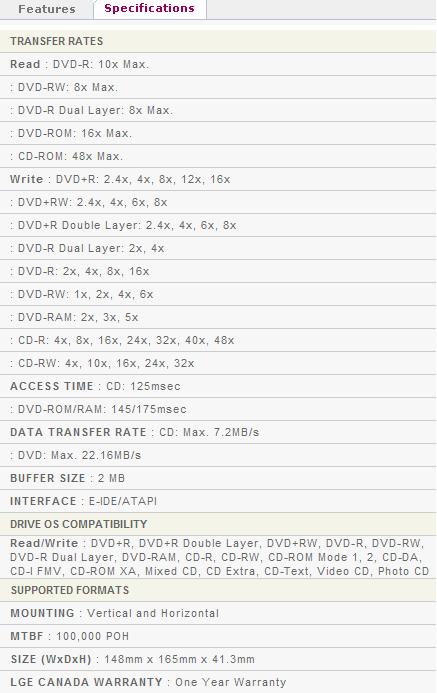
Now let's take a look at the specifications of the LG GSA-H10A, found at LG's website:
What's comes with the OEM drive?
On this page we will take a look at what the drive came with and take a look at the drive and its technology.
Below you will see what came with the OEM LG GSA-H10A:

- The internal drive itself
- Nero 6 OEM Suite
- LG DVD Writer Solution CD:
- PowerDVD
- PowerProducerGold
- Nero ExpressInCD
- Acrobat Reader
- Super Multi DVD Drive CD:
- Quick Setup Guide
- Warranty information
Now it's time to take a look at the drive itself:

Front
On the front bezel we see an eject button, an emergency eject hole and a LED (green - for read and write - we prefer a different LED color though for writing). The logos located on the loading tray include the Super Multi logo, a DVD Alliance DVD+R DL logo, the LG logo, a DVD Forum DVD-Multi Recorder logo, a CD-RW Ultra Speed logo.
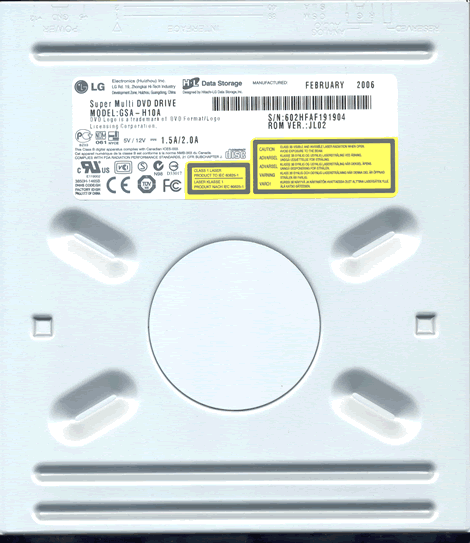
Top
Label
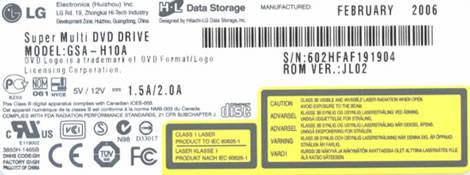
On top of the drive we found one sticker. In the bottom left corner we can see it was manufactured in China in February 2006.
Bottom
Back
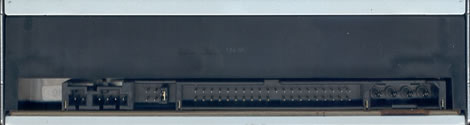
On the back of the drive starting from the left, we can see a reserved connector; analogue audio connector; pins and jumper to set the drive to cable select, slave or master; IDE connector and finally the power connector.
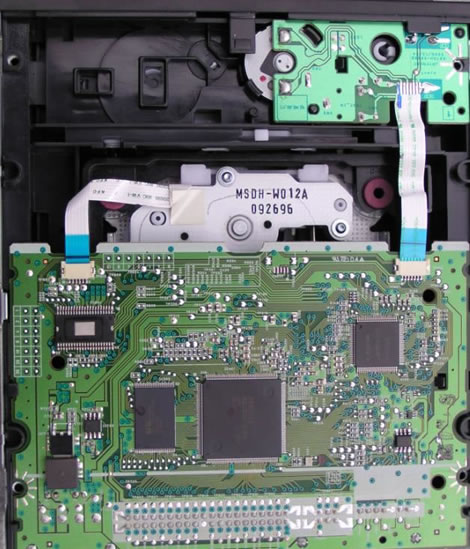
A look inside
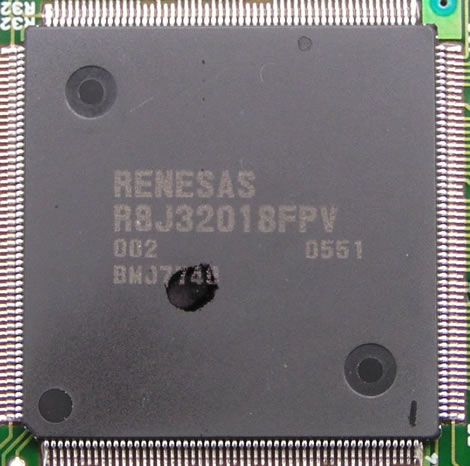
RENESAS Chipset
We installed the drive without any problems and here is a screenshot from Nero InfoTool:
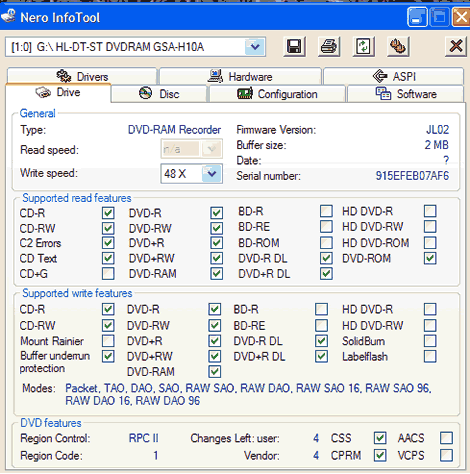
From the screenshot of Nero InfoTool we see lack of support for Mount Rainier or CD+G. The drive provided was shipped with firmware JL02 installed.
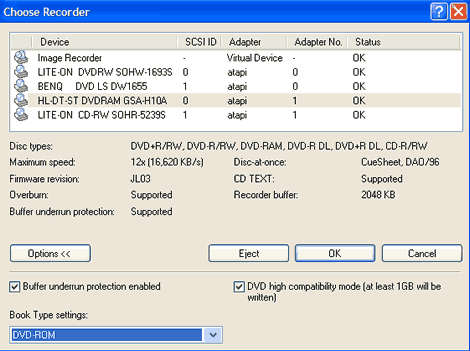
From the 'Choose Recorder' screen of Nero Burning ROM we also see that the drive supports Bitsetting to DVD-ROM:
Let's continue the review and see how the drive performs.
On the next page we will take a look at the test machine, the software, the drive features…………
Test machine:
For this review we will be using a computer with the following configuration:
Hardware:
- Motherboard: ASUS P4C800 Deluxe
- Processor: Intel Pentium 4 3.2GHz with Hyper Threading support
- RAM: 1 GB OCZ 4000 Dual Channel Gold
- GFX: ATI RADEON X850 XT PE. (AGP)
- Sound: SoundBlaster Audigy 2 ZS
- Hard disk: 1X 120GB Maxtor

System set-up:

The LG GSA-H10A was connected as Secondary Master and identified itself as HL-DT-ST DVDRAM GSA-H10A. DMA (Direct Memory Access) and autorun is enabled for all devices.
Software:
Windows XP Professional with Service Pack 2 is installed on the computer. We will be using the following software in this review:
- Nero Burning ROM version 6.6.1.8
- Nero CD/DVD Speed V4.11
- Nero Info Tool v4.03
- Slysoft CloneCD v5.9.5.6
- Exact Audio Copy v0.95 prebeta 5
- K-Probe v2.5.2
Firmware Update:
We checked LG's website and found a later Version (JL03) and proceeded to update the firmware.
Below we can see the firmware update process in action.


Our review PC was restarted after the firmware update process had completed.

We once again run InfoTool to check that the firmware had updated correctly (see the above screenshot).
Features and techniques:
Features of the Super Multi:
|
Super Multi is a multiformat burner which supports 7 types of write formats (DVD-RAM, DVD-R, DVD-RW, DVD+R, DVD+RW, CD-R and CD-RW). Because Super Multi supports both DVD-R/-RW and DVD+R/+RW as well as DVD-RAM, users can select the best type of media for every occasion. In addition, it removes users' concern about the future disc format unification. |

BookType (Bitsetting):
The LG GSA-H10A supports Bitsetting for DVD+R and DVD+R DL. The drive does not support Bitsetting for DVD+RW media. This feature can be controlled/changed with the Bitsetting option in Nero CD-DVD Speed or in Nero Burning Rom 6 as well as with various other applications. See below:

Now let's take a closer look at the write technology used by the LG GSA-H10A:
CD-Recordable:
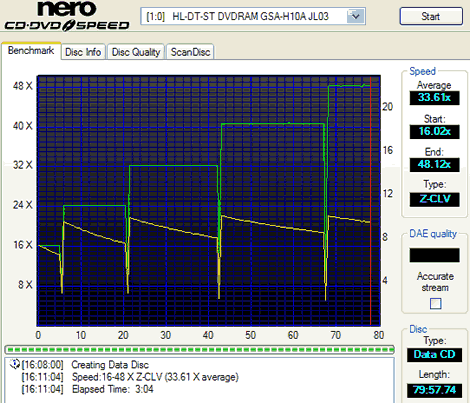
The LG GSA-H10A uses Z-CLV (Zone Constant Linear Velocity) to write at its maximum speed of 48X that gave this burn an average speed of 33.61x.
Two other drives are shown for comparison:

The Pioneer DVR-110D uses CAV (Constant Angular Velocity) to write at its maximum speed of 40X that gave this burn an average speed of 30.05x.

The Samsung TS-E552U uses P-CAV (Partial-Constant Angular Velocity) to write at its maximum speed of 40x that gave this burn an average speed of 34.39x.
The following table shows some comparative stats:
|
CD-R |
Supported |
Write |
Start |
End |
Average |
Write |
|
Lite-On |
48x |
CAV |
21.90x |
49.55x |
37.49x |
2m:38s |
|
LG |
40x |
Z-CLV |
15.98x |
40.41x |
31.70 |
3m:18s |
|
Asus |
32x |
Z-CLV |
16.03x |
32.66x |
24.92x |
3m:58s |
|
Samsung |
40x |
P-CAV |
21.12x |
39.59x |
34.39x |
2m:53s |
|
Philips |
40x |
CAV |
17.80x |
40.01x |
29.51x |
3m:24s |
|
NU |
40x |
CAV |
18.60x |
41.28x |
31.23x |
3m:09s |
|
NEC |
48x |
CAV |
21.44x |
48.17x |
36.43x |
3m:0s |
|
BenQ |
48x |
CAV |
18.31x |
47.99x |
35.20x |
2m:57s |
|
Pioneer |
40x |
CAV |
17.77x |
40.28x |
30.05x |
3m:19s |
|
LG |
48x |
Z-CLV |
16.01x |
48.22x |
33:77x |
3m:04s |
|
LG |
48x |
Z-CLV |
16.02x |
48.12x |
33:61x |
3m:04s |
What we see from the table that the LG GSA-H10A is one of the faster drives when it comes to writing CD-R.
CD-Rewritable:

The LG GSA-H10A uses Z-CLV (Zone Constant Linear Velocity) to write CD-RW media at its maximum speed of 32x that gave this burn an average speed of 28.89x.
Two other drives are shown for comparison:

The NU DHW-164 uses P-CAV (Partial-Constant Angular Velocity) to write CD-RW media at its maximum speed of 24X that gave this burn an average speed of 23.16x.

The LaCie d2 DVD±RW Double Layer uses CLV (Constant Linear Velocity) to write CD-RW media at its maximum speed of 16X that gave this burn an average speed of 16.00x.
The following table shows some comparative stats:
|
CD-RW |
Supported |
Write |
Start |
End |
Average |
Write |
|
Lite-On |
24x |
Z-CLV |
15.98x |
23.97x |
22.57x |
4m:19s |
|
LG |
24x |
Z-CLV |
15.99x |
23.99x |
23.31x |
3m:55s |
|
ASUS |
24x |
Z-CLV |
15.96x |
24.00x |
22.46x |
4m:07s |
|
Samsung |
32x |
P-CAV |
21.07x |
31.87x |
30.26x |
3m:05s |
|
Philips |
24x |
P-CAV |
17.77x |
24.01x |
23.15x |
3m:58s |
|
NU |
24x |
P-CAV |
15.39x |
23.93x |
23.16x |
3m:49s |
|
NEC |
32x |
Z-CLV |
20.11x |
32.03x |
29.75x |
3m:32s |
|
BenQ |
32x |
P-CAV |
21.26x |
31.96x |
30.33x |
3m:10s |
|
Pioneer |
32x |
Z-CLV |
15.87x |
32.01x |
24.88x |
3m:47s |
|
LG |
32x |
Z-CLV |
16.01x |
32.03x |
29.26x |
3m:14s |
|
LG |
32x |
Z-CLV |
16.02x |
32.04x |
28.89x |
3m:11s |
What we see from the table is that the LG GSA-H10A turns in a respectable time when it comes to writing CD-RW.
16X DVD+R/-R Writing speed:

The LG GSA-H10A uses P-CAV (Partial-Constant Angular Velocity) to write DVD+R at the maximum supported speed of 16x. This gives an average write speed of 12.73x and a writing time of 5 minutes 30 seconds.

The LG GSA- H10A uses P-CAV (Partial-Constant Angular Velocity) to write DVD-R at its maximum speed of 16x. This gives an average write speed of 12.71x and a writing time of 5 minutes and 20 seconds.
Below are some write graphs from some other drives for comparison:

The NEC 3540A uses CAV (Constant Angular Velocity) to write DVD+R at 16x. This gives an average writing speed of 11.81x and a writing time of 5 minutes and 58 seconds.

The Philips DVDR16LS uses CAV, (Constant Angular Velocity) to write DVD+R at 16x. The average speed is 11.33x and total writing time is 6 minutes and 8 seconds. The average speed is lower and the writing time is higher than it could have been due to the Walking OPC generation 2 using some time to constantly adjust the writing quality, we could see this as constant dips in the speed curve.

The LG GSA-5160D uses Z-CLV, (Zone-Constant Linear Velocity) to write DVD+R at 16x. The average speed is 11.60x and total writing time is 6 minutes and 12 seconds. Below, we made a comparison table:
|
16x |
Supported |
Write |
Start |
End |
Average |
Write |
|
Lite-On |
16x +R |
CAV |
6.66x |
16.02x |
11.97x |
6m:01s |
|
LG |
16x +R |
Z-CLV |
6.00x |
15.88x |
11.60x |
6m:12s |
|
ASUS |
16x +R |
Z-CLV |
6.01x |
16.04x |
10.29x |
6m:48s |
|
Samsung |
16x +R |
CAV |
6.75x |
12.09x |
11.11x |
6m:00s*1 |
|
Philips |
16x +R |
CAV |
5.80x |
12.18x |
11.33x |
6m:08s |
|
NU |
16x +R |
CAV |
6.66x |
7.97x |
9.32x |
6m:55s*2 |
|
NEC |
16x +R |
CAV |
6.70x |
16.06x |
11.81x |
5m:58s |
|
BenQ |
16x +R |
CAV |
5.70x |
15.95x |
11.53x |
5m:44s |
|
Pioneer |
16x +R |
CAV |
6.27x |
15.87x |
11.58x |
6m:09s |
|
LG |
16x +R |
P-CAV |
7.16x |
16.00x |
12.69x |
5m:37s |
|
LG |
16x +R |
P-CAV |
7.23x |
16.02x |
12.73x |
5m:30s |
*1 - Actual writing speed was max 14x due to USB-Bridge limitations.
*2 '? Actual writing speed was max 13x due to USB-Bridge limitations.
From the table above, we can see that the LG GSA-H10A is the fastest drives when writing DVD+R and DVD-R media at 16x.
8X DVD+R DL writing speed:
The LG GSA- H10A supports 8x writing speed on DVD+R DL media.

The LG GSA- H10A uses Z-CLV, (Zone-Constant Linear Velocity) to write DVD+R DL at 8x. The average speed is 6.22x and total writing time is 18:30 minutes.
Reviewers Note: We never achieved a full 8x burn on the tested media; this is the best we could achieve for an 8x write.
4X DVD-R DL writing speed:
The LG GSA- H10A supports 4x writing speed on DVD-R DL media.

The LG GSA-H10A uses CLV, (Constant Linear Velocity) to write DVD-R DL at 4x. The average speed is 4.00x and total writing time is 27:30 minutes.
8X DVD+RW writing speed:

The LG GSA-H10A uses CLV, (Constant Linear Velocity) to write DVD+RW at 8x. The average speed is 7.89x and total writing time is 8:01 minutes.
6X DVD-RW writing speed:

The LG GSA-H10A uses CLV, (Constant Linear Velocity) to write DVD-RW at 6x. The average speed is 6.02x and total writing time is 10:01 minutes.
Book type (Bitsetting):
The LG GSA-H10A supports Bitsetting, and can write DVD+R DL and DVD+R media with DVD-ROM book type.
Here is how you can see if your discs were really written with DVD-ROM book type:
Start Nero CD-DVD Speed and click the Disc info button and you should get something like this:

DVD+R DL with book type DVD-ROM

DVD+R with book type DVD-ROM
Another quick test is to start Nero CD-DVD Speed and look at the disc information:

This should say DVD-ROM.
Included software:
Now it's time to look at the included software and to comment if needed. Notice that we may not use the included software in our performance testing part of the review.
LG DVD Writer Solution:


Cyberlink PowerDVD:

Cyberlink PowerProducer Gold:

Nero Express 6:

In CD:

Now that we have finished examining the drive and its writing strategies, it's time to head on to next page, where we do the reading performance tests…
For these tests we will use Nero CD-DVD Speed to read various types of CD and DVD media. As already mentioned in the introduction, this drive supports:
- DVD-ROM : 16x
- CD-ROM : 48x
Pressed discs:
For this test we used a pressed CD-ROM disc containing a Nero Ultra Edition OEM install CD that is close to 77 minutes long. Below you will see the produced result:

The LG GSA-H10A reached 47.85x on this pressed CD. Let’s compare the result in the table below:
|
Pressed |
Average |
Start |
End |
Seek |
Seek |
Seek |
|
Memorex |
34.94x |
20.05x |
46.33x |
122ms |
130ms |
221ms |
|
AOpen |
37.34x |
21.29x |
49.42x |
105ms |
118ms |
196ms |
|
LG |
30.73x |
16.88x |
40.47x |
108ms |
105ms |
128ms |
|
Lite-On |
36.44x |
21.36x |
48.13x |
118ms |
133ms |
207ms |
|
Pioneer |
30.77x |
18.18x |
24.51x |
96ms |
110ms |
182ms |
|
BenQ |
30.74x |
15.39x |
38.87x |
99ms |
112ms |
161ms |
|
NEC |
34.82x |
19.88x |
46.09x |
122ms |
132ms |
210ms |
|
BenQ |
36.58x |
20.82x |
47.67x |
107ms |
123ms |
175ms |
|
Pioneer |
31.61x |
18.09 |
41.99 |
99ms |
111ms |
189ms |
|
LG |
34.79x |
20.01x |
46.21x |
103ms |
120ms |
178ms |
|
LG |
36.44x |
21.00x |
47.85x |
117ms |
130ms |
277ms |
The LG GSA-H10A performed above average while reading a pressed CD-ROM.
CD-Recordable Discs:
For this test we made a copy of the original Nero Ultra Edition OEM install CD. The disc we used was an Ritek 52X certified CD-R disc manufactured by Ridata.

|
CD-R |
Average |
Start |
End |
Seek |
Seek |
Seek |
|
Lite-On |
36.63x |
21.46x |
48.29x |
125ms |
157ms |
234ms |
|
LG |
30.53x |
16.83x |
40.27x |
116ms |
118ms |
128ms |
|
ASUS |
30.96x |
18.26x |
40.81x |
125ms |
143ms |
282ms |
|
Samsung |
36.65x |
21.28x |
48.33x |
92ms |
95ms |
163ms |
|
Philips |
30.69x |
17.68x |
40.44x |
126ms |
137ms |
175ms |
|
NU |
32.20x |
18.48x |
42.65 |
N/A* |
N/A* |
N/A* |
|
NEC |
35.68x |
20.76x |
47.06x |
128ms |
130ms |
213ms |
|
BenQ |
36.57x |
20.92x |
48.09x |
203ms |
233ms |
239ms |
|
Pioneer |
31.18x |
18.37x |
40.99 |
111ms |
121ms |
204ms |
|
LG |
35.63x |
20.79x |
47.16x |
110ms |
130ms |
190ms |
|
LG |
36.58x |
20.83x |
48.17x |
114ms |
136ms |
273ms |
Again the LG GSA-H10A performed above average on the CD-R read test.
* Some drives including the NU HDW-164 will simply execute the seek command without actually moving the pickup.
CD-Rewritable discs:
Again, we made a copy of the original Nero Ultra Edition OEM install CD. The disc we used was a Maxell 4x-12x certified CD-RW disc manufactured by Mitsubishi Chemicals Corporation.

As we can see the LG GSA-H10A reads at 40x when reading a CD-RW. Now let’s compare it to some other drives below.
|
CD-RW |
Average |
Start |
End |
Seek |
Seek |
Seek |
|
Lite-On |
24.25x |
14.04x |
32.15x |
129ms |
167ms |
233ms |
|
LG |
30.54x |
16.59x |
40.43x |
119ms |
116ms |
129ms |
|
ASUS |
25.32x |
14.63x |
33.52x |
129ms |
149ms |
288ms |
|
Samsung |
23.99x |
14.02x |
31.63x |
86ms |
95ms |
162ms |
|
Philips |
30.70x |
17.71x |
40.55x |
131ms |
149ms |
179ms |
|
NU |
32.20x |
18.17x |
42.53x |
N/A* |
N/A* |
N/A* |
|
NEC |
30.76x |
18.02x |
40.08x |
132ms |
128ms |
213ms |
|
BenQ |
31.36x |
17.47x |
41.46x |
105ms |
116ms |
250ms |
|
Pioneer |
24.96x |
14.60x |
33.01x |
105ms |
119ms |
195ms |
|
LG |
30.53x |
17.86x |
40.41x |
102ms |
115ms |
169ms |
|
LG |
31.27x |
17.78x |
41.16x |
105ms |
128ms |
278ms |
The LG GSA-H10A performance is about average when reading a CD-RW disc.
* Some drives including the NU HDW-164 will simply execute the seek command without actually moving the pickup.
Audio – Digital Audio Extraction:
We used Nero CD-DVD Speed to measure the transfer rate. The audio disc we used is a bit smaller than the disc used for the other tests, to be more precise, it’s about 74 minutes long.

The LG GSA-H10A is locked at 40x when reading CD-DA. Let’s compare the result with some other drives:
|
Audio |
Average |
Start |
End |
Seek |
Seek |
Seek |
|
Lite-On |
36.92x |
21.36x |
48.89x |
126ms |
157ms |
234ms |
|
LG |
31.27x |
16.81x |
41.20x |
118ms |
124ms |
115ms |
|
ASUS |
31.10x |
19.91x |
41.38x |
125ms |
146ms |
286ms |
|
Samsung |
37.53x |
19.73x |
49.76x |
85ms |
97ms |
171ms |
|
Philips |
31.44x |
17.75x |
41.69x |
107ms |
124ms |
176ms |
|
NU |
32.98x |
18.32x |
43.70x |
N/A* |
N/A* |
N/A* |
|
NEC |
31.43x |
18.00x |
40.16x |
119ms |
135ms |
217ms |
|
BenQ |
37.15x |
20.94x |
49.23x |
171ms |
200ms |
184ms |
|
Pioneer |
31.52x |
17.95x |
42.38x |
108ms |
124ms |
201ms |
|
LG |
31.26x |
17.78x |
41.39x |
102ms |
123ms |
270ms |
|
LG |
30.60x |
17.74x |
40.42x |
107ms |
125ms |
179ms |
The LG GSA-H10A performance is a little below average on the Audio-CD.
* Some drives including the NU HDW-164 will simply execute the seek command without actually moving the pickup.
As a last test we used Exact Audio Copy (EAC) to extract the audio to our hard drive. According to EAC the LG drive does not support Caching, which is considered a plus while ripping digital audio.

Below is the result produced by EAC:

Burst mode

Secure mode
The drive performed OK when in burst mode but was very slow when in secure mode.
Advanced audio – DAE quality test:
Before we move on to testing DVD read speeds, we will make a last digital audio test. This time we used the ‘Advanced DAE Quality Test’ feature in CD-DVD Speed. For this test we used a CD-R DA media from Memorex.


The digital audio extracting quality is excellent and it is reported to support everything except reading data from the Leadout.
DVD reading performance:
Again, we will use Nero CD-DVD Speed to measure the reading performance, this time for various types of DVD discs.
DVD – DVD-Video:
For our DVD reading performance tests we are going to start with a single layer and Double Layered DVD video discs. While only 1X speed is required to watch DVD movies it is useful to be able to read the discs at higher speeds if you’re going to extract (rip) the content of the disc to your hard drive.

DVD-Video Single Layer

DVD-Video Double Layer
The LG GSA-H10A is locked at 4.8x when reading DVD-Video Single Layer and Double/Dual Layer pressed discs.
|
DVD |
Average |
Start |
End |
Average |
Start |
End |
|
Lite-On |
11.96x |
6.77x |
15.94x |
6.15x |
3.46x |
8.19x |
|
LG |
7.60x |
4.12x |
10.13x |
6.14x |
3.38x |
8.16x |
|
ASUS |
3.92x |
2.17x |
5.25x |
3.94x |
2.19x |
5.25x |
|
Samsung |
11.50x |
6.78x |
13.11x |
6.41x |
3.57x |
8.51x |
|
Philips |
11.97x |
6.61x |
15.97x |
6.02x |
3.35x |
8.01x |
|
NU |
6.40x |
3.54x |
8.53x |
5.87x |
3.26x |
7.81x |
|
NEC |
5.94x |
3.32x |
7.93x |
5.45x |
3.03x |
7.24x |
|
BenQ |
11.86x |
6.59x |
15.79x |
9.01x |
5.03x |
12.00x |
|
Pioneer |
11.98x |
6.42x |
15.98x |
9.34x |
5.26x |
12.41x |
|
LG |
7.64x |
4.28x |
10.18x |
6.17x |
3.45x |
8.20x |
|
LG |
3.68x |
2.05x |
4.92x |
3.73x |
2.06x |
4.95x |
The LG GSA-H10A performance was well below average on the DVD-Video Single Layer Double/Dual Layer tests.
DVD – DVD+R(W):
For this test we used a Memorex 16X DVD+R and a Maxell 4X DVD+RW with 4.38Gb of data. Below are the results:

DVD+R

DVD+RW
|
DVD+R |
Average |
Start |
End |
Average |
Start |
End |
|
Lite-On |
6.19x |
3.42x |
8.28x |
6.23x |
3.46x |
8.33x |
|
LG |
7.66x |
4.11x |
10.23x |
6.15x |
3.32x |
8.21x |
|
ASUS |
9.35x |
5.19x |
12.52x |
6.26x |
3.48x |
8.36x |
|
Samsung |
6.23x |
3.44x |
8.32x |
6.22x |
3.43x |
8.31x |
|
Philips |
6.24x |
3.42x |
8.34x |
6.24x |
3.42x |
8.34x |
|
NU |
6.47x |
3.53x |
8.63x |
6.46x |
3.52x |
8.65x |
|
NEC |
11.99x |
6.56x |
16.05x |
9.87x |
5.45x |
13.18x |
|
BenQ |
12.10x |
6.59x |
16.22x |
9.37x |
5.12x |
12.56x |
|
Pioneer |
9.35x |
5.16x |
12.46x |
6.24x |
3.44x |
8.33x |
|
LG |
7.70x |
4.23x |
10.30x |
6.17x |
3.42x |
8.25x |
|
LG |
7.72x |
4.27x |
10.32x |
6.18x |
3.41x |
8.28x |
The LG GSA-H10A is read locked at 10x on DVD+R and 8x on DVD+RW.
Now let’s see how it will perform on DVD-R/RW.
DVD – DVD-R/RW:
For this test we used a Memorex 16X DVD-R disc and a Maxell 2X DVD-RW disc filled with 4.38Gb of data. Our test results are found below:

DVD-R

DVD-RW
There are only minor differences on DVD-R/RW when compared to reading the DVD+R/RW discs.
|
DVD-R |
Average |
Start |
End |
Average |
Start |
End |
|
Lite-On |
6.05x |
3.34x |
8.09x |
6.05x |
3.35x |
8.09x |
|
LG |
7.67x |
4.12x |
10.25x |
6.14x |
3.31x |
8.21x |
|
ASUS |
9.37x |
5.22x |
12.52x |
6.25x |
3.46x |
8.35x |
|
Samsung |
6.19x |
3.41x |
8.27x |
6.22x |
3.43x |
8.32x |
|
Philips |
6.23x |
3.40x |
8.33x |
6.24x |
3.41x |
8.34x |
|
NU |
6.46x |
3.49x |
8.66x |
6.46x |
3.49x |
8.64x |
|
NEC |
12.01x |
6.58x |
16.06x |
9.85x |
5.42x |
13.16x |
|
BenQ |
12.09x |
6.59x |
16.17x |
9.34x |
5.11x |
12.50x |
|
Pioneer |
9.36x |
5.18x |
12.51x |
6.24x |
3.46x |
8.34x |
|
LG |
7.71x |
4.25x |
10.31x |
6.16x |
3.34x |
8.23x |
|
LG |
7.73x |
4.27x |
10.33x |
6.17x |
3.42x |
8.26x |
Once again the LG GSA-H10A is read locked at 10x on DVD-R and 8x on DVD-RW.
DVD-RAM
For this test we used a Maxell 5x DVD-RAM disc and below we see the result:

The LG GSA-H10A reads DVD-RAM media at 5x and it reads the test disc without problems.
Overall thoughts:
The LG GSA-H10A is a very good reader. It is read locked to slower speeds on some of the media types, but during our read tests it proved itself as a very reliable reader.
But now it’s time to head on to a more interesting part: Writing CD-R and CD-RW discs…
The specifications of the LG GSA-H10A state that the drive is able to write CD-R discs at 48x and CD-RW at 32x. Let’s find out how the drive really performs in speed and quality.
Writing Data CD-R discs:
For our data writing tests, we simply set up a new compilation of 702Mb using Nero Burning ROM software. The writing method used is DAO (Disc At Once) and the disc is set up as a non-multisession disc with ‘finalize disc’ enabled. The screenshot below shows how long it takes to write a disc at the highest speed. (48x):

The drive took 3 minutes and 05 seconds to write the disc at 48x. Let’s see how this compares to some other drives: Pioneer DVR-110D used 3 minutes and 34 seconds at 40x
- NU DHW-164 used 3 minutes and 12 seconds at 40x
- Philips DVDR16LS used 3 minutes and 26 seconds at 40x
- Samsung TS-E552U used 2 minutes and 52 seconds at 40x
- LG GSA-4163B used 3 minutes and 15 seconds at 40x
- Philips DVDR1640P used 3 minutes and 17 seconds at 40x
- NU DDW-082 used 3 minutes and 2 seconds at 40x
- Samsung TS-H552B used exactly 3 minutes at 40x
- Plextor PX-708A used 2 minutes and 58 seconds at 40x
Write Quality:
We will test CD-R discs from seven different CD-R manufacturers. To measure the write speed, we used the ‘Create Data Disc’ function in Nero CD-DVD Speed. The discs were written at the maximum speed that the drive supports. For the quality test, we used KProbe 2 which is a tool developed by a Lite-On employee. It runs under Windows and works with drives made by Lite-On. Also note that different drives and different reading speeds may affect the results obtained when scanning the discs. We used a Lite-On LTR-5239S drive with firmware 2S0B and scanned the discs at 48x speed.
A written CD-R disc will always have some C1 errors. C1 errors are easily corrected by the drive’s error correction capabilities. The next level of errors is C2, while C2 errors could also be corrected by most drive’s error correction capabilities, they are not wanted on a good quality disc. A good disc should not contain any C2 errors and preferably have an average C1 error amount of below 2.0 for the best discs, or at least below 10.0 averages for good quality discs. After C2 errors, there are only un-correctable errors that will make a disc unusable.
Below are the obtained results:


|
Brand: |
RiDATA |
|
Manufacturer: |
RiTEK Corporation |
|
Code: |
97m15s17f |
|
Disc Type: |
CD-R (A-) |
|
Recording Layer: |
Dye Type 7: Short Strategy (Phthlocyanine) |
|
Capacity: |
79:59.29 (702.80 MB) |
|
Certified Speed: |
52x |
|
Write Speed: |
48x |
|
Write Time: |
3m:06s |
|
C1 Average/Sec: |
0.63 |
|
C2 Average/Sec: |
0.0 |
The GSA-H10A handles this RiTEK CD-R with an excellent result.


|
Brand: |
FujiFilm |
|
Manufacturer: |
Taiyo Yuden Company Limited |
|
Code: |
97m24s01f |
|
Disc Type: |
CD-R (A+) |
|
Recording Layer: |
Dye Type 1: Long Strategy (Cyanine, AZO) |
|
Capacity: |
79:57.72 |
|
Certified Speed: |
48x |
|
Write Speed: |
48x |
|
Write Time: |
3m:05s |
|
C1 Average/Sec: |
0.12 |
|
C2 Average/Sec: |
0.0 |
An excellent burn with this Taiyo Yuden media. Highly recommended


|
Brand: |
SONY |
|
Manufacturer: |
SONY Corporation |
|
Code: |
97m24s16f |
|
Disc Type: |
CD-R (B-) |
|
Recording Layer: |
Dye Type 6: Short Strategy (Phthalocyanine) |
|
Capacity: |
79:59.74 (702.80 MB) |
|
Certified Speed: |
1x-48x |
|
Write Speed: |
48x |
|
Write Time: |
3m:04s |
|
C1 Average/Sec: |
1.03 |
|
C2 Average/Sec: |
0.0 |
This is a very good result.


|
Brand: |
Memorex – Thanks to Memorex USA for sending us this media. |
|
Manufacturer: |
Prodisc Technology Inc. |
|
Code: |
97m32s19f |
|
Disc Type: |
CD-R (A+) |
|
Recording Layer: |
Dye Type 6: Short Strategy (Phthalocyanine) |
|
Capacity: |
79:59.71 (702.80 MB) |
|
Certified Speed: |
52x |
|
Write Speed: |
48x |
|
Write Time: |
3m:04s |
|
C1 Average/Sec: |
2.11 |
|
C2 Average/Sec: |
0.0 |
An OK result! Several of these discs were tried and all resulted with some C2 errors.


|
Brand: |
Verbatim |
|
Manufacturer: |
Mitsubishi Chemicals Corporation |
|
Code: |
97m34s23f |
|
Disc Type: |
CD-R (A+) |
|
Recording Layer: |
Dye Type 3: Long Strategy (Cyanine, AZO) |
|
Capacity: |
79:59.73 (702.80 MB) |
|
Certified Speed: |
52x |
|
Write Speed: |
48x |
|
Write Time: |
3m:6s |
|
C1 Average/Sec: |
0.28 |
|
C2 Average/Sec: |
0.0 |
Great result from this Verbatim media. Highly recommended.


|
Brand: |
Maxell- Thanks to Maxell USA for sending us this media. |
|
Manufacturer: |
RiTEK Corporation |
|
Code: |
97m31s07f |
|
Disc Type: |
CD-R (A-) |
|
Recording Layer: |
Dye Type 7: Short Strategy (Phthalocyanine) |
|
Capacity: |
74:45.02 (702.80 MB) |
|
Certified Speed: |
48x |
|
Write Speed: |
48x |
|
Write Time: |
2m:59s |
|
C1 Average/Sec: |
0.12 |
|
C2 Average/Sec: |
0.0 |
Another excellent RiTEK CD-R result.
Writing Quality with Re-Writable discs:
Due to requests from our readers, we will add a few write quality tests with re-writable media. Settings and testing procedures are the same as we used earlier in this review, so you may want to go back and read them if you are unsure. All discs used for these tests have been written to before, but none have been written to more than 5 times and were ‘full formatted’ before writing.
CD-ReWritable media:


|
Brand: |
Verbatim – Thanks to Verbatim US for sending us this media. |
|
Manufacturer: |
Mitsubishi Chemicals Corporation |
|
Code: |
97m34s25f |
|
Disc Type: |
Ultra Speed CD-RW 32x |
|
Recording Layer: |
Phase Change |
|
Capacity: |
74:43:04 (650MB) |
|
Certified Speed: |
32x |
|
Write Speed: |
32x (Z-CLV) |
|
Write Time: |
3m:10s |
|
C1 Average/Sec: |
0.88. |
|
C2 Average/Sec: |
0.0 |
Another excellent result with this Verbatim 32x CD-RW.


|
Brand: |
Maxell |
|
Manufacturer: |
Mitsubishi Chemicals Corporation |
|
Code: |
97m34s23f |
|
Disc Type: |
High Speed CD-RW 4-12x |
|
Recording Layer: |
Phase Change |
|
Capacity: |
79:59:74 |
|
Certified Speed: |
4x-12x |
|
Write Speed: |
10x |
|
Write Time: |
8m:25s |
|
C1 Average/Sec: |
00.9 |
|
C2 Average/Sec: |
0.0 |
This 4x-12x rated media was supported by the drive at only 10x. An excellent CD-RW burn.
Summary:
The CD-R writing quality ranges from very good to excellent. The CD-RW writing quality is very good to excellent as well.
So let’s head on to the next page and read about DVD-Writing performance…
The specifications of the drive tell us that it should write DVD±R at 16x and DVD+RW/-RW at 8x/6x. In this part, we will measure the write time for various types of DVD+R/RW and DVD-R/RW discs. We will also focus on write quality and media compatibility.
In this test we will measure the time for writing to DVD±R discs. We used Nero Burning Rom to burn an ISO compilation containing 4482Mb of data. We used the Disc-At-Once write method.

DVD+R

DVD-R
Look below for the results.
|
Write DVD data discs |
DVD+R |
DVD-R |
|
Lite-On |
6m:03s |
7m:28a |
|
LG |
6m:22s |
8m:16s |
|
ASUS |
6m:33s |
6m:44s |
|
Samsung |
6m:40s |
N/A |
|
Philips |
6m:08s |
8x:21s |
|
NU |
6m:51s |
7m:23s |
|
NEC |
6m:17s |
6m:05s |
|
BenQ |
6m:01s |
6m:11s |
|
Pioneer |
6m:25s |
6m:11s |
|
LG |
5m:40s |
5m:30s |
|
LG |
5m:36s |
5m:34s |
The results are impressive as the LG GSA-H10A is one of the fastest drives on the above list. Let’s see how the writing quality is.
Write quality:
You should first notice that this is not a scientific and professional way to test the discs. But according to our testing done in recent months, we would conclude that there is a clear link between the quality reported when scanning the disc and the playability of the disc in different devices. Also notice that different drives report different amounts of errors. K-Probe was designed to work with Lite-On DVD-Writers, so we recommend using a DVD-Writer from Lite-On. In this test we use a Lite-On SOHW-1653S DVD-Writer, as already said; remember that scans done with a Lite-On DVD-ROM or Lite-On combo drive can’t be compared with the results obtained with a Lite-On DVD-Writer. Also remember that different PI/PO ECC sum settings along with different reading speeds in K-Probe will affect the result, we use these settings; PI (Parity Inner) set to summarize 8 ECC blocks, PIF (Parity Inner Failures) set to summarize 1 ECC block, reading speed: 4X CLV (Constant Linear Velocity). Setting the PI sum to 8 and the PIF sum to 1 will give a result that we may compare to the standards for DVD+R/RW and DVD-R/RW.
But what is a good scan? That is a discussion that we don’t think will end soon, as different drives report different amount of errors, some players are more picky about media than others, and so on. But as a comparison we present you with a scan from two pressed DVD discs:

This scan shows the results from a pressed DVD-Video disc (GoldenEye).

This scan shows the result from a pressed DVD-Video disk (The Green Mile). Notice the error jump when shifting to the second layer (the error level actually drops from the end of the first layer to the beginning of the second layer).
If you read below, you will see that both the pressed DVD-discs are well within the standards.
Download the ECMA 267 Standard for DVD-ROM, the ECMA 337 Standard for DVD+R/RW and the ECMA 338 Standard for DVD-R/RW at http://www.ecma-international.org if you want to look at the standards for yourself. Here is some data from the ECMA standards (same for DVD-ROM, DVD-R/RW and DVD+R/RW):
Random errors:
A row of an ECC Block that has at least 1 byte in error constitutes a PI error. In any 8
consecutive ECC Blocks the total number of PI errors before correction shall not exceed 280.
Here we see that a PI error is defined as a row in an ECC block having 1 byte or more containing errors and that the sum of PI errors in 8 ECC blocks after each other should not exceed 280 PI errors.
But what is a row and what is an ECC block? Again we refer to the ECMA standards. We do not copy and paste everything, but if you’re interested, look in the ECMA standards. A row is 182 bytes long where the last 10 bytes contain PI (Parity Inner) information. An ECC block is 208 rows long where the last 16 rows contain the PO (Parity Outer) information. This gives us a maximum possible PI error amount of 208 errors per block and for 8 blocks after each other this sum is of course 8 times higher, giving a maximum possible amount of 1664 PI-8 errors. In practical use, a disc with 1664 PI-8 errors is unreadable.
According to our tests the specified max PI-8 sum of 280 for good discs seems to be a good guideline, as some readers have problems reading discs when the PI-8 errors is over 300 and most players starts to have problems when the PI-8 error level reaches 600 or more.
But what are the PIF errors that K-Probe reports? They are Parity Inner Failures, meaning errors left after PI correction. Only the ECMA 337 standard describes the Parity Inner Failures. So how is a Parity Inner Failure defined? Here is what the ECMA 337 states:
“If a row of an ECC Block as defined in 13.3 contains more than 5 erroneous bytes, the row is said to be “PI-uncorrectable”.”
In theory, an ECC block may in the worst case have 208 PIF since every ECC block is 208 rows long. But the ECMA 337 standard goes further and specifies the max amount of accepted PI Failures (uncorrectable errors) allowed on a good disc:
“In any ECC Block the number of PI-uncorrectable rows should not exceed 4.”
This means that when the PIF sum is set to 1, the maximum error value should not exceed 4. The theoretical maximum value for PIF is 208 errors.
But what makes a disc unreadable? A POF (Parity Outer Failure) error will make the disc unreadable, but K-Probe does not display the POF’s.
Notice that there are other aspects such as disc reflectivity, jitter, tracking errors and so on that also will affect the readability of a DVD disc – but for this we do not have measuring equipment available.
Also, another note is that we have scanned the discs at 4X CLV speed, by lowering the speed to 2X(DVD-R/RW)/2.4X(DVD+R/RW) or 1X the amount of reported errors may drop on some discs. We scanned at 4X CLV due to lower speeds taking too much time.
To see if there is a connection between the reported amount of errors and readability of the discs we used the BenQ LS DW 1655 DVD-Writer to read back the discs at 16x. The reason why we have changed the reader is that some companies disliked that we used a modified firmware to obtain 16x reading speed. So to please them, we are now using a drive that reads DVD+R/-R media at 16x as default. A small speed reduction near the end is still accepted on good discs, but serious reading problems or reading failures is a bad sign.
Easier explanation on how to read the test results:
Maybe this became too technical, and you are wondering what to look for in KProbe reports?
Use this as a guideline for good discs:
· PI (Parity Inner): No larger areas on the disc should exceed 280 PI-8 errors, do not worry too much about high single spikes that exceed 280.
· PIF (Parity Inner Failures): No larger areas on the disc should exceed 4 PIF-1 errors, do not worry too much about high single spikes that exceed 4.
And as always, lower is better 
And look at the reading curve, if it looks clean with no dips it should be good, a small slowdown near the end is accepted.
DVD+R media compatibility and write quality:
In these tests we will be using a Lite-On SOHW-1693S drive with firmware KS0B along with KProbe to measure the disc quality. We used the the BenQ DW1655 with firmware BCGB for the DVD+R /-R read-back tests.


|
Brand: |
Verbatim – Thanks to Verbatim USA for sending us this media. |
|
Manufacturer: |
Mitsubishi Chemical Corporation |
|
Code: |
MCC 004 |
|
Disc Type: |
DVD+R |
|
Capacity: |
4483MB |
|
Certified Speed: |
16x |
|
Write Speed: |
16x |
|
Write Time: |
5m:29s |
|
PI-8 errors Average/Sec: |
0.93 |
|
PI-1 failures (PIF) Avg/Sec: |
0.01 |
What a great result! This is some super fine media for this drive. Highly recommended.


|
Brand: |
Ridata |
|
Manufacturer: |
Ritek |
|
Code: |
RitekR04 |
|
Disc Type: |
DVD+R |
|
Capacity: |
4483MB |
|
Certified Speed: |
16x |
|
Write Speed: |
12x. Did not write at 16x |
|
Write Time: |
6m:11s |
|
PI-8 errors Average/Sec: |
17.92 |
|
PI-1 failures (PIF) Avg/Sec: |
0.08 |
This burn shows some high PIE spikes but the transfer curve shows no problem on read back.


|
Brand: |
Memorex – Thanks to Memorex USA for sending us this media. |
|
Manufacturer: |
CMC Magnetics Corporation |
|
Code: |
CMC MAG M01 |
|
Disc Type: |
DVD+R |
|
Capacity: |
4483MB |
|
Certified Speed: |
16x |
|
Write Speed: |
16x |
|
Write Time: |
5m:30s |
|
PI-8 errors Average/Sec: |
2.00 |
|
PI-1 failures (PIF) Avg/Sec: |
0.07 |
This is an excellent burn. CMC MAG M01 is highly recommended for this drive. The transfer curve is perfect.


|
Brand: |
Fujifilm. |
|
Manufacturer: |
Philips Electronics |
|
Code: |
PhilipsC16 |
|
Disc Type: |
DVD+R |
|
Capacity: |
4483MB |
|
Certified Speed: |
16x |
|
Write Speed: |
16x |
|
Write Time: |
5m:38s |
|
PI-8 errors Average/Sec: |
2.91 |
|
PI-1 failures (PIF) Avg/Sec: |
0.08 |
A slight jump in PIE but the read back shows no problems.


|
Brand: |
Memorex – Thanks to Memorex for sending us this media. |
|
Manufacturer: |
Ricoh Company Limited |
|
Code: |
RICOHJPN R03 |
|
Disc Type: |
DVD+R |
|
Capacity: |
4483MB |
|
Certified Speed: |
16x |
|
Write Speed: |
12x. Did not write at 16x. |
|
Write Time: |
5m:53s |
|
PI-8 errors Average/Sec: |
1.90 |
|
PI-1 failures (PIF) Avg/Sec: |
0.03 |
This RICOHJPN R03 shows an excellent result but did not write at 16x. The transfer curve is again perfect.


|
Brand: |
FujiFilm |
|
Manufacturer: |
Taiyo Yuden Company Limited |
|
Code: |
YUDEN 000 T02 |
|
Disc Type: |
DVD+R |
|
Capacity: |
4483MB |
|
Certified Speed: |
8x |
|
Write Speed: |
12x |
|
Write Time: |
6m:36s |
|
PI-8 errors Average/Sec: |
0.79 |
|
PI-1 failures (PIF) Avg/Sec: |
0.01 |
An excellent burn and a perfect read back curve. Highly Recommended.


|
Brand: |
Verbatim |
|
Manufacturer: |
Mitsubishi Chemical Corporation |
|
Code: |
MCC003 |
|
Disc Type: |
DVD+R |
|
Capacity: |
4483MB |
|
Certified Speed: |
8x |
|
Write Speed: |
8x |
|
Write Time: |
8m:06s |
|
PI-8 errors Average/Sec: |
1.34 |
|
PI-1 failures (PIF) Avg/Sec: |
0.05 |
An excellent burn with MCC003. Recommended.


|
Brand: |
Maxell- Thanks to Maxell USA for sending us this media. |
|
Manufacturer: |
Maxell |
|
Code: |
Maxell002 |
|
Disc Type: |
DVD+R |
|
Capacity: |
4483MB |
|
Certified Speed: |
8x |
|
Write Speed: |
8x. |
|
Write Time: |
8m:17s |
|
PI-8 errors Average/Sec: |
2.92 |
|
PI-1 failures (PIF) Avg/Sec: |
0.09 |
A very good burn for this Media.
DVD+ReWritable media:


|
Brand: |
Memorex – Thanks to Memorex USA for sending us this media. |
|
Manufacturer: |
Ritek Corporation |
|
Code: |
Ritek008 |
|
Disc Type: |
DVD+RW |
|
Capacity: |
4483MB |
|
Certified Speed: |
8x |
|
Write Speed: |
8x |
|
Write Time: |
8m:01s |
|
PI-8 errors Average/Sec: |
7.28 |
|
PI-1 failures (PIF) Avg/Sec: |
0.09 |
This 8x DVD+RW produces a very good result with a perfect read back.


|
Brand: |
Memorex |
|
Manufacturer: |
Phillips Electronics |
|
Code: |
Philips041 |
|
Disc Type: |
DVD+RW |
|
Capacity: |
4483MB |
|
Certified Speed: |
4x |
|
Write Speed: |
4x |
|
Write Time: |
14m:18s |
|
PI-8 errors Average/Sec: |
15.06 |
|
PI-1 failures (PIF) Avg/Sec: |
4.19 |
The LG GSA-H10A wrote this disc out of specifications but the read back shows no problems with this DVD+RW media.
Note: Because this disc was out of spec we used the higher read speed of the BenQ 1655 and there were no problems with the read back.


|
Brand: |
Maxell – Thanks to Maxell USA for sending us this media. |
|
Manufacturer: |
Ricoh Company Limited |
|
Code: |
RICOHJPN W11 (001) |
|
Disc Type: |
DVD+RW |
|
Capacity: |
4483MB |
|
Certified Speed: |
4x |
|
Write Speed: |
4x |
|
Write Time: |
15m:00s |
|
PI-8 errors Average/Sec: |
3.34 |
|
PI-1 failures (PIF) Avg/Sec: |
0.19 |
An excellent DVD+RW burn resulting in a perfect transfer curve.
To sum it up: Overall, on the selected review media the write quality is good to excellent on DVD+R/RW media
Let’s find out what this drive can do with DVD-R/RW media.
On the next page you will find the DVD-R/RW writing results...
In these tests, again we will be using the Lite-On SOHW-1693S drive with firmware KS0B along with KProbe to measure the disc quality. We will also again be using the LG GSA-H10A with firmware JL03 along with CD-DVD Speed for the DVD-RW and the BenQ DW1655 with firmware BCGB for the DVD-R read-back tests.


|
Brand: |
Verbatim – Thanks to Verbatim USA for sending us this media. |
|
Manufacturer: |
Mitsubishi Chemical Corporation |
|
Code: |
MCC 03RG20 |
|
Disc Type: |
DVD-R |
|
Capacity: |
4483MB |
|
Certified Speed: |
16x |
|
Write Speed: |
16x |
|
Write Time: |
5m:30s |
|
PI-8 errors Average/Sec: |
5.91 |
|
PI-1 failures (PIF) Avg/Sec: |
0.20 |
A good result!


|
Brand: |
Memorex – Thanks to Memorex for sending us this media. |
|
Manufacturer: |
CMC Magnetics |
|
Code: |
CMC MAG AM3 |
|
Disc Type: |
DVD-R |
|
Capacity: |
4483MB |
|
Certified Speed: |
16x |
|
Write Speed: |
16x |
|
Write Time: |
5m:20s |
|
PI-8 errors Average/Sec: |
2.43 |
|
PI-1 failures (PIF) Avg/Sec: |
0.08 |
A very nice burn with a good transfer test. Recommended


|
Brand: |
Unbranded Taiyo Yuden. |
|
Manufacturer: |
Taiyo Yuden |
|
Code: |
TYG03 |
|
Disc Type: |
DVD-R |
|
Capacity: |
4483MB |
|
Certified Speed: |
16x |
|
Write Speed: |
16x |
|
Write Time: |
5m:32s |
|
PI-8 errors Average/Sec: |
2.01 |
|
PI-1 failures (PIF) Avg/Sec: |
0.02 |
This is an example of an excellent 16x burn, all the way to the edge. Highly recommended.


|
Brand: |
Memorex - Thanks to Memorex for sending us this media. |
|
Manufacturer: |
Ritek |
|
Code: |
RitekF1 |
|
Disc Type: |
DVD-R |
|
Capacity: |
4483MB |
|
Certified Speed: |
16x |
|
Write Speed: |
16x |
|
Write Time: |
5m:30s |
|
PI-8 errors Average/Sec: |
9.91 |
|
PI-1 failures (PIF) Avg/Sec: |
0.03 |
Again a good result from this Ritek media


|
Brand: |
Unbranded Taiyo Tuden |
|
Manufacturer: |
Taiyo Yuden |
|
Code: |
TYG02 |
|
Disc Type: |
DVD-R |
|
Capacity: |
4483MB |
|
Certified Speed: |
8x |
|
Write Speed: |
8x |
|
Write Time: |
7m:55s |
|
PI-8 errors Average/Sec: |
2.69 |
|
PI-1 failures (PIF) Avg/Sec: |
0.01 |
This is an excellent burn and highly recommended media.


|
Brand: |
Memorex. |
|
Manufacturer: |
CMC Magnetics Corporation |
|
Code: |
CMC MAG AE1 |
|
Disc Type: |
DVD-R |
|
Capacity: |
4483MB |
|
Certified Speed: |
8x |
|
Write Speed: |
8x |
|
Write Time: |
7m:51s |
|
PI-8 errors Average/Sec: |
9.70 |
|
PI-1 failures (PIF) Avg/Sec: |
0.04 |
Very good result and shows no read back problems.


|
Brand: |
Maxell |
|
Manufacturer: |
RiTEK Corporation |
|
Code: |
RITEK G05 |
|
Disc Type: |
DVD-R |
|
Capacity: |
4483MB |
|
Certified Speed: |
8x |
|
Write Speed: |
8x |
|
Write Time: |
7m:53s |
|
PI-8 errors Average/Sec: |
75.25 |
|
PI-1 failures (PIF) Avg/Sec: |
0.10 |
Not really a surprise that this Media did not write very well. Transfer test shows problems at the end of the disc.


|
Brand: |
Verbatim – Thanks to Verbatim for sending us this media. |
|
Manufacturer: |
Mitsubishi Chemical Corporation |
|
Code: |
MCC 02RG20 |
|
Disc Type: |
DVD-R |
|
Capacity: |
4483MB |
|
Certified Speed: |
8x |
|
Write Speed: |
6x |
|
Write Time: |
9m:01s |
|
PI-8 errors Average/Sec: |
0.93 |
|
PI-1 failures (PIF) Avg/Sec: |
0.00 |
Although this disc wrote at 6x instead of 8x the result is a high quality burn.
DVD-ReWritable media:


|
Brand: |
Verbatim - Thanks to Verbatim USA for sending us this media. |
|
Manufacturer: |
Mitsubishi Chemicals Corporation |
|
Code: |
MKM 01RW6X01 |
|
Disc Type: |
DVD-RW |
|
Capacity: |
4483MB |
|
Certified Speed: |
6x |
|
Write Speed: |
6x |
|
Write Time: |
10m:01s |
|
PI-8 errors Average/Sec: |
1.95 |
|
PI-1 failures (PIF) Avg/Sec: |
0.01 |
An excellent result with this media from Verbatim.


|
Brand: |
Maxell - Thanks to Maxell America for sending us this media. |
|
Manufacturer: |
TDK Corporation |
|
Code: |
TDK502sakuM3 |
|
Disc Type: |
DVD-RW |
|
Capacity: |
4483MB |
|
Certified Speed: |
2x |
|
Write Speed: |
2x |
|
Write Time: |
29m:08s |
|
PI-8 errors Average/Sec: |
1.21 |
|
PI-1 failures (PIF) Avg/Sec: |
0.10 |
Again an excellent DVD-RW burn.
To sum it up: Overall, on the selected review media the write quality is very good to excellent on DVD-R and just plain excellent on DVD-RW media.
Head on to the next page and read about DVD+R DL compatibility and write quality...
The LG GSA-H10A supports DVD+R Double Layer at 8x and DVD-R Dual Layer at 4x for writing discs with a size of around 8.5 GB.
First up is Verbatim DVD+R Double Layer 8x


This Verbatim media is made by Mitsubishi Kagaku Media and is supported at 8x write speed. Thanks to Verbatim USA for sending us this media.


|
Brand: |
Verbatim – Thanks to Verbatim USA for providing the samples. |
|
Manufacturer: |
Mitsubishi Chemical Corporation |
|
Code: |
MKM 003 |
|
Disc Type: |
DVD+R DL |
|
Capacity: |
8145MB |
|
Certified Speed: |
8x |
|
Write Speed: |
8x |
|
Write Time: |
18m:30s |
|
PI-8 errors Average/Sec: |
6.09 |
|
PI-1 failures (PIF) Avg/Sec: |
1.21 |
The LG GSA-H10A had trouble creating a smooth burn graph. However the result is good and the transfer curve shows no problems reading this one back.


This Maxell media is manufactured by Mitsubishi Chemical Corporation and is supported at 6x write speed. Thanks to Maxell America for sending us this media.


|
Brand: |
Maxell – Thanks to Maxell America for providing the samples. |
|
Manufacturer: |
Mitsubishi Chemical Corporation |
|
Code: |
MKM 001 |
|
Disc Type: |
DVD+R DL |
|
Capacity: |
8145MB |
|
Certified Speed: |
2.4x |
|
Write Speed: |
6x |
|
Write Time: |
18m:42s |
|
PI-8 errors Average/Sec: |
6.63 |
|
PI-1 failures (PIF) Avg/Sec: |
0.19 |
This is a very good result. The transfer curve shows no problems reading this disc.


This media is made by RiTEK Corporation and is supported at 2.4x write speed. Thanks to Memorex for sending us this media.


|
Brand: |
Memorex – Thanks to Memorex for providing the samples. |
|
Manufacturer: |
RiTEK Corporation |
|
Code: |
RITEK D01 |
|
Disc Type: |
DVD+R DL |
|
Capacity: |
8145MB |
|
Certified Speed: |
4x |
|
Write Speed: |
4x |
|
Write Time: |
44m:37s |
|
PI-8 errors Average/Sec: |
50.64 |
|
PI-1 failures (PIF) Avg/Sec: |
1.12 |
This is not a good result producing a very large PIF count on the second layer. However the transfer curve shows no read back problems.
DVD-R DL
As mentioned earlier, the LG GSA-H10A supports the DVD-R DL standard at 4x.

Let’s find the manufacturer and media information too, for this we will use CD-DVD Speed:

This Verbatim media is manufactured by Mitsubishi Kagaku Media and is supported at 4x write speed. Thanks to Verbatim USA for sending us this media.


|
Brand: |
Verbatim – Thanks to Verbatim USA for providing the samples. |
|
Manufacturer: |
Mitsubishi Chemical Corporation |
|
Code: |
MKM 01RD30 |
|
Disc Type: |
DVD-R DL |
|
Capacity: |
8145MB |
|
Certified Speed: |
4x |
|
Write Speed: |
4x |
|
Write Time: |
27m:30s |
|
PI-8 errors Average/Sec: |
4.16 |
|
PI-1 failures (PIF) Avg/Sec: |
0.11 |
Another great result with Verbatim media. The read back shows no problems.
Summary: The LG GSA-H10A produces good quality burns on the Mitsubishi based DVD±R DL media.
Standalone DVD-Player compatibility:
We have 3 standalone DVD-Players available to test the DVD+R DL medias (Book Type: DVD-ROM) and the DVD-R DL media (Book Type: DVD-R):
- Panasonic DVD-F87
- Toshiba SD-3750
- Samsung DVD-P4
Compatibility results:
|
Drive |
Ridata |
Verbatim |
Verbatim |
Verbatim |
Comments |
|
Panasonic DVD-F87 |
OK |
OK |
OK |
FAILED |
DVD-R DL Failed at layer break. |
|
Toshiba SD-3750 |
OK |
OK |
OK |
OK |
No Problems |
|
Samsung DVD-P421 |
OK |
OK |
OK |
FAILED |
DVD-R DL Failed at layer break. |
All DVD Standalone devices played the LG GSA-H10A burned DVD+R DL media. But only one DVD Standalone device would play the LG GSA-H10A burned DVD-R DL media without any problems.
We would like to mention, that the compatibility issue with standalone DVD Players/Recorders and the DVD-R DL media format is caused by incompatibilities with the standalone devices used in this review, and not the LG GSA-H10A or media format used.
Summary: Although all the discs were readable in our scanning and read-back test drives. We would like to see some improvement in write quality.
Before we round off this review, let us run the drive through some advanced tests at next page.
To round off this review, we will run some advanced tests on the LG GSA-H10A. These tests are: “Sheep Test” and some special disc tests.
The “Sheep Test”:
 For this test, we will use the Sheep tests made by Alexander Noé. Why is it called sheep test? That’s because the logo of the first 1 to 1 copy program called CloneCD is a sheep. When looking at supported writers, you will notice that the feature list has sheep to indicate if a feature is supported or not. In this case we are interested in the writer’s ability to backup/write weak sectors. Also called: “Correct EFM encoding of regular bit-patterns”.
-
No sheep: Can’t backup any Safedisc 2 versions without the help of software tricks
-
1 Sheep: Can backup Safedisc 2 up to version 2.4x without software tricks
-
2 Sheep: Can backup Safedisc 2, including version 2.5x
-
3 Sheep: Can write all possible weak sectors, few if any writers could do this.
One of our forum moderators Womble, has written a guide concerning the “Sheep Test” that can be found here.
In the screenshot below taken from CloneCD, we see the LG GSA-H10A supports everything.

The LG GSA-H10A supports DAO-RAW recording mode, which basically means, it can write uncorrected data and sub-channel data.
|
Sheep Tests |
Reader: |
|
One Sheep Burner |
Yes |
|
Two Sheep Burner |
Yes |
|
Safedisc v2.90 |
No |
|
Three Sheep Burner |
No |


As we can see from the table the LG GSA-H10A is a ‘Two Sheep Burner’, but failed to copy the Safedisc V2.90 and Sheep3 test.
DVD-RAM:
The LG GSA-H10A is a Super Multi drive, meaning is also supports the DVD-RAM format.
Let’s look at the recording side of the disc, and as you can see it has differences from the other DVD+R/W/R9 DL and DVD-R/W discs.

We can see a very fascinating pattern of darker spots. These tick marks are "address information" ("Pre-mastered Pit Header Field") which are embedded onto the disc. This is header information in front of data sector area, and is the same format as HDD and MO.
A DVD-RAM’s disc can be formatted in the following formats:
- FAT32
- UDF 1.02
- UDF 1.50
- UDF 2.00
- UDF 2.01
- UDF 2.50

By formatting a DVD-RAM disc with FAT32 it will act like a removable hard drive and all writing will be done in the “background processes”. Meaning you do not have to wait for it to finish – you can start or work with other applications while the DVD-RAM is working without noticing any “hangs” or CPU slowdowns.
Let’s take a look at the media we are going to use in these tests:

Maxell branded DVD-RAM media certified at 2-5x

Maxell branded 5x media manufactured by Maxell.
Thanks to Maxell USA for providing this media.
On to the interesting part, writing and reading DVD-RAM media.

Maxell DVD-RAM 5x without verification

Maxell DVD-RAM 5x with verification
For those who are not familiar with DVD-RAM would probably think that something went wrong during the write process with the verifications turned on - since the 5x media was written at 2.13x. But not to worry - that is pretty normal for DVD-RAM discs, the reason for the “low” speed is – the drive constantly reads back the data after writing it to verify that it’s written correctly. We can also call it a “bullet proof” writing/verify technique – with no data loss/errors.
Another advantage with DVD-RAM is that the discs can be formatted/erased/written over 100,000 times before it will/can cause/report any errors. Let’s try to read back the disc that we wrote.

Maxell DVD-RAM 5x
As we see from the picture above, the 5x media was read back at 5x using the P-CAV technique.
Since we have no equipment at the present time to perform any quality measuring tests with the DVD-RAM format it will be skipped, but let it be noted, it should not be necessary since the RAM writer verifies the written data by default itself.
Overburning:
To test the overburning capabilities of the LG GSA-H10A, we used the over-burning test in Nero CD-DVD Speed.

The LG GSA-H10A reports an over-burning capacity of 84:17:60 a plus factor of 4:17:64.
To test if the LG GSA-H10A is actually capable of overburning, we attempted to write a CD-R to the reported overburn capacity.

We can see the LG GSA-H10A failed to achieve the CD-R overburn. We tried with several different media but the drive failed each time.

As we can see from the above DVD overburning test the LG GSA-H10A does not support overburning for DVD media.
This concludes our LG GSA-H10A review, lets head on to the last page to read our conclusion and final thoughts.
Positive:
-
Very good to excellent writing quality on most tested media
-
Supports DVD±R 16x writing with sub 5:40 write times on most tested media
-
Supports CD-R/RW writing at 48x/32x
-
Supports DVD+RW/DVD-RW writing at 8x/6x
-
Can write some DVD+R DL media at higher than certified speed
-
Supports Bitsetting for DVD+R/+R DL (sets auto. BookType to DVD-ROM)
-
'Two sheep" writer
-
Supports DAO-RAW writing
-
Supports DVD-RAM at 5x
-
Excellent documentation/Owner's Manual on CD
-
Full featured software bundle
Negative:
-
Reads CD-DA/RW only at 40x
-
Firmware locked read speeds on all but DVD±R and CD-R media
-
No support for Bitsetting on DVD+RW media
-
Green LED for both reading and writing
-
Overburn for DVD or CD-R not well supported
-
Very slow read speeds on pressed DVD-Video SL and DL discs
Conclusion:
 Let's summarize the most important positive and negative points below:
The main positive points:
LG's offering with the GSA-H10A performs with good to excellent write quality on just about every media type tested with a few exceptions. The drives support for DVD-RAM truly makes this drive a 'Super Multi Drive'.
Bitsetting on DVD+R/+R DL is supported by default and ensures good compatibility with set top DVD players.
LG has included a software bundle with this drive that will have nearly every 'DVD' need covered for a beginning user as well as some of the more sophisticated needs of the more advanced user.
The main negative points:
There are few negatives to mention. The LG GSA-H10A does not offer over speed support with the exception of some DVD+R DL MIDs. Overburning support on CD-R and DVD is lacking, it also lacks bitsetting support on DVD+RW media. Pressed disc read speeds are locked at 4.8x making it one of the slowest reader/rippers. Some firmware improvements are required for a few select CD-R and DVD media.
To sum it all up, this is what we would say: 'The LG GSA-H10A makes an excellent choice if you are looking for a drive that supports all available DVD/RAM/CD media. The drive is a good to excellent writer and with removal of read speed locks on some media types, support for bitsetting on +RW media and some firmware improvements the LG GSA-H10A would truly be a well rounded drive."
We could not find a price using price grabber feature cdfreaks.pricegrabber. We did find this website showing an average price of $45.00 Canadian for the OEM version. (April, 2006).
You may comment on this review below or in this forum thread .
Thanks to:
 For providing the Verbatim media used in this review. Verbatim provides high quality media all over the world and strives to be the standard for DVD hardware reviewing.
 For providing the Memorex media used in this review. Memorex is one of the largest providers of all types of media for larger parts of the world.
 For providing the Maxell media used in this review. Maxell is one of the world's leading producers of optical and magnetic memory media.















