
 |
Review: Memorex Dual-X (DVD±RW) Reviewer: OC-Freak Provided by: Memorex Firmware: 1.05 Manufactured: June 2003 |
Memorex was kind enough to send us a review sample of their newest DVD-Writer, the Memorex Dual-X. Memorex is not a newcomer on the market and is providing a range of products like: mices, keyboards as well as various optical drives and optical media, here is a short brief about the Memorex company:
|
Company Profile:
|
||
 |
Memorex Products is the No. 1 Brand in Digital Media worldwide, offering a wide portfolio of solutions for storing data, photo, audio and video formats. Memorex's product portfolio includes high-quality products at competitive prices, thus reflecting the company's philosophy to provide innovative concepts on fast-growing market sectors.
In the 1970s, Memorex began producing audio and video tapes. The company now stands at the cutting edge of technology where digital worlds merge, and offers user-oriented, modular solution concepts for the changing needs of end users. Memorex focuses on digital media and the DVD-media growth market, which forms the interface between the PC/Office and consumer electronics sectors. The company's product range includes a comprehensive portfolio of digital media and peripherals, including various storage media such as CD-R/RWs, DVD media, diskettes, digital audio CD-R/RWs and CompactFlash / SmartMedia Cards. It also includes internal and external CD-ROM/CD-RW/DVD+RW drives and a broad and innovative range of input devices such as mice, keyboards and wireless devices such as the optical RF mouse with Mouseport™ or the RF multimedia bundle. Accessories such as flash memory readers round off the product spectrum. Memorex currently has a 200-strong workforce worldwide and achieved sales of USD 460 million in the 2001 financial year. Memorex Europe was founded in 1998 and has a finance, logistics and customer service centre in London. Memorex Europe is currently represented in 34 countries and has a network of distributors throughout Europe, the Middle East and Africa. It has cooperation agreements with companies such as CMC, Hitachi, Ricoh, Ritek, Roxio and Toshiba. |
|
Here is a summary of the specifications of this drive
DVD+R and DVD-R writing: 4X
DVD+RW writing: 2,4X
DVD-RW writing: 2X
DVD reading: 12X
CD-R writing: 16X
CD-RW writing: 10X
CD reading: 32X
If you want to know more about the specifications and requiremts of this drive, head over to memorex.
In this review we will take the drive through several test, and compare the drive to other similar drives. We will also take a look at the included software.
Test Machine:
For this review we will be using a computer with the following configuration:
Hardware:
-
Motherboard: Gigabyte GA-8KNXP with Intel i875P chipset.
-
Processor: Intel Pentium 4 2,8GHz 800MHz FSB with Hyper Threading support.
-
RAM: 1Gb PC3500 DDR
-
GFX: ATI Radeon 9800 pro
-
Sound: SB Audigy 2
-
Hard disks: 2 x Seagate Barracuda ATA IV 80Gb in RAID 0
System set-up:
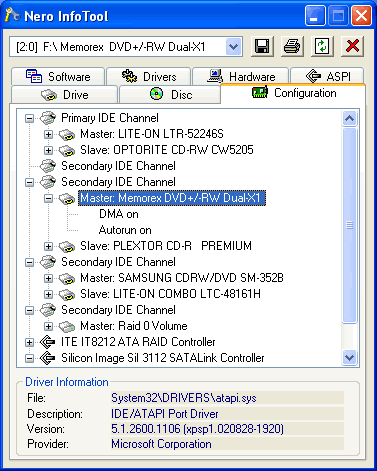
The Memorex Dual-X was connected as Secondary master and identified itself as Memorex DVD+/-RW Dual-X1. Both autorun and DMA (Direct Memory Access) was enabled for all devices.
Software:
Windows XP professional is installed on the computer along with Service Pack 1 for windows XP. We will be using the following software in this review:
Ahead Nero Burning ROM version 6.0.0.11/6.0.0.15
Ahead Nero CD/DVD Speed v2.02.2 beta
Elaborate Bytes CloneCD v4.2.0.2
Exact Audio Copy v0.95 prebeta 3
DVD Info PRO 2
The included software will be installed and evaluated, but not used in the performance testing part of this review since we want the results to be easily comparable to the other drives reviewed earlier.
Head on to the next page and find out what the box we got contained…
The package:
On this page we will take a look at what the drive came shipped with and take a look at the drive and it's techniques.
The drive came shipped from the United States of America to small Norway just to be reviewed by us. The drive survived the transport and here is the box containing the drive:

The box leaves no doubts about it: this is a dual format DVD-Writer, also the main speeds is clearly visible.
But a nice box is not enough, there have to be something inside it, so we opened the box and took out the content of it:

As we could see the package is pretty complete, to be sure that nothing is left out we list the content of the box below:
Box content:
-
The drive itself
-
Quick setup map
-
Quick install guide
-
IDE cable
-
Sound Cable
-
4 screws
-
Installation DVD
-
One empty 4X DVD+R disc
-
One empty 2,4X DVD+RW disc
Now that is everything that we want to see in an retail box, Memorex did even include an IDE cable and paper manual, something which many other manufacturers do not include.
The so called Quick Install Guide is actually very good and contains a lot of good information when installing the drive, it do also contain a user guide to get you started with most of the included programs from Roxio.
We can't find anything to put our finger on when it comes to bundle or manual.
Why not take a closer look at the drive as well?
The drive:

Memorex opted for a black design on the front and a silver tray, while this may look good in a black case it may look a bit odd in a grey or white case. We do find a lot of logos on the tray: The Memorex logo, a DVD-R/RW logo, a DVD+Rewritable logo and a CD-Rewritable High-Speed logo. And of course there is also an eject button and one LED (Light Emitting Diode), but the normal headphone connection and volume knob is gone.
Overall it looks like Memorex have tried to make their drive look special by making it with a black/silver front, but we prefer to have the choice between buying the black or the white version, also it feels strange to not have the headphone connection and volume knob, not because most people need it but because it looks a bit boring without it.

As we could see out from the sticker on the drive, our sample was manufactured in June 2003 at a factory in china. The strange thing is that the box states that it's made in Japan, but we trust this sticker more than the box.
Since Memorex do normally not manufacture any optical drives theirself, we surfed the web a bit and looked at pictures and specifications of other drives and this one seems to be an OEM Pioneer DVR-106.
Features:
We quickly installed the drive without any problems and fired up Nero Info Tool to get an idea of which features this drive supports:

Out from this picture we could see that the drive is shipped with firmware 1.05 and a buffer size of only 2000Kb. Why they do not add a larger 4Mb or 8Mb buffer like many other manufacturers is a mystery to us as we think the drive would benefit a larger buffer on older computers. The only features that lacks is the ability to read CD+G and DVD-RAM as well as writing DVD-RAM. Hopefully we will see Mount Rainier support in DVD-Writers as well some time soon.
We have also included another snapshot showing the features of this drive, this one is from DVD Info Pro

What we mentioned earlier is now confirmed, take a look at the Extra info field and you will see that it's identified as a PIONEER with a firmware that is made 23. May 2003
And another shot from Nero Burning ROM:

We couldn't find anything bad here, but still a 2000Kb buffer is a bit small and may cause the buffer-underrun protection technology to kick in very often on stressed systems.
Now it's time to take a closer look at the write technology used by the Memorex:
CD-Recordable:
The drive uses CLV(Constant Linear V elocity) to write at it's rated speed of 16X.

CD-ReWritable:

As we could see the drive uses CLV(Constant Linear Velocity) to write at it's rated speed of 10X for CD-RW.
Included software:
Now it's time to put in the included software DVD to see which programs that is included.

When we inserted the disc, we got this autorun menu, a short while and a few reboots later and all the programs were installed.
All programs except the DVD Max player is available through the following menu:

Disc copier:

No much to say really, a simple and easy to understand program for copying discs.
Audio Central:

Audio central is a music player and organizer, with pretty many options and features. Well worth a try.

Videowave is a full featured program for capturing video and edit it as well. The nice thing is that it's very easy to understand and contains most needed features.

DVD Builder is a program that will help you making your own DVD-Movie discs, again a very easy to use program. Notice that there is a quick guide on how to use this program in the included 'Quick Install Guide" manual.

Photosuite will help you to edit and organize your pictures.

And the classic easy CD-Creator, now in version 6. Works well for writing data and music CD and DVD's.
And finally the Roxio DVD
MAX Player:

This program is used to play Movie-DVD's, and is actually a very good player.
We peeked at the properties of this program:

And the program is actually developed by Cyberlink, which is known for another popular Software DVD-Player: PowerDVD.
All in all the software collection is quite complete and features most programs that could be useful in combination with your newly bought DVD-Writer.
Features and software is not everything, so continue to the next page and look at the reading performance of the Memorex…
For these tests we will use Nero CD/DVD-Speed to read various CD and DVD's, including audio discs and DVD-media. As already mentioned in the introduction this drive sports a specified read speed of 12X for DVD's and 32X for CD's.
Pressed discs:
For this test we used a pressed CD-ROM disc containing PlexTools v1.08 which is exactly 74 minutes long. Below you will see the produced result:

The drive reached its rated speed of 32X at the end of the disc with an average speed of 24,82X. How this compares to other DVD-Recorders you may see in the table below:
|
Pressed |
Average |
Start |
End |
Seek |
Seek |
Seek |
|
Plextor |
29.62x |
17.44x |
39.09x |
110ms |
113ms |
188ms |
|
Sanyo |
29.30x |
16.33x |
38.71x |
85ms |
102ms |
177ms |
|
Memorex Dual-X |
24,82x |
15,10x |
32,70x |
120ms |
140ms |
275ms |
With a read speed of only 32X it falls behind the two others drives when it comes to speed. It was a bit disappointing to see that the seek times were also far from as good as from the other two drives.
CD-Recordable Discs:
For this test we made a copy of the original PlexTools v1.08 CD. The disc we used was a Plextor 48X certified CD-R disc manufactured by Taiyo Yuden.

As we can see from this screenshot the drive passed its rated speed of 32X by even more than with the original CD-ROM disc and reaching a total of 33,79X with an average speed of 25,48X. Below is a comparison table where it's compared to other DVD-Writers:
|
CD-R Discs |
Average |
Start |
End |
Seek |
Seek |
Seek |
|
Plextor |
30,67x |
18,35x |
40,31x |
116ms |
119ms |
174ms |
|
Sanyo |
30,31x |
16,20x |
39,92x |
114ms |
115ms |
204ms |
|
Memorex Dual-X |
25,48x |
14,60x |
33,79x |
125ms |
145ms |
289ms |
Again the drive is lagging behind the two other DVD-Writers due to its read speed of only 32X. And for the seek times it is still lagging behind the other two drives.
CD-ReWritable discs:
Again we made a copy of the original PlexTools v1.08 disc, this time we used a plextor High Speed (10X) CD-RW disc made by Ricoh.

As with the other discs it passed the 32X mark and reached a total of 33,79X and an average speed of 25,48X. Look below for a comparison table with two other DVD-Writers:
|
CD-RW Discs |
Average |
Start |
End |
Seek |
Seek |
Seek |
|
Plextor |
26,08x |
15,34x |
34,45x |
113ms |
124ms |
178ms |
|
Sanyo |
30,59x |
16,97x |
40,44x |
84ms |
103ms |
175ms |
|
Memorex Dual-X |
25,48x |
14,65x |
33,79x |
130ms |
151ms |
293ms |
As the table shows it's still lagging behind, although not by much compared to the Plextor PX-504A, seek times is a different story and there is still a gap between the Memorex Dual-X and the two other drives.
Audio '“ Digital Audio Extraction:
To test the digital audio extraction performance of the Memorex we again used Nero CD/DVD-Speed to measure the transfer rate. The audio disc we used is slightly larger than the disc used for the other tests, to be exact it's about 78 minutes long (77:56:58).

The drive supports reading audio at full 32X speed, and is topping out at 33,29X with an average speed of 25,24X. Below there's a comparison table:
|
Audio Discs |
Average |
Start |
End |
Seek |
Seek |
Seek |
|
Plextor |
25,87x |
15,35x |
34,09x |
110ms |
119ms |
177ms |
|
Sanyo |
30,72x |
18,24x |
40,21x |
84ms |
103ms |
208ms |
|
Memorex Dual-X |
25,24x |
14,90x |
33,29x |
122ms |
148ms |
299ms |
Again it's limited by its read speed of only 32X and thus lags behind the other drives, although not far behind the Plextor PX-504A.
And as a last test we used Exact Audi Copy (EAC) to extract the audio to our hard drive. According to EAC the Memorex supports caching and accurate stream, but lacks the support for retrieving C2 errors.

Below is results produced by EAC:

Burst mode

Secure mode
The drive performed as expected in the burst mode test and reached a top speed of 33,5X. But for the secure mode test it was only able to read at an average speed of 5,4X.
Advanced audio '“ DAE quality test:
Before we move on to testing DVD read speeds we will take a last audio test, this time we used the 'Advanced DAE Quality Test" feature in CD-Speed.

The Memorex is able to do on the fly copying at speeds up to 12X and supports reading subchannel data and CD-Text. On the other hand it can't read data from the lead out and lead in. The drive is also good at reading audio since it reached a perfect score of 100.0
DVD '“ DVD-Video:
For our DVD reading performance tests we are going to start with a single and dual layered DVD video discs. While only 1X speed is required to watch DVD movies, it's useful to be able to read the discs at higher speeds if you're going to extract (rip) the content of the disc to your hard drive. Notice: Even if these discs contains DVD-Video they are identified as DVD-ROM discs for a reason or another, it's a disc issue and not a drive issue, we did several tests and this do not seem to affect the results of the tests in any way.


The Memorex read our single layer DVD at full speed, although with a few slowdowns at the end. For the dual layer disc it did not read it at full speed and it slowed down even more after the layer change. Let us sum up the results in a comparison table with other DVD-Writers:
|
DVD Video |
Average (SL) |
Start (SL) |
End (SL) |
Average (DL) |
Start (DL) |
End (DL) |
|
Plextor |
3,73x |
2,07x |
4,98x |
3,43x |
1,91x |
1,96x |
|
Sanyo |
8,77x |
4,15x |
11,70x |
4,28x |
3,45x |
3,88x |
|
Memorex Dual-X |
9,48x |
4,28x |
12,34x |
5,53x |
3,40x |
2,88x |
Finally the Memorex Dual-X begins to show its strengths by beating the other drives in both tests.
DVD '“ DVD+R(W):
For this test we used an Arita 4X DVD+R and the included Memorex DVD+RW with about 4,4Gb of data. Below are the results:


While the drive did not read the discs at full speed it did read them without any problems. Let us compare the result with other drives and see how it compares to those:
|
DVD+R DVD+RW |
Average (+R) |
Start (+R) |
End (+R) |
Average (+RW) |
Start (+RW) |
End (+RW) |
|
Plextor |
3,77x |
2,08x |
5,04x |
3,37x |
1,88x |
1,72x |
|
Sanyo |
4,01x |
2,64x |
4,02x |
4,02x |
2,65x |
5,77x |
|
Memorex Dual-X |
4,66x |
2,59x |
6,24x |
4,67x |
2,60x |
6,41x |
Again Memorex beats the other drives without problems.
DVD '“ DVD-R/RW:
For this test we used a Princo 4X DVD-R disc and an Princo 2X DVD-RW disc filled with about 4,4Gb of data. Our test results are found below:


As we could see out from these graphs, the drive performed nearly the same with DVD-R/RW discs as with DVD+R/RW discs, we did only get a slight slowdown on the end of the DVD-RW media (most likely due to our cheap princo DVD-RW disc). Below is a comparison table, notice that there are no results for the Plextor reading DVD-RW as it refused to read the disc (gave back an media error).
|
DVD-R DVD-RW |
Average (-R) |
Start (-R) |
End (-R) |
Average (-RW) |
Start (-RW) |
End (-RW) |
|
Plextor |
3,76x |
1,89x |
5,04x |
- |
- |
- |
|
Sanyo |
4,68x |
2,59x |
6,27x |
4,59x |
2,61x |
2,06x |
|
Memorex Dual-X |
4,68x |
2,59x |
6,27x |
4,59x |
2,61x |
2,06x |
As with the DVD+R/RW discs, the drive outperformed the other drives when reading DVD-R/RW discs.
Head on to next page and find out about the writing performance of this drive...
Phew, finally all the read tests are done and we could conclude that it's faster at reading all DVD discs but slower at reading all CD discs because of its lower read speed of only 32X. So next up is write tests and out from the specifications we could clearly see that the drive writes CD-R discs at 16X and writes at 4X to both DVD-R and DVD+R discs.
Writing Data CD-R discs:
For our data writing tests we simply set up a new compilation of 700Mb using Nero Burning ROM software. Writing method used is DAO (Disc At Once), and the discs is set up as a non-multisession disc with finalize disc enabled. The screenshot below shows how long time it takes to write a disc at the highest speed that is 16X:

The drive used 5 minutes and 28 seconds to write the disc, this is normal for 16X writespeed.
Most people do not need a faster writer than this, but we would liked if the write speed was 24X like most other new DVD-Writers. But speed is only one thing, let us take a look at the write quality of the Memorex Dual-X.
Write Quality:
We will test CD-R discs from 6 different large CD-R manufacturers. All discs have the same content and are written at 16X. For the quality test we use K-Probe that is a tool developed by a Lite-On Employee, it runs under windows and works with drives made by Lite-On. Also note that different drives and different reading speeds may affect the results obtained when scanning the discs. We used a Lite-On LTC-48161H drive and scanned the discs at maximum speed which is 48X. A written CD-R disc will always have some C1 errors, C1 errors is easily corrected by the drives error correction capabilities. The next level of errors is C2, while C2 errors could also be corrected by most drives error correction capabilities; a good disc should not contain any C2 errors. After this there is only uncorrectable errors that will make a disc unusable.
Why wait any longer? Below are the obtained results:

Brand: Packard Bell
Manufacturer: CMC Magnetics
Code: 97m26s66f
Disc Type: CD-R
Recording Layer: Dye Type 6, Short strategy (Phthalocyanine).
Capacity: 79:59.71 (703Mb)
Certified speed: 48X
Write speed: 16X
Write time: 5m:30s
C1 average: 0.621
C2 average: 0.0
These discs seems to work pretty well with this drive, an average C1 error count of 0.621 is very good.

Brand: MMORE
Manufacturer: Moser Baer India
Code: 97m17s06f
Disc Type: CD-R
Recording Layer: Dye Type 6, Short strategy (Phthalocyanine).
Capacity: 79:59.74 (703Mb)
Certified speed: 32X
Write speed: 16X
Write time: 5m:28s
C1 average: 0.258
C2 average: 0.0
These discs do also work very well with the Memorex Dual-X, a C1 average error count of only 0.258 is very good and even better than the CMC Magnetics produced disc.

Brand: Verbatim Data Life Plus
Manufacturer: Mitsubishi Chemicals
Code: 97m34s23f
Disc Type: CD-R
Recording Layer: Dye Type 3, Long strategy (Cyanine or AZO).
Capacity: 79:59.73 (703Mb)
Certified speed: 48X
Write speed: 16X
Write time: 5m:31s
C1 average: 0.728
C2 average: 0.0
These discs do also work well with the Memorex Dual-X, a C1 average error count of 0.728 is very good even though it's a bit higher than some of the other tested discs.

Brand: Fujifilm
Manufacturer: Ritek
Code: 97m15s17f
Disc Type: CD-R
Recording Layer: Dye Type 7, Short strategy (Phthalocyanine).
Capacity: 79:59.70 (703Mb)
Certified speed: 48X
Write speed: 16X
Write time: 5m:27s
C1 average: 0.092
C2 average: 0.0
These discs work extremely well with the Memorex Dual-X, a C1 average error count of 0.092 is very good and few drive/disc combinations could produce such good results.

Brand: Plextor
Manufacturer: Taiyo Yuden
Code: 97m24s01f
Disc Type: CD-R
Recording Layer: Dye Type 1, Long strategy (Cyanine or AZO).
Capacity: 79:59.72 (703Mb)
Certified speed: 48X
Write speed: 16X
Write time: 5m:27s
C1 average: 0.035
C2 average: 0.0
These discs work extremely well with the Memorex Dual-X, a C1 average error count of 0.035 is the best result we obtained with this drive and it's a fantastic low error count.
But when testing the last brand of CD-R discs we ran into problems:
Brand: Memorex
Manufacturer: Prodisc
Code: 97m32s19f
Disc Type: CD-R
Recording Layer: Dye Type 9, Short strategy (Phthalocyanine).
Capacity: 79:59.72 (703Mb)
Certified speed: 48X
Write speed: 16X
When trying to write these discs this happened:

Yes, the drive returned a power calibration error. Might be just one disc we though and throw in a new disc from the same package:

This time we got a write error instead. Not good.
We opened a new box of Memorex CD-R discs but we still banged the head against the wall as the drive returned the same error messages with all tested discs.
What's up? This is a Memorex drive and then it's not compatible with Memorex CD-R discs? This is not good at all! Thumbs down to Memorex for providing discs that is not compatible with their own drives!
Then we picked another brand of prodisc manufactured discs, this time it was smartbuy that is prodisc owned brand.

Brand: Smartbuy
Manufacturer: Prodisc
Code: 97m32s19f
Disc Type: CD-R
Recording Layer: Dye Type 9, Short strategy (Phthalocyanine).
Capacity: 79:59.72 (703Mb)
Certified speed: 48X
Write speed: 16X
Write time: 5m:29s
C1 average: 13.174
C2 average: 23.118
We do rarely see such bad results as this one, with an average C1 error count of 13.174 and an average C2 error count of 23.118 we can't do anything else than warn you against buying this CD-R disc brand for this drive.
We had even one more brand of prodisc manufactured discs and here are the results:

Brand: NoName/Bulk spindle with white printable top.
Manufacturer: Prodisc
Code: 97m32s19f
Disc Type: CD-R
Recording Layer: Dye Type 9, Short strategy (Phthalocyanine).
Capacity: 79:59.72 (703Mb)
Certified speed: 48X
Write speed: 16X
Write time: 5m:29s
C1 average: 0.084
C2 average: 0.0
This time we got a very good result, something that leads us to believe that prodisc have different production lines with different quality. A score of 0.084 average C1 errors is very good and is right up there among the best.
Summary:
With a low writing speed of only 16X it was no surprise that it did perform well with most discs since they are certified for much higher speeds. But be careful with discs manufactured by prodisc as their quality is a hit and miss.
Writing Data DVD-R and DVD+R:
In this test we will measure the time for writing to both DVD-R and DVD+R discs. We used Nero burning Rom to set up a new UDF/ISO compilation containing about 4477Mb of data and started the write process:

DVD+R

DVD-R
Out from these screenshots we could see that it wrote the DVD+R in 14 minutes and 6 seconds, and the DVD-R in 14 minutes and 49 seconds. How this compares to other drives may bee seen in the table below:
|
Write DVD data discs |
DVD+R |
DVD-R |
|
Plextor PX-504A |
14m 13s |
- |
|
Sanyo CRD-BPDV2 |
14m 59s |
14m 54s |
|
Memorex Dual-X |
14m 6s |
14m 49s |
The table shows that this drive is a good performer when it comes to writing DVD discs, it was able to beat both drives again, although not by much.
DVD-Write
quality tests may be added later as we are investigating the reliability of
our results. Yes, there is some measuring issues between different drives which we have to look closer into before posting any results officially.
Next up is this drives re-writing performance, so head on to next page…
The Memorex Dual-X supports 10X(1500kb/s) CD-RW re-writing, 2,4X (3.312Kb/s) DVD+RW re-writing and 2X (2.760Kb/s) DVD-RW re-writing. On this page of our review we'll see what these speeds mean when writing normal data compilations and when usin the packet writing method.
Re-Writing data:
For this test we set up a new compilation containing 647Mb of data in Nero Burning ROM. We used the DAO (Disc At Once) writing method. In the screenshot below you can see the burn process completed successfully.

The Memorex Dual X used 7 minutes and 45 seconds for writing the discs, this places it between the plextor PX-504A (7minutes and 44 seconds) and the Sanyo CRD-BPDV2 (8 minutes and 7 seconds). For the next DVD+RW and DVD-RW test we again used Nero Burning ROM to set up a DVD-ROM compilation containing 4477Mb of data, we wrote the disc with DAO (Disc At Once) writing method:

DVD+RW

DVD-RW
To write DVD+RW the drive used 23 minutes and 6 seconds, compared to the Sanyo CRD-BPDV2 (wrote the disc in 23m 53s) this is a bit faster. For writing the DVD-RW disc it needed 38 minutes and 51 seconds, notice that this is not including the time to format the disc.
Packet writing:
For the packet rewriting test we used Aheads InCD program to measure the time for formatting the disc and for writing 400Mb of data to the CD-RW disc and 4,35Gb of data to the DVD+RW disc and the DVD-RW disc
CD-RW packet writing performance:
|
CD-RW Packet writing |
Formatting 650Mb |
Copying 400Mb |
Average write speed |
|
Plextor PX-504A |
11m 32s |
5m 22s |
8,49x |
|
Memorex Dual-X |
8m 30s |
8m 25s |
5,33x |
Compared to the Plextor PX-504A the drive formatted the disc faster but was clearly beaten by the plextor on the copying part.
But when trying to examine the packet writing performance for DVD+RW and DVD-RW discs we ran into huge problems:
DVD+RW:

Every time we tried to format a DVD+RW disc we got this error message. We tried to erase the media, new unused media and media of other brands but it did not make any difference. Notice that we did not have any problems at all when using the exact same version of InCD and the same discs in another DVD-Writer.
DVD-RW:
This time everything seemed to work ok, and formatting the disc took 35 minutes and 12 seconds, a quick format of the disc took only 9 seconds. But when trying to copy a folder containing 4,35Gb of data(MP3 files) we ran into problems again:

We tried with another new disc and got the same result, again using another DVD-Writer cured the problems.
We are still unsure if it's an issue with the drive or a compatibility issue with Ahead InCD that caused the problems. A firmware update and/or an InCD update will most likely fix these problems.
But for now we can't recommend this drive for packet writing, at least not if you are using Aheads InCD program, other programs may work better.
Update
5.5.2004: Ahead has informed us that updating to the latest firmware (version 1.07) for the Memorex dual-x along with updating InCD to the latest version should solve this problem.
Before we round off this review, let us run the drive through some advanced tests at next page…
To round off
this review we will run some advanced tests on the Memorex Dual-X. these tests
are: making backups of protected data and audio discs as well as an overburning
test.
Copy protected data discs:
For this test
we will use CloneCD (as usual) to make a backup of games containing some of the
most popular copy protections. In the screenshot below we could see that the
Memorex Dual-X supports all available write features in CloneCD:

The Memorex
Dual-X supports DAO-RAW96 recording mode which basically means that it can write
uncorrected data and subchannel data. Below are our results for all the tested
games:

Motoracer 3 is
protected with Tagé¨s, a protection that is added during the manufacturing
process. So far no drives have been able to backup this game
successfully.

Flé¥klypa grand
prix is a Norwegian game that is protected with CD Cops, again a very special
protection that is added during the manufacturing process. So far no drives have
been able to make a 100% working backup, a few drives in combination with a few
media types may make a backup that works in a few drives.

Desperados:
Wanted dead or alive is protected with Laserlok, a protection that takes very
long time to read for most drives, but most drives is able to make working
backups of this game.

The Diablo 2
expansion set is protected with SecuROM version 4.62.00 0100, a widely used
protection scheme. Writers able to read and write subchannel data correctly
should be able to backup this Game.

Grand Theft
Auto: Vice city is protected with a newer version of SecuROM: namely version
4.84.69 0071. Very few (if any) writers could reliably make working backups of
this protection.

Max Payne is
protected with the very popular Safedisc protection, the version used on Max
Payne is version 2.30.33. If a writer supports 'Almost correct EFM encoding of
regular bit patterns" it will be able to backup this protection without
problems. If it does not support this you need to enable the 'Amplify weak
sectors" option in CloneCD. This is a software trick to make most writers able
to backup most safedisc protected games with weak sectors.

Serious Sam is also protected with
the very popular Safedisc protection, the version used on Serious Sam is version
2.51.21. If a writer supports 'Correct EFM encoding of regular bit patterns" it
will be able to backup this protection without problems. If it does not support
this you need to enable the 'Amplify weak sectors" option in CloneCD. This is a
software trick to make most writers able to backup most safedisc protected games
with weak sectors.

Command and
Conquer: Generals is another game protected with the very popular Safedisc
protection, the version used on Command and Conquer: Generals is version
2.80.10. If a writer supports 'Correct EFM encoding of regular bit patterns" it
may be able to backup this protection without problems. If it does not support
this you need to enable the 'Amplify weak sectors" option in CloneCD. This is a
software trick to make most writers able to backup most safedisc protected games
with weak sectors.

The protection
on The Sims: Superstar expansion pack is also safedisc, this time it's version
2.90.40. Very few (if any) writers are able to reliably make a working backup of
this protection.
The table
below shows the backup capabilities of the Memorex Dual-X writer:
|
Game '“ protection |
Read |
Backup works? |
|
Motoracer 3 Tages |
3m 4s |
No |
|
Flé¥klypa CD-Cops |
2m 52s |
No |
|
Desperados Laserlok |
33m 37s |
Yes |
|
Diablo 2 SecuROM |
2m 54s |
Yes |
|
GTA3 Vice City SecuROM |
3m 9s |
No |
|
Max Payne Safedisc |
44m 0s |
Partially* |
|
Serious Sam Safedisc |
43m 53s |
Partially* |
|
C&C: Safedisc |
42m 37s |
Partially* |
|
The Sims: Safedisc |
42m 25s |
No |
* Partially
means that the 'Amplify Weak Sectors" must be turned on for the backup to
work.
Let us first
take the positive things; the Memorex Dual-X is fast at reading all protections
that do not contain read errors, this shows that the drive is a fast subchannel
reader as well. For laserlok is it also very fast compared to most other drives.
But it does not win a price for its safedisc reading abilities, as many drives
is able to read this protection under 10 minutes. Also this drive do not support
'correct EFM encoding of regular bit patterns" at all, so Amplify Weak Sectors
must be enabled when backing up safedisc protected games. The drive fails to
backup Motoracer 3, Flé¥klypa, GTA3 Vice City and The Sims: Superstar. But this
was expected as no/few other drives is able to backup any of these
protections.
Copy protected Audio:
For our
protected audio test we used the Exact Audio Copy program. We inserted the
protected audio discs and if the drive was able to recognize the disc we tried
to extract the music tracks to the hard drive. First let us look at the discs we
had available for this test:

Westlife:
World of our own is protected with Cactus data shield 100.

Natalie
Imbruglias White lilies Island. This disc is protected with Cactus datashield
200

Shakira: Laundry service, that is
protected with Key2Audio version 2.

And finally
Celine Dion: A new day has come, that is protected with key2audio version
3
Results:
|
Protected |
Protection |
Exact Audio |
|
Westlife: |
Cactus data shield |
Recognizes the discs, but |
|
Natalie |
Cactus data shield |
Reads the disc without any |
|
Shakira: |
Key2Audio version |
Recognizes the discs, but |
|
Celine Dion: A |
Key2Audio version |
Recognizes the discs, but |
The Memorex
Dual-X is not your number one choice for reading protected audio discs as it was
only able to read the Cactus data shield 200 protected disc. CloneCD gave us the
same reading results as Exact Audio Copy; only the cactus data shield 200 disc
was readable.
Overburning:
To test the
overburning capabilities of the Memorex we used the overburning test in Nero
CD/DVD-Speed. According to Nero CD/DVD speed the drive can overburn to more than
99 minutes:

To make sure
that it actually works we wrote a 99 minutes disc in Nero Burning
ROM:

And the
recording went successful as the above picture shows. (Notice that you must have
Nero version 6.0.0.15 or newer, since older versions have a bug that makes
overburning fail with this particular drive).
And then we
tested the readability of the disc in Nero CD/DVD Speed:

The drive read
the disc at full speed to the end of the disc. Nero CD/DVD speed reported a
positioning error when trying to do a full seek on the disc. Because of this we
copied all files on the disc to our hard drive to test the real readability, and
all files were copied without any problems.
Now that
concludes our Memorex Dual-X review, head on to the last page to read our
conclusion…
Positive:
- Complete retail package.
- Retail package includes both one DVD+R and one DVD+RW disc.
- Very good printed manual!
- Dual-format DVD-recorder
- Supports fast DVD-recording speeds (4x DVD+R, 2.4x DVD+RW, 4x DVD-R, 2x DVD-RW).
- Buffer underrun technology to prevent buffer underruns.
- Very good read speed for all types od DVD-discs.
- Good write quality on most media types.
- Very good media compatibility, especially for DVD-R and DVD+R discs.
- Supports DAO-RAW writing.
- Supports reading and writing of CD-Text information.
- Supports reading and writing of full SubChannel Data.
- Can read and write 99 minutes discs.
Negative:
- Lower CD-Writing (16X) speed than the competition.
- Lower CD reading speed (32X) than the competition.
- Compatibility issues with Ahead InCD (Should be
fixed when using the latest firmware 1.07 along with the latest version 4 of
InCD). - Mount Rainier format not supported
- Small 2000Kb buffer
- Needs weak sector amplification to copy SafeDisc 2 protection
- Reading of copy-protected data could be improved
- Reading of copy-protected audio could be improved
- Can't write to memorex 48X CD-R media.
- Conclusion:
The Memorex Dual-X left us with a pretty positive feeling. As a plain DVD-Writer it's superb as it wrote every brand of DVD-R and DV+R media that we put in it without problems at the certified speed of the media. This includes unknown Hong Kong media identifed as AN31 as well as more known brands like Princo and Verbatim. As a CD-Writer it's also good, but it's bad that Memorex do not provide CD-R discs that works with their own writers! And it's lagging behind the competition with a write speed of only 16X compared to 24X for many competitors.As a reader it's good at reading all types of DVD discs compared to the competition, but is lagging behind on the CD reading part since it's limited to 32X reading only. When it comes to protected data and audio this drive is not your number one choice as it can't handle many audio protections and do not support "Correct EFM encoding of regular bit patterns" which is required to backup safedisc 2 protected discs without any software tricks.
If you are in the market for a DVD-Writer and is going to use it mainly for writing DVD discs, then this drive is a very good chice as it works with many media types. The bundle with this drive is also great; you get everything from a good printed manual, empty DVD+R and DVD+RW discs, screws, cables and a large software collection. But if you want fast CD-Writing speeds, then this drive is not for you. But overall we feel that this word fits this drive: Recommended.
Reviewers notice: This is my first review for a while since I've been in the army for a year. I would like to thank the cdfreaks management and Memorex for making this review possible. DVD-Writing is pretty new to me and this is also the first review that I upload myself, and because of this the review have been a bit delayed. And I would like to hear from YOU as a reader on how good this review really is, and where I could improve my work for the next review (which is not to far into the future).
Regards
OC-Freak















