
 |
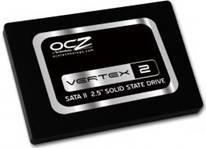
Review: OCZ Vertex 2 100GB |
OCZ Technology was kind enough to send us their latest high
performance consumer grade solid state drive for review; the MLC based Vertex 2
100GB. The Vertex 2 series of drives have a 2.5 inch form factor, SATA2
connection and SATA power connector. The Vertex 2 series can be fitted to a
laptop with SATA hard drive support, or as we have done for this review, the OCZ
Vertex 2 series can also be fitted to a desktop PC which supports SATA hard disk
drives.
It has been quite a while since I reviewed an SSD, almost 9
months to be exact. The time between reviews hasn’t been wasted however. During
this time I have spent a lot of time researching SSDs in general, the
technology itself, and also I have been doing a lot of research into what makes
an SSD fast in the real world. I have also been able to do long term testing on
three very popular SSD drives, the original OCZ Vertex 120GB, the Intel X25-M
(G1) 80GB, and the original OCZ Agility 120GB. It has been an interesting
experience using these drives and learning in detail where each of these drives
shines, and where they are not so strong.
Since I started reviewing SSDs over 2 years ago, I have
always believed that running synthetic benchmarks on SSDs is of very limited
use, as they rarely show the real world performance of an SSD. Real world
testing is not as simple as it sounds. Take the original OCZ Vertex and Intel
X25-M for example, they are both quite different in how they perform, the Intel
drive having strong 4K random write performance and very limited sequential
writing performance, whereas the original OCZ Vertex had modest 4k write
performance and strong sequential writing performance. Yet put these two drives
side by side in the real world, with real users and applications, and it become
almost impossible to tell these drives apart in terms of speed.
Back in early February of this year (2010) I started
developing and testing a new suite of real world tests, now known as the “MyCE
Reality Suite”, which uses real applications and data to run identical and
automated tests on all the drives in this review. For more details on how the
tests are run, and the tests themselves, see the MyCE Reality Suite page later
in this article.
Right then, let’s get back to the OCZ Vertex 2. As most of
you will already know, the original OCZ Vertex SSD used an Indilinx Barefoot
SSD controller. For the OCZ Vertex 2, OCZ has switched SSD controllers by using
a SandForce SSD controller, to be exact: the SandForce SF1200.
Let’s find out how this new SSD performs in our range of
benchmarks and real world tests in this review.
OCZ Technology company information
I’m sure most MyCE members will be familiar with the OCZ
Technology brand name. OCZ has been manufacturing high performance PC memory,
SSDs, and other PC related hardware for many years.
If you would like to find out more about OCZ Technology, you
can visit the OCZ Technology website.
Packaging

Box front
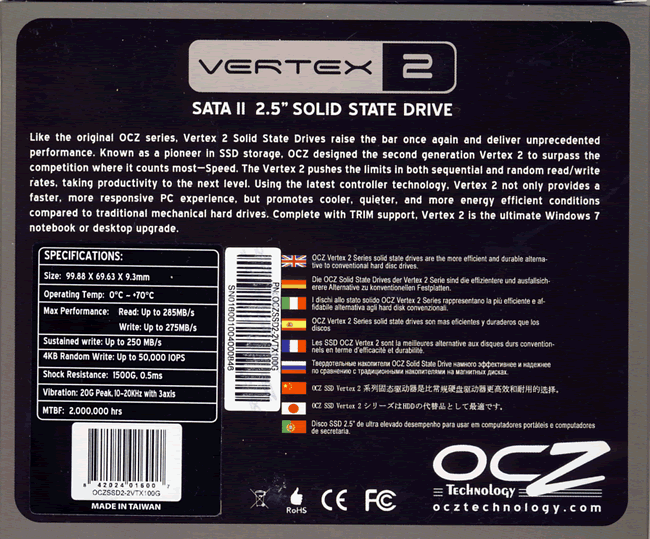
Box rear
What’s inside the box
Now it’s time to take a look at the drive itself and what
the drive came shipped with.

The package contained the OCZ Vertex 2 drive itself, 2.5
inch to 3.5 inch drive converter for easy installation of the SSD in a desktop
PC including the fixing screws, and instruction booklet.
Now let’s take a look at the drive itself.
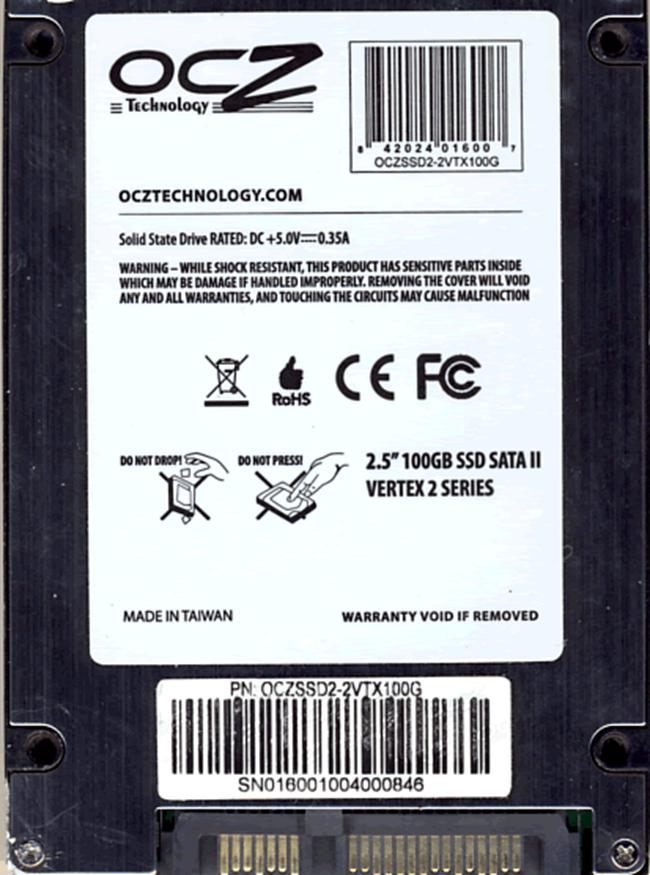
Drive bottom
On the bottom of the drive, we can see the model
(OCZSSD2-2VTX100G) and serial number, the drive’s capacity and also that the drive
was manufactured in Taiwan. We can also see the drive’s SATA power and data
connectors.
The OCZ Vertex 2 is well constructed, in a strong aluminium
housing.
Now let's head to the next page, where we look at the
SandForce SF1200 SSD controller.
OCZ Vertex 2 hardware.
Now let’s take a look at the OCZ Vertex 2 hardware.
PCB

Near the centre of the above screenshot we can see the SandForce
SF1200 SSD controller, and we can also see 8 NAND chips, the other side of the
PCB being populated by a further 8 NAND chips.
The SandForce SSD controller

The SSD controller used in the Vertex 2 is the SandForce
SF1200 series, designated SF1222TA3-SBH on the Vertex 2.
The SandForce SF1200 series is a brand new SSD controller
and has brought a number of new technologies to SSD, some are designed to
increase performance, others designed to improve durability and increase the
lifespan of the SSD. Let’s take a brief look at a few of these technologies.

From the above screenshot we can see at least 2 unique
technologies that SandForce are using on this new SSD controller under a
technology they call DuraClass. Let’s take a brief look at these technologies.
DuraWrite
There are two fundamental things that cannot be ignored when
using flash memory for storage. That is, the flash memory type currently used
is NAND, which is (a) expensive and (b) has a limited amount of total write
cycles. I’m pretty sure that all SSD manufactures would love to only use SLC
(single level cell) NAND on their SSDs: it’s faster and has 10x the total write
cycles of multi-level cell (MLC) NAND. Unfortunately though, the cost of SLC is
enormous, and this is the main reason that SLC is generally reserved for
enterprise class SSDs.
If we look at the OCZ Vertex 2, it uses MLC NAND, and on the
100GB model it uses sixteen MLC NAND chips to give the total user capacity. The
actual amount of NAND amounts to 128GB, but we will look at why only 100GB is
available for user storage a little later. Had the OCZ Vertex 2 used SLC NAND, thirty-two
NAND chips would have been required to have the same 100GB capacity. The reason
for this is, SLC can store a single bit of data per NAND cell, while MLC can
store 2 bits of data per cell. In other words, MLC NAND can store twice the
amount of data compared to SLC NAND, and this in turn means the cost of MLC
NAND is half the price of SLC NAND, and also the main reason why SLC NAND based
SSDs are generally lower capacity drives.
The other fundamental is MLC NAND is less durable compared
to SLC NAND. SLC NAND is reckoned to have 100,000 total write cycles, whereas
MLC NAND has a typical 5,000 to 10,000 total write cycles. The curse of NAND is
write amplification: put simply, this means that the more data that has to be
written, the faster those write cycles are used up. SandForce has looked at
write amplification in great detail, and come up with a new technology called
DuraWrite. The SandForce SSD controller is smart enough and fast enough to
compress data on the fly, and then write a compressed version of the data to
the NAND itself. By doing this, some writes can be 20 times smaller than they
would be if they remained uncompressed. This also has an added bonus, if you
have to write less of the data to NAND, then the write process also becomes
much faster.
So, as well as lowering write amplification you also
increase performance, which is very clever, allowing the much cheaper MLC NAND
to be used in an enterprise class environment. Of course, not all data can be
compressed in this fashion, ZIP and RAR files for example are already heavily compressed
so won’t benefit much by this process, but overall DuraWrite works extremely
well as we will see later on in this article.

RAISE
Another new technology found in the SandForce SF1200 is
RAISE (Redundant Array of Independent Silicon Elements).
As I mentioned earlier, our OCZ Vertex 2 SSD review sample
has a user capacity of 100GB. The actual amount of NAND that the drive has is
128GB of MLC NAND. So what is the other 28GB used for?
At some point during an SSD’s life a NAND cell or block of
NAND cells will fail, which is why all SSDs do not make the full amount of
onboard NAND available to the user for storage. All SSDs have a pool of
reserved NAND to map into use if a cell or block of cells fails. This can be as
low as 1GB or 2GB of NAND in reserve. RAISE sets aside a good deal more than
this in its pool of reserved NAND. In the case of the OCZ Vertex 2 100GB, the
amount of reserved NAND is approximately 28GB. By keeping so much NAND in
reserve, this should ensure the SSD can last for the expected minimum lifespan
of 5 years.

By keeping a large pool of reserved NAND, drive failure is
much less likely to happen due to just simply running out of NAND that has no
more write cycles available.
Once again, as an added bonus of reserving so much NAND, the
wear levelling and garbage collection algorithms can be enhanced, thus ensuring
there are always fresh NAND blocks to write to.

NAND
Now let’s get back to the OCZ Vertex PCB. I mentioned the
NAND already, but for those of you who like to know such details. The NAND on
our OCZ Vertex 2 review sample was fitted with 16 MLC NAND chips manufactured
by Intel which I believe is using a 34nm fabrication process.

Firmware
OCZ Technology having a close relationship with SandForce
was able to secure an exclusive firmware for the Vertex 2. Basically this
firmware has the SandForce SF1200 on speed, and exclusively gives the OCZ
Vertex 2 enterprise class 4k random write performance. This is not achieved by
overclocking the SandForce SF1200 SSD controller, the 4k random write cap has
been removed, allowing the SF1200 to give full IOPS performance of 50,000 IOPS.
You will have all probably heard by now that this firmware
in beta form was accidently shipped to another manufacturer. I will refrain
from making comment in this article about this, and leave it to OCZ, SandForce,
and the other manufacturer to sort out between themselves.
OCZ Vertex 2 Specifications


We found the specifications of the drive at OCZ Technologies
website.
Drive maintenance features
For Windows 7 users and some distributions of Linux, the OCZ
Vertex 2 supports ATA TRIM to keep the NAND clean. The Vertex 2 also has, as we
touched on above, DuraClass. The new technologies involved in DuraClass should
keep the OCZ Vertex 2 operating at peak performance levels, but only time will
tell how effective this method of keeping NAND clean is in use.
Now let’s head to the next page where we will look at our
test PC and testing procedures...
Test machine
For this review we will be using a computer with the
following configuration:
Hardware:
- Motherboard: Gigabyte GA-P55A-UD4 (Intel P55 chipset)
- Processor: Intel Core i5 750
- RAM: 4GB GEIL Ultra Line DDR3 2133MHz (dual channel)
- GFX: Sapphire Vapor X HD 5770 (1024 Megabytes GDDR5 HDCP compliant)
- Sound: Onboard Realtek ALC889 HD audio controller
- Hard disk OS: 120GB OCZ Vertex SSD
- Hard disk storage: 1X 500GB Samsung Spinpoint F3, and 1X 1TB
Samsung Spinpoint F1. - Case: Antec 900
- PSU: Enermax Liberty 620W
- Display: Samsung Syncmaster 245B 24” widescreen LCD (HDCP
compliant) - Operating System: Windows 7 Home Premium 64bit
The OCZ Vertex 2 SSD was connected to an SATA 2 port (ICH10R)
on the motherboard of our review PC and all tests on the drive were carried out
with the drive connected to this connector.
AHCI mode was also selected for all drives in the BIOS of
our test PC, and all tests were carried out in this mode.
Test applications
To test the performance of the OCZ Vertex 2 series 120GB
SSD, we will be using the following test applications in this review.
- HD Tune Pro
- HD
Tach - ATTO
- Iometer
- AS SSD
Benchmark - CrystalDiskMark
- MyCE Reality Suite
Test procedures
We will start off our testing procedures explanation by
stating that we did not run many basic benchmarks on the OCZ Vertex 2 series
drive. You may ask why we have run so few benchmarks?
SSD technology has moved so fast in the last couple of years,
that basic benchmarks alone are now of very limited use, and don't really tell
us much about performance and how the drive will behave in the real world. We
have therefore decided to show some basic benchmarks of the OCZ Vertex 2 drive,
and will complement this with advanced benchmarks using IOMeter and AS SSD
benchmark. We will also show how the OCZ Vertex 2 performs in the real world
with our brand new MyCE Reality Suite test.
Test drives
- 120GB OCZ Vertex SSD (firmware 1.5)
- 120GB OCZ Apex SSD
- 500GB Samsung SpinPoint F3 (HD502HJ)
- 64GB Traxdata Ultra S Plus SSD
- Western Digital VelociRaptor 300GB
- OCZ Agility 120GB (firmware 1.5)
- Intel X25-M 80GB (series G1)
- OCZ Vertex 2 100GB
The OCZ Vertex 2 SSD came supplied with firmware version 1.0
Reviewers note
We were only able to test with the WD Velociraptor HDD for a
very short time, in fact, only enough time to run the IOMeter tests.
Drive preparation for running the tests
All the drives used in this review were in a "used
state" with the exception of the OCZ Vertex 2 and the Intel X25-M. To
simulate a "used state" on the OCZ Vertex 2, we completely filled the
drive with files then deleted all the files, repeating this procedure five
times. The Intel X25-M was stuck with a sequential writing speed of only
36MB/s, and with no TRIM support and little point of carrying out tests on a
drive in this state, a secure erase was performed to recover the performance
before testing began.
- Both our spinning HDD drives were defragged before the
start of each test. - All SSD drives had their partitions aligned to the Windows
7 x64 defaults.
Where we use graphs in this article to display results, we
will use the following colours to make it easier, for our readers to see the
drive which we are reviewing.
 OCZ Vertex 2 100GB SSD
 Comparison SSD
 Comparison HDD
Now let's head to the next page, where we look at some
basic benchmarks...
Reading Benchmarks
HD Tune Pro

We present the graph below for comparison with other recently
tested drives.

From our limited number
of test samples, we can clearly see the OCZ Vertex 2 series SSD is very fast,
in fact it’s the fastest reading drive in this test.
HDTach read/write test (long bench 32MB zones):

Interestingly, the HDTach reading benchmark shows a slightly
slower sustained reading speed of 233.8 MB/s compared to HD Tune Pro which
reported a sustained reading speed of 243.9 MB/s. This isn’t surprising as the
two applications carry out the tests in slightly different ways. Sustained
writing speed is reported as 188.5 MB/s.
ATTO disk benchmark
ATTO has become a standard tool for measuring the data
throughput of SSD drives. It measures the performance of reading and writing,
using different file sizes and block sizes.

The reading speed results on the OCZ Vertex 2 are very impressive,
topping out at over 285MB/s, writing speeds are extremely impressive topping
out at 271 MB/s. ATTO writes its test data in a format that can be compressed
by DuraWrite, so you are seeing reading and writing in a best case scenario,
but certainly shows what the SandForce SSD controller is capable of doing.
CrystalDiskMark 3.0
Crystal Disk Mark is quite a handy benchmarking application,
as it focuses on the file sizes that can cause a problem on a system drive.

While ATTO shows the SandForce controller in its best light,
Crystal Disk Mark uses test data that isn’t so easily compressed by DuraWrite,
therefore read and write speeds are not quite so high, but very impressive in
any case. Also note that we are unsure if Crystal Disk Mark aligns at the 4K
boundaries when writing the test data to the drive, if it doesn’t, this could
well have a serious impact on the results.
AS SSD Benchmark
AS SSD benchmark is a new benchmarking tool, specifically
designed to test SSD drives. The application tests sequential reading and
writing performance, 4K random reading and writing performance.
AS SSD benchmark also tests 4K threaded performance. This is
very exciting, as this test is the first available test that I am aware of,
that simulates how a PC operating system actually works. A modern PC and OS,
such as Windows Vista does not just run a single thread at a time, it runs many
threads. The AS SSD benchmark "4K 64Thrd" tests run 64 threads
simultaneously throughout the test. If this result is good, then you can be
pretty sure the drive will perform extremely well as a system drive.
After the tests complete, AS SSD benchmark derives a total
score for the drive being tested. This is based on all aspects of the test
results, and gives an indication of how the drive is performing overall.
Now let’s look at the result from the OCZ Vertex 2 in the
form of a screenshot. All our other comparison drives results are presented in
the form of a graph.


Given that AS SSD benchmark writes a lot of compressed data
in its tests, the OCZ Vertex 2 is still at the top of the tree. Threaded
performance is particularly strong, which I’m finding is a key factor in real
world performance.
Summary:
The sequential reading speeds on the OCZ Vertex 2 series SSD
is excellent and the fastest single drive we have ever tested here at MyCE.com.
Sequential writing speeds were also the highest we have ever encountered here
at MyCE.com, and the same applies to 4k random write.
Let's head to the next page for our IOMeter test
results.....
I/O Performance
There is little point of having an SSD drive that has
blazing sustained reading and writing speeds, if the drive can't handle reading
and writing of small random files. If you intend to use your new SSD drive to
store and run your operating system, then the drive must be able to cope with
the many small random files that Windows will write to the drive continually.
So we feel it is very important to test how many of these random files that a
drive can handle in one second. I believe that anything over 1000 I/O’s per
second would be enough for most users running a consumer grade mainstream PC,
and should provide a smooth running system. But obviously, the more I/O's that
a drive can handle, the faster the drive will feel and leave more headroom for
those huge multitasking sessions that users sometimes engage in.
The things that we will look at are the total I/O per second
and total MB/s.
Partition alignment and sector boundaries
Windows 7 will automatically align a partition during
partition creation, Windows XP won’t. It is imperative that an SSDs partition
is aligned. Windows XP is also restricted to sector boundaries, while Windows 7
will use 4k boundaries if it can. The SandForce SSD controller is 4k boundary
aware, and will use these boundaries when it can. Of course it will also remap
LBA’s for compatibility with the sector boundaries so the drive can be used with
Windows XP.
IOMeter allows us to set the sector boundaries for
conducting the tests, and we have therefore set the sector boundaries at 4K,
which means the IOMeter tests are valid for Windows 7 and Windows Vista users.
XP users will not be able to obtain such results.
We will provide a screenshot of the tests on the review
drive for those of you who like to see the actual test result. All the
comparison drive results are represented in the form of graphs.
If any of you would like to see a screenshot from any
IOMeter test on a particular drive, please feel free to request one, and I’ll
post the screenshot in the forum thread.
IOMeter 4K random (outstanding I/Os = 4) write test.
Our first test involves creating continual 4KB random files
on the target drive with IOMeter. We use a 4KB file size, as it is believed
that Windows will create and modify many of this size of file constantly in the
background during a typical Windows session.

IOPS
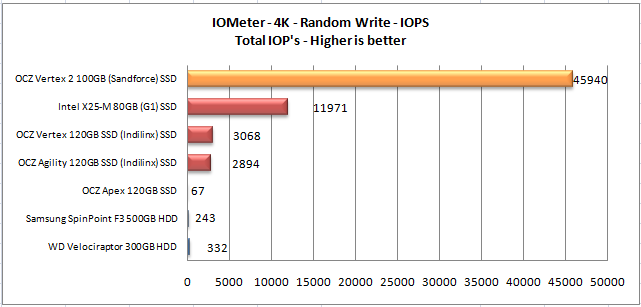
MB/s

The Intel X25-M used to be the king of 4k random writes, it
has now lost its crown to the OCZ Vertex 2 which is capable of providing nearly
4 times the performance with 4k random writes. So why is the OCZ Vertex 2 so
much faster than the other SSDs?
There are other factors, such as how many channels the SSD
controller can use to access the NAND, the speed of the NAND, and also some
specific features in the SSD controller itself (DuraWrite), but the most likely
scenario in simplistic terms is, the sheer grunt of the SandForce SF1200
controller, which has allowed firmware engineers to program the controller to
optimise 4K random write performance, without sacrificing other areas, such as
sequential write performance, and small file threaded writing performance.
This level of 4k random write performance places the OCZ
Vertex 2 in enterprise class territory, where 4k random write performance more
or less determines how fast a network database server can deliver files to the
rest of the network. It is unlikely that a normal desktop user can use all this
4k random write bandwidth. But I’m certainly not complaining when sequential
write and other areas haven’t been sacrificed in order to achieve this goal.
IOMeter 4K random (outstanding I/Os = 4) Read test.
If there are many 4k files created, then that must also mean
that many 4k files need to be read. This test measures 4k reading performance.

IOPS

MB/s

This time the results are more evenly matched, but again the
OCZ Vertex 2 is the fastest.
IOMeter 512KB (outstanding I/Os = 4) write test.
Sequential writing performance is also very important; in
this test sequential writing performance is tested.

IOPS

MB/s

Once again the OCZ Vertex 2 is extremely impressive, and is
by far the fastest SSD in our tests.
IOMeter 512KB (outstanding I/Os = 4) read test.
This test measures 512k sequential reading performance.

IOPS

MB/s

As we can see the drives are much more closely matched when
reading, but once again the OCZ Vertex 2 is out in front.
IOMeter Workstation simulation (outstanding I/Os = 64).
When running applications you will find that there is a
mixture of small random files, and larger sequential files being created and
read. Not only that, it isn’t just one file at a time. In this test we measure
a simulated workstation pattern, with a queue depth of 64 (threaded).

IOPS

MB/s

The OCZ Vertex 2 is way out in front, which isn’t surprising
when you consider that the OCZ Vertex 2 has the fastest 4K random performance
and sequential performance of all the drives tested in this article.
Summary
The OCZ Vertex 2 is the first SSD we have seen here at
MyCE.com that doesn’t appear to have any weak points at all regarding reading
and writing performance. Latency is extremely low, and it’s the fastest at 4K
random writes in fact light years ahead of the pack, and the fastest with
sequential writes. It’s is also the fastest reading drive as well.
On the next page we will check out application and games
loading performance....
These tests are very simple tests, but very important to
some users of SSD drives.
We simply started an application or game, and measured the
time taken for the application or game to fully load and start.
Application loading times
Adobe Fireworks CS3

The OCZ Vertex 2 was slightly faster than the Intel and the two
Indilinx based drives. In fact, all the SSD drives performed well.
Corel PaintShop Pro 12

Again, the OCZ Vertex 2 is marginally faster than the two
Indilinx and the Intel based drives.
Games loading times
FAR CRY 2

Once again, the OCZ Vertex 2 is marginally faster than the
two Indilinx drives and the Intel X25-M, but they really are very close indeed.
F.E.A.R. 2

The OCZ Vertex 2 is once again the winner, but the margin is
so very close.
Summary
The OCZ Vertex 2 is the winner, but it is only marginally
faster than the Intel and the two Indilinx based drives.
Now let's head to the next page for some real world tests....
It has become clear recently that simply conducting endless
benchmarks on SSD drives is pointless. Real users may run a few benchmarks when
they first fit their SSD drive, but most users just want a drive that performs
well in the real world. They want their drive to work "out of the
box" and work fast and smoothly.
Most of the latest SSD drives can deliver very fast
sustained reading and writing speeds, but these alone tell you very little
about how the drive will perform in the real world.
If you intend to use your SSD as your primary system drive,
with an operating system and applications installed and running from the drive,
real world performance becomes much more important, than just fast sequential
read and write speeds.
Real world copy
tests
We will now conduct a few real world copy tests. These tests
simulate what real people do with their drives. We will be conducting writing
tests, using two large single files and a multiple file copy of various file
sizes.
We should point out that this is not a scientific way of
measuring performance. These timings were taken with a stop watch; we have
however ensured that the reading drive is well able to supply a data stream to
our writing drive, which is high enough not to be slowing down the performance
of the writing drive.
We will once again be comparing the obtained results with
our comparison drive’s results. We will present the results in the form of
graphs.
Multiple file copy writing test
For this test we copied the Nero Burning Rom install folder
from our review PC to the D: drive (OCZ Technology Vertex 120GB) and then
copied the contents to the OCZ Vertex 2 SSD and our other comparison drives.
Our test copy contained 1,772 files of various sizes with a
combined capacity of 307MB.

The OCZ Vertex 2 was the fastest drive when writing our
small file set.
Single large file writing test (7.95GB)
For this test we used a single DVD9 ISO file which had been
copied to the D: drive of our review PC (OCZ Vertex 120GB). The file was then
copied to the OCZ Vertex 2 series 80GB SSD and our comparison drives.

The OCZ Vertex 2 is the fastest drive, and the Intel X25-M with
its poor sequential writing performance really hurting it badly in this test.
Summary
While copying such large files is perhaps not a true
representation of most people’s normal work patterns, they are results that
simply can’t be ignored, and the OCZ Vertex 2 excellent sequential writing
performance puts the OCZ Vertex comfortably in the lead.
Windows start-up and closedown
For these tests, we simply used a stop watch and tested the
amount of time taken for a full installation of Windows 7 to boot to the
desktop, and then timed how long it took for Windows 7 to close down by the
normal start menu method.
The timing was started once the BIOS had initialised and
reached the “loading OS message”.

Windows 7 boot time

Windows 7 closedown
The OCZ Vertex 2 is the marginally the fastest drive to boot
and then close down the PC again, with the Intel and two Indilinx based drives
being close on the Vertex 2 heels.
Installing applications
Installing applications is possibly something you don't do
that often. But should you replace your system disk, then you will most likely
have to re-install your applications. Most of the SSD drives I have tested up
until now are quite slow at installing applications, most likely because their
I/O performance was quite limited.
For these tests, we picked some popular applications and
copied the entire contents of the CD or DVD media to a OCZ Vertex 120GB SSD. We
did this to make sure that the reading speed of our CD/DVD reader would not
hamper the performance of the target drive.
We then installed these applications onto our comparison HDD
drives, which were all running mirror image installations of our Windows 7 Home
Premium 64bit installation, and timed the amount of time taken to install the
application with a stopwatch on each of the drives.
MS Office 2007 Professional (full install)
MS Office is another of those applications that make you
cringe at the thought of re-installing it.
Let's find out how our drives coped with the MS Office 2007
full install.

The OCZ Vertex has again won by a comfortable margin
Adobe Fireworks CS3
Adobe Fireworks CS3 is another popular package. Let's find
out how our drives coped with installing this application.

Most drives will struggle with this application, but once
again, the OCZ Vertex 2 took the task in its stride, in fact the Intel and the
two Indilinx based drives also coped very well with the Fireworks CS3 install.
Single drive copy tests
These tests are to simulate a single drive in a PC or
laptop. In other words, we will copy a series of files from one folder on the
tested drive to another folder on the same drive. This means the drive is also
reading and writing in the tests. We also want to make this a realistic test.
So we have used a folder or MP3 music files, and then repeated the test with a
folder of JPG picture files.
Single drive copy tests – 851 MP3 song files (3.85GB total)

Even though the MP3 files are already compressed, the OCZ
Vertex 2 is still the fastest drive by quite some margin.
Single drive copy tests – 3714 JPEG picture files (5.16GB total)

There are no surprises here, and once again the OCZ Vertex 2
is the fastest drive.
Summary
Our real world tests, though not scientific in nature, we
feel are more realistic than simply running benchmarks. What is clear from our
tests is, that the OCZ Vertex 2 is an outstanding SSD drive when used as an
operating system drive, with the storage of data left to a large traditional
spinning HDD. This we feel is how most people will use an SSD. In this scenario
the OCZ Vertex 2 is outstanding.
Now let’s round of this article with our new MyCE Reality
Suite tests on the next page.....
MyCE Reality Suite (storage).
So what is the MyCE Reality storage test?
The MyCE Reality Suite of tests is made from real everyday
applications and real data, there are no simulated tests, and everything is in
the real world. The only thing that is synthetic is, everything is automated to
make the tests fair, no matter which drive the tests are run on.
This style of testing is something I have been dreaming
about for more than a year. I wanted to run real world tests with real data,
but also to find a way of making the tests 100% identical for every single SSD
we review here on MyCE.com.
Work began in earnest back in early February of this year
(2010) after I became aware that Anandtech had launched their “Anandtech
storage bench” using their own “in house” method of automating the tests and
measuring the results. This was the catalyst for me to explore the
possibilities of running our own set of tests here on MyCE.com.
First I needed to compile a list of applications I would use
for the tests, and then build a set of data to test with. I would then need a
method of automating the tests themselves, thus removing the margin of error a
human would inevitably add to the tests. Finally I would need to find a method
to measure the performance of the SSDs on which the tests were being run.
The first part was fairly easy, a list of applications was
built, and the test data gathered. You can read more details of the
applications used in each test and the data that is used to test in each of the
tests that follow, but basically, the test data is 20.8 GB in size, and
includes very large HD video (1080P) files, to small text files of around 4K in
size, and just about everything in between including compressed files.
The next thing to get working was a way to automate the
tests. Once again this wasn’t as difficult to do as I first imagined. It was
simply a matter of recording a user session running these applications, loading
and editing data, and finally saving the data again, then playing back the
session.
The final hurdle to overcome was how to measure the
performance. I first started testing using HD-Tune Pro Disk monitor; it worked,
but there was no consistency with the results.
Next up was Windows 7’s own performance monitor; again this
worked, but again the results showed no real consistency. It was clear that I
needed a custom method of measuring the results that would allow a significant degree
of consistency.
The solution was provided by a design engineer whom I know
very well, however the method is proprietary and under NDA at the moment, so there
isn’t much more I can add other than a filtered trace is created of activity on
the assigned SATA port, from which some clever calculations are performed to
give an output in average MB/s or IOPS. We will be using MB/s for these tests.
Testing the measuring method started in mid March, and after
some early teething problems with recovering the test results, we were soon on
the way to having consistent results. We tested this repeatedly by running
IOMeter test patterns and comparing our own measured results with that of the
IOMeter results output, and I believe we now have a measuring method that is as
least as consistent as IOMeter, and I’m confident that it’s even more
consistent.
Testing method.
Once all the test data files were complete, they were then
copied to a single folder. I then fitted an old 80GB HDD into the PC and did a
clean install of Windows 7 Home Premium x64. The latest hardware drivers were
installed and Windows update was run to install any new updates that were
available up to 13/05/2010. At this point the applications that were to be used
in the tests were installed and updated with the latest patches.
The folder containing the application test data files was
then copied over to our fresh Windows 7 HDD. The drive was cleaned up and then
the four test scenarios were recorded, with the scenario playback data file
which will run each test scenario saved to the desktop. A drive snapshot was
then taken of the complete HDD and the drive snapshot image copied to a second
HDD for safe keeping.
The image is then simply restored to each of the drives on
test. In the case of SSD’s the partition is then realigned “on the fly” and for
SSDs that support TRIM, the free space is filled and then deleted to force
TRIM. All other HDDs and SSDs in the system are then disconnected to make sure
the complete test can only run on the drive we are testing.
A 20 minute settling time is allowed before the tests are run,
then each of the 4 tests is run and the results gathered. This process is
repeated for each of the drives we are testing.
The test scenarios are as follows.
- Graphics content
- Video editing
- Audio import and compression
- Application multitasking
Let’s begin the tests.
MyCE Reality Suite – Graphics content.
Using ACDSee Pro 3, 100 JPG pictures with an average size of
10MB are imported into the ACDSee library, and then 12 of these JPG files are
then selected for a batch process, of resize, compress the quality to 80%, and
finally write the edited pictures back to the drive. The test is approximately
78% read and 22% write.

Even though we are dealing with files that are already
compressed, the OCZ Vertex 2 is still substantially faster than any of the
other drives in this test.
MyCE Reality Suite – Video editing.
Using Vegas Pro, a 14GB HD MPEG2 video stream is loaded into
the editor, from which 2 segments are then cut and pasted into new segments. There
is a lot of disc caching going on in this test, and the test is approximately
55% read and 45% write.

All the SSDs do very well here, but none of the comparison
drives can match the performance of the OCZ Vertex 2.
MyCE Reality Suite – Audio import and compression.
Using Sony Soundforge 10, a batch process is run consisting
of 30 24bit (192000hz sample rate) .wav files, and 100 16bit (44100hz sample
rate) .wav files are imported and then converted to MP3 audio files with a bit rate
of 128kbps, and the converted files are written back to the drive. The test is
approximately 72% read and 28% write.

No surprises here, with the OCZ Vertex 2 outperforming all
our comparison drives.
MyCE Reality Suite – Application multitasking.
For this we used several popular applications, Microsoft
Word 2007, Microsoft Access 2007, Microsoft Excel 2007, Microsoft Outlook 2007,
Adobe reader, Adobe Photoshop CS3, uTorrent, Windows media player, and Internet
Explorer 8.
This session runs for approximately 12 minutes. The test is
started by downloading a Linux distribution via uTorrent, Windows media player
is then opened and a 1080p video file is opened and played for the duration of
the test. Microsoft Outlook is opened and any new emails are received, read,
then replied too, a document in Adobe reader is opened and scrolled from start
to finish, 3 Microsoft Word documents with graphics content are opened, browsed
and some sections of the documents are copied and pasted into a forth document
and then saved back to the drive. The same applies to Microsoft Access and
Excel. 100 MP3 files are imported into Windows media library. Six JPG images
are loaded into Adobe Photoshop and some minor editing is done and the files
saved back to the drive.
Finally, Internet Explorer 8 is opened with 10 tabs, and the
contents of the 10 tabs refreshed, and browsed while the other applications are
busy in the background.
I would describe the multitasking pattern as modest.
During this test there is approximately 85% reading and 15%
writing.

The OCZ Vertex 2 is strong in sequential, threaded, and
random performance, so it is no surprise to see the OCZ Vertex 2 out in front.
Summary
I hope you find the MyCE Reality Suite of tests useful, and
I hope to be able to expand the test scenarios in later articles, and bring you
more information on exactly how the throughput of each test is measured.
This concludes our review. To read the final thoughts and
conclusion, click the link below....
Final thoughts and the conclusion
Positive:
- Silky smooth operation as a system drive and completely
stable. - Outstanding reading and writing performance.
- Outstanding 4K random I/O performance
- Excellent multitasking potential.
- TRIM support under Windows 7
- Lightning fast access times.
- Completely silent operation.
- Fast operating system start-up and shutdown times.
- Fast application loading.
- 3 years warranty.
- MTBF: 2,000,000 hours
Negative:
- Expensive with high cost per GB of user storage.
User experience
A modern operating system such as Windows 7 rarely does one
thing at time; it processes hundreds of threads at once. Just take a look at
the processes and services that are running in task manager for an idea of how
much is going on, even with the PC idling at the desktop. When you start
running applications on top of this, the workload increasing in line with the
amount and type of applications you are running. It’s also fair to say that
many of these processes are already loaded into system RAM, but many are also
loaded and unloaded into RAM from the system drive as and when they are
required.
The fact of the matter is this. If you are running a mainstream
or high end modern PC with a powerful CPU and graphics card, and are still
running a traditional HDD as a system drive, regardless of how fast that HDD
is, it is still bogging the system down substantially. It has long since passed
the stage where one can have meaningful debate if an SSD is really faster than
a traditional HDD. The fact is they are, and not just by a little bit: they are
much faster.
When I first started testing SSDs more than 2 years ago, it
was less clear then how much an SSD improved performance. A lot of things have
changed with SSDs over the last 2 years. The SSD controllers are much more
powerful and the NAND itself is getting smaller and faster.
If we look at the 3 basic requirements for a fast SSD, they
are as follows.
- Small file threaded performance needs to be high
- Small random file performance needs to be high
- Sequential read and write speeds needs to be high
As I said at the top of this article, I have been able to
long-term test the original OCZ Vertex and Agility and also the Intel X25-M.
All of these SSDs are very fast indeed. While the Intel X25-M excelled in 4k
random writes and also had good small file threaded performance, the Intel
X25-M most definitely lacked sequential write performance. On the other hand,
the original OCZ Vertex and Agility SSDs excelled in sequential read and write
speeds, and had adequate 4k random write and small file threaded performance.
One drive’s strong points cancelled out the others weakness,
so you ended up having great difficulty in telling which of these drives were
fastest. In practice, both these series of drives seemed about equal in
regarding how fast they performed in real use.
The OCZ Vertex 2 has changed things, because for the first
time I have got my hands on an SSD that excels in all 3 areas. It has excellent
small file threaded performance, and phenomenal 4K random and sequential
performance. But does all this mean the OCZ Vertex 2 still ‘feels’ faster in
use?
Although I was quite surprised by this: yes, it does feel
faster, and what’s more, it feels distinctly quicker. Everything just happens
in an instant, so much so that when I first started using the OCZ Vertex 2 as a
system drive, I had to keep checking when I saved a file that the file had
actually been saved, as it happened in an instant.
Conclusion:
Let us summarise the most important positive and negative
points below:
The
main positive points:
The OCZ Vertex 2 series drives are good: in fact, extremely
good. Reading and writing access times are lightning fast and applications load
in an instant, making the OCZ Vertex 2 series of drives ideal as the operating
system drive with all the user’s installed applications.
4K random IOP performance is phenomenal and small file
threaded performance is excellent.
With TRIM support in Windows 7, and the DuraClass technology
from the SandForce SF1200 SSD controller, the OCZ Vertex 2 should remain at
near peak performance during the expected life cycle of the drive.
Noise levels from the drive are null; there are no moving
parts so the drive is completely silent.
The
main negative points:
Price is still a stumbling block to purchasing an SSD drive,
and the cost of NAND memory isn't helping matters. At the moment, the OCZ
Vertex 2, and other SandForce based SSDs are pretty expensive.
To sum up, this is what we
would say:
It is inevitable that the OCZ Vertex 2 will be directly
compared to other SandForce SF1200 based SSD drives. The special firmware that
OCZ have exclusive access to for the Vertex 2, despite a pre production
firmware being leaked to a competitor, will inevitably give the OCZ Vertex 2
the edge in the long term when firmware updates that further improve stability
and performance become available. SandForce doesn’t have things all to
themselves though, as always knocking on their door are the Intel drives. There
are other fast alternatives available, such as SSDs based on the Micron/Marvell
SSD controller which also sport a SATA 6Gbps host controller. Unfortunately I
haven’t been able to test these drives, so I cannot comment any further.
Pricing at the moment for SandForce based drives is expensive.
No doubt the SandForce SF1200 plays a part in the overall pricing of the drive,
the other factor being the large amount of NAND in reserve (28GB in the Vertex
2 100GB). There will also be cases of vendors cashing in on a new drive, especially
with an SSD which has performance like the OCZ Vertex 2.
OCZ are readying an “E” version of the Vertex 2 (Vertex 2E)
which will allow more of the onboard NAND for user storage, the “E” variant
will use 13% NAND over-provisioning rather than the present 28%. OCZ are
currently testing how much this will have an impact on durability and the
lifespan of the drive. It will however bring down the “cost per GB” of the
Vertex 2E.
Pricing, taken from ebuyer at the time of writing
(21/05/2010). Price in Euro, is from the current exchange rate.
|
Model |
User capacity |
Price |
Cost per GB |
|
OCZ Vertex 2 100GB |
93.1GB |
£315.81 |
£3.39 |
|
OCZ Vertex 2-E |
119.2GB |
Not confirmed |
Expected cost per |
|
Intel |
74.5GB |
£188.04 |
£2.52 |
|
Crucial RealSSD |
119.2GB |
£319.99 |
£2.68 |
|
OCZ Vertex 120GB |
119.2GB |
£299.99 |
£2.51 |
Current pricing
[field name=iframe]
There is no getting away from the fact that the OCZ Vertex 2
is expensive at the moment, but a new firmware update is on the way which may
allow for more user capacity from the 128GB of NAND onboard the Vertex 2.
Personally I would prefer they leave the Vertex 2 with 100GB of user space, as
I would much prefer the long term performance and durability that all that over-provisioned
NAND will potentially provide, even if that does mean paying a premium price
for it. In the end, even though the price is high, the OCZ Vertex 2 is state of
the art, and my personal opinion is the extra cost is worth it. The OCZ Vertex
2 100GB is now my system drive, so long term testing begins now.
For those who would rather have the extra available user
capacity, the Vertex 2E may well suit your needs, and we will be testing the
“E” variant of the Vertex 2 very soon.
Our parting sentence is
“The OCZ Vertex 2 is a phenomenal SSD, its state of the
art, and strong in every area it needs to be and the fastest SSD we have tested
here on MyCE.com”.
The performance and usability of the OCZ Vertex 2 100GB SSD
drive was so good, that we decided to award the drive our MyCE.com “Editor’s
choice” award.


You may comment on this review below.
Thanks to:
|
|
EFD Software for |
|
|
Simpli Software |
|
|
Alex |

















