
 |
|
Review: Panasonic SW-5582 |
SLI Direct USA was kind enough to send us the first Panasonic Blu-ray drive: the Panasonic SW-5582. This drive incorporates most of the existing optical media formats into one powerful machine. It supports the next generation Blu-ray media, DVD-RAM, Dual/Double Layer DVD recording and CD burning. Single layer Blu-ray recordable (BD-R) and Blu-ray re-writeable (BD-RE) 25GB and Double Layer BD-R/BD-RE 50GB are supported at 2X burn speed. As this is a first generation Blu-ray drive, single layer 4.7GB DVD burning is supported at 8X max, while Double Layer and Dual Layer Recording speed is 4X max. DVD-RAM recording is supported at 5x max and DVD Rewriteable speeds are 6X max. 24X max CD-R burning and 16X max CD-RW support means that you no longer need a separate CD Burner for high performance CD burning.
In this article we will show the performance of the SW-5582 Blu-ray drive by running the drive through many tests on a considerable amount of various CD/DVD/BD media.
Corporate Information:
We took a quick look at the company information found at Panasonic web pages:
Panasonic's vision of the digital future is driven by the needs and aspirations of our business customers and millions of consumers around the world who use our products every day. We share their dream to live a fuller life by providing ways of working smarter and enjoying the rewards of technological advances.
As we move forward together with our customers into the uncharted future of the 21st century with the prospect of future technologies and systems yet to be thought of, Panasonic's standards are still firmly grounded in the philosophy of company founder Konosuke Matsushita. He began our journey in 1918 by inventing a two-socket light fixture. Profound in its import yet elegantly simple, Konosuke Matsushita's breakthrough led to what is now one of the world's largest electronics companies. As he built Matsushita Electric Industrial Co., Ltd., he never lost sight of the importance of putting the needs of his customers and the public first.
Panasonic will continue its Customer First tradition of creating new products that resolve the challenges in business and personal life, helping us all enjoy more of what life has to offer. The name Panasonic is synonymous with innovation, quality, performance and ease of use. We look forward to a bright and shining technological future, and to playing a leading role in the digitally networked society, propelled by the creativity and dedication of our employees here and around the world.
We develop '? We devise solution '? We help broadcast
We entertain '? We lead '? We are Panasonic

We manufacture
Panasonic takes pride in being one of the world's premier electronics manufacturers. Not only do we make the DVD players, televisions and dozens of other consumer electronics products enjoyed by millions, but we are also a supplier of electronics components. From tiny semiconductors, to DVD-ROM drives for PCs, to flat screen plasma TV displays, Panasonic engineers are always pushing the technological envelope. In fact, many companies use our high-volume, high-speed manufacturing expertise and know-how to create even better products, just one more way Panasonic enhances lifestyles around the world.
Panasonic is not only a premier maker of electronics hardware, it is also one of the largest global manufacturers of DVD entertainment software. The growing state-of-the-art Panasonic disc replication plant in Torrance, CA, supplies many of the DVD video discs Americans bring into their homes every night.
We develop
The popular DVD format is an excellent example of Panasonic's engineering and marketing prowess. Panasonic developed many of the key technologies that make possible DVD, the format that is now transforming home entertainment and the computer industry. Our engineers took that technology from the laboratory and created high-quality, affordable components for the industry. At the same time, we used our expertise in storage media to make DVD discs a reality.
For our DVD efforts, we were awarded a technical Emmy Award by the television industry. While we are proud of that award, it hasn't stopped the technological advances. Panasonic was first to introduce recordable DVD for the PC and is moving forward with recordable DVD players for video enthusiasts. And this is only the beginning.
We devise solutions
As you click through the Panasonic Web site, you'll quickly see the broad range of consumer, business, industrial and broadcast products offered. Business customers, seeing this wide range of expertise, have asked us to provide entire systemwide solutions for all their electronics needs. Our engineers are rising to the challenge. The demand for this one-stop shopping is becoming a major growth area for the company as technology becomes more sophisticated and omnipresent. No matter if it's a giant hotel, a stadium or a major metropolitan transit system, Panasonic is meeting customers' needs.
We help broadcast
Panasonic is playing a major role in digital television broadcasting. High-definition and digital TV will have a major impact on the way we all watch television, and it's a dramatic change for the better, with vivid images that make you feel you're looking through a window instead of a TV screen. Panasonic is helping TV stations across the country as they make the transition to digital capability. We provide the broadcast cameras, video recorders, video format converters, editing consoles and other tools that make great programming possible. When ABC Sports decided to broadcast "Monday Night Football" and the Super Bowl in HDTV, Panasonic made it happen by providing an entire HD production mobile unit.
Panasonic also led the way in making the dream of digital TV a reality for consumers with the introduction of the first all-format digital TV set-top receiver/decoder and first consumer HDTV both of which were developed in the U.S. as well as other cutting edge displays, including flat panel plasma televisions that incorporate technology from our U.S. development center.
We entertain
Delve further into the Panasonic Web site and you'll see a wealth of consumer technologies that were unheard of a few years ago: High-Definition TVs, Digital TVs, the first HD VCR, progressive scan DVD players, Internet-capable cordless phones and the list goes on. You'll also find video and audio gear that simply deliver excellent sound and picture quality at affordable prices. That, too is part of the Panasonic promise.
We lead
As we move into the 21st century, people look to true innovators, technological leaders for products to enrich their personal lives and make their work life easier. Panasonic, as one of the world's premier technology companies, is devoting the resources in its global research laboratories and production divisions to make that bright future a reality.
Panasonic is leading the way with products and systems that are as obvious as our High-Definition TV systems. High-Definition Digital TV delivers picture and sound so realistic you feel like you're front row center in your favorite movie theatre. More subtly, we also make the cameras and broadcast equipment that record and edit HDTV shows that are transmitted to your home. Panasonic integrates and installs the security systems in major hotels and stadiums - and designs the cutting-edge, postage-stamp sized semiconductor memory that's revolutionizing the consumer electronics industry. Panasonic is the Emmy Award winner behind the DVD format that's transforming home entertainment. In fact, we not only helped create the format with breakthrough technologies but are also one of the top manufacturers of players and discs in the world.
And everything with the Panasonic name is backed by world-class customer service with team members who deeply believe in the philosophy of putting the customer first.
Our employees not only take care of their customers but they also contribute to their communities across the country. Panasonic takes pride in being a good neighbour. We invest in educational outreach that is so vital to vibrant communities everywhere. Panasonic is meeting the challenge of the new Digital Age in so many ways and on so many different levels. We welcome the dramatic and positive changes transforming the world around us.
Join us on the journey.
We are Panasonic
Panasonic is much more than a well-known brand name. It stands for the depth and diversity of our research capabilities, manufacturing expertise and product selection. It stands for the advanced technology of products, from easy-to-use consumer goods to sophisticated medical, broadcast, business and industrial systems.
More importantly, Panasonic stands for a commitment to quality, value and innovation. In North America, this commitment is backed up by employees working in research and development centers from California's Silicon Valley to Video Valley in New Jersey, state-of-the-art manufacturing plants, one of the country's largest customer call centers in Virginia and sales and service organizations that deal with the public and business-to-business relationships in nearly every state. In all of our dealings, the customer is always first. This was our bedrock philosophy through the 20th century and it will carry us through the 21st century.
~~~oOo~~~
Sunland International
www.slidirect.com

Sunland International, LLC (SLI) is a leading supplier of optical drives and related components to a variety of customers such as; system integrators, computer and server manufacturers, contract manufacturers, VAR's and global OEM's. SLI supplies a wide range of products including; slimline and half-height optical drives, recordable media, bridgeboards and adapters as well as a variety of custom storage solutions.
SLI was founded in 1999 as a distributor of technology components and solutions and has established long-term partnerships with top-level manufacturers and factories around the world. With a staff of Product Managers, Account Managers and Engineers on hand to help assist, plan and implement projects of all size and scope, SLI has become the supplier of choice to Global and Regional Integrators and OEM's around the world.
Contact SLI today at www.slidirect.com
Drive Overview:


The Panasonic Blu-ray SW-5582 drive is capable of reading data from and writing data on CD-R/RW, DVD+R/RW, DVD-R/RW, DVD+R DL, DVD-R DL, DVD-RAM, and BD-R/BD-RE formats. The Panasonic Blu-ray SW-5582 is the next generation of storage offering 25 to 50 GB of data on one Blu-ray disc. Blu-ray drives will lead the way for data and high definition movie storage.
The new Panasonic SW-5582 Blu-ray drive is an advanced computer Blu-ray burner that uses Blu-ray writable (BD-R) and Blu-ray re-writeable (BD-RE) 25GB single layer and 50GB double layer Blu-ray discs for storage of data, computer backup, high-definition movies and more. With Panasonic Blu-ray drives you get backwards compatibility with all the most popular DVD media formats such as DVD RAM discs, Dual Layer DVD, Double Layer DVD, DVD+R/RW, and DVD-R/RW with CD-R/RW support too!
Panasonic Blu-ray drives are the industries first, fastest, and most compatible Blu-ray drives. With the power of a Blu-ray burner comes the next generation of data storage technology. Able to burn 25GB on a single layer Blu-ray disc and up to 50GB on a double layer Blu-ray disc, the Panasonic SW-5582 has created a future for high density and secure computer and data storage including backup, high definition movies, photos and anything else you can imagine.
Drive specifications:
Now let us take a look at the specifications of the Panasonic Blu-ray SW-5582.
|
Model |
Panasonic Blu-ray SW-5582 |
|
Interface |
ATAPI (EIDE) internal interface |
|
Loading Method |
Tray Load |
|
Performance - Write |
BD-R SL/DL: 2X CLV (max.) writing |
|
Performance |
BD-ROM SL/DL: 2x CLV (max.) |
|
Burst transfer rate |
PIO Mode4 (16.67 MB/s) Multiword DMA Mode2 (16.67 MB/s) Ultra DMA Mode2 (33.33 MB/s) Ultra DMA Mode4 (66.67 MB/s) |
|
Data transfer rate |
BD: 9 MB/s (2x speed) DVD: 11,080 KB/s (8X speed max.) CD: 4,800 KB/s (32X speed max.) |
|
Random access time |
Average random stroke BD: Typical 200 ms DVD: Typical 190 ms DVD-RAM: Typical 360 ms CD: Typical 180 ms Average full stroke BD: Typical 400 ms DVD: Typical 300 ms DVD-RAM: Typical 2380 ms CD: Typical 250 ms |
|
Buffer memory |
8 MB |
|
Recording method (CD-R/RW) |
Disc at Once, Track at Once, Session at Once, Multisession, Fixed/Variable Packet Writing |
|
Recording method (DVD) |
⋅ DVD-RAM: Random Access ⋅ DVD-R: Disc at Once, Incremental ⋅ DVD-R DL: Disc at Once ⋅ DVD-RW: Disc at Once, Incremental, Restricted Overwrite ⋅ DVD+R/+R DL: Sequential Recording, Multi-Session ⋅ DVD+RW: Random Write |
|
Recording method (BD) |
⋅ BD-RE: Random Access ⋅ BD-R: Sequential Recording, Random Recording, Sequential Recording with Logical Overwrite |
|
Laser wavelength |
Blu-ray: 405nm (blue laser) DVD: 650nm (red laser) CD: 780nm (infrared) |
|
Environment |
Temperature: Operating: 5 to 50 °C Non-Operating: -30 to 60°C Humidity: Operating 10% to 80% [RH] Non-Operating: 5% to 90% [RH] Noise: 50 dB [max] Access mode |
|
Weight |
2.5 lbs (985g) |
|
Dimensions |
H: 41.3 mm, W: 146mm, D: 190mm |
|
Minimum System Requirement |
⋅ Intel® Pentium® 700 MHz ⋅ 64 MB RAM or more ⋅ One available EIDE (ATAPI) interface connection with DMA capability ⋅ One 5.25" drive bay ⋅ One available internal +12 V/+5 V power connecter ⋅ Operating system: |
What's inside the box?
On this page we will take a look at what the drive came shipped with and its technology.
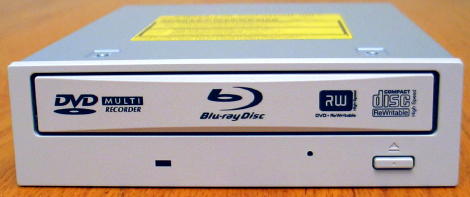
The drive supplied was OEM version
Now it's time to take a look at the drive itself:

Drive with Ivory front panel
With the Ivory front panel, the drive tray has a nice appearance. On the tray we can see a DVD Multi Recorder logo, Blu-ray logo, DVD Alliance logo, and Compact Disc High Speed ReWritable logo. Below the tray is a Blue LED indicator, an emergency eject hole, and finally an eject button.

Top

Drive Sticker
On the top of the drive we found a sticker that shows it was made in Japan.

Bottom

Drive Right

Drive Left

Rear
The rear connectors from right to left are a 4-pin Power Connector, a 40-pin Interface Connector, a 6-pin Master/Slave/Cable Select jumper, a 4-pin Analog Audio Connector and a 2-pin Not Used Connector. Note: CD-DA digital data is available through the IDE interface.
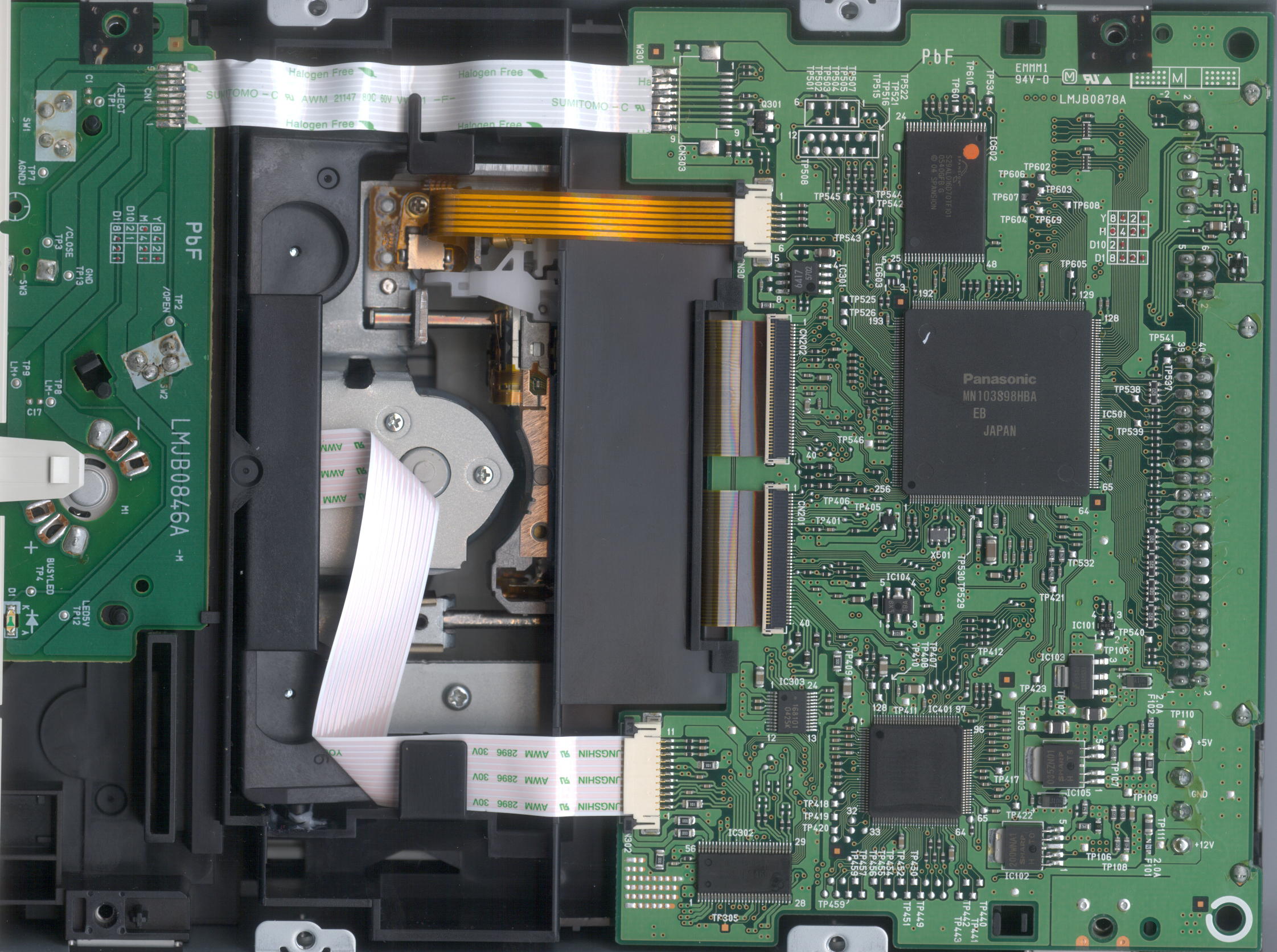

Panasonic MN103S98HBA chipset
Now, let us connect the drive and check out the features and writing technology on the next page…
Test machine:
For this review we will be using a computer with the following configuration:
Hardware:
Motherboard: ASUS P5W DH Deluxe WI-FI/AP
Processor: Intel Pentium 4 3.0GHz with Hyper Threading support
Memory: 2 GB Corsair XMS2 DDR2-800 PC2-6400
Video: Nvidia GeForce 7600 GT / ATI X850XT Platinum Edition
Display: Dual Dell 1704FPT (DVI)
Sound: Realtek ALC882 High Definition
Hard disks: 160GB Seagate SATA-II, 300GB Seagate SATA-II, 300GB Maxtor SATA.
System set-up:

The Panasonic SW-5582 was connected as Primary Master and identified itself as MATSHITA BD-MLT SW-5582. DMA (Direct Memory Access) was enabled for all devices.

The Panasonic SW-5582, which is connected as Primary IDE Channel in Device 0 (Master), supports the faster type of DMA transfer mode of 'Ultra DMA Mode 4."
Software:
Windows XP Professional is installed on the computer along with Service Pack 2 for Windows XP. We will be using the following software in this review:
- Nero Burning ROM 7.2.3.2b
- Nero CD/DVD Speed 4.51.3/4.53.3 beta/4.60.1 beta
- Nero Info Tool v4.03
- DVD Identifier 4.3.0
- Slysoft CloneCD v5.2.9.1
- Exact Audio Copy v0.95 beta 3
- K-Probe v2.5.2
Installation and supported features:
We installed the drive without any problems and here is a screenshot from Nero InfoTool:

The drive came with firmware B096 and for this review we flashed the drive using a newer firmware, version BZC3. The drive uses a 2MB buffer for DVD and 8MB for BD. It is reported as AACS compliant.
And another shot from Nero Burning ROM:

Disc Writing Technology:
Now it's time to take a closer look at the write technology used by the Panasonic SW-5582:
CD-Recordable:

The Panasonic SW-5582 uses Z-CLV, (Zone-Constant Linear Velocity), to write at its maximum speed of 24X. This gives an average speed of 19.54x and writing time of 4 minutes and 43 seconds.
CD-Rewritable:

The Panasonic SW-5582 uses Z-CLV (Zone - Constant Linear Velocity) to write CD-RW media at its maximum speed of 16x, with an average write speed of 15.59x and writing time of 5 minutes and 14 seconds.
8x DVD+R Writing speed:

The Panasonic SW-5582 uses Z-CLV (Zone - Constant Linear Velocity) to write DVD+R at the maximum supported speed of 8x. This gives an average write speed of 6.78x and a writing time of 9 minutes 7 seconds.
8X DVD-R Writing speed:

The Panasonic SW-5582 uses Z-CLV (Zone - Constant Linear Velocity) to write DVD-R at the maximum supported speed of 8x. This gives an average write speed of 6.79x and a writing time of 9 minutes 8 seconds.
8X DVD+RW writing speed:

The Panasonic SW-5582 uses Z-CLV (Zone-Constant Linear Velocity) to write DVD+RW at 8x. The average speed is 6.87x and total writing time is 8:32 minutes.
6X DVD-RW writing speed:

The Panasonic SW-5582 uses CLV (Constant Linear Velocity) to write DVD-RW at 6x. The average speed is 5.93x and total writing time is 10:04 minutes.
4X DVD+R DL writing speed:

The Panasonic SW-5582 uses CLV (Constant Linear Velocity) to write DVD+R DL at 4x. The average speed is 3.93x and total writing time is 27:08 minutes.
4X DVD-R DL writing speed:

The Panasonic SW-5582 uses CLV, (Constant Linear Velocity) to write DVD-R DL at 4x. The average speed is 3.94x and total writing time is 27:40 minutes.
5x DVD-RAM writing speed:
According to the specifications the Panasonic SW-5582 should be able to write DVD-RAM media at 5x.
For this test we used Nero CD-DVD Speed to create a test disc. To test the drives maximum write speed, we turned off 'Write and verify."

The Panasonic SW-5582 uses CLV (Constant Linear Velocity) to write DVD-RAM at its maximum speed of 5x. This resulted in an average write speed of 4.95x and a total write time of 11 minutes and 9 seconds.
2x BD-R (Single Layer) writing speed:
According to the specifications the Panasonic SW-5582 should be able to write BD-R 25GB Single Layer media at 2x.

The Panasonic SW-5582 uses CLV (Constant Linear Velocity) to write BD-R at its maximum speed of 2x. This resulted in an average write speed of 1.99x and a total write time of 45:12 minutes.
2x BD-RE (Single Layer) writing speed:
According to the specifications the Panasonic SW-5582 should be able to write BD-RE 25GB Single Layer media at 2x.

The Panasonic SW-5582 uses CLV (Constant Linear Velocity) to write BD-R at its maximum speed of 2x. This resulted in an average write speed of 1.99x and a total write time of 45:15 minutes.
Book type (bitsetting):
The Panasonic SW-5582 does not supports bitsetting on DVD+R, DVD+RW nor DVD+R DL. Hopefully this can be fixed via firmware update.

Bitsetting is not supported
Let's continue to the next page where we will examine the reading performance...
Reading Performances:
For these tests we will use Nero CD/DVD-Speed to read various CD, DVD and BD media. As already mentioned in the introduction, this drive supports:
- BD : 2x
- DVD : 8x
- CD : 32x
CD-ROM pressed discs:
For this test we used an original pressed CD-ROM disc containing the Ulead DVD MovieFactory 5 that is about 67 minutes in length.

The Panasonic SW-5582 reads CD-ROM at 32x, with average 24.90x and read time 2:50 minutes.
CD-Recordable Discs:
For this test we used a Data CD-R that was made using Nero CD-DVD Speed 'create data disc". The disc we used was a Verbatim 52x certified CD-R disc.

The Panasonic SW-5582 reached 32x when reading a full CD-R disc with average speed of 25.31x and a total read time of 3:19 minutes.
CD-Rewritable discs:
Again, we made a Data CD with Nero CD-DVD Speed 'create data disc". This time we used a Verbatim Ultra Speed (32X) CD-RW.

The drive reads CD-RW discs at 24x speed.
Audio '? Digital Audio Extraction:
To test the digital audio extraction performance of the Panasonic SW-5582, again we used Nero CD-DVD Speed to measure the transfer rate. The audio disc we used is 76 minutes in length (76:04.45).

The Panasonic SW-5582 reached 24x reading Audio-CD.
Advanced audio '? EAC test:
For this test we used EAC (Exact Audio Copy) to test the drive's audio extraction performance. As we can see from the screenshot below the drive supports accurate stream and audio caching.

Below are the results produced by EAC:

Burst mode

Secure mode
The drive performed slow in burst mode and secure mode.
Advanced audio '? DAE quality test:
For this test we used the 'Advanced DAE Quality Test" feature in Nero CD-DVD Speed. The CD-R media we used is a 40x certified Memorex Music CD-R made by Ritek. (Thanks to Memorex USA for sending us this media.)


The extracting quality is excellent, but the drive performed a little slow in this test.
DVD reading performance:
Again, we will use Nero CD-Speed to measure the reading performance, this time for various types of DVD discs.
DVD '? DVD-Video:
For our DVD reading performance tests we are going to start with a Single and Double Layered DVD video discs. While only 1X speed is required to watch DVD movies, it's useful to be able to read the discs at higher speeds if you're going to extract (rip) the content of the disc to your hard drive.

DVD-Video Single Layer

DVD-Video Double Layer
The Panasonic SW-5582 is riplocked and reads a pressed DVD-Video (CSS) at up to 6x for a Single Layer disc, and at up to 8x for a Double Layer disc
DVD '? DVD+R(W):
For this test we used a Verbatim 16x DVD+R and a Verbatim 8x DVD+RW with 4.38GB of data. (Thanks to Verbatim USA for sending us this media.) Below are the results:

DVD+R

DVD+RW
The drive is locked and reads DVD+R and DVD+RW at 8x speed.
DVD '? DVD-R/RW:
For this test we used a Verbatim 16X DVD-R disc and a Verbatim 6X DVD-RW disc filled with 4.38GB of data (Thanks to Verbatim USA for sending us this media). Our test results are found below:

DVD-R

DVD-RW
The drive is locked and reads DVD-R and DVD-RW at 8x speed.
DVD '? DVD±R DL:
For this test we used a Verbatim 8x DVD+R DL disc and a Ridata 6X DVD-R DL disc filled with 4.38GB of data (Thanks to Verbatim USA and Advanced Media/Ridata for sending us these discs). Our test results are found below:

DVD+R DL

DVD-R DL
Again the drive is locked and reads DVD+R DL and DVD-R DL at 8x speed.
DVD '? DVD-RAM:
For this test we used a Maxell 5x DVD-RAM filled with 4.27GB of data (Thanks to Maxell USA for sending us this media). Our test results are found below:

DVD-RAM
The Panasonic SW-5582 reads DVD-RAM at 5x without any problems.
BD '? BD-ROM:
For this test we used a Single Layer BD-ROM disc filled with 23.19GB of data. Our test results are found below:

BD-ROM (Single Layer)
The Panasonic SW-5582 reads BD-ROM at 2x without any problems.
BD '? BD-R SL:
For this test we used a Verbatim BD-R media filled with 22.56GB of data (Thanks to Verbatim USA for sending us this media). Our test results are found below:

BD-R SL
The Panasonic SW-5582 reads BD-R Single Layer 25GB at 2x without any issue.
BD '? BD-RE SL:
For this test we used a Verbatim BD-RE media filled with 22.56GB of data. (Thanks to Verbatim USA for sending us this media.) Our test results are found below:

BD-RE SL
The Panasonic SW-5582 reads BD-RE Single Layer 25GB at 2x without any issues.
Now it's time to head on to a more interesting part: Writing CD-R and CD-RW discs…
The specifications of Panasonic SW-5582 state that the drive is able to write CD-R discs at 24x and CD-RW discs at 16x. Let us find out how the drive really performs in speed and quality.
Writing Quality with CD-R discs:
For our data writing tests, we simply set up a new compilation of about 702Mb using Nero Burning ROM software. Writing method used is DAO (Disc At Once), and the disc is set up as a non-multisession disc with 'finalize disc" enabled. The screenshot below shows how long it takes to write a disc at the highest speed (24x):

The drive took 4 minutes and 46 seconds to write the disc at 24x.
Write Quality:
We will test CD-R discs from different CD-R manufacturers. To really measure the write speed, we used the 'create data CD" function in Nero CD-DVD Speed. The discs were written at the maximum speed that the drive supports. For the quality test, we used K-Probe 2 which is a tool developed by a Lite-On employee. It runs under Windows and works with drives made by Lite-On. Also note that different drives and different reading speeds may affect the results obtained when scanning the discs. We used a Lite-On LTR-40125S drive with firmware ZS0R and scanned the discs at 48X speed.
A written CD-R disc will always have some C1 errors; C1 errors are easily corrected by the drive's error correction capabilities. The next level of errors is C2, while C2 errors could also be corrected by most drive's error correction capabilities; they are not wanted on a good quality disc. A good disc should not contain any C2 errors, and preferably have an average C1 error amount of below 2.0 for the best quality discs, or at least below 10.0 C1 average for good quality discs. After C2 errors, there are only un-correctable errors that will make a disc unusable.
In short, our analysis will be based on these guideline to determine the quality of the burned disc:
CD-R/RW quality scan guideline
|
Average C1 |
C2 |
Quality |
|
2 and lower |
0 |
Best |
|
10 and lower |
0 |
Good |
|
Above 10 |
exist |
Poor |
And below are the obtained results:


|
Brand: |
Verbatim '? DataLifePlus (Thanks to Verbatim USA for providing) |
|
Manufacturer: |
Mitsubishi Chemicals Corporation |
|
Code: |
97m34s23f |
|
Disc Type: |
CD-R |
|
Recording Layer: |
Dye Type 3: Long Strategy (Cyanine or AZO) |
|
Capacity: |
79:59.73 (703MB) |
|
Certified Speed: |
52x |
|
Write Speed: |
24x (Z-CLV) |
|
Write Time: |
4m:43s |
|
C1 Average/Sec: |
5.41 |
|
C2 Average/Sec: |
0.00 |
Verbatim DataLifePlus CD-R media with its average C1 errors of 5.41 goes in the 'good quality discs" category.


|
Brand: |
Fujifilm |
|
Manufacturer: |
Taiyo Yuden |
|
Code: |
97m24s01f |
|
Disc Type: |
CD-R |
|
Recording Layer: |
Dye Type 1: Long Strategy (Cyanine, AZO) |
|
Capacity: |
79:59.72 (703MB) |
|
Certified Speed: |
48x |
|
Write Speed: |
24x (Z-CLV) |
|
Write Time: |
4m:44s |
|
C1 Average/Sec: |
3.07 |
|
C2 Average/Sec: |
0.0 |
Media made by Taiyo Yuden with the average C1 errors of 3.07 goes into the group 'good quality discs" category.


|
Brand: |
Maxell (Thanks to Maxell USA for sending us this media) |
|
Manufacturer: |
Prodisc |
|
Code: |
97m32s19f |
|
Disc Type: |
CD-R |
|
Recording Layer: |
Dye Type 9: Short Strategy (Phthalocyanine) |
|
Capacity: |
79:59.70 (703MB) |
|
Certified Speed: |
48x |
|
Write Speed: |
24x (Z-CLV) |
|
Write Time: |
4m:43s |
|
C1 Average/Sec: |
2.44 |
|
C2 Average/Sec: |
0.0 |
This Maxell media burns very well and goes into the category 'good quality discs" for its C1 average of 2.44.


|
Brand: |
Memorex (Thanks to Memorex USA for providing) |
|
Manufacturer: |
Ritek |
|
Code: |
97m15s17f |
|
Disc Type: |
CD-R |
|
Recording Layer: |
Dye Type 7: Short Strategy (Phthalocyanine) |
|
Capacity: |
79:59.70 (703MB) |
|
Certified Speed: |
48x |
|
Write Speed: |
24x (Z-CLV) |
|
Write Time: |
4m:44s |
|
C1 Average/Sec: |
4.58 |
|
C2 Average/Sec: |
0.0 |
This Memorex media goes into the category 'good quality discs" for its C1 average of 4.58.


|
Brand: |
Sony |
|
Manufacturer: |
Sony Corporation |
|
Code: |
97m24s16f |
|
Disc Type: |
CD-R(B-) |
|
Recording Layer: |
Dye Type 6: Short Strategy (Phthalocyanine) |
|
Capacity: |
79:59:74 (702.80 MB) |
|
Certified Speed: |
48x |
|
Write Speed: |
24x (Z-CLV) |
|
Write Time: |
4m:43s |
|
C1 Average/Sec: |
1.57 |
|
C2 Average/Sec: |
0.00 |
Sony media '? An excellent result with C1 average of 1.57.


|
Brand: |
Staples |
|
Manufacturer: |
Moser Baer India Limited |
|
Code: |
97m17s06f |
|
Disc Type: |
CD-R |
|
Recording Layer: |
Dye Type 6: Short Strategy (Phthalocyanine) |
|
Capacity: |
79:59.74 (703MB) |
|
Certified Speed: |
48x |
|
Write Speed: |
12x (CLV) |
|
Write Time: |
7m:06s |
|
C1 Average/Sec: |
7.58 |
|
C2 Average/Sec: |
0.0 |
Staples media '? manufactured by Moser Baer India Limited and with C1 average of 7.58 it goes in the 'good quality discs" category.
Writing Quality with CD-RW discs:
We will add a few write quality tests with re-writable media. Settings and testing procedures is the same as used earlier in this review, so you may want to go back and read them if you are unsure. All discs used for these tests are new and have not been written to before.


|
Brand: |
Verbatim '? Thanks to Verbatim USA for sending us this media |
|
Manufacturer: |
Mitsubishi Chemicals Corporation |
|
Code: |
97m34s25f |
|
Disc Type: |
Ultra Speed CD-RW 32x |
|
Recording Layer: |
Phase Change |
|
Capacity: |
74:43.00 (656.40MB) |
|
Certified Speed: |
32x |
|
Write Speed: |
16x (Z-CLV) |
|
Write Time: |
5m:14s |
|
C1 Average/Sec: |
1313.00 |
|
C2 Average/Sec: |
0.01 |
Very high C1 errors and unwanted C2 errors exist.


|
Brand: |
Memorex '? Thanks to Memorex for providing us this media |
|
Manufacturer: |
Infodisc Technology Co., Ltd. |
|
Code: |
97m25s31f |
|
Disc Type: |
Ultra Speed CD-RW 24x |
|
Recording Layer: |
Phase Change |
|
Capacity: |
79:59.73 (702.83MB) |
|
Certified Speed: |
24x |
|
Write Speed: |
12x (CLV) |
|
Write Time: |
7m:06s |
|
C1 Average/Sec: |
2199.00 |
|
C2 Average/Sec: |
225.60 |
C1 errors are extremely high and unwanted C2 errors exist.
Summary:
The Panasonic SW-5582 is a good CD-R writer that will write CD-R media with good to excellent results. On the other hand, on all CD-RW media we have tested, the writing quality is poor.
Head on to next page and read about DVD-Writing performance and DVD media compatibility…
The specifications of this drive tell us that it should write DVD±R at 8x, DVD+RW at 8x, and DVD-RW at 6x. In this part, we will measure the write time for various types of DVD+R/RW and DVD-R/RW discs. We will also focus on write quality and media compatibility.
DVD-Writing Performances:
First, let us see how long of a time it needs to create a disc with Nero. We used Nero Burning Rom to set up a new UDF/ISO compilation containing 4482Mb (4.38GB) of data, and started the write process. We used the Disc-At-Once write method.

DVD+R

DVD-R
The DVD+R disc was finished in 9 minutes and 10 second, while the DVD-R disc was finished in 9 minutes and 16 seconds. Both discs are written at 8x.
Write Quality:
You should first notice that this is not a scientific and professional way to test the discs. But according to our testing done in recent months, we would conclude that there is a clear link between the quality reported when scanning the disc and the playability of the disc in different devices. Also notice that different drives report different amounts of errors. K-Probe was designed to work with Lite-On DVD-Writers. So we recommend using a DVD-Writer from Lite-On, in this test we use a Lite-On SOHW-1693S DVD-Writer, as already said; remember that scans done with a Lite-On DVD-ROM or Lite-On combo drive can't be compared with the results obtained with a Lite-On DVD-Writer. Also remember that different PI/PO ECC sum settings along with different reading speeds in K-Probe will affect the result, we use these settings; PI (Parity Inner) set to summarize 8 ECC blocks, PIF (Parity Inner Failures) set to summarize 1 ECC block, reading speed: 4X CLV (Constant Linear Velocity). Setting the PI sum to 8 and the PIF sum to 1 will give a result that we may compare to the standards for DVD+R/RW and DVD-R/RW.
But what is a good scan? That is a discussion that we don't think will end soon, as different drives report different amount of errors, some players are more picky about media than others, and so on. But as a comparison we present you with a scan from two pressed DVD discs:

This scan above shows the results from a pressed, Single Layer DVD-Video disc.

This next scan shows the result from a pressed Double Layer DVD-Video disc. Notice the error jump when shifting to the second layer (the error levels jump from the end of the first layer to the beginning of the second layer).
If you read below you will see that both the pressed DVD-discs above are well within the standards.
If you want to look at the standards for yourself, download the ECMA 267 Standard for DVD-ROM, the ECMA 337 Standard for DVD+R/RW and the ECMA 338 Standard for DVD-R/RW at http://www.ecma-international.org. Here is some data from the ECMA standards (same for DVD-ROM, DVD-R/RW and DVD+R/RW):
Random errors:
A row of an ECC Block that has at least 1 byte in error constitutes a PI error. In any 8
consecutive ECC Blocks the total number of PI errors before correction shall not exceed 280.
Here we see that a PI error is defined as a row in an ECC block having 1 byte or more containing errors and that the sum of PI errors in 8 ECC blocks after each other should not exceed 280 PI errors.
But what is a row and what is an ECC block? Again we refer to the ECMA standards. We do not copy and paste everything, but if you're interested, look in the ECMA standards. A row is 182 bytes long where the last 10 bytes contain PI (Parity Inner) information. An ECC block is 208 rows long where the last 16 rows contain the PO (Parity Outer) information. This gives us a maximum possible PI error amount of 208 errors per block and for 8 blocks after each other this sum is of course 8 times higher, giving a maximum possible amount of 1664 PI-8 errors. In practical use, a disc with 1664 PI-8 errors is unreadable.
According to our tests the specified max PI-8 sum of 280 for good discs seems to be a good guideline, as some readers have problems reading discs when the PI-8 errors is over 300 and most players starts to have problems when the PI-8 error level reaches 600 or more.
But what are the PIF errors that K-Probe reports? They are Parity Inner Failures, meaning errors left after PI correction. Only the ECMA 337 standard describes the Parity Inner Failures. So how is a Parity Inner Failure defined? Here is what the ECMA 337 states:
'If a row of an ECC Block as defined in 13.3 contains more than 5 erroneous bytes, the row is said to be 'PI-uncorrectable"."
In theory, an ECC block may in the worst case have 208 PIF since every ECC block is 208 rows long. But the ECMA 337 standard goes further and specifies the max amount of accepted PI Failures (uncorrectable errors) allowed on a good disc:
'In any ECC Block the number of PI-uncorrectable rows should not exceed 4."
This means that when the PIF sum is set to 1, the maximum error value should not exceed 4. The theoretical maximum value for PIF is 208 errors.
But what makes a disc unreadable? A POF (Parity Outer Failure) error will make the disc unreadable, but K-Probe does not display the POF's.
Notice that there are other aspects such as disc reflectivity, tracking errors and so on that also will affect the readability of a DVD disc '? but for this we do not have measuring equipment available.
Also, another note is that we have scanned the discs at 4X CLV speed, by lowering the speed to 2X(DVD-R/RW)/2.4X(DVD+R/RW) or 1X the amount of reported errors may drop on some discs. We scanned at 4X CLV due to lower speeds taking too much time.
To see if there is a connection between the reported amount of errors and readability of the discs we also include the reading curve from a NEC ND-4570A DVD-Writer. A small speed reduction near the end is still accepted on good discs, but serious reading problems or reading failures is a bad sign.
Easier explanation on how to read the test results.
Maybe this got too technical, and you are wondering what to look for in KProbe reports?
Use this as a guideline for good discs:
- PI (Parity Inner): No larger areas on the disc should exceed 280 PI-8 errors, do not worry too much about high single spikes that exceed 280.
- PIF (Parity Inner Failures): No larger areas on the disc should exceed 4 PIF-1 errors, do not worry too much about high single spikes that exceed 4.
And as always: the lower is better. 
Also look at the reading curve; if it looks clean with no dips it should be good, a small slowdown near the end is accepted.
DVD+R media compatibilty and write quality:
In these tests we will be using a Lite-On SHM-165P6S drive with firmware MS0N/MS0P along with K-Probe to measure the disc quality. We will also be using the NEC ND-4570A with firmware 1.02 for our read-back tests.


|
Brand: |
Verbatim '? Thanks to Verbatim USA for providing this media. |
|
Manufacturer: |
Mitsubishi Chemicals Corporation |
|
Code: |
MCC 004 |
|
Disc Type: |
DVD+R |
|
Capacity: |
4483MB |
|
Certified Speed: |
16x |
|
Write Speed: |
8x |
|
Write Time: |
9m:067 |
|
PI-8 errors Average/Sec: |
1.47 |
|
PI-1 failures (PIF) Avg/Sec: |
0.01 |
Although the drive burned this 16x rated Verbatim media at 8x, it produced excellent write quality, highly recommended!


|
Brand: |
Taiyo Yuden |
|
Manufacturer: |
Taiyo Yuden |
|
Code: |
YUDEN000T03 |
|
Disc Type: |
DVD+R |
|
Capacity: |
4483MB |
|
Certified Speed: |
16x |
|
Write Speed: |
8x |
|
Write Time: |
9m:08s |
|
PI-8 errors Average/Sec: |
30.89 |
|
PI-1 failures (PIF) Avg/Sec: |
0.04 |
The media was burned with good result and smooth Transfer Rate test showing no problem during playback.


|
Brand: |
Sony |
|
Manufacturer: |
Sony Corporation |
|
Code: |
SONYD21 |
|
Disc Type: |
DVD+R |
|
Capacity: |
4483MB |
|
Certified Speed: |
16x |
|
Write Speed: |
8x |
|
Write Time: |
9m:01s |
|
PI-8 errors Average/Sec: |
2.48 |
|
PI-1 failures (PIF) Avg/Sec: |
0.10 |
The quality scan is very nice with smooth read-back curve.


|
Brand: |
Memorex - Thanks to Memorex USA for providing this media. |
|
Manufacturer: |
Ricoh Company Limited |
|
Code: |
RICOHJPN R03 |
|
Disc Type: |
DVD+R |
|
Capacity: |
4483MB |
|
Certified Speed: |
16x |
|
Write Speed: |
8x |
|
Write Time: |
9m:09s |
|
PI-8 errors Average/Sec: |
13.32 |
|
PI-1 failures (PIF) Avg/Sec: |
0.02 |
There are some PIF error spikes at the end and Transfer Rate curve confirm there are problems around the end of the disc. We would say that this is due to our media sample.


|
Brand: |
Fujifilm |
|
Manufacturer: |
Prodisc Technology Inc. |
|
Code: |
PRODISCR05 |
|
Disc Type: |
DVD+R |
|
Capacity: |
4483MB |
|
Certified Speed: |
16x |
|
Write Speed: |
6x |
|
Write Time: |
10m:19s |
|
PI-8 errors Average/Sec: |
2.70 |
|
PI-1 failures (PIF) Avg/Sec: |
0.12 |
Another good result with no read-back problem. However it burned this media at 6x.


|
Brand: |
Maxell '? Thanks to Maxell USA for sending this media. |
|
Manufacturer: |
Maxell |
|
Code: |
MAXELL002 |
|
Disc Type: |
DVD+R |
|
Capacity: |
4483MB |
|
Certified Speed: |
8x |
|
Write Speed: |
8x |
|
Write Time: |
7m:16s |
|
PI-8 errors Average/Sec: |
0.90 |
|
PI-1 failures (PIF) Avg/Sec: |
0.04 |
The result is very good with smooth read-back curve.


|
Brand: |
Sony |
|
Manufacturer: |
Taiyo Yuden |
|
Code: |
YUDEN000 T02 |
|
Disc Type: |
DVD+R |
|
Capacity: |
4483MB |
|
Certified Speed: |
8x |
|
Write Speed: |
8x |
|
Write Time: |
8m:59s |
|
PI-8 errors Average/Sec: |
0.76 |
|
PI-1 failures (PIF) Avg/Sec: |
0.01 |
A spectacular burn as expected from Taiyo Yuden media.
DVD+ReWritable media:
The Panasonic SW-5582 supports writing to DVD+RW discs at maximum 8x speed.


|
Brand: |
Verbatim '? Thanks to Verbatim USA for sending us the media. |
|
Manufacturer: |
Mitsubishi Chemicals Corporation |
|
Code: |
MKM A03 |
|
Disc Type: |
DVD+RW |
|
Capacity: |
4483MB |
|
Certified Speed: |
8x |
|
Write Speed: |
8x |
|
Write Time: |
9m:16s |
|
PI-8 errors Average/Sec: |
2.53 |
|
PI-1 failures (PIF) Avg/Sec: |
0.03 |
Very good burn with this Verbatim media.


|
Brand: |
RiDATA '? Thanks to Advanced Media/Ritek USA for sending us the media. |
|
Manufacturer: |
RiTEK Corporation |
|
Code: |
RITEK 008 |
|
Disc Type: |
DVD+RW |
|
Capacity: |
4483MB |
|
Certified Speed: |
8x |
|
Write Speed: |
6x |
|
Write Time: |
10m:27s |
|
PI-8 errors Average/Sec: |
82.61 |
|
PI-1 failures (PIF) Avg/Sec: |
0.05 |
Although PIE errors are high but PIF errors are very good and our NEC drive has no problem reading back the disc. Note that the drive burns this media at 6x maximum.
On the next page you will find the DVD-R/RW writing results...
DVD-R Media Write Quality:
In these tests we will be using a Lite-On SHM-165P6S drive with firmware MS0P along with K-Probe to measure the disc quality. We will also be using the NEC ND-4570A with firmware 1.02 for our read-back tests. Please read the previous page if you need explanations on how to interpret the write quality results.


|
Brand: |
Verbatim '? thanks to Verbatim USA for providing this media |
|
Manufacturer: |
Mitsubishi Chemicals Company |
|
Code: |
MCC03RG20 |
|
Disc Type: |
DVD-R |
|
Capacity: |
4489MB |
|
Certified Speed: |
16x |
|
Write Speed: |
8x |
|
Write Time: |
9m:08s |
|
PI-8 errors Average/Sec: |
1.69 |
|
PI-1 failures (PIF) Avg/Sec: |
0.00 |
The drive produces an excellent write quality with this Verbatim media.


|
Brand: |
Taiyo Yuden unbranded |
|
Manufacturer: |
Taiyo Yuden |
|
Code: |
TYG03 |
|
Disc Type: |
DVD-R |
|
Capacity: |
4489MB |
|
Certified Speed: |
16x |
|
Write Speed: |
8x |
|
Write Time: |
9m:08s |
|
PI-8 errors Average/Sec: |
16.59 |
|
PI-1 failures (PIF) Avg/Sec: |
0.01 |
Good quality scan and no read back problem.


|
Brand: |
Memorex '? Thanks to Memorex USA for providing the media |
|
Manufacturer: |
CMC Magnetics Corporation |
|
Code: |
CMCMAG AM3 |
|
Disc Type: |
DVD-R |
|
Capacity: |
4489MB |
|
Certified Speed: |
16x |
|
Write Speed: |
8x |
|
Write Time: |
9m:08s |
|
PI-8 errors Average/Sec: |
7.48 |
|
PI-1 failures (PIF) Avg/Sec: |
0.09 |
Very good quality scan and no read-back problems.


|
Brand: |
RiData '? Thanks to Advanced Media/RiDATA for sending us this media. |
|
Manufacturer: |
Ritek |
|
Code: |
RITEK F1 |
|
Disc Type: |
DVD-R |
|
Capacity: |
4489MB |
|
Certified Speed: |
16x |
|
Write Speed: |
8x |
|
Write Time: |
9m:08s |
|
PI-8 errors Average/Sec: |
37.86 |
|
PI-1 failures (PIF) Avg/Sec: |
0.04 |
An increase of PIE/PIF errors at the end of the disc and a single dip in Transfer rate test should not be a problem.


|
Brand: |
Sony |
|
Manufacturer: |
Sony Corporation |
|
Code: |
SONY 16D1 |
|
Disc Type: |
DVD-R |
|
Capacity: |
4489MB |
|
Certified Speed: |
16x |
|
Write Speed: |
8x |
|
Write Time: |
9m:08s |
|
PI-8 errors Average/Sec: |
2.80 |
|
PI-1 failures (PIF) Avg/Sec: |
0.02 |
Excellent quality scan and no problem during read-back.


|
Brand: |
Fujifilm |
|
Manufacturer: |
Taiyo Yuden |
|
Code: |
TYG02 |
|
Disc Type: |
DVD-R |
|
Capacity: |
4489MB |
|
Certified Speed: |
8x |
|
Write Speed: |
8x |
|
Write Time: |
9m:08s |
|
PI-8 errors Average/Sec: |
8.37 |
|
PI-1 failures (PIF) Avg/Sec: |
0.01 |
Another excellent write quality.


|
Brand: |
Memorex |
|
Manufacturer: |
CMC Magnetics Corporation |
|
Code: |
CMCMAG.AE1 |
|
Disc Type: |
DVD-R |
|
Capacity: |
4489MB |
|
Certified Speed: |
8x |
|
Write Speed: |
8x |
|
Write Time: |
9m:08s |
|
PI-8 errors Average/Sec: |
2.19 |
|
PI-1 failures (PIF) Avg/Sec: |
0.03 |
A rise in PIF errors at the end of the disc but transfer rate test is smooth.
DVD-ReWritable media:


|
Brand: |
Verbatim '? Thanks to Verbatim USA for sending us this media. |
|
Manufacturer: |
Mitsubishi Chemicals Corporation |
|
Code: |
MKM 01RW6X01 |
|
Disc Type: |
DVD-RW |
|
Capacity: |
4483MB |
|
Certified Speed: |
6x |
|
Write Speed: |
6x |
|
Write Time: |
10m:04s |
|
PI-8 errors Average/Sec: |
78.35 |
|
PI-1 failures (PIF) Avg/Sec: |
0.17 |
Given that the media has been written a few times, the drive produces an acceptable quality burn with this Verbatim media.


|
Brand: |
RiDATA '? Thanks to Advanced Media/Ritek USA for sending us this media. |
|
Manufacturer: |
Ritek Corporation |
|
Code: |
RITEK W06 |
|
Disc Type: |
DVD-RW |
|
Capacity: |
4483MB |
|
Certified Speed: |
6x |
|
Write Speed: |
4x |
|
Write Time: |
14m:58s |
|
PI-8 errors Average/Sec: |
10.02 |
|
PI-1 failures (PIF) Avg/Sec: |
0.24 |
Again the drive produces a good quality burn. However, it burned the media at 4x write speed.
Head on to next page and read about DVD+R DL and DVD-R DL compatibility and write quality...
DVD+R Double Layer Writing Speed and Quality:
The Panasonic SW-5582 supports the DVD+R DL standard for writing Double Layer discs with an approximate size of 8.5 GB and a writing speed of 4x.
Testing procedure: We created an ISO Image from a pre-authored DVD-Video compliant file set, with a total on-disc size of 8145 MB. We then wrote this image file using Nero Burning ROM 7. The transfer rate test to check if there is any read-back problem is done with BenQ DW1655 drive and/or Plextor PX-712A. Below are the results:


|
Brand: |
Verbatim '? Thanks to Verbatim USA for providing the media. |
|
Manufacturer: |
Mitsubishi Chemicals Corporation (Singapore) |
|
Code: |
MKM 003 |
|
Disc Type: |
DVD+R DL |
|
Capacity: |
8152MB |
|
Certified Speed: |
8x |
|
Write Speed: |
4x |
|
Write Time: |
27m:28s |
|
PI-8 errors Average/Sec: |
1.95 |
|
PI-1 failures (PIF) Avg/Sec: |
0.07 |
Great scan with smooth transfer rate curves!


|
Brand: |
Verbatim '? Thanks to Verbatim USA for providing the media. |
|
Manufacturer: |
Mitsubishi Kagaku Media (Singapore) |
|
Code: |
MKM 001 |
|
Disc Type: |
DVD+R DL |
|
Capacity: |
8152MB |
|
Certified Speed: |
2.4x |
|
Write Speed: |
4x |
|
Write Time: |
27m:11s |
|
PI-8 errors Average/Sec: |
6.66 |
|
PI-1 failures (PIF) Avg/Sec: |
0.06 |
The drive is able to overspeed this media and burn it at 4x. There is a single PIF spike of 5 but read-back test shows no problem. Good result.


|
Brand: |
RiDATA '? Thanks to Advanced Media/Ritek USA for providing this media. |
|
Manufacturer: |
Ritek Corporation |
|
Code: |
RITEK D01 |
|
Disc Type: |
DVD+R DL |
|
Capacity: |
8152MB |
|
Certified Speed: |
2.4x |
|
Write Speed: |
2.4x |
|
Write Time: |
- |
|
PI-8 errors Average/Sec: |
- |
|
PI-1 failures (PIF) Avg/Sec: |
- |
The drive failed to burn this media. We tried it with both Nero Burning ROM 7 and Nero CD-DVD Speed's burn image feature.
DVD-R Dual Layer writing speed and quality:
The Panasonic SW-5582 supports the DVD-R DL standard for writing Dual Layer discs with a size around 8.5 GB at a writing speed of 4x.
Testing procedure: We use Nero CD-DVD create disc and we also created an ISO Image from a pre-authored DVD-Video compliant file set. The total on-disc size was approximately 8145 MB. We then wrote this image file using Nero Burning ROM 7. The transfer rate test to check if there are any read-back problems is done with BenQ DW1655 and/or Plextor PX-712A drives. Below are the results:


|
Brand: |
Verbatim '? Thanks to Verbatim USA for providing it. |
|
Manufacturer: |
Mitsubishi Kagaku Media (Singapore) |
|
Code: |
MKM 01RD30 |
|
Disc Type: |
DVD-R DL |
|
Capacity: |
8148MB |
|
Certified Speed: |
4x |
|
Write Speed: |
4x |
|
Write Time: |
27m:40s |
|
PI-8 errors Average/Sec: |
16.08 |
|
PI-1 failures (PIF) Avg/Sec: |
0.12 |
The result is excellent and no problem during read-back test.


|
Brand: |
RiDATA '? Thanks to Advanced Media/Ritek USA for sending us the media. |
|
Manufacturer: |
Ritek Corporation |
|
Code: |
RITEK P01 |
|
Disc Type: |
DVD-R DL |
|
Capacity: |
8148MB |
|
Certified Speed: |
4x |
|
Write Speed: |
4x |
|
Write Time: |
27m:57s |
|
PI-8 errors Average/Sec: |
30.50 |
|
PI-1 failures (PIF) Avg/Sec: |
0.34 |
The burn quality is not good and we can see problems during the transfer rate test.
Standalone DVD-Player compatibility:
We only have 2 standalone DVD-Players available to test the DVD+R DL media (Book Type: DVD+R DL) and the DVD-R DL media (Book Type: DVD-R):
- Pioneer DV-656A
- Koss DVP2161
Compatibility results:
|
Brand |
MID |
Pioneer |
Koss |
|
Verbatim 8x |
MKM003 |
OK |
OK |
|
Verbatim 2.4x |
MKM001 |
OK |
OK |
|
Verbatim 6x |
MKM01RD30 |
FROZE |
FAILED |
|
Ridata 4x |
RITEKP01 |
STOPPED |
FAILED |
The Verbatim DVD+R DL play nicely in both players. However, we can see there are problems with both DVD-R DL media types.
We would like to mention, that the compatibility issue with standalone DVD Players and the DVD-R DL media format is also caused by incompatibilities with the standalone devices used in this review, as we know the DVD-R DL format has inferior compatibility compared to DVD+R DL especially with older standalone players.
Summary: The Panasonic SW-5582 burns Verbatim DVD+R DL nicely but with other DL media it needs improvements.
Head on to next page and read about DVD-RAM writing quality and performance...
DVD-RAM Writing Speed and Quality:
The Panasonic SW-5582 supports writing and reading the DVD-RAM format. Let us look at the recording side of the disc, and as you can see it has differences from the other DVD+R/W/R9 DL and DVD-R/W discs.

On the data side, we can see a very fascinating pattern of lighter spots, supposedly these spots are used for calibration while writing and reading.
A DVD-RAM's disc can be formatted in the following formats: FAT32, UDF 1.02, UDF 1.50, UDF 2.00, UDF 2.01, and UDF 2.50.

By formatting a DVD-RAM disc with FAT32 it will act like a removable hard drive and all writing will be done as 'background processes". Meaning you do not have to wait for it to finish, you can start or work with other applications while the DVD-RAM is working without noticing any 'hangs" or CPU slowdowns.
Lets us take a look at how the drive performs:


Maxell branded 5x media manufactured by Maxell.
Thanks to Maxell USA for providing this media.
Writing Maxell 5x without verification

Writing Maxell 5x with verification
Transfer Rate test

As we can see, the Panasonic SW-5582 writes 5x DVD-RAM without any problem. It reads back the disc at 5x speed nicely and ScanDisc shows no read-back problems.
We will now run a disc quality scan on our burned media using the Lite-On SHM-165P6S and Nero CD-DVD Speed version 4.53.3 Beta. We would like to mention that this test should not be necessary under normal use of DVD-RAM media, as the drive will automatically check the disc for errors as it writes.


Verbatim branded 3x media manufactured by Matsushita.
Thanks to Verbatim USA for providing this media.

Writing Verbatim 3x without verification

Writing Panasonic 3x with verification

Transfer Rate test

No problem with writing 3x DVD-RAM. The drive read back the disc at 3x speed and ScanDisc shows no read-back troubles.
We will now run a disc quality scan on our burned media using the Lite-On SHM-165P6S and Nero CD-DVD Speed version 4.53.3 Beta. Again, this test should not be necessary under normal use of DVD-RAM media, as the drive will automatically check the disc for errors as it writes.

For those of you who are not familiar with DVD-RAM, you may probably think that something went wrong during the write process with the verification turned on, since the 3x and 5x media was written at 1.3x and 2x, respectively. But don't worry, that is pretty normal for DVD-RAM discs. The reason for the lower writing speed is that the drive constantly reads back the data after writing it to verify that it's written correctly. We can also call it a 'bullet proof" writing/verify technique, with no data loss/errors.
Head on to next page and read about the most interesting part: Blu-ray features and performance...
Blu-ray Features:
The Panasonic SW-5582 supports writing and reading the Blu-ray Discs (BD-R/BD-RE SL/DL) at a maximum 2x speed.
A Blu-ray Disc (BD) is a next generation optical disc format jointly developed by the Blu-ray Disc Association (BDA), a group of many leading consumer electronics, personal computer and media manufacturers. The format was developed to enable recording, rewriting and playback of High Definition (HD) video, as well as high capacity of data storage.
|
Parameters |
Blu-ray |
DVD |
|
Storage capacity |
25GB (single-layer) |
4.7GB (single-layer) |
|
Laser wavelength |
405nm (blue laser) |
650nm (red laser) |
|
Numerical aperture (NA) |
0.85 |
0.60 |
|
Disc diameter |
120mm |
120mm |
|
Protection layer |
0.1mm |
0.6mm |
|
Track pitch |
0.32µm |
0.74µm |
|
Data transfer rate (data) |
36.0Mbps (1x) 54.0Mbps (1.5x) |
11.08Mbps (1x) 10.08Mbps (<1x) |
|
Video resolution (max) Video bit rate (max) |
1920é?1080 (1080p) |
720é?480/720é?576 (480i/576i) |
|
Video codecs |
MPEG-2 |
MPEG-2 |
|
Audio codecs |
Linear PCM |
Linear PCM |
|
Interactivity |
BD-J |
DVD-Video |
More information on Blu-ray can be found in Blu-ray FAQ or from our own article: Blu-ray vs. HD-DVD by our CDFreaks staff members spath & H3rB3i.
Blu-ray Format Type:
Similar to DVD-RAM, a Blu-ray disc can be formatted in the following types: UDF 1.50, UDF 2.00, UDF 2.50, UDF2.60, and FAT32.
|
Disc Type |
Format Type |
||||
|
UDF1.5 |
UDF2.0 |
UDF2.5 |
UDF2.6 |
FAT32 |
|
|
BD-R |
é? |
é? |
é? |
¨ |
é? |
|
BD-RE |
O |
O |
¨ |
é? |
O |
|
DVD-RAM |
O |
¨ |
O |
é? |
O |
¨: Default O: Enable é?: Disable
Before using BD-R and BD-RE media for writing files on the disc, we must logically format the media. Once we have logically formatted BD-R or BD-RE disc, it can be use to write files just as you would do with a floppy disk, hard disk or DVD-RAM. In the illustration below we will use Panasonic UDF Formatter (DVDForm) version 5.1.1.0 to format a BD-RE disc.
|
Panasonic Blu-ray/DVD-RAM Driver |
|
|
Driver Software |
|
|
Format Software (DVDForm) |
- Version 5.1.1.0 |
|
Write Protect Tool (WPTool) |
- Version 2.0.1.0 |
|
RAM Assistance Tool (RAMASST) |
- Version 2.0.1.0 |

DVDForm offers several format types for BD-RE disc

It took 37 seconds to quick format a BD-RE disc in FAT32

BD-RE Single Layer discs formatted with FAT32
Now we will attempt to do a quick format on a BD-RE media with format type UDF2.5.

Formatting a BD-RE disc in UDF2.5

BD-RE Single Layer discs formatted with UDF2.5
In the above illustration, using DVDForm 5.1.1.0 for BD-RE disc we can select format types of UDF 1.50, UDF 2.00, UDF 2.50, and FAT32. Whereas for BD-R/BD-R DL discs only format type UDF2.60 is selectable.

Only Format type UDF2.60 is selectable for BD-R disc

We can only select UDF2.60 for BD-R DL disc.
Note: Once a BD-R disc has been formatted, we can write, add and delete files on the disc. However, if we delete a file, the free space of a disc will not increase. Only a blank BD-R disc can be formatted, hence a formatted BD-R disc cannot be re-formatted.
Blu-ray Disc Writing Speed and Quality:
To demonstrate burning data on a Blu-ray disc, we use an ISO Image from a pre-authored data files with a total on-disc size of 23,000MB. We then wrote this image file using Nero Burning ROM 7 on a Verbatim BD-RE Single Layer 25GB media. The ScanDisc test is performed in the Panasonic SW-5582 drive to check if there is any issue with the burned disc. Below are the results:


The burn was completed in a lengthy 1h:39m:05s, however the result is good. Apparently Nero Burning ROM 7.2.3.2b is set to 'verify and write" when using this drive, and thus the actual speed was less than 2x.
BD-R Writing Speed and Quality
Now let us take a look how the drive performs on various BD-R media:


Verbatim BD-R 2x media with MID: VERBATIMa.
Thanks to Verbatim USA for providing this media.

Writing Verbatim BD-R 2x without verification

Writing Verbatim BD-R 2x with verification

Transfer Rate test

ScanDisc test
|
Brand: |
Verbatim '? Thanks to Verbatim USA for providing this media. |
|
Manufacturer: |
Mitsubishi Chemicals Corporation |
|
Code: |
VERBATIMa |
|
Disc Type: |
BD-R |
|
Capacity: |
23098MB (22.56GB) |
|
Certified Speed: |
2x |
|
Write Speed: |
2x |
|
Write Time: |
45m:15s (without verification), 100:05 (with verification) |
As we can see, the Panasonic SW-5582 writes 2x BD-R Verbatim Blu-ray media in 45:15 minutes without verification and 100:05 minutes with verification enabled. Transfer rate test and ScanDisc show good result.


TDK BD-R 2x media with MID: TDKBLDRBA.
Thanks to TDK for providing this media.

Writing TDK BD-R 2x without verification

Transfer Rate test

ScanDisc test
|
Brand: |
TDK '? Thanks to TDK USA for providing this media. |
|
Manufacturer: |
TDK Corporation |
|
Code: |
TDKBLDRBA |
|
Disc Type: |
BD-R |
|
Capacity: |
23098MB (22.56GB) |
|
Certified Speed: |
2x |
|
Write Speed: |
2x |
|
Write Time: |
45m:12s |
No problem with writing and reading onto this TDK Blu-ray media.


Memorex BD-R 2x media with MID: MEI T01.
Thanks to Memorex for providing this media.

Writing Memorex BD-R 2x without verification

Transfer Rate test

ScanDisc test
|
Brand: |
Memorex '? Thanks to Memorex USA for providing this media. |
|
Manufacturer: |
Matsushita Electric Industrial Co., Ltd. |
|
Code: |
MEI T01 |
|
Disc Type: |
BD-R |
|
Capacity: |
23098MB (22.56GB) |
|
Certified Speed: |
2x |
|
Write Speed: |
2x |
|
Write Time: |
45m:11s |
The drive has no problem writing and reading this Memorex Blu-ray media.


Sony BD-R 2x media with MID: SONY NS1.
Thanks to Sony USA for providing this media.

Writing Sony BD-R 2x without verification

Transfer Rate test

ScanDisc test
|
Brand: |
Sony '? Thanks to Sony USA for providing this media. |
|
Manufacturer: |
Sony Corporation |
|
Code: |
SONY NS1 |
|
Disc Type: |
BD-R |
|
Capacity: |
23098MB (22.56GB) |
|
Certified Speed: |
2x |
|
Write Speed: |
2x |
|
Write Time: |
45m:12s |
The drive reads and writes Sony Blu-ray media without any problems.
BD-RE Writing Speed and Quality
Now let us take a look how the drive performs on various BD-RE media:


Verbatim BD-RE 2x media with MID: VERBATIM0.
Thanks to Verbatim USA for providing this media.

Writing Verbatim BD-RE 2x without verification

Transfer Rate test

ScanDisc test
|
Brand: |
Verbatim '? Thanks to Verbatim USA for providing this media. |
|
Manufacturer: |
Mitsubishi Chemicals Corporation |
|
Code: |
VERBATIM0 |
|
Disc Type: |
BD-RE |
|
Capacity: |
23866MB (23.31GB) |
|
Certified Speed: |
2x |
|
Write Speed: |
2x |
|
Write Time: |
45m:15s |
As we can see, the Panasonic SW-5582 wrote 2x BD-RE Verbatim media in 45:15 minutes without verification. Transfer rate test as well as ScanDisc show no problems.


TDK BD-RE 2x media with MID: TDKBLDWBA.
Thanks to TDK for providing this media.

Writing TDK BD-RE 2x without verification

Transfer Rate test

ScanDisc test
|
Brand: |
TDK '? Thanks to TDK USA for providing this media. |
|
Manufacturer: |
TDK Corporation |
|
Code: |
TDKBLDWBA |
|
Disc Type: |
BD-RE |
|
Capacity: |
23866MB (23.31GB) |
|
Certified Speed: |
2x |
|
Write Speed: |
2x |
|
Write Time: |
45m:14s |
The drive performs well with this TDK Blu-ray media. Smooth transfer rate test and a very good ScanDisc test.


Panasonic BD-RE 2x media with MID: MEI Z98.
Thanks to Panasonic for providing this media.

Writing Panasonic BD-RE 2x without verification

Writing Panasonic BD-RE 2x with verification

Transfer Rate test

ScanDisc test
|
Brand: |
Panasonic '? Thanks to SLI/Panasonic for providing this media. |
|
Manufacturer: |
Matsushita Electric Industrial Co., Ltd. |
|
Code: |
MEI Z98 |
|
Disc Type: |
BD-RE |
|
Capacity: |
23866MB (23.31GB) |
|
Certified Speed: |
2x |
|
Write Speed: |
2x |
|
Write Time: |
45m:12s (without verification), 99m:33s (with verification) |
The drive burns this Panasonic Blu-ray media in without any issue at all.


Memorex BD-RE 2x media with MID: MEI T01.
Thanks to Memorex for providing this media.

Writing Memorex BD-RE 2x without verification

Transfer Rate test

ScanDisc test
|
Brand: |
Memorex '? Thanks to Memorex USA for providing this media. |
|
Manufacturer: |
Matsushita Electric Industrial Co., Ltd. |
|
Code: |
MEI T01 |
|
Disc Type: |
BD-RE |
|
Capacity: |
23866MB (23.31GB) |
|
Certified Speed: |
2x |
|
Write Speed: |
2x |
|
Write Time: |
45m:12s |
There is no trouble in writing and read-back this Memorex Blu-ray media. Transfer rate test and ScanDisc test are both good.


Sony BD-RE 2x media with MID: SONY ES1.
Thanks to Sony for providing this media.

Writing Sony BD-RE 2x without verification

Transfer Rate test

ScanDisc test
|
Brand: |
Sony '? Thanks to Sony USA for providing this media. |
|
Manufacturer: |
Sony Corporation |
|
Code: |
SONY ES1 |
|
Disc Type: |
BD-RE |
|
Capacity: |
23866MB (23.31GB) |
|
Certified Speed: |
2x |
|
Write Speed: |
2x |
|
Write Time: |
45m:16s |
No problem with this Sony Blu-ray media.
BD-R DL media
Now let us take a look at BD-R DL media information:


Sony BD-R DL 2x media with MID: MEI T01.
Thanks to Sony for providing this media.
|
Brand: |
Sony '? Thanks to Sony USA for providing this media. |
|
Manufacturer: |
Matsushita Electric Industrial Co., Ltd. |
|
Code: |
MEI T01 |
|
Disc Type: |
BD-R DL |
|
Capacity: |
47728MB (46.61GB) |
|
Certified Speed: |
2x |
|
Write Speed: |
- |
|
Write Time: |
- |
We did not test writing or reading the BD-R DL media at this time.
Summary:
|
BD-R |
MID |
Write |
Write |
|
TDK |
TDKBLDRBA |
2x |
45m:12s |
|
Sony |
SONY NS1 |
2x |
45m:12s |
|
Memorex |
MEI T01 |
2x |
45m:06s |
|
Verbatim |
VERBATIMa |
2x |
45m:12s |
|
Verbatim |
VERBATIMa |
1x |
100m:05s |
|
BD-RE |
MID |
Write |
Write |
|
Verbatim |
VERBATIM0 |
2x |
45m:15s |
|
Sony |
SONY ES1 |
2x |
45m:16s |
|
TDK |
TDKBLDWBA |
2x |
45m:14s |
|
Memorex |
MEI T01 |
2x |
45m:12s |
|
Panasonic |
MEI Z98 |
2x |
45m:12s |
|
Panasonic |
MEI Z98 |
1x |
99m:33s |
|
BD-R DL |
MID |
Write |
Write |
|
Sony |
MEI T01 |
- |
- |
As we can see the Panasonic SW-5582 drive can burn Blu-ray media: BD-R and BD-RE single layer discs without any problem. Transfer rate scans and ScanDisc tests show no problem at all.
Before we complete this review, let us run the drive through some advanced tests on the next page…
To round off this review, we will run some advanced tests on the Panasonic SW-5582, including Sheep Tests and Overburning CD/DVD media.
The 'Sheep Test":
 For this test, we will use the Sheep tests made by Alexander Noé. Why is it called the sheep test? That's because the logo of the first 1 to 1 copy program called CloneCD is a sheep. When looking at supported writers, you will notice that the feature list has sheep to indicate if a feature is supported or not. In this case we are interested in the writer's ability to backup/write weak sectors. Also called: 'Correct EFM encoding of regular bit-patterns."
⋅ No sheep: Can't backup any Safedisc 2 versions without the help of software tricks
⋅ 1 Sheep: Can backup Safedisc 2 up to version 2.4x without software tricks
⋅ 2 Sheep: Can backup Safedisc 2, including version 2.5x
⋅ 3 Sheep: Can write all possible weak sectors, few if any writers could do this.
One of our forum moderators Womble, has written a guide concerning the 'Sheep Test" that can be found here.
In the screenshot below taken from CloneCD, we see the Panasonic SW-5582 supports everything.

The Panasonic SW-5582 does not support DAO-RAW96 recording mode, which basically means it can not write uncorrected data and sub-channel data.
|
Sheep Tests |
Reader: |
|
One Sheep Burner |
Yes |
|
Two Sheep Burner |
Yes |
|
Safedisc v2.90 |
No |
|
Three Sheep Burner |
No |


As we can see from the table the Panasonic SW-5582 is a 'Two Sheep Burner", but it failed to write the Safedisc V2.90 and Sheep3 tests.
CD-R Overburning test:
To test the CD-R overburning capabilities of Panasonic SW-5582, we used the overburning test in Nero CD-DVD Speed. According to Nero CD-DVD Speed the drive can overburn disc larger then 99/100 minutes. For this test we used unbranded Infodisc 99min/900mb CD-R.


Nero CD-DVD Speed reported that the Panasonic SW-5582 can overburn larger than 100 minutes, however in the following test we attempt to create a test disc of 99:00 minutes. See below:

There are no problem overburning this media up to 99:00 minutes. We now ran a quality scan to check the created discs readability.

The scan shows a very good result. We conclude that the Panasonic SW-5582 supports overburning 99 minutes CD-R media.
DVD+R Overburning test:
To test the DVD+R overburning capabilities of the Panasonic SW-5582, we used the overburning test in Nero CD-DVD Speed with Taiyo Yuden DVD+R 8x certified media.


From Nero CD-DVD Speed Overburning Test screenshots above, the drive does not support overburning, thus we conclude that the Panasonic SW-5582 does not support overburning 4600MB DVD+R.
This concludes our Panasonic SW-5582 review, lets head on to the last page to read our conclusion…
Positive:
- Supports BD-R/BD-RE read/write at 2x
- Supports DVD-RAM read/write at 5x
- Supports DVD+R DL and DVD-R DL at 4x writing speed
- Supports DVD+RW at 8x and DVD-RW at 6x writing speed
- Can write DVD±R DL media at higher than certified speed
- Very good write quality on most DVD±R and DVD±RW media
- Very good write quality on most CD-R media
- Supports overburning 99 minutes CD-R
- A 'Two Sheep" writer
Negative:
- Reads DVD-Video SL/DL at 6x, and DVD±R/RW/DL media at a slow 8x
- Maximum CD-R/DVD+R/-R write speeds of 24x/8x/8x
- Z-CLV writing technique leads to longer burn times
- Does not support bitsetting on DVD+R, DVD+RW, and DVD+R DL
- Write quality on CD-RW media could be improved
- Write quality on DVD-R DL media could be improved
Conclusion:
Let us summarize the most important positive and negative points below:
The main positive points: The Panasonic SW-5582 is able to read and write the latest media generation, Blu-ray Discs, offering a huge 25 to 50GB of data which is needed for high definition video materials or high capacity data storage. Our tests show that the drive has no compatibility issue with all kinds of BD-R and BD-RE media we've tested. The drive also produces very good write quality on DVD+R/-R and DVD+RW/RW media we tested. From the Kprobe scans we can see that error levels are low and read back curves (Transfer Rate tests) are smooth. The Panasonic SW-5582 was able to burn CD-R media with very good quality given the low error levels shown by our Kprobe scans.
The Panasonic SW-5582 also shows its capability to burn the popular Verbatim DVD+R DL 2.4x certified speed at 4x with good results. Our smooth read back tests also prove that it produced a quality burn. The Panasonic SW-5582 is able to read and write DVD-RAM, thus covering all kinds of media types currently available.
In our DAE quality test, it shows that the extracting quality is excellent. The Advanced Tests illustrate that this Panasonic drive can be categorized as a 'Two Sheep" writer, which implies that it should be sufficient for backing up some copy protected discs.
Another positive point is that the Panasonic SW-5582 supports overburning 99 minutes CD-R media, which is useful for advanced users. Finally, the blue LED indicator is very pleasant to see.
The main negative points: There are some issues that we would like to mention and see improved in the future. As the first generation of Blu-ray drive, the Panasonic SW-5582 reads and writes CD and DVD media at slower speed compared to current released DVD burners. In our tests, the Panasonic SW-5582 is locked at 8x when reading DVD±R, DVD±RW and DVD±R DL media and 6x when reading DVD-Video Single and Double Layer discs. Write speed on DVD media is also limited to 8x on DVD±R and 4x on DVD±R DL media.
In our disc quality tests, the Panasonic SW-5582 needs some improvements when burning CD-RW as well as DVD-R DL media. In the CD-RW area we can see that the drive produces high error levels with the presence of C2 errors, which are unwanted.
The Panasonic SW-5582 lacks of bitsetting support (Book Type DVD-ROM) for DVD+R, DVD+RW and DVD+R DL which may be a problem during playback on some standalone players.
Finally, the current price tag of $1000 is considered high although we will expect to see lower pricing in the near future.
Final Thoughts: To sum it all up, this is what we would say: "As the first generation Blu-ray drive, the Panasonic SW-5582 is overall a very good multi burner that produced high quality burns on most quality media currently available."
By using our CD Freaks price grabber feature we found the retail Panasonic SW-5582 is listed at US$1,000 (August 2006).
You may discuss/comment this review below or in this forum thread.
Thanks to:
SLI for providing the Panasonic Blu-ray drive used in this review.
 For providing the Maxell media used in this review.
 For providing the Memorex media used in this review.
 For providing the Panasonic Blu-ray media used in this review.
 Advanced Media/Ritek-USA for providing the RiDATA media used in this review.
 For providing the Sony Blu-ray media used in this review.
 For providing the TDK Blu-ray media used in this review.
 For providing the Verbatim media used in this review.















