
| Preview: Pioneer BDR-101A |

Pioneer Europe NV was kind enough to send us their first Blu-Ray drive, the BDR-101A. Pioneer has a good reputation for producing quality products. In this preview, will be taking a look at what this new technology has to offer
The Pioneer BDR-101A supports 2x BD-R/RE, 8x DVD±R, 4x DVD+RW/-RW and 2.4x/2x DVD+R DL/DVD-R DL writing technology, allowing BR-R/RE discs of 25 GB and Double/Dual Layer DVD+R/-R DL discs of 8.5GB to be written.
Drive specifications:
The key features and specifications of the Pioneer BDR-101A were found at the Pioneer UK website.
| BDR-101A | |
| Writes and reads BD-R/RE, DVD-R/RW and +R/RW formats | |
|
|
|
| Buffer under-run protection for BD/DVD | |
|
|
|
| Max. 2X writing speed for BD-R/RE | |
|
|
|
| BD data capacity: 25GB Single Layer disc. DVD data capacity: 4.7GB Single Layer disc, 8.5GB Dual/Double Layer disc. | |
|
|
|
| Software bundle included - Roxio DigtalMedia LE Ver.7 | |
|
|
|
| Specifications | BDR-101A |
| Write Support | ⋅ BD-R (Ver 1.0 Single Layer), BD-RE (Ver 2.0 Single Layer) ⋅ DVD-R (Ver 2.0 for General disc only), DVD-R DL (Dual Layer, Ver 3.0), DVD-RW (Ver 1.0, 1.1 & 1.2) , +R (Ver 1.0, 1.1 & 1.2), +R DL (Double Layer Ver 1.0), +RW (Ver 1.1 & 1.2), +RW High Speed (Ver 1.0) |
|
|
|
| Read Support | ⋅ BD-ROM (Ver 1.0 Single & Dual Layer)* ⋅ BD-R (Ver 1.0 Single Layer) ⋅ BD-RE (Ver 2.0 Single Layer) ⋅ DVD-ROM & DVD-Video (Single & Dual Layer, Single & Dual Sided) ⋅ DVD-R, DVD-R DL (Dual Layer), DVD-RW ⋅ DVD-R (Ver 1.0 & 2.0 for Authoring) ⋅ +R, +R DL (Double Layer), +RW |
|
|
|
| Write Speed BD-R Single Layer | 2x CLV (8.99 MB/sec) |
|
|
|
| Write Speed BD-RE Single Layer | 2x CLV (8.99 MB/sec) |
|
|
|
| Write Speed DVD-R | ⋅ 8x Zone CLV (11.08 MB/sec) ⋅ 4x CLV (5.54 MB/sec)* ⋅ 2x CLV (2.77 MB/sec)* ⋅ 1x CLV (1.385 MB/sec)* |
|
|
|
| Write Speed DVD-R Dual Layer | 2x CLV (2.77 MB/sec) |
|
|
|
| Write Speed DVD-RW | ⋅ 4x CLV (5.54 MB/sec)* ⋅ 2x CLV (2.77 MB/sec)* ⋅ 1x CLV (1.385 MB/sec)* |
|
|
|
| Write Speed +R | ⋅ 8x Zone CLV (11.08 MB/sec) ⋅ 4x CLV (5.54 MB/sec) ⋅ 2.4x CLV (3.32 MB/sec) |
|
|
|
| Write Speed +R Double Layer | 2.4x CLV (3.32 MB/sec) |
|
|
|
| Write Speed +RW | ⋅ 4x CLV (5.54 MB/sec) ⋅ 3.3x CLV (4.57 MB/sec) ⋅ 2.4x CLV (3.32 MB/sec) |
|
|
|
| Read Speed BD-ROM Single and Dual Layer | 2x CLV (8.99 MB/sec) |
|
|
|
| Read Speed BD-R Single Layer | 2x CLV (8.99 MB/sec) |
|
|
|
| Read Speed BD-RE Single Layer | 2x CLV (8.99 MB/sec) |
|
|
|
| Read Speed DVD-ROM (Single Layer) | Max. 8x CAV (11.08 MB/sec) |
|
|
|
| Read Speed DVD-ROM (Dual Layer) | Max. 8x CAV (11.08 MB/sec) |
|
|
|
| Read Speed DVD-Video (with CSS, Single / Dual Layer) | Max. 5x CAV (6.925 MB/sec) |
|
|
|
| Read Speed DVD-R, DVD-R Dual Layer, DVD-RW | Max. 8x CAV (11.08 MB/sec), Max. 6x CAV (8.31 MB/sec), Max. 6x CAV (8.31 MB/sec) |
|
|
|
| Read Speed +R, +R Double Layer, +RW | Max. 8x CAV (11.08 MB/sec), Max. 6x CAV (8.31 MB/sec), Max. 6x CAV (8.31 MB/sec) |
|
|
|
| Access Time BD-ROM/DVD-ROM | 250msec, 150 msec (Random Average) |
|
|
|
| Interface | ATAPI (ATA-5, SFF-8090) |
|
|
|
| IDE Data Transfer Mode | PIO Mode 4, Multi Word DMA Mode 2, Ultra DMA Mode 2, Ultra DMA Mode 4 (Ultra-DMA66)* |
|
|
|
| Data Buffer | BD = 8MB, DVD = 2MB |
|
|
|
| Mounting Orientation | Horizontal and Vertical (+/- 5 degrees)* |
|
|
|
| Power Requirement | +5V 1.25A |
|
|
|
| Power Consumption | 25.4W (Maximum peak during start up), 3.09W (Standby average, Laser & Motor OFF), 7.42W (Average during BD-RE 2X CLV write), 7.57W (Average during DVD-R 8X Zone CLV Write) |
|
|
|
| Regulatory Approval | UL60950-1 First Edition, CSA C22.2 No.60950-1-03, EN60950-1:2001+A11, CB Report: IEC60950-1:2001, FIMKO, SEMKO (Optional) |
|
|
|
| Dimensions (W x H x D) | (Including height of Front Bezel) 148 x 42.3 x 198 mm |
|
|
|
| Net Weight | 1.1 kg |

What's inside the box?
Now it's time to take a look at the drive itself:
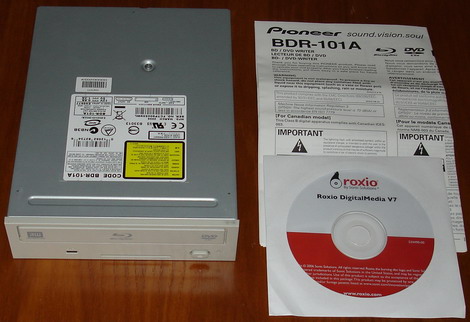
The drive supplied was the retail version, and was supplied with software and instruction booklet.
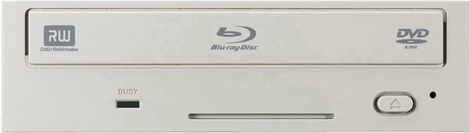
Bezel
The bezel of the Pioneer BDR-101A is cleanly styled. On the tray we can see the Blu-Ray logo, and we can also see an intake cooling vent, an emergency eject hole, a single coloured green LED for read and write, and an eject button.
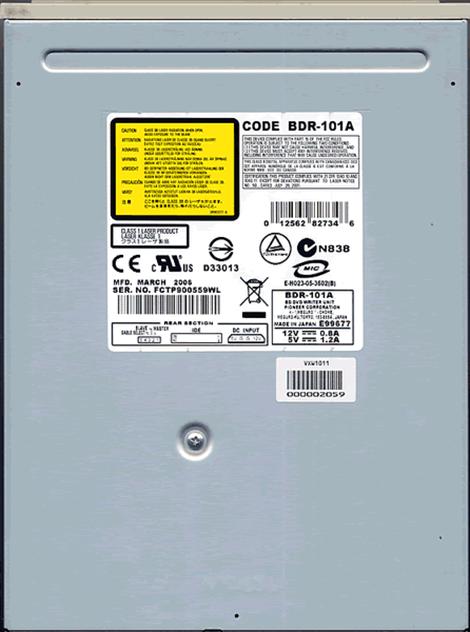
Top
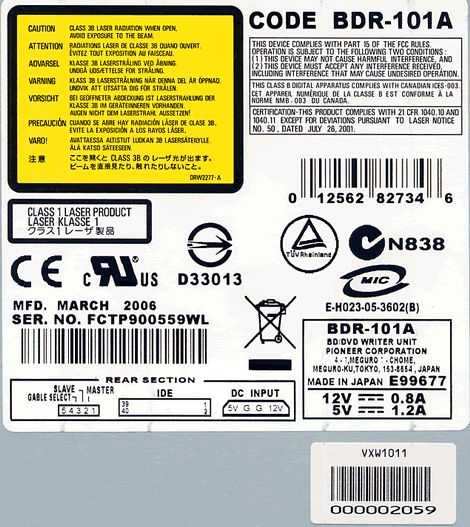
Label
On the top of the drive we found two labels, and we can see that the drive was made in Japan, dated March 2006.
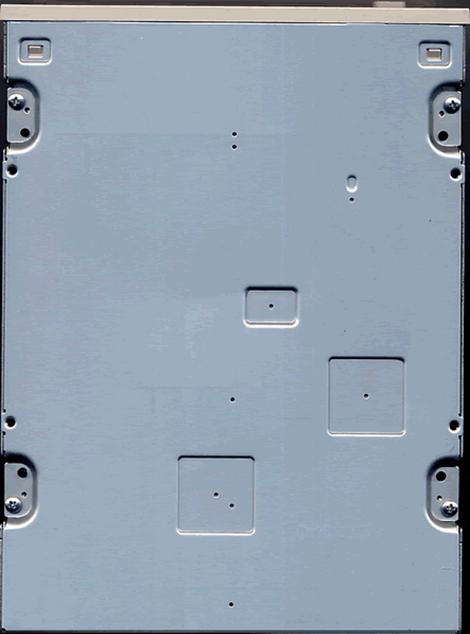
Bottom
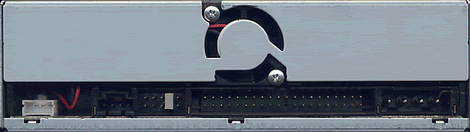
Rear
On the rear of the drive starting from the left, we can see a diagnostics connector, analogue audio connector, jumpers for cable select, slave, and master; IDE connector, and finally the power connector. We can also see a cooling fan just above the IDE connector.
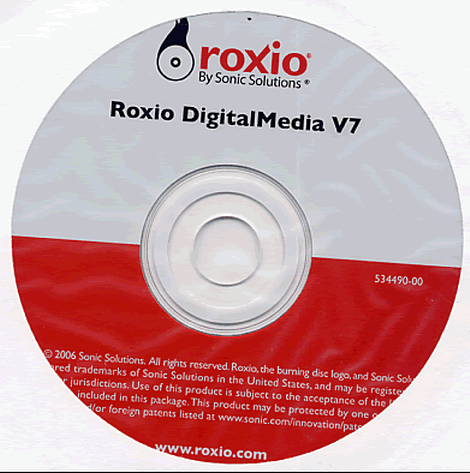
Also supplied with our test Pioneer BDR-101A drive, was Roxio's DigitalMedia V7 software suite. We did not however use this software in this article.
Now let's take a look at the drive installation and features on the next page
Test
machine:
For this review we will
be using a computer with the following configuration:
Hardware:
⋅
Motherboard: ASUSTeK A8N-SLI DELUXE (nForce 4 SLI
chipset)
⋅
Processor: AMD Athlon 64 X2 4400+ (Toledo) Dual Core
⋅
RAM: 2 GB Corsair TWINX 2CL DDR
⋅
GFX: Leadtek Winfast 6600 TD (PCI Express nVidia)
⋅
Sound: SoundBlaster Audigy 2
⋅
Hard disk: 2X 250GB Seagate Barracuda (SATA 2)
System
set-up:

The Pioneer BDR-101A was connected as Secondary Master and
identified itself as PIONEER BD-RW BDR-101A. DMA (Direct Memory Access) and autorun was enabled for all devices.
And another screenshot
from Nero InfoTool below:

From the screenshot from
Nero InfoTool above, we can see the Pioneer BDR-101A supports BD-R/RE, but does
not support CD-R/RW. The drive came shipped with firmware version
1.01.
Installed
Software:
Windows XP Professional
is installed on the computer along with Service Pack 2 for Windows XP. We will
be using the following software in this preview:
Features and techniques:

The Pioneer internal design is
clean and well constructed.

From the above
screenshots we can see that the Pioneer BDR-101A is driven by Pioneer's own
custom chipset.
An
Introduction to Blu-Ray
Until
recently, optical disc technologies such as DVD, DVD±R, DVD±RW, and DVD-RAM
relied on a red laser to read and write data, the Blu-Ray format uses a
blue-violet laser, which explains the name Blu-ray.
A
blue-violet laser (405nm) has a shorter wavelength than a red laser (650nm);
this makes it possible to focus the laser with even greater accuracy. This will
allow data to be packed more tightly, so it's possible to squeeze more data on
the disc even though it's the same size as a CD/DVD. This together with the
change of numerical aperture to 0.85 enables Blu-ray discs to hold
25GB/50GB.
Blu-ray
drives can also be made backwards compatible with CDs and DVDs through the use
of a BD/DVD/CD compatible optical pickup unit.
Now let's
take a look at the track pitch and compare them with that of DVD


Graphics courtesy of Blu-ray
Disc
As we can see in the
above screenshots, the storage density of Blu-Ray is much higher than DVD. The
Blu-Ray laser beam spot is also much narrower than that of DVD.
Blu-Ray Error
specification:
|
|
|
RSER10k | Random Symbol Error | Up to 2E-4 |
BC | Burst Count '“ The | Up to 8 |
BL | Burst Length '“ The | Up to 600 |
UNC | Un-correctable | 0 |
Jitter LEq | Length difference | Up to 6.5 % |
NPPa | Push-Pull-Signal - | 0.21 to |
NWS | Wobble-Signal - The | 0.20 to |
In the above table we
present some of the specifications for reported errors on Blu-Ray media. At
present we have no equipment or software available for measuring these errors.
Writing
Technology:
In the following tests,
we take a look at the disc writing technology used by the Pioneer
BDR-101A.
For these tests we simply
burned a disc with Nero CD-Speed's 'create data disc" function.
Blu-Ray:
BD-R:

The Pioneer BDR-101A used
CLV (Constant Linear Velocity) to write our BD-R disc at
2x, with a total writing time of 45 minutes and 3 seconds.
BD-RE:

The Pioneer BDR-101A used
CLV (Constant Linear Velocity) to write our BD-RE disc at
2x, with a total writing time of 45 minutes and 33 seconds.
DVD±R:
DVD+R

The Pioneer BDR-101A used
Z-CLV (Zoned Constant Linear Velocity) to write our
DVD+R disc at its maximum speed of 8x, with a total writing time of 10 minutes
and 25 seconds.
DVD-R

The Pioneer BDR-101A used
Z-CLV (Zoned Constant Linear Velocity) to write our
DVD-R disc at its maximum speed of 8x, with a total writing time of 10 minutes
and 26 seconds.
DVD±RW:
DVD+RW:

The Pioneer BDR-101A used
CLV (Constant Linear Velocity) to write our DVD+RW disc at
its maximum speed of 4x, with a total writing time of 15 minutes and 15
seconds.
DVD-RW:

The Pioneer BDR-101A used
CLV (Constant Linear Velocity) to write our DVD-RW disc at
its maximum speed of 4x, with a total writing time of 14 minutes and 47
seconds.
DVD±R DL:
DVD+R
DL:

The Pioneer BDR-101A used
CLV (Constant Linear Velocity) to write our DVD+R DL disc
at its maximum speed of 2.4x, with a total writing time of 44 minutes and 22
seconds.
DVD-R
DL:

The Pioneer BDR-101A used
CLV (Constant Linear Velocity) to write our DVD-R DL disc
at its maximum speed of 2x, with a total writing time of 54 minutes and 13
seconds.
Book type
(Bitsetting):
The Pioneer BDR-101A
supports auto Bitsetting, and supports DVD+R DL media with DVD-ROM book
type.
Here is how you could
check if your discs are really written with DVD-ROM book type:
Start Nero CD-DVD Speed
and click the Disc info button and you should get the following
screen:

DVD+R
DL with book type DVD-ROM.
Another quick test is to
start Nero CD-Speed and look at the disc information:

This should say
DVD-ROM.
Now let us take a look
at the reading performance of the Pioneer BDR-101A on the next page….
Reading performance:
For these tests we will
use Nero CD-Speed to read various BD-R/RE and DVD media. As already mentioned in
the introduction, this drive supports:
- BD-R/RE:
2x
- DVD-ROM:
8x
Blu-Ray media:
BD-R:
For this test we used a
BD-R media previously written with CD-Speed to test the reading
performance.

The Pioneer BDR-101A uses
a CLV reading method for reading BD-R discs at its maximum read speed of
2x.
BD-RE:

The Pioneer BDR-101A uses
a CLV reading method for reading BD-RE discs at its maximum read speed of
2x.
DVD
Media:
Pressed SL
DVD Video disc:

The Pioneer BDR-101A is
riplocked and reached a maximum read speed of only 5.25x, with an averaged read
speed of 3.93x
Pressed DL DVD Video disc
(OTP):

The Pioneer BDR-101A is
riplocked and reached a maximum read speed of only 5.19x, with an averaged read
speed of 3.90x
Pressed DL
DVD Video disc (PTP):

The Pioneer BDR-101A is
riplocked and reached a maximum read speed of only 6.29x, with an averaged read
speed of 5.35x
DVD+R:

The Pioneer BDR-101A read
our DVD+R disc at a maximum speed of 8.36x, with an average read speed of
6.25x.
DVD-R:

The Pioneer BDR-101A read
our DVD-R disc at a maximum speed of 8.35x, with an average read speed of
6.25x.
DVD+RW:

The Pioneer BDR-101A read
our DVD+RW disc at a maximum speed of 6.32x, with an average read speed of
4.72x.
DVD-RW:

The Pioneer BDR-101A read
our DVD-RW disc at a maximum speed of 6.31x, with an average read speed of
4.72x.
DVD+R
DL:

The Pioneer BDR-101A read
our DVD+R DL disc at a maximum speed of 6.33x, with an average read speed of
4.75x.
DVD-R
DL:

The Pioneer BDR-101A read
our DVD-R DL disc at a maximum speed of 6.33x, with an average read speed of
4.74x.
Overall
thoughts:
Overall reading
performance is ok, we would have liked faster DVD+R/RW and DVD-R/RW read speeds.
During our tests, the Pioneer BDR-101A proved to be a reliable
reader.
But now it's time to
head on to a more interesting part: Writing BD-R/RE
discs…
The specifications of the
Pioneer BDR-101A state that the drive is able to write BD-R/RE discs at 2x. Let
us find out how the drive really performs.
BD-R:
BD-R
CD-Speed created data disc:


Our test BD-R media was
manufactured by TDK
Our BD-R disc was written in 45
minutes and 3 seconds.
Now it was time to see if
the Pioneer BDR-101A could read back our created disc.
As we can see, the
Pioneer BDR-101A had no problems in reading back our test disc.

At present we have no
other method of checking BD-R media. We used CD-Speed's 'scan disc" option to
test our disc for errors. As we can see the disc passed our test with flying
colours.
BD-RE:
BD-RE
CD-Speed created data disc:


Our test BD-RE media was
manufactured by TDK
Our BD-RE disc was written in 45
minutes and 3 seconds.
Now it was time to see if
the Pioneer BDR-101A could read back our created disc.
As we can see, the
Pioneer BDR-101A had no problems in reading back our test disc.

At present we have no
other method of checking BD-RE media. We used CD-Speed's 'scan disc" option to
test our disc for errors. As we can see the disc passed our test with
ease.
BD-RE
Nero Burning Rom created data disc:

Having selected our
project type, we drag and dropped approximately 23 Gigabyte of data into our
compilation and then burned the project.

Nero had no problems in
writing our disc and completed the task in 46 minutes and 30 seconds.
Summary:
Writing
BD-R/RE media at present is a slow process, but the sheer amount of data one can
store on BD-R/RE media is staggering.
So let us head on to
next page and read about DVD-Writing
performance…
The specifications of
this drive tell us that it should write DVD±R at 8x and DVD+RW/-RW at 4x. In
this part, we will measure the write time for various types of DVD+R/RW and
DVD-R/RW discs. We will also focus on write quality and media compatibility.
DVD+R media compatibility and write quality:
In these tests we will be
using a Lite-On SHW-16H5S with firmware LS0W along with K-Probe to measure the
disc quality. We will also be using the NEC ND-4570A with firmware 1.02 along
with CD-Speed for our read-back tests.


PI errors are low, but
PIF errors are fairly constant throughout the disc. The read-back test is
perfect, the result is good. (Thanks to SVP for supplying this media)


PI errors once again are
low, but PIF errors are fairly constant throughout the disc. The read-back test
is perfect, the result is good. (Thanks to SVP for supplying this
media)


PI errors once again are
low, but PIF errors are fairly constant throughout the disc. The read-back test
is very good, the result is good. (Thanks to Plextor for supplying this
media)


PI errors once again are
low, but PIF errors are fairly constant throughout the disc. The read-back test
is perfect, the result is good.
DVD+ReWritable media:
We used the same test
procedures as in our DVD+R tests.
Below are our obtained results


The result is
good.
To sum
it up: So far the
Pioneer BDR-101A writes DVD+R/RW within specification, but the quality needs
improving.
On the next page
you will find the DVD-R/RW writing
results...
DVD-R media compatibility and write quality:
In these tests we will be using a Lite-On SHW-16H5S with firmware LS0W along with K-Probe to measure the disc quality. We will also be using the NEC ND-4570A with firmware 1.02 along with CD-Speed for our read-back tests.


Once again the amount of PIF errors are high, the result is ok but could be improved. (Thanks to SVP UK for sending us this media).


PIF errors are once again high and the read-back test shows a slight slowdown near the end of the disc. The result is ok but could be improved. (Thanks to Verbatim UK for sending us this media).


PI and PIF errors are very high and out of specification, our read-back test also displays serious issues with the write quality of this disc. A poor result and needs improving. (Thanks to medea International for sending us this media).


PIF errors are high and out of specification at the end of the disc, our read-back test also has some problems at the end of the disc. A poor result and needs improving. (Thanks to Verbatim UK for sending us this media).
DVD-ReWritable media:
We used the same testing procedures as we did for DVD-R media.
Our obtained results can be seen below.


The result is good
To sum it up: DVD-RW write quality was good with our tested media. DVD-R writing quality needs improving.
Head on to next page and read about DVD+R/-R DL compatibility and write quality...
DVD+R/-R Double Layer writing speed and
compatibility:
The Pioneer BDR-101A
supports the DVD+R DL/-R DL standard for writing Double Layer/Dual Layer discs
with a size around 8.5 GB at a writing speed of 2.4x/2x.
For this
test, we simply wrote the discs with CD-Speed's 'create data disc" function. We
then tested the created discs on the Lite-On SHW-16H5S using KProbe and the NEC
ND-4570A along with CD-Speed for our read-back tests.
DVD+R
DL:


Verbatim 2.4x '“
Manufactured by Mitsubishi Kagaku Media. (Thanks to Verbatim for sending us this
media).


The result is
ok.
DVD-R
DL
As mentioned at the top
of this page, the Pioneer BDR-101A supports the DVD-R DL standard at
2x.
For this
test, we simply wrote the discs with CD-Speed's 'create data disc" function. We
then tested the created discs on the Lite-On SHW-16H5S using KProbe and the NEC
ND-4570A along with CD-Speed for our read-back tests.


This media is
manufactured by Mitsubishi Kagaku Media. (Thanks to SVP UK for sending us this
media).


The PI and PIF errors are
out of specification at the layer break, however our read-back test is perfect.
The result is ok.
Summary:
Write quality is
fairly good, but once again could be improved.
This concludes our
Pioneer BDR-101A preview, let's head on to the last page to read our
conclusion…
Positive:
- Massive storage capacity with BD-R/RE media
- Excellent build quality
- Supports DVD±R/RW reading and writing
- Supports DVD+R DL/-R DL reading and writing
- Supports Bitsetting BookType DVD-ROM for DVD+R DL
- Virtually silent operation
- Large 8 MB buffer
Negative:
- Does not at present support BD-R/RE DL media
- No support for CD-R/RW
- Slow DVD±R/RW/±R DL reading and writing speeds
- DVD writing quality could be improved
Conclusion:
 Let us summarize the most important positive and negative points below:
The main positive points: The storage capacity of BD-R/RE media is awesome, and the drive performed extremely well with our tested Blu-Ray media.
DVD±R/RW/±R DL media types are also supported although with some limitations. But this is a very useful feature to have.
The drive is virtually silent in operation, being inaudible above the sound of the PC system that is hosting the drive.
Build quality is also excellent. The drive is heavy and is also well ventilated thanks to the included cooling vent and fan.
The main negative points: The only real problem with this drive is DVD±R/RW/±R DL writing quality and speed. Of course we must not forget that the BDR-101A is first and foremost a Blu-Ray drive, and in this department the drive excels. It would also have been handy to have a capability of reading and writing CD-R/RW.
To sum it all up: The Pioneer BDR-101A is at the forefront of technology. As a Blu-Ray recorder and reader, it performs extremely well. As a DVD reader and writer it could be improved.
You may comment on this preview below or in this forum thread
Thanks to:
 SVP Communications '“ The United Kingdom for providing the media used in this review.
 Medea International '“ United Kingdom for providing the Infiniti and HP media used in this review.
 Plextor SA/NV (B) for providing the Plextor media used in this review.
 Ricoh Europe '“ For providing the media used in this review.
 Verbatim - Germany and United Kingdom for providing the media used in this review.















