 | Review: Plextor Premium (IDE) Reviewer: Dennis Provided by: Plextor Europe Firmware: version 1.01 Manufactured: April 2003 TLA: #0000 |
As some of our visitors will know, when Plextor announced their PX-W4824TA recorder, they also gave out signals that 48x writing was the maximum speed a PlexWriter would support. As you can imagine it was quite a surprise when we spotted a 52x PlexWriter during our CeBIT 2003 coverage.
Perhaps due to the heavy competition in the CD-RW drive market Plextor was forced to release a 52x writer but we're of course speculating here. In order to make sure that their latest 52x writer doesn't just have improved read and (re-)write performance, Plextor has put in some very unique and innovative techniques into their latest writer.
 Because of these unique features, such as GigaRec and SecuRec for example which we'll of course get back to later on in this review, Plextor has dubbed their latest writer, the PlexWriter Premium (in some countries the drive is promoted as Plextor PX-W5232TA) indicating that this drive will support the best that Plextor has to offer.
In this review we'll see if this new PlexWriter is indeed a 'premium' drive and how it stands up to the competition. We'll of course also test the drive's unique techniques. Besides that we'll also take a look at the new PlexTools Professional software with which it's possible to perform advanced tests (C1/C2 error measurement, Focus/Tracking error tests and Beta/Jitter tests) using the Premium drive.
Test Machine:
For the tests we'll be using the following configuration:
Hardware:- Motherboard: GigaByte GA-7VAXP
- Processor: AMD AthlonXP 2100+
- RAM: 512MB (PC2700)
- GFX: ASUS V8200 (GeForce 3 Ti200)
- Hard Disks: DiamondMax 40GB (7200rpm)
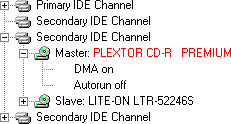
The Plextor Premium drive was hooked up as Master to the (onboard) secondary IDE-controller and identifies itself as "PLEXTOR CD-R PREMIUM". DMA (Direct Memory Access) was enabled and autorun was disabled for every device.
Used Software:
The Windows XP Professional operating system is installed on our test machine. We'll be using the following software to perform the various tests:
- Ahead InCD v3.5.24.0
- Ahead Nero Burning Rom v5.5.10.28
- Ahead Nero CD/DVD Speed v1.02.17
- Ahead Nero InfoTool v1.03.2
- Elaborate Bytes CloneCD v4.2.0.2
- Plextor PlexTools Professional v2.02
As always we're going to start our review by checking out the contents of the retail package Plextor Europe send to us. In the box of the Premium recorder we can find the following items:
- Plextor Premium drive
- Quick installation guide
- Warranty RMA procedure manual
- Warranty registration card
- Mounting screws, emergency eject pin, extra jumper cap
- Ahead Nero 5 Burning Rom disc containing;
- Nero Burning Rom
- NeroMediaPlayer
- InCD
- EasyWrite Reader
- Nero BurnRights
- PlexTools Professional v2.02 disc including 16-language manual
- One blank 52x 700MB Plextor CD-R
(manufactured by Taiyo Yuden*) - One blank 24x 650MB Plextor US CD-RW
(manufactured by Mitsubishi Chemicals*)
As we've come to expect from Plextor they have put together an good package. The drive includes some excellent software such as Nero Burning Rom and the new PlexTools Professional software (to which we'll get back to later in this review). Some items we did miss in the package were an IDE-cable and 32x CD-RW media. The latter is not surprising since no manufacturer has started producing re-writeable discs yet that can handle 32x. So unfortunately we cannot test the Premium drive at 32x re-writing in this review..
 The manual of the Plextor drive can be found on the PlexTools Professional disc and is very complete and in no less than sixteen different languages. Plextor has included a printed quick installation guide and a printed manual on how you should proceed when you have problems with your drive. For Europe, The Middle-East and Africa Plextor Europe offers a two year warranty on the drive as they do for all their new writer models.
The Drive:
The PlexWriter Premium drive is of a lighter colour than previous PlexWriter drives and it has the same whitish colour as the PX-504A DVD+RW recorder. On the front of the Premium drive we can find the PlexWriter Premium logo, a BPRec (Burn-Proof Recording) logo and an 'Ultra Speed CD ReWriteable' logo. Besides that we can find a headphone jack, emergency eject hole, a volume control dial and one LED/CD indicator on the front of the drive.
The CD indicator shines green when a CD is loaded, yellow when a CD is being read and orange when it is writing to a CD. The CD indicator blinks orange at three different speeds, depending on the write and re-write speed (CD-R: 4~31x, 32~40x, 41~52x and CD-RW: 4x, 4~10x, 24~32x).

One the back of the Premium drive we find the usual IDE and power connectors, the Master/Slave/CableSelect jumpers, a 4-pin analog audio connector and an SPDIF (Digital Audio Out) connector. On the back of the drive we can also find a fourth jumper setting with which you can set the drive to DMA mode 2 (MultiWord) instead of UDMA33 it normally uses. We of course left this jumper alone since UDMA33 is by far the best interface.
Software:
 Plextor's PlexTools software is a well known program and used to be delivered with European Plextor drives. Our American and Japanese friends are in luck since the new PlexTools Professional software is shipped worldwide with the Premium drive. The PlexTools Professional software has some interesting new features on board with which you can do advanced tests using your Premium drive. We'll take a look at these 'Q-Check' functions on the next page of this review.
 As we're used from European Plextor drives they're shipped with a copy of Ahead's Nero Burning Rom software. On this disc we can find the famous Nero Burning Rom software which is, by many people, is considered to be one of the best software packages around when it comes to your CD/DVD burning needs.
Ahead's packet writing software InCD is also located on the Nero 5 disc. With InCD you can format a CD-RW or DVD±RW disc and use it as a large floppy disc. InCD also supports the 'Mount Rainier' (CD-MRW) format.
Other tools located on the Nero 5 disc are NeroMediaPlayer, Nero BurnRights (allows an administrator to setup user accounts under Windows XP/2000 so that users without administrative rights can burn CDs with Nero) and EasyWrite Reader (adds Mount Rainier (CD-MRW) read support to a system).
Drive Specifications:
In the Nero InfoTool screenshot below we can see that the Premium drive has an 8MB buffer, firmware 1.01 is installed, reading CD-Text is supported and so is C2 error reporting. The drive also supports the Mount Rainier format.

From the screenshot we can also see that the read speed is detected as 40x. By default the Premium drive will read at a maximum speed of 40x but the drive can be set to 52x reading by enabling the SpeedRead option:

As you can see in the screenshot above the read speed has now been detected as 52x. The SpeedRead option can be enabled via the PlexTools software or manually by opening the drive's tray, making sure it's empty, closing it again and then by pressing and holding the eject-button for three seconds. The option will then be enabled and the Premium drive will be able to read discs at 52x. SpeedRead can be disabled (and thus limiting the read speed again) by pushing the eject-button or by cutting the drive's power.
In the manual that comes with the Premium drive we can read a small warning on using the drive at 52x reading, showing us that Plextor hasn't changed their mind on high read speeds:
Reading CDs at 52x will shorten the device's lifetime and will produce a higher noise level. Furthermore, at this high speed (10.400 rpm at 52x), low quality or scratched CDs could explode in the drive.

In the PlexTools Professional screenshot above we can see that has an average access time of less than 65ms. Let's take a closer look at some of the features that the drive supports:
Drive Features:

Buffer Underrun Protection:
Nero Burning Rom reports us that the Premium drive supports the BURN-Proof (Buffer UnderRuN-Proof) technique. When the, in this case 8MB, buffer of the recorder falls beneath a certain level, it will stop recording as of a specific location on the CD. The recorder then continues attempting to receive data from the PC to refill the buffer. As soon as the buffer has been refilled, the recorder will start recording again.
Mount Rainier:
In the Nero Burning Rom screenshot we can also see that the Premium drive supports the Mount Rainier format. Mount Rainier enables native operating system support of data storage on CD-ReWriteable discs. This makes the technology far easier to use and allows the replacement of the floppy. Key features include:
- Defect management by the drive itself
- Logical write-addressing at 2k
- Background formatting
- Command set implementation
- Compatibility and standards-compliance

For more information you can visit www.mt-rainier.org.
PoweRec:
 Like almost all new Plextor drives, the Premium supports the PoweRec technology to ensure a quality back-up. PoweRec (Plextor Optimised Writing Error Reduction Control) monitors the quality of the disc while burning and will adjust the speed if necessary. As you can see from the Nero Burning Rom screenshot PoweRec can be disabled to force the drive to write media at a selected speed instead of the speed the recorder would normally use when its quality checks (PoweRec) are enabled. PoweRec can also be disabled via the PlexTools software. A small benefit of this option is that when you disable PoweRec you can see at which speed your media would normally be written:

VariRec:
 The VariRec technology allows you to change the drive's laser power when writing an audio disc. With VariRec enabled you should be able to improve the quality of the recorded disc and make the recorded disc more compatible with picky CD-players like a car stereo. The VariRec function found on the Premium drive has been improved since it now allows 8x writing (previously limited to 4x) and allows you to select the dye type of your CD-R disc in order to select the best write strategy:

GigaRec:
GigaRec is an interesting new technique which allows you to expand the capacity of a normal 80 minute (700MB) CD-R disc up to 111 minutes (or almost 1GB of data). By compressing the pits and lands that are written on the disc, it is possible to increase the capacity of the disc by 40%. At the rate of 1.4x, failure free playback can be achieved on most modern equipment:

The maximum capacity of a disc is dependant on the type of disc and the GigaRec rate. When activated the recording speed will be limited to 4x in DAO (Disc At Once) mode on CD-R media without BURN-Proof.
Silent Mode:
The Silent Mode option in the PlexTools software allows you to change various settings of your Premium drive in order to get a noise-free or silent operation:

SecuRec:
The SecuRec technique allows you to password protect a CD-R disc when recording in DAO mode. When SecuRec is activated, the data on the written disc can only be retrieved by supplying the password you entered when the disc was written:

Writing and reading of a SecuRec protected disc can only be done with the Premium drive. When the data has to be accessed from a different drive or computer you can use the free SecuViewer software and the original password:

When someone tries to read the disc in another drive without using the PlexTools or SecuViewer software, Windows XP will display the following error message:
Disc is not formatted

Windows cannot  read from the disk. The disk might be corrupted, or it could be using a format  that is not compatible with Windows.
Q-Check:
The PlexTools Professional software also allows us to do some more advanced tests using the Premium drive. These so-called Q-Check tests, consisting of a C1/C2 Test, a FE/TE Test and a Beta/Jitter Test, will be looked at on the next page of this review.
Write Methods:
Let's take a look at the Premium's write performance when using Nero CD Speed. We've also taken a look at the drive's re-write performance but, as said before, due to a lack of 32x CD-RW media these tests were done with 24x CD-RW media:
CD-Recordable Media:

CD-ReWriteable Media:

CD-R | In the left screenshot you see that the Premium drive had no problems reaching 52x recording. The achieved speeds were a little higher than the Lite-On LTR-52246S (39.50x average, 51.95x maximum) but lower than the TEAC CD-W552E (41.24x average, 54.25x maximum). We'll of course check out what the achieved results mean in real terms later on in this review. | CD-RW |
The Premium's 24x re-write performance was very close to the Plextor PX-W4824A (23.91x average). With an average re-write speed of 23.90x the Premium drive achieved a higher speed than the Lite-On LTR-52246S (18.12x average) and the TEAC CD-W552E (23.80x average).
On the next page we'll take a look at the new PlexTools Professional advanced Q-Check tests.
Besides a massive amount of features (as listed on the previous page) the
Plextor Premium drive is shipped worldwide with the new PlexTools Professional
software. This software allows you to control every aspect of your drive with,
but besides that it also allows you to do some advanced quality tests.
PlexTools Professional has a number of different options. Besides a normal
read and write transfer rate test we can find three Q-Check tests; C1/C2, FE/TE
and Beta/Jitter tests. Below you can find an explanation on these tests:
C1/C2 Test:
If you have read some of our previous reviews then you will probably know
what a C1/C2 test means. These tests are used to measure the amount of errors on
a recordable disc and can give you a good indication if the disc is of good
quality and/or if it has been recorded properly.

The C1/C2 error test can display three different errors. The first kind, C1,
uses the lowest level of error correction. C1 errors (E11+E12+E13) are almost
always present on a disc and are easily corrected by the drive.
C2 errors (E22) are the second level of error correction and uses the encoded
data on the disc to try to correct read errors. These C2 errors can still be
read but they are not preferred. When you have a disc with C2 errors it's
recommended to reburn the data to a new disc. C2 errors are a result of
scratches and smudges on a disc, a freshly recorded disc should never show C2
errors.
When you have a disc that shows CU errors (E32) you can throw that disc away
since these errors are uncorrectable ones.
FE/TE Test:
With the FE/TE (Focus Error/Tracking Error) test you can test the mechanical
characteristics of a blank disc you're using with the Premium drive. In short
this test allows you to check if the media you're using can be written at the
highest speed.

The red Focus Error line reflects the capability of the laser unit to remain
focused on the recording layer of the disc. The line should remain relatively
flat in the graph's 0-30 range. In our screenshot this is not the case meaning
that the disc should be written at a lower speed.
The blue Tracking Error line indicates how well the drive's pickup can follow
the spiral track of the disc. This line should also remain relatively flat. When
the FE/TE test is completed PlexTools will report if the disc can be written at
the highest speed or not.
The Premium's PoweRec technique uses the FE/TE information and will adjust
the recording speed automatically (if PoweRec is enabled of course). As a small
test we recorded the disc we used in our screenshot above. The write speed was
indeed slowed down from 52x to 40x during the recording process.
Beta/Jitter Test:
The Beta/Jitter test is a read/quality test for written CD-R or CD-RW discs.
When a disc is being recorded, small pits are burned in the recording layer
(dye) of the disc, using a so-called Book Standard. Data on a CD is burned via
the Red Book Standard which describes the length of the pits and lands on a
recorded disc.

The red Beta line indicates how well the signal pits and lands are in balance
(asymmetry). A horizontal line would mean perfect balance and would give the
best readability result.
The blue Jitter line measures the variation between the specification in the
Book Standard and the actual data written to the disc. The lower the Jitter on
the disc, the better it can be read.
The Plextor Premium drive (just like some older Plextor drives) has a black
tray to reduce the jitter on a disc and besides that, the drive has an optimised
PCB circuit to reduce noise on a disc. These measurements should increase the
overall quality of a recorded disc.
the data and audio read performance of the Premium
drive.
In this part of our PlexWriter Premium review we'll test how fast the drive can read various media, including audio CDs. As we already mentioned during this review, the Premium drive is by default limited to 40x reading.  For the following read tests SpeedRead has been enabled via the PlexTools software.

The PlexTools screenshot above tells us that the Premium drive can read all types of media at 52x when SpeedRead is enabled. Let's see if this is indeed the case.
Pressed Discs:
For the transfer rate tests we used a pressed CD-ROM containing PlexTools v1.05 which was exactly 74 minutes (333.000 sectors) long. Below you can see the produced Nero CD/DVD Speed graphs:

From the graph you can see that the Premium drive didn't reach 52x reading. In the table below, where we compare the drive to other recorders we've reviewed, you can see that the Premium's performance was however not that bad since it performed a little better than the TEAC CD-W552E. The Premium's seek times were very good but a little below specified (<65ms random stroke):
| Pressed Discs | Average Reading Speed | Start Reading Speed | End Reading Speed | Seek Times Random | Seek Times 1/3 | Seek Times Full |
| Lite-On LTR-52246S | 37.94x | 22.97x | 50.06x | 88ms | 102ms | 152ms |
| Plextor Premium | 37.57x | 22.07x | 49.60x | 70ms | 80ms | 136ms |
| TEAC CD-W552E | 37.53x | 22.09x | 49.54x | 88ms | 104ms | 160ms |
CD-Recordable Discs:
For the transfer rate tests with CD-Recordable Media we used a back-up (CD-R) of a PlexTools v1.05 disc. The used disc was a 'That's Write' CD-R certified up to 16x writing and manufactured by Gigastorage.

The graph shows us that the Premium drive performs a little better than we saw with the pressed disc. When we compare the drive to the other recorder we've reviewed we can see that the Premium drive is the slowest one. But, on the other hand, its seek times are (far) better and this time very close to the drive's specification:
| CD-R Discs | Average Reading Speed | Start Reading Speed | End Reading Speed | Seek Times Random | Seek Times 1/3 | Seek Times Full |
| Lite-On LTR-52246S | 39.28x | 24.16x | 51.60x | 95ms | 98ms | 153ms |
| Plextor Premium | 38.45x | 23.00x | 50.53x | 66ms | 73ms | 118ms |
| TEAC CD-W552E | 38.80x | 23.21x | 50.99x | 93ms | 105ms | 163ms |
CD-ReWriteable Discs:
To test the transfer rate with CD-RW discs we again used the "PlexTools v1.05" disc only this time we read from a CD-ReWriteable disc. The used disc was a 'Plextor High Speed CD-RW' disc. Below you can see the produced graphs with Nero CD/DVD Speed again:

The Premium drive produced an excellent result when reading the CD-RW media. Not only did it perform better than with the pressed and CD-R media, it's also one of the very few drives that can read CD-RW at maximum speed. The Plextor blew away both the Lite-On and the TEAC as you can see in the table below:
| CD-RW Discs | Average Reading Speed | Start Reading Speed | End Reading Speed | Seek Times Random | Seek Times 1/3 | Seek Times Full |
| Lite-On LTR-52246S | 31.94x | 19.38x | 42.14x | 88ms | 101ms | 154ms |
| Plextor Premium | 39.71x | 23.31x | 52.45x | 66ms | 75ms | 119ms |
| TEAC CD-W552E | 25.12x | 14.79x | 33.16x | 92ms | 105ms | 154ms |
Audio Discs - Digital Audio Extraction:
To test the Premium DAE (Digital Audio Extraction) performance we used Nero CD/DVD Speed to do a transfer rate test. The audio disc we used was of a slightly larger size than in our previous tests (77 minutes):

As you can see from the produced graph something went wrong here since the Premium drive slowed down to 33x maximum. When we tried another audio disc (of also 77 minutes) we achieved a better result:

This time the Premium drive had no problems reaching 52x and it was even faster than both the Lite-On and TEAC drives, as you can see in the table below:
| CD-RW Discs | Average Reading Speed | Start Reading Speed | End Reading Speed | DAE Quality | Accurate Stream |
| Lite-On LTR-52246S | 37.39x | 22.81x | 49.23x | 10 | Yes |
| Plextor Premium | 39.42x | 20.65x | 52.04x | 10 | Yes |
| TEAC CD-W552E | 39.41x | 23.35x | 51.91x | 10 | Yes |
As a final test we used PlexTools to extract the audio disc to our hard disk. As an extra tests we also tested the drive's performance using Exact Audio Copy (EAC) in Secure Mode. The Premium drive caches audio, has an accurate stream and can report C2 error information. |  |

PlexTools Professional

Exact Audio Copy - Secure Mode
The Premium drive had no problems reaching 52x read speeds when ripping the audio disc using the PlexTools software. The drive also showed good performance when using it with EAC and its Secure Mode. We had to disable SpeedRead though since else the drive had a tendency to slow down for no apparent reason with EAC.
Audio Discs - Advanced DAE Quality Test:
To conclude our read tests we did an 'Advanced DAE Quality Test' with Nero CD/DVD Speed. You can see the produced results below:

The Premium drive showed an excellent result reaching a high average read speed of 36.67x (compared to for instance the TEAC CD-W552E (33.38x) and Lite-On LTR-52246S (33.42x)). The Plextor drive had no problems reading the CD-Text and SubChannel Data from the disc and could read data from both the lead-in and lead-out area of the disc.
So far for the reading part. Now let's see how the drive performs when writing discs...
On the second page of this Plextor Premium review we showed you a screenshot of Nero CD/DVD Speed in which the Premium drive achieved a maximum write speed of 52.52x. On this page we'll see what this write speed means in terms of write time when recording 700MB of data.
Writing Data:
For our data writing tests we simply set up a new compilation of 700MB using the Nero Burning Rom software. We used the DAO (Disc At Once) writing method. The disc was finalized and set-up as a non-multisession disc. In the screenshot below you can see the burn process completed successfully:

As you can see from the screenshot, the burn process was completed in 2 minutes and 38 seconds. Although this is not the fastest write time we've seen for a 700 MB compilation, it's pretty close the the TEAC CD-W552E (±2m:33s) and the Lite-On LTR-52246S (±2m:30s).
Write Quality:
Recording at 52x requires quality media to produce a reliable result. The Premium recorder supports several techniques (such as PoweRec) to ensure the data is written reliably to a disc. In this part of our review we're going to check the write quality of several discs, recorded with the Premium drive.
Normally we used Lite-On's WSES (Write Strategy Evaluation System) program to measure the amount of errors but for this review we're going to use the PlexTools Professional software. We did this for the simple reason that PlexTools works under Windows while WSES requires DOS to operate.
In the graphs below you can see an overview of errors occurring during the read process. Please note that every burned disc will always have C1 errors. These are errors that are corrected by the drive and they will not effect the disc in a bad way as long as their amount is limited. C2 errors are however very bad for a disc and are harder to read and correct. When there are CU errors present on the disc it means you have bad burned disc and it can't be read in the test drive you're using as a reader.
Also keep in mind that the number of C1/C2/CU errors depends on a number of different factors. The combination of software, hardware and read speed have an effect on the results. Since we're using different software in this review and a different drive for reading the disc, the results may be (a little) different then when using the traditional WSES software. Nevertheless all programs will give you a good idea of the quality of the written disc.

Plextor - 52x certified - 52x write
| Manufacturer: | Taiyo Yuden |
| Code: | 97m24s01f |
| Disc Type: | CD-R |
| Recording Layer: | Dye Type 1: Long Strategy (Cyanine, AZO) |
| Capacity: | 79:59.72 (703 MB) |
| Certified Speed: | 52x |
| Write Speed: | 52x |
| Write Time: | 2m:38s |
| C1 Average/Sec: | 0.3 |
| C2 Average/Sec: | 0.0 |
| CU Average/Sec: | 0.0 |
The Plextor disc, manufactured by Taiyo Yuden, was of course recorder with excellent quality. The combination Taiyo Yuden and Plextor has always worked great and as you can see in the graph above, this is another fine example of that.

Imation - 48x certified - 52x write
| Manufacturer: | CMC Magnetics |
| Code: | 97m26s66f |
| Disc Type: | CD-R |
| Recording Layer: | Dye Type 6: Short Strategy (Phthalocyanine) |
| Capacity: | 79:59.71 (703 MB) |
| Certified Speed: | 48x |
| Write Speed: | 52x |
| Write Time: | 2m:37s |
| C1 Average/Sec: | 5.3 |
| C2 Average/Sec: | 0.0 |
| CU Average/Sec: | 0.0 |
The Imation discs, manufactured by CMC Magnetics, had a lot more C1 errors than the Taiyo Yuden discs but keep in mind that this is still an excellent result. The number of C1 errors is limited and there are no C2/Cu errors on the disc. Also notice that the Premium drive was one second faster when writing these CMC discs, certified for 48x recording.

MAM-E - 48x certified - 40x write
| Manufacturer: | Mitsui |
| Code: | 97m27s58f |
| Disc Type: | CD-R |
| Recording Layer: | Dye Type 8: Short Strategy (Phthalocyanine) |
| Capacity: | 79:59.74 (703 MB) |
| Certified Speed: | 48x |
| Write Speed: | 40x, lowered to 32x by PoweRec |
| Write Time: | 3m:02s |
| C1 Average/Sec: | 6.4 |
| C2 Average/Sec: | 0.0 |
| CU Average/Sec: | 0.0 |
The MAM-E discs, manufactured by Mitsui, were certified for 48x recording. The Premium drive started the write process at 40x and even lowered the recording speed to 32x during the write process. As a result the number of C1 error decreases throughout the disc, resulting in another quality burn.

TDK - 48x certified - 52x write
| Manufacturer: | TDK |
| Code: | 97m15s05f |
| Disc Type: | CD-R |
| Recording Layer: | Dye Type 5: Short Strategy (Phthalocyanine) |
| Capacity: | 79:59.74 (703 MB) |
| Certified Speed: | 48x |
| Write Speed: | 52x, lowered to 32x by PoweRec |
| Write Time: | 2m:41s |
| C1 Average/Sec: | 5.0 |
| C2 Average/Sec: | 0.0 |
| CU Average/Sec: | 0.0 |
The TDK discs were certified for 48x recording but the Premium drive wrote them at 52x. However, near the end of the write process the recorder slowed down the write speed to 32x. From the graph you can again see that the disc turned out just fine with no C2/CU errors and a low amount of C1 errors.

Maxell - 40x certified - 52x write
| Manufacturer: | Hitachi Maxell |
| Code: | 97m25s29f |
| Disc Type: | CD-R |
| Recording Layer: | Dye Type 9: Short Strategy (Phthalocyanine) |
| Capacity: | 79:59.74 (703 MB) |
| Certified Speed: | 40x |
| Write Speed: | 52x |
| Write Time: | 2m:37s |
| C1 Average/Sec: | 1.9 |
| C2 Average/Sec: | 0.0 |
| CU Average/Sec: | 0.0 |
As some of our visitors will know Plextor recorders work better with media from certain manufacturers. One of these manufacturers is Maxell and this shows from our last graph. Although the disc was certified for 40x writing, the Premium drive had no problems recording them at 52x and did so with a very low amount of C1 errors. Another quality recorded disc.
Now that we've finished our normal read and write tests, it's time to check the drive's re-write performance, including packet writing and Mount Rainier support...
The Plextor Premium drive supports 32x re-writing but unfortunately there is no media available that supports this re-write speed. So, for the following tests we used the Premium drive at 24x re-writing. On this page we'll also check how the drive performs with packet writing (using Ahead's InCD software) and the drive's Mount Rainier performance.
Re-Writing Data:
For our data re-writing tests we simply set up a new compilation of 650MB using the Nero Burning Rom software. We used the DAO (Disc At Once) writing method. In the screenshot below you can see the burn process completed successfully:

Our data compilation was written in 3 minutes and 26 seconds. This was about 13 seconds faster than the TEAC CD-W552E (3m:39s) and a lot faster than the Lite-On (4m:51s, due to its CAV writing method).
Packet Writing:
For our packet writing tests we used the InCD software from Ahead. The InCD option to format the disc to CD-MRW (Mt. Rainier) was disabled since we'll do these tests later on this page of our review. When formatting was complete we measured the time it took for the drive to write our test folder of data. In the table below we've summed up our results:
| Packet Writing | InCD Formatting 650MB | InCD Copying 400MB | Average Write Speed |
| Plextor Premium | 7m:33s | 2m:22s | 19.25x |
| Plextor PX-W4824TA | 7m:32s | 2m:23s | 19.11x |
| TEAC CD-W552E | 7m:32s | 2m:19s | 19.66x |
| Yamaha CRW-F1 | 6m:50s | 2m:19s | 19.66x |
From the results you can see that the drives were all very close to each other. It really is a shame that we cannot test the Premium's performance with 32x CD-RW media...
Mount Rainier:
To test the Plextor Premium's Mount Rainier performance we again used InCD to write the same folder of test data. In the table below you can see an overview of the achieved results:
| Mount Rainier | InCD Formatting 650MB | Manual Eject While Format in Progress | Copying 400MB Data while Format in Progress |
| Plextor Premium | 0m:34s | 0m:42s | 3m:18s |
| Plextor PX-W4824TA | 0m:32s | 0m:34s | 3m:09s |
| TEAC CD-W552E | 0m:40s | 0m:52s | 4m:15s |
| Yamaha CRW-F1 | 0m:40s | 0m:32s | 8m:21s |
| Mount Rainier (continued) | Copying 400MB Data to Formatted Disc | Reading 400MB Data While Format in Progress | Reading 400MB Data from Formatted Disc |
| Plextor Premium | 3m:04s | 3m:19s | 1m:59s |
| Plextor PX-W4824TA | 3m:07s | 3m:26s | 2m:21s |
| TEAC CD-W552E | 4m:14s | 3m:21s | 3m:21s |
| Yamaha CRW-F1 | 3m:53s | 4m:46s | 1m:58s |
The Premium drive showed a pretty good result. Sometimes it was faster than the other drives we've reviewed and sometimes it was a little slower. Perhaps we can soon update this table when we can get our hands on some 32x CD-RW media.
Now that we've finished our normal tests, let's do some advanced testing...
For our final (advanced) tests we're going to test how the Plextor drive performs with data and audio copy-protections. Besides that we'll also take a quick look at GigaRec and overburning. Last but not least we'll also see if the drive can handle 8cm discs. Let's start with the data copy-protections:
Copy-Protected Data:
For our copy-protected data tests we used good old CloneCD to read and write several popular copy-protections. In the picture below you can see that the Plextor Premium is fully supported by CloneCD:

The Plextor Premium supports the DAO-RAW96 recording mode which means that the drive can write uncorrected data and SubChannel Data. In the table below we've summed up all of our results and after the table we will clarify our results. SpeedRead was enabled via the PlexTools software:
| Protected Data | Game Title | Protection (version) | Read Time | Back-up Works |
 | Desperados | LaserLock | 44m:47s | Yes |
 | The Sims: House Party | SafeDisc v2.10.030 | 1m:51s | Yes |
 | Mafia: The City Of Lost Heaven (CD1) | SafeDisc v2.70.030 | 2m:04s | Yes |
 | Neverwinter Nights (CD3) | SecuRom v4.76.00.0051 | 2m:55s | Yes |
 | Final Fantasy VIII (CD1) | PlayStation LibCrypt | 3m:00s | Yes |
The Premium's read performance with copy-protected data was pretty much as expected. The drive was struggling with the LaserLock protection but it was extremely fast with the SafeDisc protection. The reading of SubChannel Data cannot be done at full speed (something that older Plextor drives also cannot do) but luckily the drive is not limited to 8x reading like the Plextor PX-W4012TA drive. When it comes to writing the protections we can see one major improvement compared to older Plextor recorders; the PlexWriter Premium can copy SafeDisc 2 without weak sector amplification!!
Copy-Protected Audio:
For our protected audio disc tests we used the PlexTools software with the 'Enable Single Session' option enabled. We simply inserted the audio discs in the Premium drive and waited if the drive could recognize the disc and if so, could extract the audio tracks. In the table below we've summed up our results:
| Protected Audio | Audio Title | Protection (version) | PlexTools |
| Shakira - Laundry Service | Key2Audio version 2 | Read disc without problems | |
| Celine Dion - A New Day Has Come | Key2Audio version 3 | Read disc without problems | |
| Bitte Ein Beat! - Beat 5 | Cactus Data Shield 200 | Read disc without problems | |
| Yorin FM - Hitzone 21 | Doc.loc | Detecting disc and ripping tracks takes a long time | |
The audio copy-protections we tested were no problem for the Premium drive. Doc.loc gave us the most problems since it took quite a while for the Premium to recognize this disc and rip the audio tracks. Ripping was however done without any errors so all in all, an excellent result.
Overburning/GigaRec:
We can be
very short when summing up the results with the Premium drive and 99 minute media. Since the drive can burn 111 minutes of audio to a standard 80 minute disc (using GigaRec), it will come as no surprise that the drive can handle 99 minute media without problems, although the write speed is limited to 40x when overburning.

Another feature we need to take a look at is the Premium's GigaRec support. As we already described on page two of this review, this technique allows you to stretch the capacity of a standard recordable disc up to 40%. This means that a standard 700MB / 80 minute disc can be stretched to hold up to 990 MB / 112 minutes:

From the screenshot you can see that GigaRec recording is done at 4x, without using BURN-Proof. Keep in mind that the playability of GigaRec discs depends on the reader and the used GigaRec setting. In our example we used the maximum setting (1.4) which could be read fine in our stereo.
We also tested the disc in a Lite-On LTR-52246S drive which could read the disc but would detect the wrong disc length. A PlexWriter PX-W4012TA could recognize the disc correctly and the Premium drive could of course also read the disc fine, but at a limited read speed:

8cm Discs:
As a final test we tested if the Plextor drive could read and write 8cm discs. We used Nero Burning Rom and after that we used Nero CD Speed to do another transfer rate test. Both tests were completed without a problem.
That concludes our Plextor Premium review! Let's go to our final words and conclusions...Positive:
- Good looking drive supporting 52x read/write speeds and 32x re-writing
- Good software package (Nero Burning Rom, PlexTools Professional)
- Two year warranty
- 'BURN-Proof' technology plus 8 MB buffer
- Digital Audio Extraction can be done at full speed
- Good read speeds and seek times
- Excellent performance with copy-protected data and audio
- Excellent and innovative features (GigaRec, SecuRec, etc.)
- Supports overburning up to 99 minutes (and more with GigaRec)
- Supports Mount Rainier (CD-MRW) format
- Supports DAO-RAW writing
- Supports reading and writing of 8cm discs
- Supports reading and writing of CD-Text information
- Supports reading and writing of full SubChannel Data
- Could back-up all SafeDisc 2 versions without weak sectors amplification
Negative:
- Had some read problems with certain media when SpeedRead was enabled
Conclusion:
Well what can we say... Plextor has really put a lot of work into their Premium drive and we truly loved it. Not only does the drive support unique and innovative technologies such as SecuRec and GigaRec, it comes with a number of excellent features such as BURN-Proof (and an 8 MB buffer), PoweRec and VariRec to ensure the best possible quality when burning a disc.
When it came to read performance the Premium drive showed a bit of a mixed result. Sometimes the drive would slow down considerably with certain CD-R and audio discs. On the other hand though, the Premium showed an excellent performance when reading CD-RW media.
Although the drive wasn't the fastest recorder we've reviewed and it couldn't write all our media at maximum speed, it had good write quality with every disc. Besides that the drive was also very quiet and the PlexTools Silent Mode can even decrease noise even more, something that will appeal to a lot of users.
It's unfortunate we couldn't test the Premium's re-write performance at maximum speed (32x). When using the drive at 24x it performed well as it had no problems keeping up with most of the other recorders we've reviewed.
In our advanced tests we were again pleasantly surprised by the Premium drive as it had no problems with any of our data and audio copy-protections. The Premium drive is a so-called 'two-sheep' recorder, again something that many people will appreciate. 99 minute media and 8 cm media were, of course, also no problems for the Premium drive.
The price of the Plextor Premium drive is about $ 105.00
(checked at the time of writing this review). With features such as the Premium drive supports this certainly is not a price that is too high.
Normally we don't give out awards but this is a good time to start. We give the PlexWriter Premium drive our 'Editors Choice Award'.