 | Review: Plextor PX-708A (IDE) Reviewer: Dennis Provided by: Plextor Europe Firmware: version 1.00 / 1.01 Manufactured: August 2003 TLA: #0000 |
Plextor has always been a well known brand in the optical storage industry but it took quite a while before they released their first DVD recorder. At the beginning of this year, in January, Plextor announced their first DVD recorder, the Plextor PX-504A. That drive only supported the DVD+R(W) recording format and could write DVD+R media at 4x and DVD+RW media at 2.4x.
Now, about seven months later, Plextor has released their second DVD recorder and this time Plextor made sure that their drive would be something special. With their new PX-708A drive Plextor has released the world's first 8x DVD+R recorder which means that it's possible to record a complete DVD in less than 10 minutes! Another thing that's interesting is that Plextor has made this drive a dual format recorder, meaning that it supports both the DVD-R(W) and DVD+R(W) formats.
As said, when it comes to DVD+R recording the Plextor PX-708A is the fastest recorder on the planet but its other recording speeds are also very impressive. For instance, it supports 4x DVD+RW recording and 4x DVD-R recording and when it comes to CD media the drive continues to impress with 40x CD-R recording and 24x CD-RW recording. In this review we'll of course put the drive to our usual tests and see how it performs. For instance, is this new Plextor DVD recorder a worthy replacement for your old but trusty CD recorder? Read on to find out!
Test Machine:
For the tests we'll be using the following configuration:
Hardware:- Motherboard: GigaByte GA-7VAXP
- Processor: AMD AthlonXP 2100+
- RAM: 512MB (PC2700)
- GFX: ASUS V8200 (GeForce 3 Ti200)
- Hard Disks: DiamondMax 40+30GB (7200rpm)
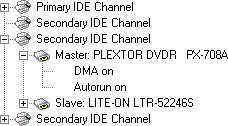
The Plextor DVD recorder was hooked up as Master to the (onboard) secondary IDE-controller and identifies itself as "PLEXTOR DVDR PX-708A". DMA (Direct Memory Access) and autorun were enabled for every device.
Used Software:
The Dutch Windows XP Professional SP1 operating system is installed on our test machine. We'll be using the following software to perform the various tests:
- Ahead InCD v4.0.5.6
- Ahead Nero Burning Rom v6.0.0.11
- Ahead Nero CD/DVD Speed v2.02.6
- Ahead Nero InfoTool v1.03.2 & v2.00
- Elaborate Bytes CloneCD v4.2.0.2
- Exact Audio Copy v0.9 beta 4
- Kris Schoofs' DVD Plus Identifier v2.3
- Plextor PlexTools Professional v2.07
As always we're going to start our review by checking out the contents of the
retail package Plextor Europe
send to us. Notice that we're taking a look at the European retail package here.
The American retail package of the Plextor PX-708A is different. In the box of
the PX-708A DVD recorder we can find the following items:

- Plextor PX-708A drive
- Quick installation guide
- Warranty RMA procedure manual
- Leaflet with DVD+R recording information
- IDE flatcable
- Mounting screws, emergency eject pin, extra jumper cap
- Application CD-ROM 1 containing;
- Pinnacle Studio 8SE
- Application CD-ROM 2 containing;
- Nero Burning ROM (v5.5)
- InCD (v4.0)
- PowerDVD (v5.0)
- PlexTools Professional (v2.06)
- Operation manual
- Nero Burning ROM (v5.5)
Notice that on the image there is also a Plextor DVD+R disc but this is
normally not included with the package of the PX-708A. If you're a frequent
visitor of our website you will probably have read that the Plextor
PX-708A drive can write some 4x DVD+R media at 8x. This was implemented because
8x DVD+R media is currently not available. In the yellow leaflet that is
included with the DVD recorder you can read this information too which also
mentions that when the drive 'thinks' 8x recording is not safe it will record at
4x instead, regardless of which speed you selected at the beginning of the write
process.
When we look at the rest of the Plextor package we can see that Plextor has
decided not to include a printed manual anymore like they used to do with all of
their other drives (we're talking about the European package here of course).
The manual of the drive is now located on the Application CD-ROM. Luckily
Plextor hasn't cut back in the software department. The drive comes with an
excellent selection of software, including Nero 5.5, PowerDVD 5 and Pinnacle
Studio 8SE to which we'll get back to later on this page.
For Europe, Norway and Switzerland Plextor offers a two year warranty
period on the drive with on-site collect & return service.
The Drive:
The Plextor PX-708A drive looks exactly the same as the PX-504A drive except
for the model number on the drive's tray of course. There are of course also
some slight differences when looking at the logo's on both drives since the
PX-708A drive supports the DVD-R(W) standard and ultra-speed re-writing (while
the PX-504A only supports the DVD+R(W) format and high-speed re-writing). The
PX-708A drive has the same white colour as the PX-504A drive and it also has the
same black plastic strip on its tray:

On the front of the Plextor drive we can find the Plextor logo (in full
colour), the model number (PX-708A), a 'DVD+ReWriteable' logo, a 'DVD-R/RW' logo
and an 'Ultra-Speed ReWriteable' logo. Besides that we of course also have our
usual headphone jack, volume control, a busy/write LED, emergency eject hole and
an eject button.

One the back of the drive we find the usual IDE and power connectors, the
Master/Slave/CableSelect jumpers, a 4-pin analog audio connector and an SPDIF
(Digital Audio Out) connector. On the back of the drive we can also find a
fourth jumper setting with which you can set the drive to DMA mode 2 (MultiWord)
instead of UDMA33 it normally uses. We of course left this jumper alone since
UDMA33 is by far the best interface.

When we look at the label on the drive we can see that we have a Plextor
PX-708A drive that was manufactured in China in August of this year. We're
reviewing the first revision of this drive which can be seen from the TLA number
(0000 is the first version).
Software:
 Plextor's PlexTools Professional software is a well known
program and is delivered with European Plextor drives (in America the PlexTools
software is only shipped with the Plextor Premium drive to our knowledge). With
the PlexTools Professional software you can control every feature of your
Plextor drive and the software also has some advanced measurement options that
can only be used with the Plextor Premium drive (for a review of this drive and
the PlexTools 'Q-Check' options click here). With the
PlexTools Professional software you can also extract audio discs and create data
and audio compilations.
 As we're used from European Plextor drives they're shipped
with a copy of Ahead's CD/DVD mastering software, Nero Burning Rom. A while ago
Ahead released their Nero 6 software but the Plextor PX-708A drive is shipped
with a copy of the Nero Burning ROM 5.5 software. For our review we'll be using
Nero Burning ROM v6.0.0.11 (notice that were not using the latest version
(v6.0.0.15) since this version has some problems with the PX-708A drive when
writing DVDs).
 Ahead's packet writing software InCD 4 is also located on
the Plextor Application CD-ROM. With InCD you can format a CD-RW or DVD±RW disc
and use it as a large floppy disc. InCD also supports the 'Mount Rainier'
(CD-MRW) format and when you want to access a CD-MRW disc on a system that
doesn't support this format, Ahead's EasyWrite Reader plug-in is also present on
the Plextor Application CD-ROM. Other tools located on this CD-ROM are
NeroMediaPlayer and Nero BurnRights (allows an administrator to setup user
accounts under Windows XP/2000 so that users without administrative rights can
burn CDs with Nero).
To play your DVD movies on the PX-708A drive Plextor has included a copy of
Cyberlink's PowerDVD software. PowerDVD is a completely solution for viewing DVD
movies on your computer and version 5, which is included in the Plextor package,
has some new techniques on board called CLPV and CLEV:

Compared to PowerDVD 4 version 5 has also undergone some design changes. The
software already looked good in my opinion but version 5 looks even better:

Last but not least Plextor has included Pinnacle's Studio 8 software. The
Studio software is a video-editing software for your computer. Simply capture
your video footage and then use the professional editing features like scene
transitions, title effects, and fast/slow motion to create compelling movies.
After you've edited your video, you can output to tape or burn your movies to a
CD or DVD that will play on most living room DVD players.

Drive Specifications:
Let's begin with a listing of the drive's specifications as listed on the
Plextor website and on the promotional leaflet we got with the drive:
| Write Speeds: |
40x
32x
16x
8x
4x
6x~8x
4x
2.4x
4x
2x
1x
24x
10x
4x
4x
2.4x
2x
1x
<150ms
(read/write):
CD-DA, CD-Extra, CD-ROM Mode-1, CD-ROM Mode-2, CD-ROM
XA, Photo-CD, Video-CD, Multisession, CD TEXT, CD-I, CD+G, UDF
(write):
Track at Once, Disc at Once, Packet Write (variable and
fixed), Multisession, Session at Once, CD-MRW (Mt. Rainier)
(read/write):
DVD-ROM, DVD-Video, Multiborder, Multisession,
DVD+VR, DVD-VR (read only)
(write):
Sequential Write, Multisession, Random Access Write,
DVD+MRW (physical formatting in background)
(write):
Disc at Once, Incremental Recording, Multiborder
Recording, Restricted Overwriting
(detected with Nero InfoTool)
RAW DAO, RAW SAO 16, RAW SAO 96, RAW DAO 16, RAW DAO 96
128 RAM minimum, Windows 95SE/ME/2000/XP
Technology, PoweRec, VariRec, 2 Year Warranty (On-Site Collect &
Return Service in E.U., Norway and
Switzerland)
From the table we can see that the Plextor PX-708A drive supports the Mount
Rainier format for both CD-RW recording and DVD+RW recording. Besides that the
drive supports techniques such as PoweRec and VariRec which we can also find in
other Plextor recorders. Let's continue with a screenshot of the PX-708A's
specifications as detected with Nero InfoTool:

Nero InfoTool reports us that the Plextor PX-708A drive can read and write
all kinds of media, except for DVD-RAM. The drive has a 2MB buffer and firmware
1.00 is installed. From the screenshot we can also see that the drive is a RPC
II (Regional Playback Control) DVD reader. This means that
the drive has been set to play region 2 DVDs (Europe) and has five region
changes left. After the last change the drive will be locked to the last used
region. This was done by motion picture studios to control the release of movie
titles in each world region. This lock can then be reset four times by the
manufacturer of the drive.

In the PlexTools Professional screenshot above we can see a confirmation on
some of the information we got from Nero InfoTool. Besides that PlexTools also
reports us the drive's access times (<100ms for CD and <150ms for DVD).
Now, let's take a closer look at some of the features that the drive
supports.
Drive Features:

Buffer Underrun Protection:
Nero reports us that, as with almost all Plextor drives, the PX-708A drive
supports the BURN-Proof (Buffer
UnderRuN-Proof) technique. When the, in this case
2MB, buffer of the recorder falls beneath a certain level, it will stop
recording as of a specific location on the CD. The recorder then continues
attempting to receive data from the PC to refill the buffer. As soon as the
buffer has been refilled, the recorder will start recording again.
Mount Rainier:
As we already saw in previous screenshots and in the Nero screenshot above
the Plextor PX-708A drive supports the Mount Rainier format. Mount Rainier
enables native operating system support of data storage on CD-ReWriteable and
DVD+ReWriteable discs. This makes the technology far easier to use and allows
the replacement of the floppy. Key features include:
- Defect management by the drive itself
- Logical write-addressing at 2k
- Background formatting
- Command set implementation
- Compatibility and standards-compliance

For more information you can visit www.mt-rainier.org.
PoweRec:
As almost all new Plextor drives, the PX-708A supports the PoweRec technology to ensure a quality back-up. PoweRec
(Plextor Optimised Writing Error Reduction
Control) monitors the quality of the disc while burning and will adjust
the speed if necessary. Via the PlexTools Professional software PoweRec can be
disabled to force the drive to write media at a selected speed instead of the
speed the recorder would normally use when its quality checks (PoweRec) are
enabled. A small benefit of this option is that when you disable PoweRec you can
see at which speed your media would normally be written:

VariRec:
The VariRec technology allows you to change the drive's laser
power when writing an audio disc. With VariRec enabled you should be able to
improve the quality of the recorded disc and make the recorded disc more
compatible with picky CD-players like a car stereo. Since the Plextor Premium
drive the VariRec function has been improved since it now allows 8x writing
(previously limited to 4x) and allows you to select the dye type of your CD-R
disc in order to select the best write strategy:

CD-R/RW Write Methods:
Let's take a look at the PX-708A's CD-R and CD-RW write performance when
using Nero CD Speed. Unfortunately, at the time of writing this review, it's not
possible to simulate DVD recordable media using Nero CD-DVD Speed yet so we'll
get back to this later on in this review:
CD-Recordable Media:

The Plextor PX-708A drive has an average CD-R write speed of 33.36x
which is not bad at all. Because the drive uses the P-CAV
writing method it's quite a lot faster than the Plextor PX-W4012S (SCSI) drive
for example (30.58x) which uses the Z-CLV
write method.
CD-ReWriteable Media:

When looking at the PX-708A's re-write performance the drive again performs
well. With an average re-write speed of 23.75x it's not as fast as the
Plextor Premium (23.90x average but notice that the Premium can also re-write at
32x) or the TEAC CD-W552E (23.80x average) but it's not far behind.
next page we'll take a look at the Plextor PX-708A's read performance with all
types of media.
In this part of our Plextor PX-708A review we'll test how fast the drive can read various media, including audio CDs and DVD media. As we already mentioned before, the Plextor drive can read CD media at 40x while DVD media can be read at 12x. Let's first take a look at what kind of speeds the PX-708A drive supports according to the PlexTools software:


PlexTools reports us that the Plextor PX-708A can read all CD media at full speed. The drive can only read DVD-ROM media at 12x though and reading DVD-Video is limited to 2x. Last but not least PlexTools reports that the drive can read DVD±R(W) media at 8x. Let's see if this is indeed the case.
Pressed Discs:
For the transfer rate tests we used a pressed CD-ROM containing the PlexTools software (v1.05) which was exactly 74 minutes (333.000 sectors) long. Below you can see the produced Nero CD-DVD Speed graph:

From the three DVD recorders I have reviewed, all claiming to support 40x read speeds, the Plextor PX-708A is the first drive to actually reach its rated read speed. The drive had no problems going a little faster than 40x and besides that its seek times were pretty good. Let's compare our results to two other drives we've previously reviewed:
| Pressed Discs | Average Read Speed | Start Read Speed | End Read Speed | Seek Times Random | Seek Times 1/3 | Seek Times Full |
| Plextor PX-504A | 29.62x | 17.44x | 39.09x | 110ms | 113ms | 188ms |
| Plextor PX-708A | 31.40x | 18.48x | 41.45x | 98ms | 116ms | 175ms |
| Sanyo CRD-BPDV2 | 29.30x | 16.33x | 38.71x | 85ms | 102ms | 177ms |
CD-Recordable Discs:
For the transfer rate tests with CD-Recordable Media we used a back-up (CD-R) of the PlexTools software disc. The used disc was a 'That's Write' CD-R certified up to 16x writing and manufactured by Gigastorage. Here are the results:

The graph shows us that the Plextor drive again had no problems reaching its rated read speed of 40x. Its seek times were better than we saw with the pressed media and when we compare them to other drives we've reviewed we can see that the Plextor PX-708A drive has both the best (read: highest) read speeds and best (read: lowest) seek times:
| CD-R Discs | Average Read Speed | Start Read Speed | End Read Speed | Seek Times Random | Seek Times 1/3 | Seek Times Full |
| Plextor PX-504A | 30.67x | 18.35x | 40.31x | 116ms | 119ms | 174ms |
| Plextor PX-708A | 31.48x | 18.83x | 41.37x | 95ms | 111ms | 164ms |
| Sanyo CRD-BPDV2 | 30.31x | 16.20x | 39.92x | 114ms | 115ms | 204ms |
CD-ReWriteable Discs:
To test the transfer rate with CD-RW discs we once again used the "PlexTools v1.05" disc only this time we read from a CD-ReWriteable disc. The used disc was a 'Plextor High Speed CD-RW' disc. Below you can see the produced graphs with Nero CD-DVD Speed again:

When it comes to reading CD-RW media the Plextor again performed well. It had no problems reaching 40x reading and in fact its top read speed was (a little) faster when compared to the drive's pressed and CD-R media top read speed. The drive's seek times were pretty close to the other drives we've reviewed:
| CD-RW Discs | Average Read Speed | Start Read Speed | End Read Speed | Seek Times Random | Seek Times 1/3 | Seek Times Full |
| Plextor PX-504A | 26.08x | 15.34x | 34.45x | 113ms | 124ms | 178ms |
| Plextor PX-708A | 31.46x | 18.47x | 41.55x | 109ms | 116ms | 183ms |
| Sanyo CRD-BPDV2 | 30.59x | 16.97x | 40.44x | 84ms | 103ms | 175ms |
Audio - Digital Audio Extraction:
To test the Plextor's digital audio extraction performance we again used Nero CD-DVD Speed to do a transfer rate test. The audio disc we used was of a slightly larger size than in our previous tests (77 minutes). In the graph below you can see the performance of the DVD-recorder:

And once again the Plextor drive showed good performance as the drive had no problems reaching 40x and going faster than that. The Plextor PX-708A's seek times were very close to the Plextor PX-504A drive:
| Audio Discs | Average Read Speed | Start Read Speed | End Read Speed | Seek Times Random | Seek Times 1/3 | Seek Times Full |
| Plextor PX-504A | 25.87x | 15.35x | 34.09x | 110ms | 119ms | 177ms |
| Plextor PX-708A | 31.84x | 18.90x | 41.98x | 97ms | 117ms | 181ms |
| Sanyo CRD-BPDV2 | 30.72x | 18.24x | 40.21x | 84ms | 103ms | 208ms |
As a final test we used PlexTools to extract the audio disc to our hard disk. As an extra test we also tested the drive's performance using Exact Audio Copy (EAC) in Secure Mode. According to EAC the PX-708A drive caches audio, has an accurate stream but it cannot report C2 error information. This is strange since both Nero InfoTool and PlexTools Professional reported that the drive is able to detect and report C2 error information. |  |

PlexTools Professional

Exact Audio Copy - Secure Mode
The Plextor PX-708A drive performed very well when using the PlexTools software as it had no problems reaching 40x while extracting the audio tracks. When using the drive with the EAC software we also had a good result but we must mention that the drive's read speeds were higher than what you can see on the screenshot. At the end of each track the software (or the drive?) had the tendency to slow down the read speed. The actual read speed for most tracks was around 12x. Not bad at all for a DVD recorder.
Audio - Advanced DAE Quality Test:
As always, to conclude our CD media read tests we did an 'Advanced DAE Quality Test' with Nero CD-DVD Speed. You can see the produced results below:

Well what can we say.. Once again an excellent result. The Plextor PX-708A drive passed all tests successfully and produced a quality score of 100% (something that the Plextor PX-504A drive had problems with). With an average read speed of 30.10x the drive was quite a lot faster than the Plextor PX-504A (24.38x average) and the Sanyo CRD-BPDV2 (28.64x average). Last but not least the Plextor PX-708A drive had no problems reading the SubChannel Data and CD-Text from the disc.
DVD - DVD-Video:
For our DVD reading tests we're going to start with a DVD-Video read test of a single-layered and double-layered DVD disc. Keep in mind that a low read speed has no effect on the drive's performance when playing a DVD. The drive's read speed is only important when you, for example, want to rip a DVD disc to your hard disk.


There isn't much to tell about the Plextor PX-708A's DVD read performance as
it's limited to 2x reading. As you could already read in the PlexTools
screenshots at the beginning of this page Plextor has done this to keep the
noise the drive produces while reading the disc to a minimum. Because the
Plextor PX-708A drive has a limited read speed it of course comes in last when
we compare to the drive to other drives we've reviewed:
| DVD Video | Average Read Speed (SL) | Start Read Speed (SL) | End Read Speed (SL) | Average Read Speed (DL) | Start Read Speed (DL) | End Read Speed (DL) |
| Plextor PX-504A | 3.73x | 2.07x | 4.98x | 3.43x | 1.91x | 1.96x |
| Plextor PX-708A | 2.00x | 1.99x | 2.01x | 2.00x | 2.00x | 2.00x |
| Sanyo CRD-BPDV2 | 8.77x | 4.15x | 11.70x | 4.28x | 3.45x | 3.88x |
Update: some clever forum members noticed that the Plextor PX-708A drive can be 'unlocked' so
that it will read DVD-Video discs a lot faster. You can do this by making sure
the drive is empty and closed. Then press and hold the drive's eject button for
about three second until the drive's LED flashes green three times. Release the
eject button so that the drive's tray will open. Now insert a DVD-Video disc and
voila the drive reads faster. When you eject the disc or when you cut the
drive's power, the PX-708A will be reset to 2x reading again. Here are the new
results:


| DVD Video | Average Read Speed (SL) | Start Read Speed (SL) | End Read Speed (SL) | Average Read Speed (DL) | Start Read Speed (DL) | End Read Speed (DL) |
| Plextor PX-504A | 3.73x | 2.07x | 4.98x | 3.43x | 1.91x | 1.96x |
| Plextor PX-708A | 9.01x | 5.00x | 12.04x | 6.03x | 3.37x | 8.03x |
| Sanyo CRD-BPDV2 | 8.77x | 4.15x | 11.70x | 4.28x | 3.45x | 3.88x |
These results look a lot more impressive of course! Sorry for the mistake,
hope you can forgive me 😉
DVD - DVD+R(W):
To test the Plextor's read performance with DVD+R and DVD+RW media we simply
copied 4.4GB to an empty DVD+R and DVD+RW disc. Below you can see the
results:


When it came to reading DVD+R(W) media the Plextor PX-708A drive performed a lot better. This time the drive reached an average read speed of 6x with both types of media. When we compare the achieved results to the results of other drives we've reviewed, the Plextor PX-708A is clearly the fastest drive. The seek times of the Plextor drive were also good and well within specifications (<150ms random stroke):
| DVD +R(W) | Average Read Speed (+R) | Start Read Speed (+R) | End Read Speed (+R) | Average Read Speed (+RW) | Start Read Speed (+RW) | End Read Speed (+RW) |
| Plextor PX-504A | 3.77x | 2.08x | 5.04x | 3.37x | 1.88x | 1.72x |
| Plextor PX-708A | 6.05x | 3.33x | 8.10x | 6.07x | 3.34x | 8.11x |
| Sanyo CRD-BPDV2 | 4.01x | 2.64x | 4.02x | 4.02x | 2.65x | 5.77x |
DVD - DVD-R(W):
To test the Plextor's read performance with DVD-R and DVD-RW media we again copied roughly 4.4GB to an empty DVD-R and DVD-RW disc. Below you can see the results again:


The Plextor's performance with DVD-R(W) media was almost exactly the same as with the DVD+R(W) media. Both discs were read at an average speed of 6x. Notice that there was a small problem with the DVD-R disc as the read speed dropped at the end of the disc. This hardly affected the drive's overall performance though.
| DVD -R(W) | Average Read Speed (-R) | Start Read Speed (-R) | End Read Speed (-R) | Average Read Speed (-RW) | Start Read Speed (-RW) | End Read Speed (-RW) |
| Plextor PX-504A | 3.76x | 1.89x | 5.04x | - | - | - |
| Plextor PX-708A | 6.00x | 3.37x | 8.04x | 6.06x | 3.34x | 8.11x |
| Sanyo CRD-BPDV2 | 4.02x | 3.06x | 4.02x | 4.02x | 3.20x | 4.02x |
So far for the reading part. Now let's see how the Plextor drive performs when writing recordable CDs and DVDs...
As we already mentioned the Plextor PX-708A is the world's first drive to support 8x DVD+R recording. This means that, in theory, the drive should be able to write a complete DVD in less than 10 minutes. One problem is that 8x DVD+R media is currently not available. To solve this problem the Plextor PX-708A drive is able to write certain 4x DVD+R media at 8x. You can find a list of supported 4x/8x media at the Plextor website. For our review we're using 4x media that can be written at 8x. On this page of our review we'll of course also check out the drive's CD-R recording performance with which we're going to start.
Writing Data CD-R:
For our data writing tests we simply set up a new compilation of 700MB using the Nero Burning Rom software. We used the DAO (Disc At Once) writing method. The disc was finalized and set-up as a non-multisession disc. In the screenshot below you can see the burn process completed successfully:

As you can see from the screenshot, the burn process was completed in just under 3 minutes (2m:58s). This is a very good result for a DVD recorder since most DVD recorders usually don't have very high CD-R recording speeds. A recording time of three minutes means that the drive performs very close to current CD-RW recorders. As a side note the Plextor PX-708A drive is actually around 20 seconds faster when burning 700MB when we compare the drive to older Plextor 40x recorders, like the PX-W4012S (SCSI). This is because the PX-708A drive uses the P-CAV writing method which we already showed you on page two of our review.
CD-R Write Quality:
For our CD-Recordable write quality tests we normally use Lite-On's WSES (Write Strategy Evaluation System) program to measure the amount of errors but for this review we're going to use the PlexTools Professional software. We did this for the simple reason that PlexTools works under Windows while WSES requires DOS to operate.
In the graphs below you can see an overview of errors occurring during the read process. Please note that every burned disc will always have C1 errors. These are errors that are corrected by the drive and they will not effect the disc in a bad way as long as their amount is limited. C2 errors are however very bad for a disc and are harder to read and correct. When there are CU errors present on the disc it means you have bad burned disc and it can't be read in the test drive you're using as a reader.
Also keep in mind that the number of C1/C2/CU errors depends on a number of different factors. The combination of software, hardware and read speed have an effect on the results. Since we're using different software in this review and a different drive for reading the disc, the results may be (a little) different than when using the traditional WSES software. Nevertheless all programs will give you a good idea of the quality of the written disc.

Maxell - 48x certified - 40x write
| Manufacturer: | Maxell |
| Code: | 97m25s07f |
| Disc Type: | CD-R |
| Recording Layer: | Dye Type 7: Short Strategy (Phthalocyanine) |
| Capacity: | 79:59.00 (702MB) |
| Certified Speed: | 48x |
| Write Speed: | 40x |
| Write Time: | 2m:58s |
| C1 Average/Sec: | 2.8 |
| C2 Average/Sec: | 0.0 |
| CU Average/Sec: | 0.0 |
The Maxell discs had a low amount of C1 errors (2.8 average) and there were no C2/CU errors on the disc. A well recorded disc but this was no surprise since the Plextor drives are known to work well with Maxell media.

MAM-E - 48x certified - 32x write
| Manufacturer: | Mitsui |
| Code: | 97m27s58f |
| Disc Type: | CD-R |
| Recording Layer: | Dye Type 8: Short Strategy (Phthalocyanine) |
| Capacity: | 79:59.74 (703 MB) |
| Certified Speed: | 48x |
| Write Speed: | 32x |
| Write Time: | 3m:13s |
| C1 Average/Sec: | 5.3 |
| C2 Average/Sec: | 0.0 |
| CU Average/Sec: | 0.0 |
The MAM-E discs, manufactured by Mitsui, had more C1 errors than the Maxell discs but an average of 5.3 is not the worst result we've seen with these discs. One thing that did worry us were the two C2 errors. They're not fatal for a disc but they're never wanted.

MMORE - 32x certified - 32x write
| Manufacturer: | Moser Baer India |
| Code: | 97m17s06f |
| Disc Type: | CD-R |
| Recording Layer: | Dye Type 6: Short Strategy (Phthalocyanine) |
| Capacity: | 79:59.74 (703 MB) |
| Certified Speed: | 32x |
| Write Speed: | 32x |
| Write Time: | 3m:11s |
| C1 Average/Sec: | 8.6 |
| C2 Average/Sec: | 0.0 |
| CU Average/Sec: | 0.0 |
The MMORE media had the highest amount of C1 errors and once again we see a small amount of CU errors. It seems like the Plextor PX-708A drive only likes recording to high quality media brands like Maxell and, of course, Taiyo Yuden:

Taiyo Yuden - 24x certified - 32x write
| Manufacturer: | Taiyo Yuden |
| Code: | 97m24s01f |
| Disc Type: | CD-R |
| Recording Layer: | Dye Type 1: Long Strategy (Cyanine, AZO) |
| Capacity: | 74:43.01 (656MB) |
| Certified Speed: | 24x |
| Write Speed: | 32x |
| Write Time: | 2m:45s |
| C1 Average/Sec: | 1.1 |
| C2 Average/Sec: | 0.0 |
| CU Average/Sec: | 0.0 |
With an average C1 error count of 1.1 the Taiyo Yuden disc was recorded very well by the Plextor PX-708A drive.
During the writing of this review a new firmware version was released for the Plextor PX-708A drive. As a test we upgraded the firmware of the Plextor drive and re-wrote a MAM-E disc and measured the amount of errors on the disc to see if this made a difference. Unfortunately it didn't since the recorded disc again had C2 errors (28) just as the first disc we recorded.
Note that as a result of the firmware upgrade all tests from here on were performed with firmware 1.01 installed!
Writing Audio CD-R:
Some older Plextor recorders were limited when it came to audio recording speed. To test if this was also the case with the Plextor PX-708A drive we simply set up a new audio compilation using the Plextools Professional software:

As you can see the Plextor PX-708A drive had no problems recording the audio disc at full speed. From the screenshot you can see that the recording process took 5 minutes. This is because PlexTools first makes an image of the audio tracks you want to record before starting the actual recording process.
VariRec:
For our VariRec recording test we simply rewrote the same audio files we used in our previous test only this time the VariRec setting for the Plextor drive was enabled via the PlexTools software. We used the default setting for VariRec and our disc was recorded at 8x. As an extra test we then tested both audio discs (the one recorded at 40x and the one at 8x using VariRec) in the Premium drive and used the PlexTools software to do a Beta/Jitter test. We did this because VariRec is supposed the decrease the amount of jitter on a disc.

VariRec Enabled

Normal 40x Recording
When we compare both graphs to each other we can indeed see that the VariRec disc has less jitter than the disc we recorded at 40x. So, does this makes a difference when playing both discs in a standard hi-fi system? Well, we couldn't tell the difference... Both discs played fine in our stereo.
Writing Data DVD±R:
To test the Plextor's performance when writing DVD media we set up a new UDF/ISO compilation of roughly 4400MB in Nero Burning ROM and started the recording process. For the 8x DVD+R recording test I used a Philips 4x DVD+R disc with the following ADIP information:
Unique Disc Identifier :  [RICOHJPN-R01-02+R]
-----------------------------------------------------
Disc  Type : [DVD+R]
Manufacturer ID : [RICOHJPN]
Media Type ID :  [R01]
Product Revision : [02]
Disc Application Code : [General  Purpose]
Recording Speeds : [2.4x -  4x]
-----------------------------------------------------
[DVD Plus  Identifier - http://DvdPlusID.CdFreaks.com]

The only word that comes to mind when seeing the above screenshot is 'wow'.. The complete DVD was written in only 8 minutes which is of course the fastest recording time we've ever seen. When you compare the recording time of the Plextor PX-708A drive to the recording time of a 4x DVD recorder, it's about 6 minutes shorter. The reason why the 8x PX-708A drive isn't twice as fast as a 4x drive is because the PX-708A starts the recording process at 6x recording and after a certain point it increases the recording speed to 8x.

For our next DVD recording test we recorded a 4x (Princo brand) DVD-R disc and as you can see from the screenshot above, the recording process was completed successfully in just under 15 minutes. So, when compared to the Plextor PX-708A's DVD+R performance the difference between 4x writing and 8x writing is no less than 7 minutes.
DVD±R Write Quality:
Unfortunately the only method of testing the write quality of a DVDR disc is by using the Kprobe software. The problem however is that Kprobe requires a Lite-On DVD-ROM drive to measure the errors on the DVD disc and I unfortunately don't own a Lite-On DVD-ROM drive. So, in order to somewhat test the write quality of the recorded DVD disc I simply watched them on a few standalone DVD players. I also played the DVDs in my very picky Xbox console and all discs played perfectly. This of course also depends on the quality of the used media but it does also indicate that the Plextor's 8x write performance to 4x media is working well.
Now that we've finished our normal read and write tests, it's time to check the drive's re-write performance...
Besides supporting the world's highest DVD+R recording speed the Plextor PX-708A is also one of the first drives to support 4x DVD+RW recording. Other re-write speeds the drive supports are 2x DVD-RW recording and 24x CD-RW. On this page of our review we'll see what these speeds mean when writing normal data compilations and when using the packet writing method.
Note that we unfortunately were unable to find DVD-RW media that would work at 2x in the Plextor PX-708A drive. However, please also note that at the time of writing this review 4x DVD+RW media is very hard if not impossible to come by. However we were able to obtain some blank 4x DVD+RW discs so we can include our results with this media in our review!
Re-Writing Data:
For our CD-RW data re-writing tests we set up a new compilation of 650MB using the Nero Burning Rom software. We used the DAO (Disc At Once) writing method. In the screenshot below you can see the burn process completed successfully:

As you can see our data compilation was written in 3 minutes and 40 seconds. This is a very good result for a DVD recorder since most other DVD recorders only support 10x or 12x CD-ReWriting. For our next DVD+RW test we set up a new DVD-ROM compilation of about 4.4GB. We again used the DAO writing method and started the write process:

The total compilation was written in 14 minutes and 40 seconds. This recording time is about 9 to 10 minutes shorter than when recording at 2.4x (which is what most DVD+RW drives currently support).
Packet Writing:
For our packet writing tests we used Ahead's InCD 4 software and tested both the Plextor's CD-RW and DVD+RW performance. For our first test we set-up a test folder with random data measuring roughly 400MB in size. After formatting was complete we measured the time it took for the drive to write the test data. In the table below we've summed up our results:
| CD-RW Packet Writing | InCD Formatting 650MB | InCD Copying 400MB | Average Write Speed |
| Plextor PX-708A | 4m:10s | 4m:35s | 9.9x |
As you can see from the table we got some strange results since the PX-708A drive only reached an average packet writing speed of 9.9x. Since we've seen the problem with other drives before we know this problem is related to InCD v4. This is one of the reasons we normally use InCD v3 for our reviews but unfortunately InCD v3 does not support the Plextor PX-708A drive. As of yet we haven't received a response from Ahead what is causing these slow recording times.
For our next DVD+RW tests we set-up a test folder with random data measuring 4.35GB in size. We then inserted an empty disc and measured the time it took for the drive to format the disc after which the test data was dragged and dropped to the disc via the Windows Explorer. In the table below you can see the results again:
| DVD+RW Packet Writing | InCD Formatting 4.4GB | InCD Copying 4.4GB | Average Write Speed |
| Plextor PX-708A | 0m:20s | 23m:36s | 2.4x |
| Sanyo CRD-BPDV2 | 1m:02s | 25m:28s | 2.2x |
And once again we have a very slow average packet writing speed of only 2.4x. This should normally be around 3.9x for this Plextor drive. Notice that the displayed results for the Sanyo drive were achieved with InCD v3. Let's continue with our Mount Rainier tests.
Mount Rainier:
To test the Plextor Premium's Mount Rainier performance we again used InCD to write the same folder of test data we used for our CD-RW packet writing test. In the table below you can see an overview of the achieved results:
| CD-RW Mount Rainier | InCD Formatting 650MB | Manual Eject While Format in Progress | Copying 400MB Data while Format in Progress |
| Plextor PX-708A | 0m:45s | 0m:38s | 17m:48s |
| Mount Rainier (continued) | Copying 400MB Data to Formatted Disc | Reading 400MB Data While Format in Progress | Reading 400MB Data from Formatted Disc |
| Plextor PX-708A | 17m:11s | 4m:23s | 2m:06s |
From the table you can see that the Plextor PX-708A drive again needs far too much time to write our test data and it really is too bad that InCD v3 does not support the drive so we can compare the write times of both InCD versions to each other. The write time for the PX-708A drive should be around 4 or 5 minutes but with InCD v4 it's more than 17 minutes...
The Plextor PX-708A drive also supports the DVD+MRW standard but since we're having problems with InCD it's pointless to continue. Hopefully we will be able to figure out what the problem is so we can perhaps fix it and update our review.
Now that we've finished our normal tests, it's time for some advanced testing...
For our final (advanced) tests we're going to test how the Plextor drive performs with data and audio copy-protections. Besides that we'll also check if the drive can overburn, if it can read GigaRec discs and if it can handle 8cm discs. Let's start with the data copy-protections:
Copy-Protected Data:
For our copy-protected data tests we, as always, used CloneCD to read and write several popular copy-protections. In the picture below you can see that the Plextor PX-708A is fully supported by CloneCD:

The Plextor drive supports the DAO-RAW96 recording mode which basically means that the drive can write uncorrected data and SubChannel Data. In the table below we've summed up all of our results and after the table we will clarify our results:
| Protected Data | Game Title | Protection (version) | Read Time | Back-up Works |
 | Desperados | LaserLock | 1h:39m:39s | Yes |
 | The Sims: House Party | SafeDisc v2.10.030 | 2m:19s | Yes |
 | Mafia: The City Of Lost Heaven (CD1) | SafeDisc v2.70.030 | 2m:35s | Yes |
 | Neverwinter Nights (CD3) | SecuRom v4.76.00.0051 | 2m:55s | Yes |
 | Final Fantasy VIII (CD1) | PlayStation LibCrypt | 2m:59s | Yes |
A bit to our surprise the Plextor PX-708A showed a very good performance during our data copy protection tests. The drive was only struggling with the LaserLock protection (something that is quite common for Plextor drives) but other than that it beats all protections without a problem. And, just as we saw with the Plextor Premium drive, the PX-708A drive could copy the SafeDisc 2 protection without needing any additional help from CloneCD's weak sector amplification. SecuRom reading was also no problem for the drive so overall an excellent result!
Copy-Protected Audio:
Since we're reviewing a Plextor drive we're going to use the PlexTools Professional software for our protected audio disc tests. For the tests we simply inserted the audio discs in the drive and waited if the drive could recognize the disc and if so, could extract the audio tracks. In the table below we've summed up our results. Note that before we did any of these tests we disabled the 'Auto Insert Notification' for the Plextor drive via the PlexTools software:
| Protected Audio | Audio Title | Protection (version) | Exact Audio Copy |
| Shakira - Laundry Service | Key2Audio version 2 | Read the disc without problems | |
| Celine Dion - A New Day Has Come | Key2Audio version 3 | Read the disc without problems | |
| Bitte Ein Beat! - Beat 5 | Cactus Data Shield 200 | Could recognize disc but there were errors | |
| Yorin FM - Hitzone 21 | Doc.loc | Takes some time to recognize disc but tracks ripped without problems | |
The Plextor PX-708A drive could recognize all discs without much trouble. It needed some time to recognize the Doc.loc protected audio disc but once it had been detected the drive was able to rip the tracks without a problem. When reading the Key2Audio protections the drive performed excellent since the discs were recognized almost instantly and the drive was able to rip the tracks. The PX-708A drive also had no problems detecting the CDS200 protected disc but when we ripped the tracks PlexTools reported that there were errors on the disc:
Start of extraction
Extracting track 15

  (D:PX-708ATrack_15.wav - 04:05)
...
468 errors
Elapsed time:

  02:38
1 track(s) successfully extracted
When ripping a CDS200 protected audio disc it's quite common that errors are generated during the extraction process. These errors can result in small pops and clicks in the ripped tracks. We of course listened to the extracted tracks but we couldn't hear any distortions. We also loaded the extracted tracks in Nero's Wave Editor software but there were no huge spikes in the wave track.
Overburning:
For our overburning test we, as always, used the Nero CD-DVD Speed software and started the test. According to the CD-DVD Speed software the Plextor PX-708A can fully overburn up to 99 minutes:

To test if the results we got from Nero CD-DVD Speed were correct we used the PlexTools Professional software to set up a new audio compilation of 96 minutes. As a small extra test we also added CD Text to the disc to see if the Plextor PX-708A drive could write this data correctly:

The disc was written without a problem although the drive did lower the write speed to a safe 16x. Next we of course tested if the Plextor drive could read the disc and the CD Text. Both tests were successfully completed and instead of showing you an image of the PX-708A drive reading the 99 minute media CD-R we're going to continue to reading a GigaRec disc instead.
GigaRec Discs:
GigaRec is a new technology that was introduced with the Plextor Premium drive (and as of yet this is the only drive that supports this technique). In short GigaRec allows you to expand the capacity of a normal 80 minute (700MB) CD-R disc up to 111 minutes (or almost 1GB of data). GigaRec has different rates and for our next test we used a GigaRec disc that was recorded with the highest setting, 1.4x, which means that there is 111 minutes of audio on a standard 80 minute disc:

As you can see the Plextor PX-708A drive was able to read the GigaRec disc although it did use a low read speed of only 8x. Nevertheless, since not many drives are able to read GigaRec disc, this is a good result. On the other hand though, we of course expected the Plextor PX-708A to be able to read the disc since GigaRec was introduced by Plextor..
8cm Discs:
For our final test we'll, as always, test if the Plextor drive can read and write 8cm discs. For our write test we used Nero Burning Rom and after that we used Nero CD-DVD Speed to do another transfer rate test. As expected, both tests were completed without a problem:

Positive:
- Fastest DVD recorder on the planet with 8x (!) DVD+R, 4x DVD+RW, 4x DVD-R, 2x DVD-RW, 40x CD-R and 24x CD-RW recording speeds!
- Excellent software package
- Two year warranty with on-site collect & return service (Europe, Norway and Switzerland)
- Supports 'BURN-Proof' technology
- Supports 'PoweRec' and 'VariRec' technology
- Excellent CD and DAE read speeds
- Excellent DVD read speeds
- Excellent performance with copy-protected data
- Good performance with copy-protected audio
- Supports overburning up to 99 minutes and can read 'GigaRec' discs
- Supports Mount Rainier (CD-MRW/DVD+MRW) format
- Supports DAO-RAW writing
- Supports reading and writing of 8cm discs
- Supports reading and writing of CD-Text information
- Supports reading and writing of full SubChannel Data
- Could back-up all SafeDisc 2 versions without weak sectors amplification
Negative:
- Only 2MB data buffer
- Write quality with certain CD-R media questionable
- No printed manuals and media included in European retail package
Conclusion:
 With their new PX-708A drive Plextor has simply put together a great drive. The PX-708A is the world's first 8x DVD+R recorder and thus, from now on, you can burn a complete DVD in around 8 minutes. Besides supporting the world's highest DVD+R recording speeds the dual format DVD recorder doesn't lack speed when it comes to recording other types of media. For instance, the drive supports 4x recording to both DVD+RW media and DVD-R media. And, as a welcome addition, we finally have a DVD recorder that also supports fast CD-R (40x) and CD-RW (24x) recording speeds.
When it came to CD read performance the Plextor drive showed great performance. The drive was able to read all kinds of CD media at maximum speed, including CD-RW media and audio discs. The Plextor drive also performed very well when reading DVD media. Although we first thought that the drive was limited to 2x when reading DVD-Video discs, it turned out that the PX-708A drive can be 'unlocked' so that it's able to read single layered DVD-Video discs at full speed (12x). Besides that the drive can read DVD±R(W) media at 8x which is not a bad speed at all.
As we already mentioned the Plextor PX-708A supports the world's fastest DVD+R recording speeds and because 8x DVD+R media is currently not available, the Plextor drive can record certain 4x certified DVD+R media at 8x. During our review we found that the drive was able to do this without any problems. When looking at the drive's performance when recording other types of media we also can't complain. One thing that did bother us was the drive's write quality with certain low quality CD-R media. But, on the other hand, when we used quality media like Maxell and Taiyo Yuden there were no problems.
During our advanced tests we were pleasantly surprised by the PX-708A's performance as the drive had no problems with any of our data copy protections. The DVD drive could back-up the SafeDisc 2 protection without needing additional software help and this will be appreciated by a lot of people. Reading SubChannel Data, 99 minute media, GigaRec discs and 8 cm media were also no problems for the Plextor drive.
The price of the Plextor PX-708A drive is about $ 239.00 which is quite low for a Plextor drive. The reason why this price is low is because Plextor has decided not to include any printed manuals or media in the European retail package we received. The drive has also been fitted with a rather small 2MB buffer. But, when looking at the drive's overall performance and considering the few minor disadvantages it has, I would recommend this drive to anyone.