
 | Review: Plextor PX-716A (IDE) Reviewer: Dennis Provided by: Plextor Europe Firmware: version 1.02/1.03 Manufactured: November 2004 (China) TLA: #0202 |
Anyone who's ever used an optical drive before must have heard of the brand name Plextor. This company has been active in the optical storage industry for years and has built up a good reputation throughout these years. Plextor has always been one of the main players in this industry and although they were quite late with releasing their first DVD recorder, their second DVD recorder, the PX-708A, was the world's first recorder to support 8x recording speeds.
Now, several months later, Plextor is one of the last companies to release a 16x and dual-layer (DL) capable DVD recorder. This latest addition to the Plextor family, model PX-716A, was already released a couple of weeks ago in the United States but us Europeans had to wait before we could buy this new drive in the stores. The reason for this can be read here. In short: there were quality problems with the drive and thus Plextor Europe decided to postpone the release of the drive.
Today we can finally buy the Plextor PX-716A and in this review we'll be looking at TLA revision 0202. The TLA number found on Plextor recorders indicates two things. The first two digits indicate the hardware revision (so we're looking at hardware revision two in this review) while the second two digits indicate the installed firmware of the drive, so in this case; firmware 1.02.
Test Machine:
Before we start our tests it's always nice to know what kind of machine we'll be using this drive in. The Plextor PX-716A has been installed in a Shuttle SN95G5 barebone computer (Small Form Factor). Here are the hardware specs:
Hardware: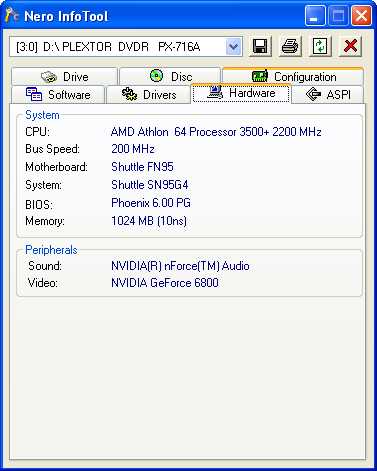
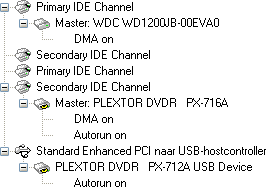
The Plextor DVD recorder was hooked up as Master to the secondary IDE-controller and identifies itself as "PLEXTOR DVDR PX-716A". DMA (Direct Memory Access) and autorun were enabled for every device. What's interesting to note here is that the Plextor PX-716A uses UDMA mode 4 instead of mode 2 once it's installed.

Drive Specifications:
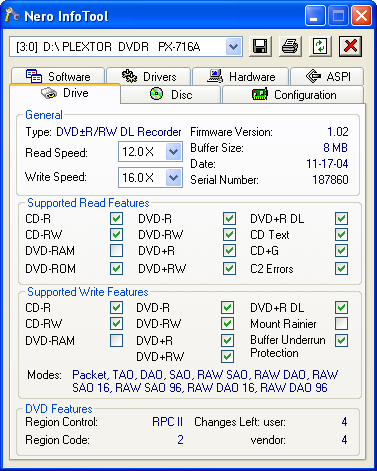
The Nero InfoTool screenshot reveals us that our drive can read and write most formats out there. The only things missing are DVD-RAM and Mount Rainier write support. From the screenshot we can also see that DVD+R DL is supported and in the future Plextor will release a firmware update that will add 6x DVD+R DL and 6x DVD-R DL support! Let's continue with the specifications of the PX-716A as posted on the Plextor website:
- Writing:
- DVD+R: 16x
- DVD-R: 16x
- DL DVD+R: 4X
- CD-R: 48x
- Rewriting:
- DVD+RW: 8x
- DVD-RW: 4x
- CD-RW: 24x
- Reading:
- DVD-ROM: 16x
- CD-ROM: 48x
- Buffer Underrun Proof Technology: Stops buffer underrun errors
- GigaRec Technology
- Intelligent Recording:
- 'AutoStrategy' is a self-learning writing technology to optimise the writing quality on any type of media
- 'Intelligent Tilt' controls the laser in three dimensions, to ensure high quality writing and reading if the disc surface has imperfections
- 'PoweRec' is a complex piece of writing intelligence ensuring superior recording quality at high speeds on certified media
- SecureRecording Technology
- Silent Mode
- Q-Check
- VariRec Technology
- Supports Lossless Linking (DVD+R/RW)
- Zero Link (DVD-R/RW)
- Supports Background Formatting
- Access Time <100 ms for CD; 150 ms for DVD
- 8MB Buffer
- E-IDE (ATAPI) interface
- PC Compatibility:
- Pentium 4 1.4Ghz or higher
- 256MB Memory
- 10GB of free disk space
- Compatible with:
- Windows 98 SE, Windows Me, Windows 2000, Windows XP
- MultiRead Compatible
- Supports SPDIF (Digital Audio Output)
- High Quality Digital Audio Extraction
- A black tray, to reduce the jitter and to increase the quality of the burned CD
- Two year fast warranty service (EU, Norway and Switzerland: Collect & Return); 1 year in other countries.
- Compatible formats:
- CD (Read/Write)
CD-DA, CD-Extra, CD-ROM Mode-1, CD-ROM Mode-2, CD-ROM XA, Photo-CD, Video-CD, Multisession, CD TEXT, CD-I, CD+G, Mixed CD - CD-R/RW (Write)
Track at Once, Disc at Once, Packet Write (variable and fixed), Session at Once - DVD (Read/Write)
DVD-ROM, DVD-Video, Multiborder, Multisession, DVD+VR, DVD-VR - DVD+R/RW (Write)
DVD+R: Disc at Once, Multisession, Incremental Recording
DVD+R DL: Disc at Once
DVD+RW: Sequential Write, Random Access Write - DVD-R/RW (Write)
DVD-R: Disc at Once, Multiborder recording, Incremental recording
DVD-RW: Disc at Once, Multiborder recording, Incremental recording, Restricted Overwriting, DRT-DM
- CD (Read/Write)
That's quite a list! We'll get back to some of the supported features later on in this review.
Inside the Box:
So, what do you get when you buy the European retail version of the PX-716A drive? Let's have a look!
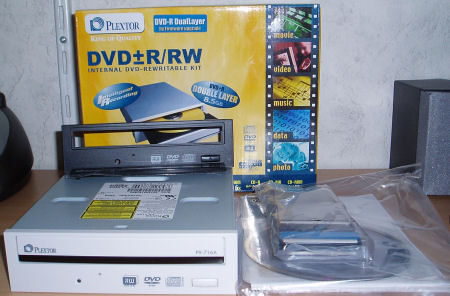
Inside the box we can find the following items:
- Plextor PX-716A drive
- Quick installation guide
- Front bezel replacement guide
- Extra black bezel
- Flatcable (80 wire)
- Mounting screws, emergency eject pin, extra jumper cap
- Drive application CD-ROM, containing;
- PlexTools Professional (full version)
- Ahead
- Nero Express 6 SE
- Nero Vision Express (30 days trial)
- Nero ShowTime (30 days trial)
- Nero Media Player
- Nero Recode 2 (30 days trial)
- CyberLink
- Power2Go 3.0 (30 days trial)
- PowerDirector 3.0 (30 days trial)
- PowerProducer 2.0 Gold (30 days trial)
- PowerDVD 5.0 (30 days trial)
- Medi@Show 2.0 (30 days trial)
- PowerBackup 1.0 (30 days trial)
- Pinnacle
- InstantCD/DVD 8.3 LE (limited edition)
- Studio 9 (30 days trial)
- Instant Cinema (limited edition)
- Instant Audio
- Instant Copy
- Instant Backup
- Sonic
- RecordNow! (30 days trial)
- MyDVD (30 days trial)
- Ulead
- Burn.Now (30 days trial)
- Video Studio 8 (30 days trial)
- DVD Movie Factory 3.5 SE (30 days trial)
The first thing that struck me when I received the Plextor PX-716A package was that it was much smaller than previous retail packages. Luckily Plextor hasn't cut back though in the number of items found inside the retail box. As we're used to from Plextor they have put together a good package and even though there is no recordable media inside the box, this is compensated by an extra front black bezel. Good news for people with a black computer case (or people with a white computer case thinking of getting a black case). The Plextor application CD-ROM has a lot of software on it but unfortunately most of them are 30 day trial versions. To me personally, the only software items of interest are Nero Express 6 and PlexTools Professional and these can both be found on the disc as full versions.
Look and Feel:
The Plextor PX-716A is shorter than its brothers, the PX-504A, PX-708A and the PX-712A. This is good news for people with a barebone computer, such as the one we're using in this review, because space is always limited in these kind of machines. Here's an image that shows the PX-716A right next to a PX-708A drive that clearly shows the decrease in length:
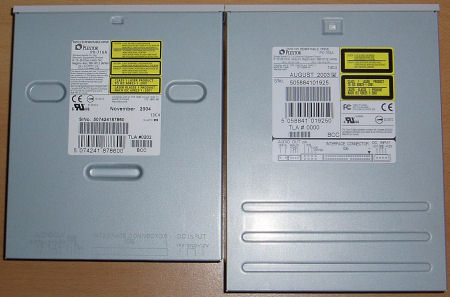
The installation of the Plextor PX-716A was very easy to do. Before we installed the drive into our review computer we first removed the white bezel on the drive and replaced it with the black one. The printed manual on replacing the front bezel was very easy to follow and replacing the bezel took less than two minutes.
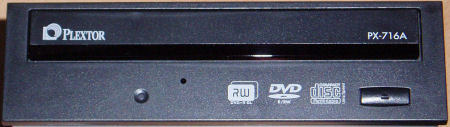
Black bezel
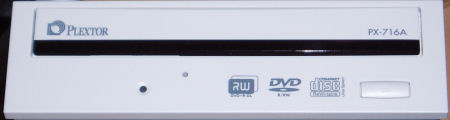
White bezel
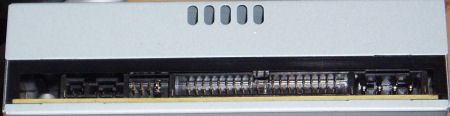
Back of the drive
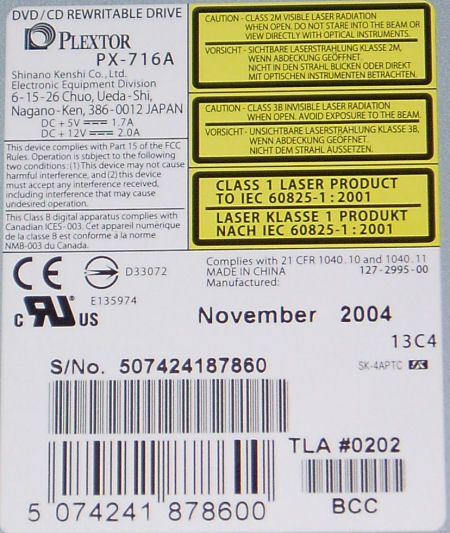
Sticker on top of drive
There isn't much else to tell about the Plextor PX-716A's looks as it looks the same as the previous Plextor models. Let's continue with taking a look at some of the features that the drive supports.
Of course, one of the most important things about any recorder is the way it writes media. So, let us first take a look at how the Plextor PX-716A writes DVDR, DVD+R DL and CD-R media. As we already mentioned on the previous page, the PX-716A supports 16x recording speeds for both DVD-R and DVD+R media, 4x recording speeds for DVD+R DL media and, last but not least, 48x recording speeds for CD-R media.
DVD±R:
To test the Plextor PX-716A's performance when writing DVDR media we used Nero CD-DVD Speed and its "Create Data Disc" function. Here are the results:

DVD-R

DVD+R
The first thing that will probably strike you is that the Plextor PX-716A didn't reach 16x recording speed in both graphs. We quickly learned that this is caused by the drive's PoweRec function kicking in, lowering the write speed. It seems that this quality control technology is a little too sensitive. We'll get back to the PoweRec technology later on this page of our review. Here is a Nero CD-DVD Speed graph of the same DVD+R disc we used in the test above, only this time with PoweRec disabled:

DVD+R, PoweRec disabled
As you can see this time the drive didn't have problems reaching its rated speed of 16x (although the drive does need an extra speed boost at the end of the write process to reach 16x). The full disc was written in 6 minutes and 16 seconds, not the fastest recording time we've seen (the Philips ED16DVDR for instance only needed 5 minutes and 52 seconds).
DVD+R DL:

There isn't much to tell about the Plextor PX-716A's DVD+R DL recording performance as the drive uses the CLV (Constant Linear Velocity) method to write the discs which means that is uses a fixed write speed throughout the entire recording process. As you can see from the screenshot 4x dual layer recording takes around 27 minutes to complete.
CD-R:

There also isn't much to tell about the Plextor PX-716A's CD-R recording performance as it performs pretty much the same as any other drive supporting 48x CD-R recording speeds.
Drive Features:
As we've seen on previous Plextor DVD recorders, the PX-716A supports a lot of technologies. We've discussed these technologies before but here is a brief overview of Plextor PX-716A's supported technologies. Let's start with a screenshot from Nero Burning ROM:

Nero reports us that the Plextor PX-716A has an 8MB buffer and that firmware 1.03 is installed, which was released during our review. We'll get back to this later when we do our media tests.
Buffer Underrun Protection:
Nero reports us that, as with almost all Plextor drives, the PX-716A drive supports the BURN-Proof (Buffer UnderRuN-Proof) technique. When the, in this case 8MB, buffer of the recorder falls beneath a certain level, it will stop recording as of a specific location on the CD. The recorder then continues attempting to receive data from the PC to refill the buffer. As soon as the buffer has been refilled, the recorder will start recording again.
BookType (Bitsetting):
Unlike the Plextor PX-708A and PX-712A drives, the Plextor PX-716A supports bitsetting out of the box for DVD+R and DVD+R DL media. In short, changing the booktype for DVD+R or DVD+R DL media increases the compatibility with standalone DVD players, because the discs are recognized as a DVD-ROM discs instead of DVD+R (recordable) discs after they've been written. For more info you can read this article.
PoweRec:
As with all new Plextor drives, the PX-716A supports the PoweRec technology to ensure a quality back-up. PoweRec (Plextor Optimised Writing Error Reduction Control) monitors the quality of the disc while burning and will adjust the speed if necessary. The drive's PoweRec feature can be disabled though to force the drive to write media at a selected speed instead of the speed the recorder would normally use when its quality checks (PoweRec) are enabled. For more information you can read this PDF-document on the Plextor Europe website.
VariRec:
The VariRec technology allows you to change the drive's laser power when writing discs. For instance, with VariRec enabled you should be able to improve the quality of audio recordings and make the recorded disc more compatible with picky CD-players like a car stereo. Since the Plextor Premium drive the VariRec function has been improved since it now allows 8x writing (previously limited to 4x) and allows you to select the dye type of your CD-R disc in order to select the best write strategy. VariRec can also be used to burn DVD media with. You can modify the laser power of the PX-716A in order to achieve higher compatibility and playability. When recording DVDs with VariRec the write speed will be limited to 2x or 4x. For more information you can read this PDF-document on the Plextor Europe website.

GigaRec:
GigaRec allows you to decrease or increase the capacity of a normal 80 minute (700MB) CD-R disc up to 113 minutes (or almost 1GB of data). By compressing the pits and lands that are written on the disc, it is possible to increase the capacity of the disc by 40%. At the rate of 1.4x, failure free playback can be achieved on most modern equipment.

The maximum capacity of a disc is dependant on the type of disc and the GigaRec rate. When activated the recording speed will be limited to 4x and 8x in DAO (Disc At Once) mode on CD-R media without BURN-Proof. Here is a small test when burning 101 minutes of audio to a standard 80 minute disc. For this small test we used GigaRec at setting 1.3x:


GigaRec disc created successfully
SecuRec:
SecuRec allows you to password protect a CD-R disc when recording in DAO mode. When SecuRec is activated, the data on the written disc can only be retrieved by supplying the password you entered when the disc was written. When you or someone else wants to access the recorded disc from a different drive or computer you can use the PlexTools software or the free SecuViewer software, and of course the original password.

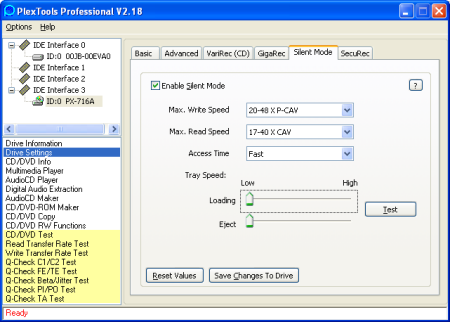
Silent Mode:
The Silent Mode option in the PlexTools software allows you to change various settings of your PX-716A drive in order to get a noise-free or silent operation:
AutoStrategy:
AutoStrategy lets the Plextor drive use an optimised write strategy on unsupported media (read: media that is not stored in the drive's currently installed firmware). A separate database collects all strategies for media which are not yet supported in the firmware. AutoStrategy is only available for DVD+R and DVD-R media (4x and higher).

The AutoStrategy database contains the write strategies that were collected by the AutoStrategy function. These strategies are additional to the write strategies that are stored in the drive's firmware. A maximum of 31 write strategies can be held in the non-volatile memory of the drive. From the screenshot above you can see that entries can be de-activated and deleted. The database also keeps track of how often a certain media was written.
In the PlexTools software we have an additional AutoStrategy test button which can be used to test unsupported media.

To demonstrate how this technology works take a look at the following image. It has been compiled out of three separate PI/PO Sum8 scans. We wrote the three identical discs of a brand unsupported by the drive's currently installed firmware:

So, what are we looking at here. The first disc we wrote was obviously not good and in fact, the PI/PO test returned an error causing the test to abort. The second disc was an improvement. The PI/PO test completed but as you can see, the first area of the disc still has a rather high PIE error rate. Next, take a look at the blue line of disc 3. This time we have an excellent result! As we said: we wrote three identical discs (Arita brand, manufactured by Ricoh) from the same spindle.
For more information on how AutoStrategy works you can read this thread on our Plextor Forum: AUTOSTRATEGY - TY and Plextor Tech???.
Q-Check:
As we've seen with previous Plextor models, the Plextor PX-716A supports so-called Q-Check functions found in the PlexTools software. In short, Q-Check allows you to check the quality of both CD-R(W) and DVDR(W) media. We won't go into details here since we've discussed Q-Check before but we do have to mention a new Q-Check feature that is found on the PX-716A. This new feature is called Q-Check TA Test which is used to check the readability of written DVDR discs. If your recorded discs have problems being played in standalone DVD players you can use the TA Test to check if the readability of the disc is good or not.

More Features:
Together with the PlexTools software you can control several extra settings which are not directly related to the drive. These settings include for instance "SpeadRead CD/DVD" to unlock the drive's read speed, "Hide CD-R Media" to prevent applications from identifying an inserted disc as a CD-R disc (this is used by certain copy-protections) and much more.
Before we get to the Plextor PX-716A's actual write performance we're first going to take a look at how well the drive can read media. Let's start with some screenshots from the PlexTools software showing the PX-716A's supported read speeds.

CD Read Speeds

DVD Read Speeds
The PlexTools software shows us that the Plextor PX-716A supports up to 48x reading for CD-ROM media but only when its SpeedRead feature is enabled. This feature can be enabled via the PlexTools software or by pressing and holding the drive's eject button for three seconds. The drive's LED will blink, indicating that SpeedRead has been enabled. In the first PlexTools screenshot we can see that audio discs and CD-RW discs can be read at a maximum speed of 40x.
When it comes to supported DVD read speeds the PlexTools software informs us that the drive can read Single Layer DVD-ROM media at a maximum speed of 16x, but again only when SpeedRead is enabled. When watching a DVD-Video disc in your Plextor drive the drive will only read the disc at 2x to prevent noise and vibrations. But, when you want to rip a DVD-Video disc to your hard disk you can use the SpeedRead option to speed up the process considerably. Last but not least, the Plextor PX-716A can read DVD±R and DVD±RW media at a maximum speed of 12x.
Reading CD-ROM/CD-R/CD-RW/Audio:
The first thing we're going to take a look at is the drive's performance when reading CD-ROM, CD-R, CD-RW and audio discs. We enabled the SpeedRead option of the Plextor PX-716A drive via the PlexTools software. As a small comparison we have included the results of a CD-ROM disc when SpeedRead is disabled.

CD-ROM Read Performance - SpeedRead Disabled

CD-ROM Read Performance - SpeedRead Enabled

CD-R Read Performance

CD-RW Read Performance

Audio Read Performance
The Plextor PX-716A's performance when reading CD-ROM, CD-R, CD-RW and Audio media was very good as in none of the tests the Plextor drive had problems reaching its rated speed and going faster than that. The seek times in every test were good and so was the CPU usage. Notice the high burst rate in the graphs as a result of the Plextor drive supporting UDMA mode 4 instead of mode 2 which most optical drives support.
Below we have compared the Plextor's average read speeds to some other drives we've recently received. As you can see, the PX-716A's performance is excellent:
| Average Read Speed Comparison | CD-ROM | CD-R | CD-RW | Audio |
| BenQ DW1620A | 30.78x | 30.76x | 31.36x | 31.36x |
| LaCie d2 DVD±RW DL | 29.93x | 30.66x | 25.56x | 26.16x |
| Mad Dog MD-16XDVD9 | 34.10x | 35.49x | 25.92x | 25.71x |
| MSI DR8-A2 | 30.45x | 30.45x | 30.66x | 30.66x |
| Philips DVDR1640P | 29.98x | 30.68x | 30.70x | 31.43x |
| Pioneer DVR-A08XLA | 31.16x | 31.12x | 25.45x | 25.45x |
| Plextor PX-716A | 36.65x | 36.51x | 31.50x | 32.06x |
| Samsung TS-H552B | 35.65x | 36.49x | 24.07x | 37.30x |
Reading DVD-Video:
The next thing we're going to take a look at is the Plextor's performance when reading pressed DVD-ROM (DVD-Video) media, single-layer and dual-layer. Here are the results:

DVD-Video - Single Layer

DVD-Video - Dual Layer
The Plextor PX-716A's read performance with DVD-Video discs is the same as the previous Plextor PX-712A drive. Both drives can read single-layer DVD-Video discs at a maximum speed of 16x while dual-layer media can be read at a maximum speed of 12x. When compared to other drives we can see that even though the Plextor PX-716A is not the fastest drive we've reviewed, its performance was very good:
| Average Read Speed Comparison | DVD-Video Single-Layer | DVD-Video Dual-Layer |
| BenQ DW1620A | 11.87x | 6.01x |
| LaCie d2 DVD±RW DL | 3.74x | 3.47x |
| Mad Dog MD-16XDVD9 | 3.74x | 3.43x |
| MSI DR8-A2 | 8.67x | 6.37x |
| Philips DVDR1640P | 11.97x | 6.02x |
| Pioneer DVR-A08XLA | 11.80x | 9.38x |
| Plextor PX-716A | 12.00x | 8.95x |
| Samsung TS-H552B | 12.08x | 6.42x |
When playing a DVD-Video disc in your Plextor drive a high read speed means nothing. Higher DVD-Video read speeds are only important when you want to rip a disc to your hard disk. So, how long does it take to rip a disc using the PX-716A with a maximum read speed of 16x for single-layer and 12x for dual-layer? Here are the results, using the DVD Decrypter software:

Ripping DVD-Video - Single Layer

Ripping DVD-Video - Dual Layer
As you can see from the DVD Decrypter screenshots it takes the drive a little over 5 minutes to read the single-layer disc and almost 11 minutes to read the dual-layer disc. These results are as one would expect.
Reading DVD+R/DVD+R DL/DVD+RW:
Next up, how fast can the Plextor PX-716A read DVD+R, DVD+R DL and DVD+RW media? Here are the results:

DVD+R Read Performance

DVD+R DL Read Performance (notice: booktype was set to DVD-ROM)

DVD+RW Read Performance
When it comes to reading DVD+R and DVD+RW media the
Plextor PX-716A again performed the same as its predecessor, the PX-712A. Both
drives can read DVD+R and DVD+RW media at a maximum speed of 12x. This is a very
good performance as there are not many optical drives out there that support
these speeds, especially for DVD+RW media. When it came to reading DVD+R DL
media the Plextor PX-716A showed a good performance. Its maximum read speed for
this dual layer media is 8x.
| Average Read Speed Comparison | DVD+R | DVD+R DL | DVD+RW |
| BenQ DW1620A | 6.25x | - | 6.25x |
| LaCie d2 DVD±RW DL | 5.97x | - | 5.98x |
| Mad Dog MD-16XDVD9 | 11.94x | - | 5.98x |
| MSI DR8-A2 | 6.38x | - | 6.37x |
| Philips DVDR1640P | 6.23x | - | 6.25x |
| Pioneer DVR-A08XLA | 9.38x | - | 6.26x |
| Plextor PX-716A | 9.04x | 6.06x | 9.05x |
| Samsung TS-H552B | 6.22x | - | 6.23x |
Reading DVD-R/DVD-RW:
Last but not least we're going to take a look at the PX-716A's performance when reading DVD-R and DVD-RW media. Here are the results again:

DVD-R Read Performance

DVD-RW Read Performance
As we expected the Plextor PX-716A's performance was again the same as the Plextor PX-712A drive. Not bad at all since once again the drive had no problems reading both the DVD-R and DVD-RW media at 12x.
| Average Read Speed Comparison | DVD-Video Single-Layer | DVD-Video Dual-Layer |
| BenQ DW1620A | 6.24x | 6.23x |
| LaCie d2 DVD±RW DL | 5.97x | 5.97x |
| Mad Dog MD-16XDVD9 | 11.96x | 5.98x |
| MSI DR8-A2 | 6.37x | 6.36x |
| Philips DVDR1640P | 6.24x | 6.23x |
| Pioneer DVR-A08XLA | 9.38x | 6.24x |
| Plextor PX-716A | 9.06x | 9.05x |
| Samsung TS-H552B | 6.22x | 6.22x |
When compared to other drives we can once again see that the Plextor PX-716A has a good performance. It has the fastest read speed for the DVD-RW media and its DVD-R performance is very good as well. So, overall the read performance of the Plextor PX-716A was very good. Let's continue to write performance!
Now that we've taken a look at the Plextor PX-716A's features and read
performance it's time to take a look at the most important thing about any
recorder: its write performance! As always, we're going to start our write tests
with taking a look at how fast and how well the drive can write CD-R and CD-RW
media. For our tests we used Nero CD-DVD Speed and its "Create Data Disc"
option. The burned discs were then scanned using the PlexTools Professional
software and a Plextor PX-712UF drive.
Below you can find an overview of our results. Every test begins with the
mentioning of the ATIP information from the disc to identify the manufacturer of
the media and to check its certified write speed. The ATIP info is followed by
the Nero CD-DVD Speed write graph, showing the Plextor PX-716A drive writing the
actual disc. Last but not least we have included the PlexTools C1/C2 Error
graph.
CD-R Disc 1 - Memorex 48x:
Manufacturer        : CMC Magnetics

Code                : 97m26s66f

Disc Type           : CD-R

Usage               : General

Recording Layer     : Dye Type 6: Short Strategy (Phthalocyanine)

Certified Speed     : 48x

Capacity            : 79:59.73

                      703 MB

Our first result is a good one. The Memorex disc, manufactured by CMC
Magnetics, was written at its certified speed (48x) and the C1/C2 scan looks
fine.
CD-R Disc 2 - Maxell 40x:
Manufacturer        : Hitachi Maxell

Code                : 97m25s29f

Disc Type           : CD-R

Usage               : General

Recording Layer     : Dye Type 9: Short Strategy (Phthalocyanine)

Certified Speed     : 40x

Capacity            : 79:59.74

                      703 MB


The Hitachi Maxell was written perfectly at a slightly higher speed than the
media was certified for (40x, written at 48x). C1/C2 scan looks perfectly
fine.
CD-R Disc 3 - Taiyo Yuden 24x:
Manufacturer        : Taiyo Yuden

Code                : 97m24s01f

Disc Type           : CD-R

Usage               : General

Recording Layer     : Dye Type 1: Long Strategy (Cyanine, AZO)

Certified Speed     : 24x

Capacity            : 74:43.01

                      656 MB


Taiyo Yuden media is considered to be one of the best media you can get and
the scans here prove it once again. An excellent C1/C2 error graph. The Plextor
PX-716A had no problems writing this Taiyo Yuden 24x media at 32x.
CD-R Disc 4 - Maxell 48x:
Manufacturer        : MPO

Code                : 97m25s07f

Disc Type           : CD-R

Usage               : General

Recording Layer     : Dye Type 7: Short Strategy (Phthalocyanine)

Certified Speed     : 48x

Capacity            : 79:59.00

                      702 MB


Another Maxell disc only this time manufactured by MPO. There isn't much to
tell about the Plextor's performance here other than that it did a great job
once again. The disc was written at its certified speed of 48x and the C1/C2
scan looks fine.
CD-R Disc 5 - MAM-E 48x:
Manufacturer        : Mitsui

Code                : 97m27s58f

Disc Type           : CD-R

Usage               : General

Recording Layer     : Dye Type 8: Short Strategy (Phthalocyanine)

Certified Speed     : 48x

Capacity            : 79:59.74

                      703 MB


The last CD-R disc we tested was again a good result. The disc was written at
its certified speed and the C1/C2 scan shows no problem areas on the written
disc.
CD-RW Disc 1 - Plextor 24x:
Manufacturer        : Verbatim

Code                : 97m34s24f

Disc Type           : UltraSpeed CD-RW

Usage               : General

Recording Layer     : Phase Change

Recording Speed     : 24 X

Capacity            : 74:43.00

                      656 MB


The Plextor CD-RW disc manufactured by Verbatim was written perfectly. CD-RW
discs always have a (much) higher C1/C2 error count and we can see this in the
produced graph as well. But, the amount of C1 errors is not high enough to cause
any problems.
CD-RW Disc 2 - Yamaha 24x:
Manufacturer        : Verbatim

Code                : 97m34s23f

Disc Type           : UltraSpeed CD-RW

Usage               : General

Recording Layer     : Phase Change

Recording Speed     : 24 X

Capacity            : 74:43.00

                      656 MB


The second and last CD-RW we tested had a higher C1 error count than the
previous Plextor CD-RW media we wrote. But, again higher C1 error counts are
normal on CD-RW media and since the disc could be read back without slowdowns we
consider this a okay result. Now, let's continue with DVD+R
performance!
Finally, the stuff we've been waiting for! On this page we're going to take a
look at the Plextor's DVD+R recording performance. Just like we did on the
previous page (CD-R Write Performance) we're going to use Nero CD-DVD Speed to
write the actual disc and then use a Plextor PX-712UF drive to do a PI/PO SUM8
(scale 500) and SUM1 (scale 10) scan.
How to look at the errors:
It's hard to give you an easy explanation on how to look at the produced
errors. Tor Magne has tried to explain it in his reviews and in this
thread on Club CD
Freaks but it's still very hard to understand. What you basically need to
keep in mind is the following:
- SUM8: No larger areas on the disc should exceed 280 PIE errors.
- SUM1: No larger areas on the disc should exceed 4 PIF errors.
The lower the amount of errors, the better of course.
Note: The first write tests we did were done with firmware 1.02
installed. During our review a newer version was released and thus, the rest of
the tests were done with firmware 1.03 installed. Also, we used two Plextor
PX-716A drives for our tests, both of course with the same TLA number
(#0202).
DVD+R Disc 1a - Mitsubishi 16x PoweRec
Enabled:
----------------------------------------------------------

Unique Disc Identifier : [DVD+R: MCC-004-000]

----------------------------------------------------------

Disc & Book Type :       [DVD+R] - [DVD-ROM]

Manufacturer Name :      [Mitsubishi Chemical Corp.]

Manufacturer ID :        [MCC]

Media Type ID :          [004]

Product Revision :       [Not Specified]

Recording Speeds :       [1x , 2.4x , 4x , 6x-8x , 6x-16x]

----------------------------------------------------------


Our first test result with the 16x media is a good one although notice that
the drive didn't reach 16x since PoweRec kicked in, reducing the write speed to
12x. By default PoweRec is enabled for the PX-716A drive so the rest of our
tests were done with this feature enabled. However, let's show you the same disc
as we just wrote, written with PoweRec disabled:
DVD+R Disc 1b - Mitsubishi 16x PoweRec
Disabled:
----------------------------------------------------------

Unique Disc Identifier : [DVD+R: MCC-004-000]

----------------------------------------------------------

Disc & Book Type :       [DVD+R] - [DVD-ROM]

Manufacturer Name :      [Mitsubishi Chemical Corp.]

Manufacturer ID :        [MCC]

Media Type ID :          [004]

Product Revision :       [Not Specified]

Recording Speeds :       [1x , 2.4x , 4x , 6x-8x , 6x-16x]

----------------------------------------------------------


As you can see from the images this time the Plextor PX-716A did reach its
rated speed of 16x. The PI/PO scans look good so the increased write speed
wasn't a problem for this media!
DVD+R Disc 2 - Plextor 8x:
----------------------------------------------------------

Unique Disc Identifier : [DVD+R: YUDEN000-T02-000]

----------------------------------------------------------

Disc & Book Type :       [DVD+R] - [DVD-ROM]

Manufacturer Name :      [Taiyo Yuden Co. Ltd.]

Manufacturer ID :        [YUDEN000]

Media Type ID :          [T02]

Product Revision :       [Not Specified]

Recording Speeds :       [1x , 2.4x , 4x , 6x-8x]

----------------------------------------------------------


Excellent result here. The 8x DVD+R media could be written at 16x only too
bad that PoweRec kicked in again, limiting the write speed to 12x. But, the
PI/PO scans look excellent.
DVD+R Disc 3 - Plextor 4x:
----------------------------------------------------------

Unique Disc Identifier : [DVD+R: YUDEN000-T01-001]

----------------------------------------------------------

Disc & Book Type :       [DVD+R] - [DVD-ROM]

Manufacturer Name :      [Taiyo Yuden Co. Ltd.]

Manufacturer ID :        [YUDEN000]

Media Type ID :          [T01]

Product Revision :       [001]

Recording Speeds :       [1x , 2.4x , 4x]

----------------------------------------------------------


An excellent result although too bad about that slowdown at the end of the
burn to 6x. PI/PO scans look excellent.
DVD+R Disc 4 - Arita 4x:
----------------------------------------------------------

Unique Disc Identifier : [DVD+R: RICOHJPN-R01-002]

----------------------------------------------------------

Disc & Book Type :       [DVD+R] - [DVD-ROM]

Manufacturer Name :      [Ricoh Co. Ltd.]

Manufacturer ID :        [RICOHJPN]

Media Type ID :          [R01]

Product Revision :       [002]

Recording Speeds :       [1x , 2.4x , 4x]

----------------------------------------------------------


The PI/PO error scans look great but the write speed was only 4x (the Plextor
PX-712A has no problems writing these discs at 8x). Note though that this was
the third Arita/Ricoh disc we wrote, the first two discs were written with much
lower quality (see page 2: AutoStrategy).
DVD+R Disc 5 - Verbatim 8x:
----------------------------------------------------------

Unique Disc Identifier : [DVD+R: MCC-003-000]

----------------------------------------------------------

Disc & Book Type :       [DVD+R] - [DVD+R]

Manufacturer Name :      [Mitsubishi Chemical Corp.]

Manufacturer ID :        [MCC]

Media Type ID :          [003]

Product Revision :       [Not Specified]

Recording Speeds :       [1x , 2.4x , 4x , 6x-8x]

----------------------------------------------------------


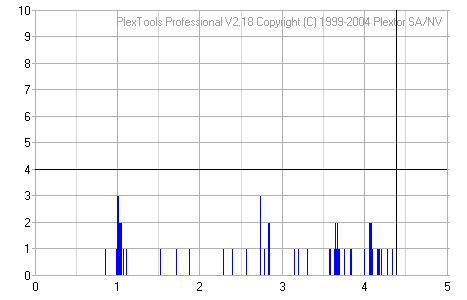
Wow this is the best scans we've seen so far! A truly excellent burn done at
12x while the discs were certified for 8x recording. Highly recommended discs
for use with the PX-716A.
DVD+R Disc 6 - Philips 8x:
----------------------------------------------------------

Unique Disc Identifier : [DVD+R: CMC MAG-E01-000]

----------------------------------------------------------

Disc & Book Type :       [DVD+R] - [DVD+R]

Manufacturer Name :      [CMC Magnetics Corp.]

Manufacturer ID :        [CMC MAG]

Media Type ID :          [E01]

Product Revision :       [Not Specified]

Recording Speeds :       [1x , 2.4x , 4x , 6x-8x]

----------------------------------------------------------


The Philips 8x DVD+R discs (manufactured by CMC Magnetics Corp.) could not be
written any faster than they were certified for. The produced scans look fine
although there is a high spike in the SUM1 error graph. But, individual spikes
are not a very big problem and the Plextor PX-716A had no problems reading back
the burned disc.
DVD+R Disc 7 - Arita 8x:
----------------------------------------------------------

Unique Disc Identifier : [DVD+R: RITEK-R03-002]

----------------------------------------------------------

Disc & Book Type :       [DVD+R] - [DVD-ROM]

Manufacturer Name :      [Ritek Corp.]

Manufacturer ID :        [RITEK]

Media Type ID :          [R03]

Product Revision :       [002]

Recording Speeds :       [1x , 2.4x , 4x , 6x-8x]

----------------------------------------------------------


The Arita 8x discs (manufactured by Ritek) were written at their certified
speeds. The PI/PO scans look fine. They're not the best we've seen but certainly
not bad either.
DVD+R Disc 8 - Prodye 8x:
Media ID:		Plasmon1C1

Write speed:	8x

Write time:	8m:16s


The Prodye discs were written at 8x, their certified speed. Nothing to
complain about here as the PI/PO scans look fine.
DVD+R Disc 9 - Samsung 8x:
Media ID:		OPTODISC.OR8

Write speed:	8x

Write time:	11m:24s


Ouch! The Samsung media was written very poorly at a low speed (around 6x).
The PI/PO values are way too high and there is a small red spike in the SUM1
graph which indicates an unrecoverable error on the disc (POF). This disc will
definitely cause read problems in players.
DVD+R Disc 10 - eProformance 8x:
Media ID:		Prodisc.R03

Write speed:	8x

Write time:	8m:03s


A good result here. But, we did notice a problem with this disc. The written
disc could not be recognized by most drives and PlexTools cannot find the
correct length of the disc without selecting "track based" under preferences. We
suspect this is a bug in the firmware of the PX-716A drive that causes the TOC
or lead-in/out to be written incorrectly. Plextor should definitely look into
this!
DVD+R Disc 11 - Commodore 8x:
Media ID:		VDSPMSAB002

Write Speed:	8x

Write time:	8m:06s
Sorry, no scans for this media as the Plextor PX-716A created an unreadable
disc. We tried two discs with mediacode VDSPMSAB002 but both times the created
disc was not readable (by any drive).
DVD+RW Disc 1 - Mitsubishi 8x:
----------------------------------------------------------

Unique Disc Identifier : [DVD+RW: MKM-A03-000]

----------------------------------------------------------

Disc & Book Type :       [DVD+RW] - [DVD+RW]

Manufacturer Name :      [Mitsubishi Kagaku Media]

Manufacturer ID :        [MKM]

Media Type ID :          [A03]

Product Revision :       [Not Specified]

Recording Speeds :       [1x , 2.4x , 4x]

----------------------------------------------------------

Unfortunately we cannot show you any scans from this DVD+RW media either. The
disc we're testing here is one of the first 8x DVD+RW media types available and
the Plextor PX-716A currently does not support these discs. In fact, at the time
of writing this review the PX-716A does not support any 8x DVD+RW discs. Support
for 8x DVD+RW media is expected to be added with firmware 1.04.
DVD+RW Disc 2 - Philips 4x:
----------------------------------------------------------

Unique Disc Identifier : [DVD+RW: PHILIPS-041-000]

----------------------------------------------------------

Disc & Book Type :       [DVD+RW] - [DVD+RW]

Manufacturer Name :      [Philips]

Manufacturer ID :        [PHILIPS]

Media Type ID :          [041]

Product Revision :       [Not Specified]

Recording Speeds :       [1x , 2.4x , 4x]

----------------------------------------------------------


The Philips DVD+RW media was written with an acceptable result. The SUM8
scans looks fine and although the SUM1 scan shows some error spikes they're not
high enough to cause any real problems. Let's continue to DVD+R DL
performance.
The Plextor PX-716A is Plextor's first DVD recorder to support dual layer
recording. At the moment the PX-716A only supports DVD+R DL media but via a
firmware upgrade the drive will also support DVD-R DL media in the future.
Disc 1 - Verbatim 2.4x:
----------------------------------------------------------

Unique Disc Identifier : [DVD+R-DL: MKM-001-000]

----------------------------------------------------------

Disc & Book Type :       [DVD+R DL] - [DVD+R DL]

Manufacturer Name :      [Mitsubishi Kagaku Media]

Manufacturer ID :        [MKM]

Media Type ID :          [001]

Product Revision :       [Not Specified]

Recording Speeds :       [1x , 2.4x]

----------------------------------------------------------


As you can see from the PI/PO scans our first disc was written perfectly.
Also note that the dual layer Verbatim disc (manufactured by Mitsubishi) was
certified for 2.4x recording but the Plextor PX-716A had no problems writing it
at 4x.
Disc 2 - Traxdata 2.4x:
----------------------------------------------------------

Unique Disc Identifier : [DVD+R-DL: RITEK-D01-001]

----------------------------------------------------------

Disc & Book Type :       [DVD+R DL] - [DVD+R DL]

Manufacturer Name :      [Ritek Corp.]

Manufacturer ID :        [RITEK]

Media Type ID :          [D01]

Product Revision :       [001]

Recording Speeds :       [1x , 2.4x]

----------------------------------------------------------


Our second and last disc we tested had a bit of a problem on the second layer
(after the 4GB mark). As you can see from the scans the first layer of the
Traxdata/Ritek DVD+R DL disc was written perfectly but the second layer shows
high SUM1 values right after the layer break. So, is the disc a coaster or still
readable? Let's find out:

As you can see the Plextor PX-716A could still read the disc after it was
burned but it did slow down to only 2x when reading the second layer. So all in
all not a very bad result but not a good one either. Let's continue to the
drive's DVD-R/RW performance.
Now that we've taken a look at the Plextor's performance with DVD+R and DVD+R
DL media we're going to take a look at the drive's DVD-R performance.
DVD-R Disc 1a - Plextor 8x:
----------------------------------------------------------

Unique Disc Identifier : [DVD-R: TYG02]

----------------------------------------------------------

Disc & Book Type :       [DVD-R] - [DVD-R]

Manufacturer Name :      [Taiyo Yuden Co. Ltd.]

Manufacturer ID :        [TYG02]

Recording Speeds :       [1x , 2x , 4x]

                         [6x And Higher Might Not Always Be Detectable]

----------------------------------------------------------


The first disc we wrote was one of Plextor's own DVD-R media (manufactured by
Taiyo Yuden). The 8x disc was written at almost 16x but unfortunately PoweRec
kicked in once again, lowering the write speed to 12x. Notice that the Plextor
8x DVD-R media was written using firmware 1.02. Here are the results when
firmware 1.03 is installed:
DVD-R Disc 1b - That's 8x:
----------------------------------------------------------

Unique Disc Identifier : [DVD-R: TYG02]

----------------------------------------------------------

Disc & Book Type :       [DVD-R] - [DVD-R]

Manufacturer Name :      [Taiyo Yuden Co. Ltd.]

Manufacturer ID :        [TYG02]

Recording Speeds :       [1x , 2x , 4x]

                         [6x And Higher Might Not Always Be Detectable]

----------------------------------------------------------


This time the That's media (also manufactured by Taiyo Yuden) was written
perfectly. Once again we see that PoweRec kicked in during the write process,
lowering the write speed to 12x. But, considering the used media was certified
for 8x recording this is a good result.
DVD-R Disc 1c - Verbatim 8x:
----------------------------------------------------------

Unique Disc Identifier : [DVD-R: TYG02]

----------------------------------------------------------

Disc & Book Type :       [DVD-R] - [DVD-R]

Manufacturer Name :      [Taiyo Yuden Co. Ltd.]

Manufacturer ID :        [TYG02]

Recording Speeds :       [1x , 2x , 4x]

                         [6x And Higher Might Not Always Be Detectable]

----------------------------------------------------------


As a final test with the 8x DVD-R Taiyo Yuden media we wrote another "TYG02"
disc, this time a disc sold under the Verbatim brand. Why write three of the
same discs you wonder? Well take a look at the scans. The Nero CD-DVD Speed
graphs show us that again PoweRec kicked in, reducing the write speed to 12x.
Nothing special here and the PI/PO SUM8 scan looks fine. But, the PI/PO SUM1
scans reveals that when PoweRec kicked in the PI/PO values were increased which
may cause problems when reading the burned disc in standalone DVD players.
DVD-R Disc 2 - Arita 4x:
----------------------------------------------------------

Unique Disc Identifier : [DVD-R: RITEKG04]

----------------------------------------------------------

Disc & Book Type :       [DVD-R] - [DVD-R]

Manufacturer Name :      [Ritek Corp.]

Manufacturer ID :        [RITEKG04]

Recording Speeds :       [1x , 2x , 4x]

                         [6x And Higher Might Not Always Be Detectable]

----------------------------------------------------------


The Ritek G04 discs were written well. The SUM8 scan is not the best we've
seen but certainly also not the worst. The Plextor PX-716A was not able to write
these 4x DVD-R discs at higher speeds.
DVD-R Disc 3 - eProformance 8x:
Media ID:		ProdiscS04

Write speed:	8x

Write time:	12m:27s


The eProformance disc was written with acceptable quality. Notice the long
write time though of 12 minutes. This is caused by the drive's AutoStrategy
function. As mentioned earlier in this review, when the Plextor PX-716A detects
a disc that is unsupported by its currently installed firmware, it will add the
information of the disc to the AutoStrategy database. This causes longer burn
times but note: when you write another disc with the same media ID the burn
time will me much faster because the information is already present in the
drive's AutoStrategy database! So, when you write an "unsupported" disc the
first burn will always take 2 to 3 minutes longer than usual.
DVD-R Disc 4 - Datawrite Printable 8x:
Media ID:		CMC.MAG.AE1

Write Speed:	8x

Write time:	8m:22s


The PI/PO SUM1 scan has some spikes that exceed the standard but this disc
can probably be read just fine by most drives. Not a great result though, just
acceptable.
DVD-R Disc 5 - Ritek 8x:
Media ID:		FUJIFILM03

Write Speed:	8x

Write time:	11m:07s


The scans from the Ritek 8x media are very similar to the previous ones from
the DataWrite media. Once again we have a high spike in the SUM1 scan. Probably
not high enough to cause serious problems any value higher than 4 is not wanted.
Notice the long write time again because of the AutoStrategy function being
used.
DVD-R Disc 6 - Verbatim (made in India) 8x:
Media ID:		MCC02RG20

Write speed:	8x

Write time:	8m:24s


The PI/PO SUM8 scans shows a perfect result once again but the SUM1 reveals
high spikes exceeding the 4-error mark. Not a good result.
DVD-R Disc 7 - Traxdata 8x:
Media ID:		Ritek G05

Write Speed:	8x

Write time:	8m:39s

Media with ID code "Ritek G05" do not work in the Plextor PX-716A drive (at
least not yet with firmware 1.03). We've seen reports on this over in our
Plextor Forum as well: the drive creates a coaster with these discs.
DVD-R Disc 8 - Samsung 8x:
Media ID:		OPTODISCR008

Write Speed:	8x

Write time:	8m:39s


The last DVD-R discs we tested shows the same result as we've seen several
times before: the SUM8 scans look alright while the SUM1 scan shows some high
spikes again. They are not high enough to cause major problems but certain
sensitive players will have problems reading these discs.
DVD-RW Disc 1 - Mitsubishi 6x:
----------------------------------------------------------

Unique Disc Identifier : [DVD-RW: MKM 01RW6X01]

----------------------------------------------------------

Disc & Book Type :       [DVD-RW] - [DVD-RW]

Manufacturer Name :      [Mitsubishi Kagaku Media]

Manufacturer ID :        [MKM 01RW6X01]

Recording Speeds :       [1x , 2x]

                         [6x And Higher Might Not Always Be Detectable]

----------------------------------------------------------


The Mitsubishi discs we wrote here are one of the first DVD-RW discs to
support 6x recording. Unfortunately, the fastest DVD-RW recording speed the
Plextor PX-716A supports is 4x. The PI/PO scans don't look great but the disc
was readable after it was burned.
DVD-RW Disc 2 - Memorex 2x:
----------------------------------------------------------

Unique Disc Identifier : [DVD-RW: TDK502sakuM3]

----------------------------------------------------------

Disc & Book Type :       [DVD-RW] - [DVD-RW]

Manufacturer Name :      [TDK Corp.]

Manufacturer ID :        [TDK502sakuM3]

Recording Speeds :       [1x , 2x]

                         [6x And Higher Might Not Always Be Detectable]

----------------------------------------------------------


The last DVD disc we tested was written with a good result. There is one
small spike in the SUM1 scan but this is not a problem. Let's continue to the
advanced tests.
To finish our Plextor PX-716A review we're going to take a look at how the
drive deals with certain copy-protections (both data and audio) and if it
supports 99 minute CD-R media.
Data Copy-Protection:
Let's start with a screenshot from CloneCD, showing us which read and write
modes the Plextor PX-716A supports:

As expected the Plextor drive supports the DAO-RAW96 write mode which
basically means that it can write uncorrected data and SubChannel data.
SafeDisc:
For our SafeDisc test we will use the Sheep tests made by Alexander Noé. Why
is it called sheep test? That is because the symbol of the first 1-to-1 copy
program called CloneCD is a sheep! The sheep test is an indication if the drive
can backup/write weak sectors (also called "Correct EFM encoding of regular
bit-patterns").
Score:
- No sheep: can't backup any SafeDisc 2 versions without the help of
software tricks.
- 2 Sheep: Can backup SafeDisc 2, including version 2.5x.xxx.
- 3 Sheep: Can write all possible weak sectors, few if any writers are able
to do this.
One of our forum moderators, Womble, has written a guide concerning the
"Sheep Test" which you can find here.
You can read through that thread for more information. Now, let's get to the
Plextor PX-716A's score:
| Sheep Tests | Reader: Plextor PX-716A |
| One Sheep Writer SD2OLD | Yes |
| Two Sheep Writer SD251 | Yes |
| Safedisc Writer SD290 | No |
| Three Sheep Writer SHEEP3 | No |
As expected the Plextor PX-716A is a two sheep recorder, meaning that it can
copy the SafeDisc 2.5 protection but it'll have problems with SafeDisc 2.9 and
newer.
Audio Copy-Protections:
For the copy protected audio tests we used the PlexTools software with the
'Single Session' option enabled. We inserted the disc into the drive and waited
if the tracks would be recognized. If they were we extracted some tracks and
listened to them to hear if they were properly extracted:
| Protected Audio | Audio Title | Protection (version) | Exact Audio Copy |
| Shakira - Laundry Service | Key2Audio version 2 | Read the disc without problems | |
| Celine Dion - A New Day Has Come | Key2Audio version 3 | Read the disc without problems | |
| Bitte Ein Beat! - Beat 5 | Cactus Data Shield 200 | Read the disc without problems | |
| Yorin FM - Hitzone 21 | Doc.loc | Could not recognize disc | |
The Plextor PX-716A drive had a problem with our Doc.loc protected audio
disc. This was too bad as the Plextor PX-712A drive was able to beat this
protection. Luckily though the PX-716A didn't have problems with the other discs
we tested. But, when we ripped the CDS200 protected audio disc the PlexTools
software did report that there were errors on the disc:
Digital Audio Extraction log
----------------------------Start of extraction
Extracting track 14 (C:Track14.wav - 04:30)
630 errors
Elapsed time: 00:09
Extracting track 15 (C:Track15.wav - 04:05)
468 errors
Elapsed time: 00:06
2 track(s) successfully extracted
Total Elapsed Time : 00:15
When ripping a CDS200 protected audio disc it's quite common that errors are
generated during the extraction process. These errors can result in small pops
and clicks in the ripped tracks. We of course listened to the extracted tracks
but we couldn't hear any distortions.
Overburning:
As usual we're going to finish our review by checking if the drive can write
and read 99 minute CD-R media. For this test we used the Nero CD-DVD Speed
software and its "Overburning test". Here are the results:

The test was completed without a problem indicating that the Plextor PX-716A
can write 99 minute media. This is of course no surprise as the drive's GigaRec
technology allows the drive to burn over 110 minutes of audio to a CD-R disc.
Reading back the 99 minute CD-R disc was also no problem of course. However,
reading back a GigaRec disc does lower the read speed to 8x:

Reading GigaRec disc
During our Plextor PX-716A a beta firmware was released by Plextor Japan.
This firmware, version 1c04, has an interesting change when compared to version
1.03 to which we'll get back to below. But first, let's flash our drive with the
beta firmware:

Flashing was done without a problem (as usual). So, what's different in
firmware 1c04? If you look at some of our 16x write speed graphs we did in this
review you will notice a strange speed bump at the end of the write process:
Notice that at around the 4GB mark the write speed is increased from 14x to
roughly 15.5x? We are used to smooth write speed graphs! Here is the same Nero
CD-DVD Speed graph again but now with the beta firmware 1c04 installed:

Here we have a very different write speed graph. The write process is started
at a higher speed (6.64x compared to 6.02x) and the overall write time is
reduced from 6m:16s to 6m:01s. Not a huge difference but our results does
show that Plextor is working on perfecting the firmware of the Plextor PX-716A
drive. Now, let's head over to our final words.
Positive:
- Good overall package: lots of software (although most of them are demo versions). Comes with an extra black front bezel and 80-wire IDE cable.
- Two year warranty with on-site collect & return service (for Europe, the Middle-East and Africa).
- UDMA mode 4 support and 8MB buffer
- Supports high write (16x DVD±R, 4x DVD+R DL), re-write (8x DVD+RW) and read speeds.
- Supports bitsetting for DVD+R and DVD+R DL media.
- Supports many technologies such as BURN-Proof, PoweRec, VariRec, GigaRec, SecuRec and Q-Check.
- Supports AutoStrategy technology; drive can learn to improve write quality.
- "Two Sheep" recorder and support for full SubChannel Data reading.
- Overburning (99 minute CD-R media) fully supported.
- Future firmware upgrades will add 6x DVD+R DL and 6x DVD-R DL support!
Negative:
- PoweRec too sensitive; with PoweRec enabled 16x writing is not possible.
- Media support should be improved; the PX-716A doesn't support 'overspeeding' for a lot of media and 16x media support is poor. Also, 8x DVD+RW media is not supported yet.
- Mount Rainier not supported.
- High price
Conclusion:
Main Positive:
One of the most interesting things about the Plextor PX-716A is definitely the AutoStrategy technology. Developed in cooperation with Taiyo Yuden (a high quality media manufacturer) this technology can improve the write quality of discs that are not supported by the drive's currently installed firmware. During our review we have found that this does indeed work but you need to write at least three discs before the drive perfects the write strategy.
Of course, the AutoStrategy function isn't the only positive thing about the drive. As we've come to expect from Plextor drives they are truly feature packed. They support a lot of technologies of which some are only found in Plextor drives. Together with Plextor's PlexTools software you have total control over your Plextor drive and can perform virtually any task (including burning discs, quality checks, speed tests, digital audio extraction, etc.).
Another positive thing is that Plextor will release firmware upgrades this year that will improved the drive's DVD+R DL recording speeds from 4x to 6x while DVD-R DL recording will also become possible. DVD-R DL discs will first be supported at 2x while later this year another firmware release will upgrade this recording speed to 6x as well. For more information on this you can read this news item.
Main Negative:
The thing we dislike about the Plextor PX-716A drive the most is its too sensitive PoweRec technology. The PoweRec technology is part of the drive's "Intelligent Recording" system (used together with "AutoStrategy" and three dimensional laser control) but with this technology enabled we failed to reach 16x write speeds with every media we've tried. Once PoweRec is switched off, 16x writing is possible and the PI/PO scans don't show a problem when writing at this speed.
We also feel that the Plextor PX-716A could use some better media support. Some discs it wrote showed problems and even though the drive's AutoStrategy function might improve this, we don't think that anyone wants to waste at least two more discs to learn the drive how to write the media. Another thing that was disappointing was that the PX-716A couldn't "overspeed" (write media at higher speeds than certified for) a wide variety of media. Most media we tried could only be written at their certified speeds and it was difficult to find 16x media that the Plextor PX-716A could actually write at 16x.
Last but not least we feel that the price of the Plextor PX-716A is too high. The lowest price for the PX-716A is US $126 while you can buy a BenQ DW1620 for just under US $60 (checked via PriceGrabber on January 2nd 2005). The Plextor drive is thus twice as expensive as the BenQ.
Final Thoughts:
What can we say about the Plextor PX-716A? Well, if we had to describe the Plextor PX-716A in one word it would be "promising". The drive has some very interesting technologies on board and it definitely has potential. It was just too bad that the drive showed poor all round media support and failed to impress us with its write quality. And then there's the price of the drive. It's twice as expensive as the popular BenQ DW1620.
Of course, the Plextor PX-716A's performance can be improved a lot via firmware upgrades and our tests with the beta firmware on the previous page already showed that Plextor is working on this. Let's just hope that Plextor releases new firmware versions soon that address our negative points...
If you want to read more user experiences with the Plextor PX-716A be sure to visit our Plextor Forum. Here you will also find the latest news,
general information and tests. If you want to comments on this review you can
react below or post a reply in this forum
thread. Additional test can also be requested there.















