
 |
Review: Radiotracker |
Introduction:
Radiotracker is a program designed to search Internet radio stations and not only allow you to listen to them but to rip the songs from the station onto your hard drive. The bonus in all of this seems to be that it is perfectly legal to do so.
Company Information:
RapidSolution Software AG with its participations and affiliates at home and abroad, is an international and technologically leading producer of Software. RapidSolution Software develops and distributes worldwide end user solutions, as well as development tools and services for companies.
Private users are already profiting from award-winning solutions from RapidSolution Software AG from Internet telephony applications, and free recording and legal copying of music tracks to the recording of TV broadcasts without advertisements as future components of complete home entertainment systems.
RapidSolution Software AG’s development tools are used worldwide by industrial companies. Our customers for tailored solutions appreciate RapidSolution Software AG’s competencies in consulting, development and quality of service. As regards the FDA Title 21 CFR Part 11, we are a member of the VDMA research group and provide consulting to renowned companies.
RapidSolution Software was founded in 1998 and has its head office in Karlsruhe. The company went public in 2002. In 2003, the second development site was founded in Temesch- burg, Romania. RapidSolution Software AG is entirely financed by its own equity capital and is growing steadily, currently employing 60 people. The company holds shares in Equero AG, air2mp3 GmbH and nachtausgabe.de GmbH.
Program Features:
The program features differ slightly depending on the version you are using, with the Platinum edition offering more features than the demo version. The highlights of the program are:
- Built-in directory of over 14,000 internet radio stations
- 77 music genres
- Multiple, parallel streaming of an unlimited number of broadcasters
- Automatic cut, volume normalization and transition fading functions
- ID3 tag search engine and editor
- Download of album cover artwork and lyrics
- Player that lets you listen while recording, playback MP3s and burn CDs
- Synchronization with MP3 players, Apple iPods and other mobile devices
On the Radiotracker website there is also a table of the features compared to other major similar programs. It has been included below for comparisons sake:
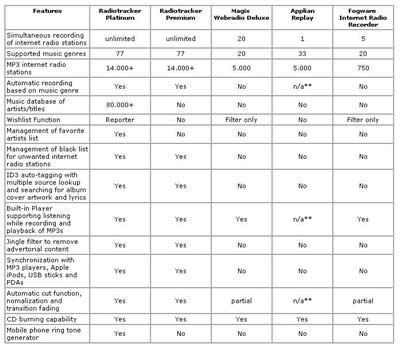
Without trying all of the other programs in the table I can’t comment on specifics but it certainly seems to stack up well against the competition.
In Radiotracker’s Own Words:
Imagine: Christmas and your birthday—together on the same day! With Radiotracker, you get the gift of unlimited MP3 music everyday, free and legal. Two unbelievably easy-to-use versions of Radiotracker stand ready to provide you around the clock with free, state-of-the-art music recordings boasting quality levels of up to 320kBit/s per MP3 track. Radiotracker Premium automatically downloads thousands of free MP3 music tracks in 24 hours by recording the music you want from Internet radio stations. Anyone can do it! Just select your desired music genre and click on the Start button! Radiotracker Platinum can do even more.
Now let us take a look at the Test Machine and Software Requirements…
Test Machine:
This product was tested the following machine:
Womble’s Test Machine:
- Processor: Pentium 3 797Ghz
- Ram: 256Mb DDR
- Graphics Card: Integrated Graphics
- Sound: Integrated Audio
- Hard Disk: Western Digital 20Gb
- Net Access: Broadband 256/128 kbps
Software Requirements:
The system requirements for the program are as follows:
- Operating System: Windows 2000 or XP
- CPU: 500Mhz
- Memory: 128Mb
- Display: Basic requirement
- Sound Card: Basic requirement
- Hard Drive: 100Mb plus additional for saving tracks
- Other: Internet access
Now let us take a Program Run Through…
Program Run Through:
The program is well laid out with all of the essential options on the main window with two pop-out windows for additional information and tools.
The first window that you will see however is the following one:

This will appear each time that you use the program reminding you that you should buy the program to support it along with getting extra features to use.

The complete program is shown here. The two buttons labelled Station and Player on the side of the main window are used to close down the other windows making the footprint of the program smaller when you are not using those features.

As you can see in the main window we have the rip functions, wish list, options and of course the station buttons. These are all used to perform the various tasks in Radiotracker.
In the Platinum version you also have the option of using a Wishlist. This is where you specify certain songs that you like and the program will go and find those songs and rip them to your hard drive for you. This obviously saves time in having to listen to lots of radio stations waiting for the song that you like. I will cover this later on in the review.
The options are complete and allow you to configure most parts of the program to your needs.

As you can see there are separate tabs for each section and a page worth of option to help you get the most out of the program. On this page as you can see you have options to avoid tracks that are shorter than 90 seconds, set on default, to avoid ripping the jingles to your hard drive. This means that each song that is played will be saved as a separate song so that no other program is required to cut a 30 min segment of audio into the various songs.
To add stations to the program you will need to click the “station” button on the main window. This will bring up the following window.

In this window you can choose a Genre to listen to along with the Minimum bitrate that you want to hear. This one is important if you are only looking for high quality songs to rip. If you know the station name then you can search for it as well. The buttons at the bottom of the window allow you to do a few different things with the stations too. These range from just playing the station to rip it as soon as it is added and to add stations by there URL if they are not already in the list.
The first pop-out window is the station box.

Here you will see a list of the stations that you are either currently listening to or ripping from. You can do both up with up to 5 stations at a time. If you have a low bandwidth connection then you may not be able to listen at the same time as ripping other stations as it wont be able to buffer enough at any one time.
The second pop-out window is the player.

This is used to locate the tracks that you have downloaded as well as being able to be used to synchronise your tracks with your MP3 player. As well as this it also has the option of burning your tracks to a CD if you want to back them up or use them elsewhere. If you have the Platinum edition then you can also convert your tracks into Ringtones for your phone. This will be covered later in the review.
As you can see from the picture the program will also attempt to find the over art for the album or single that you have along with the lyrics to the song. You can also edit the ID3 tags from this window:
The ID3 tag editor is clean enough and allows you to change anything that maybe wrong.

Let us now take a look at the Premium features of Radiotracker…
Premium Features:
The two main features of the Premium edition are the Wishlist and the Ringtone creator. Here we will cover them and se what they offer.
Wishlist:
If the Wishlist is activated, Radiotracker automatically recognizes when an artist or song that you "wished" for is played on one of the 16,000 stations known to Radiotracker and starts recording. Using the Wishlist can save time and bandwidth.
The Wishlist is accessed by clicking on the scroll icon in the Wishlist window.

Once on the Wishlist page you can enter exactly what you are trying to find. You can do this by entering the details of the artist that you are looking for. The list will change to give you the results that you are looking for. Once found you can then enter the artist and get songs from them or select a particular song that you are looking for.

If you choose to add a particular song then you will get a small warning window. It is basically saying that it will take longer to find the individual track than to find any songs by the artist.

Once you have added all of the songs that you are looking for you will need to turn on the Wishlist facility. To do this you put a tick into the Hunting Wishlist box. This will tell the program to scan the stations for the songs that you are looking for.
Ringtone Creator:
The "Ringtone" button launches an application that can convert a ripped track into a Ringtone in just a few steps and load it onto your mobile phone.
The Ringtone buutton can be found on the Player windows at the bottom. Before clicking this you can select a file that you want to turn into a Ringtone. If you don't you wwill be asked to later

Once launch the program will decode the file so that it can use it.

Next it will launch the above window. This is where you select what you want the Ringtone to consist of. You can select a snippet of the track of the whole things depending upon what you want along with fading of the track.
At the top of the screen is an option to load a track from a CD, to record something or use an existing MP3 file.

Next the program will cut the track as you selected in the previous window.

Step three is to select the format of the Ringtone that you want. This will need to be something that you phone can use. It will then start the process of creating your Ringtone.

The final thing to do is to decide how you want to get your new Ringtone onto your phone. This can be either via a Download to your computer where you have to then connect your phone to your computer to use the Ringtone or via WAP directly to your phone.

The final window then gives the option to redo the previous operation if something went wrong.
Finally let us take a look at the Positives and Negatives and the Conclusion…
Positives and Negatives:
While using this program a number of points both positive and negative came up. These are listed below for easy reference:
Positives:
- Some 16,000 radio stations available to you wherever you live in the world
- Ability to copy the tracks to your home pc for later
- Various bitrates for whatever connection you have
- Creation of Ringtones
- Ability to search for specific Artists or Tracks
Negatives:
- The Volume bar is not application specific. So turning it down will quiet down all windows sounds.
- No Mute button
Conclusion:
This is a great application. It is powerful and lets you listen to music from anywhere in the world on approximately 16,000 radio stations.
It offers a number of easy to use functions on the basic package that you can try out for nothing to see how it works and if you like it. If you do then you can upgrade it to the Premium or Platinum edition where you can really see the benefits of such things like the Wishlist or Ringtones creator.
As this music is coming from a Radio station you get what the program hears. That means if an Internet radio station fades one song into another, or a DJ talks over a portion of the music, then that is what Radiotracker will record. However the fade opinion is a good go at fixing this as it will fade out and hopefully you won’t even notice it. Another plus point for the program.
The price of $34.95 / 29.95 euros for the Platinum edition or $22.95 / 19.95 euros is not too much if you like your music and plan on listening to and ripping any number of songs perfectly legally.
Given that this software offers so much for such a small fee I feel that I can give this software the highest award at CDFreaks. This being the CDFreaks Editors Choice Award:

As a bonus the Radiotracker developers have designed a CDFreaks version of the application. Although the changes are only skin deep it is a nice touch. This limited version of the software can be found via the link below.

The RapidSolution Software homepage can be found here.
The Radiotracker homepage can be found here.
The CDFreaks version of the software can be downloaded here.















