
 |
Preview: Samsung SN-S082M |
This time Samsung was kind enough to provide us with a review sample of their DVD-RW writers for Laptops. See the following review to find out how the Samsung SN-S082M DVD+/-RW drive performed in our tests.
Company Information:
Let us take a look at some of the company information found at the Samsung Europe Website:
As a world leader in the field of digital media, Samsung Electronics produces Optical Disc Drives (ODD) since 1994. In the past few years Samsung was able to take a central market position in this field.
With subsidiaries all over Europe and a large part of the former USSR, Samsung Europe can offer the consumer a complete selection of disc drives, for all types of computers.
With large and continuous investments in research and development Samsung is able to be more and more at the forefront of disc drive technology.
As one of the first companies developing COMBO drives (DVD-ROM and CD-RW combined in one disc drive), Samsung is a frontrunner in this technology.
In the field of slim-line technologies, Samsung is expanding the line-up, in order to meet the demands of the market for desktop and notebook PCs.
Samsung offers a wide range of Optical Disc Drives, allowing customers to choose the exact combination of capabilities and features. Our products feature the latest noise suppression technologies. If you are looking for a high performance Optical Drive, you need look no further than Samsung.
If you are interested in reading more company information, please visit: www.samsungoms-europe.com
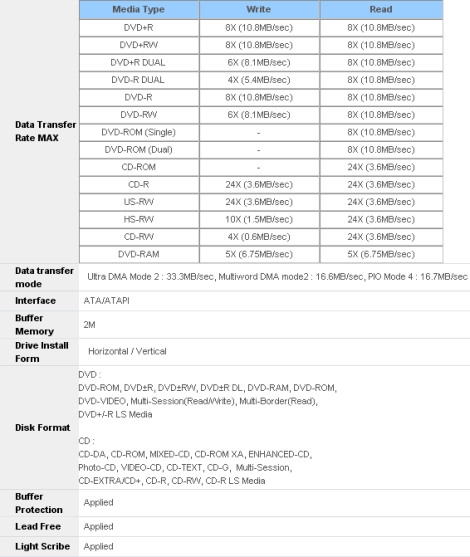
Drive Specifications:
What’s inside the box?
In this section we will take a look at what the drive came shipped with and take a look at the drive and its technology.
Below you will see the contents of the package:
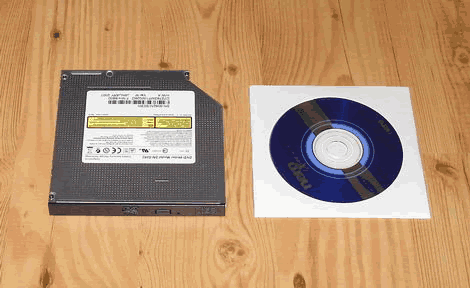
· The drive itself
· The Install CD which contains
· Nero Express 6
Now it’s time to take a look at the drive itself:

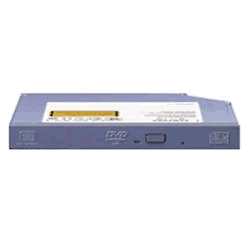
The drive came with Samsung’s black coloured standard bezel, a single green coloured LED (we prefer different LED colours to distinguish between reading and writing operations), an emergency eject hole and an eject button. The logos located on the tray include a DVD Forum DVD-Multi Recorder logo, a DVD Alliance DVD+R DL logo, and a CD-RW Ultra Speed logo.
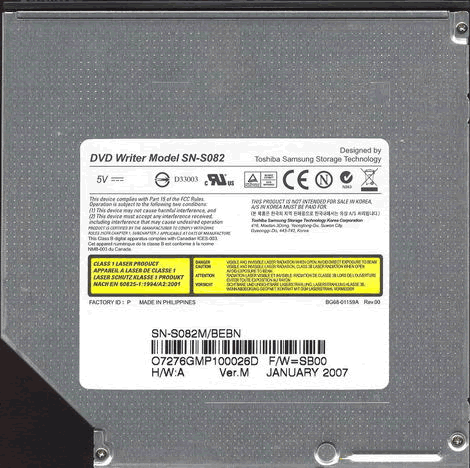
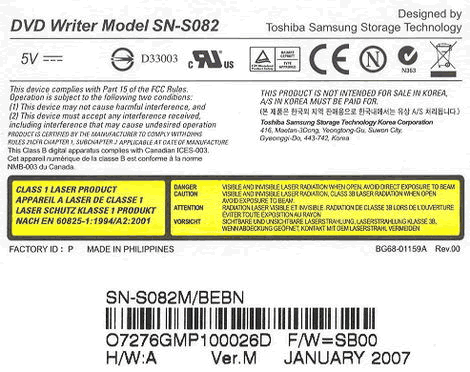
At the top of the drive we found a sticker, telling us that the drive has been produced in January 2007 and that firmware SB00 is installed.


Side
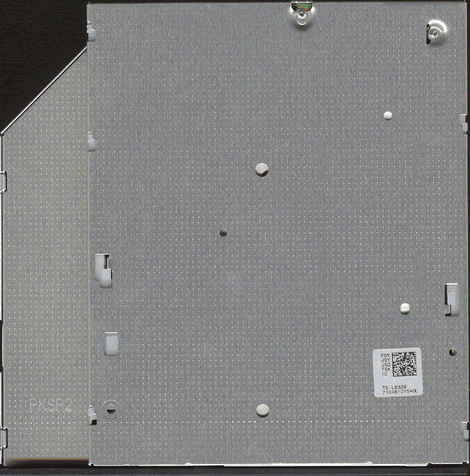
Underside

Back
Now, let us install the drive and check out the features on the next page…
Test machine:
For this review we will be using a computer with the following configuration:
Hardware 1:
HP Pavilion ZV6153EA
- Processor: AMD Athlon 64 3200+
- RAM: 1280 MB MDT PC2700 DDR
- GFX: ATI MOBILITY RADEON Xpress 200
- Sound: Conexant AMC Audio
- Hard disk: 100GB Seagate ST9100822A
Hardware 2:
HP Pavilion DV8213EA
- Processor: AMD Turion 64 ML-34
- RAM: 1 GB DDR 333 MHz (2 x 512 MB)
- GFX: ATI Radeon X200M
- Sound: Conexant AC-Link
- Hard disk: Hitachi HTS541616J9AT00 (160 GB) & Samsung HM160JC (160 GB)
System set-up 1:

As we can see above, the drive was running in UDMA 2 mode. See another Screenshot from Nero Infotool below

From the screenshot from Nero InfoTool above, we can see the Samsung SN-S082M does not support Mount Rainer. The drive came shipped with firmware version SB00.
System set-up 2:

Again we see the Samsung SN-S082M connected to the secondary IDE Channel and the drive appears to run in UDMA – 2 mode.
Installed Software:
Windows XP Professional is installed on the computer along with Service Pack 2 for Windows XP. We will be using the following software in this review:
- Nero 7.10.1.0
- Nero CD/DVD Speed
- Nero InfoTool
- KProbe v2.5.2
- Slysoft CloneCD v5.2.8.1
- Exact Audio Copy v0.95 beta 4
- Droppix Label Maker 2.9.1.0
Features and techniques:
Software Bundle:
Now let’s take a look at the software bundle which came together with the drive. Please note that we may not use this software in our review.

The supplied Software CD-ROM

In the above screenshot we see the available install options
- Nero 6
- Firmware Live Update
- User Guide

The Nero 6 installation screen

The Live Firmware Update utility
The software bundle is not as good as we have expected. For a drive, which has been produced in January 2007 we expected at least to find Nero 7 Essentials.
Disc Quality Scanning:
Unfortunately, the Samsung SN-S082M does not support Disc Quality Scanning.
Booktype (Bitsetting):
The Samsung SN-S082M supports bit-setting via burning applications such as Nero Burning Rom and supports Bit-Setting on DVD+R/RW/+R DL media types.
To check if your drive supports bitsetting you can open Nero CD/DVD-Speed, click Extra and Bitsetting. Now the following screen should appear.

As you can see above, the Samsung SN-S082M lets you set the Booktype for DVD+R/+RW manually and has a default DVD-ROM Booktype setting for DVD+R DL media.
Here is how you could check if your discs are really written with DVD-ROM book type:
Start Nero CD-DVD Speed and click the Disc info button and you should get something like this:

Another quick test is to start Nero CD-Speed and look at the disc information:

Writing Technology:
24x CD-Recordable Writing:
Now it’s time to take a closer look at the writing technologies used from that drive. According to the specs, the Samsung SN-S082M is able to write CD-R media at a maximum speed of 24x.

The Samsung SN-S082M uses P-CAV (Partial-Constant Angular Velocity) to write CD-R media at 24x speed. The average speed is 19.18x and total writing time is 5:19 minutes.
For comparison we have made the following table:
|
CD-R Disc |
Supported |
Write |
Start |
End |
Average |
Write |
|
NEC |
24x |
CAV |
11.45x |
25.94x |
19.55x |
5:09 |
|
Samsung |
24x |
P-CAV |
11.17x |
24.27x |
19.18x |
5:19 |
As we can see from our table, the Samsung SN-S082M is slower than the NEC 7551A which has been tested a while ago.
24x CD-ReWritable writing speed:

The Samsung SN-S082M uses Z-CLV (Zoned Constant Linear Velocity) to write CD-RW at 24x. The average speed is 16.18x and the total writing time is 6:09 minutes.
For comparison we have made the following table:
|
CD-RW Disc |
Supported |
Write |
Start |
End |
Average |
Write |
|
NEC |
20x |
Z-CLV |
8.00x |
20.08x |
16.08x |
6:18 |
|
Samsung |
24x |
Z-CLV |
10.04x |
24.10x |
16.18x |
6:09 |
Here, the Samsung SN-S082M is slightly faster than the NEC 7551A.
8x DVD+R/-R writing speed:
According to the specifications of the Samsung SN-S082M, it should be able to write DVD+R/-R media at a maximum speed of 8x.

DVD+R
The Samsung SN-S082M uses P-CAV (Partial-Constant Angular Velocity), to write at its maximum speed of 8X. This gives an average speed of 6.01x and a total writing time of 10 minutes and 56 seconds.

DVD-R
The Samsung SN-S082M uses P-CAV (Partial-Constant Angular Velocity), to write at its maximum speed of 8X. This gives an average speed of 6.02x and a total writing time of 11 minutes and 23 seconds.
For comparison we have made the following table:
|
8x |
Supported |
Write |
Start |
End |
Average |
Write |
|
NEC |
8x +R |
CAV |
3.38x |
8.10x |
5.95x |
11:11 |
|
Samsung |
8x +R |
P-CAV |
3.43x |
8.03x |
6.01x |
10:56 |
The drive was slightly faster than the NEC 7551A when writing DVD+R and significantly faster when writing DVD-R.
6x DVD+R DL writing speed:
The specs indicate that the Samsung SN-S082M writes DVD+R DL media with a maximum speed of 6x, let’s find out if this is true.

The drive uses Z-CLV (Zoned Constant Linear Velocity) to write DVD+R DL at 6x. The average speed is 4.54x and the total writing time is 27:44 minutes.
4x DVD-R DL writing speed:

The Samsung SN-S082M uses Z-CLV (Zoned Constant Linear Velocity) to write DVD-R DL at 4x. The average speed is 3.51x and the total writing time is 34:10 minutes.
For comparison we have made the following table:
|
DVD DL |
Size |
Writing |
Writing |
Book |
|
NEC |
8152MB |
DVD+R DL 4x |
37m:11s |
DVD-ROM |
|
Lite-On |
8152MB |
DVD+R DL 6x |
27m:44s |
DVD-ROM |
The Samsung SN-S082M performed good, compared to the NEC ND-7551A, when writing DVD+R/-R DL media.
5x DVD-RAM:

The SN-S082M uses P-CAV (Partial-Constant Angular Velocity) to write DVD-RAM media at its maximum speed of 5x (verify off). This resulted in an average write speed of 4.64x and a total write time of 12 minutes and 10 seconds.
Since we had no 5x writing tests of another Laptop drive available we can’t provide you with a comparison table this time.
On the next page: Reading performance…
Reading performance:
For these tests we will use Nero CD-DVD Speed to read various CD and DVD’s, including audio discs and DVD-media.
Pressed discs:
For this test we used a pressed CD-ROM disc containing Roxio Easy Media Creator 7.5 install CD that is close to 75 minutes long. Below you will see the produced result:

The Samsung SN-S082M reached 24.21x read speed. Let’s compare it with some other drives below.
|
Pressed |
Average |
Start |
End |
Seek |
Seek |
Seek |
|
NEC |
19.03x |
11.08x |
25.14x |
133ms |
153ms |
250ms |
|
Samsung |
18.27x |
10.27x |
24.21x |
132ms |
145ms |
243ms |
The Samsung SN-S082M is slightly slower than the NEC ND-7551A when it comes to reading pressed CD-ROMs.
CD-Recordable Discs:
For this test, we made a copy of the original Easy Media Creator 7.5 install CD. The disc we used was a Taiyo Yuden 52x certified CD-R disc manufactured by Taiyo Yuden.

The Samsung SN-S082M reached 24.47x read speed. Let’s compare it with the NEC ND-7551A below drives below.
|
CD-R |
Average |
Start |
End |
Seek |
Seek |
Seek |
|
NEC |
19.50x |
11.10x |
25.88x |
- |
- |
- |
|
Samsung |
18.53x |
10.57x |
24.47x |
131ms |
143ms |
225ms |
The Samsung SN-S082M was slightly slower than the NEC ND-7551A.
CD-Rewritable discs:
Again, we made a copy of the original Easy Media Creator 7.5 install CD; this time we used a Verbatim Ultra Speed+ (32X) CD-RW disc made by Mitsubishi Chemicals Corporation.

The CD-RW reading speed is equal to the CD-R reading performance of the drive.
|
CD-RW |
Average |
Start |
End |
Seek |
Seek |
Seek |
|
NEC |
19.14x |
10.91x |
25.14x |
- |
- |
- |
|
Samsung |
18.54x |
10.56x |
24.48x |
133ms |
145ms |
223ms |
Again, the Samsung SN-S082M was slightly slower than the NEC ND-7551A.
100 minutes CD:
We used Nero CD-DVD Speed to measure the transfer rate. The 100 min disc we used is slightly larger than the disc used for the other tests, to be exact it is 96 minutes and 36 seconds long.

As you can see, the drive had no problems with 100min CD-R media.
Audio – Digital Audio Extraction:
To test the digital audio extraction performance of the Samsung SN-S082M, again we used Nero CD/DVD-Speed to measure the transfer rate. The audio disc we used is about 75 minutes in length (74:45:27 min).
The Samsung SN-S082M reached 24.28 when reading our test audio disc. Let’s compare it with the NEC ND-7551A below.
|
Audio |
Average |
Start |
End |
Seek |
Seek |
Seek |
|
NEC |
19.00x |
10.75 |
25.75x |
133ms |
244ms |
254ms |
|
Samsung |
18.49x |
10.39x |
24.48x |
126ms |
146ms |
235ms |
The reading performance is again not as good as the reading performance of the NEC drive.
Audio Extraction:
For this test we used EAC (Exact Audio Copy) to test the drives Audio extraction performance. As we can see from the screenshot below, the drive supports accurate stream and C2 error info.

Below are the results produced by EAC:


The Samsung SN-S082M performed excellent in burst mode but was much slower in secure mode.
Advanced audio – DAE quality test:
Before we move on to testing DVD read speeds, we will take a last audio test, and this time we used the “Advanced DAE Quality Test” feature in CD-Speed. For this test we used a JVC CD-R DA media.

The extracting quality is excellent and it should support everything, except reading the Leadin / Leadout. However the drive was not able to copy on at 16x.
DVD reading performance:
Again, we will use Nero CD-DVD Speed to measure the reading performance, this time for various types of DVD discs. The drive should read pressed single layer DVD-discs at 16X.
DVD – DVD-Video:
For our DVD reading performance tests we are going to start with single and dual layered DVD video discs. While only 1X speed is required to watch DVD movies, it’s useful to be able to read the discs at higher speeds if you’re going to extract (rip) the content of the disc to your hard drive.

DVD-Video Single Layer

DVD-Video Double Layer (OTP)
As we can see, it reads DVD-Video Single layer at 8x and DVD-Video Double layer at 6x.
|
DVD |
Average |
Start |
End |
Average |
Start |
End |
|
NEC |
3.68x |
2.05x |
4.90x |
3.78x |
2.09x |
5.03x |
|
Samsung |
6.08x |
3.31x |
8.11x |
4.73x |
2.47x |
6.29x |
The Samsung SN-S082M performed a lot better when reading both, pressed DVD-SL and DVD-DL media.
DVD – DVD+R/RW:
For this test, we used one DVD+R and one DVD+RW with about 4.4GB of data. Below are the results:
DVD+R:

DVD+RW:

|
DVD+R |
Average |
Start |
End |
Average |
Start |
End |
|
NEC |
6.01x |
3.32x |
8.03x |
6.06x |
3.32x |
8.09x |
|
Samsung |
6.14x |
3.39x |
8.21x |
6.14x |
3.40x |
8.21x |
The Samsung SN-S082M performed similar to the NEC ND-7551A.
DVD – DVD-R/RW:
For this test, we used one DVD-R disc and one DVD-RW disc filled with about 4.4GB of data. Our test results are found below:
DVD-R:

DVD-RW:

There are hardly any differences in the speed, compared to reading the DVD-R/RW discs.
|
DVD-R |
Average |
Start |
End |
Average |
Start |
End |
|
NEC |
6.05x |
3.34x |
8.08x |
6.06x |
3.34x |
8.09x |
|
Samsung |
6.22x |
3.45x |
8.32x |
6.22x |
3.44x |
8.32x |
DVD – DVD+R DL:
For this test, we used one DVD+R DL disc and the result can be found below:

The SN-S082M reads DVD+R DL media with up to 6x speed.
DVD – DVD-R DL:
For this test, we used one DVD-R DL disc and the result can be found below:

The Samsung SN-S082M reads DVD-R DL media with up to 6x speed.
DVD – DVD-RAM:
For this test, we used a Verbatim DVD-RAM 5x disc and the result can be found below:

Summary:
The Samsung SN-S082M is a very slow drive compared to a nowadays standard standalone PC DVD-Writer, but this drive is a Laptop DVD-Writer and here it is a good and reliable reader.
Now let’s head over to the next page where we will test CD-R/RW writing performance……
The specifications of the Samsung SN-S082M state that the drive is able to write both CD-R discs and CD-RW discs at 24x speed. Let us find out how the drive really performs in speed and quality.
Writing Data CD-R/RW discs:
For our data writing tests, we simply set up a new compilation of 702MB using Nero Burning ROM software. Writing method used is DAO (Disc At Once), and the disc is set up as a non-multisession disc with “finalize disc” enabled. The screenshot below shows how long it takes to write a disc at the highest speed. (48x)
.
CD-R:

The Samsung SN-S082M took 5 minutes and 16 seconds to write the disc at 48x. Let us see how this compares to other drives in the table below:
|
Nero Burning Rom |
Write |
Total |
|
NEC |
24x |
6m:18s |
|
Samsung |
24x |
5m:16s |
The Samsung SN-S082M was more than a minute faster than the NEC ND-7551A when writing CD-R media at 24x speed.
CD-R Writing Quality
We will test CD-R discs from different CD-R manufacturers. To really measure the write speed, we used the “create data CD” function in Nero CD-Speed. The discs were written at the maximum speed that the drive supports. For the quality test, we used KProbe 2 which is a tool developed by a Lite-On employee. It runs under Windows and works with drives made by Lite-On. Also note that different drives and different reading speeds may affect the results obtained when scanning the discs.
A written CD-R disc will always have some C1 errors; C1 errors are easily corrected by the drive’s error correction capabilities. The next level of errors is C2, while C2 errors could also be corrected by most drive’s error correction capabilities; they are not wanted on a good quality disc. A good disc should not contain any C2 errors, and preferably have an average C1 error amount of below 2.0 for the best discs, or at least below 10.0 averages for good quality discs. After C2 errors, there are only un-correctable errors that will make a disc unusable.
Below are the obtained results:


|
Brand: |
Verbatim Printable CD-R |
|
Manufacturer: |
Mitsubishi Chemicals Corporation |
|
Code: |
97m34s23f |
|
Disc Type: |
Printable CD-R |
|
Recording Layer: |
Dye Type 3: Long Strategy (Cyanine,Azo) |
|
Capacity: |
79:59.31 (703 MB) |
|
Certified Speed: |
52x |
|
Write Speed: |
24x (CAV) |
|
Write Time: |
5m:15s |
|
C1 Average/Sec: |
1.91 |
|
C2 Average/Sec: |
0.0 |
A very good quality result for this Mitsubishi Chemicals manufactured 52x CD-R media. With a C1 average the disc fits in the “best quality discs” category.


|
Brand: |
Taiyo Yuden |
|
Manufacturer: |
Taiyo Yuden Company Limited |
|
Code: |
97m24s01f |
|
Disc Type: |
Tuffcoat with Watershield CD-R |
|
Recording Layer: |
Dye Type 1: Long Strategy (Cyanine,Azo) |
|
Capacity: |
79:59.72 (703 MB) |
|
Certified Speed: |
52x |
|
Write Speed: |
24x (CAV) |
|
Write Time: |
5m:18s |
|
C1 Average/Sec: |
0.70 |
|
C2 Average/Sec: |
0.0 |
A C1 average of 0.70 places this Taiyo Yuden manufactured media into the “best quality discs” category. Everything else would have been a surprise.


|
Brand: |
Datawrite Scribbles CD-R |
|
Manufacturer: |
CMC Magnetics |
|
Code: |
97m26s66f |
|
Disc Type: |
CD-R |
|
Recording Layer: |
Dye Type 6: Short Strategy (Phthalocyanine) |
|
Capacity: |
79:59.71 (703MB) |
|
Certified Speed: |
52x |
|
Write Speed: |
24x (CAV) |
|
Write Time: |
5m:15s |
|
C1 Average/Sec: |
0.86 |
|
C2 Average/Sec: |
0.0 |
A CMC Magnetics manufactured 52x CD-R media and once more an excellent result. With a C1 average of 0.86, the disc fits in our “best quality discs” category.


|
Brand: |
Tevion |
|
Manufacturer: |
Daxon Inc. |
|
Code: |
97m22s67f |
|
Disc Type: |
CD-R |
|
Recording Layer: |
Dye Type 7: Short Strategy (Phthalocyanine) |
|
Capacity: |
79:59.70 (703MB) |
|
Certified Speed: |
48x |
|
Write Speed: |
24x (CAV) |
|
Write Time: |
5m:14s |
|
C1 Average/Sec: |
1.19 |
|
C2 Average/Sec: |
0.0 |
1.19 C1 average, once more a “best quality disc” result for this media.


|
Brand: |
JVC CD-R Audio |
|
Manufacturer: |
Wealth Fair Investment Limited |
|
Code: |
97m18s17f |
|
Disc Type: |
CD-R |
|
Recording Layer: |
Dye Type 7: Short Strategy (Phthalocyanine) |
|
Capacity: |
79:59.74 (703 MB) |
|
Certified Speed: |
52x |
|
Write Speed: |
24x (CAV) |
|
Write Time: |
5m:15s |
|
C1 Average/Sec: |
4.24 |
|
C2 Average/Sec: |
0.0 |
Ultron media and with the average C1 errors of 4.24 it goes into the group “good quality discs” category.


|
Brand: |
Traxdata Black – Thanks to Conrexx (NL) |
|
Manufacturer: |
RiTEK Corporation |
|
Code: |
97m15s17f |
|
Disc Type: |
CD-R |
|
Recording Layer: |
Dye Type 7: Short Strategy (Phthalocyanine) |
|
Capacity: |
79:59.73 (703MB) |
|
Certified Speed: |
40x |
|
Write Speed: |
24x (CAV) |
|
Write Time: |
5m:19s |
|
C1 Average/Sec: |
1.59 |
|
C2 Average/Sec: |
0.0 |
A C1 average of 1.59 is an excellent result for this RiTEK manufactured CD-R media. Once more, a disc that fits in our “best quality discs” category.
Overall thoughts:
The Samsung SN-S082M burns CD-R media with very good quality.
Now let us check if the CD-RW writing performance is as good as the CD-R writing performance…..
CD-RW Writing Quality
For these tests we will be using 3 different CD-RW media from 2 different manufacturers.
To really measure the write speed, we used the 'create data CD" function in Nero CD-Speed. The discs were written at the maximum speed that the drive supports.
For the quality test, we used the same testing procedures as for the CD-R tests in this review


|
Brand: |
Verbatim |
|
Manufacturer: |
Mitsubishi Chemicals Corporation |
|
Code: |
97m34s25f |
|
Disc Type: |
Ultra Speed CD-RW |
|
Recording Layer: |
Phase Change |
|
Capacity: |
79:59.74 (703 MB) |
|
Certified Speed: |
32x |
|
Write Speed: |
24x (Z-CLV) |
|
Write Time: |
6m:09s |
|
C1 Average/Sec: |
43.98 |
|
C2 Average/Sec: |
0.0 |
No C2 errors but a C1 average of 43.98. A very poor result for this high quality, Mitsubishi Chemicals manufactured media.


|
Brand: |
Verbatim |
|
Manufacturer: |
Mitsubishi Chemicals Corporation |
|
Code: |
97m34s24f |
|
Disc Type: |
Ultra Speed CD-RW |
|
Recording Layer: |
Phase Change |
|
Capacity: |
79:59.74 (703 MB) |
|
Certified Speed: |
24x |
|
Write Speed: |
24x (Z-CLV) |
|
Write Time: |
6m:08s |
|
C1 Average/Sec: |
20.25 |
|
C2 Average/Sec: |
0.0 |
Again we expected a much better result, but a C1 average of 20.25 says it all.


|
Brand: |
FujiFilm |
|
Manufacturer: |
RiTek Corporation |
|
Code: |
97m10s00f |
|
Disc Type: |
High Speed CD-RW |
|
Recording Layer: |
Phase Change |
|
Capacity: |
79:59.74 (703 MB) |
|
Certified Speed: |
12x |
|
Write Speed: |
10x (CLV) |
|
Write Time: |
8m:42s |
|
C1 Average/Sec: |
6.58 |
|
C2 Average/Sec: |
5.54 |
A good result for this media. A C2 average of 6.58 places this RiTek manufactured CD-RW into our “good quality discs” category.
Overall thoughts:
The CD-RW writing performance of the Samsung SN-S082M is poor. Here the drive really needs improving.
DVD-Writing performance:
The specification of the drive states that it is able to write DVD+R/-R with up to 8x speed and DVD+RW/-RW media with up to 8x/6x speed. In this part, we will measure the writing times for various types of DVD+R/RW and DVD-R/RW discs. We will also focus on write quality and media compatibility.
DVD+/-R writing with Nero 7
In this test we will measure the time for writing to DVD±R discs. We used Nero Burning Rom to burn an ISO compilation containing 4462MB of data. We used the Disc-At-Once write method.

DVD+R

DVD-R
Write quality:
You should first notice that this is not a scientific and professional way to test the discs. But according to our testing done in recent months, we would conclude that there is a clear link between the quality reported when scanning the disc and the playability of the disc in different devices. Also notice that different drives report different amounts of errors. K-Probe was designed to work with Lite-On DVD-Writers, so we recommend using a DVD-Writer from Lite-On. In this test we use a Lite-On SHM-165P6S DVD-Writer, as already said; remember that scans done with a Lite-On DVD-ROM or Lite-On combo drive can’t be compared with the results obtained with a Lite-On DVD-Writer. Also remember that different PI/PO ECC sum settings along with different reading speeds in K-Probe will affect the result, we use these settings; PI (Parity Inner) set to summarize 8 ECC blocks, PIF (Parity Inner Failures) set to summarize 1 ECC block, reading speed: 4X CLV (Constant Linear Velocity). Setting the PI sum to 8 and the PIF sum to 1 will give a result that we may compare to the standards for DVD+R/RW and DVD-R/RW.
But what is a good scan? That is a discussion that we don’t think will end soon, as different drives report different amount of errors, some players are more picky about media than others, and so on. But as a comparison we present you with a scan from two pressed DVD discs:

This scan shows the results from a pressed DVD-Video disc (GoldenEye).

This scan shows the result from a pressed DVD-Video disk (The Green Mile). Notice the error jump when shifting to the second layer (the error level actually drops from the end of the first layer to the beginning of the second layer).
If you read below, you will see that both the pressed DVD-discs are well within the standards.
Download the ECMA 267 Standard for DVD-ROM, the ECMA 337 Standard for DVD+R/RW and the ECMA 338 Standard for DVD-R/RW at http://www.ecma-international.org if you want to look at the standards for yourself. Here is some data from the ECMA standards (same for DVD-ROM, DVD-R/RW and DVD+R/RW):
Random errors:
A row of an ECC Block that has at least 1 byte in error constitutes a PI error. In any 8
consecutive ECC Blocks the total number of PI errors before correction shall not exceed 280.
Here we see that a PI error is defined as a row in an ECC block having 1 byte or more containing errors and that the sum of PI errors in 8 ECC blocks after each other should not exceed 280 PI errors.
But what is a row and what is an ECC block? Again we refer to the ECMA standards. We do not copy and paste everything, but if you’re interested, look in the ECMA standards. A row is 182 bytes long where the last 10 bytes contain PI (Parity Inner) information. An ECC block is 208 rows long where the last 16 rows contain the PO (Parity Outer) information. This gives us a maximum possible PI error amount of 208 errors per block and for 8 blocks after each other this sum is of course 8 times higher, giving a maximum possible amount of 1664 PI-8 errors. In practical use, a disc with 1664 PI-8 errors is unreadable.
According to our tests the specified max PI-8 sum of 280 for good discs seems to be a good guideline, as some readers have problems reading discs when the PI-8 errors is over 300 and most players starts to have problems when the PI-8 error level reaches 600 or more.
But what are the PIF errors that K-Probe reports? They are Parity Inner Failures, meaning errors left after PI correction. Only the ECMA 337 standard describes the Parity Inner Failures. So how is a Parity Inner Failure defined? Here is what the ECMA 337 states:
“If a row of an ECC Block as defined in 13.3 contains more than 5 erroneous bytes, the row is said to be “PI-un-correctable”.”
In theory, an ECC block may in the worst-case have 208 PIF since every ECC block is 208 rows long. But the ECMA 337 standard goes further and specifies the max amount of accepted PI Failures (un-correctable errors) allowed on a good disc:
“In any ECC Block the number of PI-un-correctable rows should not exceed 4.”
This means that when the PIF sum is set to 1, the maximum error value should not exceed 4. The theoretical maximum value for PIF is 208 errors.
But what makes a disc unreadable? A POF (Parity Outer Failure) error will make the disc unreadable, but K-Probe does not display the POF’s.
Notice that there are other aspects such as disc reflectivity, jitter, tracking errors and so on that also will affect the readability of a DVD disc – but for this we do not have measuring equipment available.
Also, another note is that we have scanned the discs at 4X CLV speed, by lowering the speed to 2X(DVD-R/RW)/2.4X(DVD+R/RW) or 1X the amount of reported errors may drop on some discs. We scanned at 4X CLV due to lower speeds taking too much time.
To see if there is a connection between the reported amount of errors and readability of the discs we also include the reading curve from a Optiarc AD-7173A DVD-Writer. The reason why we have changed the reader is that some companies disliked that we used a modified firmware to obtain 16x reading speed. So to please them, we are now using a drive that reads DVD+R/-R media at 16x as default. A small speed reduction near the end is still accepted on good discs, but serious reading problems or reading failures is a bad sign.
Easier explanation on how to read the test results.
Maybe this got too technical, and you are wondering what to look for in KProbe reports?
Use this as a guideline for good discs:
· PI (Parity Inner): No larger areas on the disc should exceed 280 PI-8 errors, do not worry too much about high single spikes that exceed 280.
· PIF (Parity Inner Failures): No larger areas on the disc should exceed 4 PIF-1 errors, do not worry too much about high single spikes that exceed 4.
And as always; lower is better
And look at the reading curve; if it looks clean with no dips it should be good, a small slowdown near the end is accepted.
DVD+R media compatibility and write quality:
In these tests we will be using the Lite-On LH-20A1P with firmware KL05 along with KProbe to measure the disc quality. We will also be using the Lite-On LH-20A1P with firmware KL05 along with CD-Speed for our read-back tests.


|
Brand: |
Miflop Extreme – Thanks to Miflop |
|
Manufacturer: |
Taiyo Yuden Company Limited |
|
Code: |
YUDEN 000 T03 |
|
Disc Type: |
DVD+R |
|
Capacity: |
4483MB |
|
Certified Speed: |
16x |
|
Write Speed: |
8x |
|
Write Time: |
11m:47s |
|
PI-8 errors Average/Sec: |
11.38 |
|
PI-1 failures (PIF) Avg/Sec: |
0.03 |
Miflop extreme media with Taiyo Yuden media code, the result is excellent.


|
Brand: |
Verbatim – Thanks to Verbatim (Germany) |
|
Manufacturer: |
Mitsubishi Chemicals Corporation |
|
Code: |
MCC 004 |
|
Disc Type: |
DVD+R |
|
Capacity: |
4483MB |
|
Certified Speed: |
16x |
|
Write Speed: |
8x |
|
Write Time: |
10m:57s |
|
PI-8 errors Average/Sec: |
1.37 |
|
PI-1 failures (PIF) Avg/Sec: |
0.05 |
The result is excellent.


|
Brand: |
Datawrite - Thanks to E-net |
|
Manufacturer: |
Prodisc Technology Inc. |
|
Code: |
ProdiscR03 |
|
Disc Type: |
DVD+R |
|
Capacity: |
4483MB |
|
Certified Speed: |
8x |
|
Write Speed: |
8x |
|
Write Time: |
11m:00s |
|
PI-8 errors Average/Sec: |
7.32 |
|
PI-1 failures (PIF) Avg/Sec: |
3.30 |
A bad result, the TRT Lite-On LH-20A1P shows problems with reading at the position with high PIF. Other readers might have more problems with that disc and it’s possible that the disc appears to be unreadable in other drives.


|
Brand: |
Ricoh |
|
Manufacturer: |
Moser Bear India Limited |
|
Code: |
MBIPG101R04 |
|
Disc Type: |
DVD+R |
|
Capacity: |
4483MB |
|
Certified Speed: |
16x |
|
Write Speed: |
8x |
|
Write Time: |
11m:58s |
|
PI-8 errors Average/Sec: |
0.61 |
|
PI-1 failures (PIF) Avg/Sec: |
0.01 |
Excellent. One of the best results we had with this drive.


|
Brand: |
Datawrite - Thanks to E-net |
|
Manufacturer: |
Prodisc Technology Inc. |
|
Code: |
ProdiscR04 |
|
Disc Type: |
DVD+R |
|
Capacity: |
4483MB |
|
Certified Speed: |
16x |
|
Write Speed: |
8x |
|
Write Time: |
11m:01s |
|
PI-8 errors Average/Sec: |
3.10 |
|
PI-1 failures (PIF) Avg/Sec: |
0.01 |
The result is excellent.


|
Brand: |
Traxdata DVD+R |
|
Manufacturer: |
Ricoh Company Limited |
|
Code: |
RICOH JPN R03 |
|
Disc Type: |
DVD+R |
|
Capacity: |
4483MB |
|
Certified Speed: |
16x |
|
Write Speed: |
8x |
|
Write Time: |
10m:56s |
|
PI-8 errors Average/Sec: |
0.59 |
|
PI-1 failures (PIF) Avg/Sec: |
0.12 |
Another very good result.
DVD+RW media compatibility and write quality:
We used the same test procedures as in our DVD+R tests.
Below are our obtained results.


|
Brand: |
Ricoh – Thanks to Ricoh Europe |
|
Manufacturer: |
RICOH Company Limited |
|
Code: |
RICOH JPNW21 |
|
Disc Type: |
DVD+RW |
|
Capacity: |
4483MB |
|
Certified Speed: |
8x |
|
Write Speed: |
4x |
|
Write Time: |
15m:29s |
|
PI-8 errors Average/Sec: |
20.58 |
|
PI-1 failures (PIF) Avg/Sec: |
0.33 |
The drive wasn’t able to burn the media at its rated speed but the result is good for this DVD+RW media.


|
Brand: |
Verbatim – Thanks to Verbatim (Germany) |
|
Manufacturer: |
Mitsubishi Chemicals Corporation |
|
Code: |
MKMA02 |
|
Disc Type: |
DVD+RW |
|
Capacity: |
4483MB |
|
Certified Speed: |
4x |
|
Write Speed: |
4x |
|
Write Time: |
16m:04s |
|
PI-8 errors Average/Sec: |
7.89 |
|
PI-1 failures (PIF) Avg/Sec: |
0.55 |
Overall a good result for this Verbatim 4x DVD+RW


|
Brand: |
Traxdata - Thanks to Conrexx Europe |
|
Manufacturer: |
RiTEK Corporation |
|
Code: |
RITEK 008 |
|
Disc Type: |
DVD+RW |
|
Capacity: |
4483MB |
|
Certified Speed: |
8x |
|
Write Speed: |
4x |
|
Write Time: |
15m:29s |
|
PI-8 errors Average/Sec: |
186.80 |
|
PI-1 failures (PIF) Avg/Sec: |
0.24 |
The media wasn’t burned at its rated speed. It contains Very high PIE but relatively low PIF and the disc is perfect readable. A mixed result.
Summary:
The Samsung SN-S082M produced good results on the DVD+R media type and mixed results on the DVD+RW media type. Also, the drive wasn’t able to write any tested DVD+RW 8x media at its rated speed.
On the next page we are going to take a look at DVD-R/RW writing performance…
DVD-R/RW Writing performance:
For these tests we used the same testing equipment as for our DVD+R/+RW tests.


|
Brand: |
Miflop Extreme – Thanks to Miflop |
|
Manufacturer: |
Taiyo Yuden Company Limited |
|
Code: |
TYG03 |
|
Disc Type: |
DVD-R |
|
Capacity: |
4483MB |
|
Certified Speed: |
16x |
|
Write Speed: |
8x |
|
Write Time: |
11m:23s |
|
PI-8 errors Average/Sec: |
9.82 |
|
PI-1 failures (PIF) Avg/Sec: |
0.00 |
Miflop extreme media, with Taiyo Yuden media code and the result is excellent.


|
Brand: |
Ricoh – Thanks to Ricoh Europe for |
|
Manufacturer: |
CMC Magnetics Corporation |
|
Code: |
CMC MAG AM3 |
|
Disc Type: |
DVD-R |
|
Capacity: |
4483MB |
|
Certified Speed: |
16x |
|
Write Speed: |
8x |
|
Write Time: |
11m:26s |
|
PI-8 errors Average/Sec: |
5.76 |
|
PI-1 failures (PIF) Avg/Sec: |
0.48 |
The result is good.


|
Brand: |
Verbatim – Thanks to Verbatim (Germany) |
|
Manufacturer: |
Mitsubishi Chemical Corporation |
|
Code: |
MCC 03R G20 |
|
Disc Type: |
DVD-R |
|
Capacity: |
4483MB |
|
Certified Speed: |
16x |
|
Write Speed: |
8x |
|
Write Time: |
11m:23s |
|
PI-8 errors Average/Sec: |
3.77 |
|
PI-1 failures (PIF) Avg/Sec: |
0.02 |
The result is very good.


|
Brand: |
Datawrite - Thanks to E-net |
|
Manufacturer: |
CMC Magnetics Corporation |
|
Code: |
CMC MAG AE1 |
|
Disc Type: |
DVD-R |
|
Capacity: |
4483MB |
|
Certified Speed: |
8x |
|
Write Speed: |
8x |
|
Write Time: |
11m:21s |
|
PI-8 errors Average/Sec: |
19.22 |
|
PI-1 failures (PIF) Avg/Sec: |
1.63 |
High PIE and PIF at the end of the disc make it unreadable, a poor result.


|
Brand: |
Datasafe - Thanks to E-net for sending us this media. |
|
Manufacturer: |
Mitsubishi Chemical Corporation |
|
Code: |
MCC 03RG20 |
|
Disc Type: |
DVD-R |
|
Capacity: |
4483MB |
|
Certified Speed: |
16x |
|
Write Speed: |
8x |
|
Write Time: |
11m:32s |
|
PI-8 errors Average/Sec: |
29.00 |
|
PI-1 failures (PIF) Avg/Sec: |
0.66 |
Same Media Code as the Verbatim made DVD-R but a result which is much worse. A good example for the quality difference of media from the same manufacturer.


|
Brand: |
Pleomax – Thanks to Pleomax (NL) |
|
Manufacturer: |
Opto Disc |
|
Code: |
OPTODISCR016 |
|
Disc Type: |
DVD-R |
|
Capacity: |
4483MB |
|
Certified Speed: |
16x |
|
Write Speed: |
16x |
|
Write Time: |
5m:53s |
|
PI-8 errors Average/Sec: |
60.91 |
|
PI-1 failures (PIF) Avg/Sec: |
0.20 |
A good result for this media, but the TRT test shows a significant slowdown.


|
Brand: |
Traxdata – Thanks to Conrexx (NL) |
|
Manufacturer: |
RiTEK Corporation |
|
Code: |
RITEK F1 |
|
Disc Type: |
DVD-R |
|
Capacity: |
4483MB |
|
Certified Speed: |
16x |
|
Write Speed: |
8x |
|
Write Time: |
11m:20s |
|
PI-8 errors Average/Sec: |
10.71 |
|
PI-1 failures (PIF) Avg/Sec: |
0.07 |
Not a very good result for this media. The TRT test fails.
DVD-RW media compatibility and write quality:


|
Brand: |
Verbatim - Thanks to Verbatim |
|
Manufacturer: |
Mitsubishi Kagaku Media |
|
Code: |
MKM 01RW 6X01 |
|
Disc Type: |
DVD-RW |
|
Capacity: |
4483MB |
|
Certified Speed: |
6x |
|
Write Speed: |
6x |
|
Write Time: |
14m:40s |
|
PI-8 errors Average/Sec: |
19.18 |
|
PI-1 failures (PIF) Avg/Sec: |
0.54 |
Very high PIF at the end of the burn, but the Transfer Rate Test is perfect.


|
Brand: |
Verbatim - Thanks to Verbatim |
|
Manufacturer: |
Mitsubishi Chemicals Corporation |
|
Code: |
MCC01RW4X |
|
Disc Type: |
DVD-RW |
|
Capacity: |
4483MB |
|
Certified Speed: |
4x |
|
Write Speed: |
4x |
|
Write Time: |
17m:22s |
|
PI-8 errors Average/Sec: |
7.85 |
|
PI-1 failures (PIF) Avg/Sec: |
0.36 |
The result is good.
Summary:
The Samsung SN-S082M produced mixed results with the tested DVD-R/RW media. Quality media, such as Taiyo Yuden and Verbatim branded Mitsubishi Chemicals manufactured DVD-R were burned with excellent quality. Lower quality media are burned with almost bad quality and they are sometimes un-usable.
On the next page we are going to take a look at DVD±R DL writing performance…
DVD+R/-R Double Layer writing performance and quality:
The Samsung SN-S082M supports the DVD+R DL/-R DL standard for writing Double Layer/Dual Layer discs with a size around 8.5 GB at a writing speed of 6x/4x.
For these tests we pre-authored several video clips into an image file and burned the resulting image in Nero Burning Rom. We then used the Lite-On LH-20A1P along with KProbe to test the disc’s quality; we then finally ran a read-back test on our Lite-On LH-20A1P using Nero CD-Speed.
But before we present our quality tests let’s have a look at the writing performance when burning the media with Nero 7

6x DVD+R DL burn, burning time in Nero is 29 minutes and 58 seconds

4x DVD-R DL burn, burning time in Nero is 36 minutes and 16 seconds


|
Brand: |
Verbatim – Thanks to Verbatim (D) |
|
Manufacturer: |
Mitsubishi Kagaku Media |
|
Code: |
MKM 003 |
|
Disc Type: |
DVD+R DL |
|
Capacity: |
8103MB |
|
Certified Speed: |
8x |
|
Write Speed: |
6x |
|
Write Time: |
27m:44s |
|
PI-8 errors Average/Sec: |
2.53 |
|
PI-1 failures (PIF) Avg/Sec: |
0.03 |
The result is very good.
DVD-R DL:


|
Brand: |
Verbatim – Thanks to Verbatim |
|
Manufacturer: |
Mitsubishi Kagaku Media |
|
Code: |
MKM 03RD30 |
|
Disc Type: |
DVD-R DL |
|
Capacity: |
8103MB |
|
Certified Speed: |
8x |
|
Write Speed: |
4x |
|
Write Time: |
36m:16s |
|
PI-8 errors Average/Sec: |
9.30 |
|
PI-1 failures (PIF) Avg/Sec: |
0.04 |
The result is very good.
Standalone DVD-Player compatibility:
Unfortunately we only have 1 standalone DVD-Player available to test the DVD+R DL media (Book Type: DVD-ROM) and the DVD-R DL media (Book Type: DVD-R):
· Cyberhome CH-DVD 402
Compatibility results:
|
Drive |
Verbatim |
Verbatim |
Comments |
|
Cybnerhome |
OK |
not tested |
ok |
Our DVD Standalone device played the DVD+R DL media burned by the Samsung SN-S082M without any problems.
We would like to mention that the Cyberhome CH-DVD 402 DVD player does not support DVD-R DL playback and a test result hasn’t been added because of this.
Summary:
The Samsung SN-S082M burned DVD+R/-R DL media with excellent quality, but we have to add that we were only able to test with two high quality media.
Let’s head onto the next page where we will take a look at DVD-RAM performance….
Writing performance DVD-RAM:
The SN-S082M supports writing and reading the DVD-RAM format. Let us look at the recording side of the disc, and as you can see it has differences from the other DVD+R/W/R9 DL and DVD-R/W discs.

We can see a very fascinating pattern of darker spots. These tick marks are "address information" ("Pre-mastered Pit Header Field") which are embedded onto the disc. This is header information in front of data sector area, and is the same format as HDD and MO.
A DVD-RAM disc can be formatted in the following formats:
· FAT32
· UDF 1.02
· UDF 1.50
· UDF 2.00
· UDF 2.01
· UDF 2.50

By formatting a DVD-RAM disc with FAT32 it will act like a removable hard drive and all writing will be done as “background processes”. This means that you do not have to wait for it to finish, you can start or work with other applications while the DVD-RAM is working without noticing any “hangs” or CPU slowdowns.
DVD-RAM has error correction, but also has error replacement spare sectors as a "defect management" function. This gives higher reliability than other DVD formats.
Another advantage with DVD-RAM is that the discs can be formatted/erased/written at over 100,000 times before it will/can cause/report any errors.
Let us take a look at the media we are going to use in these tests:


Verbatim 5x DVD-RAM media, manufactured by Matsushita Electric

Traxdata 3x DVD-RAM media, manufactured by RiTEK.

Now let’s find out how the Samsung SN-S082M performed when writing DVD-RAM media:
Verbatim 5x DVD-RAM media, manufactured by Matsushita Electric.
Verbatim 5x at 5x with “Streaming” option
The SN-S082M wrote our 5x DVD-RAM media in 12 minutes and 10 seconds.
Traxdata 3x DVD-RAM media, manufactured by RiTEK.

The SN-S082M wrote our 3x DVD-RAM media in 18 minutes and 22 seconds.
Now let’s see how our SN-S082M performs when reading back the discs that we wrote:


As we can see, the SN-S082M uses a P-CAV reading method, and reads the disc at its rated write speed, meaning the 5x media at 5x and the 3x media at 3x.
Summary:
The SN-S082M performed excellent at both reading and writing our test DVD-RAM media. When using 5x media the drive completed a full disc in 12 minutes and 10 seconds, which should be fast enough for everyday backups.
On the next page we will run some LightScribe tests on the SN-S082M …
LightScribe:
 On January 4, 2004, HP announced an innovative new technology to address the problem of labelling CD’s and DVD’s. LightScribe technology allows consumers to create silk-screen quality labels on their CDs or DVDs by burning text and graphics directly onto a disc, eliminating the need for adhesive labels.
But, before we continue - Let us first take a look at some information found at the LightScribe site:

CREATE SILKSCREEN-QUALITY LABELS FOR ALL YOUR CDS AND DVDS, RIGHT FROM YOUR COMPUTER.
Until now there hasn't been much choice when it comes to creating labels for your CDs and DVDs. Messy markers or sticky adhesive labels were pretty much the only affordable option. But imagine creating professional-looking labels using the same laser that burns your data-right inside your CD/DVD drive! Well, now it's easy with LightScribe Direct Disc Labelling technology.
LABEL-MAKING REDEFINED.
LightScribe technology is an integrated system that combines the CD or DVD drive of your LightScribe-enabled computer with specially coated discs and enhanced disc-burning software to produce precise, laser-etched labels. You can design and produce labels to express your creativity and personality-the sky's the limit!
With LightScribe, the disc is the label. This amazing technology is the no-hassle way to create elegant labels for all your CDs and DVDs. Simply burn your music mix, digital-video/photo archives, or business application. Then flip the disc and burn your own unique label.
LightScribe Direct Disc Labelling technology is now available in PCs, external USB optical DVD writers, labelling software, and a variety of brand name discs. Remember, the LightScribe logo indicates a LightScribe-enabled product, so be sure to look for it at your favourite retail locations. Also check out the Looking for LightScribe page for a list of companies that make LightScribe-enabled products.

A RADICAL REVOLUTION IN DISC LABELING.
Once you've burned your first LightScribe label and experienced the amazing result, you'll never want to use a permanent marker or sticky label again. LightScribe makes it easy. It truly is a revolution in disc labelling.
JUST HOW DOES IT WORK?
How can you burn a label onto your disc right from your computer? Suppose you have just created a music CD of your favourite songs. Now you want to make a label that contains the song titles, artists' names, and some personal information and design elements to make it special.
Burn your tracks onto the data side of the disc. Flip the disc over to the label side and put it back in the drive. Burn your label by opening your favourite LightScribe-enabled label-making software and going to the CD template work area. Now you do all of your creative design work-imported pictures, copy, and artwork. When you are satisfied with what you have done, click "print." It really is that simple! No ink, no messy markers, no clumpy adhesive labels, just an amazingly beautiful label right before your eyes.
LIKE TO KNOW MORE?
Your LightScribe-enabled CD/DVD disc drive contains a special laser that pumps light energy into a thin dye coating on the label side of the disc. The light from the laser causes a chemical change in the dye coating that shows up as a visible point on the disc. With laser precision, LightScribe delivers closely controlled light energy to multiple points on the disc as it spins in the drive. The result is a high-resolution reproduction of the artwork, text, or photos you composed in the software application. Seeing is believing!
In this review we decided to use Droppix Label Maker instead of the supplied label making module in Nero.
The LightScribe Media:
The surface of the LightScribe media is gold-brown, also referred to as sepia coloured.


If we take a closer look at the inner ring of the LightScribe media, we can see a bar code indexing system. This is what the drive’s laser uses to recognize the LightScribe surface, but also for the indexing (for later re-burns).
Designing and burning with Droppix Label Maker:

Drippix Label Maker is a very easy to use disc labelling software which allows you to create a LightScribe label within a few steps.

The Droppix Label maker label creation interface.

The Preview screen.
Once we have created our layout, we just need to click onto the Print button to start the LightScribe labelling process.

Of course, we selected best quality printing and clicked the Print button again.

While printing the label we see the progress in the printing queue in the application.

Once the printing was done we quickly checked the result and as you can see above, it was perfect.

The same goes for the coloured LightScribe media.

To check if the indexing feature works corretctly, we burned one of the discs again and as you can see above, it worked great.
To round off this review, we will run some advanced tests on the Samsung SN-S082M on the next page…
Sheep Test
 For this test, we will use the Sheep tests made by Alexander Noé. Why is it called sheep test? That’s because the logo of the first 1 to 1 copy program called CloneCD is a sheep. When looking at supported writers, you will notice that the feature list has sheep to indicate if a feature is supported or not. In this case we are interested in the writer’s ability to backup/write weak sectors. Also called: “Correct EFM encoding of regular bit-patterns”.
· No sheep: Can’t backup any safedisc 2 versions without the help of software tricks
· 1 Sheep: Can backup safedisc 2 up to version 2.4x without software tricks
· 2 Sheep: Can backup safedisc 2, including version 2.5x
· 3 Sheep: Can write all possible weak sectors, few if any writers could do this.
One of our forum moderators Womble; has written a guide concerning the “Sheep Test” that can be and be found here.
In the screenshot below taken from CloneCD, we see the Samsung SN-S082M supports everything.

The SN-S082M supports DAO-RAW96 recording mode, which basically means, it can write uncorrected data and sub-channel data.
|
Sheep Tests |
Reader: |
|
One Sheep Burner |
Yes |
|
Two Sheep Burner |
Yes |
|
Safedisc v2.90 |
Yes |
|
Three Sheep Burner |
No |


As we can see from the table and screenshots, the SN-S082M is a “Two Sheep Burner”. It also succeeded in writing the Safedisc V2.90 test but failed the Sheep3 test.
Overburning
CD-R overburning:
To test the overburning capabilities of the Samsung SN-S082M, we used the over-burning test in Nero CD/DVD-Speed.


Nero CD/DVD Speed reports that the disc can be overburned to 96 minutes and 36 seconds.
To test if the Lite-On LH20A1P is able to read overburned CD-Rs, we have set up a compilation in Nero and burned the disc, which has been tested above, to its maximum capacity and tried to read back the disc:

The Samsung SN-S082M wrote the disc with 24x speed in 5minutes and 46 seconds.

We read the disc back in CD-Speed at full speed. As we can see above, the Samsung SN-S082M had no problems in reading the disc to the end, with a maximum read speed of 26.82x.
DVD+R overburning:
First we tried to overburn a DVD+R disc.

As we can see above, the Samsung SN-S082M does not support overburning on DVD+R media.
DVD-R overburning:
Now we try a DVD-R.

As expected, the drive does also not support overburning on this media type.
Positive:
- Supports DVD±R/±R DL/RAM writing at 8x/8x/6x/4x/5x
- Supports DVD+RW/-RW writing at 8x/6x
- Supports CD-R/-RW writing at 24x
- Supports Bitsetting for DVD+R/RW/DL media
- Can overburn and write 100 min CD-R up to 96 minutes
- Can read 100 minutes CD-Rs
- Reads DVD±R/±RW at 8x/8x
- Reads DVD-Video SL/DL at 8x/6x
- Supports LightScribe Disc Labelling Technology
- Good Writing Quality on quality DVD-R media
- Good CD-R writing quality
- Almost good writing quality on DVD+R/+RW media
Negative:
- Does not support Mt. Rainer
- Questionable DVD-RW writing Performance
- Does not meet with the specs when it comes to DVD+/-R DL reading
- Does not meet with the specs when it comes to DVD+RW burning
- Single LED for reading and writing
- Questionable writing quality on some CD-RW media
Conclusion:
Let us now summarise the most important positive and negative points below:
 The Main Positive Points:
The Samsung SN-S082M is a Laptop drive which supports reading and writing to all available standard media types (apart from HD media) and with its additional LightScribe support it appears to be an almost complete Laptop DVD+/-RW drive.
The Samsung SN-S082M supports bitsetting for DVD+R/RW/DL media, it burns DVD+R/RW, DVD-R and CD-R media with good/excellent quality and it can also read and write 100 min CD-R media.
The Main Negative Points:
The Samsung SN-S082M doesn’t meet the specs when it comes to read DVD+/-R DL media and burning DVD+RW media.
The writing quality on DVD-RW needs to become improved as well as the writing quality on CD-RW media.
To sum it all up, this is what we would say: “The Samsung SN-S082M is an almost complete Laptop DVD+/-RW drive with good writing quality on the most used media types (DVD+/-R and CD-R) that also supports the LightScribe disc labelling technology. There should be no problem for the average user to use the drive for everyday backups.”
At Geizhals.at we didn’t find the drive listed.
You may discuss/comment this review below or in this forum thread.
Thanks to:
 |
Miflop Media – Spain for providing the media used in this review. |
 |
Daxon Technology Inc – Taiwan for providing the BenQ media used in this article. |
 |
Ricoh Europe – For providing the media used in this review. |
 |
Verbatim - Germany and United Kingdom for providing the media used in this review. |















