
 |
Review: Samsung Spinpoint F1 HD103UJ |
The HD103UJ was Samsung’s first harddisc to reach the 1TB (=1000GB) barrier. The 3.5” drive features a SATA2 interface for connection to the PC.
In this review we will test the performance of the Samsung HD103UJ drive.
Samsung Company Information
Founded as “Samsung Store” in 1938 Samsung has grown to South Korea’s largest company that now manufactures all kind of things. From our previous reviews you may already know their DVD burners. Besides that you may find cell phones, refrigerators, flash chips, LCD screens and harddiscs to name just a few of their products.
Further company information can be found on Samsung’s website or on Wikipedia.
Drive specifications
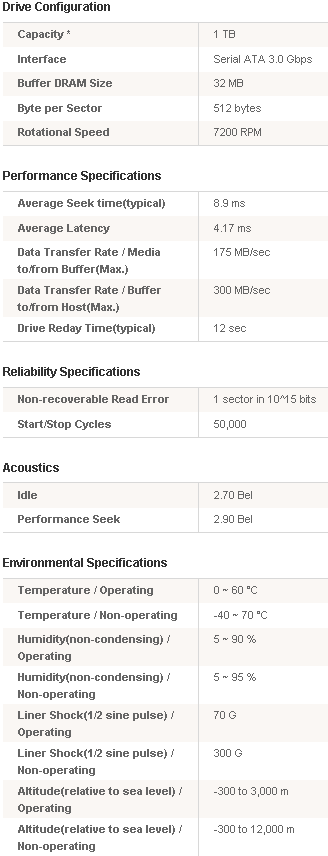
We found the HD103UJ’s specification on Samsung’s website:
What’s inside the box
Now it’s time to take a look at the drive itself and what the drive came shipped with.
Our package was the bulk version.

The bulk drive was enclosed in plastics to avoid transportation damage.
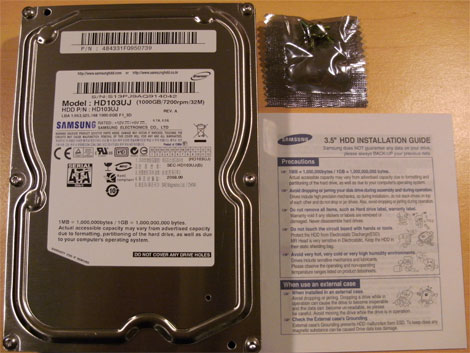
We can see that the Samsung HD103UJ comes with a set of screws and an installation guide.
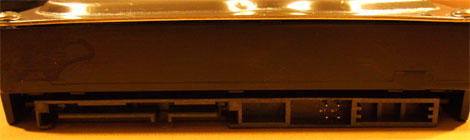
A look at the drive’s connectors
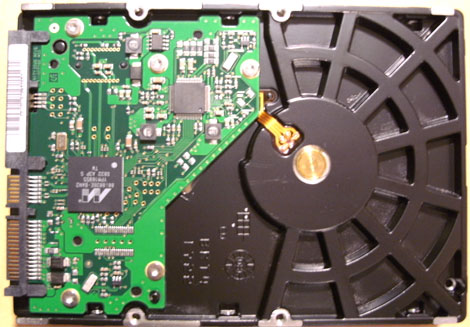
Here you can see the drive’s PCB
Drive capacity
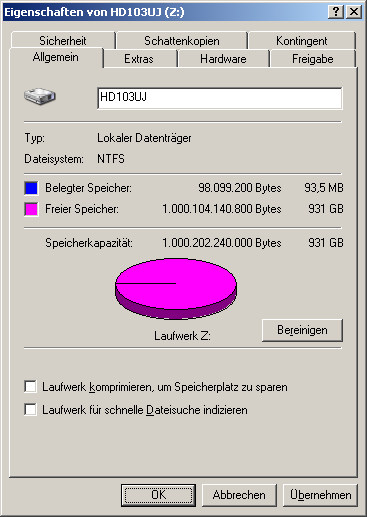
Windows XP reports the drive has a usable capacity of 931 GB. The difference between the announced 1000 GB and the reported capacity is caused by drive manufacturers calculating with multiples of 1,000 while Windows calculates with multiples of 1,024.
Test machine
For this review we will be using a computer with the following configuration:
Hardware:
- Motherboard: Gigabyte GA-EP35-DS3R
- Processor: Intel Core2Duo E8400
- RAM: 4 GB (2*2GB) OCZ PC2-6400U CL5 XTC OCZ2G8004GK
- GFX: Sapphire HD 3850 Ultimate 512MB PCIe
- Sound: Onboard Realtek HD Audio controller
- Hard disk: Samsung HD103UJ
- PSU: BeQuiet Dark Power Pro P7-450W
- Operating System: Windows XP Professional (32 bit) with SP3
Drive Capabilities
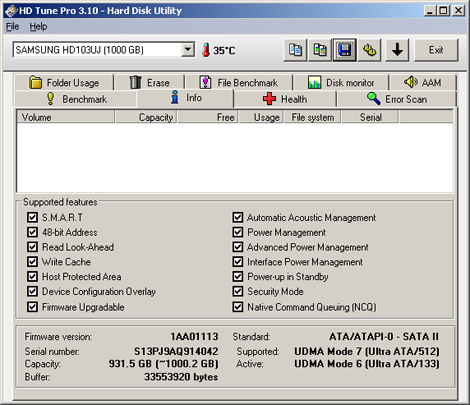
The drive provides the expected features like S.M.A.R.T, 48-bit addressing, AAM, Power Management or Native Command Queuing. The drive’s firmware version is 1AA01113.
Instead of just setting a jumper you need to run software that is available for download from www.samsunghdd.com in order to change the drive’s SATA mode in case your controller has compatibility issues with SATA-2 mode. This will make things complicated if you do not have a PC that can recognize the drive in SATA-2 mode. Fortunately this only affects some boards with older VIA chipsets.
Test applications
To test the performance of the Corsair Flash Survivor, we will be using the following test applications in this review.
- HD Tune Pro
- HD Tach
- H2benchw
All tests except for the HD Tune Pro file benchmarks were run with the drive being unpartitioned.
Now let’s head to the next page where we will test out reading performance...
Reading and Writing Performance
The Samsung HD103UJ is capable of Automatic Acoustic Management (AAM) meaning that you can choose between a silent mode with a slightly reduced speed and a fast mode that will cause the drive to make more noise. In this review we will run all tests twice, once using silent and another time using the fast mode. The drive was connected to the mainboard’s ICH9R with the controller configured to AHCI mode.
For this test we will use HD Tune Pro 3 and conduct reading and writing benchmarks. We would like to point out that HD Tune Pro results may differ from one system to another and results could also be operating system dependent.
Samsung HD103UJ Read Benchmark
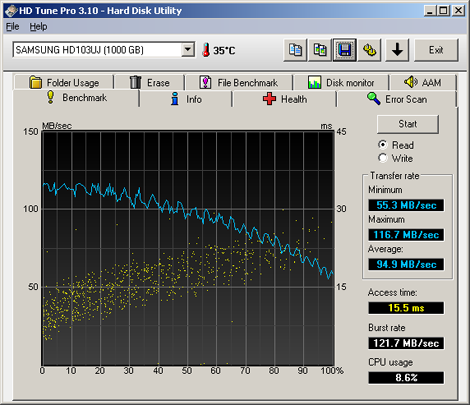
Samsung HD103UJ reading in silent mode
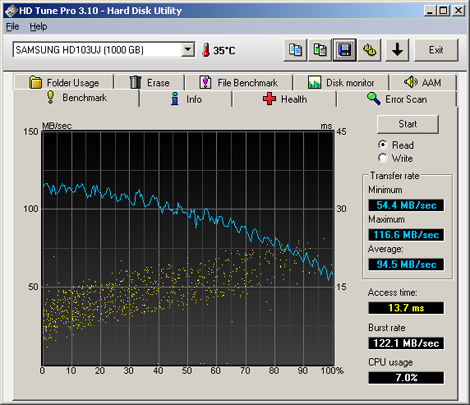
Samsung HD103UJ reading in fast mode

The drive can keep a transfer rate of more than 100 MB/sec within about the first 50% of its capacity. While the differences in transfer rate between fast and silent mode are only marginal the access times in silent mode are about 13% higher than in fast mode.
Samsung HD103UJ Write Benchmark

Samsung HD103UJ writing in silent mode

Samsung HD103UJ writing in fast mode
The drive’s writing speed is a little lower than the reading speed. But even here we can achieve a transfer rate of more than 100 MB/sec within the first 40% of the drive’s capacity. However the average transfer rate throughout the disc achieves an excellent 90 MB/sec which is a very good value for a harddisc spinning at 7,200 rpm.
HD Tach Full Bench
To round off the reading/writing benchmarks, we also include a test from HD Tach.

HD Tach results in silent mode

HD Tach results in fast mode
The values provided by HD Tach are similar to those of HD Tune Pro. The burst speed shows that the drive is able to exceed the SATA-1 limit of 150 MB/sec when transferring cached data.
Advanced benchmarks
For these tests we used H2benchw. H2benchw communicates with the Samsung HD103UJ at low level and should therefore, at least in theory be, operating system independent. This test suite is capable of testing many aspects of a drives performance, including simulated real world tests.
We used the –a option (all tests) which depending on the drive’s capacity and speed will take a few hours to complete.
We will present performance graphs where available. Other test results will be presented in the form of text and tables.
Zone reading test

Zone reading in silent mode

Zone reading in fast mode
In our graphs above, we can see that there is almost no difference between silent and fast mode. This is exactly what we expect for a sequential reading test. At the beginning of the disc the HD103UJ is able to achieve a reading speed of almost 120 MB/s which is going down to about 60 MB/s at the end of the disc.
Zone writing test

Zone writing in silent mode

Zone writing in fast mode
Again you can hardly see a difference between fast and silent mode and just like in our reading test, the drive is able to transfer almost 120 MB/sec at the beginning of the disc, slowing down to about 60 MB/s at the end.
H2benchw reading and writing test results and comparison tables
Below we can see the full reading and writing test results from H2benchw in the form of tables, which display the results of our review drive.
Repetitive and sequential read/write tests

The drive achieves excellent transfer rates in both AAM modes.
Sustained transfer rate (block size: 128 sectors)

Again the Samsung Spinpoint F1 HD103UJ shows that it can achieve very high transfer rates when reading and writing data.
Random read/write access times

The seek times throughout the disc are quite good for a 3.5” drive
Simulated application read/write tests

H2benchw application profile (silent)

H2benchw application profile (fast)
In our graphs above, we can see that the drive gains an additional 6% performance when switching from silent to fast mode

While we do not have data from other harddiscs for comparison, we assume that these values are not too bad for a 3.5” drive spinning at 7,200 rpm.
Summary:
Read and write speeds seem to be very high on the Samsung Spinpoint F1 HD103UJ. However we do not have much data from other drives for comparison yet.
Let’s move on to the next page where we test file reading and writing performance...
File reading and writing performance tests
To test the file reading and writing performance of the Samsung HD103UJ, we used the file benchmark option in HD Tune Pro using various file sizes between 32KB to 512MB.
To understand what the file benchmarking graphs are showing, we present a short explanation.
The vertical axis of the graph shows the reading and writing speed of the device in Megabytes per second, with the blue colour showing reading performance and the orange colour showing writing performance.
The horizontal axis of the graph shows the file block size in Kbytes and, as we can see, various block sizes are used in the test.
A small block size is useful for making the most of the available storage space on the device (very small files take up less space). The downside of using a small block size is that performance suffers badly when larger files need to be stored or read from the device. Using a larger block size will use up more space on the device when very small files are being stored, however, using a larger block size will give much better performance when larger files have to be stored or read from the device.
Below are our obtained results.

32KB file size (silent)

32KB file size (fast)

1 MB file size (silent)

1 MB file size (fast)

4MB file size (silent)

4MB file size (fast)

8MB file size (silent)

8MB file size (fast)

64MB file size (silent)

64MB file size (fast)

512MB file size (silent)

512MB file size (fast)
Summary
On very small files we can see that the drive handles most of the transfers from the internal cache. On large files we can see that the drive achieves its maximum speed with a block size of 64KB or more.
This concludes our Samsung Spinpoint F1 HD103UJ review. Click the link below to read the conclusion...
Conclusion
Positive:
- Excellent reading and writing performance
- Very large capacity
- Large 32 MB cache
- Very silent
- Very low price in relation to capacity
Negative:
- No jumper for SATA-1 compatibility mode
Conclusion:
Let us summarize the most important positive and negative points below:
The main positive points:
The Samsung Spinpoint F1 HD103UJ provides an excellent reading and writing performance and is a great addition for everyone who wants a fast or a large drive.
In idle mode you can hardly notice the drive as it is very silent. In silent mode you don’t hear much of the drive’s head spinning and even in fast mode you still wouldn’t call the noise annoying. The drive is a good choice in a Home Theatre PC being very silent but still offering a large capacity for your audio and video data.
According to price comparison sites, this drive is among the cheapest drives when you relate the price to the drive’s capacity.
The main negative points:
The only negative point we could find probably does not affect many people. If you only have access to mainboards which have a VIA VT8237, VT8237R, VT6420 or VT6421L chipset, it might become a little difficult to have your PC detect this drive and change the SATA mode.
To sum up, this is what we would say:
“The drive is cheap, extremely fast and has a very large storage capacity”.
Because of the price, speed and storage capacity of the Samsung Spinpoint F1 HD103UJ drive; we decided to award the drive our CD Freaks “Editors choice” award.

We found the Samsung HD103UJ harddisc drive at DriveCity priced at 90.88€.
You may comment on this review below or in this forum thread.
Thanks to:
 |
EFD Software for providing the fully licensed version of HD Tune Pro |
 |
Simpli Software for HD Tach |
 |
c’t Magazin for providing H2benchw |















