
USB Memory stick,
USB
Flash Drive, Flash Memory, USB Stick ……, are some of
the most common names for one of the nowadays probably most popular portable
storage devices around the globe, the so called USB Flash Memory Sticks.
Almost
everyone has one or knows what it means. Up until
this day these devices where not reviewed here at CD Freaks, but now, thanks to
Traxdata, we are now able to present you CD Freaks our
first review on one of these devices.
Company
information:
Let us take a look at some of the
company information:

Traxdata
The reliable
brand
In 2001, the RITEK Corporation
decided to market the Traxdata brand throughout
Europe, Africa and the Middle East. At that
time, the product portfolio only consisted of CD and DVD media and accessories,
but in the past years Traxdata has expanded its range
with flash memory products to offer a complete and reliable portfolio in storage
solutions.
The current portfolio of
products includes recordable/rewritable CD and DVD media and flash memory
products. However, the search is always on for new and innovative improvements
or additions to the range. This genuine commitment to innovation has resulted in
a state-of-the-art Research and Development centre being created where the most
advanced research equipment and laboratories in the optical, electronic and
chemical fields are operated by leading R&D teams.
Traxdata is committed to
providing easy digital solutions to everyone whether at home, in the office or
on the move. Wherever you are, whatever you're doing, Traxdata's wide range of products has something reliable to
offer and to cover all digital storage needs.
Traxdata is the brand to rely on for all digital storage
needs.
For 2005/2006 the Traxdata brand was the number 2 brand in Europe for DVD media products.
Specifications:
The official listed specification
of this drive was found on the Traxdata
website:
Traxdata
EZ Drive 2.0 PRO
 The Traxdata EZ Drive 2.0 PRO is a stylish thumb-sized portable
storage device on which you can store all your valuable files. With its
groundbreaking slide system, aluminum housing and a transfer rate of up to 8MBs
per second, it's the safest and most convenient way to carry all your valuable
data, pictures, music and much more anytime and anywhere!
The USB Plug &
Play feature makes connecting to your desktop or laptop much easier; no
additional power supply and external cables are required!
Especially developed
to meet the needs of all professionals, it maintains Traxdata's position as the World Leader in Quality,
Technology and Innovation.
Features
⋅
Compliant to the USB
2.0 specification
⋅
Storage
capacities: 128MB, 256MB, 512MB and 1GB Performance
⋅
Read access speed:
8MB/sec
⋅
Write access speed
6MB/sec
⋅
Supports PC Windows
98SE/2000/Me/XP; Mac OS 8.6 and above
⋅
Truly Plug &
Play USB connection, no additional power required
⋅
Supports USB-HDD
booting
⋅
Built-in
Write-Protect switch
⋅
Optional DiskSafe security software
⋅
Up to 10 years data
retention
⋅
Memory chip write
cycle up to 100,000 times
What's inside
the package?
In this section we will take a
look at what the USB 2.0 Flash drive came shipped with.

Front

Back

Traxdata EZ Drive
2.0 PRO bundle which includes a USB cable, a strap and the stick
itself

Front and
back

Open
On the next page we
will take a look at the test machine, the software,
installation…………
Test machine and
Software:
For this review we will be using a
computer with the following configuration:
Hardware:
- Processor '“ AMD Athlon XP 2200+
- RAM '“ 512 MB DDR 400; Infineon
- Motherboard '“ ASRock K7S8X
- Graphics Card '“ Gainward GeForce 440MX; 128mb
RAM - Sound '“ RealTek AC97 Integrated Digital Audio
- Hard Disk '“ Samsung SV0802N 80GB; Western
Digital WD 30 00JB 300GB and 30GB Western Digital ST 330621A (USB
2.0) - Optical Drives '“ Lite-On SHM-165P6S; NEC 3540A; BTC 1108 IM
Testing
Software:
For our tests we decided to use
the following programs:
Installation and
Usage:
Installation
The installation of the drive is
as easy as possible, it doesn't need any additional power connection and like
all other USB Flash memory sticks, this one is also fully Windows 2000/XP Plug
& Play compatible. This means the stick can easily be installed, just by
putting it into a free USB slot of your PC. Only Windows 98 systems require the
installation of an additional driver which can be found on the stick itself or
downloaded from the Traxdata website.
Once installed, the device is
detected as a removable device and it's ready for use immediately after
installation.

My Computer

EZ Drive 1 GB pro properties
window

In device manager we
can find the device in the section drives, detected as Ut161 USB2FlashStorage
USB Device.
Usage and
features:
Because of its small size, the
size of the EZ Drive 1GB pro is comparable to the size
of a regular cigarette lighter, and the unit is very comfortable to transport
and handle. The drive itself has a relative unspectacular/simple design.
Compared to many other drives the USB-connector is not protected with a cap you
might loose, rather it uses a sliding system where you just have to push the
slider button to forward the connector. Once forwarding the connector, we also
find the small write-protection switch of the drive which is, because of its
size, without the help of a pin or needle very hard to switch.
The usage of the drive is as
simple as the installation itself. Once installed, you can handle it in the same
way like conventional hard discs. Of course, it's not as fast but due to its USB
2.0 hi-speed connector you can do almost anything you like, from storing your
documents or pictures to storage and playback of your favorite music and video
files.
Once you have the drive connected
and you are opening the drive in My Computer, you will quickly find that there
is already data stored on drive.

Besides the user manual and the
Windows 98 driver you will also find a folder called AP, this folder includes a
format and security software which enables you to create a secure/password
protected area on the stick, but more on this feature later in this
review.
Another very interesting and in
some cases very welcome feature of this device is its USB-HDD boot feature. This
means nothing else than you can store an operating system on it and boot from
the drive. The purpose of this feature is not to replace the one on the computer
installed OS, it is more useful for troubleshooting by the use of a on the stick
installed small Linux distribution or Windows PE.
On the next page we
will take a look at the test security features of the
drives…………
Format and
Security:
If you are one of those persons
who often transport very sensitive data, which shouldn't be accessible by any
person who finds the drive after or before you lost it, this drive offers a very
easy and fast way to create a secure and save area on the drive. For this
purpose, there is no more to do than to open the, preferably before on the hard
disc saved, USB Flash Disk Format Tool.
Once opened, the tool offers us
the following functions.

- Partition
- Security
- Configuration
A simple click onto the Start
Format button would quick format the drive without the creation of a secure
area. To enable this feature we need to switch to the Security Tab and set a
password.

Once the password is set, we can
switch back to the partition tab and define the secure area. The size of the
secure area can be set to almost every possible value. There is just a minimum
of 3 MB that needs to be left as public area.

Back on the Partition tab, all we
need to do is to hit the Start Format button. After a few seconds the stick is
formatted and the secure area is set. Now the secure area can be accessed by the
use of the USB Flash Disk Login Tool, which has been created in the public area
of the drive.


After the input of the password
and clicking onto the Unlock button the secure area is accessible and we can put
our 'sensitive" data into it. Now a small icon in the task bar indicates us that
secure mode is enabled.

After finishing our work in the
save area, we can easily lock the drive by just right clicking onto the icon and
selecting close.
The tab we left out until now is
the Configuration tab, this one is nothing special, here we can just define if
we want a quick or a full format of the drive. Please note that a full format is
not possible when you want to create a secure area on the
drive.

Alternatively, the entire drive
can be formatted by the use of the in Windows integrated tool too, but here it's
not possible to create a secure area on the drive.
Now let's continue
with testing the drives performance…………
Performance:
Like already mentioned we will use
two different programs to test the performance of the drive. SiSoft Sandra 2007 is probably most popular and accurate
tool for such tests but because it's Shareware, we include also some results
from the freeware tool HD Tune.
Since the given results are
strongly depended on used system, processor, USB - port, data and the stick
itself, we want you to note that the results are only accurate for the system
where the drive is tested on and the USB-Stick which has been tested. Depending
on the used stick, even when it's the same brand/type, the results may look
different when performed on the same or other systems. In short: The Benchmark
results only give us a general idea on how the performance might
be.
SiSoft
Sandra 2007
We used two tests of the program,
the Removable Storage Benchmark and the Sandra File System
Benchmark.


|
Tests |
Drive |
|
EZ |
|
|
Combined |
1099 |
|
Endurance |
12.0 |
|
512 |
1258 |
|
32 |
1276 |
|
256 |
795 |
|
2 |
161 |
|
64 |
7 |
|
|
|
The Combined Index
score represents the overall performance of the drive and it is based on the
average of the combined indices of the 5 in the above table shown file size
transfer tests. These results include write, read and delete tests for each file
size. The endurance factor is the average performance (sequential write) value
divided by the lowest performance (high-stress same block re-write) value and
represents the life expectance of the drive.

|
Tests |
Drive |
|
EZ |
|
|
Test |
512 |
|
File |
2 |
|
Buffered |
13 |
|
Sequential |
12 |
|
Random |
9 |
|
Buffered |
2086 |
|
Sequential |
3733 |
|
Random |
3372 |
|
Random |
31 |
|
Drive |
9 |
HD Tune
2.52

The HD Tune benchmark shows
slightly different results compared to the results given by Sandra 2007. While
the access time is equal to the Sandra 2007 result is the average transfer rate
(11.6 MB/s) better. This is mainly caused by an unusual increase of the transfer
rate, starting at the 75% mark of test.
HD Tach RW 3.0.1.0

The HD Tach RW results for sequential read/write and the random
access time are quite similar to the results of the file system benchmark done
by Sandra 2007.
Now, all the important tests are
done and we keep our attention on another topic which is probably of interest
for some of you.
What can I do when my stick is
broken….
Recovery:
Of course we all hope that it
wouldn't be necessary to find a way to recover a 'broken" USB-Stick, but this
appears to be a big problem for many users around the world and this happened
also to us. After a approximately two weeks of daily use the stick has been
detected as write protected from one moment to the other and we weren't able
write data on it or format it. We can't tell for sure what caused this problem,
was the stick disconnected to early? Or appeared another problem? However,
fact is that the problem appeared and that we had to find a way to recover our
USB-Stick.
During our searches in the
internet we found some possible ways to solve this problem and we have posted
some of these possible solutions in this thread in our
Flash memory
forum. There isn't a unique method to solve such problems and it isn't
guaranteed that a method which worked for one person works for another to, even
for people with the same stick and a similar problem.
Here we will show you the solution
which worked for us (again, it isn't a must that it works for you too). The tool
which worked for us is called Recovery_1002
and can be found on the Trancendusa website. It's a
very simple and easy to use tool. Here a short explanation on how to use
it.

After the stick has been connected
and the tool has been opened the following screen appears.
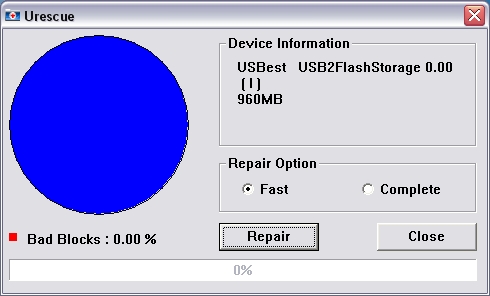
We can find some information about
the device, such as name, drive letter and size. Here it is noted that the
device was detected as Ut161 USB2FlashStorage USB Device
before and when the problems appeared first the device was detected as USBest USB2FlashStorage device from one moment to the other.
Anyway, for us this doesn't matter since the Ut161 controller is produced by
USBest. Besides this information we can
deicide if we like to perform a fast repair or a complete repair.
After a click onto the repair
button, the process starts.
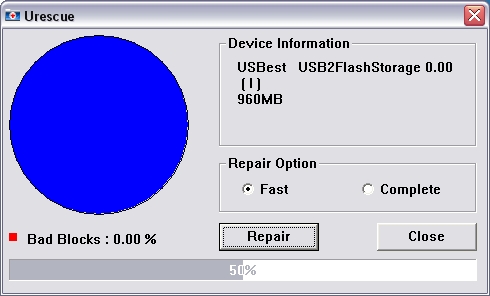
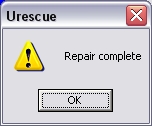
Once finished, you just have to
disconnect the device and after connecting the device again you will find that
all the previously on the stick saved data has been lost but all should work
again. You may have to reformat the stick if you like to use a different file
system.
Now let's move to the
conclusion…..
Positive:
- Easy Installation
- Very easy to use
- Security options
- Good design
- Good performance
- Good support via the Traxdata website (Drivers, Manual, Security
Software) - Write protection
switch
Negative:
- To small write protection
switch
Conclusion:
 As you can see above in the
positives and negatives, there is not much negative to say about this drive and
regarding the protection switch, we must add that this is not a real negative
point but it's included and because of this we find that it should be possible
to use it without the help of any needles and pins.
Else, the Traxdata EZ Drive Pro 1GB is an inconspicuously (but good)
designed and well performing drive which is not only easy to use but also
includes some security features that are of interest in case you don't want to
have your data accessible by other persons.
Its small dimensions make it easy
to connect the drive to almost every USB-connector of a PC and even if you can't
connect the drive directly to the PC, then you can connect it via the, with the
stick delivered, USB cable.
Over all we can say: The EZ Drive Pro 1GB is a really successful product. Well done Traxdata.
You may comment on this review in
this thread in our new Flash Memory
forum.
By using our CD Freaks price grabber feature we
didn't find the Traxdata EZ
Drive pro listed and at getprice the drive
is listed at € 24.50.















