
 |
Review: Traxdata 64GB MLC SSD |
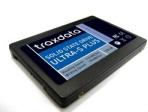
Traxdata was kind enough to send us one of their latest solid state drives for review. The MLC based 64GB ULTRA-S PLUS. The ULTRA-S PLUS has a 2.5 inch form factor and SATA2 connection and SATA power connector, the ULTRA-S PLUS can be fitted to a laptop with SATA hard drive support, or as we have done for this review, the ULTRA-S PLUS can also be fitted to a desktop PC which supports SATA hard disc drives.
In this review we will test the performance and usability of the Traxdata ULTRA-S PLUS (MLC) SSD.
Traxdata Company Information
I’m sure most CD Freaks members will be familiar with the Traxdata brand name. If you would like to find out more about Traxdata, you can visit the Traxdata website.
What’s inside the box
Now it’s time to take a look at the drive itself and what the drive came shipped with.
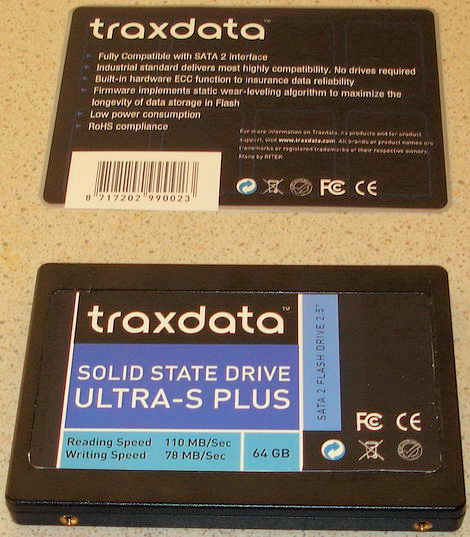
Now let’s take a look at the drive itself.
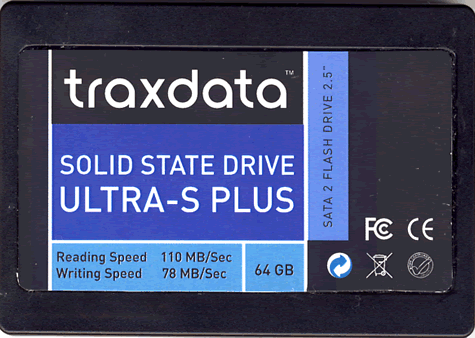
Drive top
We can see the drives capacity is listed and the claimed reading and writing performance.
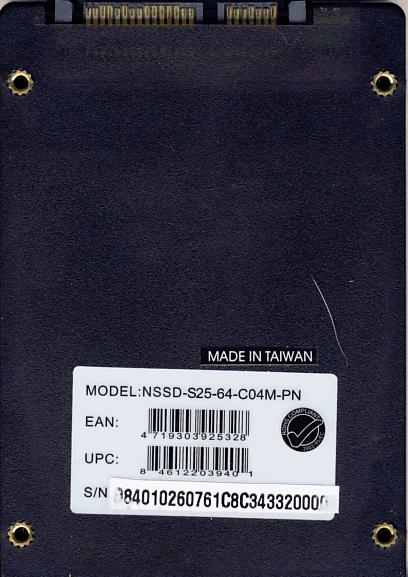
Drive bottom
On the bottom of the drive we can see two labels, one of the label states that the drive was manufactured in Taiwan, the other label carries the drives model number and serial number. We can also see the drives SATA power and data connectors. Also worth noting from our two drive pictures, the drive has certainly been around going by the scratches and marks on the casing.
Specifications and features

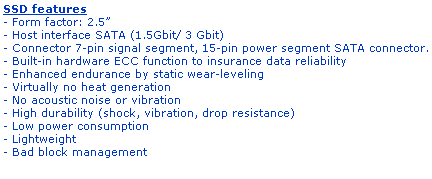
We found the specifications of the drive at the Traxdata website.
Test machine
For this review we will be using a computer with the following configuration:
Hardware:
- Motherboard: ASUSTeK P5K (Intel P35 chipset)
- Processor: Intel Core 2 Quad Q6600
- RAM: 4 GB OCZ Platinum dual channel kit DDR2 800
- GFX: ATI HD 4870 (512 Megabytes GDDR5 HDCP compliant)
- Sound: Onboard Realtek ALC882 HD audio controller
- Hard Disc OS: 2x 64GB OCZ Core V2 SSD in RAID 0
- Hard disk storage: 2X 500GB Seagate Barracuda 7200.10
- Case: ThermalTake Armor (silver)
- PSU: Enermax Liberty 620W
- Display: Samsung Syncmaster 245B 24” widescreen LCD (HDCP compliant)
- Operating System: Windows Vista Home Premium (64 bit) with SP1
The Traxdata 64GB ULTRA-S Plus SSD was connected to a SATA 2 port on the motherboard of our review PC and all tests were carried out with the drive connected to this connector.
Test applications
To test the performance of the Traxdata 64GB ULTRA-S Plus SSD, we will be using the following test applications in this review.
Now let’s head to the next page where we will test out reading performance...
Reading Benchmark
For these tests, we will use HD Tune Pro 3.10 and will conduct reading benchmarks. As a reference we also tested a Western Digital My Book drive, Samsung Spinpoint F1 and a Ridata 64GB SLC SSD, so we had some data to compare with the Traxdata 64GB ULTRA-S Plus MLC SSD. We would like to point out that HD Tune Pro results may differ from one system to another and results could also be operating system dependent.
Western Digital “My Book” Reference test

Western Digital “My Book” reference test
Samsung 1000GB HD103UJ Spinpoint F1

Samsung HD103UJ Spinpoint F1
Ridata 64GB SLC SSD

Ridata 64GB SLC SSD reference test
Traxdata 64GB ULTRA-S Plus SSD benchmark

Traxdata 64GB ULTRA-S Plus SSD 16GB
We present the table below for comparison with other recently tested flash drives.
From our limited number of tests, we can clearly see the Traxdata ULTRA-S PLUS is the fastest reading drive.
Writing and advanced benchmarks
Synthetic writing test: HDTach

For some reason, the writing speed varied quite a lot and, this is quite unusual for an SSD drive. The average writing speed was 61.3MB/S
H2benchW benchmarks
For these tests we used H2benchw. H2benchw communicates with the drive at low level and should therefore, at least in theory be, operating system independent. This test suite is capable of testing many aspects of a drives performance, including simulated real world tests.
We used the –a option (all tests) which depending on the drives capacity and speed will take over 2 hours to complete.
We will present performance graphs where available. Other test results will be presented in the form of tables.
Zone writing test

In our graph above, we can see that the Traxdata 64GB ULTRA-S Plus had an average writing speed of approximately 28MB/sec (see table for exact measurement).
Zone reading test

In our graph above, we can see that the Traxdata 64GB ULTRA-S Plus had an average reading speed of approximately 115MB/sec (see table for exact measurement).
H2benchw reading and writing test results and comparison tables
Below we can see the full reading and writing test results from H2benchw, in the form of tables which display the results of our review drive and, comparison results from a 1000GB Samsung FI.
Repetitive and sequential read/write tests

The reading speed of the Traxdata 64GB ULTRA-S Plus SSD is similar to the Samsung Spinpoint F1 however, writing speeds are considerably slower.
Sustained transfer rate (block size: 128 sectors)

The Traxdata 64GB ULTRA-S Plus SSD has a faster sustained reading speed compared to the Samsung Spinpoint F1 however, the sustained writing speed is very much slower.
Random read/write access times

The Traxdata 64GB ULTRA-S Plus SSD reading access times are faster than the Samsung F1. Writing access times are also faster for large files but, much slower for small random files.
H2benchw simulated application reading and writing test

In our graph above, we can see how the Traxdata 64GB ULTRA-S Plus SSD performed in our simulated application tests.
We present the following table for comparison with other HDD/SSD drives

In our application test, the Traxdata 64GB ULTRA-S Plus SSD is considerably slower than the Samsung F1.
Summary:
Reading speeds on the Traxdata 64GB ULTRA-S Plus SSD are very good, writing speed is however not so fast but, we don’t yet have a lot of comparable data to compare with other drives.
Let’s move on to the next page where we test file reading and writing performance...
To test the file reading and writing performance of the Traxdata 64GB ULTRA-S Plus SSD, we used the file benchmarking option in HD Tune Pro using various file sizes from 32KB to 512MB.
To understand what the file benchmarking graphs are showing, we present a short explanation.
The vertical axis of the graph shows the reading and writing speed of the device in Megabytes per second, with the blue colour showing reading performance and the orange colour showing writing performance.
The horizontal axis of the graph shows the file block size in Kbytes and, as we can see, various block sizes are used in the test.
A small block size is useful for making the most of the available storage space on the device (very small files take up less space). The downside of using a small block size is, performance suffers badly when larger files need to be stored or read from the device. Using a larger block size will use up more space on the device when very small files are being stored, however, using a larger block size will give much better performance when larger files have to be stored or read from the device.
Below are our obtained results.

32KB file size

1 MB file size

4MB file size

16 MB file size

32 MB file size

64MB file size

128MB file size

256MB file size

512MB file size
ATTO disc file benchmark
For our final file benchmark, we used ATTO and ran the file benchmark. ATTO measures much the same thing as HD Tune but, is considered a very reliable way of testing file throughput on SSD drives.
Our result is below.

Summary
We can notice that as file size increases, the performance of the Traxdata 64GB ULTRA-S Plus SSD drive also increases. This is exactly what we would expect and, the results are pretty impressive.
On the next page we will conduct some real world tests....
Real world copy tests
We will now conduct a few real world copy tests. These tests simulate what real people do with their drives. We will be conducting writing tests, using two large single files and a multiple file copy of various file sizes.
We should point out that this is not a scientific way of measuring performance. These timings were taken with a stop watch; we have however ensured that the reading drive is very able to supply a data stream to our writing drive, which is high enough not to be slowing down the performance of the writing drive.
We will once again be comparing the obtained results with our traditional HDD’s. We will present the results in the form of graphs and tables.
Multiple file copy writing test
For this test we copied the Nero Burning Rom install folder from our review PC’s C: drive to the Traxdata 64GB ULTRA-S Plus SSD and our other HDD’s.
Our test copy contained 1,772 files of various sizes with a combined capacity of 306MB.


The Traxdata ULTRA-S Plus SSD is not the fastest drive when writing our “small files” test.
Single large file writing test (4.37GB)
For this test we used a single DVD5 ISO file which had been copied to the C: drive of our review PC. The file was then copied to the Traxdata 64GB ULTRA-S Plus SSD and our traditional HDD’s.


Once again the Traxdata ULTRA-S Plus SSD was outperformed by the Samsung F1 HDD.
For this test we used a single DVD9 ISO file which had been copied to the C: drive of our review PC. The file was then copied to the Traxdata 64GB ULTRA-S Plus SSD and our traditional HDD’s.


Once again the Traxdata ULTRA-S Plus SSD was outperformed by the Samsung F1 HDD.
Summary
Once again, our copy tests expose the limitations of the Traxdata ULTRA-S Plus writing performance.
Vista start-up and closedown
For these tests, we simply used a stop watch and tested the amount of time taken for a full installation of Vista to boot to the “Vista welcome” screen and, then timed how long was taken to close the PC down from the Vista “shutdown” option in the start menu.


No surprises here. The Traxdata ULTRA-S Plus SSD was much faster than our traditional HDD’s.
This concludes our review. To read the conclusion, click the link below....
Conclusion
Positive:
- Fast reading performance.
- Lightning fast access times.
- Completely silent operation.
- Fast operating system start-up and shutdown times.
- Fast application loading
Negative:
- Writing performance could be better.
- Low storage capacity.
- Expensive.
Conclusion:
Let us summarize the most important positive and negative points below:
The main positive points:
Reading performance is outstanding and as fast as any traditional mechanical desktop hard drive and, faster the most. The Traxdata 64GB ULTRA-S Plus exceeded the manufacturers stated reading performance for the device.
Reading access times are lightning fast and applications load in an instant, making this drive ideal as the operating system drive with all the users installed applications.
Noise levels from the drive is null, there is no moving parts so the drive is completely silent.
The main negative points:.
Write access times for writing small random files was slow, although this is not uncommon for MLC based SSD drives. We also spoke to Traxdata about the write performance, they explained the reason.
“Traxdata Ultra-S Plus is using the Run - Time Static Wear levelling, which means the data is stored directly to a final location instead of a temporary location. This technique is safer compared to storing to a temporary location, since the controller needs time to locate the correct location for storing, it takes more time. That means that Traxdata has chosen safety instead of outright performance”.
Storage capacity is quite low and the drive is expensive.
To sum up, this is what we would say:
“Outstanding reading performance with blisteringly fast application loading times, let down somewhat by slower writing performance”.

The Traxdata 64GB ULTRA-S Plus MLC SSD is expected to retail at £175 inc VAT.
You may comment on this review below or in this forum thread.
Thanks to:
|
|
EFD Software for providing the fully licensed versions of HD Tune Pro and Flash Memory Toolkit |
|
|
Simpli Software for HD Tach |
|
|
c’t Magazin for providing H2Benchw |

















