
 |
Review: Verbatim Store ‘n’ Go 12GB USB HD Drive |
Verbatim USA was kind enough to send us their latest USB drive: Store ‘n’ Go 12GB USB HD Drive. The USB HD Drive supports 12GB of storage space with built-in USB 2.0 connectivity and it’s preloaded with Mobile Lauchpad, the “start” menu for your USB HD Drive. It also has the capability of auto-synchronize between computers and the USB drive. The design is sleek and compact, convenient for carrying and transporting files.
Corporate Information:
 About Verbatim: Since its beginning in 1969, Verbatim® has been at the forefront of the evolution in data storage technology. Today, more than 30 years later, Verbatim remains one of the most recognizable names in the data storage industry.
Customer-driven, Verbatim is known for adding considerable product value--above and beyond its competitors--to established media technology. As an industry pioneer, Verbatim is recognized for the role it plays in early product development and commercial product introduction of new technologies. Verbatim's leadership role is especially apparent in the evolution of optical media recording including MO and the CD/DVD family of products.
Along with its technological innovations, Verbatim has always been recognized universally for its superior manufacturing practices. Verbatim was the first media company to receive ISO certification, the de facto standard for quality management systems worldwide. This commitment to quality translates into consistent product performance and reliability. In addition, Verbatim provides toll-free technical support and service to enable its customers to maximize the performance of its products.
As a subsidiary of Mitsubishi Chemical Corporation, a recognized world leader in the chemical and computer industries, Verbatim is ideally positioned to take advantage of changes in the market while continuing to challenge the frontiers of data storage.
Product Information:
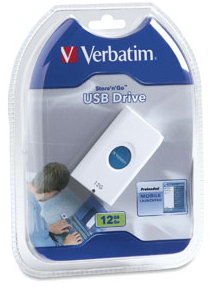
The new Store ‘n’ Go Drive makes it convenient for users to keep vital information such as emails, photos, personal calendars, presentations and video files available at all times. The sleek USB storage device comes pre-loaded with Mobile Launchpad, a utility for downloading applications that can be run directly from the Verbatim USB Drive. Mobile Launchpad also allows users to have complete access to personal files and data without loading the content on a guest system. For quick and immediate access, the drives can also be used in the familiar drag 'n' drop mode.
Providing a true portable working environment with a flip-out USB connector and USB extension cable, the unit is highly compact and delivers high performance, low power consumption and superior reliability. With the device, users can carry and access up to 12 hours of MPEG-1 video, about 6,000 300-DPI photos, 6 hours of DVD-quality video or tens of thousands of personal or business documents.
The tremendous capacity, combined with Mobile Launchpad, makes it convenient for users to store mobile applications on the Store ‘n’ Go USB Drive, ready to use wherever they go. Many applications specifically designed to enhance the portable experience are available for download online. Programs include mobile photo databases, ID/Password management tools, and applications which use the drive to log in from any computer and make Internet phone calls or have online chats.
A stand-out in both design innovation and durability, the hot-pluggable 12GB Store ‘n’ Go Drive has a polymer enclosure to provide shock resistance to the hard disc inside. With gently rounded corners, the slender case fits comfortably in the hand. When moving between different locations, the drive can be placed in its designer travel wallet and slipped into your pocket, purse, attaché or backpack.
Using the rugged swing-out USB connector, the hot-pluggable Store ‘n’ Go Drives can be easily moved from computer to computer without having to shut down or reboot the system. For added convenience and usage flexibility, Verbatim also provides a USB extension cable to make it easy to connect to a personal or guest computer. When connected to a computer, the blue center area of the drive lights up, showing the drive is connected and powered. The area blinks when information is being transferred between drive and computer.
The drive’s compact size makes it easy for students to carry research and class project files from school to home. Consumers can plug the device into a friend’s or family member’s computer and instantly share slideshows of family photos, vacation videos and personal MP3 selections. Busy executives who are constantly on-the-go can use a Store ‘n’ Go USB Drive to keep the latest company presentations, customer and partner contact information, databases, spreadsheets and key business files with them at all times, without having to carry their notebook systems. And, with the convenience of being able to carry diagnostic/repair, configuration and application files in their pocket, Verbatim’s Store ‘n’ Go USB Drive is also a compelling storage solution for IT personnel and service technicians.
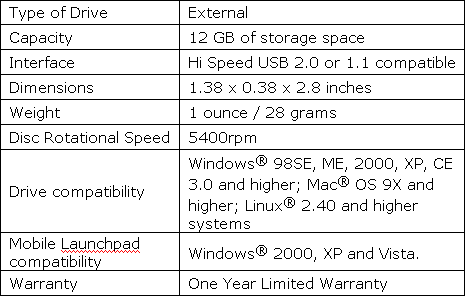
Drive Specifications:
What’s inside the box?
The USB HD Drive we received was secured inside a retail package.
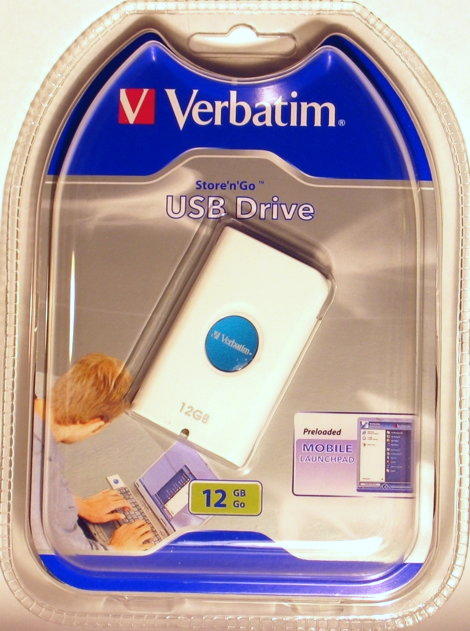
Front
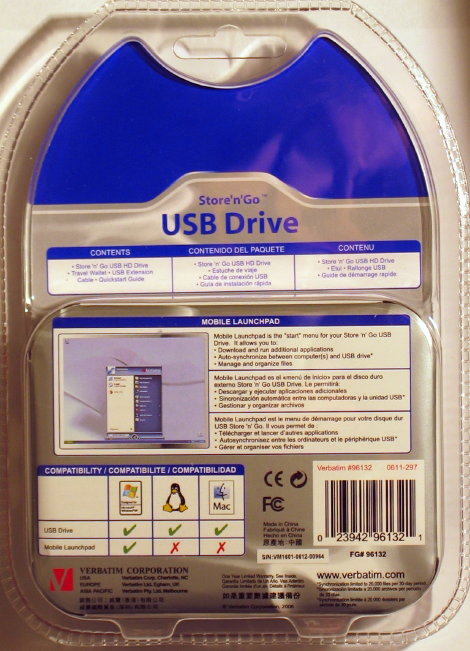
Rear
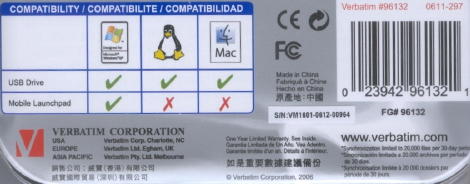
Information on the back of the package
It is time to open the retail package and observe what’s inside it…
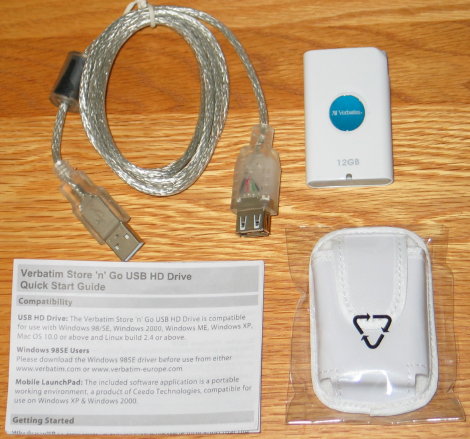
The package includes the following items:
- Verbatim Store ‘n’ Go USB HD Drive 12GB
- Travel wallet
- USB extension cable
- Quick Start Guide
Now let’s take a closer look at the drive itself:
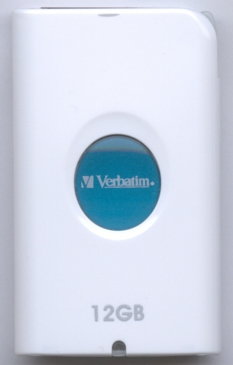
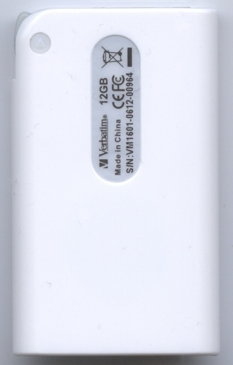
Drive front and rear
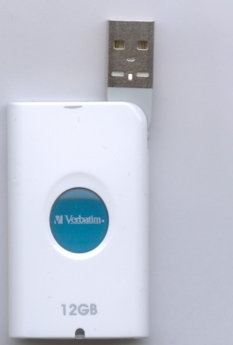
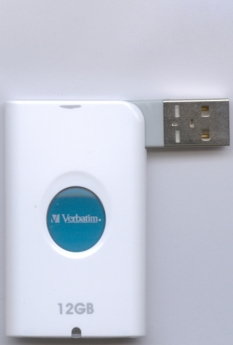
Drive with USB connector
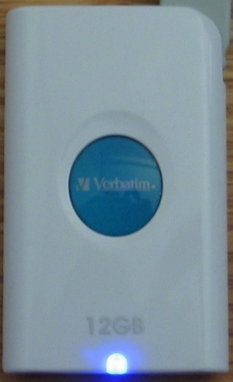
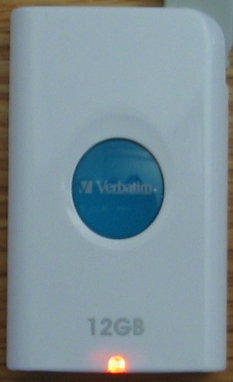
Drive when connected to a computer
Led status indicator:
- Blue LED on: Device is connected and ready for use
- Orange LED flashing: Device is in use (data is being accessed or transferred)
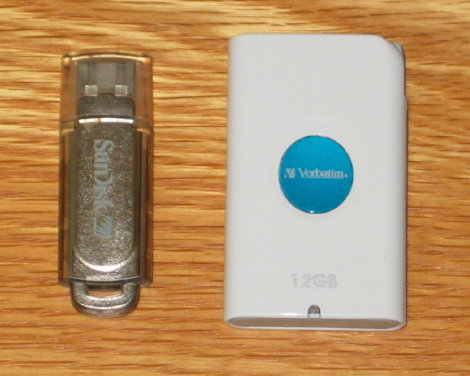
Compared to one of our smallest USB flash drive: SanDisk Cruzer Micro, this Verbatim drive doesn’t look big at all.
Now, let us connect the drive and check out the features and program bundle on the next page…
Test machine:
For this review we will be using a computer with the following configuration:
Hardware:
-
Motherboard: ASUS P5W DH Deluxe WI-FI/AP
-
Processor: Intel Core 2 Duo E6400
-
Memory: 2x 1Gb G.Skill DDR2-800 PC2 6400 F2-6400PHU2-2GBHZ
-
Video: ATI RADEON X1950Pro
-
Display: Samsung 20” SyncMaster 206BW (DVI)
-
Sound: Realtek ALC882 High Definition (onboard)
-
Hard disks: 160GB Seagate SATA-II, 2x 500GB Seagate SATA-II

The Verbatim USB HD drive is recognized in Device Manager as CORNICE Inc. Panther USB Device.

The drive is preformatted and the properties show a volume label of “VERBATIM” with a capacity of 11.1GB or 12,001,026,048 bytes. The volume label can be changed with your own preferences. There is a used space of 26.9 MB which is taken for the Mobile LaunchPad applications.
Software:
Windows XP Professional is installed on the computer along with Service Pack 2 for Windows XP.
On the next page we will take a look at the supported features …
Installation:
When we plugged the drive into our USB 2.0 port connection for the first time, Windows XP Professional immediately recognizes the device.


Then a new window appears loading the software Ceedo.

Apparently there was a new update for Ceedo and we decided to update it.

During the updates, it downloaded several files and installed them automatically.

After the updates completed, we clicked on “About” to find out that the drive is now equipped with CeedoTM Personal version 2.1.0.10.
Software Features:
As you can see above, the Verbatim USB HD Drive includes a software application which is a portable working environment, a product of Ceedo Technologies, and compatible for use on Windows 2000, XP and Vista. Let us take a look at the software features.

When we plugged the drive into our computer’s USB port, Windows will automatically detect it and will open the Autoplay menu. We selected Start Ceedo and the application started by showing the easy-access menu as shown below.

Notice that when the Ceedo application starts; it adds icons both to your quick-lunch toolbar, desktop and taskbar. These icons can be used to start Ceedo again after closing. The Mobile LaunchPad looks very alike to Windows Start menu. Clicking My Documents on the launchpad will take you to the folder in the USB HD Drive. Similarly, when you click My Pictures, My Music or Favorites, they will also bring you to the folders on the USB HD Drive and not to your PC hard drive’s folders.
Ceedo will also runs Internet Explorer and Outlook Express from the USB HD Drive. Let’s take a peek on what is installed inside the drive.

Now let’s try Always Sync which enables you to synchronize your files between computer(s) and the USB drive.

Unfortunately, the above window shows that AllwaySync is not included and you will be asked to download the free trial. 🙂
Fortunately, we tried to browse in the CeedoProgram FilesAllway SyncBin folder inside the USB HD Drive and run “syncappw.exe” that shows Allway Sync version 5.0.5 as below and it works. 🙂

We will now browse through the Options menus to give you some perspective on the software.

In General menu we can set Startup options as well as Action window.

In Appearance menu you can change the nickname, picture and language used.

In the Security menu you can set password to protect the drive from unauthorized users.

The Advanced menu is where you can set volume label, environment and exit settings.

In Add-ons menu you can add and remove Add-ons such as Argo Application Installer and Ceedo Backup & Restore.

In this menu you can set default web browser and e-mail client.
On the next page we will take a look on the drive’s performances…
The Verbatim 12GB USB HD Drive has the built-in USB 2.0 connectivity that allows a fast data transfer rate. We will test its reading and writing performance using HD Tach RW version 3.0.1.0. HD Tach RW is a more advanced version of HD Tach containing all features of HD Tach 3 commercial and free (non-commercial), plus the ability to perform sequential write tests, perform full read/write tests of the drive and save test data to Excel compatible CSV files.

HD Tach will test the sequential read, random access and interface burst speeds of the drive. The test results from HD Tach can be used to confirm manufacturer specs, analyze your system for proper performance, and compare your performance with others if needed.
We will now test the drive with HD Tach RW using three methods:
- Quick bench (8mb zones)
- Long bench (32mb zones)
- Full bench (variable zone)
Quick bench (8mb zones)


The random access benchmark is 30.6ms, which is the average time to read a randomly located sector on the drive. The screenshot also shows average read test of 10.1 MB/s, which is the average read speed across the entire disk. The burst speed of 17.6 MB/s is pretty slow for today’s needs.
Long bench (32mb zones)


Similar to the quick bench, the random access benchmark is 36.2ms and the average read speed across the entire disc is 10.1 MB/s. Burst speed shows 18.4 MB/s which is slightly higher then the first benchmark however it is still pretty slow given that it’s capable for USB 2.0 speed.
Full bench (variable zones)


In our last test, the results are alike with the other two tests. Random access of 27.9 ms, average read speed of 10.1 MB/s and burst speed of 17.6 MB/s.
This concludes our review, lets head on to the last page to read our conclusion…
Positive:
-
12GB of high capacity storage
-
USB 2.0 connectivity for universal compatibility (backward compatible to USB 1.1)
-
Plug and play operation and does not need external power supply
-
Attractive design and small footprint to increases portability
-
Compatible with Windows, Mac and Linux operating systems (Mobile Launchpad only available in Windows)
-
Supports data security
-
Auto synchronize between computer and the device
-
Very good retail package with carrying case to protect the device
-
Blue and orange led indicators for read and write
Negative:
-
No keychain support
-
Relatively slow read and write speed
Conclusion:
 Let us summarize the most important positive and negative points below:
Verbatim Store 'n' Go 12GB USB HD Drive is very well designed for cross platform compatibility and ease of use. The device comes with Mobile Launchpad which is a utility for hosting applications that can be run directly from the Verbatim USB Drive. The new Verbatim 12GB USB HD drive also supports data security features which you can set a password to protect the drive from unauthorized users. The drive’s design is simple but attractive with small footprint to increase portability and comes with a flip-out USB connector and USB extension cable.
Unfortunately, benchmark tests show that the drive performance is not fast as expected from a USB2.0 capable device, with an average read speed of 10MB/s. The reason behind this is due to the fact that the device uses the sixth generation Cornice’s Dragon-2 12GB mini hard drive, thus performance will not be as spectacular as some flash drives. However, speed may not be the only factor for some when choosing a portable storage. Design, security support and features as well as price per gigabytes could be factored in.
You may discuss/comment this review below or in this forum thread.
Thanks to:
 |
Verbatim USA – For providing the device used in this review. |















