
|
|
Review: Corsair Reviewed by: Antonis Provided by: Corsair Model: Corsair Force MP500 480GB NVMe SSD Firmware version: E7FM02.1
|
|
|
|

Corsair is a name that managed to surprised
me positively even back when I purchased my first SSD, and if my memory serves me
well it was a Nova 64GB SSD, which back then was a life changing experience.
Nowadays SSDs have reached a point where they're very fast, and also very well
priced, so when I tested the Neutron XTi it was another surprise for me, which
made me excited about what would be possible when Corsair finally release an
NVMe SSD. That day is finally here, and Corsair has now released the Force
MP500 NVMe SSD, the first NVMe SSD from Corsair and at the time of writing the
review the fastest drive that Corsair has made. Before I start the review, I
would advise you to visit their website to find out more about Corsair and all
their products, simply click here.
So let's start this review by taking a quick
look at the packaging and its contents, followed by some benchmarks.
Corsait Force MP500 480GB NVMe SSD
As always, I will start this review by
taking a quick look at the package and the contents that are included with the Corsair
Force MP500 NVMe SSD. We will start with the package.
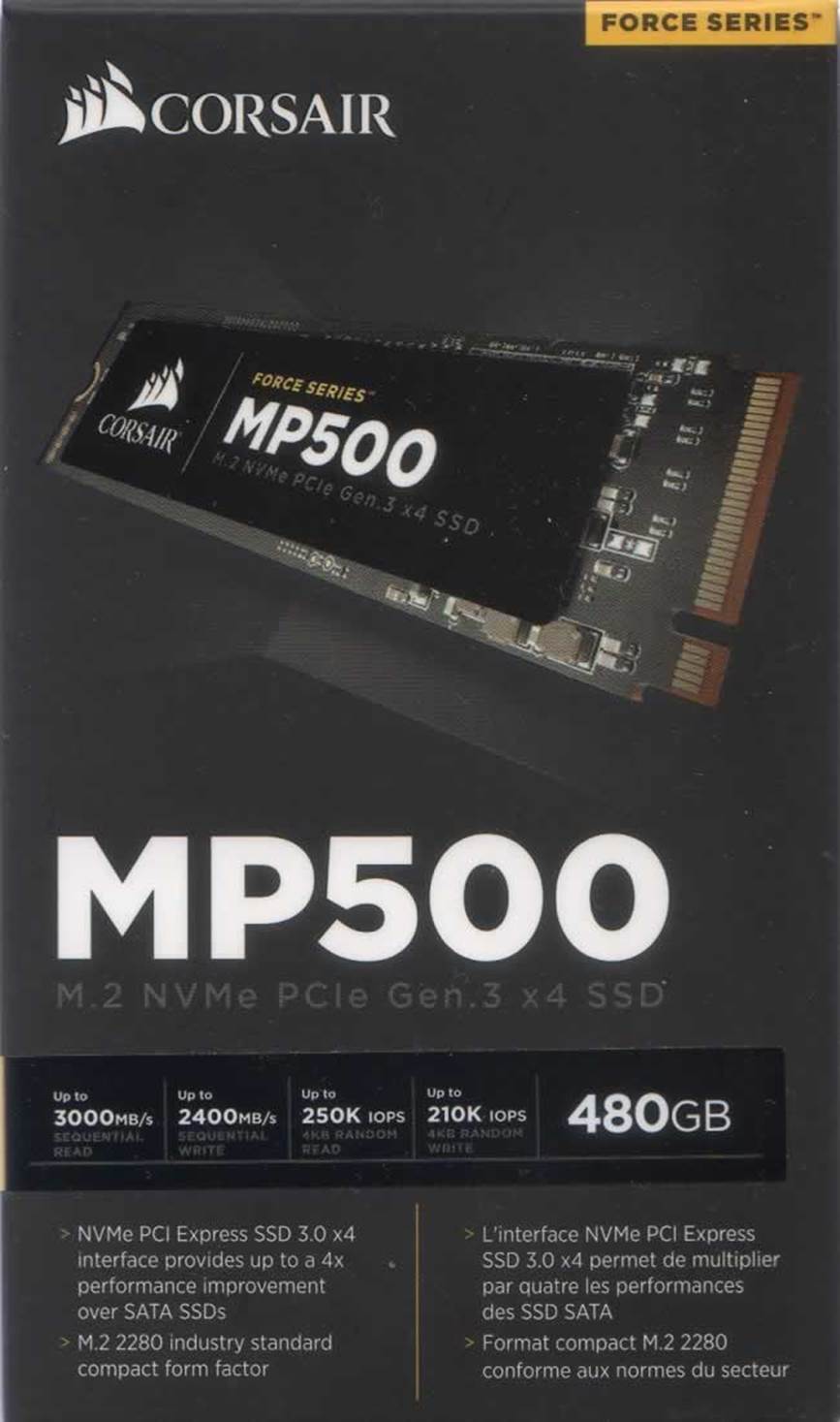
Here is a look at the front of the box.
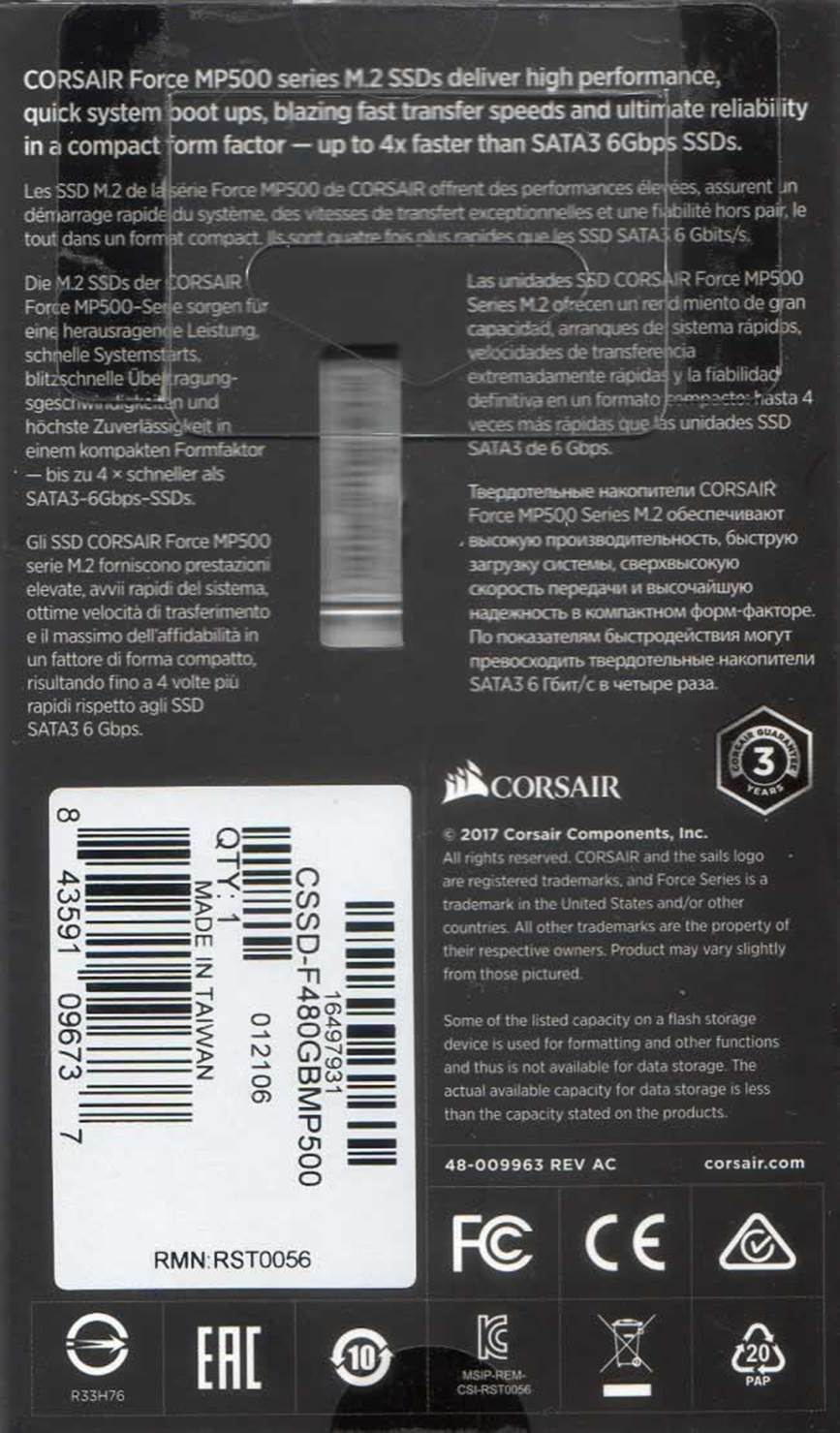
Also the rear of the box.
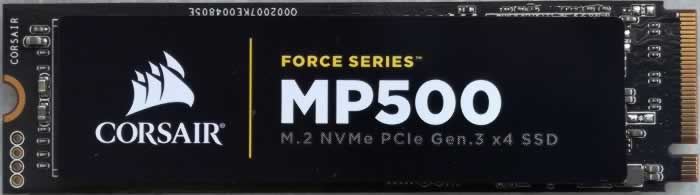
The front of the Corsair Force MP500 SSD.
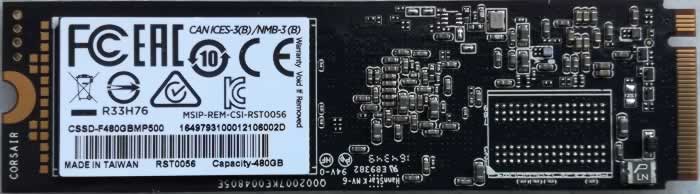
Here is the rear of the Corsair Force MP500
SSD.
Specifications of the Corsair Force MP500 480GB NVMe SSD
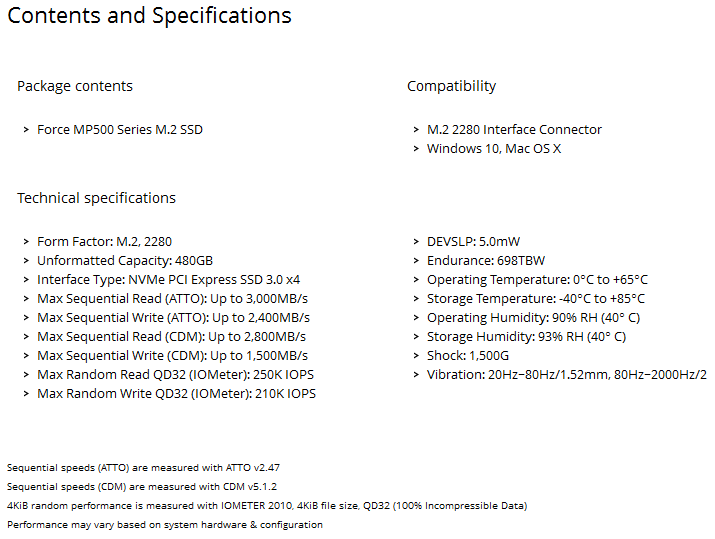
Looking at the specifications of the
Corsair Force MP500 you have to be impressed. Read speed is up to 3000MB/s and the
write speed of the Force MP500 can be up to 2400MB/s. The Corsair Force MP500
is using MLC NAND made by Toshiba, and it uses a Phison PS5007-E7 controller.
The drive is available in three sizes, 120GB, 240GB, and 480GB. With the
exception of the 120GB drive you should have all the room that you need to
install your OS, the applications that you need, and some games. You can find
out more about the pricing by taking a look at the Corsair website, but as
always prices will change over time. NVMe drives are at a premium but it's
usually a small price to pay for all that additional speed.
CrystalDiskInfo
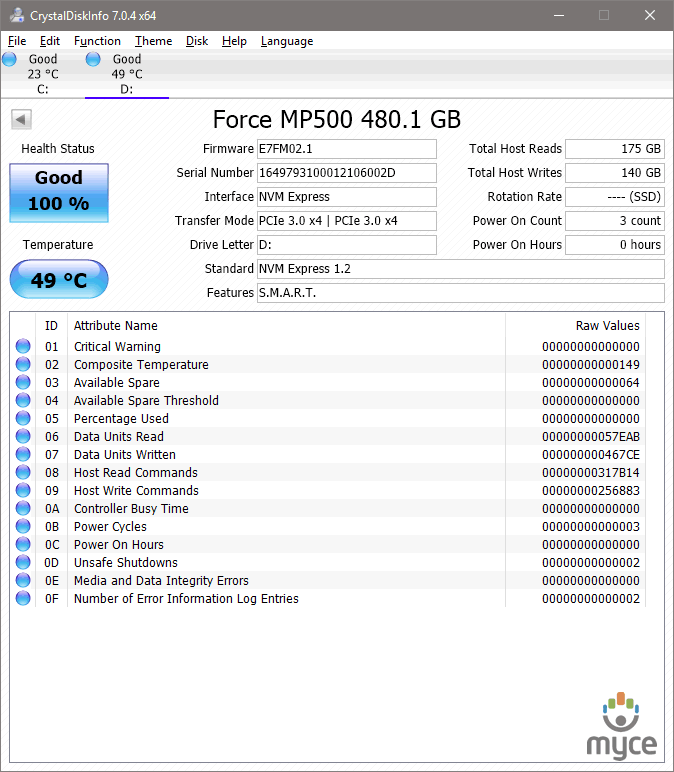
In
the above screenshot we can see all the available info for the Corsair Force
MP500 480GBB NVMe SSD.
Let’s head to the next page where we
take a look at our testing methods and the review PC.
Test machine
For this review I will be using a computer
with the following configuration:
PC 1:
- Motherboard: ASUS X99-A (Intel X99 chipset)
- Processor: Intel Core i7 5280K @ 4.4GHz
- RAM: RAM: Crucial Ballistix Elite 4x8GB
- GFX: MSI GTX 960 2GB
- Sound: Onboard Realtek HD audio
controller - OS SSD: HyperX Fury 240GB
- PSU: Seasonic 750W
- Display: Futsiju Siemens 22”
- Operating System: Windows 10 x64
PC 2:
- Motherboard: ASUS H110M-A/M.2 (Intel H110
chipset) - Processor: Intel Celeron G3900
- RAM: RAM: Crucial 2133 4x4GB DDR4
- GFX: Intel HD 510
- Sound: Onboard
- OS SSD: Netac N580 m.2 240GB
- PSU: Thermaltake 400W
- Display: Futsiju Siemens 22”
- Operating System: Windows 10 x64
PC 2 is only used to measure the idle power consumption of
the test drive, all other tests and power measures are done with PC 1.
The Corsair Force MP500 NVMe SSD was
connected to m.2 port on the motherboard. All power saving features were
disabled during all of my synthetic benchmarks.
Test applications
To test the performance of the Corsair
Force MP500 480GB NVMe SSD, I will be using the following test applications in
this review.
- HD Tune
Pro - ATTO
- Iometer
- AS SSD Benchmark
- CrystalDiskMark
- Anvil’s
Storage Utilities - PCMark
Test procedures
I will start off our testing procedures
explanation by stating that I did not run many synthetic benchmarks on the Corsair
Force MP500 480GBB NVMe SSD. You may ask why I have run so few synthetic benchmarks.
SSD technology has moved so fast in the
last couple of years, that basic synthetic benchmarks alone are now of very
limited use, as they don't really tell us much about performance and how the
drive will behave in the real world. I have therefore decided to show some
basic benchmarks for the Corsair Force MP500 SSD, and will complement this with
advanced benchmarks using IOMeter and AS SSD benchmark. I will also show how
the Corsair Force MP500 SSD performs in the real world.
The reality of SSD performance
While I can easily show you which SSD is
technically the faster, when you use one of these modern SSDs as an operating
system drive it becomes very difficult to tell them apart as far as performance
is concerned.
A typical use of a small capacity SSD at
the moment is to have your operating system and applications installed onto the
SSD. The performance difference compared to a traditional HDD is enormous,
however when you start to compare SSD to SSD the difference becomes almost
impossible to detect.
Let’s look at why this is the case.
Drive A can boot to the desktop in 8.11
seconds, and drive B can boot to the desktop in 8.12 seconds, the difference in
time is milliseconds, and can one really tell the difference?
The fact is, all modern SSDs are only
ticking over when they are only running the OS and launching applications, it’s
only when you get to some of the larger capacity SSDs, with enough free space
to be able to hold the actual data that you’re going to be working with, be
that video, audio or pictures, for example, that you actually get a tangible
difference in performance. This is where the SSDs with the better sequential
performance start to pull well ahead of the SSDs which have lower sequential
read/write performance.
Small file random IOPS vs sequential performance
IOPS
This is a fairly complex subject, but I
will do my best to explain things in a manner that is easy to understand.
The term IOPS is the amount of input or
output transactions that can take place in a one second interval, so for
example, if an SSD is quoted as being able to cope with 20,000 4K random write
IOPS, then the SSD should be able to cope with 20,000 input transactions in a
period of one second. If the same SSD is said to be able to produce 20,000 4K
random read IOPS, then the same SSD should be able to produce 20,000 4K random
read output transactions in a one second interval.
Ok, now we have some figures to work with,
the next question is how many IOPS are actually required?
This will depend on your usage pattern. If
you are a typical desktop user who browses the internet, does some word
processing or perhaps some audio or video editing, and perhaps plays a few
games, then in actual fact, you don’t need to have massive 4K random read/write
performance. The actual amount of 4K random performance that is required for a
fast and smooth running system for a desktop user with a usage pattern similar
to the above will be well under 1,000 4K IOPS.
On the other hand, if the SSD is being used
for running a large and complex database server, then 4K random performance is
the absolute measurement of how fast that server will run, as this type of
application does most of its input and output transactions in the 4K domain.
So why would I need an SSD with 80,000 4K
IOPS for a desktop?
In fact you don’t need this type of
performance for a desktop, but an SSD which is capable of coping with 80,000 4K
IOPS will be faster than an SSD which can only cope with 20,000 4K IOPS.
OK, I just said if under 1,000 4K IOPS are
actually required for typical desktop usage, why is an SSD with 80,000 4K IOPS
faster than an SSD with only 20,000 4K IOPS, confused?
You may ask, if I only require 1,000 4K
IOPS surely the rest is wasted?
While you may never need 80,000 4K IOPS,
IOPS is all about latency. The reason that an SSD can cope with as much as 80,000
4K IOPS is because latency in this domain is very low. With 4K files, even if
you require to process 500 of them at the same time, you are not talking about
a huge amount of data, it has far more to do with how long it takes the SSD to
process a single file, and the amount of time required to process a single 4K
is all about how long it takes for the SSD to access or store that data before
it can move on to the next transaction.
In other words an SSD with 80,000 4K IOPS
performance will handle those 500 files faster than the SSD with 20,000 IOPS.
So how will a desktop user even notice this
faster speed if so little 4K random IOPS and data are actually used?
Multitasking is a good example. The more
tasks you run at the same time, you more you will notice the speed difference.
Sequential performance
I have always maintained that sequential
performance was every bit as important as small random file performance for a
desktop SSD. Some highly regarded people on other sites found this statement
quite funny a couple of years ago when I made it, but my, how times have
changed in the world of SSD reviewing.
To me this was always so obvious for a
desktop user. For example, let’s say you want to launch an application or game.
Both have some fairly large files to load, and also a great many small files,
but the point is, even the smaller files are sequential in nature. Now let’s
say you’re into audio or video editing. Video files tend to be huge, and the
files are written or read sequentially. Isn’t this how many users are using
their PCs these days?
Summary
So how does this shape up in the real
world? Which is better, massive 4K IOPS or massive sequential performance?
In an ideal world you want both, as an SSD
with massive random 4K IOPS and sequential performance will always be faster
than an SSD that has high sequential performance and moderate 4K random IOPS
performance, and the same applies to an SSD that has massive 4K random
performance and moderate sequential performance. The SSD which has high
performance in both patterns will always be the faster SSD.
However, you can still have an SSD that is
very fast for desktop use that has moderate random 4K performance and massive
sequential performance, the same can be said about a drive having massive
random 4K performance and moderate sequential performance, as it is about
getting the balance right if you have to compromise on one or the other.
Drive preparation for running the tests
All the SSDs used in this article were in a
clean and fresh state when the testing period started. From then on, each drive
had to rely on its own NAND cleaning effectiveness for the remainder of the
tests.
- Both our spinning HDD drives were
defragged before the start of each test.
- All SSD and HDD used in this article had
their partitions aligned to the Windows 7 x64 defaults.
Where I use graphs in this article to
display results, I will use the following colours to make it easier, for our
readers to see which drive we are reviewing.
 Corsair Force MP500 480GB SSD
 Comparison SDD
Now let's head to the next page, where I
look at some basic benchmarks...
Reading Benchmarks
HD Tune
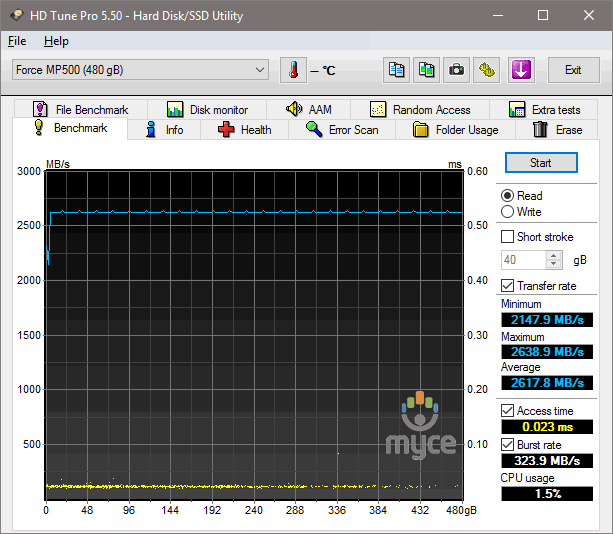
HD
Tune Test – Sequential reading test
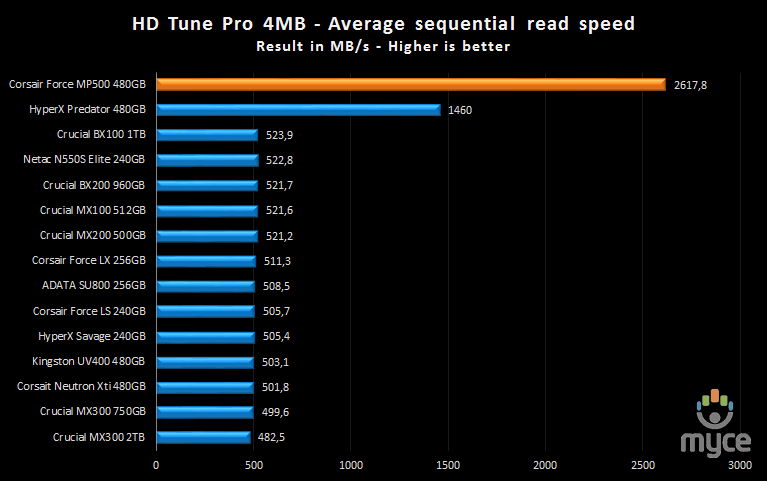
The Corsair Force MP500 is the fastest
drive that I have tested with HD Tune and this gives an idea of what we can
expect.
ATTO disk benchmark
ATTO has become a standard tool for
measuring the data throughput of HDDs and SSDs. It measures the reading and
writing performance, using different file sizes and block sizes.
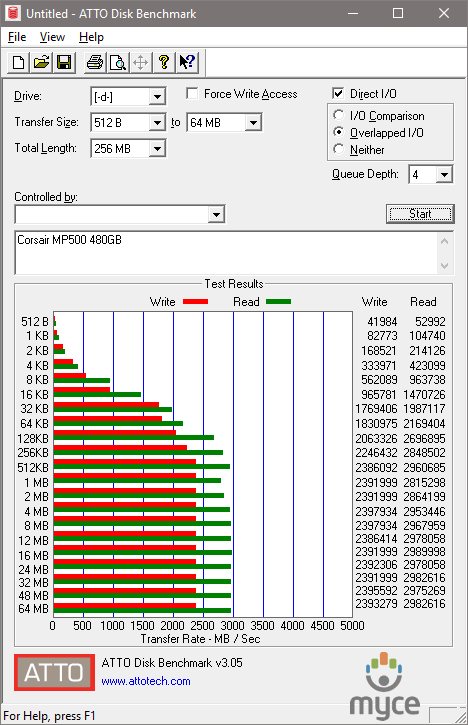
ATTO had no issues verifying the numbers
that Corsair advertises for the Force MP500 SSD.
CrystalDiskMark 3.0
CrystalDiskMark is quite a handy
benchmarking application, as it focuses on the file sizes that can cause problems
for a system drive.
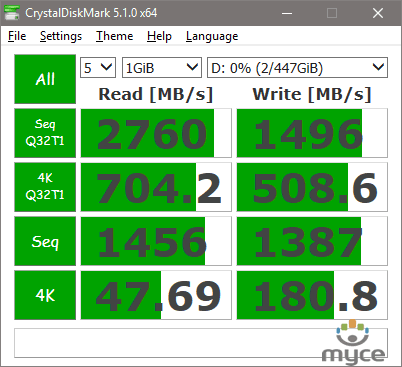
The result for the Corsair Force MP500
480GBB SSD is very good.
The two graphs below will give a more
detailed view of how the Corsair Force MP500 SSD compares with other SSDs that
I have tested.
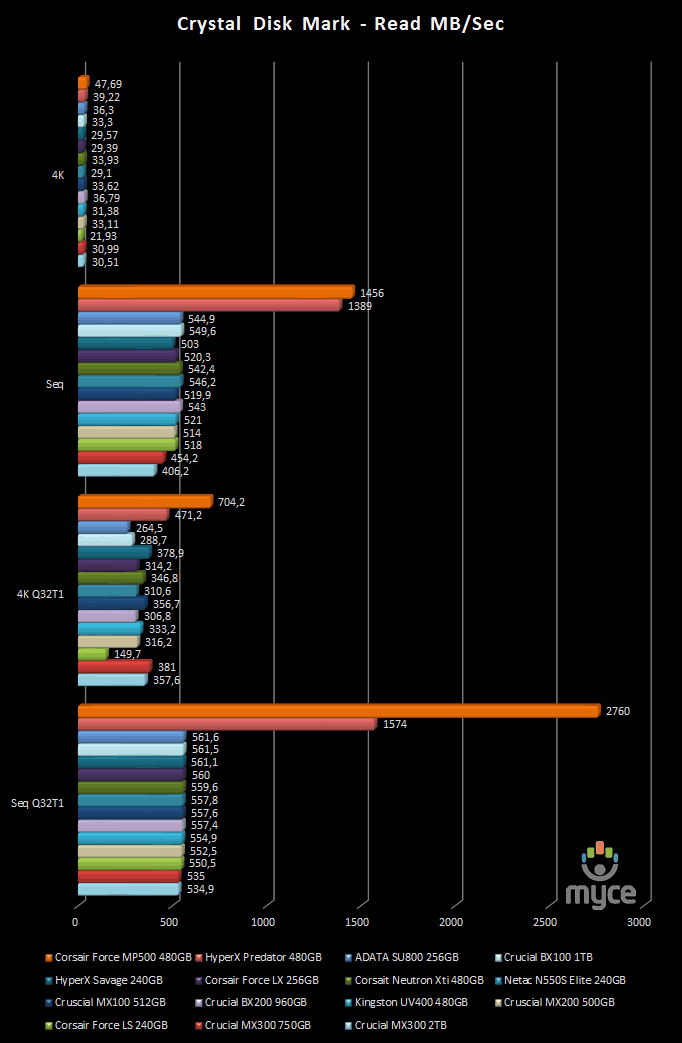
Here I present the graph for the read speed
tests. You can compare the Corsair Force MP500 SSD's performance with other
drives I have tested.
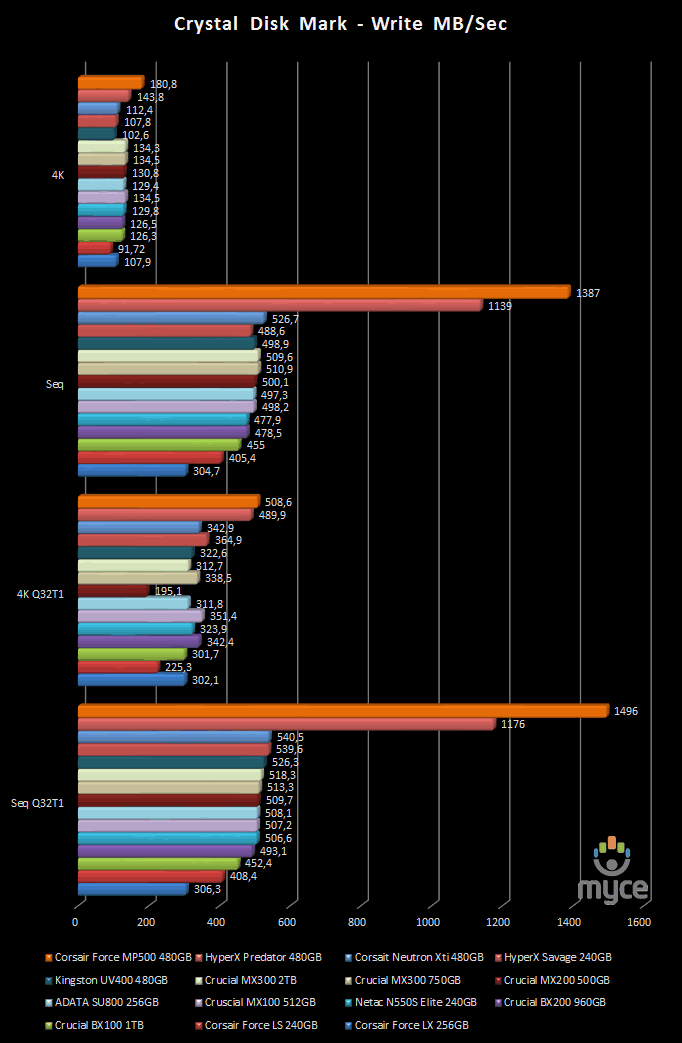
Corsair promises up to 2800MB for the read
speed, and up to 1500MB for the write speed and the numbers that I got in my tests
were very close to that. So far everything is very impressive.
AS SSD Benchmark
AS SSD benchmark is a benchmarking tool
specifically designed to test SSDs. The application tests sequential reading
and writing performance, 4K random reading and writing performance.
AS SSD benchmark also tests 4K threaded
performance. This is very exciting, as this test is the first available test
that I am aware of, that simulates how a PC operating system actually works. A
modern PC and OS, such as Windows Vista/7 does not just run a single thread at
a time, it runs many threads. The AS SSD benchmark "4K 64Thrd" tests
run 64 threads simultaneously throughout the test. If this result is good, then
you can be pretty sure the drive will perform extremely well as a system drive.
After the tests complete, AS SSD benchmark
derives a total score for the drive being tested. This is based on all aspects
of the test results, and gives an indication of how the drive is performing
overall.
Now let’s look at the results for the Corsair
Force MP500 480GB SSD in the form of a screenshot. All our other comparison
drives’ results are presented in the form of a graph.
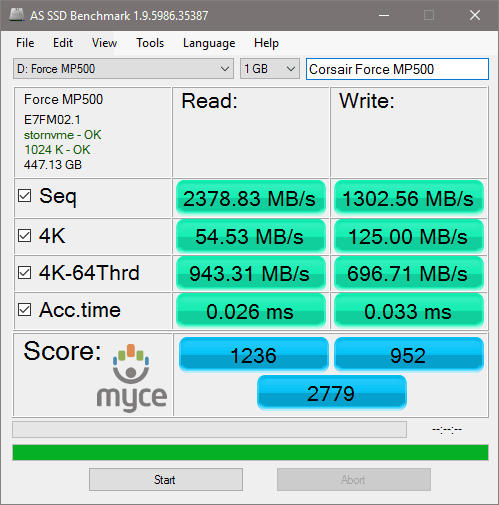
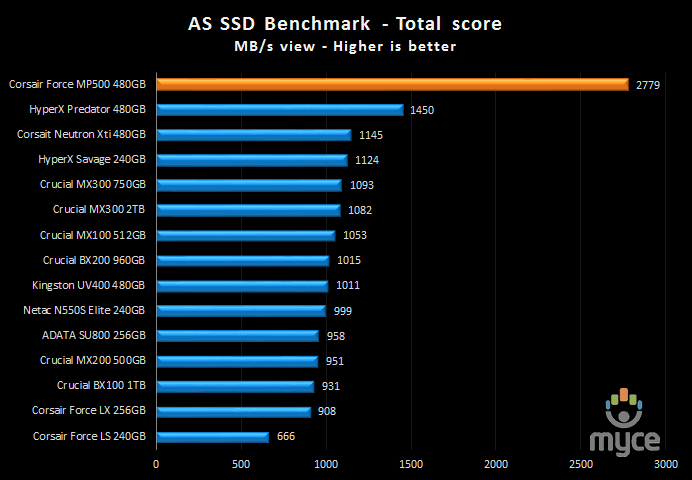
As you might expect the Corsair Force MP500
SSD is at the top of the chart and its overall performance is outstanding.
Let's head to the next page and run some
tests using PCMark 8.....
PC Mark 8 - HDD Suite
We have built quite a close relationship
with FutureMark software, the authors of the PCMark PC benchmarking software
that we use in our tests. I decided I would use PCMark Vantage as stopgap
measure until the more up-to-date PCMark 8 benchmarking suite became available.
I'm pleased to say that PCMark 8 is now available, and it gives me great
pleasure to introduce you all to the results obtained by this new 'real world'
benchmarking suite.
I will describe the basic way that each
test is carried out, above the graph for each test.
PC Mark 8 HDD suite results
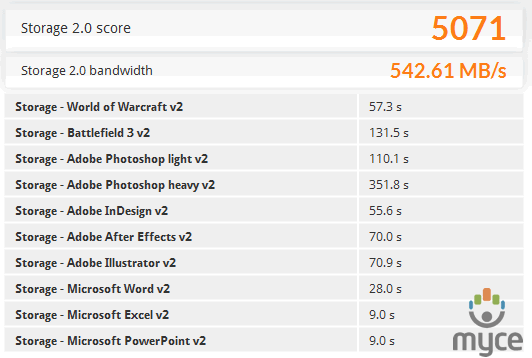
Here
is a screenshot displaying the results for the Corsair Force MP500 SSD.
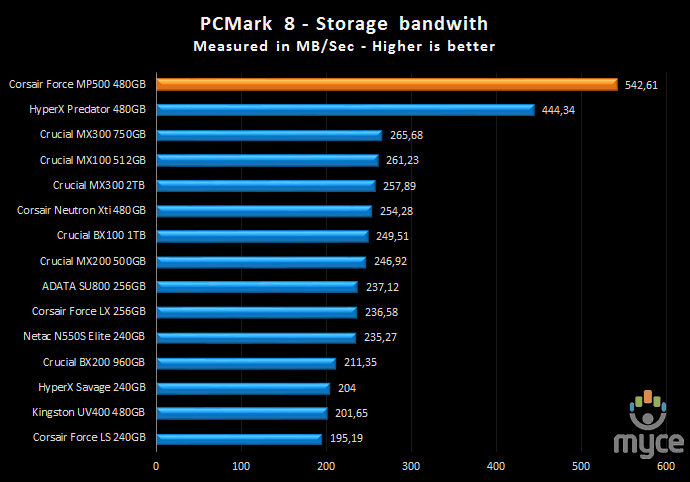
Another impressive result for the Corsair
Force MP500 SSD.
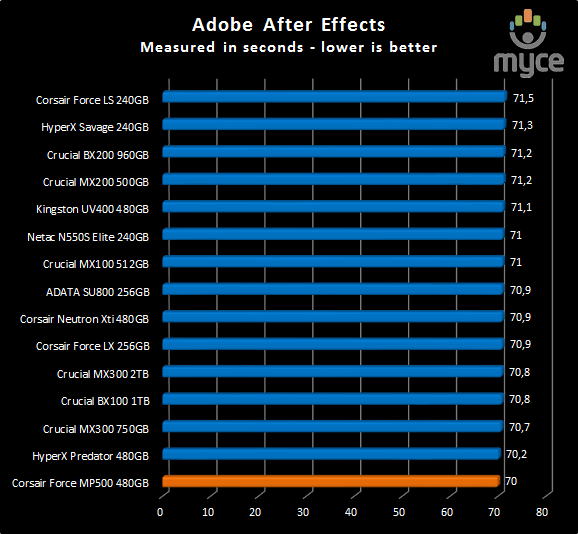
The
result for the After Effects test.
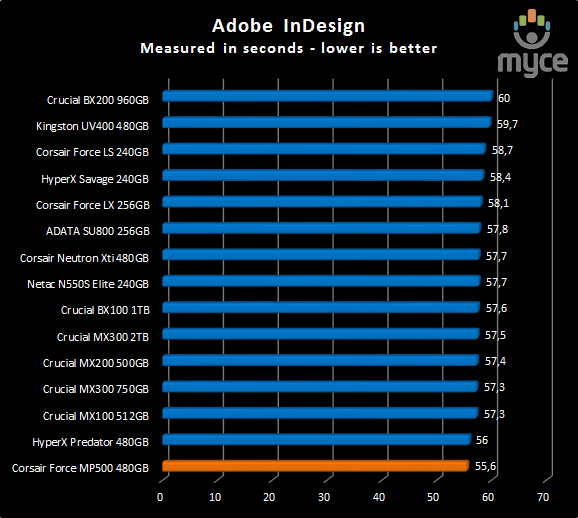
The
result for the InDesign test.
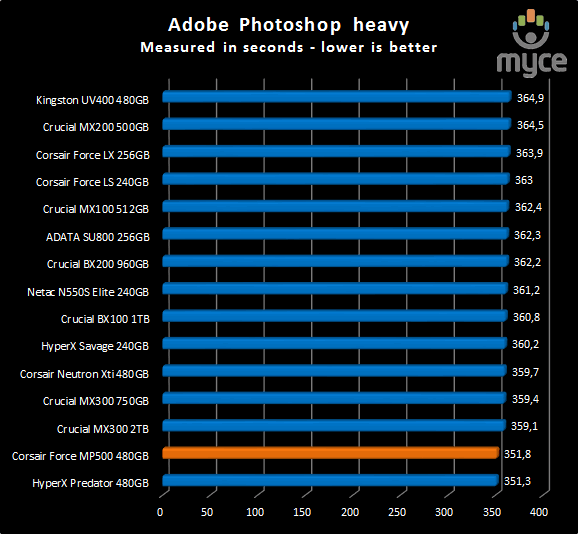
The
result for Photoshop heavy test.
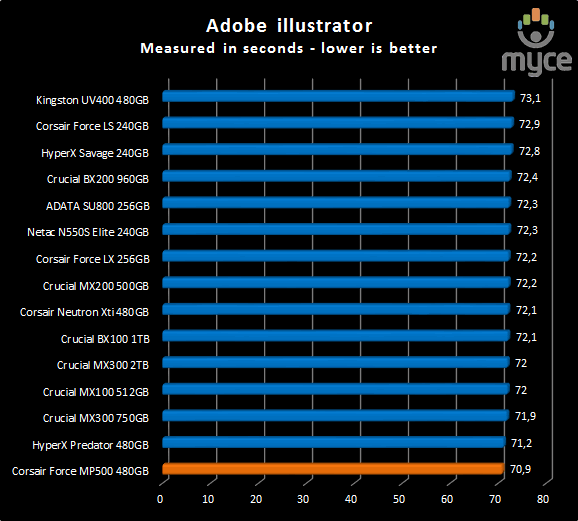
The
result for the Illustrator test.
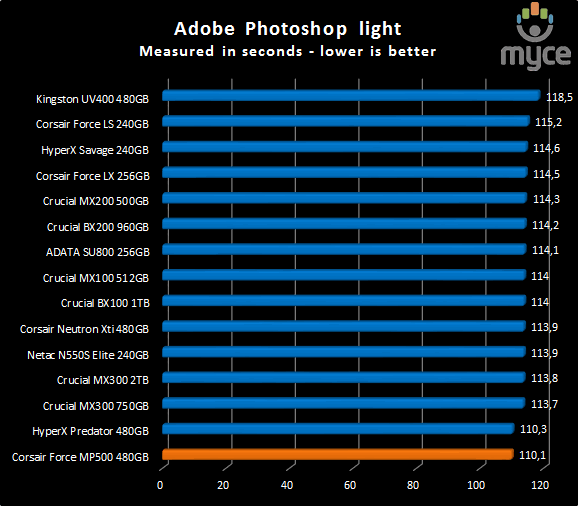
The
result for the Photoshop light test.
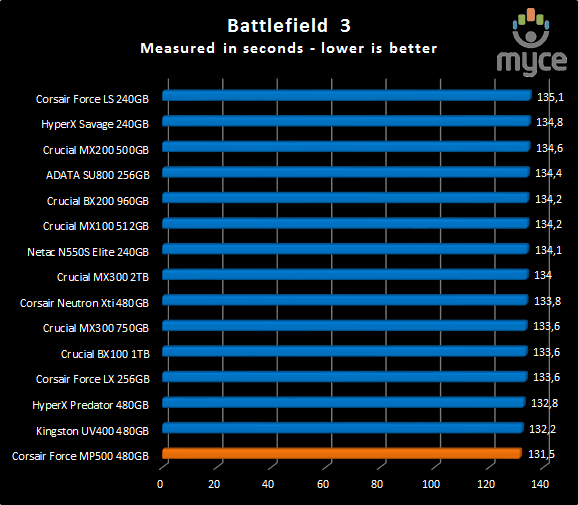
The
result for Battlefield 3.
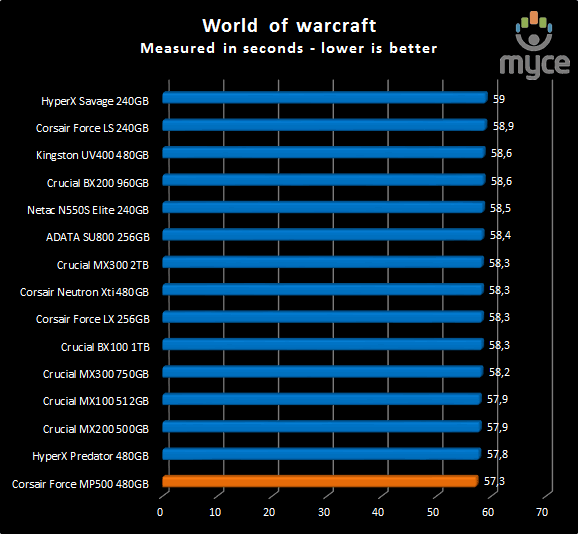
The
result for World of Warcraft.
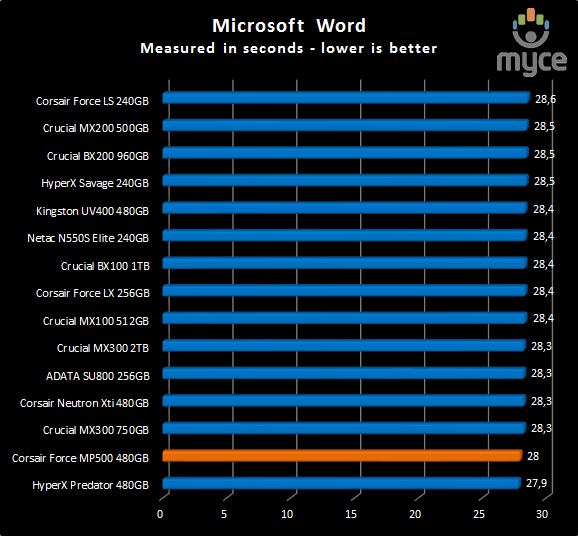
The
result for the Word test.
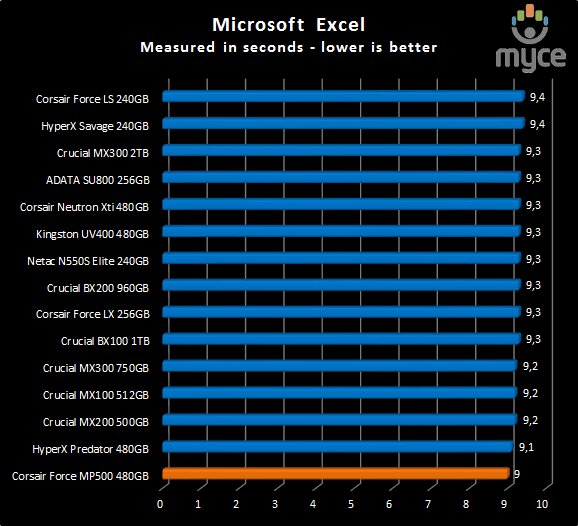
The
result for the Excel test.
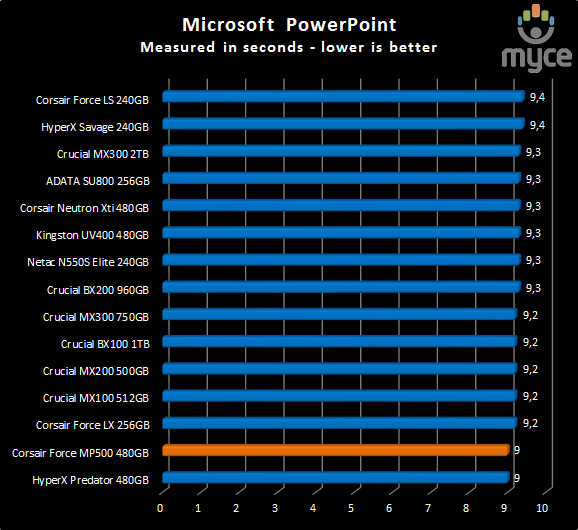
The
result for the PowerPoint test.
Summary:
The Corsair Force MP500 480GB SSD gave
performance that in a single word can be described as awesome.
Let's head to the next page for our
IOMeter test results.....
I/O Performance
There is little point of having an SSD
drive that has blazing sustained reading and writing speeds, if the drive can't
handle reading and writing of small random files. If you intend to use your new
SSD drive to store and run your operating system, then the drive must be able
to cope with the many small random files that Windows will write to the drive
continually. So I feel it is very important to test how many of these random
files that a drive can handle in one second. I believe that anything over 1,000
I/O’s per second would be enough for most users running a consumer grade
mainstream PC, and should provide a smooth running system. But obviously, the
more I/O's that a drive can handle, the faster the drive will feel and leave
more headroom for those huge multitasking sessions that users sometimes engage
in.
The things that I will look at are the
total I/O per second and total MB/s.
Partition alignment and sector boundaries
Windows 7 and Vista will automatically
align a partition to 4k boundaries during partition creation, Windows XP won’t.
It is imperative that an SSDs partition is aligned. Windows XP is also
restricted to sector boundaries, while Windows 7 will use 4k boundaries if it
can. The Corsair Force MP500 NVMe SSD is 4k boundary aware, and will use these
boundaries if possible. Of course it will also remap LBAs for compatibility
with the sector boundaries so that the drive can be used with Windows XP.
IOMeter allows us to set the sector
boundaries for conducting the tests, and I have therefore set the sector
boundaries at 4K, which means the IOMeter tests are valid for Windows 7 and
Windows Vista users. XP users will not be able to obtain such results.
I will provide a screenshot of the tests on
the review drive for those of you who like to see the actual test result. All
the comparison drive results are represented in the form of graphs.
If any of you would like to see a
screenshot from any IOMeter test on a particular drive, please feel free to
request one, and I’ll post the screenshot in the forum thread.
All the IOMeter tests create a 10GB data
set on the target drive, and each test is run for a duration of 3 minutes.
IOMeter 4K random write test with repeating data.
The first test involves creating continual
4KB random files on the target drive with IOMeter. I use a 4KB file size, as it
is believed that Windows will create and modify many of this size of file
constantly in the background during a typical Windows session. It is said that
most 4K random writes take place at a queue depth of only one.
Queue depth 1
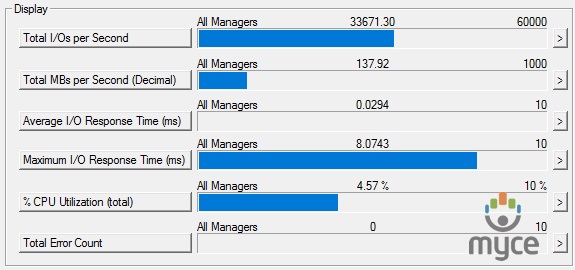
Corsair Force MP500 480GB SSD (Queue depth 1)
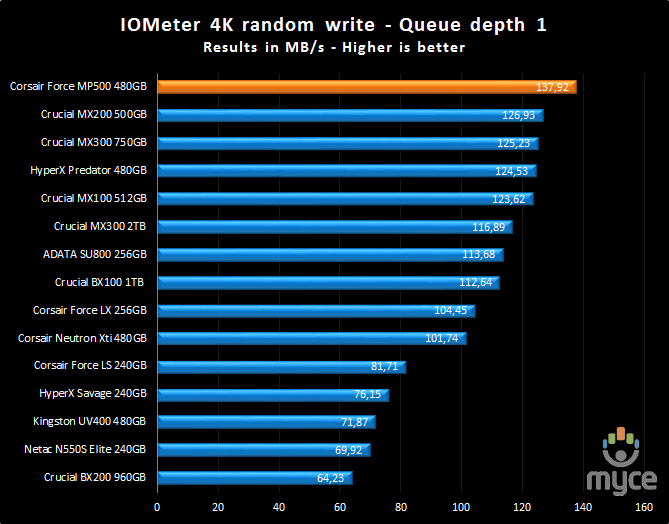
The result is excellent.
Queue depth 4
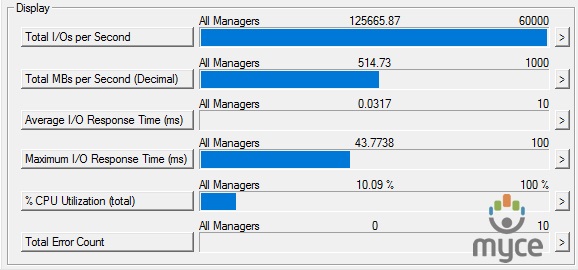
Corsair Force MP500 480GB SSD (Queue depth 4)
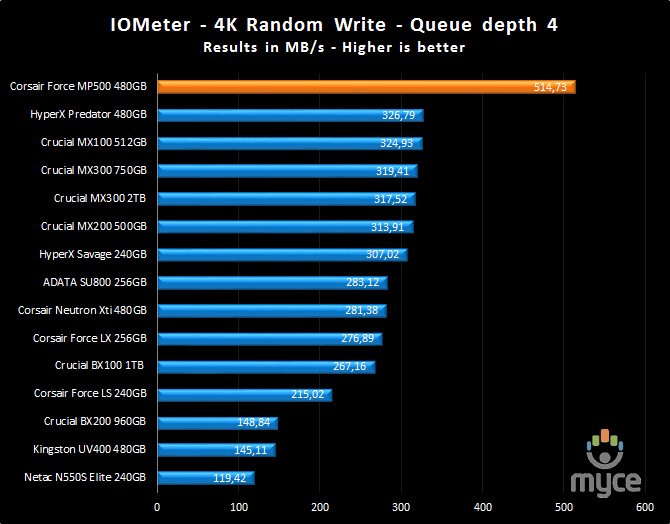
Again the result is excellent.
Queue depth 32
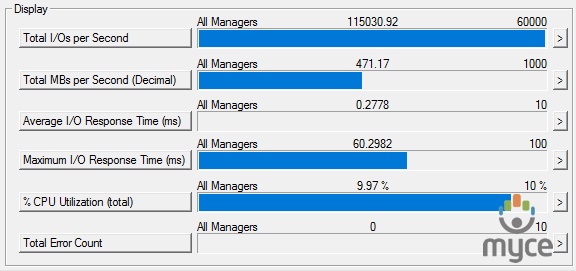
Corsair Force MP500 480GB SSD (Queue depth 32)
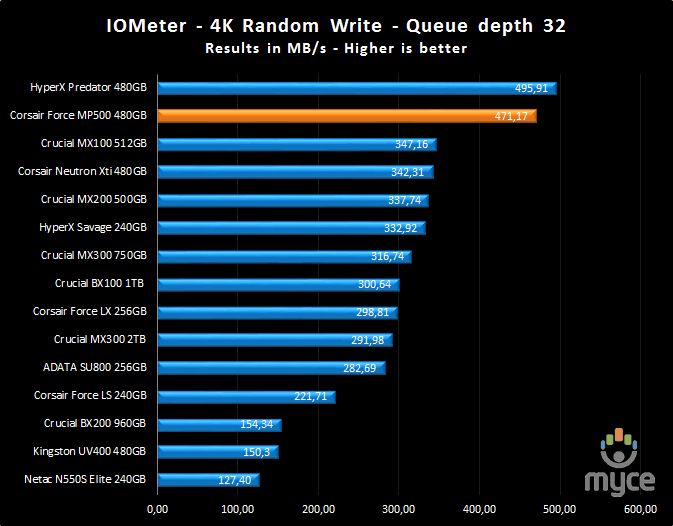
With the highest queue depth the Corsair
Force MP500 is a little behind but manages to reach second place in the chart.
Four workers with queue depth 32
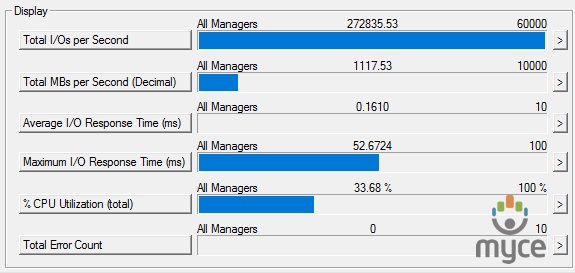
Setting up IOMeter to have four workers, and a queue depth of 32, the Corsair
Force MP500 reached almost 270K IOPS.
4K random write queue depth profile
For this
test I used various queue depths from 1 – 32 to give you an idea how this SSD
performs at different queue depths. For a normal desktop user, with lightweight
multitasking, the queue depth will rarely rise above 2. For heavy multitasking,
the queue depth is unlikely to rise above a value of 8.
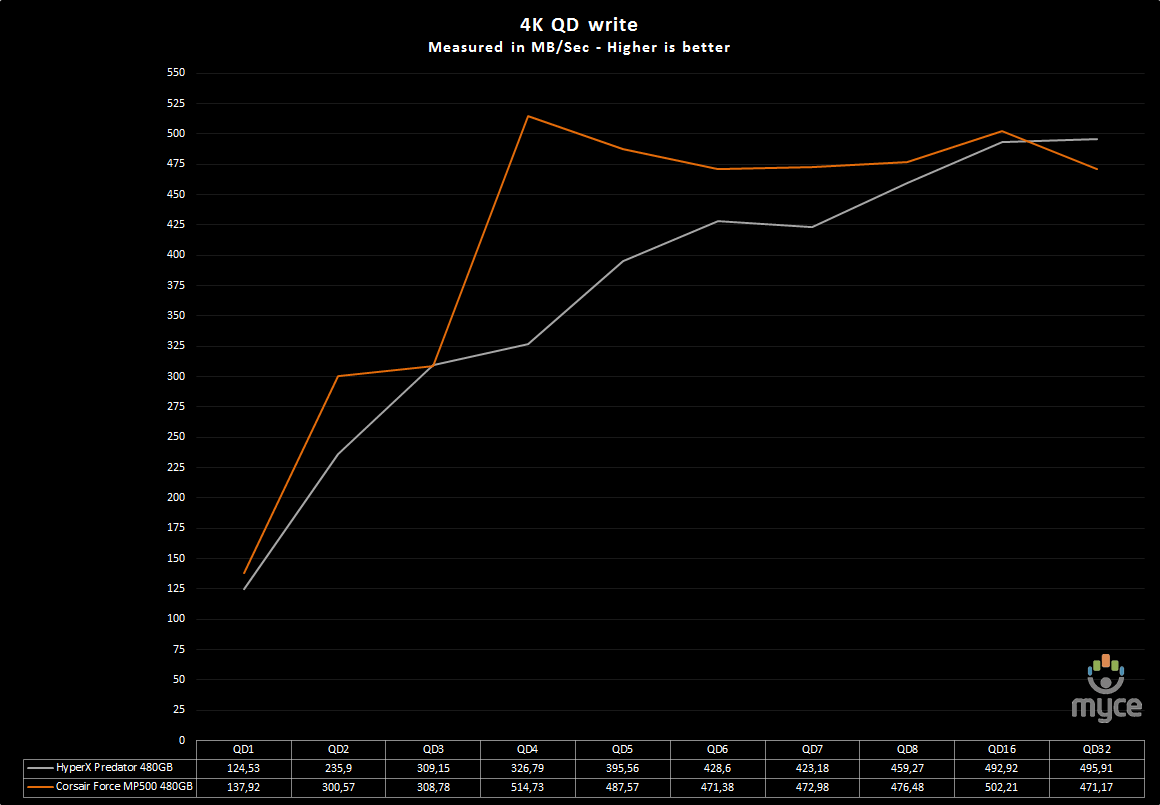
The performance of the Corsair Force MP500
480GB NVMe SSD, as we can see from the graph, is excellent.
IOMeter 4K random read test.
If there are many 4k files created, then
that must also mean that many 4k files need to be read. This test measures 4k
reading performance.
Queue depth 1
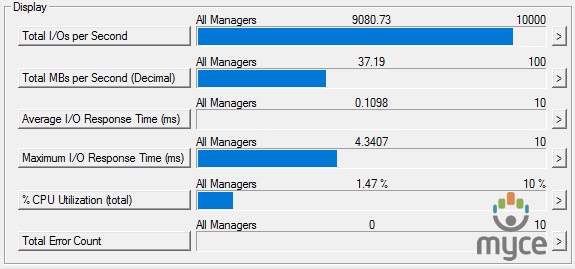
Corsair Force MP500 480GB SSD (Queue depth 1)
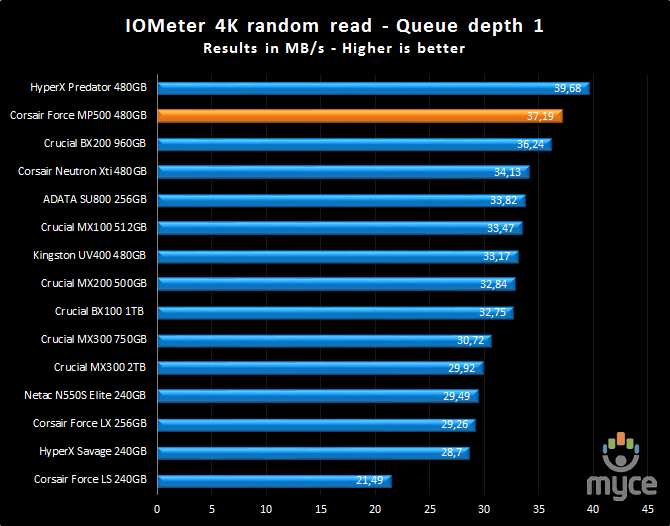
The Corsair Force MP500 was a little behind
compared to the fastest drive that I had tested.
Queue depth 4
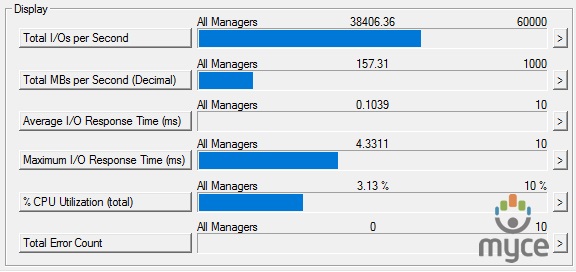
Corsair Force MP500 480GB SSD (Queue depth 4)
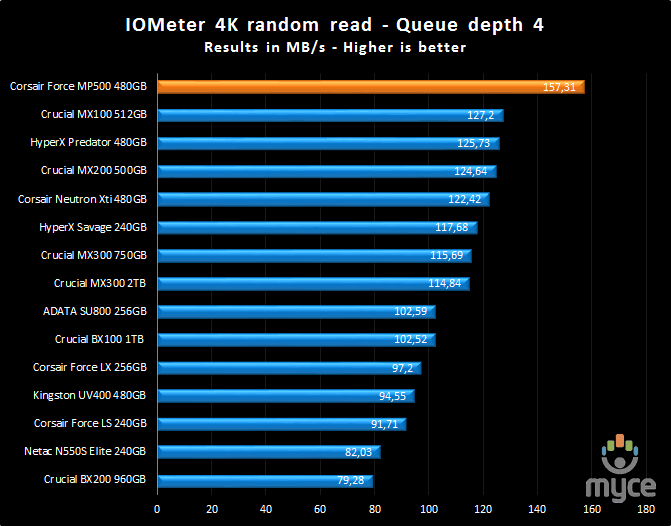
But at a queue depth of 4 once again it
pulls ahead of the competition.
Queue depth 32
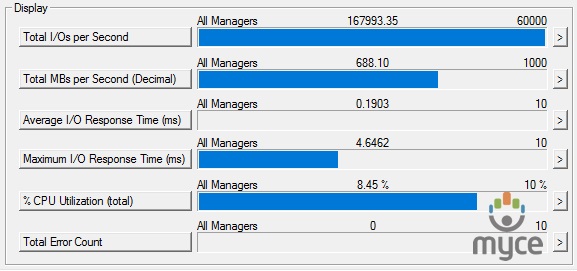
Corsair Force MP500 480GB SSD (Queue depth 32)
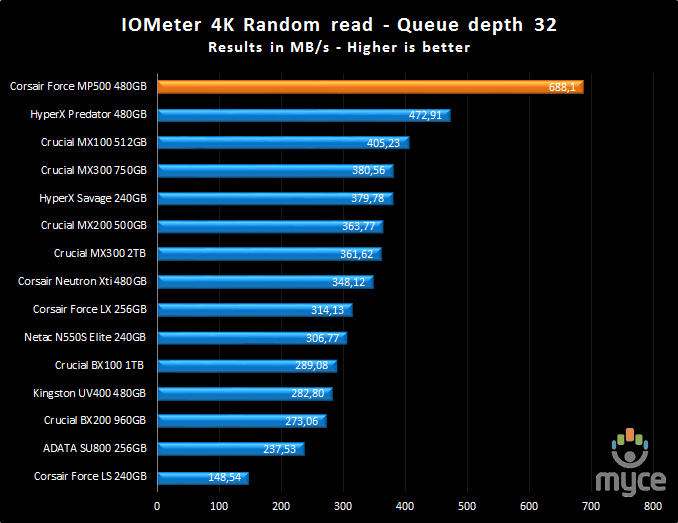
Again an outstanding result.
Four workers with queue depth 32
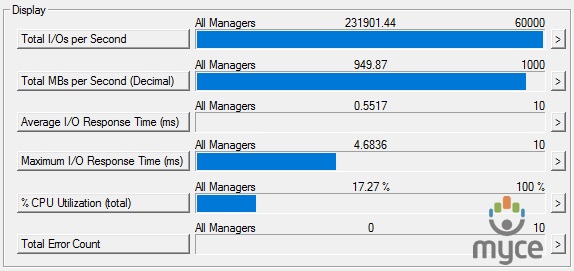
Setting up IOMeter to have four workers, and a queue depth of 32, we can see
that the drive reaches almost 230K IOPS.
4K random read queue depth profile.
This test
shows how the review drive scales with increasing queue depths.
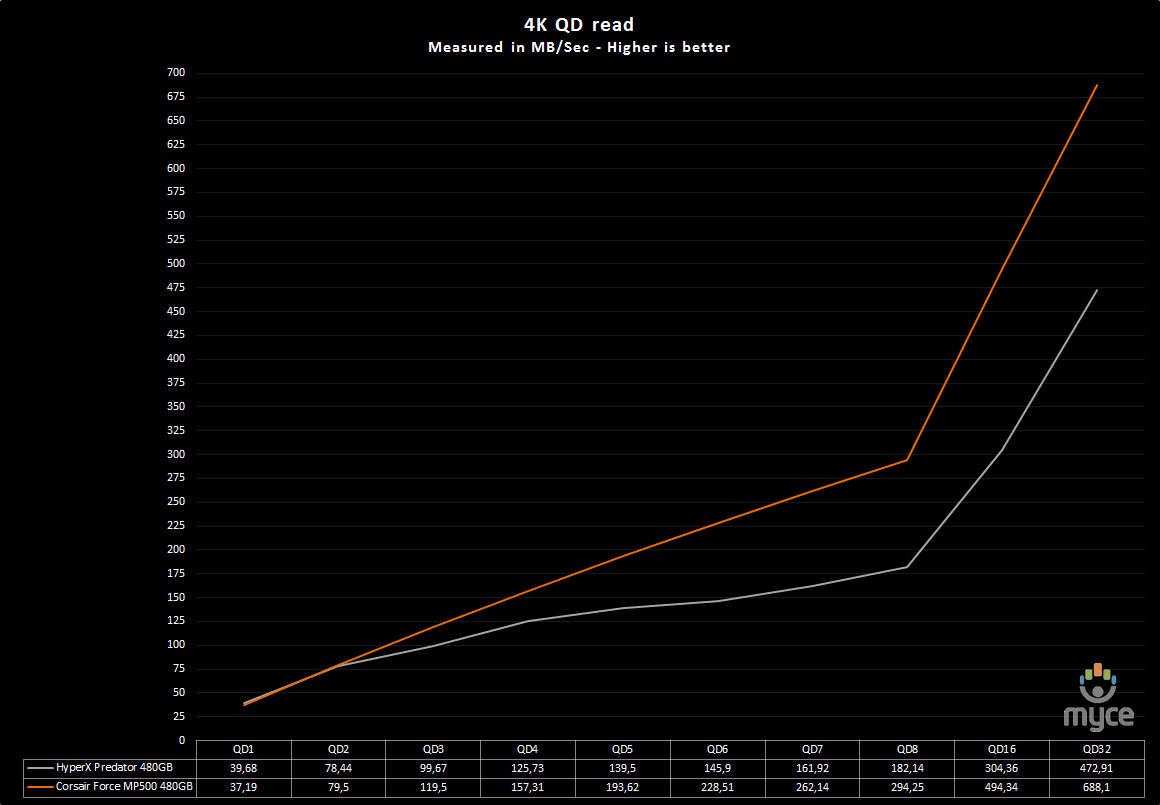
Only at a very low queue depth is the
Corsair Force MP500 behind, but after QD3 the drive gives an impressive
performance.
IOMeter 512KB write test with repeating data.
Sequential writing performance is also very
important, and in this test I will be measuring the sequential writing
performance of the drive.
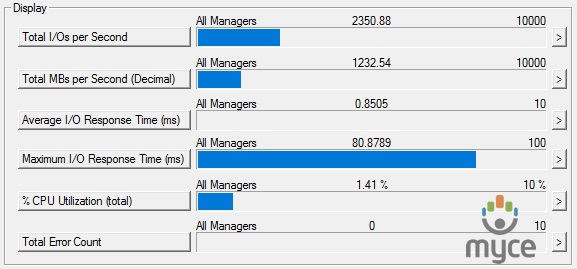
Corsair Force MP500 480GB SSD - 512K Sequential write with repeating data
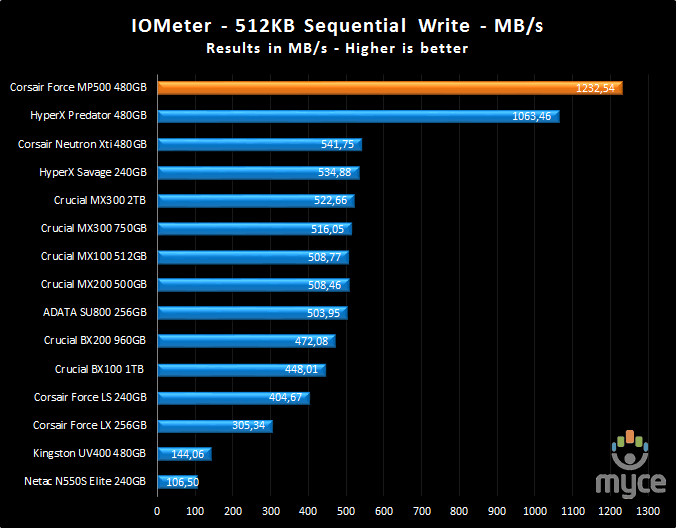
The sequential write performance is outstanding.
IOMeter 512KB read test.
This test measures 512k sequential reading
performance.
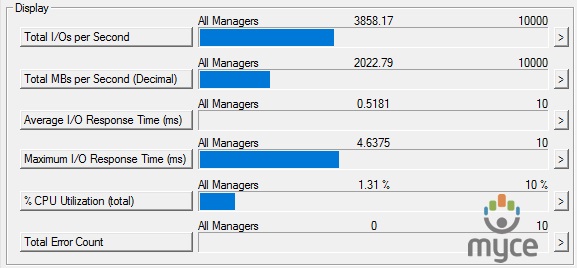
Corsair Force MP500 480GB SSD – 512K sequential reading test
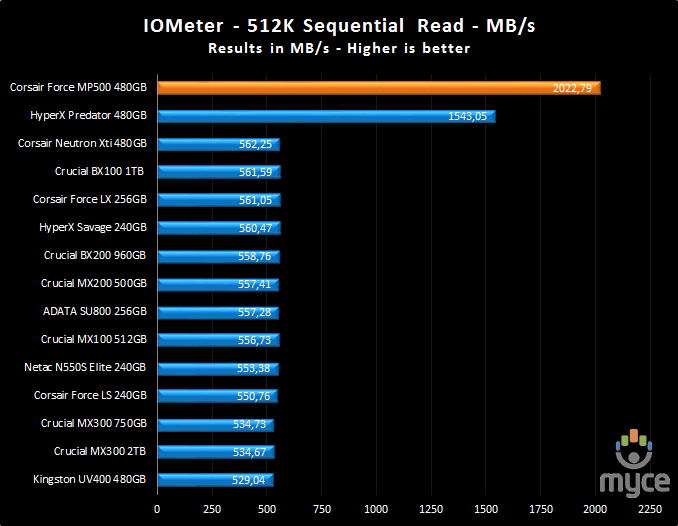
No surprises here, the Corsair Force MP500 delivers
an impressive result.
IOMeter Workstation simulation (outstanding I/Os = 64).
When running applications you will find
that there is a mixture of small random files and larger sequential files,
being created and read. Not only that, it isn’t just one file at a time. In
this test I measure a simulated workstation pattern, with a queue depth of 64
(threaded).
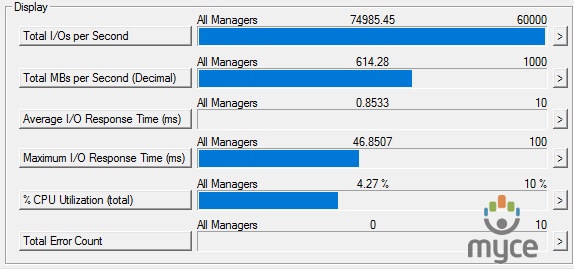
Corsair Force MP500 480GB SSD – Workstation simulation
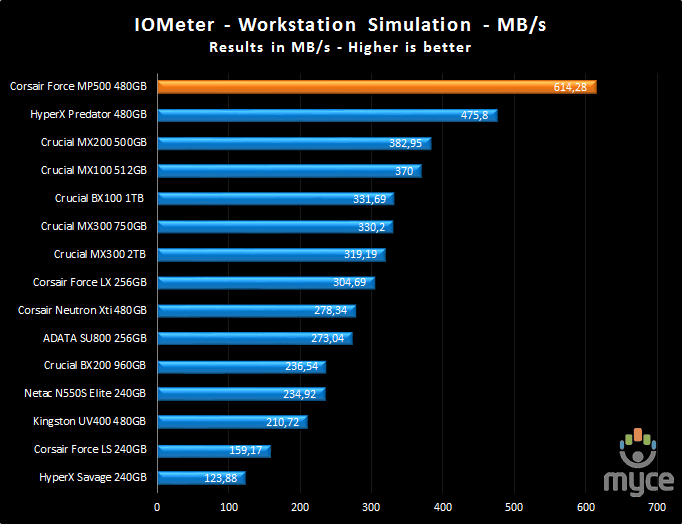
The result is excellent.
Summary
Corsairs Force MP500 is a top performing
drive and you can see this in all of the previous results.
Now let’s head to the next page where we
will look at how the Corsair Force MP500 SSD performs using Anvil's Storage
utilities....
Anvil’s Storage Utilities
As well as performing SSD endurance tests.
Anvil’s Storage Utilities has a very nice SSD benchmarking application. The SSD
benchmark tests many different aspects of SSD performance, including 4K random
at different queue depths, and also sequential performance, but more importantly
than this, all using real test data.
Another very nice feature of Anvil’s SSD
benchmark is the fact that you can change the compression levels of the test
data. The compression levels of the data sets used for the tests can be varied
from 0% compression right up to 100% compressed data, and there are even a few
data profiles already included, such as database (8%) compression, and also an
application profile (46%) compression, which is designed to simulate real
application data being read and written to the SSD.
Anvil’s Storage Utilities is still in beta
at the moment, but the application is currently solid enough to use in this
article, and I have already verified the results obtained using an SATA analyser.
I will include a screenshot of the review
drive, and all comparison results will be presented in the form of graphs. If
you would like to see screenshots of the test results obtained on the other
SSDs in this article, you can do so by following the link here.
I will also be testing three different
compression profiles, which are as follows.
- 0 fill (100% compressible data)
- Application simulation profile (46%
compressed) - 100% (non compressible data)
So let’s begin the tests.
0 fill
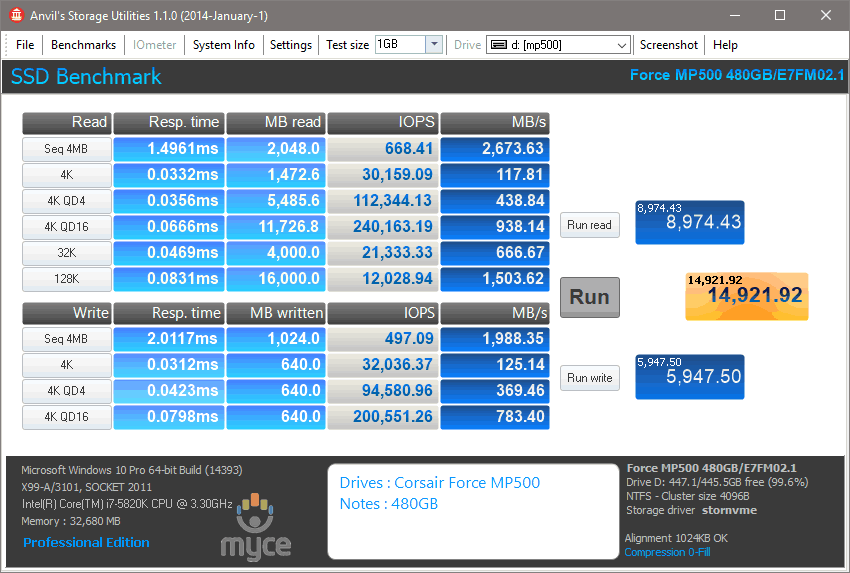
Corsair Force MP500 480GB SSD (0 fill)
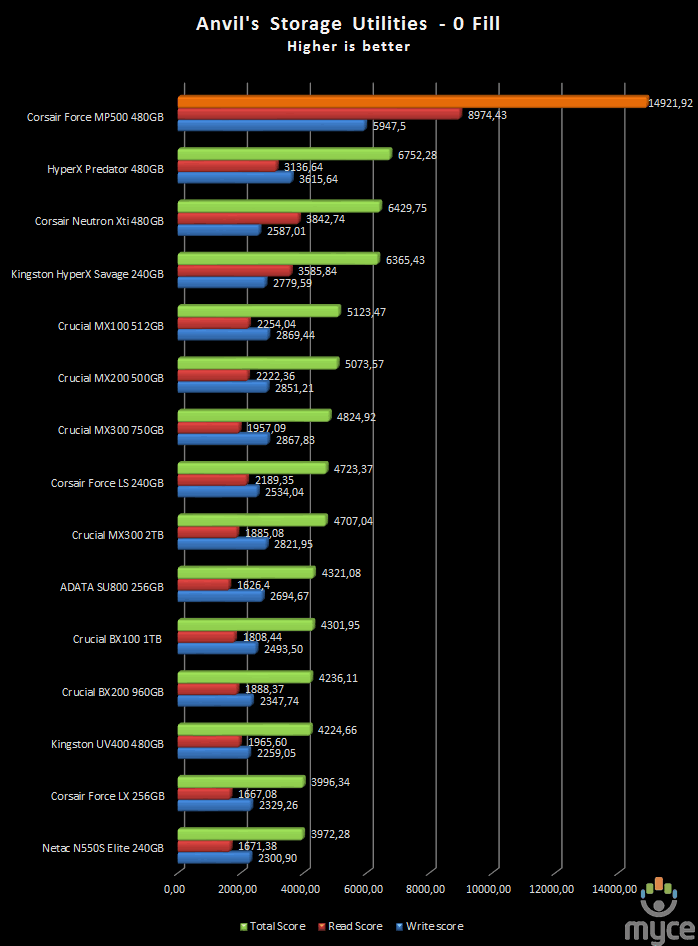
Results
are ranked by highest total score.
An outstanding result for the Corsair Force
MP500.
Application profile
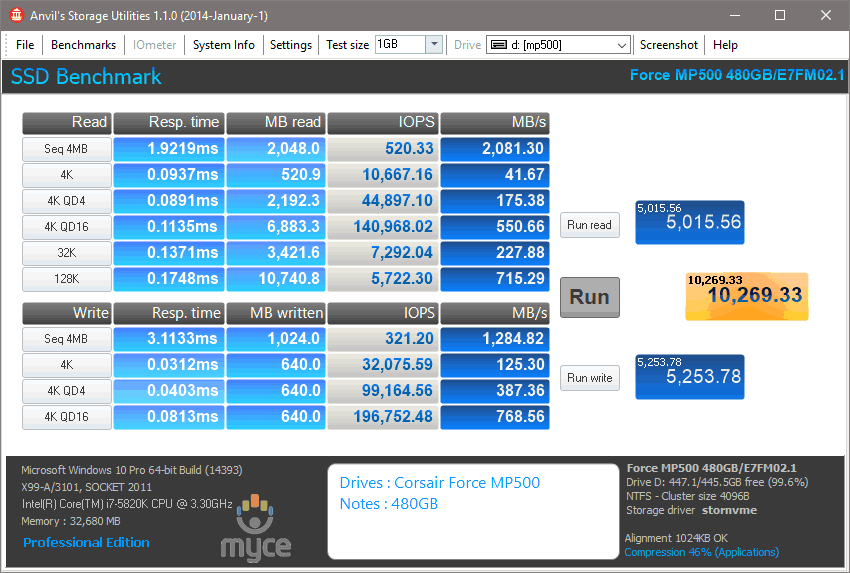
Corsair Force MP500 480GB SSD (application profile)
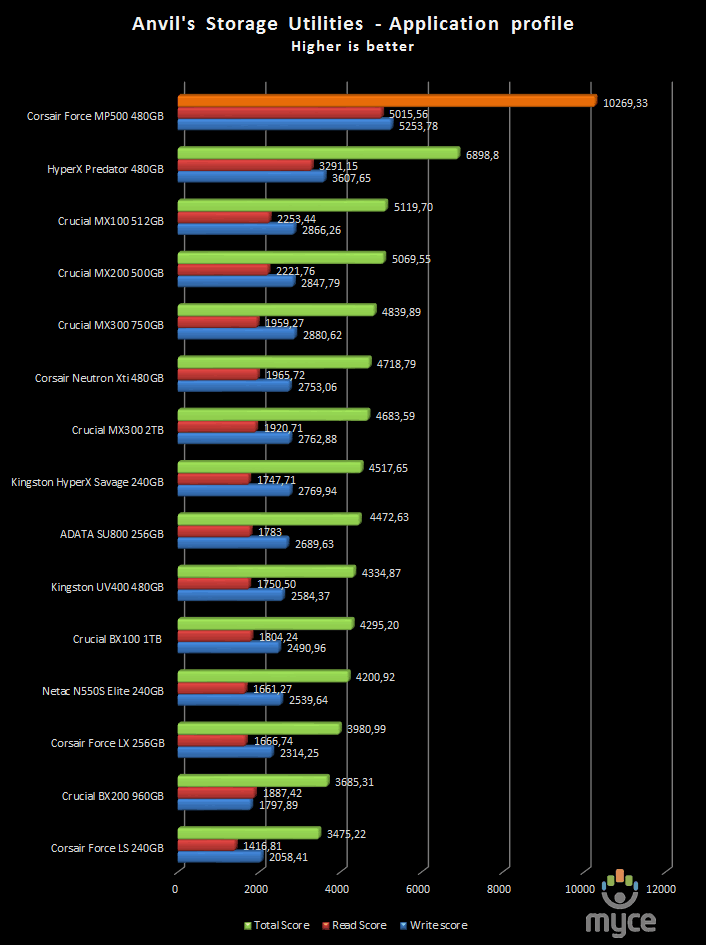
Results are ranked by highest total score.
Again the Corsair Force MP500 continues to give
outstanding results.
100% incompressible
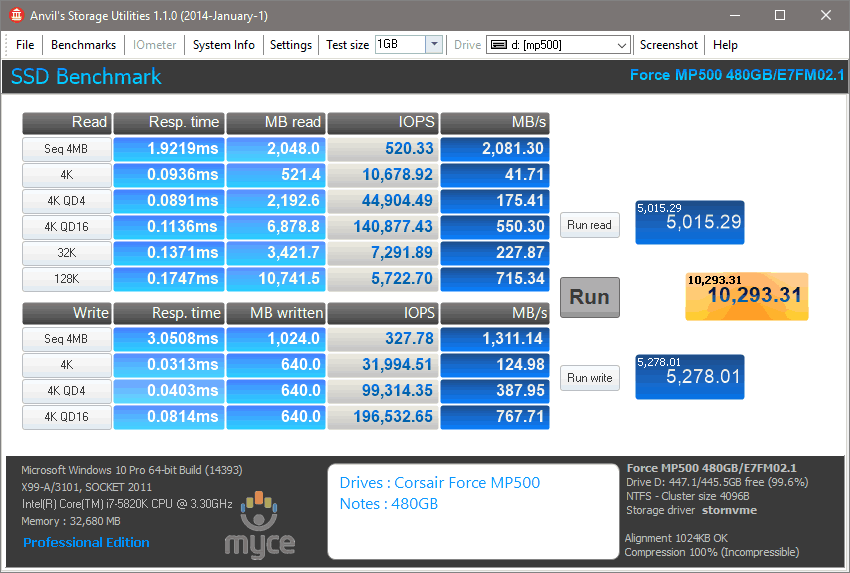
Corsair Force MP500 480GB SSD (100% incompressible)
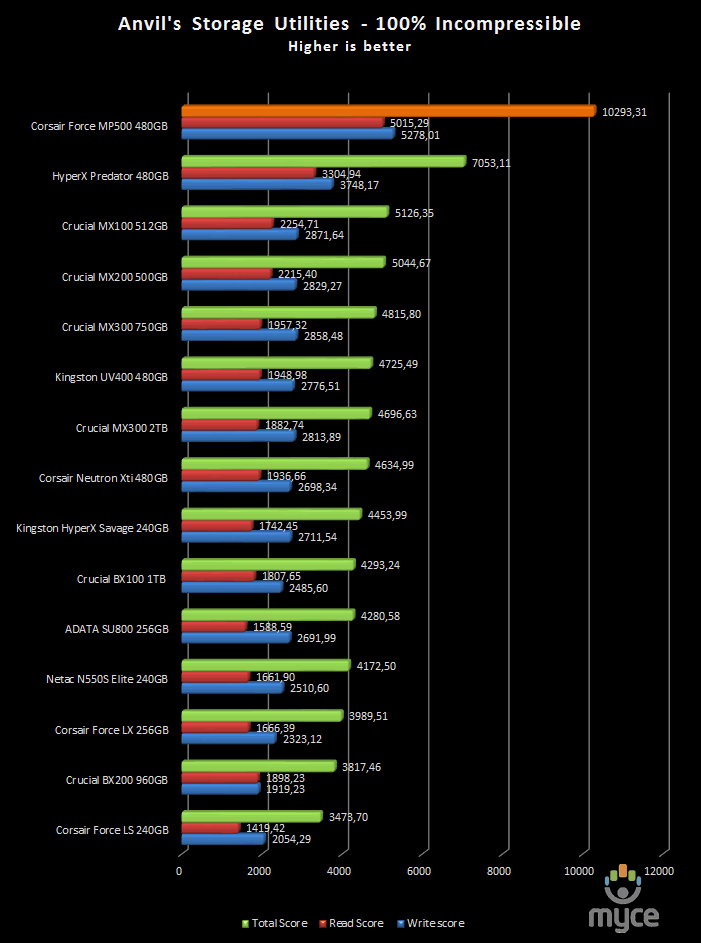
Results are based on the highest total score.
In the final test the Force MP500 is again on
top of the chart.
Summary
The performance of the Corsair Force MP500 SSD
is excellent.
Now let's head to the next page for some
real world tests....
It has become clear that simply conducting
endless benchmarks on SSD drives is pointless. Real users may run a few
benchmarks when they first fit their SSD drive, but most users just want a
drive that performs well in the real world. They want their drive to work
"out of the box" and work fast and smoothly.
Most of the latest SSD drives can deliver
very fast sustained reading and writing speeds, but these alone tell you very
little about how the drive will perform in the real world.
If you intend to use your SSD as your
primary system drive, with an operating system and applications installed and
running from the drive, real world performance becomes much more important than
just fast sequential read and write speeds, in this case I felt that it was
time to move into a different method of testing.
From now on I will only use the log files
from the Event Viewer to measure the start-up and shutdown of the system, and
also use filecopy to measure all my copy tests from a RAM disk to the selected
storage drive that I will be testing. For these tests I will also enable all
power savings features that are available, since I believe that this is the way
that the majority of the users will have them set on their PC.
Real world copy tests
I will now conduct some real world copy
tests so that you can have a much better view of how the drive will perform. In
these simple tests I try to simulate what a real user does with their drives. I
will be copying some mp3 files, various picture and MKV files, and finishing by
installing MS Office 2007.
As I said earlier from now on all my test
files will be stored in a RAM disk and copied/pasted to the destination drive
using filecopy. The filecopy utility will be used from now on for all my tests,
and I’ll be using it this way to measure the time that it takes to copy the
files.
Before I move on to the test, I want to
give you an idea on how fast your RAM is. Below you can find the results.
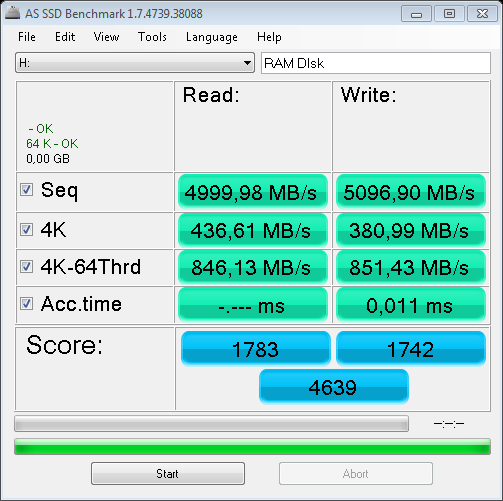
As
we can clearly see speed isn’t going to be an issue in these tests.
Read write tests – 259 MP3 song files (1.36GB total)
I will start this set of tests by copying
259 MP3 files from the RAM disk to the destination SSD and also from the SSD to
the RAM disk.
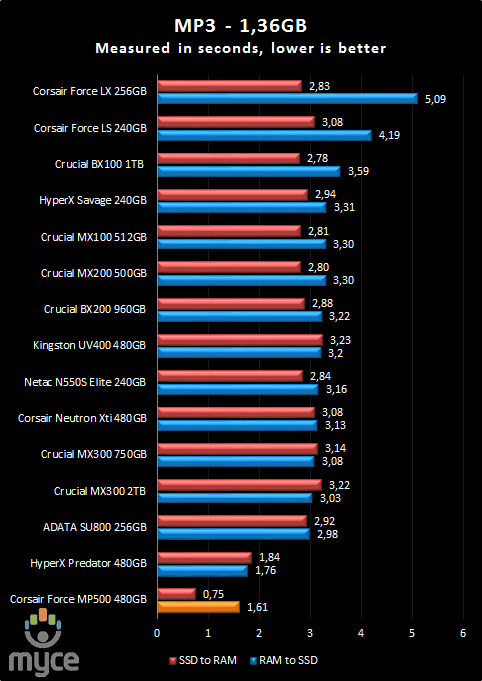
The result is outstanding.
Read write tests – 3,377 JPEG picture files (2.56GB total)
Continuing my set of tests, but this time I
will be copying 2.54GB of pictures that are stored in the RAM disk to the
currently testing SSD and vice versa.
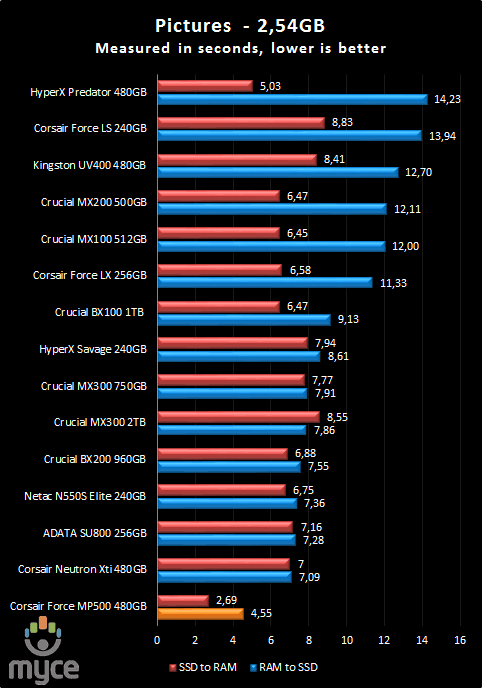
Again the Force MP500 was the fastest drive
that I have tested so far in this test.
Read write tests – 1 MKV and 1 SRT file (3.46GB)
Copying a movie is very common task for all
of us, and in this test there are two files that will be copied from the RAM
disk to the SSD and again from the SSD to the RAM disk.
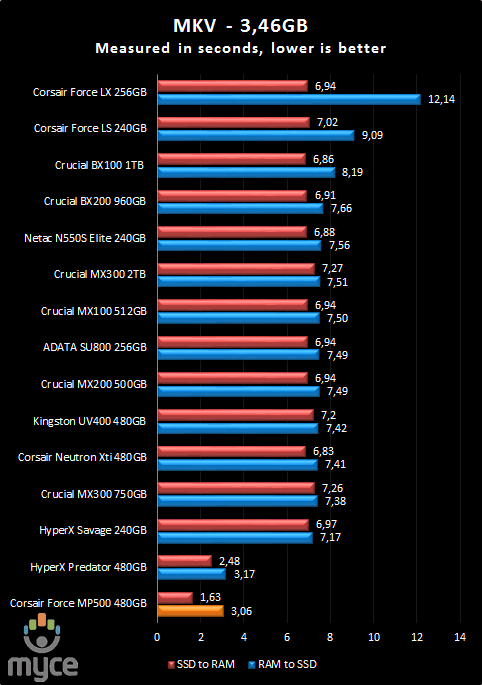
3.06 seconds to write 3.46GB is impressive,
and the read performance of the Corsair Force MP500 is even more impressive.
Read write tests – ISO (7927MB)
For this test, I copied ISO of the 'Iron
Man' movie from the RAMDisk to the SSD and vice versa.
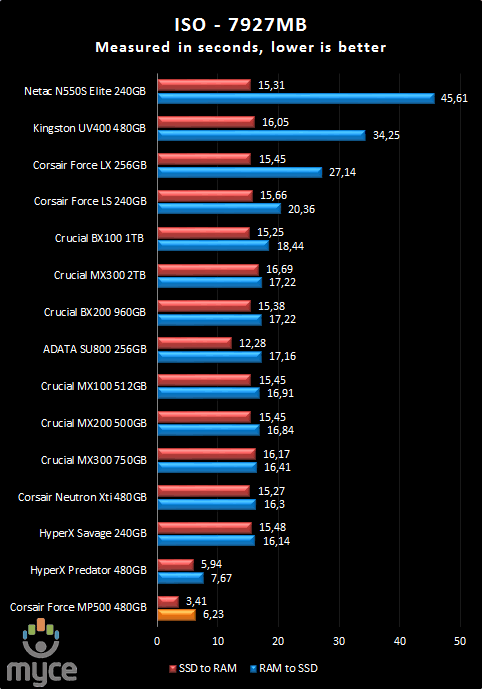
At this point the Force MP500 gave a result
that was outstanding.
Read write tests – Small files (533MB)
I have decided to adapt the very small
files test that I am using as part of my USB3 flash tests, so this time I will
be also copying all the files from the RAM disk to the SSD, and again from the
SSD to the RAM disk.
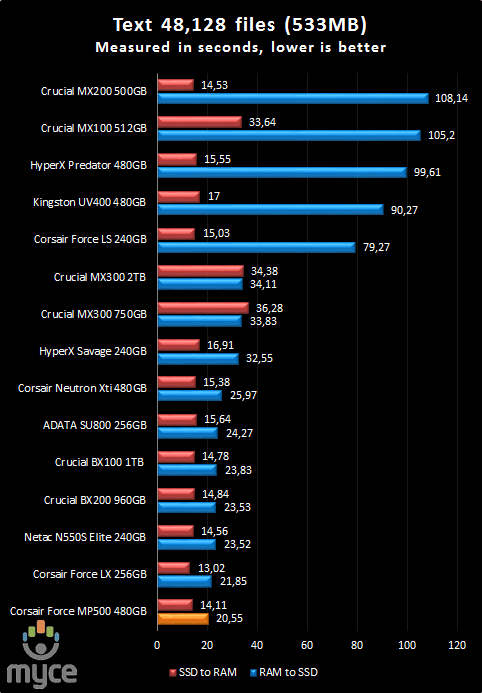
Okay, when it comes to smaller files the
Corsair Force MP500 again gives an impressive result, but overall you can find
SATA drives that can come close to this level of performance.
Windows start-up based on the Boot Racer 5.00
Start-up time
On the next screen shot you can compare the
current tested SSD and compare it to other drives that I have tested. Below I
present the results.
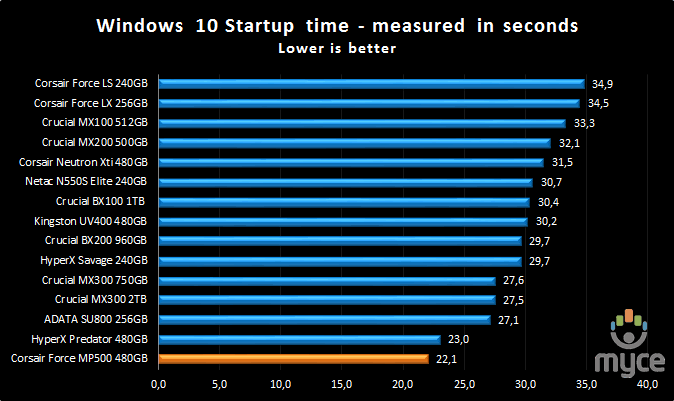
The boot time is impressive.
Installing applications
Installing applications is possibly
something you don't do that often. But should you replace your system disk,
then you will most likely have to re-install your applications. Most of the SSD
drives I have tested up until now are quite slow at installing applications,
most likely because their I/O performance was quite limited.
For these tests, we picked some popular
applications and copied the entire contents of the CD or DVD media to the RAM disk.
We did this to make sure that the reading speed of our CD/DVD reader would not
hamper the performance of the target drive.
We then installed these applications onto
our comparison HDD drives, which were all running mirror image installations of
our Windows 7 Home Premium 64-bit installation, and timed the amount of time
taken to install the application with a stopwatch on each of the drives.
MS Office 2007 Enterprise (full install)
Now let’s see
how the Corsair Force MP500 SSD performs with the installation of MS Office
2007 Enterprise Edition.
The procedure
followed was very simple. I copied all the files from the CD to the RAM disk and
used the virtual drive as a source for the installation files.
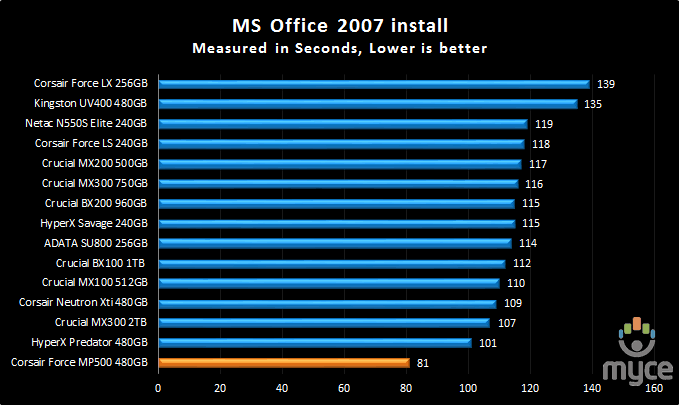
Installing Office 2007 took only 81
seconds, an outstanding result.
Speed degradation after heavy testing
On this page I will measure how the SSD
performs after heavy testing and usage.
I will run an AS SSD benchmark test when
the OS is freshly installed so that we can get a good view of how the drive
performs with the OS. After that I will fill the drive up to 50% of its
capacity, use the drive for a few days, and then re-run the AS SSD benchmark.
The same procedure will be followed once again, but this time the drive will be
filled close to 90% or higher of its capacity. To finish this test, I will
simply delete all the extra data and leave the PC idle for a few hours so that
the controller has the time to perform any necessary cleaning, then see how the
drive performs.
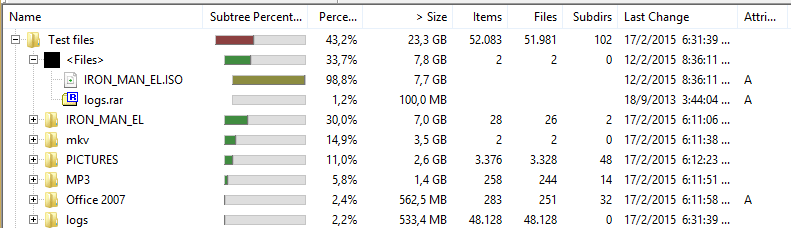
In this picture you can see the test files
that I will be copying to fill the drive with data, as you can see files vary
from 8GB ISOs to very small text files.
In the picture below you will find all the
applications that were installed for this test using Ninite, and I have also installed Microsoft
Office 2007.
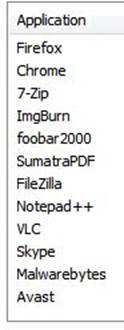
Now let’s start our tests.
Okay, so you got our Corsair Force MP500
NVMe SSD and you are excited, so you decide to run AS SSD to see how fast your
new NVMe SSD is.
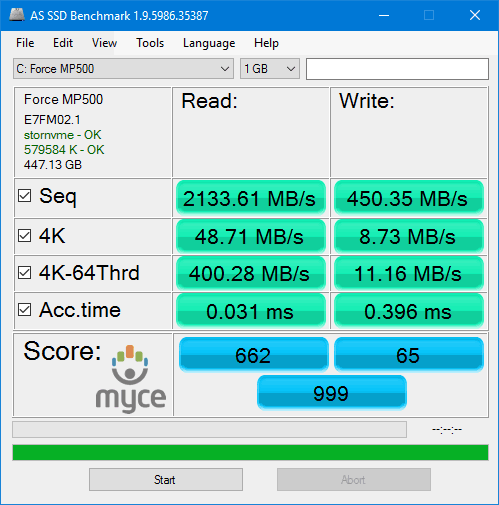
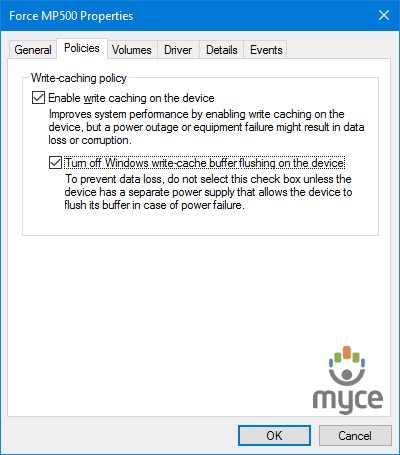
You look at this result and probably this
wasn’t what you expected. Before you start thinking strange things you might
want to enable the Turn off Windows write-cache buffer on this device and then
re-run AS SSD.
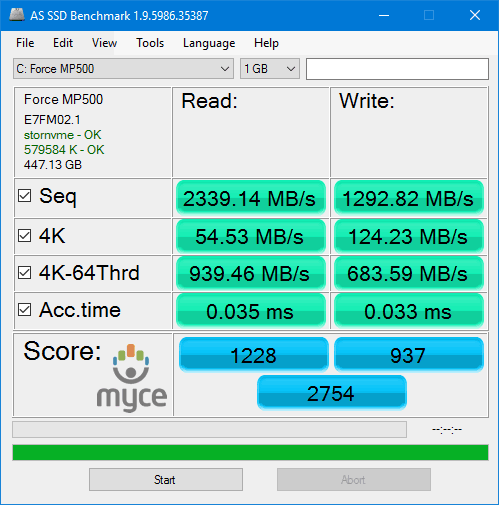
As we can see magic happens and performance
is exactly where we expected it to be. Also this is the base result for this
test, with the drive having a fresh install of Windows 10 so that we can have a
reference point for our other tests.
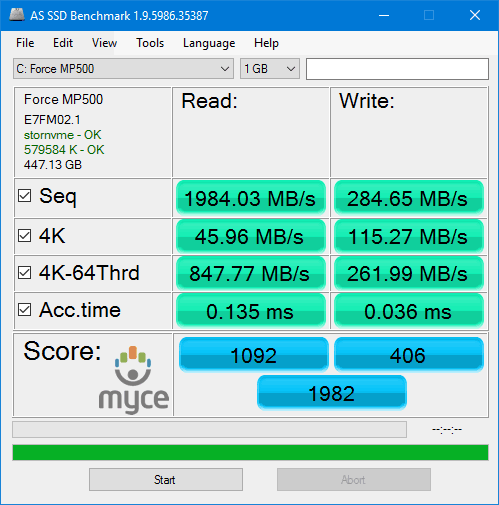
Having less than 4GB of free space is
something that I don’t recommend doing, and here we can see that there is a
huge drop in the write performance, so either leave more free space on your
drive, or do a manual over-provisioning.
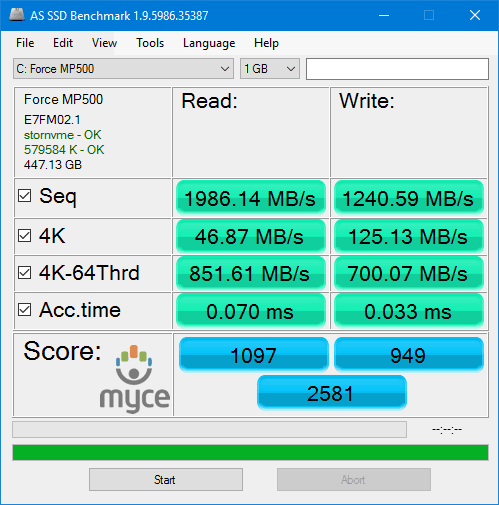
Having the drive filled with data, but with
almost 220GB of free space and a few minutes so that TRIM can work, and the
results are once again great.
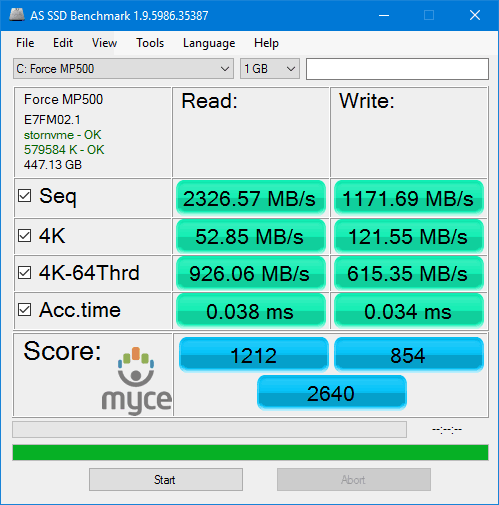
With all the extra files deleted the result
is almost where I expected it to be, and probably it would have been slightly
better if the drive had more idle time. Overall the Corsair Force MP500 NVMe
SSD gave an outstanding performance.
This concludes our review. To read the final
thoughts and conclusion, click the link below....
Closing thoughts.
As I said in the prologue, Corsair was able
to surprise me once again with the Force MP500 NVMe SSD, and not only because
of its performance, which is excellent. The Corsair Force MP500 NVMe SSD was
able to reach its maximum read speed when tested with ATTO, and in the IOMeter
tests IOPS were also excellent, so when it comes to speed, at the moment you
can’t ask for more. One more thing to keep in mind is the extra layer of copper
that makes contact with the NAND and the controller, this way you have better
cooling, so thermal throttling should not be an issue, and from the time that I
spent with the drive I didn’t notice any throttling.
The price of the Corsair Force MP500 NVMe
SSD is a little high, but if you want to have the best storage in your system,
you will not hesitate to pay the extra money. The only thing that needs an
update is the Corsair software, and at the time of writing this review, it did
not work 100% with the Force MP500, but this is something that I expect to be
fixed, at some point.
The drive comes with a three-year warranty,
and it's available in three capacities, 120GB, 240GB, and 480GB. The m.2 form
factor is another plus, no extra SATA and power cables, no PCIe adapters for
the Corsair Force MP500, just an m.2 2280 NVMe drive with excellent
performance. Finally, the real world performance of the Corsair Force MP500 is
also excellent, and having used the drive daily from the day that I finished
testing it, I have to say that its overall performance was rock solid, offering
way more speed than I needed, which is something that I welcome. Also in my
real world tests the Corsair Force MP500 was the fastest SSD that I have
tested.
To sum up, this is what I would say:
“Corsair Force
MP500 is an excellent drive, both read and write speeds were excellent but most
importantly its real world performance is also excellent..”
Therefore, I give the 'Excellent' rating and
the ‘Editor’s choice’ award to the Corsair Force MP500 NVMe SSD.


Thanks to:
|
|
EFD |
|
|
Alex Schepeljanski for |
|
|
|
|
|
FutureMark |
|
|
Quarch |




You may comment on this review here, you
can also post your benchmarks in our forum.















