
|
|
Review: Lexar |

Lexar is a name that shouldn’t be strange
to Myce members, as in the past I have reviewed some of their fastest USB3
flash drives, such as the P10
and the Triton,
as well as more affordable flash drives such as the S23
JumpDrive. Lexar this time has provided me with their S33 drive and in
theory this drive should have the exact same performance as the S23 JumpDrive.
But the thing that differentiates this is its retractable swivel mechanism. You
can find more info about that in this review, but you can also read all about
it from the official site here,
and if you want to learn more about Lexar you can find all the info here.
So let's start this review for the Lexar
S33 JumpDrive by taking a look at the packaging and contents.
A first look at the Lexar S33 JumpDrive and its specifications
The package of the Lexar S33 JumpDrive is
very similar to the S23
JumpDrive that I had reviewed back in June.
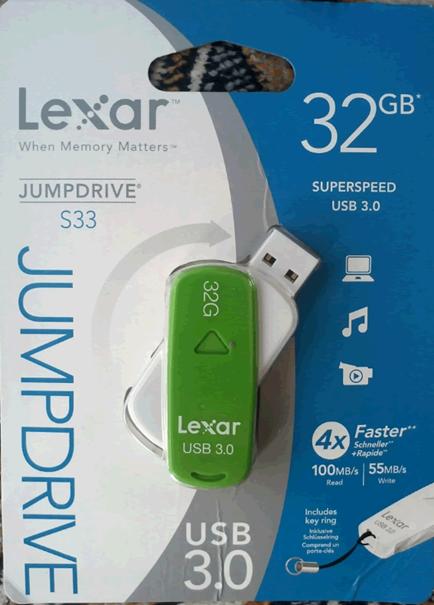
The
front side.
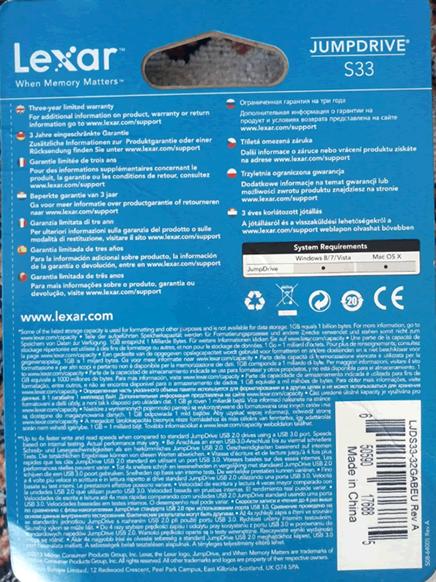
Here
is the rear.
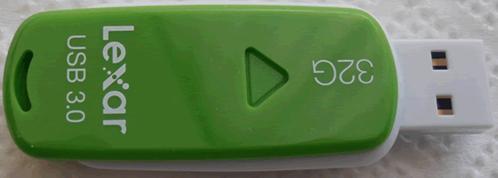
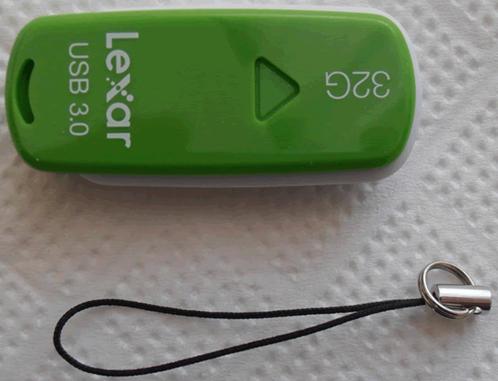
The
top of the Lexar S33. Inside there is also a carrying ring, the drive is made
of plastic and it’s very well built.
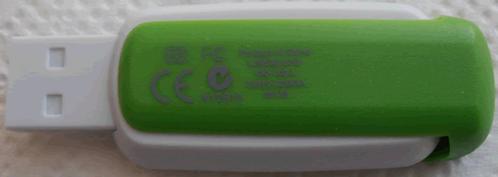
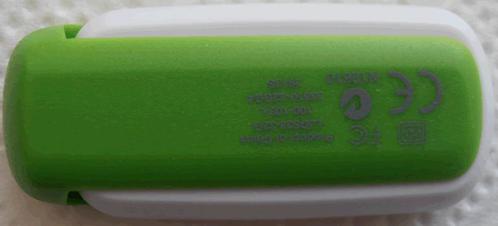
The rear
of the Lexar S33 JumpDrive
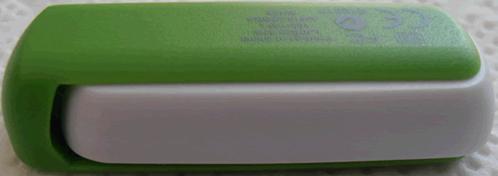
A close
view of the side of the Lexar S33.
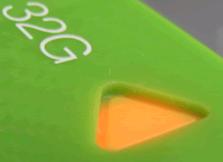
The
arrow pointing to the size of the drive also houses the orange LED that indicates
activity when reading or writing data.
Specifications
Let's take a look at the specifications of
the Lexar S33 JumpDrive as they appear on the official website.
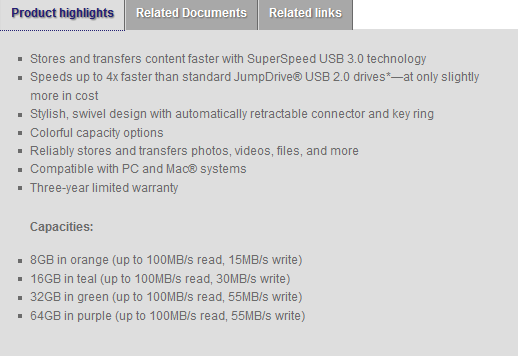
Lexar continues to colour code their
drives, and this makes it much easier to identify the capacity of the S33 JumpDrive.
Also we can see that all the drives will reach a maximum read speed of
100MB/Sec but the 8GB and 16GB versions will only reach a max write speed of 15MB/Sec
and 30MB/Sec, the 32GB and 64GB will give the fastest write speed of 55MB/Sec.
Now let's start our tests with the FAT32
file-system...
Test system and test procedures
For this review I will be using a PC with
the following configuration.
PC
- MOTHERBOARD: ASRock extreme4 Z77
- CPU: Intel
2500K @ 4Ghz - CPU COOLER: Corsair A70
- RAM: 16GB
Crucial Ballistix Sport - VGA: Intel
3000HD - HDD1: Corsair
Nova 60GB (OS) - PSU: Corsair
CX 430Watt - OS:
Windows 7 x64
Testing methods
I will try to keep my testing methods as
simple as possible and repeatable on various systems. I will run two simple
benchmarks, ATTO and CrystalDiskMark, as both tools can give a
good impression of how the drive performs. I will also run these benchmarks
with the two most common file systems that most users use, the older and more compatible
file system FAT32, and NTFS which is the current standard that
has a lot of benefits over FAT32. There will also be some real life
tests, simple tasks such as copy/paste and also a compatibility test with a
list of various consumer devices that most people will use in or out of their
homes.
FAT32 Tests
So let’s start testing the Lexar S33 JumpDrive
with the FAT32 file-system.
ATTO
My first test will be running ATTO to give
an idea of the sequential performance of the flash drive.

A solid performance from the Lexar S33 JumpDrive,
when it comes to read speed the drive was able to sustain a 110+MB/Sec speed,
write speeds are close to 45MB/Sec.
CrystalDiskMark

CrystalDiskMark gives a totally different view of the performance of
the drive, especially when it comes to writing sequential data. Now we can have
a more detailed view of the read/write performance of the Lexar S33 JumpDrive,
and again it gives an outstanding performance when it comes to read speeds,
also the 512K write results are outstanding, but the write performance is not
what I expected.
You can see how the Lexar S33 JumpDrive compares to some other USB3
flash drives I have tested, in the following graph.

Here you can see the read
results,

and here are the write results.
Conclusion
The Lexar S33 JumpDrive delivered some very
impressive read speeds, but falls behind with write speed. Overall the
performance of the S33 is very good.
Let’s move to the next page and test the
drive with the NTFS file system...
NTFS Tests
Again I will be starting my tests with
ATTO, so let’s see how the Jump Drive performs with the NTFS file-system.
ATTO

I had shown you in the previous test that
the write performance of the Lexar wasn’t as fast as it was advertised on the
box, however things are looking very differently in the NTFS tests. I will
start again with the read performance of the Lexar S33 and as we can see it has
very good performance. With the write speeds we can see that the drive is able
to reach a maximum write speed of 53MB/Sec and also the read speed is close to
103MB/Sec, so the overall performance is very good.
CrystalDiskMark

In this test we can see that the read
speeds are again close to the FAT32 test, but there is an improvement when it
comes to smaller files. Again the sequential write performance isn't as high as
I would expect. To help you view the difference in performance you can have a
look at the graphs below and see how the Lexar S33 JumpDrive compares against
other drives.

Again
I first present the read speeds,

and then
the write speeds.
Conclusion
We can see that the Lexar S33 JumpDrive gives
a solid performance but the write speed isn't as fast as its brother, the S23.
Let’s move to the next page for some
real world tests ...
Real world tests
Benchmarks are great, as they can give a
very good view of how the drive can perform when it’s pushed to the maximum.
Unfortunately they only tell part of the story, the rest you have to find out
when you're using the drive for everyday tasks.
I've therefore decided to perform three
simple tests that almost everyone does, so that I can get a better view of the
performance of the drive.
For this test I will be moving all the test
files from a RAM disk to the tested USB drive, and vice versa, below you can see
the results.
MP3
I will start my tests by performing a
simple copy of 1.36GB of MP3s. You can see the results for the Lexar S33 JumpDrive
in the graph below.

Starting this set of tests, we can verify
that the read performance of the Lexar S33 JumpDrive is very good, but it also loses
the write battle with the Lexar S23 JumpDrive.
Pictures
For the next test I will copy 3377 assorted
picture files with a total size of 2.56GB.

The same trend continues with these tests,
the Lexar S33 is very fast on read performance but falls behind on write
speeds.
Movie
I finished my tests by copying an MKV file
and an SRT file. The two files have a total size of 3.46GB

Most USB3 flash drives have no serious
speed issues when it comes to big files and the Lexar S33 JumpDrive is very
fast, but falls behind overall because of the slow write speed.
Small Text files
In one of my previous reviews I was asked by
a user to do a test with proper small files. So I went ahead and put 48128
files in one folder and ran some tests with a few of the latest USB flash
drives. I personally don’t feel that this kind of abuse will happen on daily
basis, but it's a good way to separate the men from the boys.
First here is a screenshot to give you an
idea of the actual size of all these files and further below you can view the
results from this test.


I am not expecting too much from this test,
however it will give an idea of how the drive will perform when it’s pushed to
the limits, and from the above graph we can see that the Lexar S33 JumpDrive doesn’t
like to be tortured with very small files.
Compatibility
This is a simple test, in which I will
simply plug the Lexar S33 JumpDrive into various devices, two PCs, a laptop, a
netbook, one mini Hi-Fi, a media player, and two TVs, to check the
compatibility.
Let’s see if the Lexar S33 has any possible
compatibility issues.

Once again, no surprises here as the Lexar
S33 worked fine with all of my test equipment.
Performance with older systems
For those of you that are still using an
older machine, like I do on daily basis here, I will post the results of the Lexar
S33 JumpDrive when it's connected to an older PC that has no native Intel USB3
support. My Gigabyte P55A-UD4 motherboard uses an NEC chipset to provide two
USB3 ports, so let's see how the Lexar S33 JumpDrive performs on this old
system, and maybe you can compare it with the Z77 to see how much performance you
would lose.

With this old system the Lexar S33 shows
very impressive speed, it's able to reach read speeds of 110MB/Sec and it also
reaches a highest speed of 54MB/Sec when it comes to write speeds. For a non-Intel
chipset the performance is outstanding.

Moving back to Crystal Disk Mark, we can
see pretty much the same performance numbers as we saw with the Z77 chipset,
overall the result is good for this system.
Anvils Benchmark (100% incompressible)
Below you will find a graph showing the
performance of the Lexar S33 JumpDrive against all the other USB3 flash drives
that I have tested.

The Lexar S33 JumpDrive is in the middle on
this test.
Crystal Disk Mark extra tests
Before I finish my review on the Lexar S33
Jumpdrive, I want to say that I wasn't very happy with the results that I got
so I asked Lexar and their reply was to run my test on FAT32 and also to set
the file size in Crystal Disk Mark at 100MB. As you can imagine I was very
curious to see if this change would make any difference to the test result. So
I decided to keep my previous result with Crystal Disk Mark at 1000MB so that
they could be compared with all my previous reviews. My rating is also based
on the previous results obtained and not with the ones that are presented here.
So let's move ahead and see what results I
got when I changed the file size on Crystal Disk Mark. I will publish the
results for the Z77 chipset, and just for fun the results with the Gigabyte
P55A-UD4 motherboard that doesn't have native Intel USB3 support.
Let's start with the Z77 chipset.

As we can see the difference when it comes
to write speed is massive, and with this setting the sequential write speed is
66.03MB/Sec, that's 29.26MB/Sec more.

The same applies on the NTFS format, the
write speed has been improved by 21.19MB/Sec. For some reason the Lexar S33
didn't want to show its full potential on my regular set of tests, but as we
can see from this test, the speed is there but when it comes to benchmarking
you have to unlock it.

The last test was done using the NEC
chispet that the Gigabyte P55A-UD4 has. This time the OS was Windows 8 and the
default Microsoft USB3 drivers were used. As you can see the results are very
close to the ones that I got with the Lexar S33 connected to an Intel USB3
port.
Now let's conclude this review.
Conclusion.
Positive:
- Very good build quality
- Colourful
- Very good read performance
- Swivel design with a retractable
mechanism
Negative:
- Mixed results with Crystal Disk Mark.
Summary:
I will start by saying that I wasn’t very
impressed with the overall write performance of the Lexar S33, it isn’t bad for
a flash drive that never was designed to fight with the P10 or the Triton, but
I still feel that the write speeds could have been better, and I was expecting speeds
similar to the Lexar
S23.
Moving forward to the positives, again
Lexar has made a USB flash drive that is colourful, very compact, and has very
good read performance. The foldable swivel mechanism is another part of the
Lexar S33 that I found to be very convenient, and the build quality is also very
good for a drive that is made of plastic.
The final sentence is:
“Lexar continues to provide us with very
colourful and solidly built flash drives. The Lexar S33 JumpDrive has very good
read speed but it gave me some mixed results in some of my tests. The
experience totally changes in my real world tests, there the Lexar S33 gave some
very good performance. "
If it wasn’t for the mixed results with
Crystal Disk Mark the Lexar S33 would have gained a better rating, but in the
circumstances I am giving it a rating of “Good”.
















