
|
|
Review: Corsair |

Corsair is a company that specialises in
high performance computer parts, from power supply units, cooling solutions, to
gaming mice, keyboards, and headsets. But they also have a wide range of system
memory, and storage products, from SSDs such as the Corsair Neutron GTX that we
have tested, and also a variety of USB flash drives.
Corsair was kind and provided me with their
latest Voyager GS 64GB USB3 flash drive which comes in two other sizes, 128GB
and 265GB. All three options have the same excellent built quality, with a
metallic housing that is scratch and fingerprint resistant and all of them have
a maximum read speed of 260MB/Sec. The only difference is in the write speed,
the 64GB will go up to 70MB/Sec and the 128GB & 256GB will reach speeds of
90MB/Sec & 105MB/Sec. All these drives are covered by a five year
warranty, but you don’t need me to write endless about all this, you can find
all the information about read/write speeds and also about the pricing on the
official website, simply by clicking on the link here. You
can also find out more about Corsair by clicking here.
So let's move forward and I will start this
review of the Corsair Voyager GS by taking a look at the packaging and
contents.
A first look at the Corsair Voyager GS and its specifications
The package that the Corsair Voyager comes
is very appealing, simple, as with most USB flash drives, and very informative.

On the front side, you will see the name of
the drive, the drive itself, and the information about the size , pretty much
all you need to know.
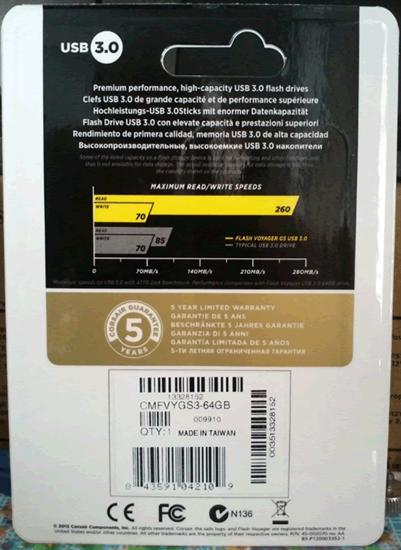
Moving to the rear of the package, again
you will be able to see the overall performance of the Voyager GS, and also the
usual information about the warranty, which for the Voyager GS is a five year
warranty.
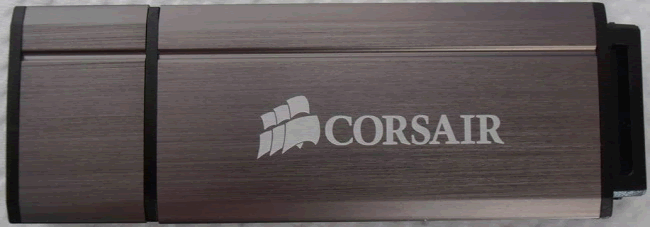
The
top of the drive has a very clean and minimal look that I really like.
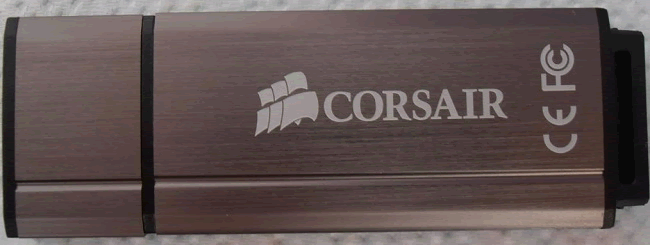
The
same also applies to the rear of the Corsair Voyager GS

A
view of the side of the Voyager GS.

On
the end of the drive you will find a mounting point so that you can carry the
voyager GS with you.
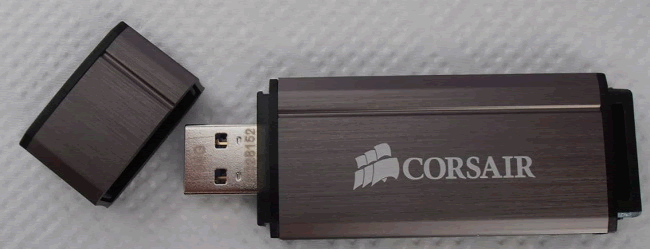
Finally
a picture of the drive opened. Notice that the size of the drive is incised on
the top of the USB port.
Specifications
Let's take a look at the specifications of
the Corsair Voyager GS as they appear on the official website.
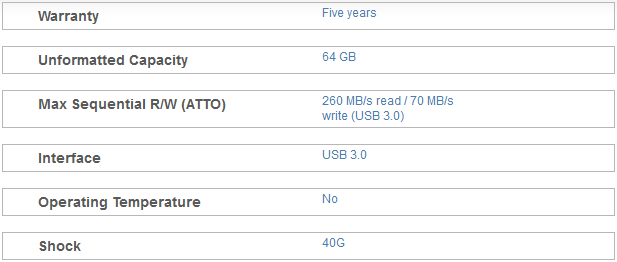
From the above table we can see that the Corsair
Voyager GS can achieve a maximum read speed of 260MB/Sec and a maximum write
speed of 70MB/Sec. Notice that this performance will vary depending on the size
of the flash drive. You can find more info on the Voyager GS here.
Now let's start our tests with the FAT32
file-system...
Test system and test procedures
For this review I will be using a PC with
the following configuration.
PC
- MOTHERBOARD: ASRock extreme4 Z77
- CPU: Intel
2500K @ 4Ghz - CPU COOLER: Corsair A70
- RAM: 16GB
Crucial BallistiX Sports - VGA: Intel
3000HD - HDD1: Corsair
Nova 60GB (OS) - PSU: Corsair
CX 430Watt
Testing methods
I will try to keep my testing methods as
simple as possible and repeatable on various systems. I will run two simple
benchmarks, ATTO and CrystalDiskMark, as both tools can give a
good impression of how the drive performs. I will also run these benchmarks
with the two most common file systems that most users use, the older and more compatible
file system FAT32, and NTFS which is the current standard that
has a lot of benefits over FAT32. There will also be some real life
tests, simple tasks such as copy/paste and also a compatibility test with a
list of various consumer devices that most people will use in or out of their
homes.
FAT32 Tests
So let’s start testing the Corsair Voyager
GS with the FAT32 file-system.
ATTO
My first test will be running ATTO to give
an idea of the sequential performance of the flash drive.

As was promised on the box, the drive was
able to reach its maximum read speed without sweating, however the Corsair
Voyager GS only reached 58MB/Sec when it came to write performance. A nice
result though to start our tests.
CrystalDiskMark

CrystalDiskMark gives a totally different view on the performance of
the drive, especially when it comes to write sequential data. As you can see
from the results the numbers look outstanding with sequential data, also very
impressive are the numbers when it comes to read performance. But we will get the
chance to look at them more closely in the real life test.
You can see how the Corsair Voyager GS compares to some other USB3
flash drives I have tested in the following graph.

Here you can see the read
results,

and here are the write results.
Conclusion
Very impressive read performance for the
Corsair Voyager GS, but the write results are mixed, as we can see from the
CrystalDiskMark results.
Let’s move to the next page and test the
drive with the NTFS file system...
NTFS Tests
Again I will be starting my tests with
ATTO, so let’s see how the Jump Drive performs with the NTFS file-system.
ATTO

With the drive formatted to NTFS, we can
see that it is now is able to reach its maximum write speed with a peak of +80MB/Sec,
also the same applies for the read speed, with a maximum of 270MB/Sec. One
thing that you will notice is a small inconsistency, nothing to worry about,
the drive is able to sustain very good read/write performance, and it’s always
faster than the FAT32 results that I obtained in my first test.
CrystalDiskMark

CrystalDiskMark continues to show
outstanding sequential write performance, but overall there is an improvement
on 4K write speeds. To help you view the difference in performance you can have
a look at the graphs below and see how the Corsair Voyager GS compares against
other drives.

Again
I first present the read speeds,

and then
the write speeds.
Conclusion
We can see that there is an improvement
when the drive uses the NTFS file system, but again the sequential write
results from CrystalDiskMark are very high. Overall the Corsair Voyager GS has excellent
performance.
Let’s move to the next page for some
real world tests ...
Real world tests
Benchmarks are great, as they can give a
very good view of how the drive can perform when it’s pushed to the maximum.
Unfortunately they only tell part of the story, the rest you have to find out
when you're using the drive for everyday tasks.
I've therefore decided to perform three
simple tests that almost everyone does, so that I can get a better view of the
performance of the drive.
For this test I will be moving all the test
files from a RAM disk to the tested USB drive, and vice versa, below you can see
the results.
MP3
I will start my tests by performing a
simple copy of 1.36GB of MP3s. You can see the results for the Corsair Voyager
GS in the graph below.

The Corsair Voyager GS is the winner when
it comes to read performance, but writing is slow.
Pictures
For the next test I will copy 3377 assorted
picture files with a total size of 2.56GB.

The same trend continues in this set of
tests and the Corsair Voyager is again the fastest drive when it comes to read
speeds, but falls behind in write performance.
Movie
I finished my tests by copying an MKV file
and an SRT file. The two files have a total size of 3.46GB

Big files, this is the sweet spot for the
Corsair Voyager GS, as we can see the flash drive didn’t hesitate and gives an
outstanding performance for both read and write speeds.
Small Text files
In one of my previous reviews I was asked by
a user to do a test with proper small files. So I went ahead and put 48128
files in one folder and ran some tests with a few of the latest USB flash
drives. I personally don’t feel that this kind of abuse will happen on daily
basis, but it's a good way to separate the men from the boys.
First here is a screenshot to give you an
idea of the actual size of all these filesand further below you can view the
results from this test.


As we can see from the graph in this
extreme test, it shows that almost every flash drive that I have tested doesn't
like to handle that amount of small files, and the Corsair Voyager is no
exception to this rule.
Compatibility
This is a simple test, in which I will
simply plug the Corsair Voyager GS into various devices, two PCs, a laptop, a
netbook, one mini Hi-Fi, a media player, and two TVs, to check the
compatibility.
Let’s see if the Corsair Voyager GS has any
possible compatibility issues.

No surprises here, the Corsair Voyager GS
worked fine on all of my test equipment.
Performance on older systems.
For those of you that are still using an
older machine, like I do on daily basis, here I will post the results of the Corsair
Voyager GS when it's connected to an older PC that has no native Intel USB3
support. My Gigabyte P55A-UD4 motherboard uses an NEC chipset to provide two
USB3 ports, so let's see how the Corsair Voyager GS performs on this old
system, and maybe you can compare it with the Z77 and see how much performance you
would lose.

It’s clear that there is a difference in performance;
you will lose close to 50MB/Sec on read speed, but only a few MB on write
speed, with the FAT32 file system. Other than that the performance remains very
good.

Again read performance is limited by the
NEC chipset, but write speed isn’t affected that much. Again we see that the
write performance is very high for sequential data is, and this could also
explain why the drive was able to give the outstanding results in the MKV test.
To it's clear that the Corsair Voyager GS
has very good performance on this older system, and in daily use you probably wouldn't
notice any loss of speed.
Anvils Benchmark (100% incompressible)
Below you will find a graph showing the
performance of the Corsair Voyager GS against all the other USB3 flash drives
that I have tested.

We can clearly see that Corsair Voyager GS
is a very fast drive, and even with the write speed limited to 70MB/Sec, has no
problem reaching the second place in the chart when it comes to the total score
it achieves.
Conclusion.
Positive:
- Excellent build quality
- Outstanding read performance.
- Scratch resistant
- Metal chassis
- Fingerprint resistant
Negative:
- Slow write performance.
Summarize:
Quality is something that we have all come
to expect from Corsair, and the Voyager GS Corsair continues this trend. The
Voyager GS has excellent build quality, with a brushed, and scratched resistant
metal chassis, and that is a good thing to start with. But we need one more
ingredient to complete this recipe, and this is also very important, it’s called
performance.
The Corsair Voyager GS has a very
impressive performance, it can reach read speeds of up to 280MB/Sec, and that
makes it one of the fastest USB flash drives that I have tested so far. But I
personally would like to see a higher write speed. You can’t really say that
70MB/Sec is slow, but equally you can’t say that it is fast. The good point is
that the write speed is outstanding when it comes to writing large files.
Also you have a 5 year warranty, and those
five years should be more than enough to last until you upgrade to the next, faster,
Corsair flash drive.
The final sentence is:
“Impressive looks, impressive build
quality, with outstanding read speeds"
For the excellent build quality and also
for the excellent read performance, I give the Corsair Voyager GS the Myce 'Excellent'
award.

















