
|
|
Review: Haswell from a storage perspective |
When Intel introduced Sandy Bridge and the P67/Z68 chipset,
it brought for the first time on the Intel platform, native SATA 6Gbps support.
From an SSD reviewer's perspective, it meant retesting most if not all SSDs
again. A task not taken lightly. Since Sandy Bridge and the P67/Z68 chipset, we
of course have had the Ivy Bridge and the Z77 chipset. They both share the same
architecture, so only some brief retesting was required.
The Sandy Bridge and Ivy Bridge architecture only supports
two native SATA 6Gbps ports, however, they are high performance.
Let's fast forward a couple of years and we now have a new
CPU architecture (Haswell), and a new chipset in the shape of Z87. Z87 supports
up to six native SATA 6Gbps ports, and increased bandwidth to the CPU. Apart
from the obvious increased port count and bandwidth, we also have to consider
the new CPU architecture and the possibility that things have changed
significantly as a reviewer's test platform. Haswell and the Z87 chipset could
give totally different results from that of the older generation of CPUs and
chipsets. This has meant that I have been very busy checking out Haswell and
the Z87 chipset.
Normally I would just do the testing on the quiet, and then
when I felt confident in the results, I would include the new review rig in my
SSD reviews. This time I thought it would be interesting to share the results.
I'm also going to take the opportunity to introduce you all to the FutureMark's
PC Mark 8, which I will be using from now on in my SSD reviews.
The purpose of this article is to compare the performance of
the new Haswell platform with Ivy Bridge, specifically in relation to SATA 6Gbps
performance. There will inevitably be some differences, as clock per clock
Haswell is faster than Ivy Bridge, and the two platforms use different SATA
option ROMS, and drivers. Hopefully the differences are slight, but let's find
out in this article.
My new Haswell SSD review platform.
Motherboard
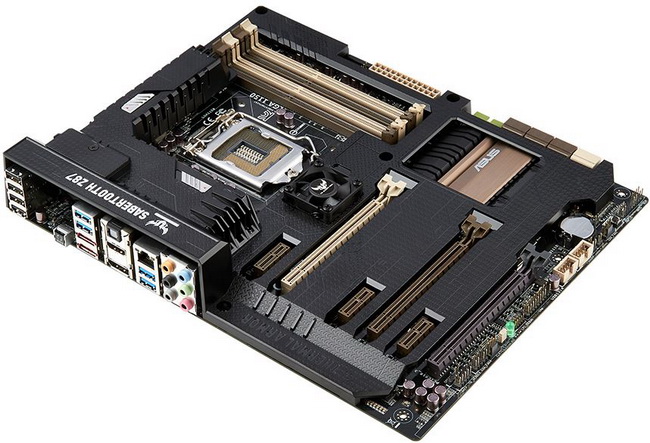
Asus Z87 SaberTooth
I chose the Asus SaberTooth as I wanted the highest possible
quality components, without having to pay for features that I personally would
never use, such as onboard Wi-Fi. I also wanted the full complement of SATA
6Gbps ports, and also the full number of six native USB3 ports with UASP
support. The SaberTooth also has its thermal armour, with a couple of cooling
fans, specifically designed to cool the Voltage Regulation Modules (VRMs), Platform
Controller Hub (PCH), and the SATA controller. This means for the first time I
can make sure that the SATA controller temperature is kept in check during the
testing phase of my SSD reviews.
CPU
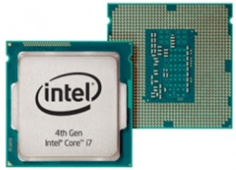
Intel 4th generation Core i7 4770K
The Core i7 4770K is a quad core CPU with Hyper threading,
and an unlocked multiplier. For the purpose of reviewing SSDs, and for that
matter conducting all hardware reviews, the 4770K is run at the stock frequency
of 3.5GHz with Turbo 2 enabled which boosts this frequency to 3.9GHz when
required.
Z87 chipset
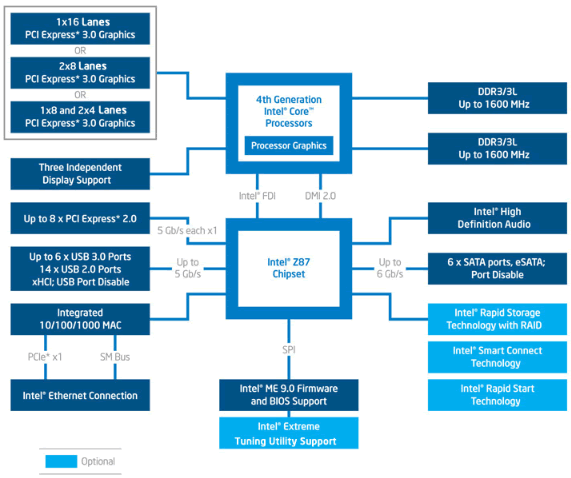
Intel Z87 chipset block diagram
There are 16 PCIe 3 lanes available, directly from the
Haswell CPU. A further 8 PCIe 2 lanes are available from the PCH (Platform
Controller Hub) to drive the integrated peripherals, and external ports. We can
also see that up to 6x native SATA 6Gbps ports are available, which is four
more than was available on the previous Z68/Z77 chipsets.
Test SSD
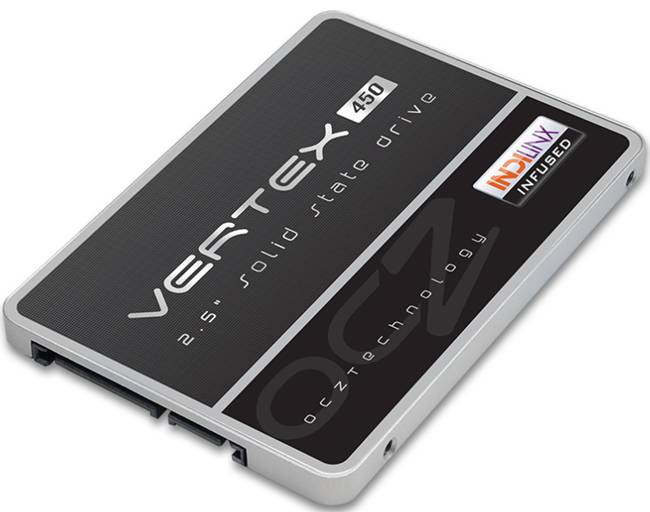
OCZ Vertex 450 - 256GB SSD
The OCZ Vertex 450 was chosen for the tests, as I reviewed
this SSD recently, and the firmware version is unchanged from the original
Vertex 450 SSD review.
Test machine
For this review I will be using a computer with the
following configuration:
Hardware:
- Motherboard: Asus Z87 SaberTooth (Intel Z87 chipset)
- Processor: Intel 4th generation Core i7 4770K
- CPU Cooler: BeQuiet Dark Rock Pro 2.
- RAM: 16GB Samsung Green DDR3 1600MHz (dual channel)
- GFX: Onboard Intel HD 4600
- Sound: Onboard Realtek ALC1150 HD audio controller
- Hard disk OS: OCZ Vector 256GB SSD
- Case: Antec Performance One P280
- PSU: Antec True Power modular 550W
- Display: Dell UltraSharp U2412M 24” widescreen IPS LCD (HDCP
compliant) - Operating System: Windows 8 Professional 64bit
The OCZ Vertex 450 SSD was connected to the Intel native SATA
6Gbps (port 0) on the Z87 motherboard of our review PC and all tests on the drive
were carried out with the drive connected to this port.
AHCI mode was also selected in the UEFI of our test PC, and
all tests were carried out in this mode. The SATA 6Gbps drivers used on our
review PC were the Intel Rapid Storage Technology (RST) Version 12.6.0.1033.
CPU power saving states were disabled for consistency, and
all the tests in this article were conducted with all CPU power saving states
disabled. Note that the Asus Z87 SaberTooth has a feature called 'Dynamic
Storage Accelerator', which disables certain CPU power saving states when SATA
demand is high.
Test applications
To test the performance of the OCZ Vertex 450 SSD, I will be
using the following test applications in this review.
- HD-Tune Pro
- ATTO
- Iometer
- AS SSD
Benchmark - Anvil’s
Storage Utilities - PCMark
8
Test procedures
Whilst I won't be running a full set of tests, I have run
enough to be confident of the results obtained. The results for Ivy Bridge
(Z77), are from my recently published review of the OCZ Vertex 450.
If you wish to view the results from the OCZ Vertex 450 when
tested on the Ivy Bridge Z77 platform, you can do so by viewing the original
review here.
Drive preparation for running the tests
The SSD used in this article was in a clean and fresh state
when the testing period started. From then on, the drive had to rely on its own
NAND cleaning effectiveness for the remainder of the tests.
Where I use graphs in this article to display results, I
will use the following colours to make it easier, for our readers to see which drive
we are reviewing.
 Intel Haswell Z87 platform
 Intel Ivy Bridge Z77 platform
Now let's head to the next page, where I look at some
basic benchmarks...
Synthetic Benchmarks
HD Tune Pro
In this benchmark I am checking sequential reading speed.

OCZ Vertex 450 256GB SSD - Intel Haswell Z87
Let's see how this compares to Intel Ivy Bridge (Z77) in the
table below.

With an average sequential reading speed of 522.9 MB/s, Z87
is marginally faster.
ATTO disk benchmark
ATTO has become a standard tool for measuring the data
throughput of HDD and SSD. It measures the reading and writing performance,
using different file sizes and block sizes.

OCZ Vertex 450 256GB - Intel Haswell Z87
Let's find out how this compares with Ivy Bridge and the Z77
chipset.
ATTO Reading performance

ATTO - Reading performance at various block sizes
The results are pretty near identical.
ATTO Writing performance

ATTO - Writing performance at various block sizes
Haswell and Z87 have a slight advantage at low block sizes,
but the results at higher block sizes are very nearly identical.
AS SSD Benchmark
AS SSD benchmark is a benchmarking tool specifically
designed to test SSDs. The application tests sequential reading and writing
performance, 4K random reading and writing performance.
AS SSD benchmark also tests 4K threaded performance. This is
very exciting, as this test is the first available test that I am aware of,
that simulates how a PC operating system actually works. A modern PC and OS,
such as Windows 7/8 does not just run a single thread at a time, it runs many
threads. The AS SSD benchmark "4K 64Thrd" tests run 64 threads
simultaneously throughout the test. If this result is good, then you can be
pretty sure the drive will perform extremely well as a system drive.
After the tests complete, AS SSD benchmark derives a total
score for the drive being tested. This is based on all aspects of the test
results, and gives an indication of how the drive is performing overall.
Now let’s look at the result from the OCZ Vertex 450 on the
Haswell platform in the form of a screenshot.

OVZ Vertex 450 256GB SSD - Intel Haswell platform

As we can see from the AS SSD test run, the test run on the
Haswell platform provided a slightly superior result.
Anvil’s Storage Utilities
As well as performing SSD endurance tests. Anvil’s Storage
Utilities has a very nice SSD benchmarking application. The SSD benchmark tests
many different aspects of SSD performance, including 4K random at different
queue depths, and also sequential performance, but more importantly than this,
all using real test data.
Another very nice feature of Anvil’s SSD benchmark is the
fact that you can change the compression levels of the test data. The
compression levels of the datasets used for the tests can be varied from 0%
compression right up to 100% compressed data, and there are even a few data
profiles already included, such as database (8%) compression, and also an
application profile (46%) compression, which is designed to simulate real
application data being read and written to the SSD.
Anvil’s Storage Utilities is still in beta at the moment,
but the application is currently solid enough to use in this article, and I
have already verified the results obtained using an SATA analyser.
I will be testing two different compression profiles, which
are as follows.
- 0 fill (100% compressible data)
- 100% (incompressible data)
So let’s begin the tests.
0 Fill

OCZ Vertex 450 256GB SSD - Intel Haswell platform

This time, Ivy Bridge and the Z77 chipset have a slight
advantage.
100% Incompressible

OCZ Vertex 450 256GB SSD - Intel Haswell platform

Once again, Intel Z77 is marginally faster.
Summary:
It's pretty much swings and roundabouts here. In three of
the five tests carried out, the Intel Haswell platform had the slight edge, but
the results were very close in most cases.
Intel Haswell Z87 RAID 0 performance
With six native SATA 6Gbps ports available on the Haswell Z87
platform, and all of these ports available for building large (by consumer
standards) RAID arrays. I thought it would be interesting to find out how much
bandwidth is actually available for the RAID array.
Before testing the amount of bandwidth available from the
six native SATA 6Gbps ports, I had already done some rough calculations, based
on the DMI 2 and FDI frequency and architecture. Without overheads, I had
calculated that there would be around 2.1GB per second bandwidth under optimum
conditions. What I didn't know was how this would translate into the real world
after overheads were taken into consideration.
With this sort of bandwidth in mind, four SSDs with read and
write speeds of around 520MB/s would be enough to test my calculations. But I
decided to push things further by creating a five SSD RAID 0 array.
Unfortunately, I did not have five identical SSDs to build
this array. I knew that five different SSDs should be fine for testing
sequential performance, but five different SSDs would for sure not allow small
file random file scaling simply because they all have varying reading and
writing access times, and this would have a severe impact on RAID 0 scaling,
where small random files were concerned.
I will however show you the small file random results, but
do keep in mind that they are not in slightest bit representative of what you
can expect from five identical SSDs in a RAID 0 array on the Intel Haswell
platform. The sequential tests from ATTO, will however be representative of the
total bandwidth available from the six native SATA 6Gbps when a large consumer
grade RAID 0 array is built on this platform.

5 SSD RAID 0 array - Intel Haswell Z87 platform
ATTO: 5 SSD RAID 0 array - Intel Haswell platform

Reading speeds top out at nearly 1.66GB/s, and writing
speeds top out at nearly 1.33GB/s.
Anvil's: 5 SSD RAID 0 array - Intel Haswell Z87 platform

Sequential speeds are impressive, however, as I suspected,
using five different SSDs to build the RAID 0 array would have a large impact
on scaling, and this is certainly how things turned out with small file random
performance, which didn't really scale at all.
Let's head to the next page for our IOMeter test
results.....
I/O Performance
There is little point of having an SSD drive that has
blazing sustained reading and writing speeds, if the drive can't handle reading
and writing of small random files. If you intend to use your new SSD drive to
store and run your operating system, then the drive must be able to cope with
the many small random files that Windows will write to the drive continually.
So I feel it is very important to test how many of these random files that a
drive can handle in one second. I believe that anything over 1,000 I/O’s per
second would be enough for most users running a consumer grade mainstream PC,
and should provide a smooth running system. But obviously, the more I/O's that
a drive can handle, the faster the drive will feel and leave more headroom for
those huge multitasking sessions that users sometimes engage in.
IOMeter is probably the most versatile of all the synthetic
benchmarks. Its ability to be configured to generate a multitude of different
I/O traffic is unmatched. Another great feature of IOMeter, is the capability
to test any storage metric that you can think of, providing you know how to
configure the assignments. The reviewer also has complete control over things
like queue depth, block size, whether the traffic is random, sequential, or
even a mixture of both.
Partition alignment and sector boundaries
Windows 8, Windows 7, and Windows Vista will automatically
align a partition to 4k boundaries during partition creation, Windows XP won’t.
It is imperative that an SSD’s partition is aligned. Windows XP is also
restricted to sector boundaries, while Windows 7 and 8 will use 4k boundaries
if they can. The Seagate 600 series is 4k boundary aware, and will use these
boundaries if possible. Of course it will also remap LBAs for compatibility
with the sector boundaries so that the drive can be used with Windows XP.
IOMeter allows us to set the sector boundaries for
conducting the tests, and I have therefore set the sector boundaries at 4K,
which means the IOMeter tests are valid for Windows 7, Windows 8 and Windows
Vista users. XP users will not be able to obtain such results.
All the IOMeter tests create a 10GB data set on the target
drive, and each test is run for a duration of 3 minutes.
IOMeter 4K random write test with repeating data.
The first test involves creating continual 4KB random files
on the target drive with IOMeter. I use a 4KB file size, as it is believed that
Windows will create and modify many of this size of file constantly in the
background during a typical Windows session. It is said that most 4K random
writes take place at a queue depth of only one, and I have been requested to
include this test in my reviews.
Queue depth 1

OCZ Vertex 450 256GB SSD – Intel Haswell platform

The Intel Ivy Bridge (Z77) platform is quite a bit faster
than the Haswell platform in this test.
Our next test involves creating continual 4KB random files
on the target drive with IOMeter. I use a 4KB file size, as it is believed that
Windows will create and modify many of this size of file constantly in the
background during a typical Windows session. I will use queue depths of 4 and
32 for these tests.
Queue depth 4

OCZ Vertex 450 256GB SSD - Intel Haswell platform

At a queue depth of 4, the Intel Haswell platform is quite a
bit faster than Z77.
Queue depth 32

OCZ Vertex 450 256GB SSD - Intel Haswell platform

At a queue depth of 32, Z77 is marginally faster than Z87.
IOMeter 4K random read test.
If there are many 4k files created, then that must also mean
that many 4k files need to be read. This test measures 4k reading performance.
It is said that most 4K random reads take place at a queue
depth of only one, and readers have requested that I include this test in my
reviews.
Queue depth 1

OCZ Vertex 450 256GB SSD - Intel Haswell platform

At a queue depth of one, the Intel Z77 platform is slightly
faster than the Intel Haswell platform.
Queue depth 4

OCZ Vertex 450 256GB SSD - Intel Haswell platform

Once again, the Intel Z77 platform is slightly faster.
Queue depth 32

OCZ Vertex 450 256GB SSD - Intel Haswell platform

At a queue depth of 32, the Intel Z77 platform is slightly
faster than Haswell.
IOMeter 512KB sequential write test with repeating data.
Sequential writing performance is also very important; so in
this test sequential writing performance is measured.

OCZ Vertex 450 256GB SSD - Intel Haswell platform

This time, the Intel Haswell platform is faster than the
older generation Ivy Bridge Z77 platform.
IOMeter 512KB sequential read test.
This test measures 512k sequential reading performance.

OCZ Vertex 450 256GB SSD – Intel Haswell platform

This time the Intel Haswell platform is significantly faster
than the Ivy Bridge platform.
IOMeter Workstation simulation (outstanding I/Os = 64).
When running applications you will find that there is a
mixture of small random files, and larger sequential files, being created and
read. Not only that, it isn’t just one file at a time. In this test I measure a
simulated workstation pattern, with a queue depth of 64 (threaded).

OCZ Vertex 450 256GB SSD – Intel Haswell platform

Once again, the Intel Haswell platform is the faster of the
two.
Summary
The IOMeter results are interesting for a number of reasons.
It is quite clear that in most cases, small file reading performance is
superior from the older generation Ivy Bridge Z77 platform. I would attribute
this to driver maturity in the older platform. Sequential reading and writing
performance is quite a bit faster in the new generation Haswell platform, and
indeed the 'workstation simulation' shows the same trend.
Again this could be attributed to the SATA driver, or
Haswell's superior IPC performance.
Now let's head to the next page for some real world tests....
It has become clear that simply conducting endless
benchmarks on SSD drives is pointless. Real users may run a few benchmarks when
they first fit their SSD drive, but most users just want a drive that performs
well in the real world. They want their drive to work "out of the
box" and run fast and smoothly.
Most of the latest SSD drives can deliver very fast
sustained reading and writing speeds, but these alone tell you very little
about how the drive will perform in the real world.
If you intend to use your SSD as your primary system drive,
with an operating system and applications installed and running from the drive,
real world performance becomes much more important than just fast sequential
read and write speeds.
Real world copy
tests
I will now conduct a few real world copy tests. These tests
simulate what real people do with their drives. I will be conducting writing
tests, using a large single file, and I will then round off the tests by
copying a folder of MP3 audio files, and also a folder of JPG pictures.
For the reading drive, I had to make sure that it was fast
enough not to be holding back the target drive. For the reading drive I have therefore
chosen the OCZ RevoDrive X2 PCIe SSD as the OCZ RevoDrive X2 is capable of
reading speeds of 740MB/s, and also sits on the low latency PCIe x16 system
bus.
Write a folder of JPG picture files.
For this test I copied a folder of JPG picture files from
the OCZ RevoDrive X2 SSD to the OCZ Vertex 450 256GB SSD. The folder contained
7861 JPG pictures, with a total capacity of 8410.3MB.

OCZ Vertex 450 256GB - Intel Haswell platform

The Intel Haswell platform was slightly quicker at copying
the folder of JPG pictures.
Write a folder of MP3 audio files.
For this test I copied a folder of MP3 audio files from our
OCZ RevoDrive X2 SSD to the OCZ Vertex 450 256GB SSD. The folder contained 1691
MP3 audio files, with a total capacity of 9176.5MB.

OCZ Vertex 450 256GB - Intel Haswell platform

The Intel Haswell platform is once again faster, but only
marginally.
Single drive copy tests
These tests are to simulate a single drive in a PC or
laptop. In other words, I will copy a series of files from one folder on the
tested drive to another folder on the same drive. This means the drive is simultaneously
reading and writing during the tests. I also want to make this a realistic test,
so I have used a folder of MP3 music files, and then repeated the test with a
folder of JPG picture files.
Single drive copy tests – 1,691 MP3 song files (9176.5MB total)

OCZ Vertex 450 256GB - Intel Haswell platform

With this test the SSD has to read and write data, and this
time the Intel Ivy Bridge Z77 platform is marginally quicker.
Single drive copy tests – 7,861 JPEG picture files (8410.3MB total)

OCZ Vertex 450 256GB - Intel Haswell platform

In the final copy test, the Intel Haswell platform is
marginally faster.
Now let's head to the next page where I introduce PC Mark
8.....
PC Mark 8 - HDD Suite
Here at Myce.wiki, we only recently introduced PCMark Vantage
into our SSD testing. PCMark Vantage is a good test, but is now somewhat
outdated in the applications that it tests, even to the extent of including a
test trace on how Windows Vista booted. We could have course have opted for the
newer PCMark 7, but I personally had issues with the way it ran the HDD tests.
We have built quite a close relationship with FutureMark
software, the authors of the PCMark PC benchmarking software that we use in our
tests. I decided I would use PCMark Vantage as stopgap measure until the more
up-to-date PCMark 8 benchmarking suite became available. I'm pleased to say
that PCMark 8 is now available, and it gives me great pleasure to introduce you
all to the results obtained by this new 'real world' benchmarking suite.
I figured that now was the best time to make the switch to
PCMark 8. Throughout this article, I have been validating my new review rig
based on the new Intel Haswell Z87 platform and presenting the results. Since I
had changed the review rig significantly, and to start using PCMark 8 I would
have to rerun the HDD suite tests on as many SSDs as possible. It made sense to
start afresh with PCMark 8, on the new Intel Haswell platform.
I will describe the basic way that each test is carried out,
above the graph for each test.
PC Mark 8 HDD suite results

OCZ Vertex 450 256GB - Intel Haswell platform SSD results
Now let’s look at the individual PC Mark 8 HDD suite scores,
in the form of graphs.
PC Mark 8 HDD suite: World of Warcraft


The first thing that is very noticeable is that all the
tested SSDs are remarkably close performance wise when loading this game.
PC Mark 8 HDD suite: Battlefield 3


Once again, the results are very close between all the
competing SSDs.
PC Mark 8 HDD suite: Adobe Photoshop light


Yet again the results are all very close together, with the
SSDs with higher writing performance out in front.
PC Mark 8 HDD suite: Adobe Photoshop heavy


Again, there isn't a large difference between any of the
competing SSDs, and as before the SSDs with the superior writing performance
prove to be fastest.
PC Mark 8 HDD suite: Adobe InDesign


Once again, the SSDs with the higher writing performance
head the table.
PC Mark 8 HDD suite: Adobe After Effects


There is virtually no difference between the tested SSDs.
PC Mark 8 HDD suite: Adobe Illustrator


Once again, there is hardly any difference between the
tested SSDs.
PC Mark 8 HDD suite: Microsoft Word


With only 0.1 seconds between the fastest and the slowest
SSD in this test, I would doubt anyone could tell the difference.
PC Mark 8 HDD suite: Microsoft Excel


Once again, there is only 0.1 seconds between the slowest
and the fastest SSD in this test.
PC Mark 8 HDD suite: Microsoft PowerPoint


Once again, the results obtained from our test SSDs are
almost identical.
PC Mark 8 HDD suite: Overall Score
PC Mark 8 sums all the individual times taken to run each
storage benchmark, then comes up with an overall score for each of the tested
SSDs.

As we can see from the above graph, there isn't a large
margin between any of the tested SSDs.
Summary
You may well ask, if the scores are so close between the
tested SSDs, then what is the point of running PC Mark 8 storage benchmark?
Basically, most of these individual tests are very low
demand as far as storage is concerned. More or less all the traces are
lightweight. But hang on a minute, this is how real applications work, and I
and many other reviewers have been saying for years that when we have
lightweight storage traces, it becomes almost impossible to tell SSDs apart
from a performance perspective. We now have a tool that can demonstrate this to
very good effect.
It's not until we start to push SSDs very hard that the
performance differences between SSDs start to become clearer, and for that we
need much heavier workloads, such as the tests run in the Myce Reality Suite.
PC Mark 8 is still very useful, as I'm quite sure that most of you will use at
least a couple of the applications used in these tests, and now you will be
able to compare one SSD to another.
This concludes the article. To read the final thoughts
and conclusion, click the link below....
Final thoughts and the conclusion
Intel Haswell Z87 from a storage perspective is pretty much
what I expected. With Haswell being clock for clock faster than the previous
Ivy Bridge generation, it is very slightly faster than Ivy Bridge and the
Z68/Z77 chipset. I am however happy to report that the difference is not a
large one, and certainly not large enough to cause me any concern when
publishing results that may initially contain results from the previous
generation Ivy Bridge platform.
What I will have to keep in mind is that Haswell is new, so we
should expect to see improvements in performance as the SATA option ROMS are
updated, and as the SATA drivers mature.
To sum up, this is what I would say.
Z87 RAID 0 performance, whilst a fairly large improvement
over Z77 and the Ivy Bridge platform, is a little disappointing. I guess it was
only a pipe dream to expect full bandwidth for all six ports when used in a
RAID 0 array, which would have resulted in around 3GB/s transfer rates.
However, 1.66GB/s is rather disappointing in my book.
As far as SATA storage performance is concerned on the Haswell
Z87 platform, the four extra native SATA 6Gbps do make a huge difference, if
you can utilise them by connecting fast SSDs to these ports, where moving data
around the connected SSDs is incredibly fast. In general, Haswell is a very
powerful processor, and the onboard HD 4600 Integrated Graphics Processor Unit
(iGPU) is pretty impressive. Adding to this, the new Z87 chipset with its six
native SATA 6Gbps ports and six native USB3 ports, is certainly a step up from
Ivy Bridge and the Z68/Z77 chipsets.
Thanks to:
|
|
EFD Software for |
|
|
Alex |
|
|
|
|
|
FutureMark for |


You may comment on this article below.















