
 |
Review: Intel P67, Sandy Bridge, and Native SATA |
The Intel Sandy Bridge processor architecture has been on
the horizon for quite some time, and it seems like ages ago that it was first
rumoured. It was known from the outset that the new CPU would have a more
advanced architecture than previous Intel CPU’s, it would be based on a 32nm
fabrication process, be more powerful, and at the same time consume less power.
It would also host a much more capable IGP, and much more advanced multimedia
features.
It was back in July that these rumours became a reality,
when the first engineering samples of the new processor began to land on tester’s
benches. For me, I have to admit I was rather disappointed, not with the
processor itself, but the fact that the Sandy Bridge parts would require a new
processor socket, and therefore a new motherboard and chipset, the 6 series
chipset to be exact. However, once details started to emerge that the mainstream
high performance P67 chipset would also host a brand new native 6Gbps SATA host
controller; I started to become much more optimistic about the new platform.
P67 is Intel’s second foray into a 2 chip solution, the P55
being the first chipset to do away with the North Bridge chip, and host the
memory controller and the x16 PCI Express controller in the CPU package itself,
with the South Bridge being renamed to PCH (Platform Controller Hub).
In most parts, P55 was a nice mainstream solution, but it most certainly had
its limitations. With only 16 PCIe2 lanes for graphics, and a further 8 PCIe2
lanes for the PCH, bandwidth was bound to become an issue for high end two card
graphic solutions. It was further compounded by the fact that although P55 had
PCIe2, these lanes were half duplex, meaning although a single lane had 5Gbps of
concurrent bandwidth, in reality it was half of this in the real world
(2.5Gbps), as the bandwidth was shared between send and receive.
Sandy Bridge and P67 is altogether different. It still has
16 PCIe2 lanes for graphics and 8 PCIe2 lanes for the PCH at 5Gbps, but this
time these run at full duplex, which means there is actually 10Gbps of
concurrent bandwidth.
In this article I will be taking a brief look at the Sandy
Bridge platform itself, and a more in depth look at the P67 PCH in regards to
SATA storage performance.
STOP PRESS
This article had been completed before the P67 SATA flaw
had been announced
by Intel. However, after careful consideration, I decided to publish the
article, as I think from the obtained results, there is no evidence of the
review system used in this article having been affected by the flaw in the P67
chipset.
Let’s head to the next page where we will take a closer
look at the Sandy Bridge platform.....
P67 block diagram
Let’s first take a look at the P67 block diagram
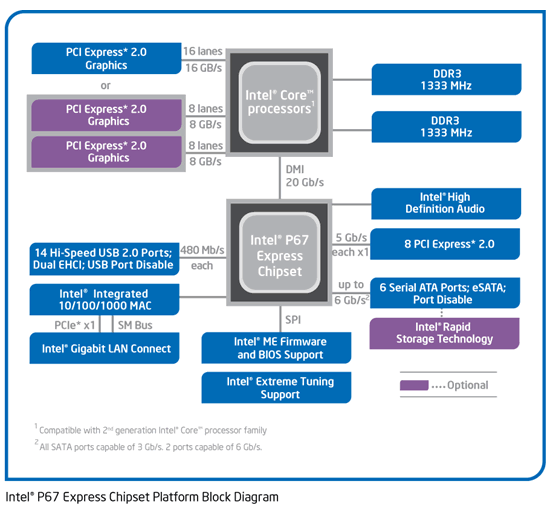
We can see that the P67 platform is a two chip solution,
comprising of the CPU itself and the PCH (Platform Controller Hub). The memory
controller (dual channel), and the PCIe2 x16 (primary PCI Express controller)
are integrated into the CPU package itself, and there is also an option to have
two sockets occupied running at x8/x8. Maximum bandwidth for the primary PCIe2
x16 lanes is 16GB/s (full duplex).
The rest of the information can be clearly seen in the
diagram, so I will leave to you to scan over that.
One thing you will notice is, there is no provision for PCI,
IDE, floppy, printer port, serial port, Firewire, or game port from the chipset
itself, these features can be added by the motherboard manufacturer if desired.
Also note that USB3 or is not natively supported from the
P67 chipset, this is left to a third party USB3 controller, in most parts by
NEC, which even Intel are fitting to most of their own P67 motherboards.
Asus P8P67 Deluxe, P67 motherboard

Asus P8P67 Deluxe
LGA1155 CPU socket
The Asus P8P67 Deluxe is a mid to high end feature rich
mainstream P67 motherboard. If we look at the main components of the board, we
can clearly see the LGA1155 CPU socket, this socket is only compatible with the
“second generation Core i” series of CPU’s, it is not backward compatible with
the “series one Core i” processor family. Don’t try and fit the older
generation Core i in this socket, it will physically fit but you will kill the
CPU and motherboard if you power the system up. You have been warned.
DDR3 memory slots
P67 motherboards support up to 4 DDR3 memory modules with
speeds ranging from 1333MHz all the way up to 2133MHz, and a total of 32GB for
RAM. DIMM voltage is officially 1.5 volts max, but 1.65 volt DDR3 memory can be
used on most P67 motherboards without any problems.
Expansion slots
The official P67 specification requires one x16 PCIe2 slot
for graphics cards, but most boards will come with at least 2 x16 PCIe2
sockets, and some, like our Asus P8P67 Deluxe has a third x16 PCIe2 socket in
this instance running at x4.
When purchasing a P67 motherboard, you should carefully
check the speeds that these PCIe2 x16 slots will run at. The main x16 socket
with a single graphics card will always run at x16, but adding a second card in
ATi Crossfire, or NVidia SLI is not always as straightforward as you may think
with P67.
Very cheap P67 boards tend to have a PCIe2 implementation
something like the following.
- Single PCIe2 graphics card mounted in the first x16 socket
will run at x16. - Two PCIe2 graphic cards mounted in socket one and two in
an SLI or Crossfire configuration will run at x8/x4.
The more up market boards tend to have a configuration
something like the following.
- Single PCIe2 graphic card mounted in the first x16 socket
will run at x16 - Two PCIe2 graphic cards mounted in socket one and two in
an SLI or Crossfire configuration will run at x8/x8. - Three PCIe2 graphics cards mounted in “tri” configuration
will result in x8/x8/x1, but can be made to run at x8/x8/x4 by forcing the
third socket to run at x4, unfortunately this will disable other ports on
the motherboard.
The top of the range boards, such as our Asus P8P67 Deluxe,
may have an extra chip, the PLX Technology PEX8608 PCIe2 x8 switching chip,
which will allow a configuration like the following.
- Single PCIe2 graphic card mounted in the first x16 socket
will run at x16 - Two PCIe2 graphic cards mounted in socket one and two in
an SLI or Crossfire configuration will run at x8/x8. - Three PCIe2 graphics cards mounted in “tri” configuration
will result in x8/x8/x4, and this is achieved without disabling other
ports on the motherboard.
You can see the PLX Technology PEX8608 PCIe2 switching chip
located near the centre of our screenshot, just left of the first PCIe2 x16
slot.
SATA ports
Most P67 motherboards will have 6 SATA ports with two of them
being SATA 6Gbps supported natively from the P67 PCH. There will also be four
SATA 3Gbps ports; once again they are natively supported from the P67 chipset.
In the case of our Asus P8P67 Deluxe, and for that matter, all Asus P67
motherboards, they come pre fitted with two extra SATA 6Gbps ports, this time
driven by a Marvell 91xx SATA 6Gbps chip.
USB3
As I already mentioned, most P67 motherboards will support
USB3 with at least two ports. In the case of the Asus P8P67 Deluxe, there is
also a second NEC USB3 controller, with a header which connects to the supplied
USB3 front panel box. The box is designed to fit into an external 3.5 inch bay,
such as one used for Floppy disk drives.
As I mentioned before, the Asus P8P67 Deluxe is a feature
rich board, so let’s see what it has to offer.

Asus P8P67 Deluxe
overview

Asus P8P67 Deluxe I/O
panel
The overview screenshot speaks for itself, so let’s see what
is fitted to the I/O panel.
- PS2 Mouse and keyboard port.
- 8x USB2 ports.
- 2x USB3 ports.
- 2x eSATA ports, one of them powered.
- 2x LAN ports, with the one above the USB3 ports, being
driven by an Intel NIC. The second one is powered by a Realtech NIC. - Digital audio coaxial output, plus a digital audio optical
output. - 1x Bluetooth radio.
- 1x Clear CMOS button.
- 6 port audio output jacks.
The UEFI firmware
P67 and Sandy Bridge has brought about a change that is long
overdue. Instead of the motherboard having a legacy BIOS for setting up the
board, P67 and Sandy Bridge uses a UEFI (Unified Extendable Firmware Interface)
point and click method of setting up the board and its peripherals.

It most certainly looks different from the old style BIOS,
but once you get used to working with it, you certainly won’t want to go back
to the old style legacy BIOS.
A few interesting features of the Asus P8P67 Deluxe
I have highlighted a few of the more interesting features of
the Asus P8P67 Deluxe motherboard in the screenshot below.

The P67 Platform Controller Hub (PCH) uses the code name
“Cougar Point”, and most if not all P67 motherboards will have a 6 port SATA
interface, with 4 ports being SATA 3Gbps, and the remaining 2 being SATA 6Gbps
ports.
We can also see the brand new Marvell 88SE9130 SATA 6Gbps
controller.
One of the more interesting features of the Asus P8P67
Deluxe in the inclusion of the PLX Technology 8 lane 8 port PCI Express
switching chip, designated PEX8608. This chip ensures that the third PCIe x16
socket can run at x4 without disabling other ports and x1 PCIe sockets.
If you are wondering what the entries in the list that are
entitled Pericom PI7C9X130, and Silicon Image SiI 3124, they are the hardware
PCIe interface of the OCZ RevoDrive X2 SSD.
Simple overclocking
With a just a couple of mouse clicks, the Asus P8P67 Deluxe
was able to jump straight to 4.5 GHz, which is a 32% over clock. This was done
simply by increasing the CPU multiplier in the UEFI to 45 from its default 34.

Memory bandwidth and latency
Anyone worrying about memory bandwidth on P67 has no need to
worry with the fact that P67 only supports dual channel memory. Memory
bandwidth is insane and latency commendably low.

Sandy Bridge and P67 – Brief benchmark results
CineBench R11.5 64 bit – CPU
Note:
For this test I also ran CineBench on my P55 system
overclocked to 3.8GHz, which was the maximum overclock this system could
achieve for everyday use.
On the Sandy Bridge system, the processor is overclocked to
4.5GHz, although the test states the system is running at the default 3.4GHz.

CineBench R11.5 64bit – OpenGL

It’s pretty impressive stuff considering a £250 2600K is up
against some processors costing 2 – 3 times the price of the 2600K.
Right then, I think I have said enough about the platform
itself, and here at MyCE we don’t specialise in motherboards and CPU’s. There
are many reviews of the platform itself on many other sites, so now let’s get
to the point of this article.
The aim of the article is to find out how P67 performs
regarding storage. If you remember back a few weeks when I reviewed the Crucial
RealSSD C300 SSD, I was not happy with the way that the Marvell SATA 6Gbps
controller had performed, and I also hinted that I had a feeling that we would
have to wait for native SATA 6Gbps support from within the chipset before we
would really have an idea how SATA 6Gbps would perform.
Well now we have Intel P67, so let’s find out if P67 and its
native SATA 6Gbps solution are better than the Marvell solution that has, and
still is the only solution for P55 and X58 chipsets.
Let’s head to the next page for details on our review PC
and the methods we will be using to test.....
Test machine
For this review we will be using a computer with the
following configuration:
Hardware:
- Motherboard: Asus P8P67 Deluxe (Intel P67 chipset)
- Processor: Intel 2nd generation Core i7 2600K
- RAM: 4GB GEIL Ultra Line DDR3 2133MHz (dual channel)
- GFX: Sapphire Vapor X HD 5770 (1024 Megabytes GDDR5 HDCP compliant)
- Sound: Onboard Realtek ALC889 HD audio controller
- Hard disk OS: OCZ RevoDrive X2 240GB PCIe SSD
- Hard disk storage: 1X 500GB Samsung Spinpoint F3, and 1X 1TB
Samsung Spinpoint F1. - Case: Antec 900
- PSU: Enermax Liberty 620W
- Display: Samsung Syncmaster 245B 24” widescreen LCD (HDCP
compliant) - Operating System: Windows 7 Home Premium 64bit
The Asus P8P67 Deluxe has two SATA 6Gbps controllers.
- Intel 6 series native AHCI SATA 6Gbps (2 ports P67 PCH)
- Marvell 9130 AHCI SATA 6Gbps (2 ports)
SATA 3Gbps is provided natively by the P67 PCH, and we will
also be testing how SATA 3Gbps performs on the P67 platform.
For these tests we will be using the following SSDs
SATA 6Gbps
- Crucial RealSSD C300 128GB
SATA 3Gbps
- OCZ Vertex 2 100GB
For SATA 6Gbps we will test both the native Intel SATA 6Gbps
solution, and I will also conduct the exact same tests with the RealSSD C300
connected to the Marvell 9130 SATA 6Gbps controller. I will also compare the
results with the ones achieved by the P55 SATA solution.
For SATA 3Gbps, the OCZ Vertex 2 was connected to the first
SATA 3Gbps port to conduct the tests, and I will also be comparing the obtained
results with those from the P55 SATA solution. The Vertex 2 was not tested on
SATA 6Gbps, as there was little point of doing so as the Vertex 2 has a SATA
3Gbps host controller, so it can never run faster than SATA 3Gbps.
For all tests carried out in this review, “Hot swapping” was
enabled in the UEFI.
HINT for users
On at least Asus P67 boards, “Hot swapping” is disabled by
default. If Hot Swapping is disabled then you will have no NCQ (Native Command
Queuing), and this is very likely going to hit SSD performance quite hard. So
my advice would be, go into the UEFI SATA options of your P67 motherboard and
enable hot swapping, and just watch the performance go through the roof for
SSDs.
Test applications
To test the performance of the P67 SATA solution, we will be
using the following test applications in this review.
- ATTO
- Iometer
- AS SSD
Benchmark - MyCE Reality Suite
Test procedures
We will start off our testing procedures explanation by
stating that we did not run a full set of benchmarks for this article, but more
than enough to see how the new P67 SATA solution is performing.
Test drives
- OCZ Vertex 2 100GB
- Crucial RealSSD C300 128GB
Drive preparation for running the tests
All the drives used in this review were in a "used
state", and no special cleaning or preparation was done for the two
SSDs in this test. The OCZ Vertex 2 has been in heavy use for the last 8
months, and the Crucial RealSSD C300 has also had some heavy use in the last
couple of months.
I would like to state right now, that this article is not
about which is the fastest SSD, we have already covered this in the reviews of
these two SSDs. The article is only testing the performance of the P67 6Gbps/3Gbps
SATA solution in comparison to what was available with the P55 chipset and the
third party SATA 6Gbps solution provided by the Marvell 9128 SATA 6Gbps
controller.
Now let's head to the next page, where we look at some
basic benchmarks...
Synthetic Benchmarks
ATTO disk benchmark
ATTO has become a standard tool for measuring the data
throughput of HDD and SSD. It measures the performance of reading and writing,
using different file sizes and block sizes.
OCZ Vertex 2

Intel P67 SATA 3Gbps

Intel P55 SATA 3Gbps
With small file read and writes, the P67 solution is
considerable faster than the P55 solution. In larger files, the P55 is bit
faster than P67.
Crucial RealSSD C300

Intel P67 SATA 6Gbps

Marvell 9130 (P67 motherboard) SATA 6Gbps

Marvell 9128 (P55 motherboard) SATA 6Gbps
It’s a similar story with SATA 6Gbps. Intel P67 SATA 6Gbps
is a good deal faster at handling small files, with the Marvell 9128 on the P55
being slightly faster with large files.
AS SSD Benchmark
AS SSD benchmark is a benchmarking tool specifically
designed to test SSDs. The application tests sequential reading and writing
performance, 4K random reading and writing performance.
AS SSD benchmark also tests 4K threaded performance. This is
very exciting, as this test is the first available test that I am aware of,
that simulates how a PC operating system actually works. A modern PC and OS,
such as Windows 7 does not just run a single thread at a time, it runs many
threads. The AS SSD benchmark "4K 64Thrd" tests run 64 threads
simultaneously throughout the test. If this result is good, then you can be
pretty sure the drive will perform extremely well as a system drive.
After the tests complete, AS SSD benchmark derives a total
score for the drive being tested. This is based on all aspects of the test
results, and gives an indication of how the drive is performing overall.
OCZ Vertex 2

Intel P67 SATA 3Gbps

Intel P55 SATA 3Gbps
This test is too close to call, P55 wins at reads, and P67
wins for writes, and has a slightly higher overall score.
Crucial RealSSD C300

Intel P67 SATA 6Gbps

Marvell 9130 (P67 motherboard) SATA 6Gbps

Marvell 9128 (P55 motherboard) SATA 6Gbps
It’s really no contest, the Intel P67 native SATA 6Gbps
solution is just miles ahead of both solutions from Marvell, with the new 9130
Marvell controller being even slower than the old 9128 controller.
Summary:
What we can see quite clearly here with the synthetic
benchmarks, is that the Intel P67 native SATA 6Gbps solution is far superior to
the Marvell 91xx SATA 6Gbps solution.
SATA 3Gbps was always strong on the P55 chipset, however,
the P67 SATA 3Gbps solution is more than a match for P55. It is faster at
handling small files, and this should see it pull further ahead in our more
demanding tests which we will start on the next page.
Let's head to the next page for our IOMeter test
results.....
I/O Performance
There is little point of having an SSD drive that has
blazing sustained reading and writing speeds, if the drive can't handle reading
and writing of small random files. If you intend to use your new SSD drive to
store and run your operating system, then the drive must be able to cope with
the many small random files that Windows will write to the drive continually.
So we feel it is very important to test how many of these random files that a
drive can handle in one second. I believe that anything over 1000 I/O’s per
second would be enough for most users running a consumer grade mainstream PC,
and should provide a smooth running system. But obviously, the more I/O's that
a drive can handle, the faster the drive will feel and leave more headroom for
those huge multitasking sessions that users sometimes engage in.
The things that we will look at are the total I/O per second
and total MB/s.
Partition alignment and sector boundaries
Windows 7 will automatically align a partition during
partition creation, Windows XP won’t. It is imperative that an SSD’s partition
is aligned. Windows XP is also restricted to sector boundaries, while Windows 7
will use 4k boundaries if it can. The RealSSD C300 is 4k boundary aware, and will
use these boundaries when it can. Of course it will also remap LBA’s for
compatibility with the sector boundaries so the drive can be used with Windows
XP.
IOMeter allows us to set the sector boundaries for conducting
the tests, and we have therefore set the sector boundaries at 4K, which means
the IOMeter tests are valid for Windows 7 and Windows Vista users. XP users
will not be able to obtain such results.
Where we use graphs in this article to display results, we
will use the following colours to make it easier, for our readers to see which
drive we are reviewing.
 Intel
Intel
native P67 SATA 6Gbps (Intel P67 motherboard)
 Marvell
9130 SATA 6Gbps (Intel P67 motherboard)
 Intel P67
SATA 3Gbps (Intel P67 motherboard)
 Marvell
9128 SATA 6Gbps (Intel P55 motherboard)
 Intel P55
SATA 3Gbps (Intel P55 motherboard)
IOMeter 4K random (outstanding I/Os = 4, 32) write test.
Our first test involves creating continual 4KB random files
on the target drive with IOMeter. We use a 4KB file size, as it is believed
that Windows will create and modify many of this size of file constantly in the
background during a typical Windows session. We will use queue depths of 4 and
32 for these tests on the Crucial RealSSD C300, and the OCZ Vertex 2 SSD.
Let me remind you, we are not testing the fastest SSD here
in any particular test, we are testing the performance of the chipsets and SATA
controllers.
MB/s

Intel P55 was always a strong SATA 3Gbps performer, but we
can clearly see when writing small random files, that the P67 SATA 3Gbps is
even stronger, with nearly a 20MB/s advantage over P55 SATA 3Gbps.
Intel P67 SATA 6Gbps has also proved to be much better at
writing small random files than the Marvell 91xx SATA 6Gbps controllers, with
the Crucial RealSSD C300 managing its maximum rated speed with small random
files when connected to the Intel P67 SATA 6Gbps controller.
IOMeter 4K random (outstanding I/Os = 4, 32) Read test.
If there are many 4k files created, then that must also mean
that many 4k files need to be read. This test measures 4k reading performance.
MB/s

Again we see some very substantial gains from the P67 native
SATA solution, with SATA 3Gbps and SATA 6Gbps proving to be faster than the
Marvell solution regarding SATA 6Gbps, and there are also gains in P67 SATA
3Gbps over P55 SATA 3Gbps.
IOMeter 512KB (outstanding I/Os = 4) write test.
Sequential writing performance is also very important; in
this test sequential writing performance is measured.
MB/s

Again the Intel SATA solution proves to be better than
Marvell, with both the Vertex 2 and RealSSD C300 right on the limit of what
they can deliver.
IOMeter 512KB (outstanding I/Os = 4) read test.
This test measures 512k sequential reading performance.
MB/s

The Marvell 9128 SATA 6Gbps controller always did have very
strong sequential reading performance, and it just beats the Intel P67 SATA
6Gbps solution by a very small margin. Also note that this time Intel P55 is
also slightly ahead of Intel P67 SATA 3Gbps.
IOMeter Workstation 1 simulation (outstanding I/Os = 64).
When running applications you will find that there is a
mixture of small random files, and larger sequential files being created and
read. Not only that, it isn’t just one file at a time. In this test we measure
a simulated workstation pattern, with a queue depth of 64 (threaded).
MB/s

Intel P67 SATA 6Gbps once again comes out well ahead of the
Marvell SATA 6Gbps solutions, and P67 SATA 3Gbps is marginally faster than
Intel P55 3Gbps.
Summary
As we can see from our IOMeter test results, the Intel P67
SATA 6Gbps and SATA 3Gbps solution has extremely good performance. In SATA
3Gbps it is faster than the P55 SATA 3Gbps controller, and as for SATA 6Gbps,
it easily outperforms the SATA 6Gbps solutions from Marvell.
Now let's head to the next page for some real world tests,
and the MyCE Reality Suite of tests....
It has become clear recently that simply conducting endless
benchmarks on SSD drives is pointless. Real users may run a few benchmarks when
they first fit their SSD drive, but most users just want a drive that performs
well in the real world. They want their drive to work "out of the
box" and work fast and smoothly.
Most of the latest SSD drives can deliver very fast sustained
reading and writing speeds, but these alone tell you very little about how the
drive will perform in the real world.
If you intend to use your SSD as your primary system drive,
with an operating system and applications installed and running from the drive,
real world performance becomes much more important, than just fast sequential
read and write speeds.
Real world copy
tests
For this article I only conducted a couple of real world
copy tests, involving copying a folder of JPG pictures, and a folder of MP3
audio files.
Write a folder of JPG picture files.
For this test we copied a folder of JPG picture files from
our OCZ RevoDrive X2 SSD to the Crucial RealSSD C300 SSD, and our OCZ Vertex 2
SSD. The folder contained 3714 JPG pictures, with a total capacity of 5.16GB.

The Intel P67 SATA solution is again in front, with P67 able
to shave off nearly 3 seconds compared to P55 SATA 3Gbps, and Intel P67 SATA
6Gbps well in front of the Marvell SATA 6Gbps controllers.
Write a folder of MP3 audio files.
For this test we copied a folder of MP3 audio files from our
OCZ RevoDrive X2 SSD to the Crucial RealSSD C300 SSD and the OCZ Vertex 2 SSD.
The folder contained 851 MP3 audio files, with a total capacity of 3.85GB.

Once again, the Intel SATA solution proves to be a good deal
faster than the Marvell SATA 6Gbps solution.
Summary
While I only conducted a couple of very brief tests, it’s
clear to see that the Intel P67 SATA solution is working very well in the real
world.
MyCE Reality Suite (storage).
So what is the MyCE Reality storage test?
The MyCE Reality Suite of tests is made from real everyday
applications and real data, there are no simulated tests, and everything is in
the real world. The only thing that's synthetic is that everything is automated
to make the tests fair, no matter which drive the tests are run on.
Recorded user sessions, by means of a script, are used to
launch the applications, load data, edit data, and then finally write that data
back to the target drive. The scripts do load the system much more than a human
could with these tests, as the scripts do not make mistakes, or pause to think
about what has to be done next.
Measurement system (revision 2)
The measuring system is part hardware and part software. The
hardware is proprietary and under an NDA, but what I can tell you is: The
measuring system can now accommodate SATA2, SATA3, USB3, PCIe, and DMI.
Testing method.
Once all the test data files were complete, they were then
copied to a single folder. I then fitted an old 80GB HDD into the PC and did a
clean install of Windows 7 Home Premium x64. The latest hardware drivers were
installed and Windows update was run to install any new updates that were
available up to 26/01/2011. At this point the applications that were to be used
in the tests were installed and updated with the latest patches.
The folder containing the application test data files was
then copied over to our fresh Windows 7 HDD. The drive was cleaned up and then
the four test scenarios were recorded, with the scenario playback data file
which will run each test scenario saved to the desktop. A drive snapshot was
then taken of the complete HDD and the drive snapshot image copied to a second
HDD for safe keeping.
The image is then simply restored to each of the drives on
test. In the case of SSD’s the partition is then realigned “on the fly” and for
SSDs that support TRIM, the free space is filled and then deleted to force
TRIM. All other HDDs and SSDs in the system are then disconnected to make sure
the complete test can only run on the drive we are testing.
A 20 minute settling time is allowed before the tests are run,
then each of the 4 tests is run and the results gathered. This process is
repeated for each of the drives we are testing.
The test scenarios are as follows.
- Graphics content
- Video editing
- Audio import and compression
- Application multitasking
Let’s begin the tests.
MyCE Reality Suite – Graphics content.
Using ACDSee Pro 3, 100 JPG pictures with an average size of
10MB are imported into the ACDSee library, and then 12 of these JPG files are
then selected for a batch process, of resize, compress the quality to 80%, and
finally write the edited pictures back to the drive. The test is approximately
78% read and 22% write.

With this test involving mostly reading files, all the
results are pretty close, but the Intel P67 SATA controller is still the
fastest with each of our test SSDs.
MyCE Reality Suite – Video editing.
Using Vegas Pro, a 14GB HD MPEG2 video stream is loaded into
the editor, from which 2 segments are then cut and pasted into new segments. There
is a lot of disc caching going on in this test, and the test is approximately
55% read and 45% write.

This time the test involves more writing to the SSDs, and we
can clearly see the Intel P67 SATA 3Gbps is faster than Intel P55 SATA 3Gbps,
as for SATA 6Gbps, the Intel P67 solution is a good deal faster than the
Marvell SATA 6Gbps controllers.
MyCE Reality Suite – Audio import and compression.
Using Sony Soundforge 10, a batch process is run consisting
of 30 24bit (192000hz sample rate) .wav files, and 100 16bit (44100hz sample
rate) .wav files which are imported and then converted to MP3 audio files with
a bit rate of 128kbps, and the converted files are written back to the drive.
The test is approximately 72% read and 28% write.

Once again, Intel P67 SATA 3Gbps just pulls ahead of P55
SATA 3Gbps, and Intel P67 SATA 6Gbps is again a good deal faster than the SATA
6Gbps solution provided by Marvell.
MyCE Reality Suite – Application multitasking.
For this we used several popular applications, Microsoft
Word 2007, Microsoft Access 2007, Microsoft Excel 2007, Microsoft Outlook 2007,
Adobe reader, Adobe Photoshop CS3, uTorrent, Windows media player, and Internet
Explorer 8.
This session runs for approximately 12 minutes. The test is
started by downloading a Linux distribution via uTorrent, Windows media player
is then opened and a 1080p video file is opened and played for the duration of
the test. Microsoft Outlook is opened and any new emails are received, read,
then replied too, a document in Adobe reader is opened and scrolled from start
to finish, 3 Microsoft Word documents with graphics content are opened, browsed
and some sections of the documents are copied and pasted into a forth document
and then saved back to the drive. The same applies to Microsoft Access and
Excel. 100 MP3 files are imported into Windows media library. Six JPG images
are loaded into Adobe Photoshop and some minor editing is done and the files
saved back to the drive.
Finally, Internet Explorer 8 is opened with 10 tabs, and the
contents of the 10 tabs refreshed, and browsed while the other applications are
busy in the background.
I would describe the multitasking pattern as modest.
During this test there is approximately 85% reading and 15%
writing.

There are really no surprises here, and once again P67 SATA
3Gbps is slightly faster than P55 SATA 3Gbps, and Intel P67 SATA 6Gbps is once
again able to pull clearly ahead of the Marvell SATA 6Gbps controllers.
Summary
I firmly believe that the MyCE Reality Suite gives a very
good overall picture of how a drive can perform in the real world, and in this
case, the Intel P67 SATA 3Gbps, and SATA 6Gbps controller is very capable of
providing a much better level of performance than the Marvell SATA solution.
This concludes our tests. To read the final thoughts and conclusion,
click the link below....
Final thoughts and the conclusion
SATA 6Gbps has taken a while to catch on, and as I write
this article, the only SATA drive that can take advantage of SATA 6Gbps is the
Crucial RealSSD C300. However, things are about to change, and in the next few
weeks we will see many new SSDs based on SATA 6Gbps solutions.
Crucial themselves will release a new SATA 6Gbps SSD, the M4
series which will have much improved performance over the current C300 range of
SSDs.
SandForce will unleash the mighty SandForce SF-2000 series
of controllers to the world. The first one is likely to be the OCZ Vertex 3
Pro, and Vertex 3 EX. These SSDs, if they perform as expected will really push
SATA 6Gbps to its limits.
I speculated a few weeks back that SandForce had waited for
P67 to launch before they in turn launched their SATA 6Gbps solutions, and
further speculated that the Intel P67 SATA 6Gbps solution would be the first
SATA 6Gbps solution to be able to deliver real SATA 6Gbps performance. From
these tests, this certainly looks like being the case, but I guess we have to
wait a few weeks for these new SATA 6Gbps SSDs to land in the review suite to
find out for sure. From what I have seen so far, the outlook for P67 SATA 6Gbps
certainly looks very promising.
Intel are not finished yet with P67 either. They have
promised a P67 firmware update that will further increase SATA 6Gbps performance,
and will make this firmware available to motherboard manufacturers so they can
update the firmware via a BIOS update. Intel is also readying new high
performance RST drivers for their P67 SATA solution.
As for the Intel Sandy Bridge and P67 platform, it really is
a big step up from LGA775, and even LGA1156. The Sandy Bridge CPUs are very
strong, even beating Intel’s top of the range 6 core processors in many
situations. They also over clock very well and 5GHz is certainly achievable on
the 2500K and 2600K processors.
You may comment on this article below.....















