
 |
Review: Kingston |
More and more new Laptops and Desktop PCs
are equipped with the new USB 3 technology, so it’s time for us to look closer at
devices that are supporting this new USB Superspeed standard. This time
Kingston NL was kind enough to send us a review sample of their first USB 3 supporting flash memory drive, the Kingston Data Traveller Ultimate 3.0. The device is
available with storage capacities of of 16GB, 32GB and 64GB. In our review we
use the 32GB version.
Kingston Technology Company Information
Kingston Technology was founded in 1987 and
has its headquarters in Fountain Valley, California. Kingston offers more than
2,000 memory products that support nearly every device that uses memory, from
computers, servers and printers to MP3 players, digital cameras and mobile
phones.
If you would like to find out more about Kingston
Technology, you can visit their website.
Now let’s take a look at the product and
packaging.
Packaging – DT Ultimate 3.0
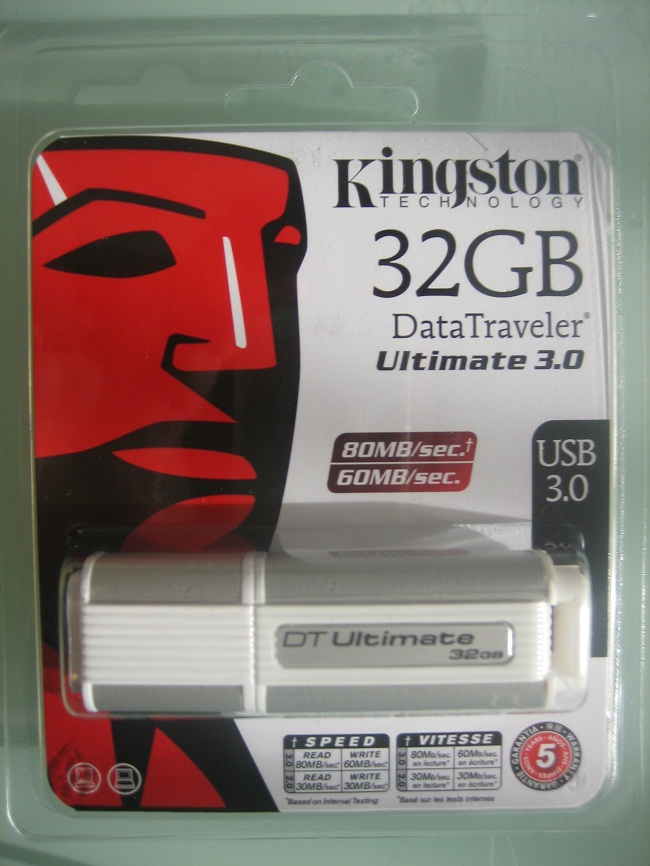
Box front
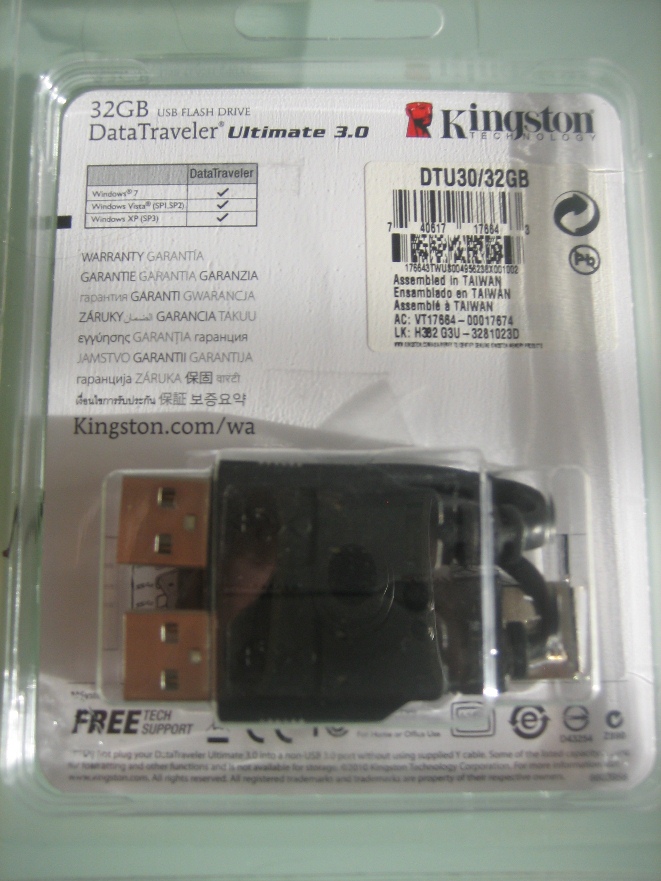
Box rear
What’s inside the box
Now it’s time to take a look at the content
of the package.
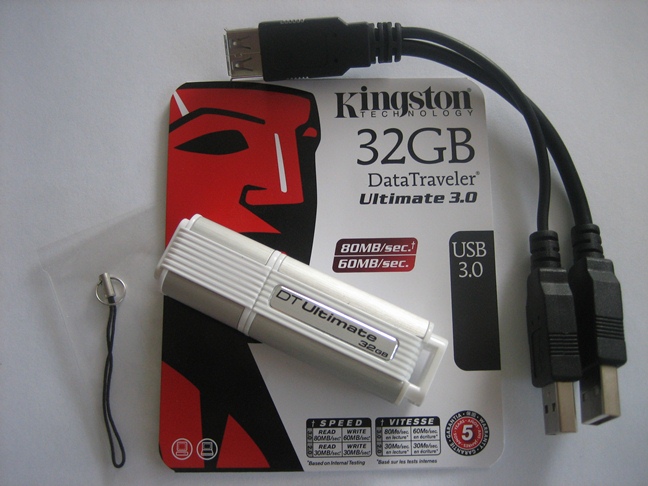
The package contained the DT Ultimate flash
drive itself, a y-cable for connecting the device to common USB 2 ports and a strap.
Now let’s take a look at the drive itself.

Drive
top
On the top of this stylish but “bulky” drive
we can see the name and the capacity of the device.

Drive
bottom
On the bottom of the drive, we can see the Kingston company name.
Now let's head to the next page, where
we look at the specifications.
Features and specifications
Now let’s take a look at the special
features and specifications of the Kingston DT Ultimate 3.0.


As you can see, the specifications of the
device are impressive, up to 80MB/s read and 60MB/s write speed are really fast
for a USB flash drive. With 30MB/s read and write it promises also to be very fast
when connected via USB 2.0.
To archive the promised speeds the device
is equipped with a Jmicron JMF612 controller together with Toshiba NAND
devices.
Note: The device requires two USB2 ports when you want to connect the device via USB 2.
USB 3 recap
 Computer technology moves forward at a
frightful pace, what is new today becomes old hat very quickly. USB has been around for a while, the original USB1 specification being ratified in 1996, and
first appearing in PC’s around 1998. The original specification of USB was to provide a universal high speed peripheral connection that could be used for anything
such as a printer to an optical drive, and a myriad of other things in between.
The original USB specification was 12Mbps, and was soon found to be too slow
for many of the peripherals that were soon onto the market supporting a USB connection.
In April 2000 the USB2 specification was
announced, and incorporated into motherboards and peripherals alike. The USB2 specification had a maximum bandwidth of 480Mbps, and at the time, could cope with the speed
of most of the peripherals that were around. Members here at MyCE.com have been
using USB2 enclosures to house their optical drives for years, and up until 16x
DVD burners surfaced, they could cope quite easily with the transfer rate
required for burning at maximum speed.
16x DVD writers have been around for about
5 years, and HDDs have been around a bit longer which were faster than the USB2 interface could cope with. Of course, these devices all worked with USB2. In the case of
optical drives, you just kept the burning speed down to around 12x, and
everything worked quite well. In theory, USB2 had enough bandwidth to cope with
around 20x – 24x writing and reading speeds, but poorly designed host
controllers on both the peripheral and PC host meant that these speeds were
very rarely achieved. There were faster alternatives to USB2, such as Firewire
800 and eSATA for example, but these connections have never really caught on
with the majority of PC users.
The great hope was in a faster, much faster
USB interface, and we have waited a long time to see this new fast USB interface appear, and finally it arrived not long ago in the form of USB3 (Superspeed USB). USB 3 has a maximum bandwidth of 5Gbps, which is over 10x the performance of USB2. So this is quite an update to the specification.

Motherboard manufacturers didn’t take long
to start incorporating these shiny new Superspeed USB interfaces into their PC
motherboards, and not only at the high end of the market. GigaByte, for example
has USB3 equipped motherboards for their full range of P55/H55/H57/Q57
motherboards, and many of their X58 chipset motherboards.
The USB3 equipped motherboard
For this section of the article we will
look at a typical USB3 equipped motherboard, in the shape of the GigaByte
GA-P55A-UD4.

The GigaByte GA-P55A-UD4 is a midrange
motherboard and incorporates the powerful Intel P55 chipset, and the usual host
of PCIe/PCI sockets, DDR3 memory sockets, SATA2/3 connectors, IDE connector,
Floppy connector, and various other connectors, and a socket 1156 to house the
new Lynnfield class of Intel Core i5 and i7 CPU’s.
If you look at the top centre of the above
screenshot, and just below the audio connectors on the backplane, we can see
the new NEC uPD720200 USB3 host controller IC package. Also worth noting, since
this motherboard has the P55 chipset, GigaByte have come up with an ingenious
method of allowing the USB3 host controller to run in two different modes.
As you may or may not know. The P55 chipset
has a limited amount of PCIe lanes to play with, and 16 of these PCIe lanes are
connected directly and controlled from the Core i5/i7 CPU itself, and is almost
exclusively used for the graphics card. This has two main benefits. Costs can
be kept down, and latency is kept to a minimum.
Another 8 PCIe lanes are provided on the
P55 PCH (platform controller hub) chip package. These are mainly for the ICH10R SATA RAID controller, Firewire, LAN, USB2, and other integrated peripherals on the
motherboard. Each of these lanes has a maximum bandwidth of 5 Gbps, as they are
PCIe2 specification. The problem with using these PCH lanes is the bandwidth is
shared between other integrated peripherals on the PCH. So to get the best out
of USB3, GigaByte have two ways to configure the USB3 host controller from
within the GA-P55A-UD4 BIOS.
Normal mode
This uses spare capacity on the PCH, this should provide enough bandwidth for all but the very fastest HDDs. In practice as our
tests will later reveal, this has a cap of around 133MB/s on our test system.
Using normal mode also has the advantage of leaving the graphics card to run at
full PCIe2 x16 speed. See the screenshot below.

Turbo mode
Turbo mode connects directly to the much
faster PCIe x16 bus, and should quite easily provide the bandwidth required to
run both USB3 ports at its maximum bandwidth of 5Gbps. The down side of this
method is it forces the graphics card down to PCIe2 x8 speeds. In practice this
has no perceived effect on graphics performance, as the bandwidth, even at
PCIe2 x8 is still massive, hardened gamers may not agree, though.

Now let’s take a look at the USB3 connectors themselves.

From our screenshot of the GigaByte
GA-P55A-UD4 backplane, the USB3 sockets are the blue ones which are just to the
left of the audio connectors.
Also interesting in this series of
motherboards from GigaByte is that they have also taken the opportunity to
upgrade the power output from all USB sockets on the backplane. In fact, they
have increased the power output by a factor of 3x.

All the tests in this article were carried
out with USB3 in normal mode.
If you have an older motherboard which
doesn’t already have USB3 onboard, there is no need to panic. You can quite
easily add USB3 support to your existing motherboard by means of a USB3 PCIe card. They are inexpensive, and a good card can be purchased for under £30.
Now let’s head to the next page where we
will look at our test PC and testing procedures...
Test machine
For this review we will be using a HP
Elitebook 8540p Laptop with the following configuration:
Hardware:
- Motherboard: Hewlett Packard Model 1521
(Intel QM57 chipset) - Processor: Intel Core i7 620M
- RAM: 4GB DDR3 2133MHz
- GFX: NVIDIA NVS 5100M
- Hard disk OS: Western Digital WD2500BEKT
- Operating System: Windows 7 Enterprise 32Bit
Test applications
To test the performance of the Kingston DT
Ultimate 3.0, we will be using the following test applications in this review.
Test procedures
We will start off our testing procedures
explanation by stating that we did not run many basic benchmarks on the Kingston
DT Ultimate 3.0.
You may ask why we have run so few
benchmarks.
USB flash drives
are generally always used for (a) moving data from one place to another, or (b)
depending on the available storage capacity for backing up important data. They
are almost never used as a permanent drive for storage.
I would rather concentrate the tests on
real world usage, such as real data file transfer rates. We therefore will only
show a few brief synthetic benchmarks, basically to show you the raw speeds of
the Kingston DT Ultimate GT 3.0.
Drive preparation for running the tests
The drive has been formatted in NTFS format
before we started the tests.
Where we use graphs in this article to
display results, we will use the following colours to make it easier for our
readers to see the drive which we are reviewing.
 Kingston
DT Ultimate 3.0 USB3 mode
 Kingston
DT Ultimate 3.0 USB2 mode
 Comparison
Drive
Now let's head to the next page, where
we look at some basic benchmarks...
Reading Benchmarks
HD Tune Pro
At first we take a look at HD Tune Pro and
we compare the drive against our Maxell 32GB eSATA/USB SSD. So we can get an
impression of the drives reading performance compared to an eSATA connected SSD
We present the graph below for comparison
with other recently tested drives.

As you can
see, when the Kingston DT Ultimate 3.0 is connected via USB 3 then the reading
performance is almost equal to the performance of the eSATA SSD. In USB 2 mode the device also reaches a good 26.5 MB/s.
In addition to
the reading benchmark we also ran the HD Tune Pro file Benchmark on the device.
The results can be seen below.
Maxell eSATA SSD reference test

Kingston DT Ultimate 3.0 (USB3)

Kingston DT Ultimate 3.0 (USB2)

Again, the results for USB 3 compared to eSATA are almost the same, only the reading performance of the eSATA device
appears to be slightly better. Again, good results in USB2 mode.
ATTO disk benchmark
ATTO has become a standard tool for
measuring the data throughput of HDDs. It measures the performance of reading
and writing, using different file sizes and block sizes.

Kingston DT Ultimate 3.0 (USB3)

Kingston DT Ultimate 3.0 (USB2)
The reading and writing speeds are very
good for a USB flash drive, with reading speeds topping out at over 80MB/s. Writing
speeds are also pretty good topping out at 50 MB/s. In USB2 mode, the drive
also performs very well, 27MB/s reading and 18MB/s writing speed is really good
for a USB2 connected device.
Summary:
The Kingston DT Ultimate 3.0 is a very good
performing drive in USB 3 and USB 2 mode.
Let's head to the next page for our real
world test results.....
Benchmarks give a good indication for the
performance of a device. However, most real users want a drive that performs
well in the real world. They want their drive to work "out of the
box" and work fast and smoothly.
Since this is an USB3 device with USB2 compatibility we focus our comparisons on USB3 mode. Nevertheless we have the results for
the USB2 connected device included.
Real
world copy tests
We will now conduct a few real world copy
tests. These tests simulate what real people do with their drives. We will be
conducting writing tests, using a large single movie file, a folder of MP3
audio files, a folder of JPG picture files, a multiple file copy of small files
(200KB average) and a multiple file copy of files with a size between 1MB an
400MB.
We should point out that this is not a
scientific way of measuring performance. These timings were taken with a stop watch;
we have however ensured that the reading drive is well able to supply a data
stream to our writing drive, which is high enough not to be slowing down the
performance of the writing drive.
We will once again be comparing the
obtained results with our comparison drive’s results. We will present the
results in the form of graphs.
Multiple file copy writing test
For this test we copied the Nero Burning
Rom install folder from our review computer to the Kingston DT Ultimate 3.0.
Our test copy contained 1,772 files of
various sizes with a combined capacity of 307MB.

The result is as expected, the Maxell eSATA
SSD is clearly faster than the Kingston DT Ultimate 3.0 in USB3 mode. Connected via USB2 the Kingston device is much slower.
Single large file writing test (5.5GB)
For this test we used a single movie file
which had been copied from our review computer to the Kingston DT Ultimate 3.0.

In this test we find the Kingston DT
Ultimate 3.0 clearly in front. In USB3 mode the device is around 40 seconds
faster than the Maxell eSATA SSD and 3 times faster than our eSATA SSD.
MP3 audio files
For this test, we copied a folder of MP3 audio
files from our review computer to our Kingston DT Ultimate 3.0, and also our
comparison drives. The folder contained 2,168 files with a total capacity of 10.1
GB.

Once again the Kingston DT Ultimate 3.0 is
again the best performing device when connected to the USB3 port of our review
computer.
JPG picture files
For this test, we copied various folders containing
JPEG pictures from our review computer to our Kingston DT Ultimate 3.0, and
also our comparison drives. The folder contained 1,288 files with a total
capacity of 2 GB.

This time we find the USB3 connected Kingston DT Ultimate 3.0 and our eSATA SSD head to head. Both are about 2 times
faster than our Kingston DT Ultimate 3.0 in USB 3 mode.
Multiple file copy writing test 2
For this test, we copied various folders
containing files of many different formats, such as RAR, ZIP, EXE, DOCX … and
sizes, from our review computer to our Kingston DT Ultimate 3.0, and also our
comparison drives. The folders contained 1,425 files with a total capacity of
4.9 GB.

Unlike the test at the beginning of the
page, we find here that the USB3 connected Kingston DT Ultimate 3.0 performs much
better than the Maxell eSATA SSD. In USB2 mode, the device is again the
slowest.
Average writing performance
After finishing all our writing tests we
decided to show you also the real world writing performance of the devices and
we calculated the average writing speed in MB/s from our bunch of tests. In the
following graph the average real world writing performance in MB/s can be seen.

When connected via USB3 the Kingston DT
Ultimate 3.0 is the best performing drive, with an average writing speed of
31.7MB/s it clearly outperforms the Maxell eSATA SSD. The results for the USB2 connected device are also very good.
Summary
The Kingston DT Ultimate 3.0 performed very
well in both USB3 and USB2 mode and reached impressive speeds for a USB flash drive.
Copy tests
Since this drive’s main purpose is to transport
files from one PC to another, these tests should show the drive’s performance
when copying files from the device to the HDD of your PC. Of course, the
results depend on the performance of the target HDD/computer, but since all
modern computers offer enough power to handle this kind of drive, this test
should give a good indication of the performance of this device.
We also want to make this a realistic test.
So we have used the same file sets as before.
Copy to HDD – 1,772 files (307MB total)

The Kingston DT Ultimate in USB3 mode
performs at the same level as the Maxell eSATA SSD, in USB2 mode the device is
about 2 times slower.
Copy to HDD – 1 movie file (5.5GB total)

Here we find a difference as expected. The
Kingston DT Ultimate 3.0 is the slowest device when it’s connected to the USB2 port of the computer. As we have seen in the benchmarks before, both devices, the Maxell
eSATA SSD and the Kingston DT Ultimate perform at the same level.
Copy to HDD – 2,168 MP3 files (10.3GB total)

Here the eSATA SSD is a bit faster than our
review device. USB2 is the slowest but this is no surprise.
Copy to HDD – 1288 JPEG pictures (2.1GB total)

Same picture as before, the eSATA SSD is slightly faster.
Copy to HDD – 1,425 files (4.9GB total)

Again the same picture, the Kingston DT
Ultimate 3.0 is slightly slower than the Maxell eSATA SSD, this time the
difference is 12 seconds.
Average reading performance
Similar to our writing to the drive test,
we also calculated the averages in MB/s for the devices in these tests. The
results are seen in the following graph.

When it comes to reading data from the
device and writing data onto a HDD the Maxell eSATA SSD is slightly faster than
the Kingston DT Ultimate 3.0. However, the Kingston DT Ultimate 3.0 in USB3 mode is 2 times faster than the same device connected via USB2.
Summary
Even when our tests cover only a small part
of the possible file sizes and combinations, we feel that you can get a good
impression of the performance of the Kingston DT Ultimate 3.0 USB3 flash drive and of its speed benefits over USB2. Also you can clearly see that there is not
much difference to an eSATA connected device. Overall we can say that the
Kingston DT Ultimate 3.0 performed pretty well in our real world tests.
This concludes our tests. To read the final
thoughts and conclusion, click the link below....
Final thoughts and the conclusion
Positive:
- Fast USB3 connection
- USB2
compatibility - Good file copying performance
- Stylish construction, even though it
looks a bit “bulky” - No noise
- Did not require an additional power
source - Good value for money
Negative:
- The device becomes very hot when working
- USB2 connection
requires 2 USB2 ports.
User experience
The main intention of a USB flash drive is to transport files between computers. Since file sizes and the amount of data
that needs to be transported are increasing, speed and capacity become more and
more important. For these needs USB3 is a very good solution.
The Kingston DT Ultimate performed
extremely well in our tests, without the need for an additional power source. It
shows good performance when reading and writing data and it also offers the
regular PC user enough capacity to transport data between computers. USB2
compatibility makes sure that you are not limited to USB3 equipped computers.
The Kingston DT Ultimate is well-designed
and its white plastic and aluminium design make the Kingston DT Ultimate a nice
looking drive, even if it looks a bit “bulky”
Apart from the requirement of two USB2 ports when we want to connect the Kinston DT Ultimate in USB2 mode, the only negative thing
we found was the amount of heat generated when the device was working.
Price
At geizhals.at we found the Kingston DT
Ultimate 3.0 32GB starting from €76.90, with a capacity of 16GB starting from €50.21
and the 64GB version starting from €152.48.
Conclusion
The Kingston DT Ultimate 3.0 is a very
well performing USB3 flash memory stick which also offers USB2 connectivity. If you have the benefit of a USB3 equipped computer and when you have to
transport a lot of data, then the Kingston DT Ultimate 3.0 is a very good
choice.
With very little negative things to mention
and loads of good things to say, we decided to give the Kingston DT Ultimate
our MyCE.com “Safe Buy” award.


This is the current price for the Kingston DataTraveler Ultimate 32GB USB 3.0 (DTU30/32GB)
[field name=iframe]
You may comment on this review below.
Thanks to:
|
|
EFD |
















