
|
|
Review: Lexar Reviewed by: Antonis Provided by: Lexar Manufactured: in China |

USB flash drives were mainly used to store
temporary files, and move them from one place to another. They made our lives much
easier but over time our needs have changed and also technology has moved
forward, from the typical type A, to micro USB, and now to type C that on paper
looks to be very promising, for both features and speed.
Lexar has three USB flash drive that all
share the C20 model number but with different last letters. They start with the
C20i that as you might have guessed is aimed at Apple users. Next we have the
C20m that has a micro-USB connector, and finally the C20c that features a
type-C connector. The common factor for all three drives though is the type-A
connector, and they are all available in capacities of 32GB, 64GB and 128GB.
You can find out more about them on the Lexar website, simply by clicking here.
Lexar has sent me the C20c USB3.1 Gen1 64GB
device to review, so let's start this review by taking a look at the drive and
its packaging.
Lexar C20c 64GB USB3 flash drive, packaging and specifications
Let's take a closer look at the packaging
of the Lexar C20c USB3.1 flash drive.
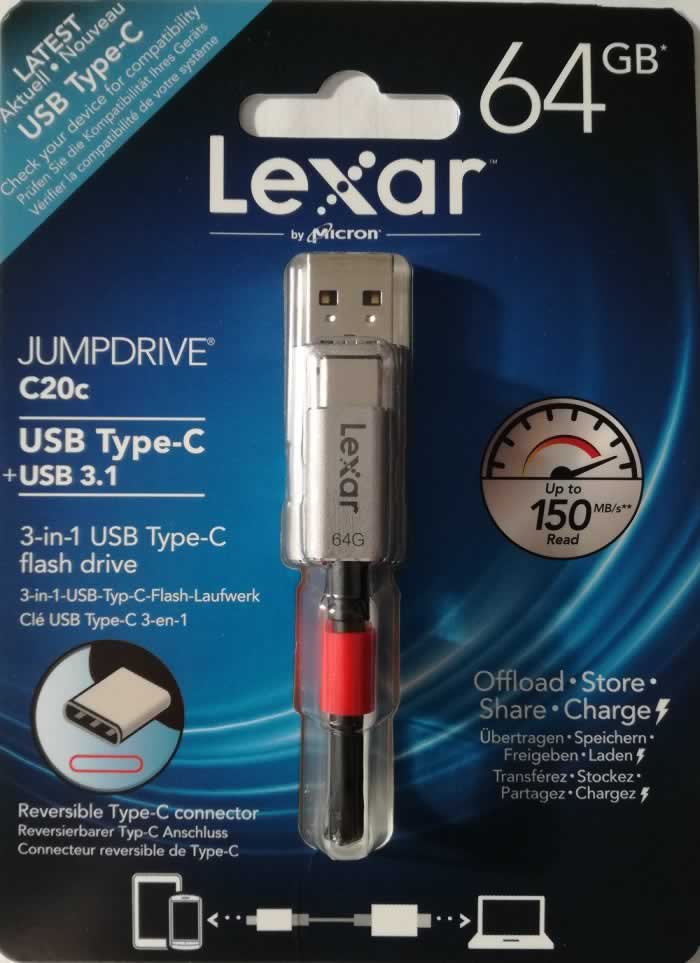
From the front of the package we can see the
drive. The main attraction here is the 3-in-1 USB, which means that the drive
can be used with a machine that supports Type A, also Type C, and it can charge
our device. Read speed is up to 150MB/Sec but there's no information on the
write speed.

A look at the Lexar C20c USB3.1 flash
drive, its size is 15cm (which is just less than six inches).
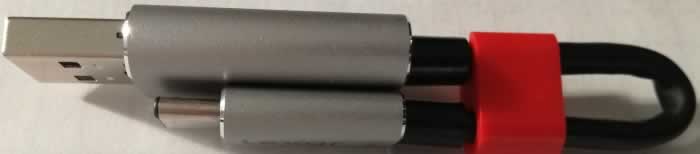
This is how the drive is stored, and this
way it can be used, with the type A port. It saves a lot of space, and build quality
is also very good for both connectors and cable, which should hopefully last
for a long time.
Specifications
Let's take a look at the specifications for
the Lexar C20c as they appear on the website.
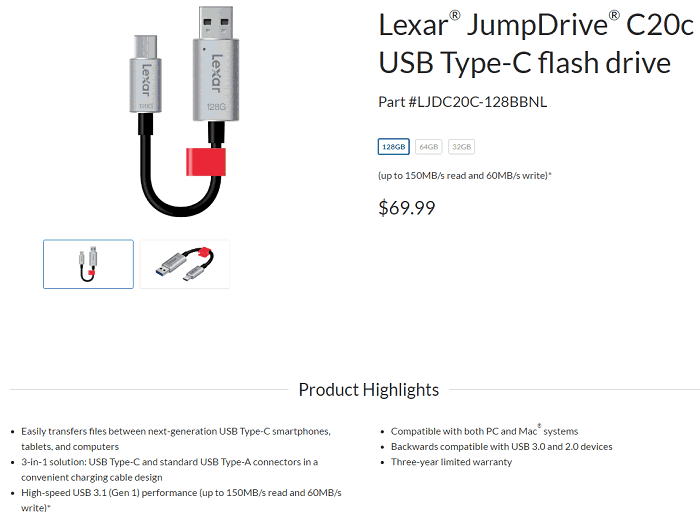
We can see the main features and
specifications of the Lexar C20c, and also that the drive is a USB3.1 Gen 1 and
reaches read speeds of 150MB/sec and the write speeds of 60MB/sec for the 128GB
drive, although there's no info on the write speed of the other two drives.
Before I start testing the Lexar C20c flash
drive let’s find out what's inside using the Flash Drive Information Extractor
tool.
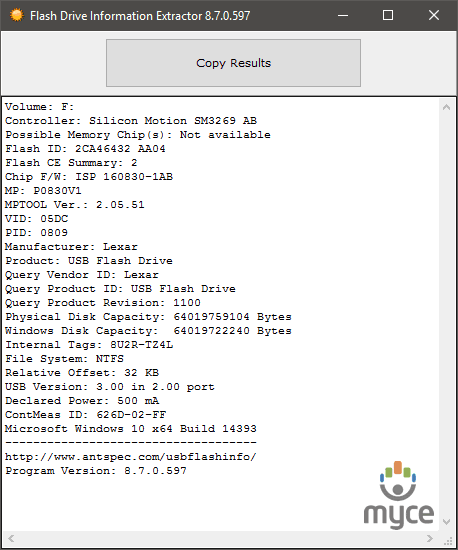
Here we can see that the Lexar C20c uses
the Silicon Motion SM3269 controller. The tool does not provide any info on the
memory chips but it will be safe to say that inside we will find chips that are
manufactured by Micron.
Now it's time to start testing the Lexar C20c
and see what speeds it can achieve in real world tests, and I will start with a
few synthetic benchmarks.
Now let's start testing the drive with
the NTFS file-system...
Test system and test procedures
For this review I will be using a PC with
the following configuration.
Bench test
- Motherboard: ASUS X99-A
- CPU: Intel
i7-5820K @ 4.4GHz - RAM: Crucial
Ballistix Sport DDR4 2400 - VGA: MSI
Gaming GTX960 2GB - HDD1: Kingston
HyperX Fury 240GB
(OS Drive) - PSU:
Seasonic M12II-750 - OS:
Windows 10
Testing methods
Trying to keep my testing methods as simple
as possible and at the same time repeatable on various systems. I will run two
simple benchmarks, ATTO and CrystalDiskMark, as both tools can
give a good impression of how the drive performs. This time I will be running
my tests with NTFS and also the default file system that the drive comes
with.
There will also be some real life tests,
simple tasks such as copy/paste of various files. As a source to store my files
I will be using 10GB of ram, and I will also be testing the flash drive with various
consumer devices such as TV’s, Laptops, and a micro HiFi.
NTFS Tests
As usual I will be starting my tests with
ATTO, so let’s see if a different file-system will improve the write numbers, and
how this USB Flash drive performs.
ATTO
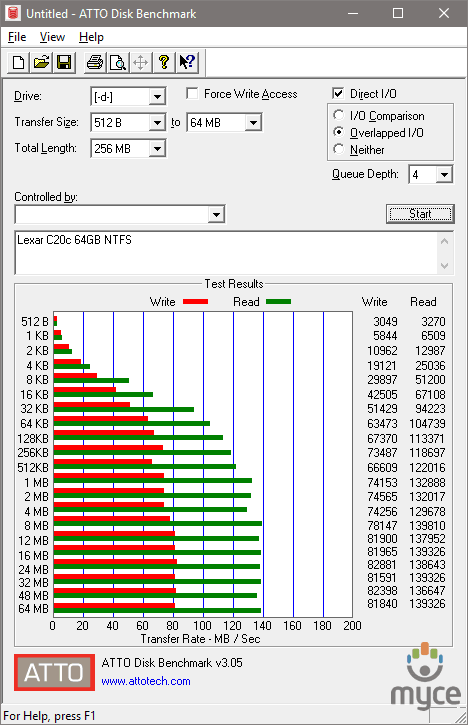
The results are good. The drive was able to
reach 80MB/Sec when it comes to write speed, but only close to 140MB/Sec for the
read result.
CrystalDiskMark
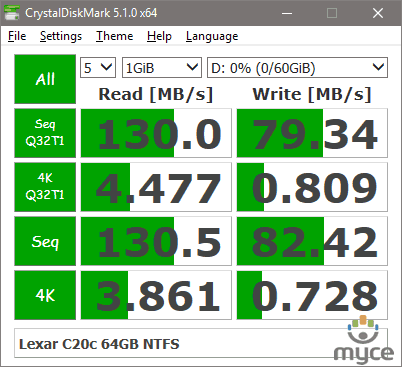
No surprises here, 130MB/Sec read and
82MB/Sec for the write speed, again a good result overall.
Conclusion
At first look the results are very good,
especially for the write results, but read speed is lower than the 150MB/Sec
that we see quoted on the box.
Let’s move to the next page for some
real world tests...
Real world tests
Benchmarks are great, as they can give a
very good view of how the drive can perform when it’s pushed to the maximum. Unfortunately,
they only tell part of the story, and the rest you have to find out when you're
using the drive for everyday tasks. I've therefore decided to perform three
simple tests that almost everyone does, so that I can get a better view of the
performance of the drive.
For this test I will be moving all the test
files from a RAM disk to the tested USB drive, and vice versa. Below you can see
the results.
MP3
I will start my tests by performing a
simple copy of 1.36GB of MP3s. You can see the results in the graph below.
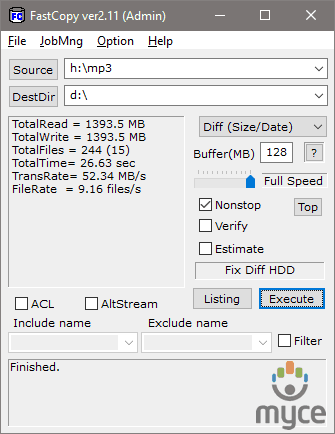
Copying
file from RAM to USB
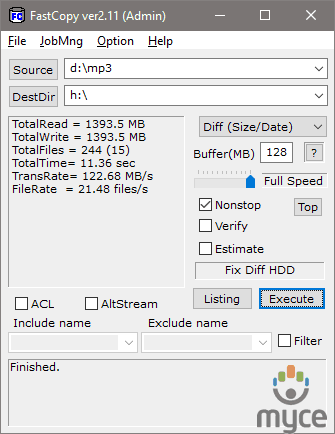
Copying
files from USB to RAM
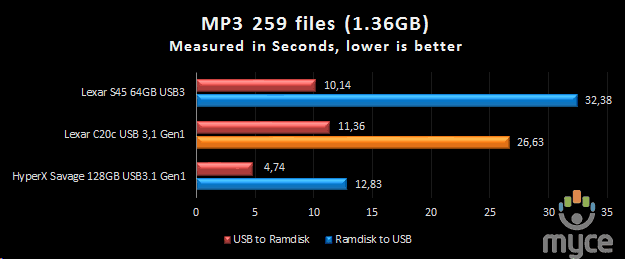
The
result for the Lexar C20c USB3.1 GEN 1
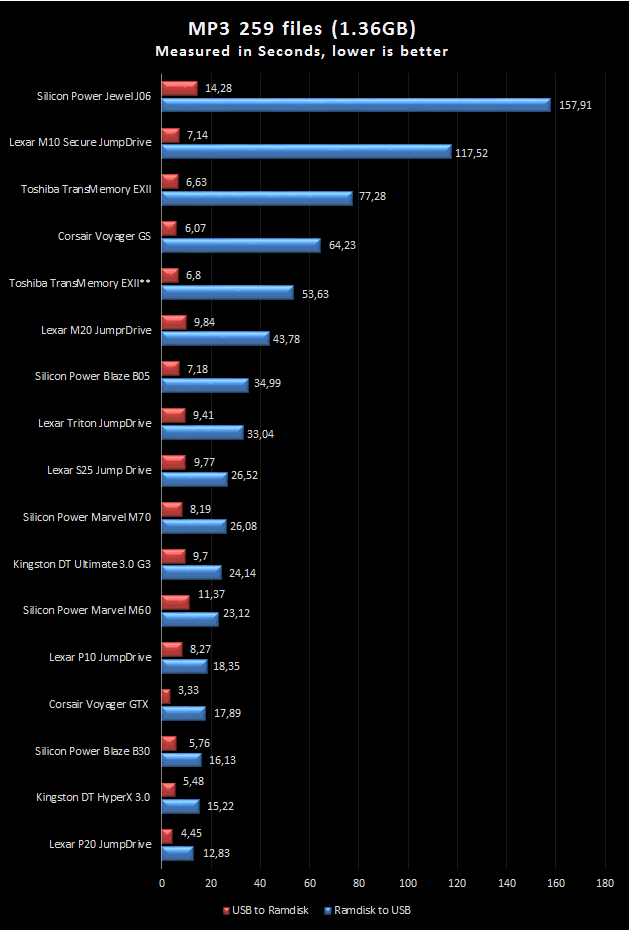
Here
are some previous results, which are only for reference purposes.
The first test for the LexarC20c is good, write
speed topped out at 52MB/sec and the read speed maxed out at 122MB/sec.
Pictures
For the next test I will copy 3377 assorted
picture files with a total size of 2.56GB, so let's see how the drive performs.
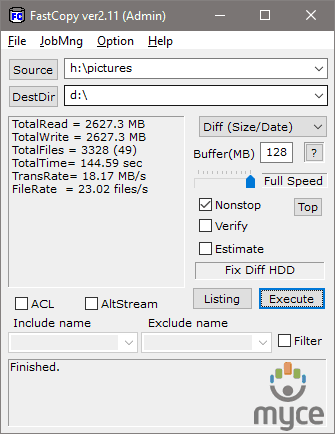
Copying
files from RAM to USB
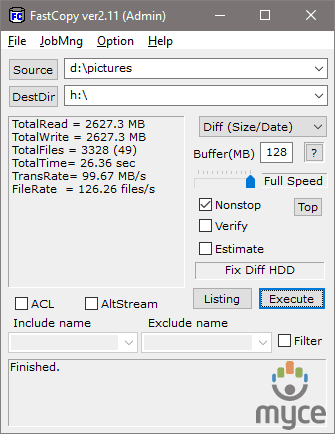
Copying
files from USB to RAM
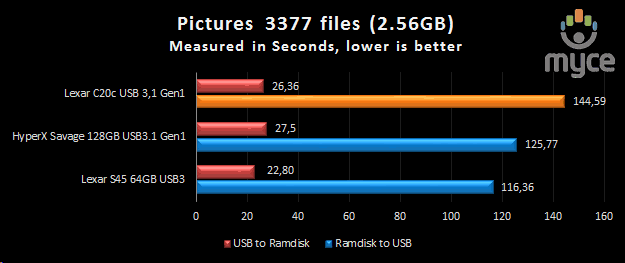
The
result for the Lexar C20c USB3.1 GEN 1
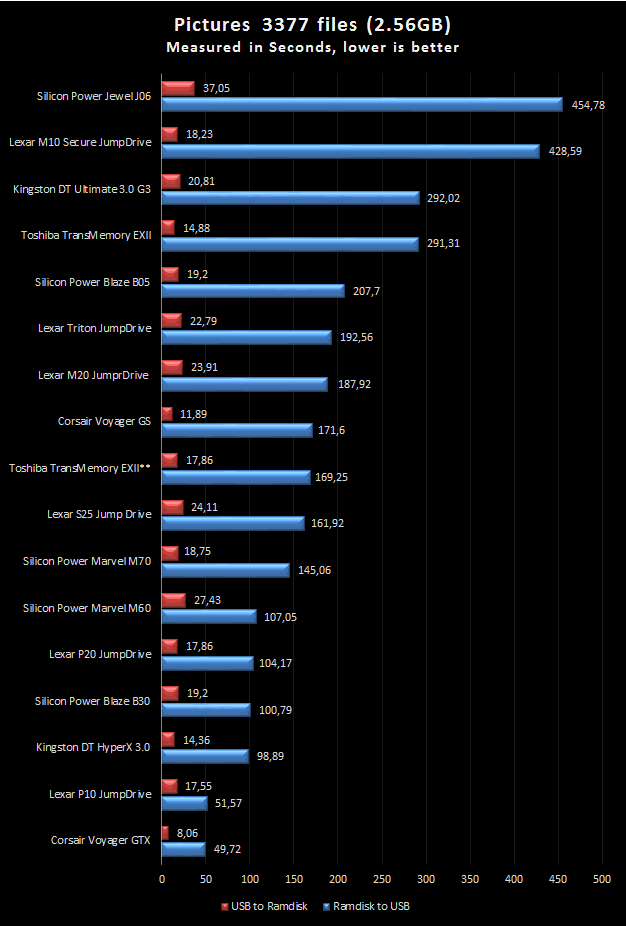
Here
are some previous results, which are only for reference purposes.
Here we can see that the Lexar C20c does
not like relatively small files, but it's able to reach a maximum write speed
of 18MB/sec and the read speed was 99MB/sec, so there is also a drop in the
read performance.
Movie
Before I finish my tests I’ll copy an MKV
file and an SRT file, a very common task that most of us do to transfer movies.
The two files have a total size of 3.46GB
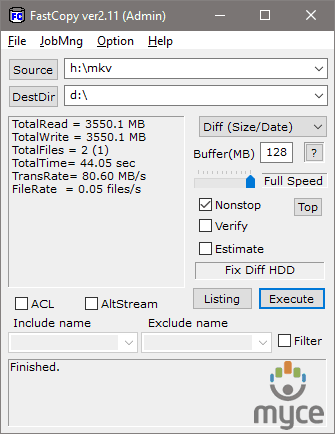
Copying
from RAM to USB
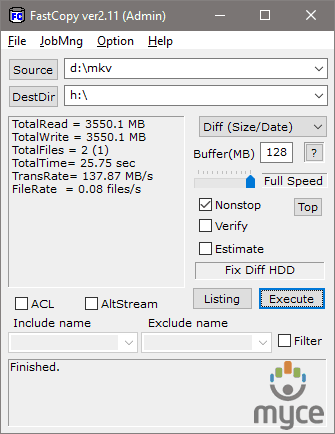
Copying
from USB to RAM
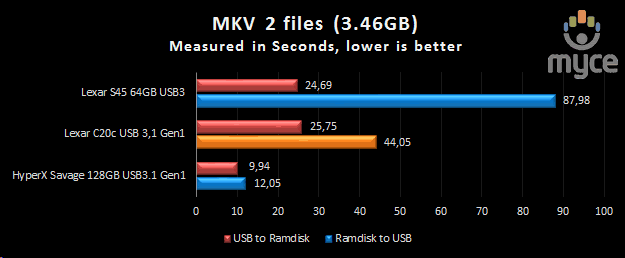
The
result for the Lexar C20c USB3.1 GEN 1
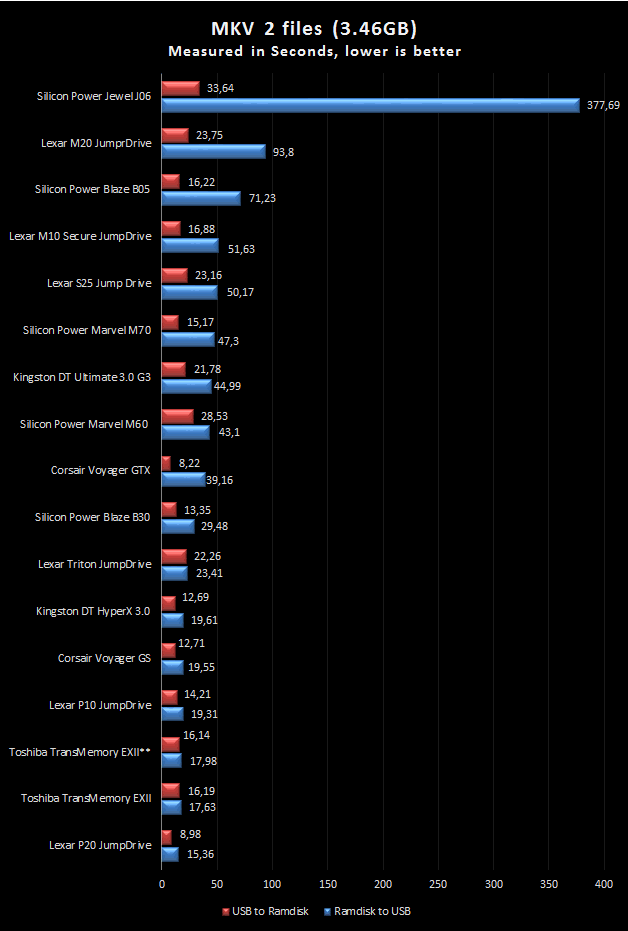
Here
are some previous results, which are only for reference purposes.
wherewith large files the Lexar C20c was
able to achieve its maximum performance. Write speed topped out at 80MB/sec and
the read speed was 137MB/sec, both of which are very good.
ISO
Closing my four main tests, I will copy an
ISO file with a size of 7927MB, from the RAMDisk to the destination and vice
versa.
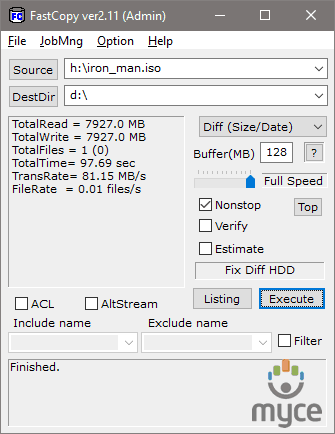
Copying
from RAM to USB
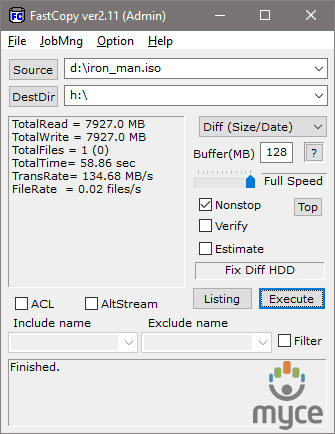
Copying
from USB to RAM
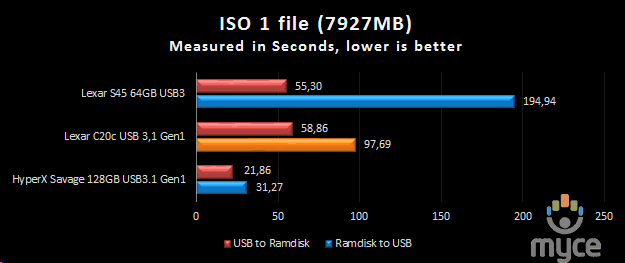
The
result for the Lexar C20c USB3.1 GEN 1
Moving on to even larger files we can see
that Lexar C20c continues to deliver very good results, 81MB/sec for the write
and 134MB/sec for the read part of this test.
Small Text files
In one of my previous reviews I was asked by
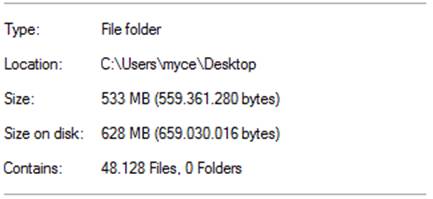
a user to do a test with proper small files. So I went ahead and put 48128
files in one folder and ran some tests with a few of the latest USB flash drives.
I personally don’t feel that this kind of abuse will happen on a daily basis,
and the result of this test will not have a very big impact on my rating of the
tested drive, but it's a good way to separate the men from the boys and fun to
do, even if it takes a lot of time.
First here is a screenshot to give you an
idea of the actual size of all these files and further below you can view the
results from this test.
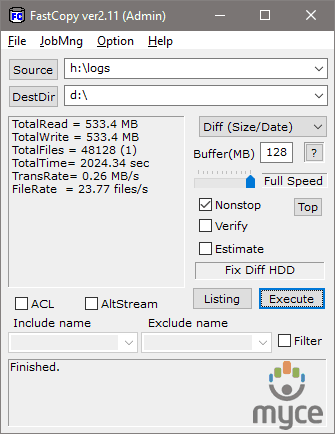
Copying
from RAM to USB
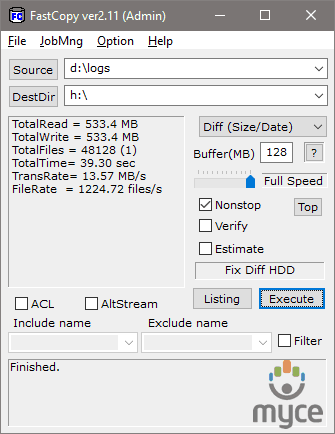
Copying
from USB to RAM
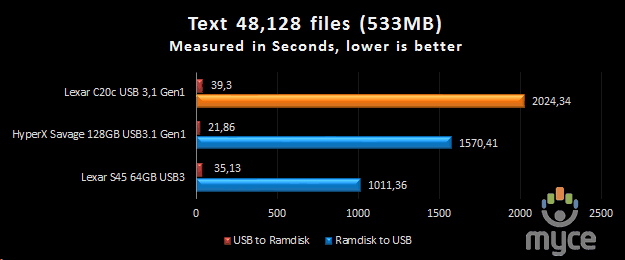
The
result for the Lexar C20c USB3.1 GEN 1
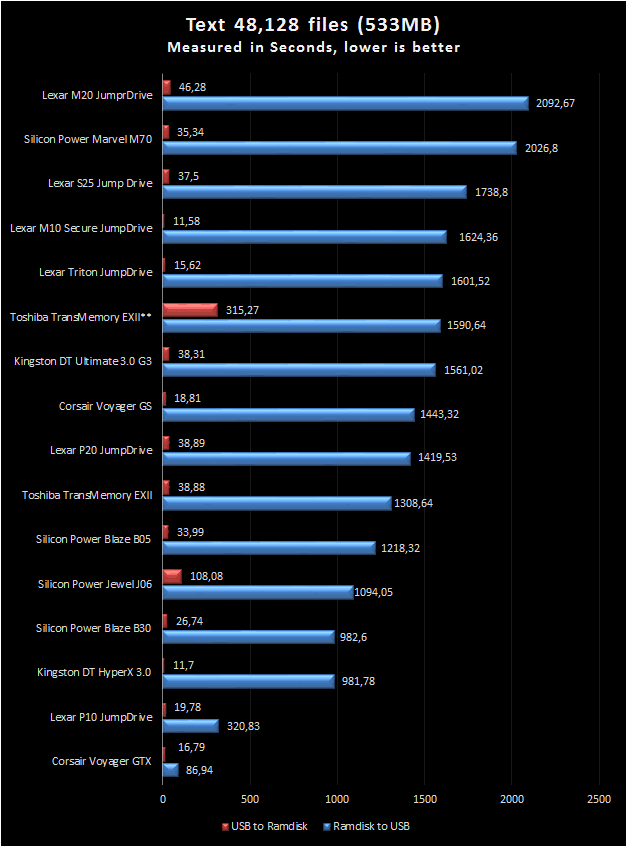
Here
are some previous results, which are only for reference purposes.
2000 seconds is a lot of time. Most USB3
flash drives don’t like writing that many small files and the Lexar C20c is no
exception to this trend, however the read result was good and the drive was
able to achieve 13Mb/sec.
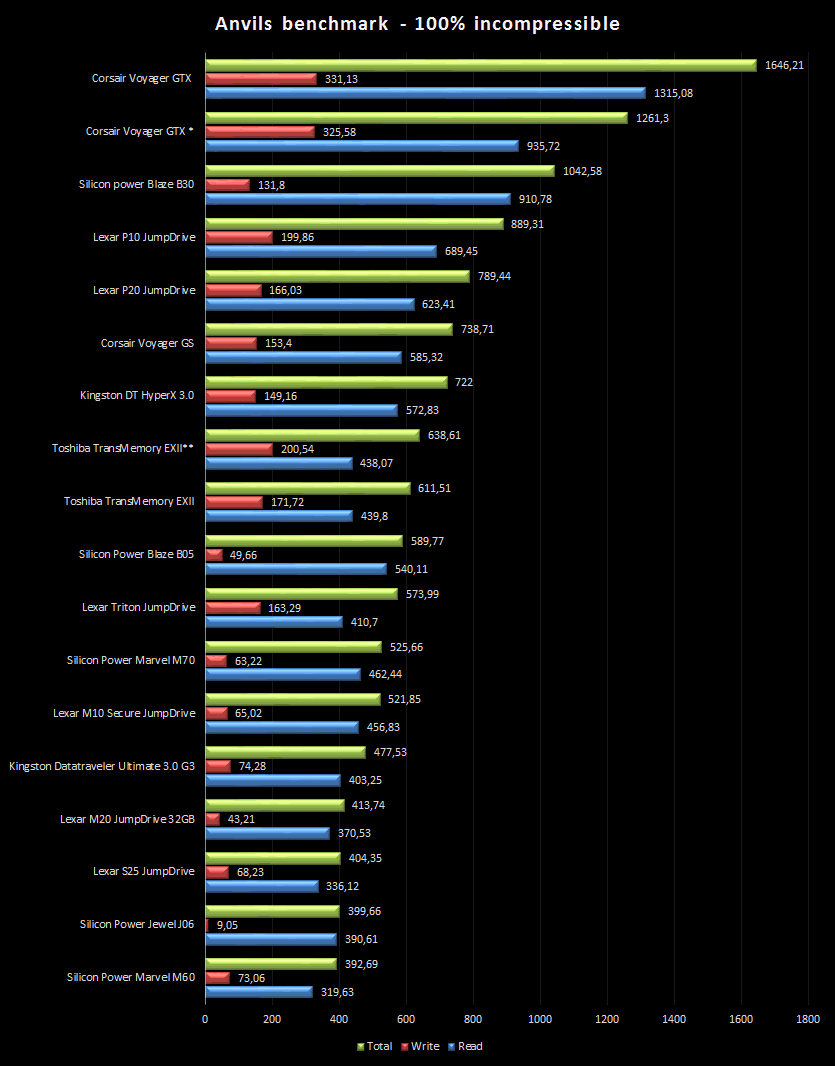
Anvils Benchmark (100% incompressible)
Below you will find a graph showing the
performance of the Lexar C20c against all the other USB3 flash drives that I
have tested. All the drives were connected to the Intel USB3 ports.
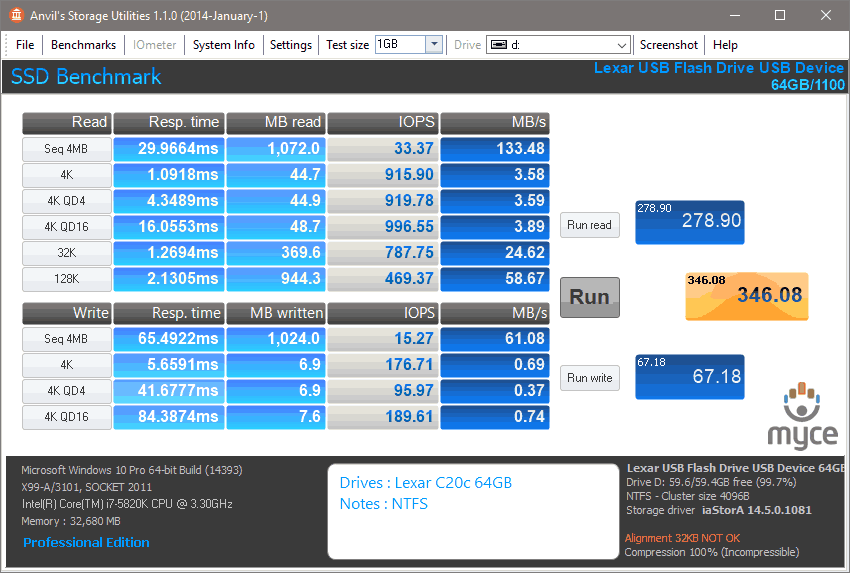
Here
is the result for the Lexar C20c USB3.1 Gen 1 flash drive.
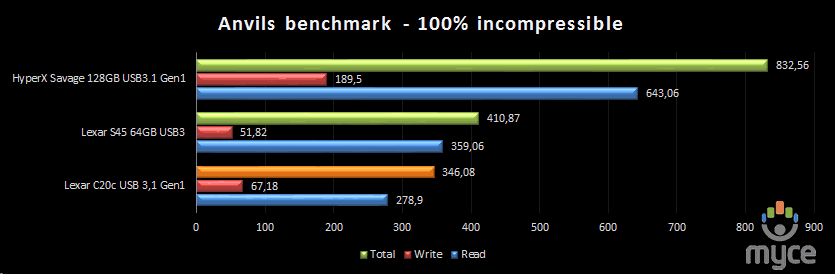
The
result for the Lexar C20c USB3.1 GEN 1
Here
are some previous results, which are only for reference purposes.
In this final extra test, we can see that
the Lexar C20c achieves the speeds that we saw in the previous tests. A good
read speed, but a higher write speed would have been welcomed.
Now let's close this review...
The conclusion for the Lexar C20c 64GB USB3.1 Gen 1 flash
drive.
Lexar has had a very nice idea for the C20
series of flash drives and it was also very well executed, compared to the M20
that I tested back in 2015. Smaller size, more convenient use, and the overall
build quality, judging by the C20c, is very good. The drive has a three year
warranty, and it can be used with devices that support Type C and Type A USB, which
will also charge your device.
When it comes to performance, in synthetic
benchmarks it was able to give some very good numbers, mainly on the sequential
side, but when I moved onto the real world tests I started get a much better
idea of its real performance, and the main complaint would be the slow write
speeds with small files. It's with larger files that the Lexar C20c was able to
give very good results for both read and write speeds.
The Lexar C20c is a flash drive that has
very good read and write performance with larger files. It's a 3-in-1 USB3.1
flash drive, and it has a very good built quality. You could ask for higher
speeds but fingers crossed soon we will have them. For now though this is a
very good solution for a combined type A and type C USB flash drive.

You may comment on this review here.















