
|
|
Review: Lexar Reviewed by: Antonis Provided by: Lexar Model: Workflow Portable SSD DD512GB USB3
|
|
|
|

It’s
been almost 18 months since I first looked at the Lexar Workflow portable SSD,
and back then it was an amazing little drive, with very good performance but
even better it had drivers that supported UASP, and you always had the option
to use it with the Lexar workflow HR1 USB3 hub and also the HR2 Thunderblolt
hub. The HR1 and HR2 hubs are very simple and quick solutions for the
professional that needs more storage together with the freedom to arrange things
to meet their needs.
By
now I am sure that all of our readers are familiar with the Lexar name and
their products, but in case you are new to them you can find out everything
about Lexar simply by clicking this link.
Now
let’s take a look at the Lexar portable SSD, and we'll start by examining the
packaging and its contents.
Lexar portable USB3 SSD DD512GB
Packaging
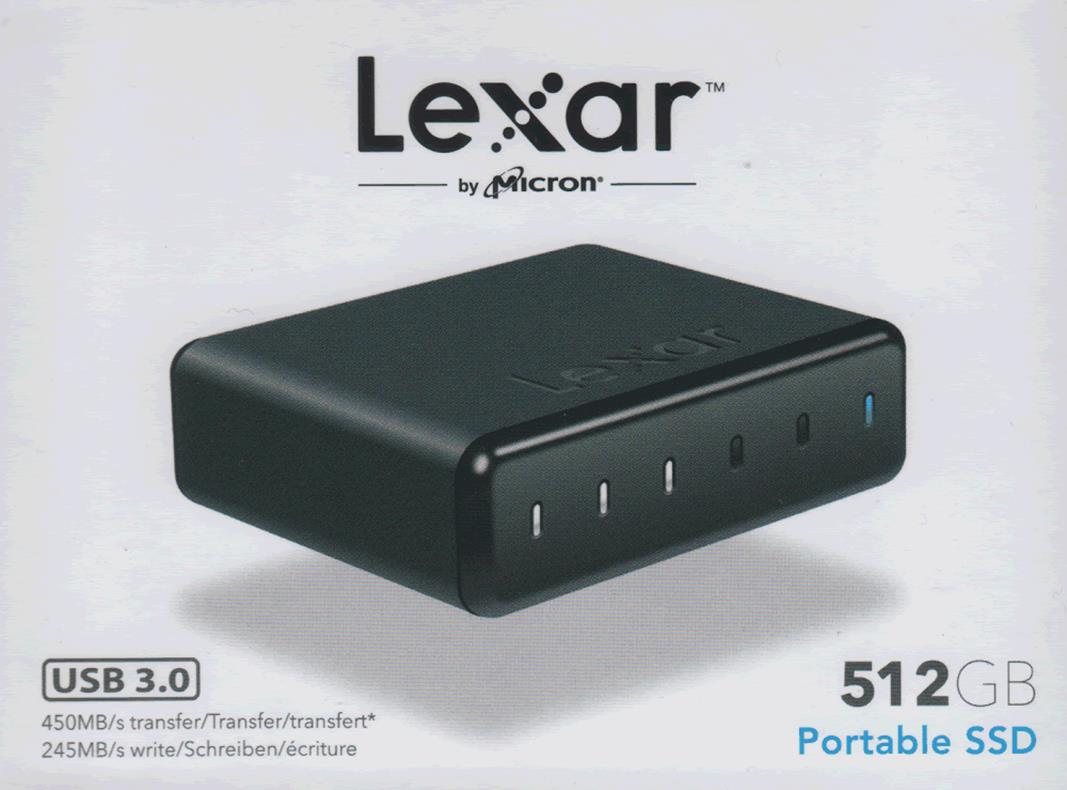
The first thing that has changed is the packaging, this time it's not as
elegant as the previous one, but it still has a very clean look and offers all
the info that you'd want on the front of the box..
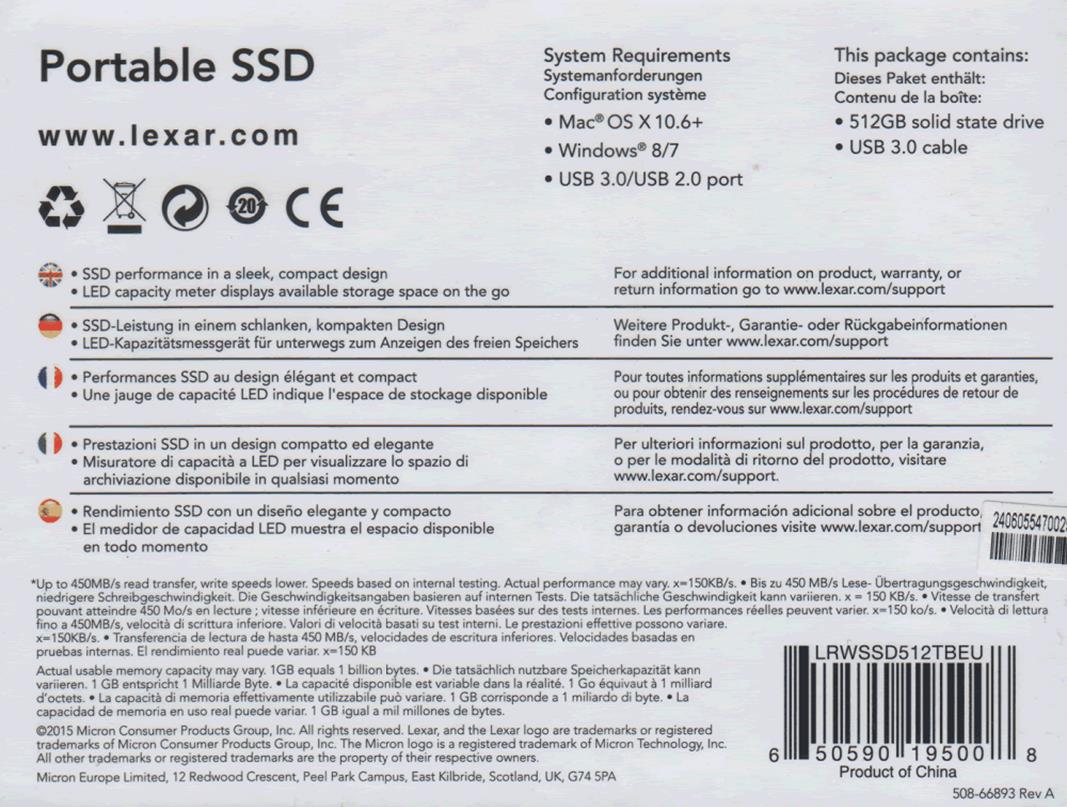
The rear of the box.
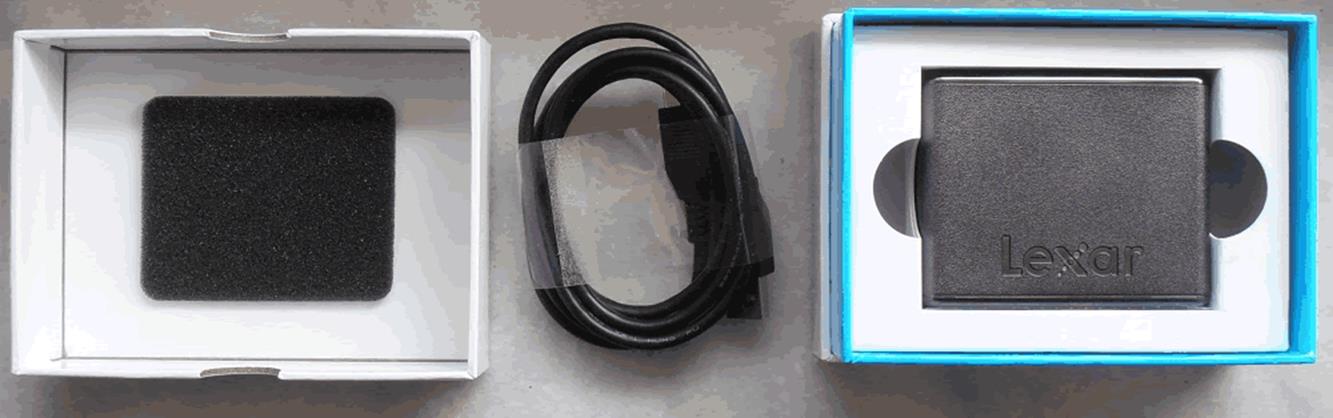
Inside
you will find the 512GB portable SSD, and a USB3 cable that is thankfully very
long, close to 110cm.
A closer look at the Lexar 512GB portable SSD
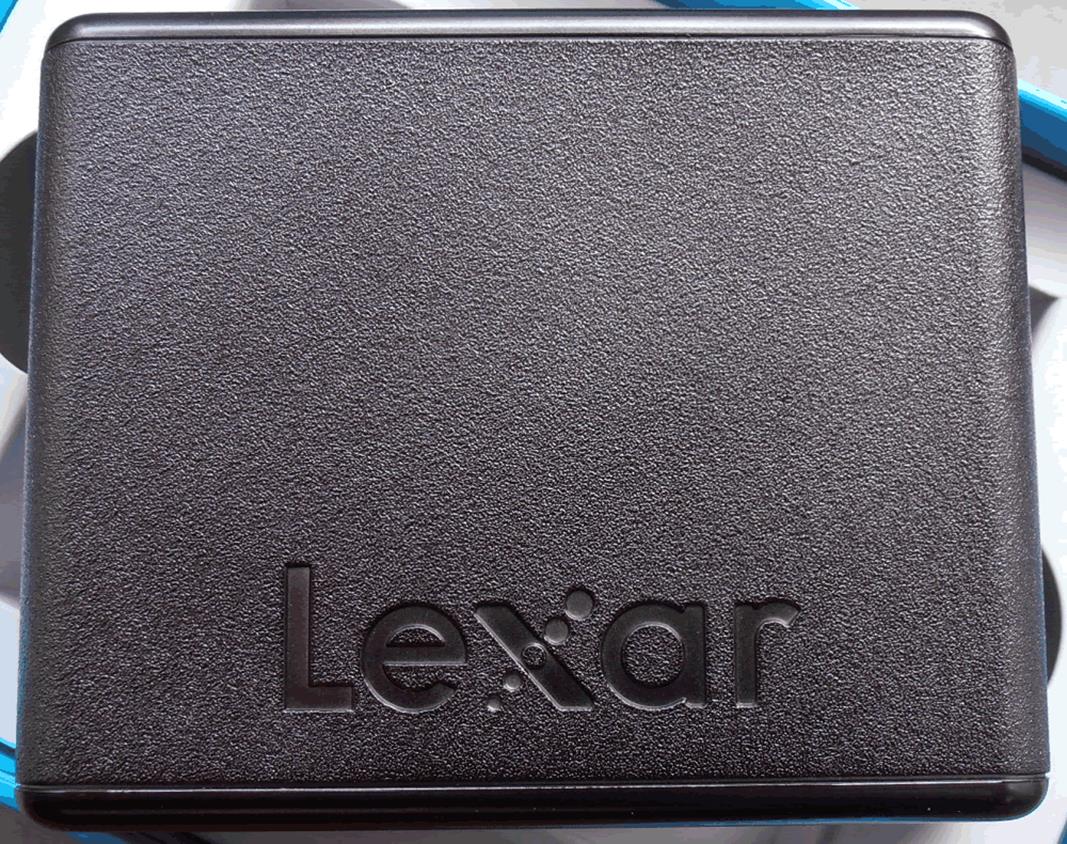
The top of the Lexar portable SSD, and as you can see there are no changes from
the previous model.
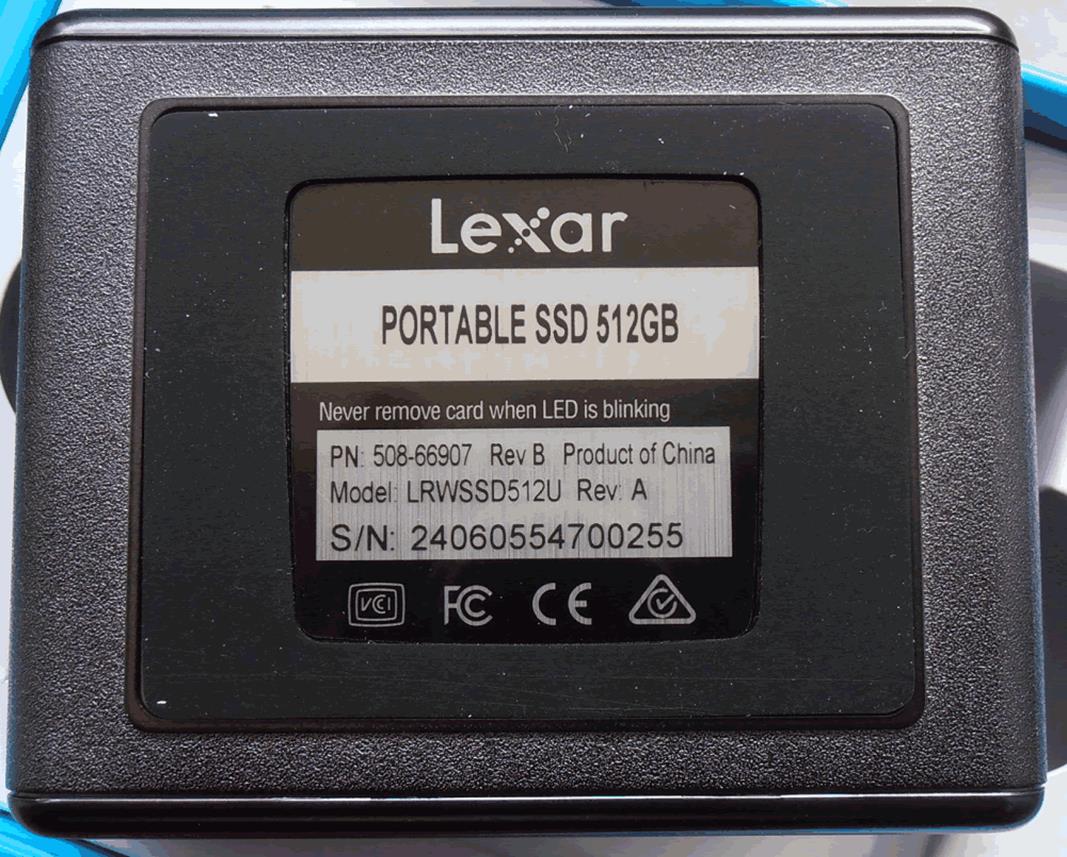
the same applies for the rear.
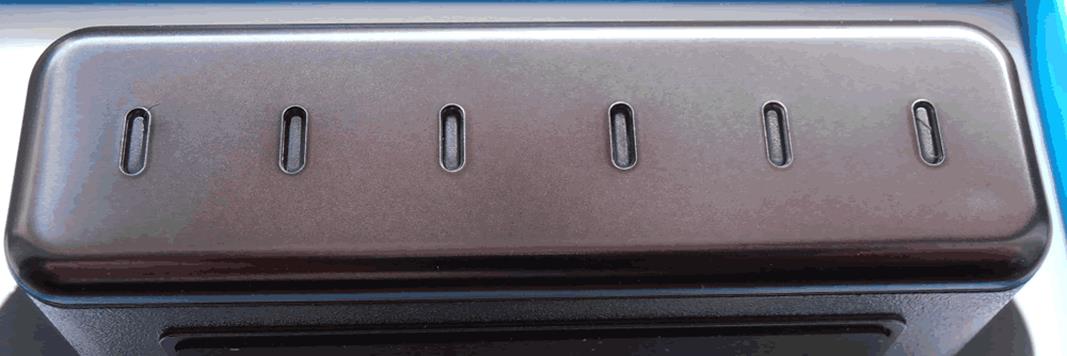
The front of the Lexar 512GB portable SSD
looks identical to the previous drive that I tested, it continues to have six LEDs,
and the first five are white ones that are also used to give an optical
indication of the used capacityThe last LED is a blue one that shows when the drive is powered on and also flashes when the
drive is writing or reading data.
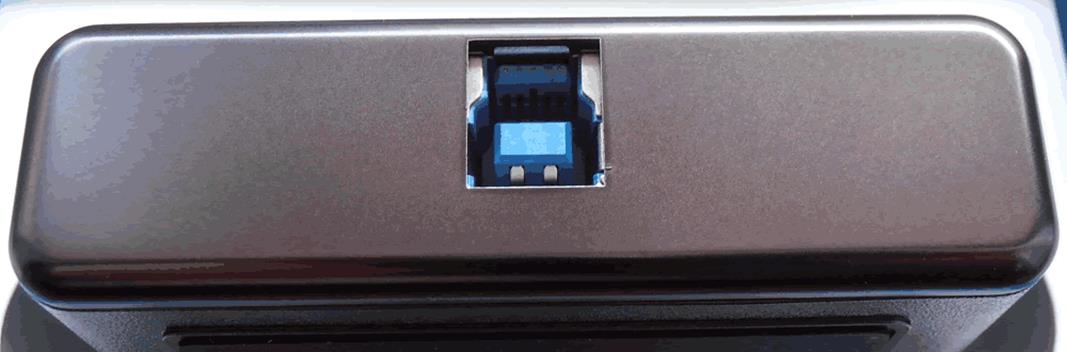
On
the back of the Lexar 512GB portable SSD we see the USB3 port.
Test machine
For this review I will be using a PC with
the following configuration.
Bench test
- Motherboard: ASUS X99-A
- CPU: Intel
i7-5820K @ 4.4GHz - RAM: Crucial
Ballistix Sport DDR4 2400 - VGA: MSI
Gaming GTX960 2GB - HDD1:
Kingston HyperX Fury 240GB
(OS Drive) - PSU:
Seasonic M12II-750 - OS:
Windows 10
The Lexar 512GB portable SSD was connected
to a USB3 port on the back of the motherboard.
Test applications
To test the performance of the Lexar 512GB
portable SSD I will be using the following test applications in this review.
- ATTO
- Iometer
- AS SSD
Benchmark - CrystalDiskMark
- Anvil’s
Storage Utilities
Let’s head to the next page where we
take a look at our testing methods and the review PC.
ATTO disk benchmark
ATTO has become a standard tool for
measuring the data throughput of HDD and SSD. It measures the reading and
writing performance, using different file sizes and block sizes.
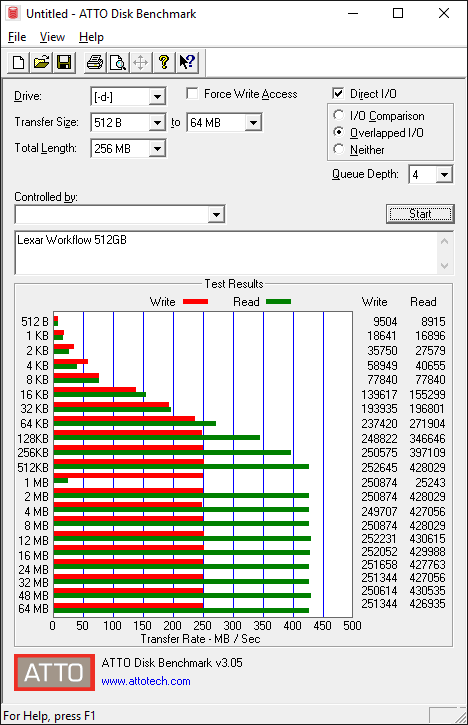
The
performance of the new drive,
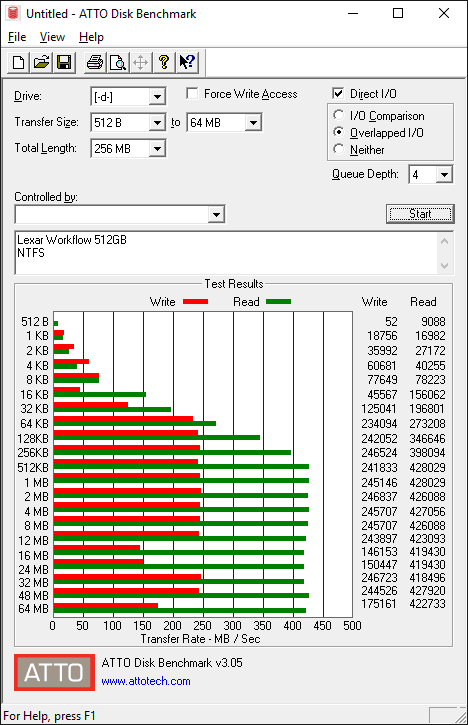
and also
the performance of the previous drive.
As we can see the new drive has slightly increased
overall performance. It was a little faster for write speed, reaching a maximum
of 250MB/sec, but was able to achieve 430MB/sec when it came to read speed.
CrystalDiskMark 3.0
CrystalDiskMark is quite a handy benchmarking
application, as it focuses on the file sizes that can cause a problem on a
system drive.
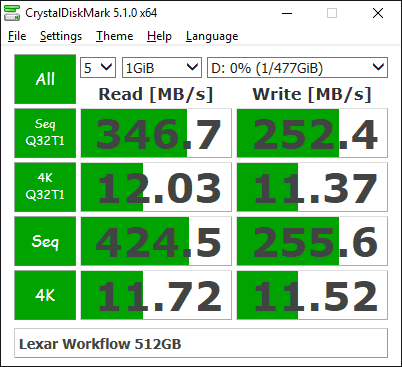
The
numbers for the new drive,
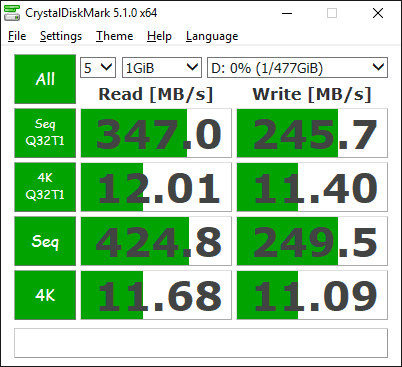
and for
the previous drive.
In this test we can't see any noticeable
differences between the two drives.
AS SSD Benchmark
AS SSD benchmark is a benchmarking tool
specifically designed to test SSDs. The application tests sequential reading
and writing performance, 4K random reading and writing performance.
AS SSD benchmark also tests 4K threaded
performance. This is very exciting, as this test is the first available test
that I am aware of, that simulates how a PC operating system actually works. A
modern PC and OS, such as Windows Vista/7 does not just run a single thread at
a time, it runs many threads. The AS SSD benchmark "4K 64Thrd" tests
run 64 threads simultaneously throughout the test. If this result is good, then
you can be pretty sure the drive will perform extremely well as a system drive.
After the tests complete, AS SSD benchmark
derives a total score for the drive being tested. This is based on all aspects
of the test results, and gives an indication of how the drive is performing
overall.
Now let’s look at the results for the Lexar
512GB portable SSD in the form of a screenshot and also compare it with the
previous Lexar portable SSD that I tested.
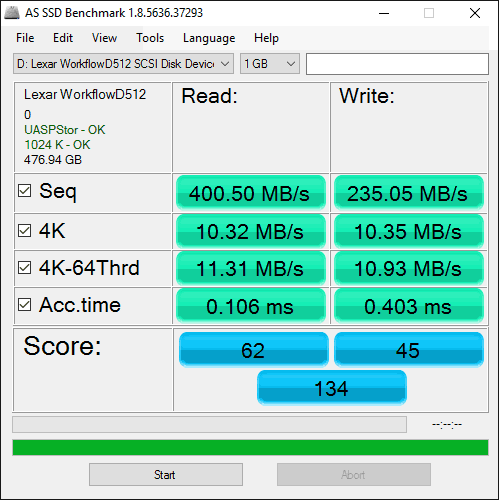
The
results for the new drive.
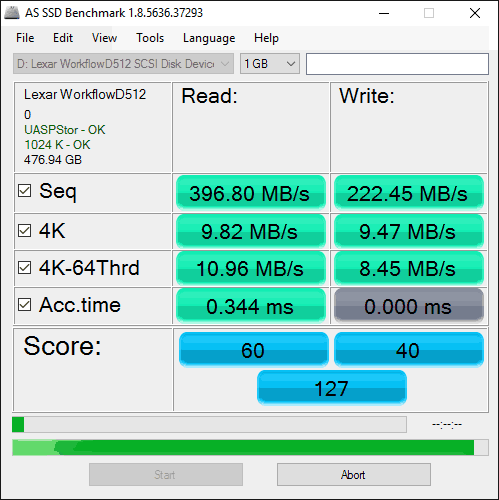
I ran this test a couple of times and every
time it failed to finish the access time test. So I am presenting the results
for the previous drive and as we can see there are a few differences, and all
of them are focused on the 4K result.
Now let’s head to the next page where we
will look at how the Lexar Workflow DD512 USB3 SSD
performs using Anvil's Storage utilities....
Anvil’s Storage Utilities
As well as performing SSD endurance tests.
Anvil’s Storage Utilities has a very nice SSD benchmarking application. The SSD
benchmark tests many different aspects of SSD performance, including 4K random
at different queue depths, and also sequential performance, but more importantly
than this, all using real test data.
Another very nice feature of Anvil’s SSD
benchmark is the fact that you can change the compression levels of the test
data. The compression levels of the data sets used for the tests can be varied
from 0% compression right up to 100% compressed data, and there are even a few
data profiles already included, such as database (8%) compression, and also an
application profile (46%) compression, which is designed to simulate real
application data being read and written to the SSD.
Anvil’s Storage Utilities is still in beta
at the moment, but the application is currently solid enough to use in this
article, and I have already verified the results obtained using an SATA
analyser.
I will include a screenshot of the review
drive, and all comparison results will be presented in the form of graphs. If
you would like to see screenshots of the test results obtained on the other
SSDs in this article, you can do so by following the link here.
I will also be testing three different
compression profiles, which are as follows.
- 0 fill (100% compressible data)
- Application simulation profile (46%
compressed) - 100% (non compressible data)
So let’s begin the tests.
0 fill
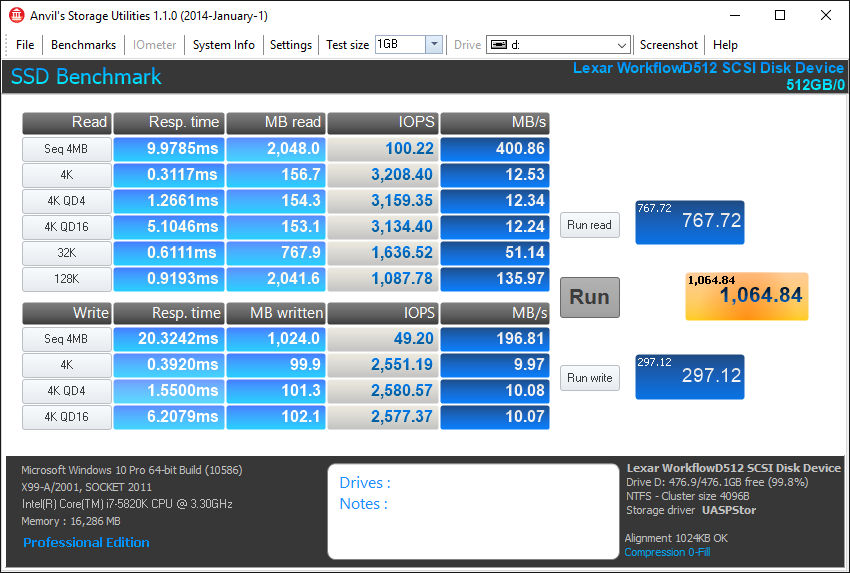
The results for the new drive.
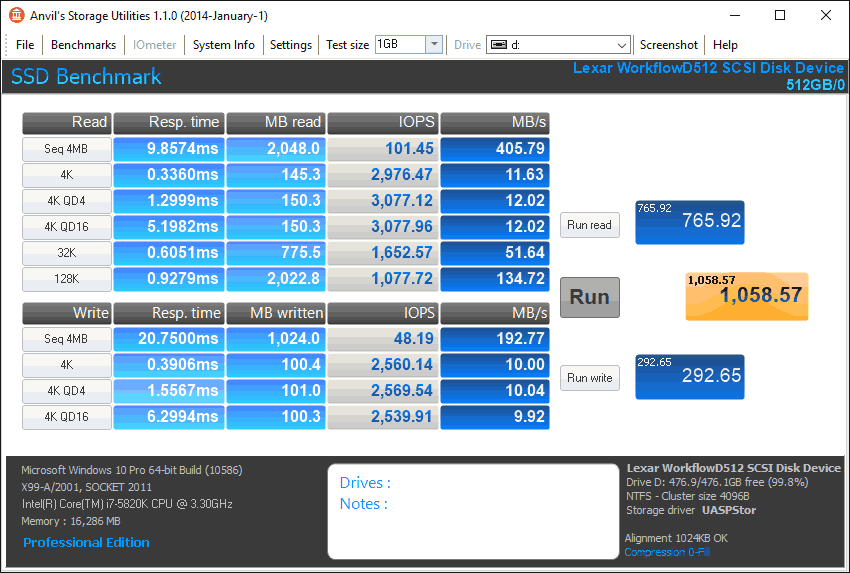
and here are the results for the previous drive.
Read speeds are both excellent with the new
drive staying ahead of the previous, overall both drives are very close when it
comes to read/write performance.
Application profile
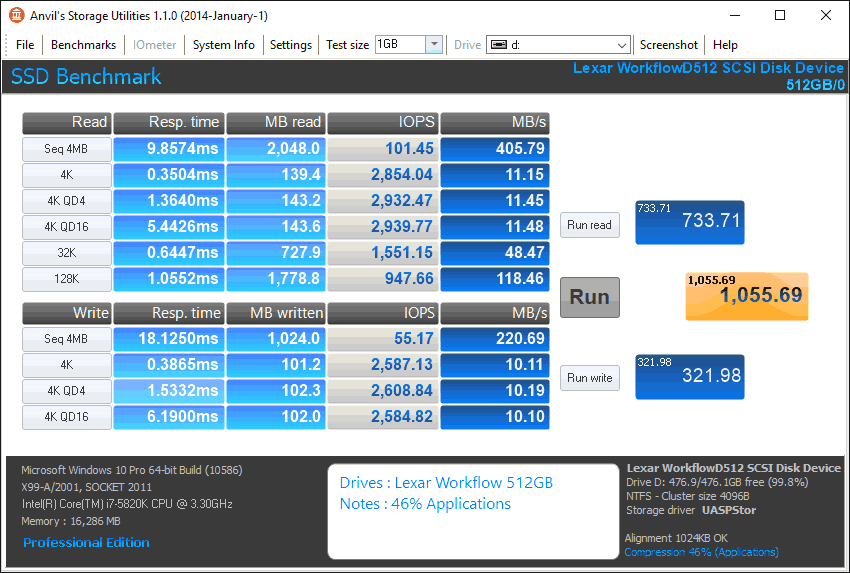
The results for the new drive,
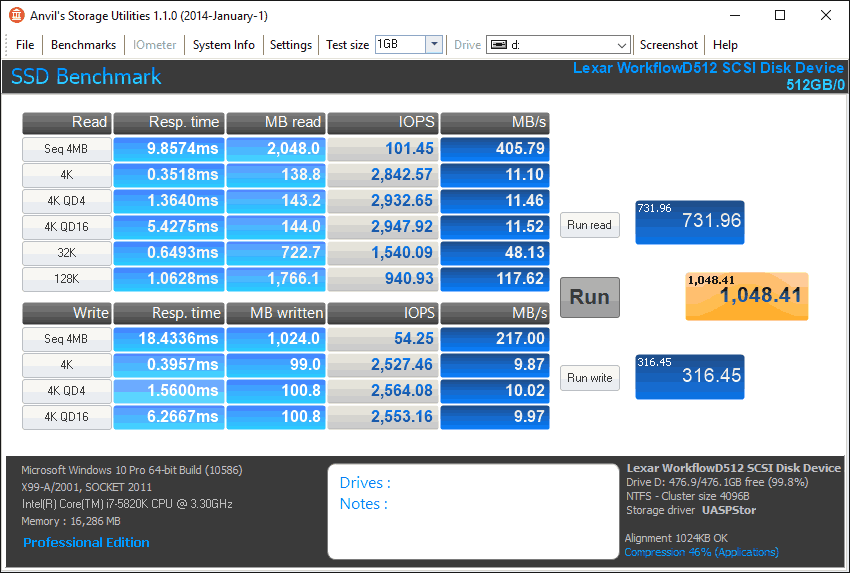
and here are the results for the previous drive.
Once again there isn’t any noticeable
difference between the two drives, and as we can see the new drive is able to
stay ahead of the older one.
100% incompressible
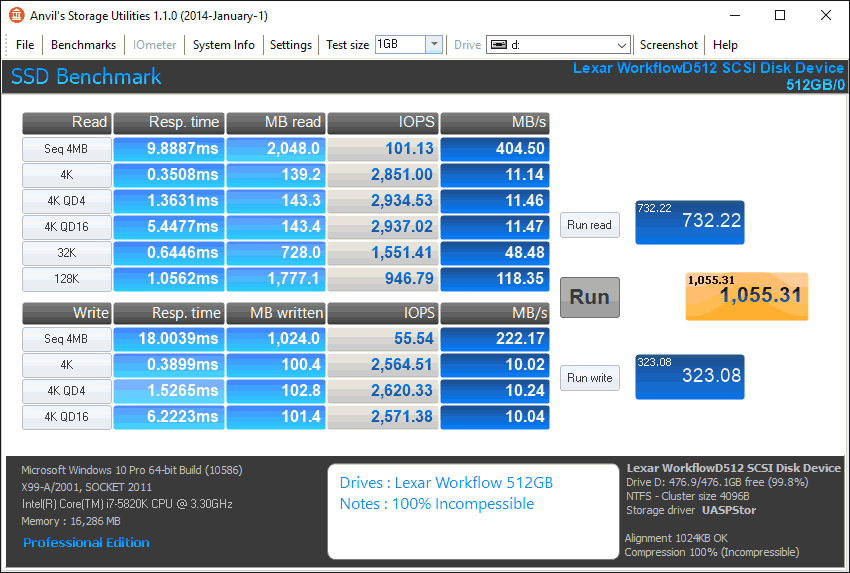
The results for the new drive,
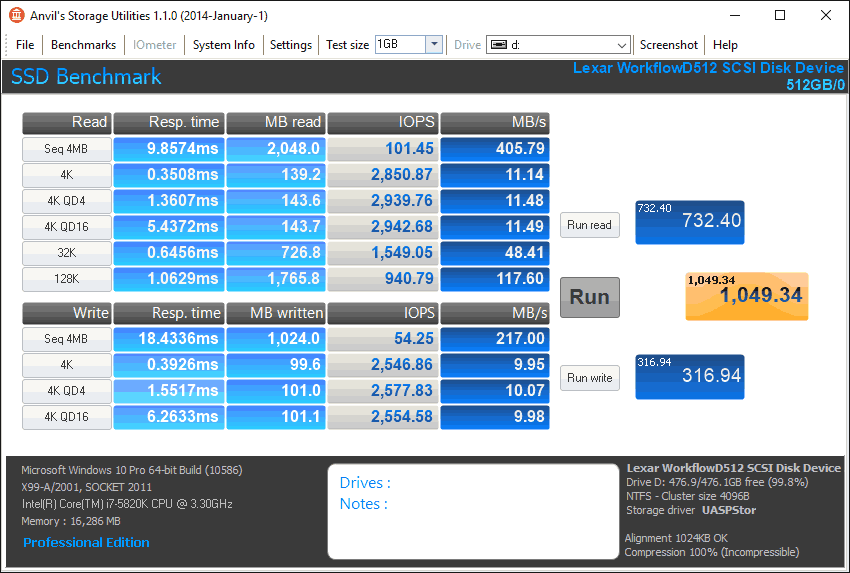
and here are the results for the previous drive.
Again the new drive shows better numbers.
Summary
As expected the new drive shows slightly
better numbers, but there isn’t a huge difference between the two drives.
Now let's head to the next page for some
real world tests....
It has become clear that simply conducting
endless benchmarks on SSD drives is pointless. Real users may run a few
benchmarks when they first fit their SSD drive, but most users just want a
drive that performs well in the real world. They want their drive to work
"out of the box" and work fast and smoothly.
Most of the latest SSD drives can deliver
very fast sustained reading and writing speeds, but these alone tell you very
little about how the drive will perform in the real world.
If you intend to use your SSD as your
primary system drive, with an operating system and applications installed and
running from the drive, real world performance becomes much more important than
just fast sequential read and write speeds, in this case I felt that it was
time to move into a different method of testing.
From now on I will only use filecopy to measure
all my copy tests from a RAM disk to the selected storage drive that I will be
testing. For these tests I will also enable all power savings features that are
available, since I believe that this is the way that the majority of the users will
have them set on their PC.
Real
world copy tests
I will now conduct some real world copy
tests so that you can have a much better view of how the drive will perform. In
these simple tests I try to simulate what a real user does with their drive. I
will be copying some mp3 files, various pictures, an ISO, an MKV file, and a
lot of small files.
MP3 copy test – 259 MP3 song files (1.36GB total)
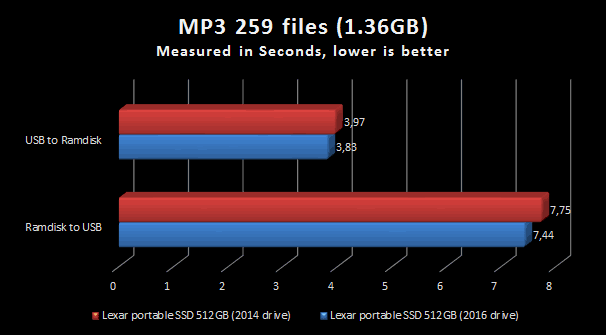
As we can see there isn’t any huge
difference between the two drives, and the new one is slightly faster.
Picture copy test – 3,377 various picture files (2.56GB
total)
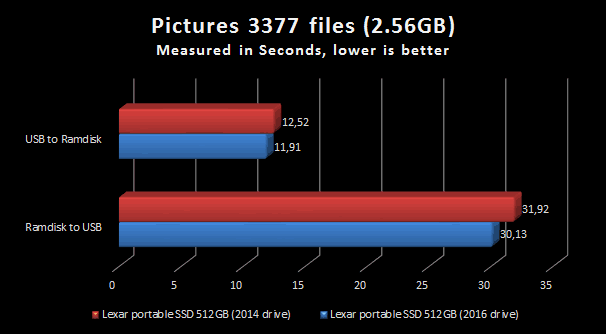
In this test we see again that the new
drive is slightly faster for write speed, and almost 1.8 seconds faster for read
speed.
Movie copy test – 1 MKV and 1 SRT file (3.46GB)
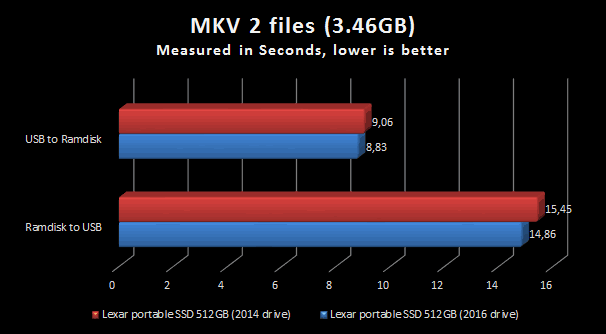
As it was expected the new drive continues
to be slightly ahead of the previous drive.
ISO copy test – 1 file (7xxx MB)
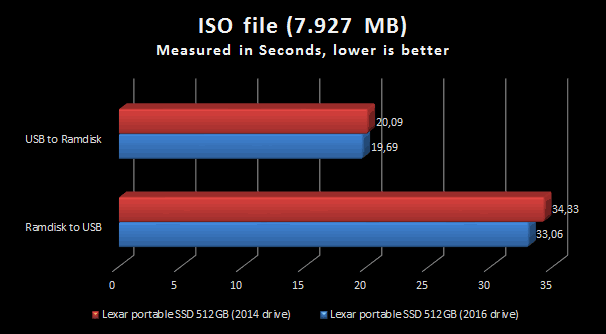
Large files continue to show the same
pattern that we have seen so far, with the new drive again staying ahead of the
older drive.
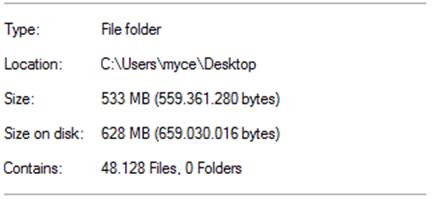
Small text test – 48.128 files (533 MB)
In one of my previous reviews I was asked
by a user to do a test with proper small files. So I went ahead and put 48128
files in one folder and ran some tests with a few of the latest USB flash
drives. I personally don’t feel that this kind of abuse will happen on a daily
basis, and the result of this test will not have a very big impact on my rating
of the tested drive, but it's a good way to separate the men from the boys and
fun to do, even if it takes a lot of time.
First here is a screenshot to give you an
idea of the actual size of all these files and further below you can view the
results from this test.
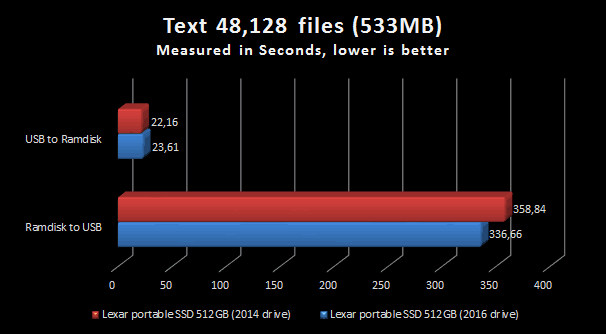
To my surprise, in this test the older
drive was able to give a better result in the write test, but again it loses in
the read test.
This concludes our review. To read the final
thoughts and conclusion, click the link below....
The conclusion for the Lexar 512GB portable SSD review.
So the main thing that has changed is the
packaging of the Lexar 512GB portable SSD, which is now more clean looking and
still continues to offer all the information that you need. All my previous
positives are still here, the five white LEDs that show how much of the drives
capacity has been used, the option to use it as portable SSD, and also being able
to use it with the workflow HR1 and HR2 stations. It continues to have
excellent read performance, but unfortunately it pretty much remains the same
as the previous drive that I tested,. This is also the same for write speed, which
is comparable to the previous drive, and I would have loved to have seen an
improvement in write speed for the Lexar portable SSD. The cable is a huge plus
for me, it's long enough, almost 110cm, and this gives you a lot of freedom to
move the drive around without having to worry too much where or how you will place
it.
Overall the parting sentence is going to
be, “The Lexar 512GB portable SSD continues to be a very good drive for sequential
reads. It has a cable long enough to make life much easy but I would have liked
to have seen an improvement in the write speeds. I can only hope that this will
happen soon, but at the moment it looks like we will have to wait a bit longer.”
I therefore give the 'Very good' rating to the
Lexar Workflow DD512.

Thanks to:
|
|
EFD |
|
|
Alex Schepeljanski for |
|
|
|
|
|
FutureMark for providing a
|



You may comment on this review here, you
can also post your benchmarks in our forum.















