
|
|
Article: Intel Z170 native M.2 vs PCIe3 Article by: Wendy Robertson |
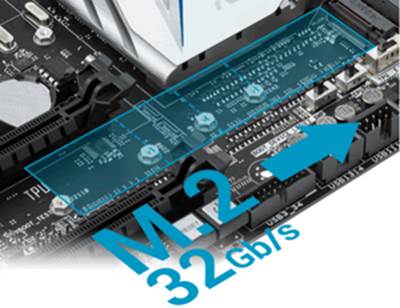
With consumer grade NVMe SSDs finally arriving, it becomes
important that the performance of NVMe SSDs can be fully realised by the way they
are connected to the motherboard.
In this article I will examine the performance difference
(if any) of an M.2 NVMe SSD connected using the Intel Z170 ‘native’ hyper M.2
solution via the Z170 Skylake PCH (Platform Controller Hub),
and the same M.2 NVMe SSD connected using the main PCIe3 x16 sockets via the Intel
Skylake CPU.
NVMe (Non Volatile Memory Express)
SSDs are PCIe based and can be installed in a standard PCIe slot, M.2 socket, or
via the brand new U.2 connector. PCIe SSDs are not new, and have been around
for several years. However, the PCIe SSDs of the past required a special
controller which sat between the SSD hardware and the PCIe system bus, to allow
the SSD hardware and the PCIe bus to perform the translation and communication
between the two interfaces. This was of course a very complex and time
consuming task, which inevitably led to increased latency.
NVMe is a native solution, with its own highly optimised
protocol, which features a very much reduced command set, much lower latency
when compared to AHCI, and is specifically optimised for Non Volatile Memory
(FLASH memory).
M.2 is a small form factor, initially designed for small
form factor PCs, such as laptops, but have found their way into desktop PCs.
Initially, M.2 appeared ‘natively’ in desktop PC’s with the Intel Z97 chipset.
The Z97 native solution was very limited. It could use only two generation 2
PCIe lanes, and was thus limited to maximum bandwidth of 10Gbps, or 1GB per
second. In practice, and due to the overheads, this translated to a maximum
throughput of around 740 MB/s. Latency was also quite high with the Z97 native
solution and therefore, to get maximum performance from M.2 in a Z97 setup, M.2
SSDs were often mounted in a PCIe3 PCIe to M.2 adapter card, thereby utilising
the higher bandwidth and lower latency of main PCIe3 sockets on the motherboard.
However, mounting an M.2 SSD in a PCIe3 card, and then
connecting this to the main PCIe3 sockets on the motherboard does have its
limitations. If you’re using a main PCIe3 socket then you’re limited to a
single graphics card, and that single graphics card will be limited to using
eight PCIe3 lanes. This shouldn’t really be a problem as current graphics cards
should not be limited by the reduced bandwidth, but it does rule out using an effective
SLI or crossfire graphics solution.
The new Intel Skylake CPU requires an Intel 100 series
chipset to function, with the high performance desktop variant being designated
Z170. For a device to be ‘natively’ supported, it must either be a feature
built into the CPU, such as the DRAM controller, Intel HD graphics, DMI, and
16x PCIe3, or alternatively, a feature of the chipset itself, PCH (platform
controller hub).
Most Z170 motherboard manufacturers are connecting M.2 via
the platform controller hub, but a few are connecting M.2 via the main 16x
PCIe3 sockets. You should watch out for this because, as I explained above,
connecting via the main PCIe3 sockets will be stealing bandwidth from those
sockets. On the positive side, M.2 connected via the main PCIe3 sockets is
likely to enjoy lower latency, and therefore better performance.
My Asus Z170 Deluxe motherboard uses the native Z170 PCH
solution, and therefore makes the full bandwidth available to the two main
PCIe3 sockets for graphics cards, or other bandwidth hungry PCIe3 solutions. In
the picture below, we can see the layout of the Asus Z170 Deluxe.
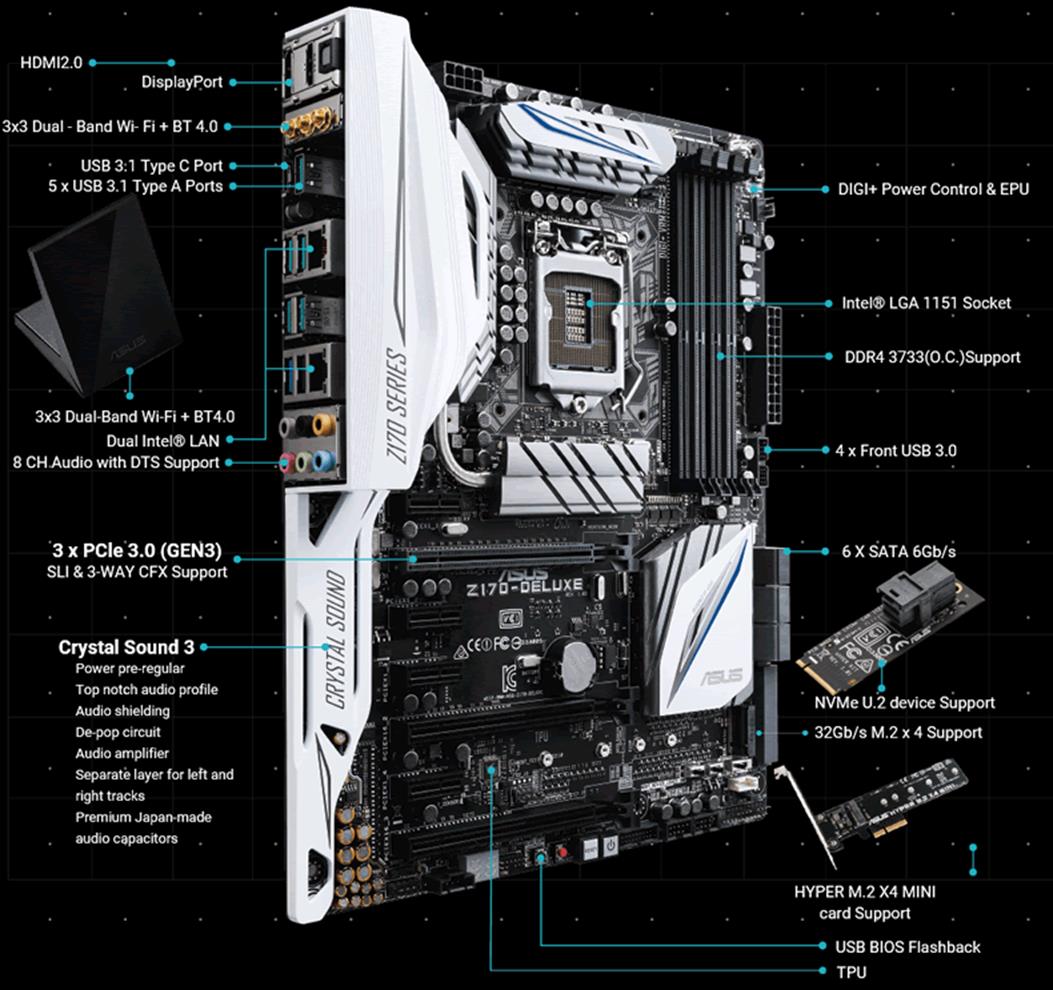
Asus Z170 Deluxe
At the bottom right of the picture you see the native M.2
socket. This solution uses 4x PCIe3 lanes, with a maximum bandwidth of 32Gbps,
or 3.2 GB/s. You can also see that the Asus Z170 Deluxe supports Hyper M.2 X4
with the built in M.2 socket, via an PCIe3 x4 add in card. Worth noting as well
is that the Asus Z170 Deluxe supports the new U.2 standard, for 2.5 inch NVMe
SSD solutions.
In the block diagram below, you can see how native hyper M.2
is connected on the Asus Z170 Deluxe motherboard.
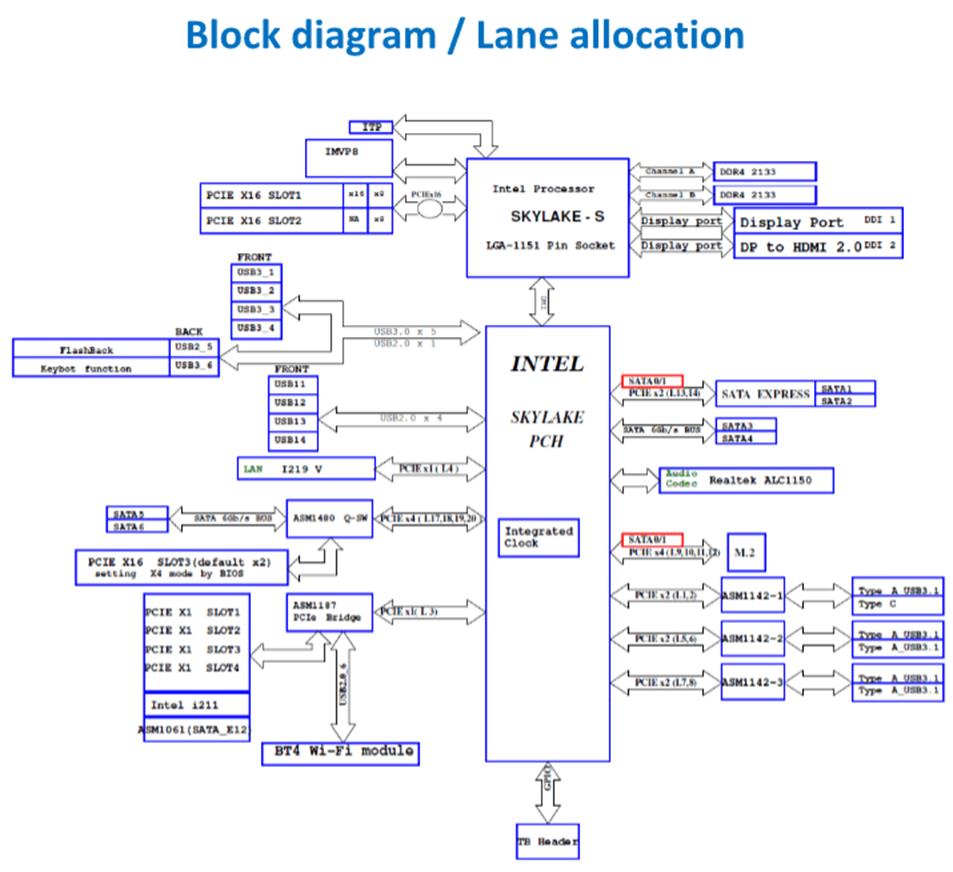
We can see clearly that the hyper M.2 socket is connected
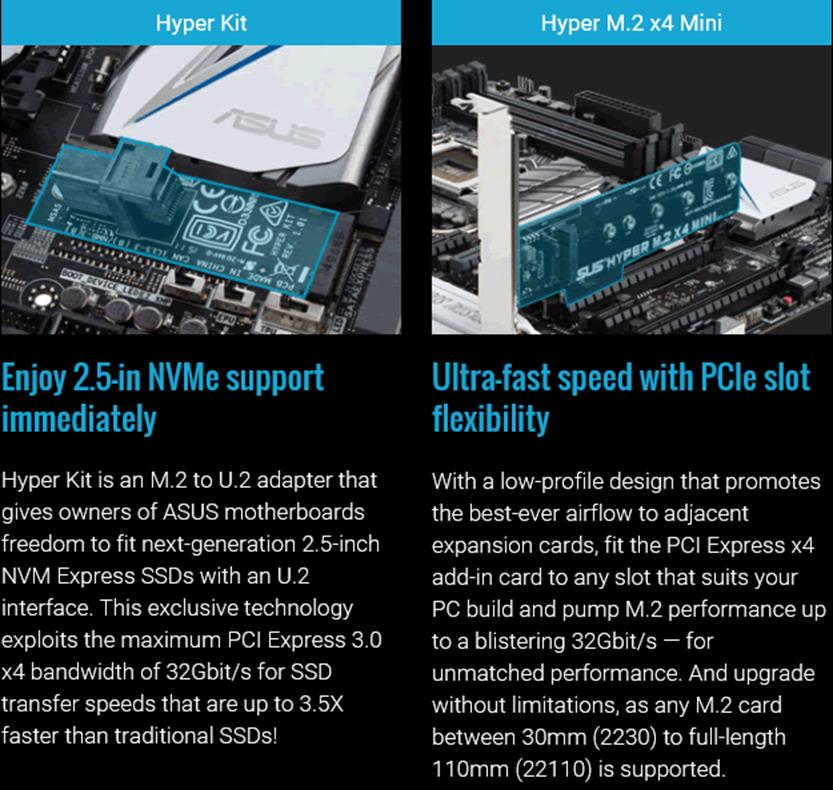
via the Intel Skylake Z170 PCH (platform controller hub). Finally, in the
screenshot below, you can see both the U.2 and M.2 PCIe3 adapter cards supplied
with the Asus Z170 Deluxe. The hyper M.2/U.2 card allows you to mount an M.2 or
U.2 SSD in the main PCIe3 x16 sockets, should you prefer to take that route
rather than using the built in hyper M.2 socket.
Before I go any further, I should explain some important
things that have changed between the Intel Z97 and the Intel Z170 chipsets.
The platform controller hub on the Intel Z97 chipset is
connected to the CPU via an interface known as DMI 2, which allows maximum
bandwidth between the PCH and the CPU of 20 Gbps, or 2 GB/s without overheads.
On the Intel Skylake Z170 platform, DMI has been upgraded to DMI 3, which
allows 8GT per second, or 8 Giga transfers per second, with a maximum bandwidth
of 40 Gbps, (4GB/s).
Intel Z97 connected to all connected devices using PCIe
generation 2 lanes; with each lane allowing a maximum bandwidth of 500 MB/s.
Z97 had eight PCIe2 lanes available for connecting all the devices.
Intel Z170 PCH connects to all connected devices using PCIe3
lanes, with each lane providing a maximum bandwidth of 1GB/s, and Z170 has 20
PCIe3 lanes at its disposal. So the Intel Z170 platform controller hub is a
huge upgrade from a performance perspective.
So, let’s compare ‘native’ hyper M.2 via the Z170 platform
controller hub, and hyper M.2 connected via the main PCIe3 x16 sockets, to find
out which one performs the best.
Let’s head to the next page.........
Test machine
For this review I will be using a computer with the
following configuration:
Hardware:
- Motherboard: Asus Z170 Deluxe (Intel Z170 chipset)
- Processor: Intel 6th generation Core i7 6700K
- CPU cooler: BeQuiet Dark Rock Pro 2
- RAM: 16GB Corsair Vengeance LPX 2666MHz DDR4 (dual channel)
- GFX: MSI GTX 950 Gaming 2G
- Sound: Onboard Realtek ALC1050 HD audio controller
- Hard disk OS: OCZ Vector 256GB SSD.
- Case: Antec Performance One P280
- PSU: Antec True Power modular 550W
- Display: Dell UltraSharp U2412M 24” widescreen IPS LCD (HDCP
compliant) - Operating System: Windows 10 Professional 64bit
For these tests I will be using a Samsung
950 Pro M.2 NVMe SSD, which I reviewed just a few weeks ago. The Samsung
950 Pro M.2 NVMe SSD was tested in the ‘native’ hyper M.2 socket fitted to the
Asus Z170 Deluxe, then the same tests were carried out with the Samsung 950 Pro
M.2 NVMe SSD mounted in the Asus hyper M.2 to PCIe3 adapter card, and then
connected to the main PCIe3 x16 socket, connected via the Skylake CPU.
The NVMe drivers used to test the 950 Pro M.2 NVMe SSD were
Samsung’s own NVMe driver version 1.4.7.15
CPU power saving states was disabled for consistency, and
all the SSDs in this article were tested with all CPU power saving states
disabled.
Test applications
To test the performance of the Samsung 950 Pro M.2 NVMe SSD,
I will be using the following test applications in this review.
- HD-Tune Pro
- ATTO
- Iometer
- AS SSD Benchmark
- Anvil’s
Storage Utilities - PC
Mark 8
Test procedures
Firstly I will check the performance with a few synthetic
benchmarks, and on the next page I will supplement this with a real world test
using PCMark 8 storage suite.
The exact same tests were carried out in the two different
methods of connecting the Samsung 950 Pro M.2 NVMe SSD.
Drive preparation for running the tests
To make the tests fair, the SSD was secure erased to bring
performance back to its factory default state before the start of each test.
Where I use graphs in this article to display results, I
will use the following colours to make it easier for our readers to see which drive
we are reviewing.
 Samsung 950 Pro –
Native Z170 hyper M.2 connected.
 Samsung 950 Pro –
PCIe3 hyper M.2 connected.
 SATA SSD
Synthetic Benchmarks
HD Tune Pro
In this benchmark I am checking sequential reading speed.

Samsung 950 Pro –
Native Z170 hyper M.2 connected

Samsung 950 Pro –
PCIe3 connected
Let's see how the two connection methods compare in the bar
graph below.

The result is almost identical, with PCIe3 having a slight
advantage.
ATTO disk benchmark
ATTO has become a standard tool for measuring the data
throughput of HDDs and SSDs. It measures the reading and writing performance,
using different file sizes and block sizes.

Samsung 950 Pro –
Native Z170 hyper M.2 connected

Samsung 950 Pro –
PCIe3 connected
Let's find out how they compare.
ATTO Reading performance

ATTO - Reading
performance at various block sizes
The Samsung 950 Pro M.2 NVMe SSD connected via native Z170
hyper M.2 has a very slight advantage when reading data, but once again they
are very close.
ATTO Writing performance

ATTO - Writing
performance at various block sizes
This time the PCie3 connecting method has a slight
advantage, but yet again they are very close.
AS SSD Benchmark
AS SSD benchmark is a benchmarking tool specifically
designed to test SSDs. The application tests sequential reading and writing
performance, 4K random reading and writing performance.
AS SSD benchmark also tests 4K threaded performance. This is
very exciting, as this test is the first available test that I am aware of,
that simulates how a PC operating system actually works. A modern PC and OS,
such as Windows 10 does not just run a single thread at a time, it runs many
threads. The AS SSD benchmark "4K 64Thrd" tests run 64 threads
simultaneously throughout the test. If this result is good, then you can be
pretty sure the drive will perform extremely well as a system drive.
After the tests complete, AS SSD benchmark derives a total
score for the drive being tested. This is based on all aspects of the test
results, and gives an indication of how the drive is performing overall.

Samsung 950 Pro –
Native Z170 hyper M.2 connected

Samsung 950 Pro –
PCIe3 connected

This time, PCIe3 connected is faster than native Z170 hyper
M.2 connected, but once again the advantage is slight.
Anvil’s Storage Utilities
As well as performing SSD endurance tests. Anvil’s Storage
Utilities has a very nice SSD benchmarking application. The SSD benchmark tests
many different aspects of SSD performance, including 4K random at different
queue depths, and also sequential performance, but more importantly than this,
all using real test data.
Another very nice feature of Anvil’s SSD benchmark is the
fact that you can change the compression levels of the test data. The
compression levels of the datasets used for the tests can be varied from 0%
compression right up to 100% compressed data, and there are even a few data
profiles already included, such as database (8%) compression, and also an application
profile (46%) compression, which is designed to simulate real application data
being read and written to the SSD. However, for this test I will only use the 0
fill option.

Samsung 950 Pro –
Native Z170 hyper M.2 connected

Samsung 950 Pro –
PCIe3 connected
Let’s compare the results in the graph below.

Once again, the PCIe3 connecting method has an advantage,
but the Samsung 950 Pro connected via native Z170 hyper M.2 is not far behind.
Testing I/O Performance with IOMeter
IOMeter is probably the most versatile of all the synthetic
benchmarks. Its ability to be configured to generate a multitude of different
I/O traffic is unmatched. Another great feature of IOMeter, is the capability
to test any storage metric that you can think of, providing you know how to
configure the assignments. The reviewer also has complete control over things
like queue depth, block size, whether the traffic is random, sequential, or
even a mixture of both.
Partition alignment and sector boundaries
Windows 10, Windows 8.1, Windows 7, and Windows Vista will
automatically align a partition to 4k boundaries during partition creation,
Windows XP won’t. It is imperative that an SSD’s partition is aligned. Windows
XP is also restricted to sector boundaries, while Windows 7 and 8 will use 4k
boundaries if they can. The Samsung 950 Pro M.2 NVMe SSD is 4k boundary aware,
and will use these boundaries if possible. Of course it will also remap LBAs
for compatibility with the sector boundaries so that the drive can be used with
Windows XP.
IOMeter 4K random write test with repeating data.
The first test involves creating continual 4KB random files
on the target drive with IOMeter. I use a 4KB file size, as it is believed that
Windows will create and modify many of this size of file constantly in the
background during a typical Windows session. It is said that most 4K random
writes take place at a queue depth of only one, and I have been requested to
include this test in my reviews.
Queue depth 1

Samsung 950 Pro –
Native Z170 hyper M.2 connected

Samsung 950 Pro –
PCIe3 connected
MB/s
Yet again, the PCIe3 connecting method is the faster of the
two.
Latency
This graph shows the difference in latency between the two
connecting methods, and also includes an SATA SSD for comparison.

The Samsung 950 Pro performs slightly better when connected
via PCIe3 in this test, so it’s no surprise to see that latency is also lower.
By including an SATA SSD in this test (the Samsung 850 Pro)it is interesting to
see how much lower the latency is with NVMe SSDs.
Queue depth 4

Samsung 950 Pro –
Native Z170 hyper M.2 connected

Samsung 950 Pro –
PCIe3 connected

This time the native Z170 hyper M.2 connection proves to the
faster of the two, but once again they are close.
Queue depth 32

Samsung 950 Pro –
Native Z170 hyper M.2 connected

Samsung 950 Pro –
PCIe3 connected

Once again, the native Z170 hyper M.2 connection method
proves to be faster.
IOMeter 4K random read test.
If there are many 4k files created, then that must also mean
that many 4k files need to be read. This test measures 4k reading performance.
It is said that most 4K random reads take place at a queue
depth of only one, and readers have requested that I include this test in my
reviews.
Queue depth 1

Samsung 950 Pro –
Native Z170 hyper M.2 connected

Samsung 950 Pro –
PCIe3 connected
MB/s

PCIe3 is slightly faster when compared to native Z170 Hyper
M.2 connected, but only very slightly faster.
Latency

It’s no surprise to see that the PCIe3 connection method has
the lowest latency, but the difference between PCIe3 connected and native Z170
hyper M.2 connected is marginal. Once again we can see that the SATA SSD
suffers from higher latency when compared to the NVMe SSD.
Queue depth 1

Samsung 950 Pro –
Native Z170 hyper M.2 connected

Samsung 950 Pro –
PCIe3 connected
Let’s take a look at the result in the form of a bar graph.

Once again the PCIe3 connection method proves to be slightly
faster than the native Z170 hyper M.2 connection method, but the difference in
performance is yet again very slight.
Queue depth 32

Samsung 950 Pro –
Native Z170 hyper M.2 connected

Samsung 950 Pro –
PCIe3 connected
Let’s take a look at the result
below.

Yet again, the PCIe3 connecting method is marginally faster
than connecting via native Z170 hyper M.2.
Queue depth 32 with four threads
I was curious to find out how fast the Samsung 950 Pro could
read small random files when the task was over multiple threads, so I created a
test pattern with a queue depth of 32, and then ran this with four threads.

Samsung 950 Pro –
Native Z170 hyper M.2 connected

Samsung 950 Pro –
PCIe3 connected
Let’s take a look at the result from this very heavy
workload.

Even with this extremely heavy workload, both connection
methods prove to be very close from a performance perspective, with the PCIe3
connection method being slightly faster than when the Samsung 950 Pro is
connected via the native Z170 hyper M.2 socket.
IOMeter 512KB sequential write test.
Sequential writing performance is also very important; in
this test sequential writing performance is measured.

Samsung 950 Pro –
Native Z170 hyper M.2 connected

Samsung 950 Pro –
PCIe3 connected

The Samsung 950 Pro when connected via PCIe3, proves to be
faster than the native Z170 hyper M.2 solution.
IOMeter 512KB sequential read test
This test measures 512k sequential reading performance.

Samsung 950 Pro –
Native Z170 hyper M.2 connected

Samsung 950 Pro –
PCIe3 connected

When reading sequential data, the native Z170 hyper M.2
connecting method proved to be faster than the PCIe3 connecting method.
Summary
Synthetic benchmarks have their limitations, and none of
them are completely consistent with their results. It only takes Windows to
want to do some other task in the background to slightly skew the results. With
this in mind, I’m hesitant to prefer one method of connecting a high
performance NVMe SSD over the other. What the synthetic benchmarks do tend to
suggest is that connecting the SSD via one of the main PCIe3 x16 sockets will give
slightly better performance in most cases over the native Z170 hyper M.2
socket, but the differences in performance are very marginal, and would almost
certainly go unnoticed in the real world.
Now let's head to the next page where we will see the real
world performance in PC Mark 8.....
PC Mark 8 - Storage Suite
Here at Myce.wiki, we only recently introduced PCMark Vantage
into our SSD testing. PCMark Vantage is a good test, but is now somewhat
outdated in the applications that it tests, even to the extent of including a
test trace on how Windows Vista booted. We could of course have opted for the
newer PCMark 7, but I personally had issues with the way it ran the HDD tests.
We have built quite a close relationship with FutureMark
software, the authors of the PCMark PC benchmarking software that we use in our
tests. I decided I would use PCMark Vantage as stopgap measure until the more
up-to-date PCMark 8 benchmarking suite became available. I'm pleased to say
that PCMark 8 is now available, and it gives me great pleasure to introduce you
all to the results obtained by this new 'real world' benchmarking suite.
I will describe the basic way that each test is carried out,
above the graph for each test.
PC Mark 8 storage suite results

Samsung 950 Pro –
Native Z170 hyper M.2 connected

Samsung 950 Pro –
PCIe3 connected
Now let’s look at the individual PC Mark 8 HDD suite scores,
in the form of tables and graphs.
PC Mark 8 storage suite: World of Warcraft


The first thing that is very noticeable is that both
connection methods are remarkably close, performance wise, when loading this
game.
PC Mark 8 storage suite: Battlefield 3


Both connection methods performed identically.
PC Mark 8 storage suite: Adobe Photoshop light


Again it’s a dead heat.
PC Mark 8 storage suite: Adobe Photoshop heavy


This time, the native Z170 hyper M.2 connection method is
marginally faster than the PCIe3 connection method.
PC Mark 8 storage suite: Adobe InDesign


Once again we have a draw.
PC Mark 8 storage suite: Adobe After Effects


Yet again, both connection methods are identical, from a
performance perspective.
PC Mark 8 storage suite: Adobe Illustrator


Once again it’s a draw.
PC Mark 8 storage suite: Microsoft Word


Yet again we have a draw.
PC Mark 8 storage suite: Microsoft Excel


Once again we have a draw.
PC Mark 8 storage suite: Microsoft PowerPoint


Once more the results obtained from our tests are identical.
PC Mark 8 storage suite: Storage bandwidth
Storage bandwidth displays the amount of bandwidth available
from the storage device, when it is faced with requests for simultaneous reads
and writes.

According to PC Mark 8, connecting the Samsung 950 Pro via the
native Z170 hyper M.2 socket will provide more bandwidth.
PC Mark 8 storage suite: Overall Score
PC Mark 8 sums all the individual times taken to run each
storage benchmark, and then comes up with an overall score for each of the
tested SSDs.

As we can see from the above graph, the performance margin
between native Z170 hyper M.2 connected, and PCIe3 connected via the main PCIe3
x16 sockets, is minimal.
Summary
According to PC Mark 8 storage suite, connecting via the
native Z170 hyper M.2 socket provides a marginally faster connection when
compared to connecting the Samsung 950 Pro NVMe SSD to the main PCI3 x16
sockets. However, just like in the synthetic benchmarks, the difference in
performance is so slight between the two connection methods to be unnoticeable
in the real world.
This concludes our tests. To read the final thoughts and conclusion,
click the link below....
The limitations and advantages, of both connecting methods.
Like most things in life, both these connecting methods for
high performance NVMe M.2 SSDs have their advantages, and limitations. So let’s
look at the main ones.
Native Z170 hyper M.2 connected.
Advantages
Native Z170 hyper M.2 has been proven to be just as fast as
the same SSD connected to one of the main PCIe3 x16 sockets via the Skylake
CPU. Another advantage is, at least on the Asus Z170 Deluxe, the connecting
socket is out of the way of the main PCIe sockets, and therefore unlikely to
cause a problem when trying to fit a graphics card. The native Z170 hyper M.2
connected solution also leaves both of the main PCIe3 sockets available for
graphics cards, or other bandwidth hungry PCIe3 devices.
Limitations
Given that a single Samsung 950 Pro M.2 NVMe SSD can reach
speeds of 2.3 GB/s, and you could RAID two of these SSDs using the native Z170
chipset (one via the onboard hyper M.2 socket, and another via the third x16
PCIe3 socket with hyper M.2/PCIe3 adapter card, which also connects to the Z170
platform controller hub). Then you would have already saturated the interface.
PCIe3 connected
Advantages
You get slightly lower latency and therefore, at least in
theory, slightly better performance. You also get scalability, all the way up
to x16 PCIe3, providing none of the main PCIe3 sockets are already occupied. In
practice, the limit is likely to be a PCIe3 x8 PCIe3 SSD, rather than an M.2
SSD.
Limitations
If you have a graphics card installed in your mainstream PC,
be that the Z170, Z97, Z87, and the other mainstream chipsets preceding those,
then you will halve the amount of PCIe lanes from 16 to 8 for each device, also
making an SLI or crossfire graphics setup improbable. If you require SLI or
crossfire, and an extreme PCIe NVMe SSD storage solution, then the mainstream
chipset is probably not the best choice, so you may be better considering the
Intel X99 platform.
So what have we learnt from this article?
The main x16 PCIe3 sockets are already a known quantity.
They are scalable, and offer very low latency. Native Z170 hyper M.2 has proved
to be a match for the performance of a PCIe3 connection. Native Z170 hyper M.2
has more than enough bandwidth for a single, currently available, M.2 NVMe SSD,
and latency is also extremely low.
The native Z170 hyper M.2 socket, at least on the Asus Z170
Deluxe motherboard, is positioned out of the way of other devices and won’t
interfere, or get in the way when you’re installing a graphics card, or for
that matter, trying to install an M.2 SSD when a graphics card is already
installed in the system.
The PCIe3 connection method probably just has the edge from
a performance perspective, but as the results in this article prove, they are
so close that this most certainly will go unnoticed in the real world. So to
sum up, this is what I would say.
“Native Z170 hyper M.2 is just as fast as the main PCIe3
x16 sockets driven directly from the CPU, and I have no problem recommending
this connection method for anyone considering a high performance NVMe hyper M.2
SSD”.
Thanks to:
|
|
EFD Software for |
|
|
Alex |
|
|
|
|
|
FutureMark for |
|
|
Samsung |


You may comment on this review below.















