
|
|
Review: OCZ RevoDrive 350 PCIe SSD |
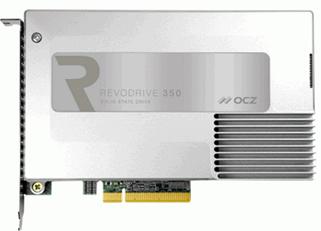
There are times when SATA just isn't fast enough to meet the
demands of high end workstation workloads. Of course, you could RAID a few SATA
SSDs in a RAID0 configuration to boost reading and writing speeds, but this can
become complicated and messy, and not to mention eats up those precious
motherboard SATA ports.
A much neater, and less complicated solution is to purchase
a PCIe based SSD. Gone is the restrictive SATA bandwidth. and you have a single
card solution that is neat and doesn't use up those precious SATA ports.
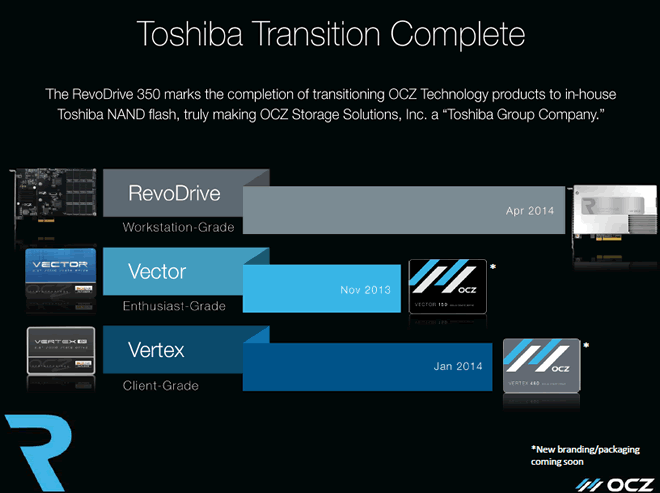
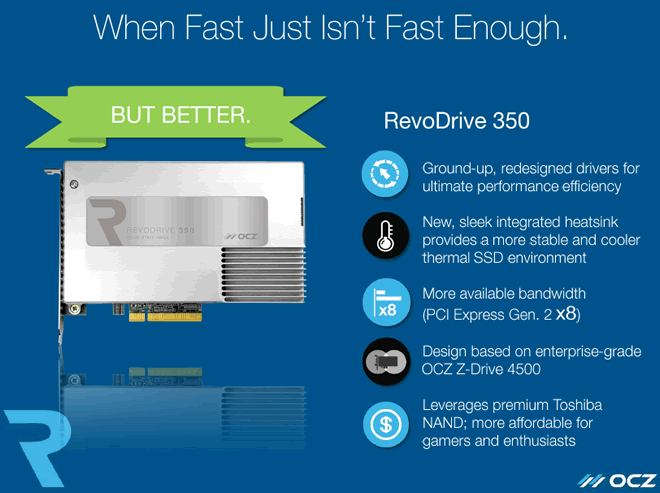
Enter the OCZ Storage Solutions RevoDrive 350. The RevoDrive
350 completes the OCZ transition to Toshiba NAND. It doesn't stop there though.
The RevoDrive 350 also makes the transition to a PCIe generation 2 x8 connection
to the PCIe system bus. Thereby increasing the total bandwidth to approximately
4GB/s.
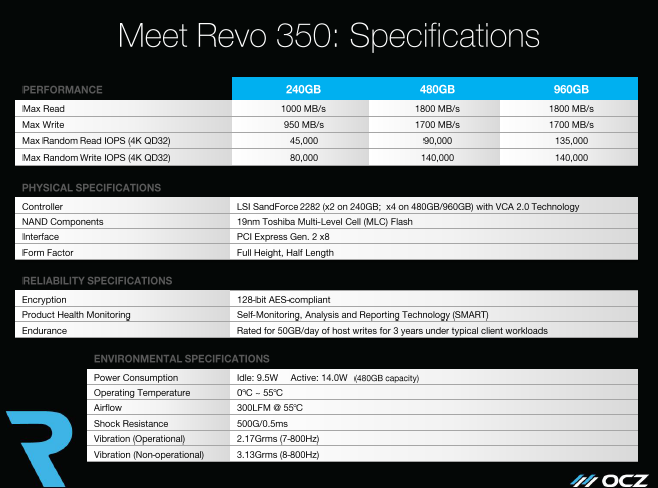
The RevoDrive 350 is available in three different
capacities, 240GB, 480GB, and 960GB. The RevoDrive also uses the LSI Sandforce
SF2282 SSD controller, with two of these SSD controllers utilised in the 240GB
version, and four SF2282 SSD controllers utilised in the 480GB and 960GB
versions.
The RevoDrive 350 is aimed at the high end workstation
market, where mixed read/write performance needs to be of a very high standard.
Having only got my hands on this SSD yesterday, there simply
wasn't the time to complete a full review of the OCZ RevoDrive 350. So what
follows is a first look at the RevoDrive 350, and I will back this up a full
review in the coming days.
The version I'm looking at today is the 480GB version.
So let's find out how this new SSD performs in our range of
tests.
OCZ Storage Solutions company information
OCZ should need no introduction, but those of you who would
like to find out more about OCZ Storage Solutions, can do so at their website.
The OCZ RevoDrive 350 - 480GB SSD
Now it’s time to take a look at the drive itself and what it
came shipped with.
Packaging
The review sample I received was the full retail kit.
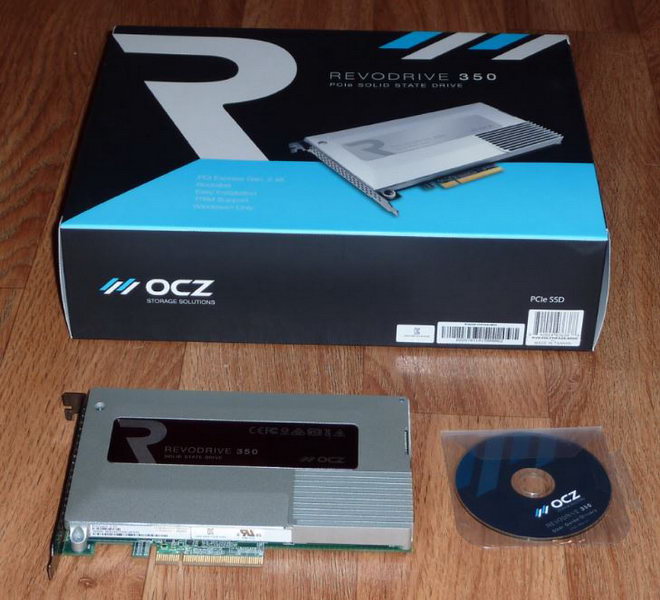
The box contained the OCZ RevoDrive 350 PCIe SSD, driver
software for Windows 7/8/8.1, and Linux drivers for Fedora, Mint, and Ubuntu.
There is also a user guide on the supplied CD-ROM.
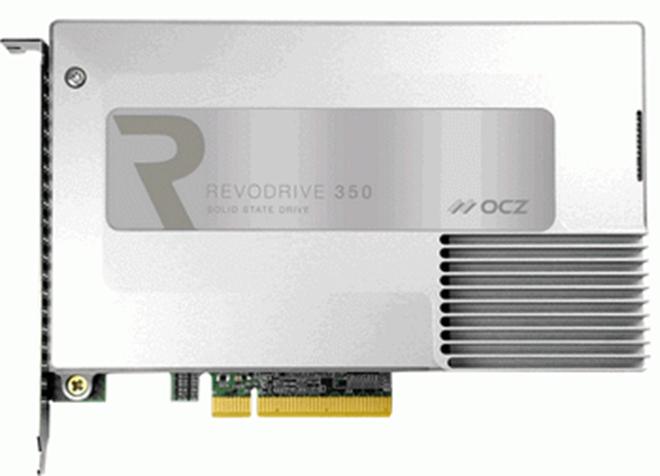
Drive front
Software
The software supplied via download from the OCZ website is
as follows.
- OCZ SSD Toolbox
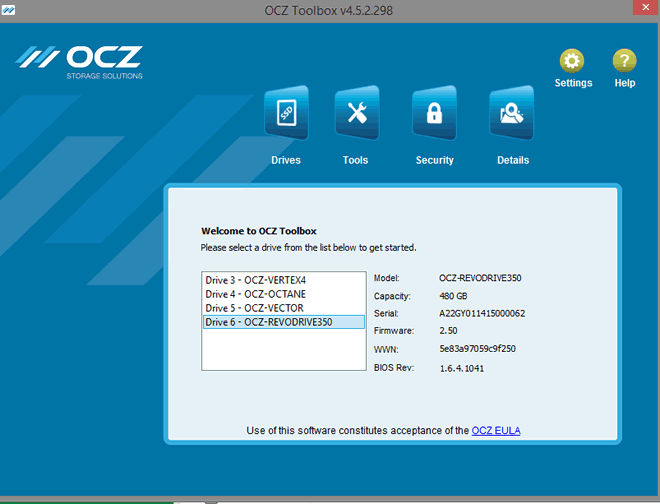
OCZ SSD Toolbox
The OCZ SSD toolbox provides a means of updating the SSD's
firmware, controller BIOS, Secure Erasing the SSD, TRIM the free space on the
SSD, and also providing useful information about the OCZ RevoDrive 350 hardware
via S.M.A.R.T.
Software drivers are also supplied for Windows 7/8/8.1, and
Linux drivers for Fedora, Mint, and Ubuntu.
A closer look at the OCZ RevoDrive 350 hardware.
PCB
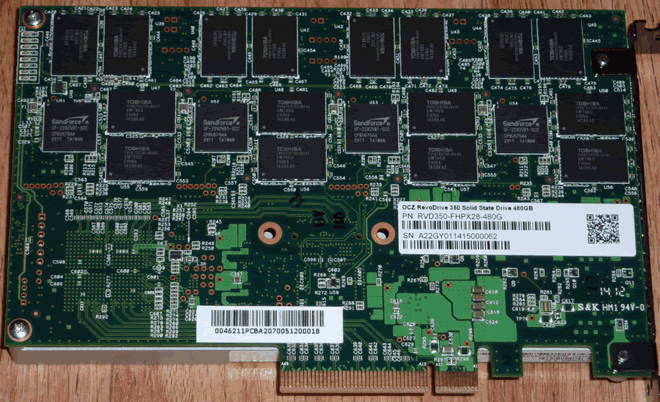
Drive rear and PCB
Removing the integrated heat sink reveals the PCIe controller
(not shown), and on the rear side of the PCB, we can see 4x LSI Sandforce
SF2282 SSD controllers, and the 19nm 'premium grade' Toggle 2 MLC NAND chip
packages manufactured by Toshiba.
Features

Let’s head to the next page where we take a look at a few
synthetic benchmarks and I/O performance.....
Test machine
For this review I will be using a computer with the
following configuration:
Hardware:
- Motherboard: Asus Z87 SaberTooth (Intel Z87 chipset)
- Processor: Intel 4th generation Core i7 4770K
- CPU cooler: BeQuiet Dark Rock Pro 2
- RAM: 16GB Samsung Green DDR3 1600MHz (dual channel)
- GFX: Onboard Intel HD 4600
- Sound: Onboard Realtek ALC1050 HD audio controller
- Hard disk OS: OCZ Vector 256GB SSD.
- Case: Antec Performance One P280
- PSU: Antec True Power modular 550W
- Display: Dell UltraSharp U2412M 24” widescreen IPS LCD (HDCP
compliant) - Operating System: Windows 8.1 Professional 64bit
The OCZ RevoDrive 350 was fitted to the first PCIe x16 slot
in our review PC, and all tests were performed with the OCZ RevoDrive 350
fitted to this PCIe slot.
CPU power saving states were disabled for consistency, and
all the SSDs in this article were tested with all CPU power saving states
disabled.
Test applications
To test the performance of the OCZ RevoDrive 350 SSD, I will
be using the following test applications in this review.
One should note that the RevoDrive 350 is going head to head
in these tests with single SATA 6Gbps SSDs, and not with similar PCIe based SSDs.
- HD-Tune Pro
- ATTO
- Iometer
- AS SSD
Benchmark - CrystalDiskMark
- Anvil’s
Storage Utilities - PC
Mark 8
Drive preparation for running the tests
All the SSDs used in this article were in a clean and fresh
state when the testing period started. From then on, each drive had to rely on
its own NAND cleaning effectiveness for the remainder of the tests.
- All SSDs used in this article had their partitions aligned
to the Windows 8.1 x64 defaults.
Where I use graphs in this article to display results, I
will use the following colours to make it easier, for our readers to see which drive
we are reviewing.
 OCZ RevoDrive 350 480GB PCIe
SSD
 Comparison SATA SSDs
Synthetic Benchmarks
HD Tune Pro
In this benchmark I am checking sequential reading speed.

With an average sequential reading speed of 1818.5 MB/s the OCZ
RevoDrive 350 SSD shows an outstanding turn of speed.
Let's see how this compares to other recently tested SATA SSDs
in the table below.

The OCZ RevoDrive 350 480GB SSD is outstanding in the HD
Tune Pro 5 sequential reading test.
ATTO disk benchmark
ATTO has become a standard tool for measuring the data
throughput of HDD and SSD. It measures the reading and writing performance,
using different file sizes and block sizes.

The reading speed results on the OCZ RevoDrive 350 480GB SSD
are extremely impressive, topping out at nearly 2030 MB/s, and writing speed is
equally impressive topping out at nearly 1927 MB/s.
CrystalDiskMark 3.0
Crystal Disk Mark is quite a handy benchmarking application,
as it focuses on the file sizes that can cause a problem on a system drive.

As we can see from the above screenshot, sequential reading and
writing speeds are both very impressive, and random writing performance at low
and high queue depths is outstanding.
AS SSD Benchmark
AS SSD benchmark is a benchmarking tool specifically designed
to test SSDs. The application tests sequential reading and writing performance,
4K random reading and writing performance.
AS SSD benchmark also tests 4K threaded performance. This is
very exciting, as this test is the first available test that I am aware of,
that simulates how a PC operating system actually works. A modern PC and OS,
such as Windows 7/8 does not just run a single thread at a time, it runs many
threads. The AS SSD benchmark "4K 64Thrd" tests run 64 threads
simultaneously throughout the test. If this result is good, then you can be
pretty sure the drive will perform extremely well as a system drive.
After the tests complete, AS SSD benchmark derives a total
score for the drive being tested. This is based on all aspects of the test results,
and gives an indication of how the drive is performing overall.
Now let’s look at the result from the OCZ RevoDrive 350 SSD in
the form of a screenshot. All our other comparison drives’ results are
presented in the form of a graph.

OCZ RevoDrive 350 480GB SSD

As we can see from the AS SSD test run, the OCZ RevoDrive
350 SSD has outstanding reading and writing performance, finishing this test in
first place, and well ahead of all the SATA SSDs.
Anvil’s Storage Utilities
As well as performing SSD endurance tests. Anvil’s Storage
Utilities has a very nice SSD benchmarking application. The SSD benchmark tests
many different aspects of SSD performance, including 4K random at different
queue depths, and also sequential performance, but more importantly than this,
all using real test data.
Another very nice feature of Anvil’s SSD benchmark is the
fact that you can change the compression levels of the test data. The
compression levels of the datasets used for the tests can be varied from 0%
compression right up to 100% compressed data, and there are even a few data
profiles already included, such as database (8%) compression, and also an
application profile (46%) compression, which is designed to simulate real
application data being read and written to the SSD.
I will include a screenshot of the review drive, and all
comparison results will be presented in the form of graphs. If you would like
to see screenshots of the test results obtained on the other SSDs in this
article, you can do so by following the link here.
I will also be testing three different compression profiles,
which are as follows.
- 0 fill (100% compressible data)
- Application simulation profile (46% compressed)
- 100% (incompressible data)
So let’s begin the tests.
0 fill

OCZ RevoDrive 350 480GB SSD (0 fill)

In the 0 fill test, the OCZ RevoDrive 350 SSD has performed
exceptionally well and finishes this test in first place.
Application profile

OCZ RevoDrive 350 480GB SSD (application profile)

The application test pattern is much more realistic in terms
of the type of data that real users will employ, and the OCZ RevoDrive 350 is
miles ahead of the SATA SSDs.
100% incompressible

OCZ RevoDrive 350 480GB SSD (100% incompressible)

With test data that can't be compressed at all, the OCZ
RevoDrive 350 SSD is still performing extremely well, and is still a long way
ahead of the SATA SSDs.
One should keep in mind that although Anvil’s Storage
Utilities SSD benchmark is a very good benchmark, and tests many aspects of SSD
performance, ultimately it is demonstrating which SSD is technically the
fastest when reading data, and this may not be showing (for example) which
drive will be fastest in the real world with a professional workstation load.
The OCZ RevoDrive 350 480GB SSD has however performed
exceptionally well in Anvil's SSD benchmark tests.
Summary:
The OCZ RevoDrive 350 480GB SSD has performed extremely well
in the basic synthetic benchmarks. Random reading and writing performance is
very impressive. Sequential reading and writing performance is outstanding.
Let's head to the next page where I look at I/O
performance.....
I/O Performance
There is little point of having an SSD drive that has
blazing sustained reading and writing speeds, if the drive can't handle reading
and writing of small random files. If you intend to use your new SSD drive to
store and run your operating system, then the drive must be able to cope with
the many small random files that Windows will write to the drive continually.
So I feel it is very important to test how many of these random files that a
drive can handle in one second. I believe that anything over 1,000 I/O’s per second
would be enough for most users running a consumer grade mainstream PC, and
should provide a smooth running system. But obviously, the more I/O's that a
drive can handle, the faster the drive will feel and leave more headroom for
those huge multitasking sessions that users sometimes engage in.
IOMeter is probably the most versatile of all the synthetic
benchmarks. Its ability to be configured to generate a multitude of different
I/O traffic is unmatched. Another great feature of IOMeter, is the capability
to test any storage metric that you can think of, providing you know how to
configure the assignments. The reviewer also has complete control over things
like queue depth, block size, whether the traffic is random, sequential, or
even a mixture of both.
Partition alignment and sector boundaries
Windows 8.1, Windows 7, and Windows Vista will automatically
align a partition to 4k boundaries during partition creation, Windows XP won’t.
It is imperative that an SSD’s partition is aligned. Windows XP is also restricted
to sector boundaries, while Windows 7 and 8 will use 4k boundaries if they can.
The OCZ RevoDrive 350 SSD is 4k boundary aware, and will use these boundaries if
possible. Of course it will also remap LBAs for compatibility with the sector
boundaries so that the drive can be used with Windows XP.
IOMeter allows us to set the sector boundaries for
conducting the tests, and I have therefore set the sector boundaries at 4K,
which means the IOMeter tests are valid for Windows 7, Windows 8, and Windows
Vista users. XP users will not be able to obtain such results.
I will provide a screenshot of the tests on the review drive
for those of you who like to see the actual test result. All the comparison
drive results are represented in the form of graphs.
If any of you would like to see a screenshot from any
IOMeter test on a particular drive, please feel free to request one, and I’ll
post the screenshot in the forum thread.
All the IOMeter tests create a 10GB data set on the target
drive, and each test is run for a duration of 3 minutes.
Note about queue depth scaling.
Performance scaling with rising queue depths has a golden
rule governed by the laws of physics. First of all, you have a baseline
measurement which is at a queue depth of one. Thereafter, it is not possible
for each rise in queue depth to produce a result of more than a multiple of
your baseline measurement (queue depth one).
For example. If your baseline measurement for 4K random read
is 20 MB/s, then it is not possible for QD2 to be greater than 40 MB/s, QD3 to
be greater than 60 MB/s, QD4 to be greater than 80 MB/s, and so on. This rule
applies to a single SSD with a single controller.
SSDs such as the OCZ RevoDrive 350 have multiple SSD
controllers, and while QD1 may only utilise a single controller, QD8 for
example, could utilise all four SSD controllers. So it is possible for the baseline
measurement (QD1) for 4K random read to be 20 MB/s, but at QD8, all four
controllers could produce a result which is greater than 20 MB/s x 8.
IOMeter 4K random write test with repeating data.
The first test involves creating continual 4KB random files
on the target drive with IOMeter. I use a 4KB file size, as it is believed that
Windows will create and modify many of this size of file constantly in the
background during a typical Windows session. It is said that most 4K random
writes take place at a queue depth of only one, and I have been requested to
include this test in my reviews.
Queue depth 1

OCZ RevoDrive 350 480GB SSD – 4K random write (QD 1)

At 137.39 MB/s the OCZ RevoDrive 350 480GB SSD is excellent,
and finishes this test in eight place.
Our next test involves creating continual 4KB random files
on the target drive with IOMeter. I use a 4KB file size, as it is believed that
Windows will create and modify many of this size of file constantly in the
background during a typical Windows session. I will use queue depths of 4 and
32 for these tests.
Queue depth 4

OCZ RevoDrive 350 480GB SSD (QD 4)

At a queue depth of 4 and obviously more than a single SSD
controller being utilised, the OCZ RevoDrive 350 SSD delivers outstanding
performance, and finishes this test in first place.
Queue depth 32

OCZ RevoDrive 350 480GB SSD (QD 32)

At 752.72 MB/s, the OCZ RevoDrive 350 480GB SSD has outstanding
performance, and finishes this test in first place, and a country mile ahead of
the SATA SSDs.
IOMeter 4K random write test with fully random data.
This test is exactly the same as the test above except that
the test data is fully random and is therefore much more difficult to compress.
This test was requested as SandForce based SSDs gain a lot of performance by
being able to compress data on the fly. While the above test shows the
SandForce based SSDs in a best case scenario, the following test will show the
SandForce based SSDs in a much more realistic scenario.
Queue depth 4 with fully random data

OCZ RevoDrive 350 250GB SSD – 4K random write (QD 4 with fully random data)

The OCZ RevoDrive 350 SSD with its SandForce SSD controllers
pay a penalty when writing data which is incompressible. However, it is still
able to write at 413.11 MB/s, and is still much faster than any of our SATA
SSDs.
IOMeter 4K random read test.
If there are many 4k files created, then that must also mean
that many 4k files need to be read. This test measures 4k reading performance.
It is said that most 4K random reads take place at a queue
depth of only one, and readers have requested that I include this test in my
reviews.
Queue depth 1

OCZ RevoDrive 350 480GB SSD - 4K random read (QD 1)

In this test the OCZ RevoDrive 350 SSD has good performance,
and finishes in eighteenth place.
Queue depth 4

OCZ RevoDrive 350 480GB SSD - 4K random read (QD 4)

Once again the OCZ RevoDrive 350 is good, and finishes this
test in thirteenth place.
Queue depth 32

OCZ RevoDrive 350 480GB SSD - 4K random read (QD 32)

At a queue depth of 32, the OCZ RevoDrive 350 SSD is showing
what it can do under a heavy workload, and is comfortably the fastest drive in
this test.
IOMeter 512KB sequential write test with repeating data.
Sequential writing performance is also very important; in
this test sequential writing performance is measured.

OCZ RevoDrive 350 480GB SSD - 512K Sequential write with repeating data

The OCZ RevoDrive 350 SSD shows an outstanding turn of
speed, finishing this test a long way ahead of the SATA SSDs.
IOMeter 512KB sequential write test with fully random data.
This test is almost exactly the same as the test above
except that the test data is fully random in nature. This test was requested as
SandForce based SSDs gain a lot of performance by being able to compress data
on the fly. While the above test shows the SandForce based SSDs in a best case
scenario, the following test will show the SandForce based SSDs in a more
realistic light. In the real world, the data is neither 100% incompressible nor
100% compressible, it is somewhere in between. So please keep this in mind.

OCZ RevoDrive 350 480GB SSD – 512K sequential write with fully random data

With data that is not so easy to compress, the SandForce
based SSDs take a performance hit. Whilst the OCZ RevoDrive 350's sequential
writing speed is down substantially, it is still miles ahead of the SATA SSDs
in this test.
IOMeter 512KB sequential read test QD1.
This test measures 512k sequential reading performance at
very low queue depths.

OCZ RevoDrive 350 480GB SSD – 512K sequential reading test (QD 1)

The OCZ RevoDrive 350 manages an outstanding 1.3 GB/s, and
is by far the fastest SSD in this test.
IOMeter 512KB sequential read test (dual threaded).

OCZ RevoDrive 350 480GB SSD – 512K sequential reading test (QD 2)

At a more realistic queue depth the OCZ RevoDrive 350 480GB
is outstanding.
IOMeter Workstation simulation (outstanding I/Os = 64).
When running applications you will find that there is a
mixture of small random files and larger sequential files, being created and
read. Not only that, it isn’t just one file at a time. In this test I measure a
simulated workstation pattern, with a queue depth of 64 (threaded).

OCZ RevoDrive 350 480GB SSD – Workstation simulation

The 'workstation' simulation sorts the men out from the
boys, with its mixed reads and writes. This test shows how an SSD could behave
in a heavy workload, graphics or video workstation. The RevoDrive 350 has
exceptional mixed read/write performance, and allows the RevoDrive 350 to
finish in first place with a mighty impressive 949.8 MB/s.
Summary
All in all, the OCZ RevoDrive 350 480GB SSD has performed
extremely well in our IOMeter tests. It has outstanding reading performance,
and writing performance is second to none. The RevoDrive 350 has very impressive
mixed read/write performance, and this is where the OCZ RevoDrive 350 really
shines.
Now let's head to the next page where we will see how the
OCZ RevoDrive 350 SSD performs in real world....
It has become clear that simply conducting endless
benchmarks on SSD drives is pointless. Real users may run a few benchmarks when
they first fit their SSD drive, but most users just want a drive that performs
well in the real world. They want their drive to work "out of the
box" and run fast and smoothly.
Most of the latest SSD drives can deliver very fast
sustained reading and writing speeds, but these alone tell you very little
about how the drive will perform in the real world.
If you intend to use your SSD as your primary system drive,
with an operating system and applications installed and running from the drive,
real world performance becomes much more important than just fast sequential
read and write speeds.
Real world copy
tests
I will now conduct a few real world copy tests. These tests
simulate what real people do with their drives. I will be conducting writing
tests, using a large single file, and I will then round off the tests by
copying a folder of MP3 audio files, and also a folder of JPG pictures.
In past reviews I simply used Windows copy and paste to copy
the files from one drive to the target drive, and then I measured the time
taken to complete the test with a stop watch. This method was flawed in a
couple of ways. Windows employs a cache, so even when the files had been
copied, some of the data was still in the Windows cache and hadn't yet been
written to the SSD. The other flaw was that a stop watch is not a very accurate
way of measuring the time taken to complete the test.
I had also noticed that copying the small file set had
become pointless, as most modern SSDs have a rather large cache, in fact large
enough to be able to take the complete file set in this cache without having to
commit that data to NAND before the test had completed. I could have increased
the amount of data in the test, but I felt this was moving away from the real
world. For example, who would copy 2GB of data containing only very small
files?
I concluded it was perhaps better just to drop this test
completely, and just focus on the large 8GB ISO file, the folder of MP3 audio
files, and the folder of JPG picture files. I also have taken the opportunity
to increase the amount of data to be copied in the MP3 and JPG tests, to make
sure the SSD's memory cache doesn't obtain an unfair advantage.
The other change is that I now use an application to copy
the data, which also times how long it takes to complete the test. This
application also supports "cache write-through". What this basically
means is, there is now no caching of the files, and instead the data being
copied must be committed to the target SSD as it's being copied.
Obviously making such changes to the methods of testing is
not taken lightly. To make changes means a lot of extra work, as all the
comparison drives have to be re-tested with the new method. However, here at
Myce.wiki, we believe we should always try to improve our reviews, and if that
means updating the testing methods and some initial extra work, then that
benefits the Myce community as a whole.
For the reading drive, I have made the switch to a RAMDisk.
With SATA Express SSDs just around the corner, the OCZ REVODrive X2 would no
longer be fast enough to supply data to a SATA Express SSD. Because RAM has
lower latency and higher transfer speeds when compared to an SSD, this has
meant having to rerun the tests on a selection of other SSDs to make sure the
results are up to date. Please note, that some SSDs which were on loan during
the review period, has meant that these SSDs still use the old results, simply
because I can't retest them.
For the tests themselves, I will show a screenshot of the
copy test for the SSD that I'm reviewing. All other results will be presented
in the form of a graph, so you can easily compare the results.
Single large file writing test (8144.6MB)
For this test I used a single DVD9 ISO file which had been
copied to the RAMDisk. The file was then copied to the OCZ RevoDrive 350 SSD
and our comparison drives.

OCZ RevoDrive 350 480GB SSD

The OCZ RevoDrive 350 SSD has outstanding sequential writing
performance, and finishes this test in first spot.
Write a folder of JPG picture files.
For this test I copied a folder of JPG picture files from
the RAMDisk to the OCZ RevoDrive 350 SSD series 480GB SSD, and our other
comparison drives. The folder contained 7861 JPG pictures, with a total
capacity of 8410.3MB.

OCZ RevoDrive 350 480GB SSD

Once again the RevoDrive 350 is performing extremely well,
and finishes in first place in this test.
Write a folder of MP3 audio files.
For this test I copied a folder of MP3 audio files from our
RAMDisk to the OCZ RevoDrive 350 SSD series SSD and our other comparison
drives. The folder contained 1691 MP3 audio files, with a total capacity of
9176.5MB.

OCZ RevoDrive 350 480GB SSD

Yet again the OCZ RevoDrive 350 480GB SSD is performing
well, and finishes this test in first spot.
Single drive copy tests
These tests are to simulate a single drive in a PC or
laptop. In other words, I will copy a series of files from one folder on the
tested drive to another folder on the same drive. This means the drive is
simultaneously reading and writing during the tests. I also want to make this a
realistic test, so I have used a folder of MP3 music files, and then repeated
the test with a folder of JPG picture files.
Single drive copy tests – 1,691 MP3 song files (9176.5MB total)

OCZ RevoDrive 350 480GB SSD

With this test the SSD has to read and write data, and we
already know that the RevoDrive 350 has outstanding mixed reading and writing
performance, so it's no surprise to see the OCZ RevoDrive 350 finish this test
at the top of the table, and more than twice as fast as the fastest SATA SSD,
even when dealing with data that is incompressible.
Single drive copy tests – 7,861 JPEG picture files (8410.3MB total)

OCZ RevoDrive 350 480GB SSD

The OCZ RevoDrive 350 480GB SSD is once again the fastest
drive by a huge margin.
Summary
The OCZ RevoDrive 350 480GB has performed exceptionally well
in the copy tests. With its high performance sequential writing speeds
translating into some very fast write times. The OCZ RevoDrive 350 also has
very impressive mixed read/write performance, and this has ensured that it has
finished miles ahead of the other tested drives in the single drive copy tests.
This concludes our review. To read the final thoughts and
conclusion, click the link below....
First impressions
I dearly would have loved to have been able to bring you a
full in-depth review of the OCZ RevoDrive 350 right now. But, with the Easter
break meaning the drive was delayed in arriving, there simply wasn't time to
run the full range of tests on the RevoDrive 350.
I will of course publish a full in-depth review of this new
SSD in the coming days, but in the mean time, I hope I have published enough
data in this article, to be able to give you all a good idea of how the OCZ
RevoDrive 350 performs.
Conclusion:
Let us summarise the most important positive and negative
points below:
Positive:
- Outstanding mixed read/write performance.
- Outstanding sequential reading and writing performance,
even at very low queue depths. - Outstanding 4K random writing performance, at high queue
depths. - Excellent 4k random reading performance at high queue
depths. - TRIM support under Windows 7 and Windows 8.
- Completely silent operation.
- 3 year limited warranty (50GB per day writes).
Negative:
- Nothing to mention at the moment.
To sum up, this is what I
would say:
The OCZ RevoDrive 350 completes OCZ's transition to in house
Toshiba NAND, and not only that, OCZ have taken the opportunity while updating
the RevoDrive 350 to make the switch to an PCIe gen2 x8 connection to the PCIe
bus, thereby increasing the maximum bandwidth to around 4GB/s. In the future,
this will allow OCZ to perhaps use more modern SSD controllers, such as their
own Indilinx BareFoot 3, or the future LSI SandForce 3xxx series of SSD
controllers.
As it stands, the RevoDrive 350 is a mighty performer, aimed
squarely at the professional workstation user environment. In this scenario the
OCZ RevoDrive has the grunt to get the job done, with the minimum of fuss. The
old saying goes, 'time is money', and the less time you wait, the more work you
get done. The OCZ RevoDrive 350 ensures that your waiting time will be at a
minimum, and anyone who has had a go at editing raw uncompressed video footage will
know exactly what I'm meaning.
The RevoDrive 350 is a neat alternative to raiding three or
four SSDs to get the required performance for a workstation. The OCZ RevoDrive
will give the required performance and more, from a single, no nonsense, PCIe
card. To get this level of performance from SATA SSDs would require that you
purchased four very fast SATA 6Gbps SSDs, and a hardware RAID card, as even the
latest Intel Z87 chipset, with its six native SATA 6Gbps ports, is bandwidth
tied to less than 1.6GB/s.
The RevoDrive 350 is bootable, so it is perfectly feasible
to use the RevoDrive 350 as your system drive. In my opinion, the RevoDrive 350
is more suited to being used as an I/O drive your raw video, graphic, or audio
data, where that data can be streamed in and out of RAM at lightning speed,
making editing of this type of data as smooth as silk.
Price
The OCZ RevoDrive 350 SSD will be available soon. The
RevoDrive is not cheap, but then again, you wouldn't expect this level of
performance to be competing on price with a mainstream SATA SSD.
The suggested pricing is as follows.
RevoDrive 350 - 240GB = $529.00
RevoDrive 350 - 480GB = $829.99
RevoDrive 350 - 960GB = $1299.99
The parting sentence is:
“The OCZ RevoDrive 350 480GB is an outstanding
'workstation class' SSD, and during a the brief testing period, proved to be
100% stable".
Rating system
The editor rating is based on the following key factors.
- Performance
- Stability (is the device stable?)
- Price
- Warranty
- Supplied accessories (what is included in the package)

Thanks to:
|
|
EFD Software for |
|
|
Alex |
|
|
|
|
|
FutureMark for |


You may comment on this review below.















