
|
|
Review: Plextor M6e M.2. 256GB SSD |
One thing that has remained pretty constant since SSDs
started to appear, is that the storage interface they connect to appears to
struggle to keep pace with the performance levels of the SSD.
The SATA2 interface was soon saturated by the SSDs of the
day, and SATA3 hasn't done much better. If we look at mainstream PC platform
chipsets such as the Intel Z68, Z77, Z87, and now Z97, they all have one thing
in common. You have the high speed 'north' side of the board where the CPU,
memory, and PCIe3 reside. PCIe3 connects direct to the CPU, and has 16 10Gbps
lanes available for graphics cards or PCIe storage.
The 'south' side of the board where the platform controller
hub (PCH) sits is very much slower, and restricted to PCIe2 speeds. In actual
fact you have 8 PCIe2 lanes with 5Gbps bandwidth per lane. The PCH not only
hosts the SATA interface but also all the other connected peripherals that are required
in order to allow the PC to function, such as LAN, USB, and audio.
The Intel Z97 chipset supports M.2. and SATA Express
natively, but uses only two PCIe2 lanes, and these are shared between M.2. and
SATA Express, and have a maximum bandwidth of 10Gbps. That would give up to
1GB/s available bandwidth without overheads. With overheads that will drop down
to around 780MB/s, which isn't a vast improvement over SATA3 speeds. Nevertheless,
that is all that's available via this revision of the PCH on Z97. It is
rumoured that the Intel 100 series chipset, designed for the Intel Skylake CPU
will make the transition to PCIe3 for the PCH, which will double the amount of
available bandwidth at the 'south' side of the board, but Skylake is more than
a year away.
It could be that to properly support future SSDs, the
storage interface will have to move to the 'north' side of the board. This
seems quite simple, you can use one of the PCIe3 x16 sockets for a PCIe SSD
such as the OCZ RevoDrive 350, or wait until NVMe SSDs start to appear in
mainstream form. The problem with this approach in a mainstream PC is the fact
that PCIe3 is generally used for graphics cards, and I can't see gamers giving
up graphics bandwidth for storage, plus you only have 16 PCIe3 lanes available.
With the next generation of CPUs dropping to a 14nm
fabrication process, that will give more room on the CPU die for more
components, and it would make perfect sense to me for Intel to add a high speed
storage interface to the CPU itself. This won't happen with Broadwell, and from
what I know about Skylake it won't happen there either. So that leaves PCIe3,
M.2., or SATA Express for the immediate future.
That neatly brings us to the point of this article. In this
review I will be checking out an M.2. PCIe SSD in the shape of the Plextor M6e
M.2., which Plextor very kindly sent me for review. In fact I'll be looking at
the 256GB version of the M6e M.2.. Also available are 128GB and 512GB versions.
So let's find out how this new SSD performs in our range of
tests.
Plextor company information
Plextor should need no introduction, but those of you who
would like to find out more about Plextor, can do so at their website.
The Plextor M6e M.2. 256GB SSD
Now it’s time to take a look at the drive itself and what it
came shipped with.
Packaging
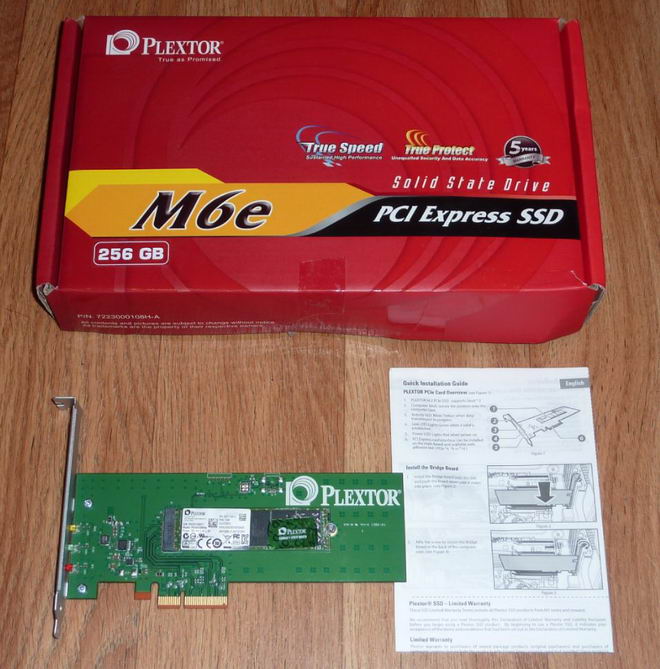
Plextor M6e M.2. Pro SSD package
The M.2. SSD I received was already mounted on a PCIe
adapter. The M6e M.2. was removed from the bracket for most of the tests.
Box top
Now let's head to the next page, where we look in more
detail at the Plextor M6e M.2. 256GB SSD.....
A closer look at the Plextor M6e M.2. hardware.

Plextor M6e M.2. 256GB SSD
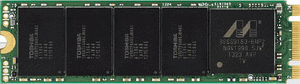
The Plextor M6e M.2. 256GB SSD uses the M.2. 2280 form
factor. There are 8 NAND chip packages (four per side) on the Plextor M6e M.2.
256GB SSD. The front of the drive also hosts the SSD controller, the rear of
the PCB hosts another 4 NAND chips and 512MB of DDR3 cache.
The SSD controller

The SSD controller is the Marvell 88SS9183.
The NAND

The NAND is Toshiba toggle 2 MLC, and there are eight NAND
chip packages aboard the Plextor M6e M.2. 256GB SSD.
Booting the M6e M.2. SSD
The Plextor M6e M.2. SSD is bootable via UEFI mode, or
Legacy BIOS mode, and does not require device drivers under Windows 8.1. (not
tested on earlier versions of Windows).
Drive maintenance features
For Windows 7 and Windows 8 users, and some distributions of
Linux, the Plextor M6e M.2. series SSD supports ATA TRIM to keep the NAND
clean. The Plextor M6e M.2. series also has advanced garbage collection to
clean the NAND during drive idle periods.

Plextool
- The Plextool software supports the following features on
Plextor SSDs. - Drive Status: Gives an indication on the SSD's health.
- Plextool info: Shows various information about the M6e
M.2. SSD. - Secure format: Peforms an internal secure erase of the M6e
M.2. SSD. - FW Update: Allows the drives firmware to be updated.
- Diagnostics scan: Performs a diagnostic test of the M6e
M.2. SSD. - SMART details: shows the drives SMART information.
- Sign in: Allows the user to sign in to their Plextor
account.
Specifications

Let’s head to the next page where we take a look at our
testing methods and the review PC....
Test machine
For this review I will be using a computer with the
following configuration:
Hardware:
- Motherboard: Asus Z97 Deluxe (Intel Z97 chipset)
- Processor: Intel 4th generation Core i7 4770K
- CPU cooler: BeQuiet Dark Rock Pro 2
- RAM: 16GB Samsung Green DDR3 1600MHz (dual channel)
- GFX: Onboard Intel HD 4600
- Sound: Onboard Realtek ALC1050 HD audio controller
- Hard disk OS: OCZ Vector 256GB SSD.
- Case: Antec Performance One P280
- PSU: Antec True Power modular 550W
- Display: Dell UltraSharp U2412M 24” widescreen IPS LCD (HDCP
compliant) - Operating System: Windows 8.1 Professional 64bit
AHCI mode was also selected for all drives in the UEFI of
our test PC, and all tests were carried out in this mode. The SATA 6Gbps drivers
used on our review PC were the Intel Rapid Storage Technology (RST) Version
13.1.0.1058.
CPU power saving states were disabled for consistency, and
all the SSDs in this article were tested with all CPU power saving states
disabled.
The Plextor M6e M.2. 256GB SSD was connected to the Intel
native M.2. socket of the review PC, and all tests were carried out on the M6e
M.2. with the SSD connected to this socket. A few additional tests were carried
out with the Plextor M6e M.2. SSD connected to its PCIe generation 2 adapter.
For these tests the M6e M.2. and its adapter were connected to the first PCIe3
x16 socket of the review PC.
Test applications
To test the performance of the Plextor M6e M.2. SSD, I will
be using the following test applications in this review.
- HD-Tune Pro
- ATTO
- Iometer
- AS SSD
Benchmark - CrystalDiskMark
- MyCE Reality Suite
- Anvil’s
Storage Utilities - PC
Mark 8
Test procedures
I will start off our testing procedures explanation by
stating that I did not run many synthetic benchmarks on the Plextor M6e M.2. SSD.
You may ask why I have run so few synthetic benchmarks?
SSD technology has moved so fast in the last couple of years,
that basic synthetic benchmarks alone are now of very limited use, as they don't
really tell us much about performance and how the drive will behave in the real
world. I have therefore decided to show some basic benchmarks of the Plextor M6e
M.2. SSD, and will complement this with advanced benchmarks using IOMeter and
AS SSD benchmark. I will also show how the Plextor M6e M.2. SSD performs in the
real world with our Myce Reality Suite test.
The reality of SSD performance
Whilst I can easily show you which SSD is technically the
faster, when you use one of these modern SSDs as an operating system drive it
becomes very difficult to tell them apart as far as performance is concerned.
A typical use of a small capacity SSD at the moment is to
have your operating system and applications installed onto the SSD. The
performance difference compared to a traditional HDD is enormous, however when
you start to compare SSD to SSD the difference becomes almost impossible to
detect.
Let’s look at why this is the case.
Drive A can boot to the desktop in 8.11 seconds, and drive B
can boot to the desktop in 8.12 seconds, the difference in time is
milliseconds, and can one really tell the difference?
The fact is, all modern SSDs are only ticking over when they
are only running the OS and launching applications, it’s only when you get to
some of the larger capacity SSDs, with enough free space to be able to hold the
actual data that you’re going to be working with, be that video, audio or
pictures, for example, that you actually get a tangible difference in
performance. This is where the SSDs with the better sequential performance start
to pull well ahead of the SSDs which have lower sequential read/write
performance.
Small file random IOPS vs sequential performance
IOPS
This is a fairly complex subject, but I will do my best to
explain things in a manner that is easy to understand.
The term IOPS is the amount of input or output transactions
that can take place in a one second interval, so for example, if an SSD is
quoted as being able to cope with 20,000 4K random write IOPS, then the SSD
should be able to cope with 20,000 input transactions in a period of one
second. If the same SSD is said to be able to produce 20,000 4K random read
IOPS, then the same SSD should be able to produce 20,000 4K random read output
transactions in a one second interval.
Ok, now we have some figures to work with, the next question
is how many IOPS are actually required?
This will depend on your usage pattern. If you are a typical
desktop user who browses the internet, does some word processing or perhaps
some audio or video editing, and perhaps plays a few games, then in actual
fact, you don’t need to have massive 4K random read/write performance. The actual
amount of 4K random performance that is required for a fast and smooth running
system for a desktop user with a usage pattern similar to the above will be
well under 1,000 4K IOPS.
On the other hand, if the SSD is being used for running a
large and complex database server, then 4K random performance is the absolute
measurement of how fast that server will run, as this type of application does
most of its input and output transactions in the 4K domain.
So why would I need an SSD with 80,000 4K IOPS for a
desktop?
In fact you don’t need this type of performance for a
desktop, but an SSD which is capable of coping with 80,000 4K IOPS will be
faster than an SSD which can only cope with 20,000 4K IOPS.
OK, I just said if under 1,000 4K IOPS are actually required
for typical desktop usage, why is an SSD with 80,000 4K IOPS faster than an SSD
with only 20,000 4K IOPS, confused?
You may ask, if I only require 1,000 4K IOPS surely the rest
is wasted?
While you may never need 80,000 4K IOPS, IOPS is all about
latency. The reason that an SSD can cope with as much as 80,000 4K IOPS is
because latency in this domain is very low. With 4K files, even if you require
to process 500 of them at the same time, you are not talking about a huge
amount of data, it has far more to do with how long it takes the SSD to process
a single file, and the amount of time required to process a single 4K is all
about how long it takes for the SSD to access or store that data before it can
move on to the next transaction.
In other words an SSD with 80,000 4K IOPS performance will
handle those 500 files faster than the SSD with 20,000 IOPS.
So how will a desktop user even notice this faster speed if
so little 4K random IOPS and data are actually used?
Multitasking is a good example. The more tasks you run at
the same time, you more you will notice the speed difference.
Sequential performance
I have always maintained that sequential performance was
every bit as important as small random file performance for a desktop SSD. To
me this was always so obvious for a desktop user. For example, let’s say you
want to launch an application or game. Both have some fairly large files to
load, and also a great many small files, but the point is, even the smaller
files are sequential in nature. Now let’s say you’re into audio or video
editing. Video files tend to be huge, and the files are written or read
sequentially. Isn’t this how many users are using their PCs these days?
Summary
So how does this shape up in the real world? Which is
better, massive 4K IOPS or massive sequential performance?
In an ideal world you want both, as an SSD with massive
random 4K IOPS and sequential performance will always be faster than an SSD
that has high sequential performance and moderate 4K random IOPS performance,
and the same applies to an SSD that has massive 4K random performance and
moderate sequential performance. The SSD which has high performance in both
patterns will always be the faster SSD.
However, you can still have an SSD that is very fast for
desktop use that has moderate random 4K performance and massive sequential
performance, the same can be said about a drive having massive random 4K
performance and moderate sequential performance, as it is about getting the
balance right if you have to compromise on one or the other.
Test drives
- Intel 520 series 240GB
- OCZ Vertex 4 512GB SSD
- Corsair Neutron GTX 240GB SSD
- OCZ Vector 256GB SSD
- Samsung 840 Pro 512GB SSD
- Plextor M5 Pro 512GB SSD
- Samsung 840 250GB SSD
- Kingston V300 240GB SSD
- OCZ Vertex 3.20 240GB SSD
- OCZ Vertex 450 256GB SSD
- Seagate 600 series 480GB SSD
- Samsung 840 EVO 250GB SSD
- Samsung 840 EVO 750GB SSD
- OCZ Vector 150 240GB SSD
- Samsung 840 EVO mSATA 1TB SSD
- Samsung 840 EVO mSATA 250GB
SSD - OCZ Vertex 460 240GB SSD
- Crucial M550 512GB SSD
- Toshiba HG6 256GB SSD
- Samsung 850 Pro 1TB SSD
- Plextor M6e M.2. 256GB SSD
Drive preparation for running the tests
All the SSDs used in this article were in a clean and fresh
state when the testing period started. From then on, each drive had to rely on
its own NAND cleaning effectiveness for the remainder of the tests.
For the sake of clarity, I now only include SATA 6Gbps SSDs
in these tests, and all were connected to the native Intel SATA 6Gbps (port 0)
of my motherboard for these tests.
- All SSDs used in this article had their partitions aligned
to the Windows 8.1 x64 defaults.
Where I use graphs in this article to display results, I
will use the following colours to make it easier, for our readers to see which drive
we are reviewing.
 Plextor M6e M.2. 256GB SSD
connected to the native M.2. socket.
 Plextor M6e M.2. 256GB SSD connected
to its PCIe adapter.
 Comparison SSD
Now let's head to the next page, where I look at some
basic benchmarks...
Synthetic Benchmarks
HD Tune Pro
In this benchmark I am checking sequential reading speed.

Plextor M6e M.2. (M.2. connected)

Plextor M6e M.2. (PCIe connected)
With an average sequential reading speed of 717.4 MB/s the Plextor
M6e M.2. SSD shows an excellent turn of speed. Also worth noting is the SSD is
slightly faster when connected to PCIe.
Let's see how this compares to other recently tested SSDs in
the table below.

The Plextor M6e M.2. 256GB SSD has done extremely well in
the HD Tune Pro 5 sequential reading test with a healthy advantage over the
SATA connected SSDs. With the M6e M.2. connected to PCIe, showing a slight
advantage over the M6e M.2. when connected to M.2.
ATTO disk benchmark
ATTO has become a standard tool for measuring the data
throughput of HDDs and SSDs. It measures the reading and writing performance,
using different file sizes and block sizes.

The reading speed results on the Plextor M6e M.2. 256GB SSD are
extremely impressive, topping out at over 730 MB/s, and writing speed is
equally impressive topping out at over 584 MB/s.
Let's find out how this compares with other recently tested
SSDs.
ATTO Reading performance

ATTO - Reading performance at various block sizes
The Plextor M6e M.2. SSD is the fastest SSD when reading
data.
ATTO Writing performance

ATTO - Writing performance at various block sizes
The Plextor M6e M.2. SSD shows excellent writing performance.
CrystalDiskMark 3.0
Crystal Disk Mark is quite a handy benchmarking application,
as it focuses on the file sizes that can cause a problem on a system drive.

As we can see from the above screenshot, sequential reading and
writing speeds are both very impressive, and random writing performance at low
and high queue depths is excellent.
AS SSD Benchmark
AS SSD benchmark is a benchmarking tool specifically designed
to test SSDs. The application tests sequential reading and writing performance,
4K random reading and writing performance.
AS SSD benchmark also tests 4K threaded performance. This is
very exciting, as this test is the first available test that I am aware of,
that simulates how a PC operating system actually works. A modern PC and OS,
such as Windows 7/8 does not just run a single thread at a time, it runs many
threads. The AS SSD benchmark "4K 64Thrd" tests run 64 threads
simultaneously throughout the test. If this result is good, then you can be
pretty sure the drive will perform extremely well as a system drive.
After the tests complete, AS SSD benchmark derives a total
score for the drive being tested. This is based on all aspects of the test
results, and gives an indication of how the drive is performing overall.
Now let’s look at the result from the Plextor M6e M.2. SSD in
the form of a screenshot. All our other comparison drives’ results are
presented in the form of a graph.

Plextor M6e M.2. 256GB SSD (M.2. connected)

Plextor M6e M.2. 256GB SSD (PCIe connected)

As we can see from the AS SSD test run, the Plextor M6e M.2.
SSD has excellent reading and writing performance, finishing this test in first
place.
Summary:
The Plextor M6e M.2. 256GB SSD has performed extremely well
in the basic synthetic benchmarks. Random reading and writing performance is
very good. Sequential reading and writing performance is outstanding.
Let's head to the next page for our IOMeter test
results.....
I/O Performance
There is little point of having an SSD drive that has
blazing sustained reading and writing speeds, if the drive can't handle reading
and writing of small random files. If you intend to use your new SSD drive to
store and run your operating system, then the drive must be able to cope with
the many small random files that Windows will write to the drive continually.
So I feel it is very important to test how many of these random files that a
drive can handle in one second. I believe that anything over 1,000 I/O’s per
second would be enough for most users running a consumer grade mainstream PC,
and should provide a smooth running system. But obviously, the more I/O's that
a drive can handle, the faster the drive will feel and leave more headroom for
those huge multitasking sessions that users sometimes engage in.
IOMeter is probably the most versatile of all the synthetic
benchmarks. Its ability to be configured to generate a multitude of different
I/O traffic is unmatched. Another great feature of IOMeter, is the capability
to test any storage metric that you can think of, providing you know how to
configure the assignments. The reviewer also has complete control over things
like queue depth, block size, whether the traffic is random, sequential, or
even a mixture of both.
Partition alignment and sector boundaries
Windows 8.1, Windows 7, and Windows Vista will automatically
align a partition to 4k boundaries during partition creation, Windows XP won’t.
It is imperative that an SSD’s partition is aligned. Windows XP is also
restricted to sector boundaries, while Windows 7 and 8 will use 4k boundaries
if they can. The Plextor M6e M.2. SSD is 4k boundary aware, and will use these
boundaries if possible. Of course it will also remap LBAs for compatibility
with the sector boundaries so that the drive can be used with Windows XP.
IOMeter allows us to set the sector boundaries for
conducting the tests, and I have therefore set the sector boundaries at 4K,
which means the IOMeter tests are valid for Windows 7, Windows 8, and Windows
Vista users. XP users will not be able to obtain such results.
I will provide a screenshot of the tests on the review drive
for those of you who like to see the actual test result. All the comparison
drive results are represented in the form of graphs.
If any of you would like to see a screenshot from any
IOMeter test on a particular drive, please feel free to request one, and I’ll
post the screenshot in the forum thread.
All the IOMeter tests create a 10GB data set on the target
drive, and each test is run for a duration of 3 minutes.
IOMeter 4K random write test with repeating data.
The first test involves creating continual 4KB random files
on the target drive with IOMeter. I use a 4KB file size, as it is believed that
Windows will create and modify many of this size of file constantly in the
background during a typical Windows session. It is said that most 4K random
writes take place at a queue depth of only one, and I have been requested to
include this test in my reviews.
Queue depth 1

Plextor M6e M.2. 256GB SSD – 4K random write (QD 1)

At 101.57 MB/s the Plextor M6e M.2. 256GB SSD is reasonable,
but still finishes this test at the bottom of the table.
Our next test involves creating continual 4KB random files
on the target drive with IOMeter. I use a 4KB file size, as it is believed that
Windows will create and modify many of this size of file constantly in the
background during a typical Windows session. I will use queue depths of 4 and
32 for these tests.
Queue depth 4

Plextor M6e M.2. 256GB SSD (QD 4)

At a queue depth of 4, the Plextor M6e M.2. SSD is
performing well, but still finds itself in last place.
Queue depth 32

Plextor M6e M.2. 256GB SSD (QD 32)

At 333.2 MB/s, the Plextor M6e M.2. 256GB SSD is very good,
and finishes this test in seventeenth place.
IOMeter 4K random write test with fully random data.
This test is exactly the same as the test above except that
the test data is fully random and is therefore much more difficult to compress.
This test was requested as SandForce based SSDs gain a lot of performance by
being able to compress data on the fly. While the above test shows the
SandForce based SSDs in a best case scenario, the following test will show the
SandForce based SSDs in a much more realistic scenario.
Queue depth 4 with fully random data

Plextor M6e M.2. 250GB SSD – 4K random write (QD 4 with fully random data)

The Plextor M6e M.2. SSD pays no penalty when writing data
which is incompressible, and with 238.8 MB/s it finishes the test in nineteenth
place.
4K random write queue depth profile
For this test I used various queue depths from 1 – 32 to
give you an idea how this SSD performs at different queue depths. For a normal
desktop user, with lightweight multitasking, the queue depth will rarely rise
above 2. For heavy multitasking, the queue depth is unlikely to rise above a
value of 8.
The results are shown below.

As we can see, the Plextor M6e M.2. SSD has reasonable
performance at low queue depths, and does get better as queue depths rise.
Below I present a table of the results in more detail.

IOMeter 4K random read test.
If there are many 4k files created, then that must also mean
that many 4k files need to be read. This test measures 4k reading performance.
It is said that most 4K random reads take place at a queue
depth of only one, and readers have requested that I include this test in my
reviews.
Queue depth 1

Plextor M6e M.2. 256GB SSD - 4K random read (QD 1)

In this test the Plextor M6e M.2. SSD has very good performance,
and finishes in tenth place.
Queue depth 4

Plextor M6e M.2. 256GB SSD - 4K random read (QD 4)

At a queue depth of four, the Plextor M6e M.2. is excellent,
and is the sixth fastest SSD in this test.
Queue depth 32

Plextor M6e M.2. 256GB SSD - 4K random read (QD 32)

At a queue depth of 32, the Plextor M6e M.2. SSD is showing excellent
performance, and is still only the fifteenth fastest SSD in this test.
4K random read queue depth profile.
This test shows how the review drive scales with increasing
queue depths.

Below I present a table of the results in greater detail.

If we look at the Plextor M6e M.2. SSD 4K random read
performance in detail, at low queue depths, the performance is excellent, and the
Plextor M6e M.2. scales very well all the way up to a queue depth of 16.
IOMeter 512KB sequential write test with repeating data.
Sequential writing performance is also very important; in
this test sequential writing performance is measured.

Plextor M6e M.2. 256GB SSD - 512K Sequential write with repeating data

The Plextor M6e M.2. SSD shows an outstanding turn of speed,
finishing this test in first place and, by quite some margin, the fastest SSD
in this test.
512K sequential write - Queue depth profile
While most sequential writes will rarely rise above a queue
depth of two, it has been noted from SATA analyzer traces that with more
demanding tasks, queue depths can rise very close to a queue depth of four.
This is why I now include queue depth profiles for sequential read and write.
Please note that in the following graph, I do not have the
lowest possible score set at zero. This is purely to allow the graphs to be
easier to read, but starting with a lowest possible score other than zero,
gives the impression that there are large differences between competing SSDs with
regard to performance, so please keep this in mind.

512K sequential write - Queue depth profile
Below I present a table of the results in more detail.

The Plextor M6e M.2. SSD series reaches peak performance at
queue depth of two, where it manages an impressive 578.85 MB/s.
IOMeter 512KB sequential write test with fully random data.
This test is almost exactly the same as the test above
except that the test data is fully random in nature. This test was requested as
SandForce based SSDs gain a lot of performance by being able to compress data
on the fly. While the above test shows the SandForce based SSDs in a best case
scenario, the following test will show the SandForce based SSDs in a more realistic
light. In the real world, the data is neither 100% incompressible nor 100%
compressible, it is somewhere in between. So please keep this in mind.

Plextor M6e M.2. 256GB SSD – 512K sequential write with fully random data

With data that is not so easy to compress, the SandForce SF-2281
based SSDs take a big performance hit, whilst the Plextor M6e M.2. SSD returns
a very impressive 581.8 MB/s, and finishes this test in first place.
IOMeter 512KB sequential read test QD1.
This test measures 512k sequential reading performance at
very low queue depths.

Plextor M6e M.2. 256GB SSD – 512K sequential reading test (QD 1)

The Plextor M6e M.2. 256GB SSD has outstanding sequential
reading performance at very low queue depths, finishing in first place.
IOMeter 512KB sequential read test (dual threaded).
This test measures 512k sequential reading performance QD2.

Plextor M6e M.2. 256GB SSD – 512K sequential reading test (QD 2)

At a more realistic queue depth the Plextor M6e M.2. 256GB
is still showing outstanding sequential reading performance, and finishes this
test in first place.
512K sequential read - Queue depth profile
While most sequential reads will rarely rise above a queue
depth of two, it has been noted from SATA analyzer traces that with more
demanding tasks, queue depths can rise very close to a queue depth of four.
This is why I now include queue depth profiles for sequential read and write.
Please note that in the following graph, I do not have the
lowest possible score set at zero. This is purely to allow the graphs to be
easier to read, but starting with a lowest possible score other than zero,
gives the impression that there are large differences between competing SSDs with
regard to performance, so please keep this in mind.

512K sequential read - Queue depth profile
Below I present a table of the results in greater detail.

The Plextor M6e M.2. SSD reaches maximum sequential reading
performance at a queue depth of four, where it achieves an outstanding 776.19
MB/s.
IOMeter Workstation simulation (outstanding I/Os = 64).
When running applications you will find that there is a
mixture of small random files and larger sequential files, being created and
read. Not only that, it isn’t just one file at a time. In this test I measure a
simulated workstation pattern, with a queue depth of 64 (threaded).

Plextor M6e M.2. 256GB SSD – Workstation simulation

The 'workstation' simulation sorts the men out from the
boys, with its mixed reads and writes. This test shows how an SSD could behave
in a heavy workload, graphics, or video workstation. The Plextor M6e M.2. SSD
has very good mixed read/write performance, but it's still quite a long way
behind some of the SSDs in this test.
Summary
The Plextor M6e M.2. 256GB SSD strength certainly lies in
its sequential reading and writing performance, where it is outstanding, and is
comfortably the fastest SSD in the IOMeter tests. 4K random performance is
reasonable but some way behind the performance of some of the SSDs in these
tests. 4K random reading performance is excellent.
Now let’s head to the next page where we will look at how
the Plextor M6e M.2. SSD performs using a new benchmarking application....
Anvil’s Storage Utilities
As well as performing SSD endurance tests. Anvil’s Storage
Utilities has a very nice SSD benchmarking application. The SSD benchmark tests
many different aspects of SSD performance, including 4K random at different
queue depths, and also sequential performance, but more importantly than this,
all using real test data.
Another very nice feature of Anvil’s SSD benchmark is the
fact that you can change the compression levels of the test data. The
compression levels of the datasets used for the tests can be varied from 0%
compression right up to 100% compressed data, and there are even a few data
profiles already included, such as database (8%) compression, and also an
application profile (46%) compression, which is designed to simulate real
application data being read and written to the SSD.
I will include a screenshot of the review drive, and all
comparison results will be presented in the form of graphs. If you would like
to see screenshots of the test results obtained on the other SSDs in this
article, you can do so by following the link here.
I will also be testing three different compression profiles,
which are as follows.
- 0 fill (100% compressible data)
- Application simulation profile (46% compressed)
- 100% (incompressible data)
So let’s begin the tests.
0 fill

Plextor M6e M.2. 256GB SSD (0 fill) M.2. connected.

Plextor M6e M.2. 256GB SSD (0 fill) PCIe connected.

In the 0 fill test, the Plextor M6e M.2. SSD has performed extremely
well, and also worth noting is it performs better when connected to the lower
latency PCIe system bus.
Application profile

Plextor M6e M.2. 256GB SSD (application profile)

The application test pattern is much more realistic in terms
of the type of data that real users will employ, and once again the Plextor M6e
M.2. is performing well and finishes this test in ninth place.
100% incompressible

Plextor M6e M.2. 256GB SSD (100% incompressible)

With test data that can't be compressed at all, the Plextor M6e
M.2. SSD is still performing well, and finishes the test in eleventh place.
Summary
One should keep in mind that although Anvil’s Storage
Utilities SSD benchmark is a very good benchmark, and tests many aspects of SSD
performance, ultimately it is demonstrating which SSD is technically the
fastest when reading data, and this may not be showing (for example) which
drive will be fastest in the real world with a home user's work pattern.
The Plextor M6e M.2. 256GB SSD has however performed very
well in Anvil's SSD benchmark tests.
Now let's head to the next page for some real world tests....
It has become clear that simply conducting endless
benchmarks on SSD drives is pointless. Real users may run a few benchmarks when
they first fit their SSD drive, but most users just want a drive that performs
well in the real world. They want their drive to work "out of the
box" and run fast and smoothly.
Most of the latest SSD drives can deliver very fast
sustained reading and writing speeds, but these alone tell you very little
about how the drive will perform in the real world.
If you intend to use your SSD as your primary system drive,
with an operating system and applications installed and running from the drive,
real world performance becomes much more important than just fast sequential
read and write speeds.
Real world copy
tests
I will now conduct a few real world copy tests. These tests
simulate what real people do with their drives. I will be conducting writing tests,
using a large single file, and I will then round off the tests by copying a
folder of MP3 audio files, and also a folder of JPG pictures.
In past reviews I simply used Windows copy and paste to copy
the files from one drive to the target drive, and then I measured the time
taken to complete the test with a stop watch. This method was flawed in a
couple of ways. Windows employs a cache, so even when the files had been
copied, some of the data was still in the Windows cache and hadn't yet been
written to the SSD. The other flaw was that a stop watch is not a very accurate
way of measuring the time taken to complete the test.
I had also noticed that copying the small file set had
become pointless, as most modern SSDs have a rather large cache, in fact large
enough to be able to take the complete file set in this cache without having to
commit that data to NAND before the test had completed. I could have increased
the amount of data in the test, but I felt this was moving away from the real
world. For example, who would copy 2GB of data containing only very small
files?
I concluded it was perhaps better just to drop this test
completely, and just focus on the large 8GB ISO file, the folder of MP3 audio
files, and the folder of JPG picture files. I also have taken the opportunity
to increase the amount of data to be copied in the MP3 and JPG tests, to make
sure the SSD's memory cache doesn't obtain an unfair advantage.
The other change is that I now use an application to copy
the data, which also times how long it takes to complete the test. This
application also supports "cache write-through". What this basically
means is, there is now no caching of the files, and instead the data being
copied must be committed to the target SSD as it's being copied.
Obviously making such changes to the methods of testing is
not taken lightly. To make changes means a lot of extra work, as all the
comparison drives have to be re-tested with the new method. However, here at
Myce.wiki, we believe we should always try to improve our reviews, and if that
means updating the testing methods and some initial extra work, then that benefits
the Myce community as a whole.
For the reading drive, I have made the switch to a RAMDisk.
With SATA Express SSDs just around the corner, the OCZ REVODrive X2 would no
longer be fast enough to supply data to a SATA Express SSD. Because RAM has
lower latency and higher transfer speeds when compared to an SSD, this has
meant having to rerun the tests on a selection of other SSDs to make sure the
results are up to date. Please note, that some SSDs which were on loan during
the review period, has meant that these SSDs still use the old results, simply
because I can't retest them.
For the tests themselves, I will show a screenshot of the
copy test for the SSD that I'm reviewing. All other results will be presented
in the form of a graph, so you can easily compare the results.
Single large file writing test (8144.6MB)
For this test I used a single DVD9 ISO file which had been
copied to the RAMDisk. The file was then copied to the Plextor M6e M.2. SSD and
our comparison drives.

Plextor M6e M.2. 256GB SSD

The Plextor M6e M.2. SSD has excellent sequential writing
performance, and finishes this test in first spot.
Write a folder of JPG picture files.
For this test I copied a folder of JPG picture files from
the RAMDisk to the Plextor M6e M.2. SSD series 256GB SSD, and our other
comparison drives. The folder contained 7861 JPG pictures, with a total
capacity of 8410.3MB.

Plextor M6e M.2. 256GB SSD

Once again the Plextor M6e M.2. is performing extremely
well, and finishes in first place in this test.
Write a folder of MP3 audio files.
For this test I copied a folder of MP3 audio files from our RAMDisk
to the Plextor M6e M.2. SSD series SSD and our other comparison drives. The
folder contained 1691 MP3 audio files, with a total capacity of 9176.5MB.

Plextor M6e M.2. 256GB SSD

Yet again the Plextor M6e M.2. 256GB SSD is performing well,
and finishes this test in first spot.
Single drive copy tests
These tests are to simulate a single drive in a PC or
laptop. In other words, I will copy a series of files from one folder on the
tested drive to another folder on the same drive. This means the drive is simultaneously
reading and writing during the tests. I also want to make this a realistic test,
so I have used a folder of MP3 music files, and then repeated the test with a
folder of JPG picture files.
Single drive copy tests – 1,691 MP3 song files (9176.5MB total)

Plextor M6e M.2. 256GB SSD

With this test the SSD has to read and write data, and we
already know that the Plextor M6e M.2. has excellent mixed reading and writing
performance, so it's no surprise to see the Plextor M6e M.2. finish this test
at the top of the table.
Single drive copy tests – 7,861 JPEG picture files (8410.3MB total)

Plextor M6e M.2. 256GB SSD

The Plextor M6e M.2. SSD is substantially quicker than the
other SSDs in this test.
Summary
The Plextor M6e M.2. 256GB has performed extremely well in
the copy tests. With its high performance sequential writing speeds translating
into some very fast write times. The Plextor M6e M.2. also has impressive mixed
read/write performance, and this has ensured that it has finished at the top of
the tables when the SSD is faced with having to simultaneously read and write
data.
Installing applications
Installing applications is possibly something you don't do
that often. But should you replace your system disk, then you will most likely
have to re-install your applications. Most of the SSD drives I have tested up
until now are quite slow at installing applications, most likely because their
I/O performance was quite limited.
For these tests, we picked some popular applications and
copied the entire contents of the CD or DVD media to a RAMDisk. We did this to
make sure that the reading speed of our CD/DVD reader would not hamper the
performance of the target drive.
We then installed these applications onto our comparison drives,
which were all running mirror image installations of our Windows 8 Professional
64-bit installation, and timed the amount of time taken to install the
application with a stopwatch on each of the drives.
MS Office 2007 Professional (full install)
MS Office is one of those applications that make you cringe
at the thought of re-installing it.
Let's find out how our drives coped with the MS Office 2007
full install.

The Plextor M6e M.2. SSD showed an excellent turn of speed
when installing this large office suite, and finished the test in first place.
Adobe Fireworks CS3
Adobe Fireworks CS3 is another popular package. Let's find
out how our drives coped with installing this application.

There isn’t a huge margin in the amount of time taken to
install this application on our modern SSDs. However, the Plextor M6e M.2. 256GB
SSD once again is the fastest SSD when installing this application.
Summary
Our real world tests, though not scientific in nature, I
feel are more realistic than simply running benchmarks. What is clear from these
tests is that the Plextor M6e M.2. 256GB SSD has outstanding performance in the
real world.
Let’s check out application and game loading performance
on the next page of this article.....
These tests are very simple tests, but very important to
some users of SSD drives.
We simply started an application or game, and measured the
time taken for the application or game to fully load and start.
Application loading times
Adobe Fireworks CS3

There is so little difference in tangible performance between
the modern SSDs. However, the Plextor M6e M.2. 256GB SSD loads this large
application in 3.31 seconds, and finishes the test in first place.
Corel PaintShop Pro 12

Again, I doubt anyone could tell difference from the fastest
to the slowest modern SATA 6Gbps SSD, as they are all very close.
Games loading times
FAR CRY 2

Once again the results are all very close, and I highly
doubt anyone could tell the difference between the fastest and slowest SSD in
this test.
F.E.A.R. 2

The Plextor M6e M.2. 256GB SSD has performed very well.
Summary
By now it's is becoming very clear that the Plextor M6e M.2.
256GB SSD delivers excellent performance, and its superb reading capabilities
have ensured that it's the fastest SSD in these tests.
Now let's head to the next page where we will see how the
Plextor M6e M.2. SSD performs in PC Mark 8.....
PC Mark 8 - Storage Suite
Here at Myce.wiki, we only recently introduced PCMark Vantage
into our SSD testing. PCMark Vantage is a good test, but is now somewhat
outdated in the applications that it tests, even to the extent of including a
test trace on how Windows Vista booted. We could have course have opted for the
newer PCMark 7, but I personally had issues with the way it ran the HDD tests.
We have built quite a close relationship with FutureMark
software, the authors of the PCMark PC benchmarking software that we use in our
tests. I decided I would use PCMark Vantage as stopgap measure until the more
up-to-date PCMark 8 benchmarking suite became available. I'm pleased to say
that PCMark 8 is now available, and it gives me great pleasure to introduce you
all to the results obtained by this new 'real world' benchmarking suite.
I will describe the basic way that each test is carried out,
above the graph for each test.
PC Mark 8 storage suite results

Plextor M6e M.2. 256GB
Now let’s look at the individual PC Mark 8 HDD suite scores,
in the form of tables and graphs.
PC Mark 8 storage suite: World of Warcraft


The first thing that is very noticeable is that all the
tested SSDs are remarkably close, performance wise, when loading this game.
PC Mark 8 storage suite: Battlefield 3


Once again, the results are very close between all the
competing SSDs.
PC Mark 8 storage suite: Adobe Photoshop light


Yet again the results are all very close together, with the
higher writing performance SSDs out in front.
PC Mark 8 storage suite: Adobe Photoshop heavy


Again, there isn't a large difference between any of the
competing SSDs, and the SSDs with the higher sustainable writing performance
are generally out in front.
PC Mark 8 storage suite: Adobe InDesign


Once again, the SSDs with the higher writing performance
head the table.
PC Mark 8 storage suite: Adobe After Effects


There is virtually no difference between the tested SSDs.
PC Mark 8 storage suite: Adobe Illustrator


Once again, there is hardly any difference between the
tested SSDs.
PC Mark 8 storage suite: Microsoft Word


With only 0.2 seconds between the fastest and the slowest SSD
in this test, I would doubt anyone could tell the difference.
PC Mark 8 storage suite: Microsoft Excel


There is only 0.2 seconds between the slowest and the
fastest SSD in this test.
PC Mark 8 storage suite: Microsoft PowerPoint


Once again, the results obtained from our test SSDs are
almost identical.
PC Mark 8 storage suite: Storage bandwidth
Storage bandwidth displays the amount of bandwidth available
from the storage device, when it is faced with requests for simultaneous reads
and writes.

According to PC Mark 8, the Plextor M6e M.2. has 326.64 MB/s
of bandwidth.
PC Mark 8 storage suite: Overall Score
PC Mark 8 sums all the individual times taken to run each
storage benchmark, then comes up with an overall score for each of the tested
SSDs.

As we can see from the above graph, there isn't a large
difference between any of the tested SSDs, but the Plextor M6e M.2. SSD takes
first spot in these tests.
Summary
You may well ask, if the scores are so close between the
tested SSDs, then what is the point of running PC Mark 8 storage benchmark?
Basically, most of these individual tests are very low
demand as far as storage is concerned. More or less all the traces are
lightweight. But hang on a minute, this is how real applications work, and I
and many other reviewers have been saying for years that when we have
lightweight storage traces, it becomes almost impossible to tell SSDs apart
from a performance perspective. We now have a tool that can demonstrate this to
very good effect.
It's not until we start to push SSDs very hard that the
performance differences between SSDs start to become clearer, and for that we
need much heavier workloads, such as the tests run in the Myce Reality Suite.
PC Mark 8 is still very useful, as I'm quite sure that most of you will use at
least a couple of the applications used in these tests, and now you will be
able to compare one SSD to another.
Now let’s round off the performance tests with the Myce
Reality Suite on the next page.....
Myce Reality Suite revision 4.
NOTE: New in revision 4.
- Support for NVMe
- Support for SATA Express
- Support for PCIe
- Support for M.2.
So what is the Myce Reality storage test?
The Myce Reality Suite of tests is made from real everyday
applications and real data, there are no simulated tests, and everything is in
the real world. The only thing that's synthetic is that everything is automated
to make the tests fair, no matter which drive the tests are run on.
Recorded user sessions, by means of a script, are used to
launch the applications, load data, edit data, and then finally write that data
back to the target drive. The scripts do load the system much more than a human
could with these tests, as the scripts do not make mistakes, or pause to think
about what has to be done next.
Measurement system
The measuring system is part hardware and part software. The
hardware is a two part system comprising of a host PC and an external hardware
analyser which is proprietary, and runs a proprietary version of Linux with special
software.
The host PC is built around an Intel Core i7 2600 (Sandy
Bridge) CPU, and an Asrock Z68 Extreme 4 motherboard, with 8GB of 1600MHz DDR3
RAM. The interface between the host PC and the external measuring system uses a
proprietary PCIe2 x8 card, which is housed in the primary PCIe2 x16 slot on the
host PC. The analyser is calibrated before the start of the tests, and is
guaranteed to be accurate to within 0.03%.
Testing method.
Previously the test platform was Windows 7 Home Premium
64bit. The transition to Windows 8.1 Professional 64bit has now been made, and
at the same time a couple of new tests have been validated and introduced. This
has of course meant that I have had to retest a selected number of SSDs on the
new platform, and the results from SSDs that were old, or no longer available
in the test labs, have been discarded.
Building the tests and test image.
Once all the test data files and the scripts that run the
tests were complete, they were then copied to a single folder. I then fitted an
120GB SSD into the PC and did a clean install of Window 8.1 Professional x64.
The latest hardware drivers were installed and Windows update was run to
install any new updates that were available up to 24/11/2013. At this point the
applications that were to be used in the tests were installed and updated with
the latest patches.
The folder containing the application test data files and
scripts was then copied over to our fresh Windows 8.1 Professional 64bit SSD. A
drive snapshot was then taken of the complete SSD and the drive snapshot image
copied to an HDD for safe keeping.
The image is then simply restored to each of the SSDs on
test. After imaging the drive the partition is then realigned “on the fly” and the
free space is filled and then deleted to force TRIM. A 20 minute settling time
is allowed before the tests are run, then each of the 6 tests is run and the
results gathered. This process is repeated for each of the drives I am testing.
The test scenarios are as follows.
- Graphics content
- Video editing
- Audio import and compression
- Application multitasking
- Windows defender (full system drive scan)
- GRID 2 gaming test.
Let’s begin the tests.
Myce Reality Suite – Graphics content.
Using ACDSee Pro 3, 100 JPG pictures with an average size of
10MB are imported into the ACDSee library, and then 12 of these JPG files are
then selected for a batch process, of resize, compress the quality to 80%, and
finally write the edited pictures back to the drive. The test is approximately
78% read and 22% write, with an average queue depth of 1.98.

The Plextor M6e M.2. 256GB performs well in this test, finishing
in first place when the M6e M.2. is connected to its adapter, and a close
second place when connected to the native M.2. socket of our review PC.
Myce Reality Suite – Video editing.
Using Vegas Pro, a 14GB HD MPEG2 video stream is loaded into
the editor, from which 2 segments are then cut and pasted into new segments. There
is a lot of disc caching going on in this test, which is approximately 55% read
and 45% write, with an average queue depth of 1.89.

Once again the Plextor M6e M.2. is the fastest SSD, with the
PCIe connection being slightly faster than the native M.2. socket.
Myce Reality Suite – Audio import and compression.
Using Sony Sound Forge 10, a batch process is run consisting
of importing 30 24bit (192000 Hz sample rate) .wav files, and 100 16bit (44100
Hz sample rate) .wav files which are converted to MP3 audio files with a bit rate
of 128kbps, and the MP3s are then written back to the drive. The test is
approximately 72% read and 28% write, with an average queue depth of 2.62.

Yet again the Plextor M6e M.2. is the fastest SSD in this
test.
Myce Reality Suite – Application multitasking.
For this test I used several popular applications, Microsoft
Word 2007, Microsoft Access 2007, Microsoft Excel 2007, Microsoft Outlook 2007,
Adobe reader, Adobe Photoshop CS3, uTorrent, Windows media player, and Internet
Explorer 9.
This session runs for approximately 12 minutes. The test is
started by downloading a Linux distribution via uTorrent, Windows media player
is then opened, and a 1080p video file is opened and played for the duration of
the test. Microsoft Outlook is opened and any new emails are received, read,
then replied too, a document in Adobe reader is opened and scrolled from start
to finish, 3 Microsoft Word documents with graphics content are opened, browsed
and some sections of the documents are copied and pasted into a forth document
and then saved back to the drive. The same applies to Microsoft Access and
Excel. 100 MP3 files are imported into Windows media library. Six JPG images
are loaded into Adobe Photoshop and some minor editing is done and the files
saved back to the drive.
Finally, Internet Explorer 11 is opened with 10 tabs, and
the contents of the 10 tabs refreshed, and browsed while the other applications
are busy in the background.
I would describe the multitasking pattern as moderate to
heavy.
During this test there is approximately 85% reading and 15%
writing, with an average queue depth of 6.73.

With the higher queue depths in this test, the Plextor M6e
M.2. 256GB SSD is able to show what it can really do when pushed hard, and performs
well, finishing in first spot.
Windows Defender (full system drive scan)
A full system drive scan is selected on drive C: and then
run. The test is approximately 99% reading and 1% writing, with an average
queue depth of 1.2.

The Plextor M6e M.2. SSD has performed extremely well in
this test, finishing in first place, and substantially faster than the SATA
based SSDs.
GRID 2 gaming test
The game is launched and then a pre-saved level is loaded.
The test runs until the loaded level starts. The test is approximately 98% reading
and 2% writing, with an average queue depth of 1.

Once again, the Plextor M6e M.2. SSD has performed extremely
well in this test, and takes the top spot.
Summary
I firmly believe that the Myce Reality Suite gives a very
good overall picture of how a drive can perform in the real world and, in this
case, the Plextor M6e M.2. 256GB SSD is clearly an excellent performer.
Now let’s head to the next page, and see how well the
drive performs after heavy use....
Filling up the SSD with data
For obvious reasons, when an SSD is tested, the drive is
always tested as a spare drive, and is generally always empty (no data on the
drive) during the synthetic benchmarks. There is no other way of having a level
playing field for all the SSDs under test. This of course changes during the
real world tests we conduct here at Myce.wiki.
Real users of course don't buy an SSD for it to remain
empty, and how full the SSD will eventually become varies from one user to the
next. What I thought would be useful is to run tests on the SSDs with real data
on the drives, and at different levels regarding how full the drive is.
For these tests the SSD is connected as a spare, and I test
at three different levels.
- Level 1: There an operating system installed on the
SSD, and all the applications that I use are also installed. In my case
that amounts to approximately 44GB of data on the SSD. - Level 2: The SSD is filled to 60% of its formatted
capacity. - Level 3: The SSD is filled to 80% of its formatted
capacity.
For the 60% and 80% tests, the type of data varies from compressible
to incompressible data, and file sizes range from a few Kilobytes to very large
files of several Gigabytes, then a single run of Anvil's SSD Benchmark is run
(100% incompressible).
It is also worth noting that the larger capacity SSDs will
tend to slow down less than their smaller counterparts, as the larger SSDs will
have more free NAND available to work with, and this is only a quick burst test
that all members will be able to run for themselves. The real test is the Myce
Sustained Performance test, which you can find a little further down the page.
In the graph below, I present the results.

Filling up an SSD with data can certainly cause a slowdown to
occur on some SSDs. The Plextor M6e M.2. 256GB SSD showed little evidence that
it had slowed down when data was already on the drive. In fact it achieved a
highest score when the drive was 80% full.
This however is a short burst test and we will see what
happens in a much more gruelling test below.
Myce Sustainable Performance Test
Over the last few months I have been studying countless
analyzer traces of real computing workloads, and also developing a test that
would accurately emulate and measure how performance is sustained over a period
of time. For obvious reasons, it is not possible to test an SSD review sample
over several months before publishing a review. The solution was to condense
this down to a manageable test, that doesn't take too long to run.
I will make it clear right from the outset that this is not
a torture test. Bringing any SSD to its knees is not helpful in the least, as I
for one would not use any SSD that had slowed down to crawl, just to prove a
point. The Myce Sustainable Performance test, I believe is a tough, but
sensible test pattern to use for measuring how an SSD will be behave once it's pushed
hard over a period of time.
The test pattern is "workstation" based, and
closely emulates a typical video or graphics workstation environment. The
results are measured using the same hardware I use for the Myce Reality Suite tests,
however, the test data and measuring system use a different method.
From the 80% full test listed above, I already have an SSD
with a lot of data on it. Adding to the data that is already there, the
"Sustainable Performance" test data is added. This test data is
approximately 20GB is size, so once this is added the SSD is pretty full.
The test is then run for a period of 20 minutes. 60
performance measurements are taken for every minute of the test, and an average
performance figure is generated after each minute. At the end of the test I
have 20 performance measurements which are then used to generate the graph
below.
The faster SSDs will obviously sustain more writes then the
slower SSDs. For the fastest SSD in this test, the test pattern generated 146GB
of writes, and 193GB of data was read from the SSD during the test.
When reading the graph, you should not pay too much
attention to which drive is the fastest, but instead look at the sustainable
performance curve of each SSD, as this is what this test is all about.
For the SSD that I am reviewing, I will also add a second
graph which looks at the result in more detail.
So let's look at the results.

Sustainable Performance test

Detailed results for the review drive
It's very refreshing to see that most of the SSDs released
this year have very good sustainable performance, and the Plextor M63 M.2.
256GB SSD is no exception. There is a slight slowdown when the SSD is pretty
full and pushed very hard, but it only drops by 10 MB/s, and I highly doubt
that this will be noticeable in the real world.
This concludes our review. To read the final thoughts and
conclusion, click the link below....
Final thoughts and the conclusion
User experience
A modern operating system such as Windows 8 rarely does one
thing at time; it processes hundreds of threads at once. Just take a look at
the processes and services that are running in task manager for an idea of how
much is going on, even with the PC idling at the desktop. When you start
running applications on top of this, the workload increases in line with the number
and type of applications you are running. It’s also fair to say that many of
these processes are already loaded into system RAM, but many are also loaded into
and unloaded from RAM to the system drive as and when they are required.
If we look at the 4 basic requirements for a really fast
SSD, they are as follows.
- Small file threaded performance needs to be high.
- Small random file performance needs to be high.
- Sequential read and write speeds need to be high.
- Fast access times.
The Plextor M6e M.2. SSD series SSD has all of these attributes
in abundance, and feels very snappy in use as a system drive.
Stability
I have only had the Plextor M6e M.2. SSD series SSD for a few
weeks, so it’s not possible to comment on the drive's long term reliability. What
I can say is that during the testing period, the Plextor M6e M.2. 256GB has
been 100% stable and has caused no problems whatsoever.
Conclusion:
Let us summarise the most important positive and negative
points below:
Positive:
- Silky smooth operation as a system drive.
- Outstanding sequential reading and writing performance,
even at very low queue depths. - Very good 4K random writing performance.
- Excellent 4k random reading performance at very low, and
very high queue depths. - Sustainable writing performance is excellent.
- TRIM support under Windows 7 and Windows 8.
- Completely silent operation.
- Fast operating system start-up and shutdown times.
- Extremely fast in 'real world scenarios'.
- 5 year warranty.
Negative:
- Although 4K random writing performance is very good, the
Plextor M6e M.2. SSD is outpaced by many of the SATA SSDs that I have
tested.
To sum up, this is what I
would say:
As an operating system drive, the Plextor M6e M.2. 256GB SSD
is pretty hard to fault. Performance in the real world is outstanding, and the
SSD proved to be very stable during the testing period.
The Plextor M6e 256GB M.2. SSD's main strength is in its
sequential reading and writing performance. The extra bandwidth offered by the
M.2. PCIe socket really does help in making sure that the Plextor M6e M.2. SSD
is easily faster than any SATA SSD in this department.
In a desktop PC, I'm unconvinced that M.2. as a format is
the way to go. It's a small form factor, so therefore will require very high
NAND densities to get anywhere near 1TB of storage, and on my particular
motherboard was a nightmare to fit. That of course is not Plextor's fault, but
I feel however that it's worth mentioning. If you're going for an M.2. SSD for
a desktop PC, then my advice would be to fit it to the motherboard before
mounting the motherboard in the case.
The M.2. format makes perfect sense for a small form factor
computer, such as a laptop or tablet, and this is where the small form factor
M.2. socket will come into its own. For a desktop PC, SATA Express makes more
sense. Unfortunately the way M.2. and SATA Express has been implemented at the
chipset level could have been much better. With only two PCIe2 lanes available,
and therefore a maximum bandwidth of only 10Gbps before overheads, it is likely
that both these formats in their present form will be short lived.
This should not however distract you from buying the Plextor
M6e M.2. SSD. It's an excellent SSD. It's fast and stable, and in real world
computing proved to be the fastest single controller SSD I have tested.
Price and availability
The Plextor M6e M.2. SSD is available now, and I found it
available at newegg
for £154.54
The parting sentence is:
“The Plextor M6e M.2. 256GB is an outstanding, high
performance SSD, and offers high stability, with outstanding performance in the
real world.
Rating system
The editor rating is based on the following key factors.
- Performance
- Stability (is the device stable?)
- Price
- Warranty
- Supplied accessories (what is included in the package)


Thanks to:
|
|
EFD Software for |
|
|
Alex |
|
|
|
|
|
FutureMark for |


You may comment on this review below.















