
 |
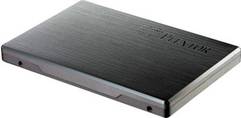
Preview: Plextor M2S 256GB SSD |
Plextor Europe was kind enough to send me their latest SSD,
the PX-256M2S for a preview. The sample I received was the 256GB model. The
PX-256M2S uses a new revision of the powerful Marvell 88SS9174 SSD controller
with support for ONFI 2.1 and Toggle mode MLC NAND.
As we approach spring, SATA 6Gbps SSDs are certainly
becoming hot property, only last week we looked at the new OCZ Vertex 3 SATA
6Gbps SSD, and this week we have another SSD with native SATA 6Gbps support in
the shape of the Plextor PX-256M2S.
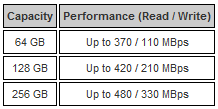
The Plextor PX-256M2S is available in three different
capacities, 64GB, 128GB and 256GB, with each capacity offering different levels
of performance. The difference in performance is due to the NAND density and
chip count, with the high density and chip count model, the 256GB, being able to
use all 8 channels on the Marvell SSD controller.
In this preview we will find out how the new PX-256M2S
performs with a range of benchmarks and real world tests.
Also in this preview I bring a few changes in how I go about
testing SSDs. This has been necessary because we now have a fast “native” SATA
6Gbps host controller in the shape of Intel P67, and this has allowed SSD
manufacturers to optimise their SSDs in a different way from SSDs designed to
run on a SATA 3Gbps controller.
You can find an explanation of the new methods and the
thinking behind the need for these changes on the “Test PC and testing
procedures” page a little later in this article.
Plextor company information
I’m sure everyone here at MyCE will be familiar with the
Plextor brand name, they became legendary for their range of optical drives,
and more recently they branched out to other products such as NAS, and now
SSDs.
If you would like to find out more about Plextor, you can
visit the Plextor website.
The Plextor PX-256M2S packaging.
Let’s first take a look at the package.
The review sample I received was the full retail package.
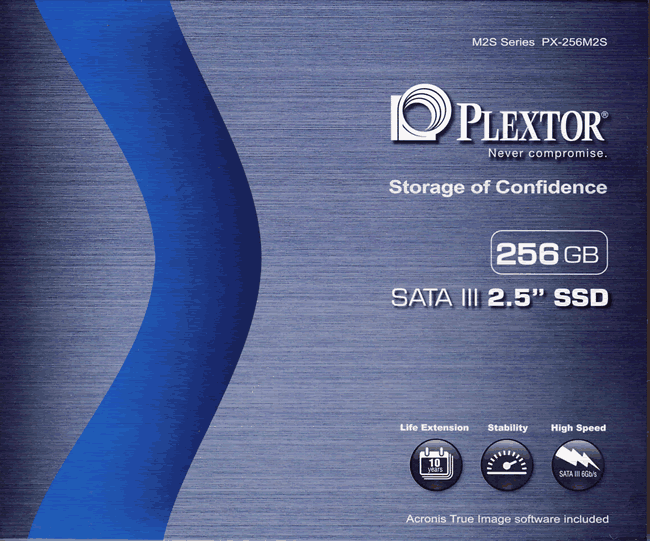
Box front
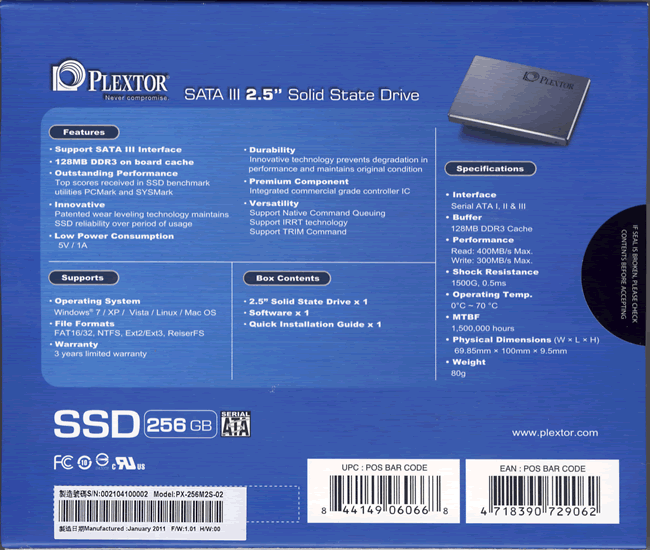
Box rear
Now it’s time to take a look at the drive itself and what
the drive came shipped with.
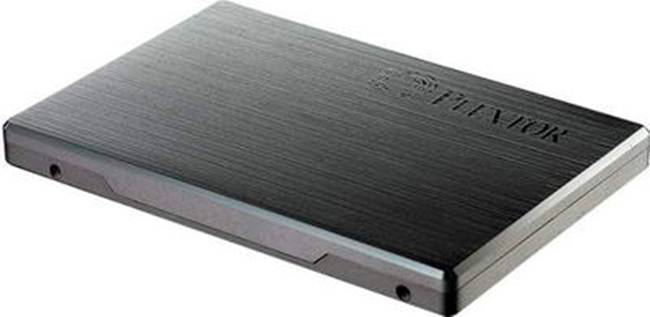
The PX-256M2S SSD
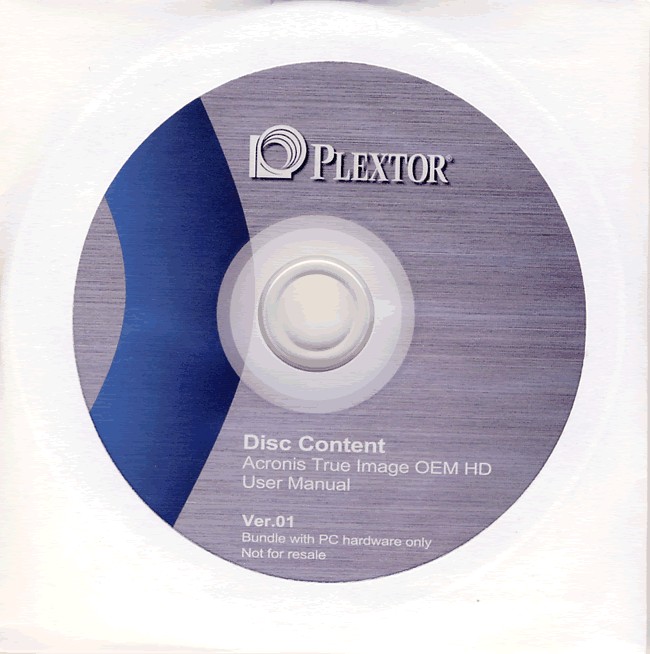
Software DVD
Let’s now take a look at the drive itself.
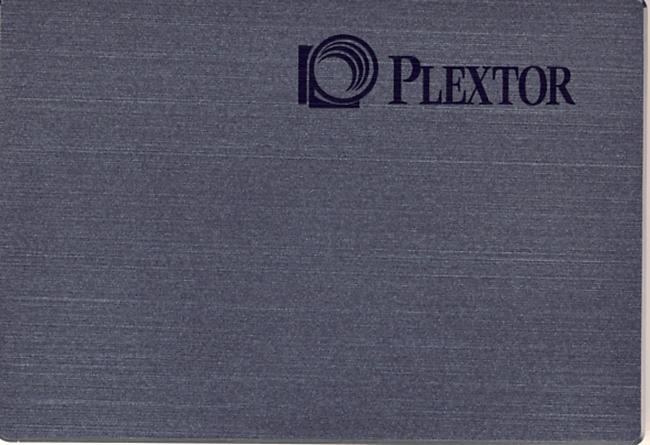
Drive top
The top of the case looks very stylish with a brushed
aluminium finish, which looks good and is also durable.
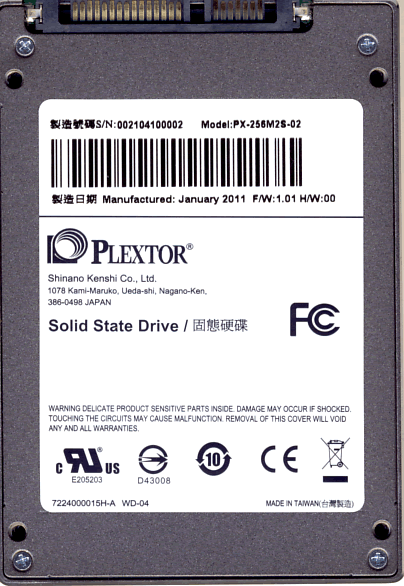
Drive bottom
On the bottom of the SSD we can see the SATA power and data
connectors, and we can also see a label.

Drive label
From the information on the label we can see that the drive
was manufactured in Taiwan during January 2011, and shipped with firmware
version 1.01. We can also the see the model and serial number of the SSD.
Now let's head to the next page, where we look in more
detail at the Plextor PX-256M2S.
Specifications

Plextor PX-256M2S hardware.
Now let’s take a closer look at the hardware.
Drive internals

If we look at the above screenshot, we can see that the PCB
doesn’t occupy all the available space. In fact the PCB is made to fit either a
2.5 inch form factor case, and also the smaller 1.8 inch form factor case
style.
PCB

PX-256M2S PCB (top side)
From the above screenshot we can see the Marvell SSD
controller, four NAND chips, and 128MB of DDR3 cache.
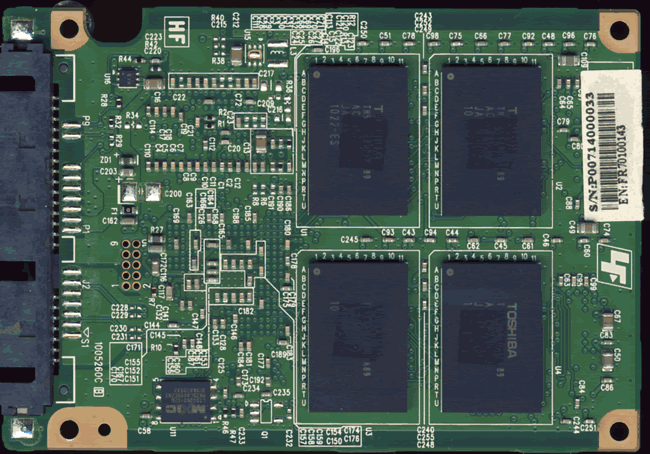
PX-256M2S PCB (underside)
On the underside of the PCB we can see another four NAND
chips.

Marvell SSD controller
Above we can see the new revision of the Marvell 88SS9174
SSD controller designated 88SS9174-BKK2. The main purpose of the revision is to
provide far superior performance with regard to NAND maintenance. That is to
say, the garbage collection, which Plextor has named “Instant Restore Technology”,
has meant NAND cleaning performance has been increased substantially.
The controller no longer has to rely totally on Windows 7
and TRIM, as Instant Restore Technology alone is very capable of keeping the
SSD at near peak performance.
The controller still has 8 channels connecting it to the
NAND array, with the 256GB model being able to use all 8 channels; therefore
the 256GB model will produce the best performance overall.
One of the other new features is to support a larger range
of NAND, such as toggle mode MLC NAND. Toggle mode NAND provides higher
throughput by providing DDR type qualities. It is also believed that the new
88SS9174 –BKK2 revision may also be able to support 24nm, 25nm, and also 32nm
NAND.

128MB DDR3 cache
The Plextor PX-256M2S also supports 128MB of DDR3 cache
which provides a stable write buffer for the SSD controller, and also helps
provide an area for use with the new garbage collection features of the Plextor
PX-256M2S.

The above data was supplied
by Plextor

Toshiba 32GB 32nm “toggle mode” MLC NAND
The PX-256M2S uses Toshiba 32nm toggle mode MLC NAND, with
each chip providing 32GB of flash memory. The PX-256M2S has 8 of these chips to
give a total of 256GB of MLC NAND. Toggle mode NAND is like DDR memory, in
other words, you can have twice the bandwidth from each NAND die, compared to
non toggle mode NAND.
Wear levelling

The above data was supplied by Plextor
Drive maintenance features
For Windows 7 users and some distributions of Linux, the
Plextor PX-256M2S supports ATA TRIM to help keep the NAND clean. The Plextor
PX-256M2S uses fairly aggressive garbage collection (Instant Restore
Technology) to clean the NAND blocks even with an operating system that does
not support the TRIM command.
The Plextor PX-256M2S can also be “secure erased”, which
will return all NAND on the SSD to its factory default clean state. You can do
this via the DOS application “HDDErase” or as I prefer by using a Linux “live”
distribution called Parted Magic.
The supplied software (Acronis True Image HD)
It is always nice to get some bundled software when you
purchase a hardware product; it is even nicer when that software is of high
quality and genuinely useful.
The Plextor PX-256M2S comes bundled with Acronis True Image
HD, which can be installed and used to backup the complete SSD, or backup your
precious data, or clone your existing system install onto your new Plextor
PX-256M2S SSD.
I will take a very brief look at the bundled Acronis True Image
HD software.
Backing up a complete partition
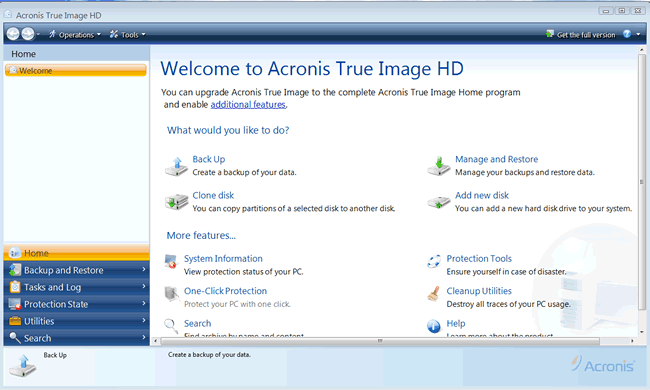
The main Acronis True Image HD screen

The backup wizard

Summary of the backup task

The backup in progress

Backup completed successfully

The task and event log. Showing when the last backup was completed.
Restoring a complete partition

The restore wizard

Selecting the partition to restore

Selecting the target drive

The restore summary
I have only scratched the surface of what this software can
do, and there are many other features that would require an article of its own
to go into any great detail regarding the full feature list of Acronis True Image
HD.
I also only conducted a single backup and restore with the
bundled Acronis True Image HD, and in both cases it worked flawlessly.
Let’s head to the next page where we can look at the test
PC and the testing methods....
Test machine
For this review I will be using a computer with the
following configuration:
Hardware:
- Motherboard: Asus P8P67 Deluxe (Intel P67 chipset)
- Processor: Intel 2nd generation Core i7 2600K
- RAM: 4GB GEIL Ultra Line DDR3 2133MHz (dual channel)
- GFX: Sapphire Vapor X HD 5770 (1024 Megabytes GDDR5 HDCP compliant)
- Sound: Onboard Realtek ALC889 HD audio controller
- Hard disk OS: OCZ RevoDrive X2 240GB PCIe
SSD, and Crucial RealSSD C300 128GB - Hard disk storage: 1X 500GB Samsung Spinpoint F3, and 1X 1TB
Samsung Spinpoint F1. - Case: Antec 900
- PSU: Enermax Liberty 620W
- Display: Samsung Syncmaster 245B 24” widescreen LCD (HDCP
compliant) - Operating System: Windows 7 Home Premium 64bit with Service Pack 1
The Plextor PX-256M2S SSD was connected to SATA 6Gbps (port 0)
on the P67 motherboard of our review PC and all tests on the drive were carried
out with the drive connected to this connector.
AHCI mode was also selected for all drives in the UEFI of
our test PC with “hot plugging” enabled, and all tests were carried out in this
mode.

The SATA 6Gbps drivers used on our review PC were the Intel
Rapid Storage Technology (RST) Version 10.1.0.1008.
Test applications
To test the performance of the Plextor PX-256M2S SSD, I will
be using the following test applications in this review.
- HD Tune Pro
- HD-Tach
- ATTO
- Iometer
- AS SSD
Benchmark - CrystalDiskMark
- MyCE Reality Suite
Test procedures
I will start off our testing procedures explanation by
stating that I did not run many synthetic benchmarks on the Plextor PX-256M2S
series drive. You may ask why I have run so few synthetic benchmarks?
SSD technology has moved so fast in the last couple of months,
that basic synthetic benchmarks alone are now of very limited use, as they don't
really tell us much about performance and how the drive will behave in the real
world. I have therefore decided to show some basic benchmarks of the Plextor
PX-256M2S SSD, and will complement this with more advanced benchmarks using
IOMeter and AS SSD benchmark. I will also show how the Plextor PX-256M2S performs
in the real world with our real world tests, and the recently introduced MyCE Reality
Suite test.
Small file random IOPS vs sequential performance
IOPS
This is a fairly complex subject, but I will do my best to
explain things in a manner that is easy to understand.
The term IOPS is the amount of input or output transactions
that can take place in a one second interval, so for example, if an SSD is
quoted as being able to cope with 20,000 4K random write IOPS, then the SSD
should be able to cope with 20,000 input transactions in a period of one
second. If the same SSD is said to be able to produce 20,000 4K random read
IOPS, then the same SSD should be able to produce 20,000 4K random read output
transactions in a one second interval.
Ok, now we have some figures to work with, the next question
is how many IOPS are actually required?
This will depend on your usage pattern. If you are a typical
desktop user who browses the internet, does some word processing or perhaps
some audio or video editing, and perhaps plays a few games, then in actual
fact, you don’t need to have massive 4K random read/write performance. The
actual amount of 4K random performance that is required for a fast and smooth
running system for a desktop user with a usage pattern similar to the above
will be well under 1,000 4K IOPS.
On the other hand, if the SSD is being used for running a
large and complex database server, then 4K random performance is the absolute
measurement of how fast that server will run, as this type of application does
most of its input and output transactions in the 4K domain.
So why would I need an SSD with 60,000 4K IOPS for a
desktop?
In fact you don’t need this type of performance for a
desktop, but an SSD which is capable of coping with 60,000 4K IOPS will be
faster than an SSD which can only cope with 20,000 4K IOPS.
OK, I just said if under 1,000 4K IOPS are actually required
for typical desktop usage, why is an SSD with 60,000 4K IOPS faster than an SSD
with only 20,000 4K IOPS, confused?
You may ask, if I only require 1,000 4K IOPS surely the rest
is wasted?
While you may never need 60,000 4K IOPS, IOPS is all about
latency. The reason that an SSD can cope with as much as 60,000 4K IOPS is
because latency in this domain is very low. With 4K files, even if you require
to process 500 of them at the same
time, you are not talking about a huge amount of data, it has far more to do
with how long it takes the SSD to process a single file, and the amount of time
required to process a single 4K is all about how long it takes for the SSD to
access or store that data before it can move on to the next transaction.
In other words an SSD with 60,000 4K IOPS performance will
handle those 500 files faster than the SSD with 20,000 IOPS.
So how will a desktop user even notice this faster speed if
so little 4K random IOPS and data are actually used?
Multitasking is a good example. The more tasks you run at
the same time, you more you will notice the speed difference.
Sequential performance
I have always maintained that sequential performance was
every bit as important as small random file performance for a desktop SSD. Some
highly regarded people on other sites found this statement quite funny a couple
of years ago when I made it, but my, how times have changed in the world of SSD
reviewing.
To me this was always so obvious for a desktop user. For
example, let’s say you want to launch an application or game. Both have some
fairly large files to load, and also a great many small files, but the point
is, even the smaller files are sequential in nature. Now let’s say you’re into
audio or video editing. Video files tend to be huge, and the files are written
or read sequentially. Isn’t this how many users are using their PCs these days?
Summary
So how does this shape up in the real world? Which is
better, massive 4K IOPS or massive sequential performance?
In an ideal world you want both, as an SSD with massive
random 4K IOPS and sequential performance will always be faster than an SSD
that has high sequential performance and moderate 4K random IOPS performance,
and the same applies to an SSD that has massive 4K random performance and
moderate sequential performance. The SSD which has high performance in both
patterns will always be the faster SSD.
However, you can still have an SSD that is very fast for
desktop use that has moderate random 4K performance and massive sequential
performance, the same can be said about a drive having massive random 4K
performance and moderate sequential performance, as it is about getting the
balance right if you have to compromise on one or the other.
Test drives
- 120GB OCZ Vertex SSD (firmware 1.5)
- 500GB Samsung SpinPoint F3 (HD502HJ)
- Seagate Momentus XT 500GB (Hybrid drive)
- OCZ Agility 120GB (firmware 1.5)
- Intel X25-M 80GB (series G1)
- OCZ Vertex 2 100GB
- Crucial RealSSD C300 128GB
- OCZ Vertex 3 240GB (engineering sample)
- Plextor PX-256M2S 256GB
The Plextor PX-256M2S SSD came supplied with firmware
version 1.01
Drive preparation for running the tests
All the SSDs used in this article were in a clean and fresh
state when the testing period started. From then on, each drive had to rely on its
own NAND cleaning effectiveness for the remainder of the tests.
- Both our spinning HDD drives were defragged before the
start of each test.
- All SSD and HDD used in this article had their partitions
aligned to the Windows 7 x64 defaults.
Where I use graphs in this article to display results, I
will use the following colours to make it easier, for our readers to see which drive
we are reviewing.
 Plextor PX-256M2S SSD
 Comparison SSD
 Comparison HDD
Now let's head to the next page, where I look at some
synthetic benchmarks...
Reading Benchmarks
HD Tune Pro (sequential reading speed)

I present the graph below for comparison with other recently
tested drives.

From our limited number of test samples, we can clearly see that the Plextor PX-256M2S SSD is very fast;
in fact it’s the second fastest reading drive in this test.
HD-Tach (sequential reading and writing speeds)

The average reading speed of the Plextor PX-256M2S is 377.1
MB/s, and the average writing speed is 302.5 MB/s.
ATTO disk benchmark
ATTO has become a standard tool for measuring the data
throughput of HDD and SSD. It measures the performance of reading and writing,
using different file sizes and block sizes.

(Default queue depth 4)
The reading speed results on the Plextor PX-256M2S are
extremely impressive, topping out at over 484 MB/s, and writing speeds are
equally impressive, topping out at over 342 MB/s.
CrystalDiskMark 3.0
Crystal Disk Mark is quite a handy benchmarking application,
as it focuses on the file sizes that can cause a problem on a system drive.

Sequential reading and writing speeds are once again
confirmed to be of a very high standard. 4K random figures even with increased
queue depth are a little low by today’s standards.
AS SSD Benchmark
AS SSD benchmark is a benchmarking tool specifically
designed to test SSDs. The application tests sequential reading and writing
performance, 4K random reading and writing performance.
AS SSD benchmark also tests 4K threaded performance. This is
very exciting, as this test is the first available test that I am aware of,
that simulates how a PC operating system actually works. A modern PC and OS,
such as Windows Vista does not just run a single thread at a time, it runs many
threads. The AS SSD benchmark "4K 64Thrd" tests run 64 threads
simultaneously throughout the test. If this result is good, then you can be
pretty sure the drive will perform extremely well as a system drive.
After the tests complete, AS SSD benchmark derives a total
score for the drive being tested. This is based on all aspects of the test
results, and gives an indication of how the drive is performing overall.
Now let’s look at the result from the Plextor PX-256M2S in
the form of a screenshot. All our other comparison drives’ results are
presented in the form of a graph.

Once again, sequential reading and writing speeds are very
impressive, but 4K random performance is a little low.

With 4K performance being a little low by today’s standards,
this has had quite a large impact on the overall AS SSD Benchmark score, and
the Plextor PX-256M2S finishes in fifth place overall.
AS SSD compression benchmark.
This test creates test patterns on the target drive which
are random and vary in the level of compression used in the test data. This
ranges from 0% compressible to 100% compressible. This test is ideal for
SandForce based drives, as it will show the relevant performance at different
levels of compression already applied to the test data.
I run this test on the Plextor PX-256M2S, and also on three
other SSDs.
- Crucial RealSSD C300 128GB
- OCZ Vertex 2 100GB
- OCZ Vertex 3 240GB
Below are the obtained results.

Plextor PX-256M2S

OCZ Vertex 3 240GB

Crucial RealSSD C300 128GB

OCZ Vertex 2
The Plextor PX-256M2S doesn’t compress data on the fly like
the two SandForce based drives, and the PX-256M2S has performed very well in
this test.
Summary:
It’s a bit of a mixed bag where the Plextor PX-256M2S is
concerned with our synthetic benchmarks. The PX-256M2S has very strong sequential
performance, but unfortunately small file random performance is not so good,
and it simply can’t keep pace with the SandForce SF-2281 based OCZ Vertex 3.
Let's head to the next page for our IOMeter test
results.....
I/O Performance
There is little point of having an SSD drive that has
blazing sustained reading and writing speeds, if the drive can't handle reading
and writing of small random files. If you intend to use your new SSD drive to
store and run your operating system, then the drive must be able to cope with
the many small random files that Windows will write to the drive continually.
So I feel it is very important to test how many of these random files that a
drive can handle in one second. I believe that anything over 1,000 I/O’s per
second would be enough for most users running a consumer grade mainstream PC,
and should provide a smooth and fast running system. But obviously, the more I/O's
that a drive can handle, the faster the drive will feel and leave more headroom
for those huge multitasking sessions that users sometimes engage in.
The things that I will look at are the total I/O per second and
total MB/s.
Partition alignment and sector boundaries
Windows 7 will automatically align a partition to 4k boundaries
during partition creation, Windows XP won’t. It is imperative that an SSD’s
partition is aligned. Windows XP is also restricted to sector boundaries, while
Windows 7 will use 4k boundaries if it can. The Plextor PX-256M2S is 4k
boundary aware, and will use these boundaries when it can. Of course it will
also remap LBAs for compatibility with the sector boundaries so the drive can
be used with Windows XP.
IOMeter allows us to set the sector boundaries for
conducting the tests, and I have therefore set the sector boundaries at 4K,
which means the IOMeter tests are valid for Windows 7 and Windows Vista users.
XP users will not be able to obtain such results.
I will provide a screenshot of the tests on the review drive
for those of you who like to see the actual test result. All the comparison
drive results are represented in the form of graphs.
If any of you would like to see a screenshot from any
IOMeter test on a particular drive, please feel free to request one, and I’ll
post the screenshot in the forum thread.
All the IOMeter tests create a 10GB data set on the target
drive, and each test is run for a duration of 3 minutes.
IOMeter 4K random (outstanding I/Os = 4, 32) write test.
Our first test involves creating continual 4KB random files
on the target drive with IOMeter. I use a 4KB file size, as it is believed that
Windows will create and modify many of this size of file constantly in the
background during a typical Windows session. I will use queue depths of 4 and
32 for these tests on the OCZ Vertex 3, OCZ Vertex 2, and Crucial RealSSD C300.

(Queue depth 4)

(Queue depth 32)
IOPS

MB/s

The Plextor PX-256M2S is left well behind many of the other
SSDs in this test; even increasing the queue depth to 32 didn’t really lift
performance. The question is will the lack of 4K random writing performance
have a negative impact on the performance of the drive in the real world?
We will find out the answer to that question a little later
in this article.
IOMeter 4K random (outstanding I/Os = 4, 32) Read test.
If there are many 4k files created, then that must also mean
that many 4k files need to be read. This test measures 4k reading performance.

(Queue depth 4)

(Queue depth 32)
IOPS

MB/s

The Crucial RealSSD C300 was always mighty with 4K random reading
performance, and is well over 3 times faster than the PX-256M2S, which is also
well behind the SandForce based SSDs. This time however, the 4K reading
performance does get better with the PX-256M2S as the queue depth increases.
IOMeter 512KB (outstanding I/Os = 2) write test.
Sequential writing performance is also very important; in
this test sequential writing performance is measured. I use a queue depth of 2
to make sure the drive has a constant load.

IOPS

MB/s

The Plextor PX-256M2S has performed extremely well in this
test, and is the second fastest drive.
IOMeter 512KB (outstanding I/Os = 2) read test.
This test measures 512k sequential reading performance. I
use a queue depth of 2 to make sure the drive has a constant load.

IOPS

MB/s

Sequential reading performance is very impressive, and the Plextor
Px-256M2S is only very slightly behind the OCZ Vertex 3.
IOMeter Workstation simulation (outstanding I/Os = 64).
When running applications you will find that there is a
mixture of small random files, and larger sequential files being created and
read. Not only that, it isn’t just one file at a time. In this test I measure a
simulated workstation pattern, with a queue depth of 64 (threaded).

IOPS

MB/s

The Plextor PX-256M2S has performed quite well, but once
again its lack of small random file performance lets it down in this test.
Summary
Once again it’s a mixed bag for the Plextor PX-256M2S. It is
now very apparent that the PX-256M2S has very strong sequential performance,
but small random file performance is having a negative impact on some IOMeter
results.
Now let's head to the next page for some real world tests....
It has become clear recently that simply conducting endless
benchmarks on SSD drives is pointless. Real users may run a few benchmarks when
they first fit their SSD drive, but most users just want a drive that performs
well in the real world. They want their drive to work "out of the
box" and work fast and smoothly.
Most of the latest SSD drives can deliver very fast
sustained reading and writing speeds, but these alone tell you very little
about how the drive will perform in the real world.
If you intend to use your SSD as your primary system drive,
with an operating system and applications installed and running from the drive,
real world performance becomes much more important than just fast sequential
read and write speeds.
Real world copy
tests
I will now conduct a few real world copy tests. These tests
simulate what real people do with their drives. I will be conducting writing
tests, using a large single file and a multiple file copy of various file
sizes. Then I will round off the tests by copying a folder of MP3 audio files,
and also a folder of JPG pictures.
I should point out that this is not a scientific way of
measuring performance. These timings were taken with a stop watch; we have
however ensured that the reading drive is well able to supply a data stream to
our writing drive, which is high enough not to be slowing down the performance
of the writing drive.
I will once again be comparing the obtained results with our
comparison drives, and will present the results in the form of graphs.
Multiple file copy writing test
For this test I copied the Nero Burning Rom install folder
from our review PC to the OCZ RevoDrive X2 240GB SSD, and then copied the
contents from the RevoDrive to the Plextor PX-256M2S SSD and our other
comparison drives.
Our test copy contained 1,772 files of various sizes with a
combined capacity of 307MB.

The Plextor PX-256M2S is pretty impressive in this test, and
is the second fastest SSD.
Single large file writing test (7.95GB)
For this test I used a single DVD9 ISO file which had been
copied to the OCZ RevoDrive X2 240GB SSD. The file was then copied to the Plextor
PX-256M2S SSD and our comparison drives.

The Plextor PX-256M2S with its excellent sequential writing performance
pushes the OCZ Vertex 3 close in this test, and once again it is the second
fastest SSD.
Write a folder of JPG picture files.
For this test I copied a folder of JPG picture files from
our OCZ RevoDrive X2 SSD to the Plextor PX-256M2S SSD, and our other comparison
drives. The folder contained 3,714 JPG pictures, with a total capacity of
5.16GB.

Again the PX-256M2S is performing extremely well when
writing our folder of JPG picture files.
Write a folder of MP3 audio files.
For this test I copied a folder of MP3 audio files from our
OCZ RevoDrive X2 SSD to the Plextor PX-256M2S SSD and our other comparison
drives. The folder contained 851 MP3 audio files, with a total capacity of
3.85GB.

The Plextor PX-256M2S had no problems in dealing with our
folder of MP3 audio files, and once again has performed extremely well in this
test.
Summary
In the previous two pages of this article, it was clear that
according to our synthetic benchmarks and the IOMeter test results that the Plextor
PX-256M2S wasn’t the fastest drive when it had to deal with small random files,
however it did compete very well with sequential files, and this is also
translated to the real world, where the PX-256M2S has performed extremely well
and is overall the second fastest drive in our real world file copying tests.
Windows start-up and closedown
For these tests, I simply used a stop watch and tested the
amount of time taken for a full installation of Windows 7 to boot to the
desktop, and then timed how long it took for Windows 7 to close down by the
normal start menu method.
The timing was started once the BIOS had initialised and
reached the “loading OS message”.

Windows 7 boot time

Windows 7 closedown
All the SSDs are very much the same in this test, and any
difference is marginal.
Single drive copy tests
These tests are to simulate a single drive in a PC or
laptop. In other words, I will copy a series of files from one folder on the
tested drive to another folder on the same drive. This means the drive is simultaneously
reading and writing during the tests. I also want to make this a realistic
test. So I have used a folder or MP3 music files, and then repeated the test
with a folder of JPG picture files.
Single drive copy tests – 851 MP3 song files (3.85GB total)

The Plextor PX-256M2S's excellent reading and writing
performance has made sure that it has performed very well in this test, being
beaten only by the OCZ Vertex 3.
Single drive copy tests – 3,714 JPEG picture files (5.16GB total)

Once again, the Plextor PX-256M2S is giving the Vertex 3 a
run for its money, and once again has performed very well indeed.
Summary
Our real world tests, though not scientific in nature, I
feel are more realistic than simply running benchmarks. What is clear from our
tests is that the Plextor PX-256M2S has proven that small random file
performance is not the be all and end all of how an SSD can perform in the real
world. In these simple copy tests, the Plextor PX-256M2S is showing us that
sequential performance is also very important in the real world.
Now let’s look at the MyCE Reality Suite tests on the
next page.....
MyCE Reality Suite (storage).
So what is the MyCE Reality storage test?
The MyCE Reality Suite of tests is made from real everyday
applications and real data, there are no simulated tests, and everything is in
the real world. The only thing that's synthetic is that everything is automated
to make the tests fair, no matter which drive the tests are run on.
Recorded user sessions, by means of a script, are used to
launch the applications, load data, edit data, and then finally write that data
back to the target drive. The scripts do load the system much more than a human
could with these tests, as the scripts do not make mistakes, or pause to think
about what has to be done next.
Measurement system (revision 2)
The measuring system is part hardware and part software. The
hardware is proprietary and under an NDA, but what I can tell you is: The
measuring system can now accommodate SATA2, SATA3, USB3, PCIe, and DMI.
Testing method.
Once all the test data files were complete, they were then
copied to a single folder. I then fitted an old 80GB HDD into the PC and did a
clean install of Windows 7 Home Premium x64. The latest hardware drivers were
installed and Windows update was run to install any new updates that were
available up to 13/05/2010. At this point the applications that were to be used
in the tests were installed and updated with the latest patches.
The folder containing the application test data files was
then copied over to our fresh Windows 7 HDD. The drive was cleaned up and then
the four test scenarios were recorded, with the scenario playback data file
which will run each test scenario saved to the desktop. A drive snapshot was
then taken of the complete HDD and the drive snapshot image copied to a second
HDD for safe keeping.
The image is then simply restored to each of the drives on
test. In the case of SSDs the partition is then realigned “on the fly” and for
SSDs that support TRIM, the free space is filled and then deleted to force
TRIM. All other HDDs and SSDs in the system are then disconnected to make sure
the complete test can only run on the drive I am testing.
A 20 minute settling time is allowed before the tests are run,
then each of the 4 tests is run and the results gathered. This process is
repeated for each of the drives I am testing.
The test scenarios are as follows.
- Graphics content
- Video editing
- Audio import and compression
- Application multitasking
Let’s begin the tests.
MyCE Reality Suite – Graphics content.
Using ACDSee Pro 3, 100 JPG pictures with an average size of
10MB are imported into the ACDSee library, and then 12 of these JPG files are
then selected for a batch process, of resize, compress the quality to 80%, and
finally write the edited pictures back to the drive. The test is approximately
78% read and 22% write.

The Plextor PX-256M2S has performed extremely well with the
graphics suite, and is the second fastest drive in this test.
MyCE Reality Suite – Video editing.
Using Vegas Pro, a 14GB HD MPEG2 video stream is loaded into
the editor, from which 2 segments are then cut and pasted into new segments. There
is a lot of disc caching going on in this test, and the test is approximately
55% read and 45% write.

The Plextor PX-256M2S is showing an excellent turn of speed
in this test, and since the PX-256M2S has excellent sequential performance,
this really isn’t a surprise.
MyCE Reality Suite – Audio import and compression.
Using Sony Soundforge 10, a batch process is run consisting
of 30 24bit (192000hz sample rate) .wav files, and 100 16bit (44100hz sample
rate) .wav files are imported and then converted to MP3 audio files with a bit rate
of 128kbps, and the converted files are written back to the drive. The test is
approximately 72% read and 28% write.

Once again, the Plextor PX-256M2S has done extremely well in
the audio editing test.
MyCE Reality Suite – Application multitasking.
For this I used several popular applications, Microsoft Word
2007, Microsoft Access 2007, Microsoft Excel 2007, Microsoft Outlook 2007,
Adobe reader, Adobe Photoshop CS3, uTorrent, Windows media player, and Internet
Explorer 8.
This session runs for approximately 12 minutes. The test is
started by downloading a Linux distribution via uTorrent, Windows media player
is then opened and a 1080p video file is opened and played for the duration of
the test. Microsoft Outlook is opened and any new emails are received, read,
then replied too, a document in Adobe reader is opened and scrolled from start
to finish, 3 Microsoft Word documents with graphics content are opened, browsed
and some sections of the documents are copied and pasted into a forth document
and then saved back to the drive. The same applies to Microsoft Access and
Excel. 100 MP3 files are imported into Windows media library. Six JPG images
are loaded into Adobe Photoshop and some minor editing is done and the files
saved back to the drive.
Finally, Internet Explorer 8 is opened with 10 tabs, and the
contents of the 10 tabs refreshed, and browsed while the other applications are
busy in the background.
I would describe the multitasking pattern as modest to
medium.
During this test there is approximately 85% reading and 15%
writing.

Multitasking at this level, demands that all 3 metrics for
SSD performance are required. That is to say the SSD requires good small file
reading and writing performance, small file threaded performance (higher queue
depth), and sequential performance. We know the Plextor PX-256M2S has excellent
sequential performance, but it is most certainly lacking in small file, and
small file threaded performance by today’s standards.
Nonetheless, the PX-256M2S is still performing well in the “Reality”
Multitasking test.
Summary
I firmly believe that the MyCE Reality Suite gives a very
good overall picture of how a drive can perform in the real world, and in this
case, the Plextor PX-256M2S SSD is performing extremely well in the real world.
Now let’s head to the next page, and see how well the
drive performs after heavy use....
Speed degradation after heavy testing
On this page I will test how the SSD performs after heavy
testing and usage.
I now have a new policy as to how I go about testing an SSD.
In the past I would deliberately try and get an SSD into a “used state”, by
filling the drive several times before starting the tests. This seemed to work
quite well up until the SandForce based SSDs appeared, but because of the way
the SandForce controller works, it was near impossible to tell if deliberately
trying to get a SandForce based SSD into a “used state” had actually worked on
not.
A new strategy was required. So now I begin the tests with
the SSD in a clean state and allow it to look after itself during the testing
period. I start off the tests by running HD-Tach read/write test. This gives me
the “as new” reading and writing performance of the SSD.
Once all the tests have been completed, the drive is then tested
as a system drive, and just used normally for many days (which is something I
have always done with a review sample). At the end of the period, the drive is
filled to capacity and then all files are deleted from the drive and then the
partition is also deleted.
The last test is a rerun of the HD-Tach read/write
benchmark, and the result from the final test compared with the first run of
HD-Tach when the SSD was in an “as new” state.
The results are below.
New state
New state Plextor PX-256M2S
Used state

Used state Plextor PX-256M2S
There is no real evidence of speed degradation after some
very heavy testing, in fact the average reading speed is slightly higher and
writing speeds have only dropped by approximately 4MB/s at the end of the
testing period.
If this is an indication of how this SSD will perform in the
long term, then it would pretty safe to say that Plextor “Instant Restore
Technology” is very effective indeed at keeping the drive operating at, or very
near to its “as new” state.
This concludes our preview. To read the final thoughts
and conclusion, click the link below....
Final thoughts and the conclusion
Positive:
- Silky smooth operation as a system drive (during the test
period). - Excellent reading and writing performance.
- SATA 6Gbps support.
- Plextor Instant Restore Technology is excellent.
- Good multitasking potential.
- TRIM support under Windows 7.
- Lightning fast access times.
- Completely silent operation.
- Fast operating system start-up and shutdown times.
- Very good software bundled with the SSD.
- 10 year expected life cycle.
- 3 years warranty in the EU (warranty period may vary
outside of the EU).
Negative:
- Expensive.
- Limited random small file writing performance by today’s
standards
User experience
A modern operating system such as Windows 7 rarely does one
thing at time; it processes hundreds of threads at once. Just take a look at
the processes and services that are running in task manager for an idea of how
much is going on, even with the PC idling at the desktop. When you start
running applications on top of this, the workload increases in line with the number
and type of applications you are running. It’s also fair to say that many of
these processes are already loaded into system RAM, but many are also loaded into
and unloaded from RAM from the system drive as and when they are required.
The fact of the matter is this. If you are running a mainstream
or high end modern PC with a powerful CPU and graphics card, and are still
running a traditional HDD as a system drive, regardless of how fast that HDD
is, it is still bogging the system down substantially. It has long since passed
the stage where one can meaningfully debate if an SSD is really faster than a
traditional HDD. The fact is they are, and not just by a little bit: they are
much faster.
If we look at the 3 basic requirements for a fast SSD, they
are as follows.
- Small file threaded performance needs to be high
- Small random file performance needs to be high
- Sequential read and write speeds needs to be high
The Plextor PX-256M2S SSD has extremely good sequential
performance and reasonable small random file, and small file threaded
performance.
Stability
With only 1 week of testing, it is impossible to say if the
drive is stable or not, as this amount of time is not enough to declare the
PX-256M2S completely stable. However, during the week of testing and use as the
system drive, the Plextor PX-256M2S was completely stable during this period.
Pricing
The Plextor PX-256M2S has just been released in the EU,
priced at around € 589, which is
around the $800 mark. This will place the Plextor PX-256M2S as a direct
competitor to the OCZ Vertex 3 Pro 200GB, which is similarly expensive. Toggle
mode NAND is very expensive at the moment, so this could be one reason why the
PX-256M2S is placed at this price point.
Conclusion:
Let us summarise the most important positive and negative
points below:
The
main positive points:
The Plextor PX-256M2S is a fast SSD and has extremely good
reading and writing speeds from a single SATA drive and is one of the fastest
SSDs that we have ever tested here at MyCE.com.
With TRIM support in Windows 7, the Plextor PX-256M2S should
remain at near peak performance, and Plextor Instant Restore Technology will
ensure that maximum performance is maintained throughout the expected life
cycle of the SSD, regardless of the operating system that is running on the
PX-256M2S.
Noise levels from the drive are nil; there are no moving
parts so the drive is completely silent.
The
main negative points:
4K random read and write speeds are moderate by today’s
standards, but are still more than fast enough for a powerful desktop computer
running Windows 7.
The price is high, and there is really no other way of
describing it other than as an expensive SSD.
To sum up, this is what I
would say:
As I write this article, given that the Plextor PX-256M2S
has just been released in the EU, the Plextor PX-256M2S will be up against some
very series competition from SandForce SF-22xx based SSDs, such as the OCZ
Vertex 3.
The Plextor PX-256M2S has limited 4K random performance, but
as we have seen in this article, this has not really harmed performance in the
real world, where it is the second fastest SATA drive we have ever tested here at
MyCE.com. So it just goes to show that 4K performance isn’t everything, and
that fast sequential performance is also very important.
Our parting sentence is
“The Plextor PX-256M2S is an outstanding SSD, its fast,
and should remain fast even after heavy use”.
As the Plextor PX-256M2S was on loan, and I haven’t had time
to test the durability of the SSD, I am not going to give an “editors” award to
this drive, as no long term durability testing is possible.
What I can do is, give the drive a rating based on its
performance and stability during the testing period.

You may comment on this review below.
Thanks to:
|
|
EFD Software for |
|
|
Simpli Software |
|
|
Alex |

















