
|
|
Review: Samsung T3 USB3.1 (gen1) SSD Reviewed by: Wendy Robertson Provided by: Samsung |
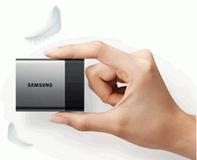
In this day and age, everyone who uses a computer will
require a way of getting data from A to B. For just a few megabytes, or
gigabytes, of data, a USB pen drive, or cloud storage will be sufficient. But
what if you need to move around large amounts of data?
You can of course use an external USB HDD to store and
retrieve the data. An external USB HDD is cheap, and can have a large capacity,
but they are quite slow when tens of gigabytes of data needs to transferred to
and from the device. Not only that, an HDD is quite a fragile piece of kit. You
certainly won't want to drop it, or subject it to any violent shock, while it's
running.
An ideal solution, in my opinion is an external USB3 SSD.
The downside of this is they tend to be pretty expensive. On the positive side
though, they are much faster than an HDD, and much more robust. If you drop it
while data is being transferred, the chances are it will continue doing its
task without any fuss.
Enter the new Samsung T3 external USB3 SSD. Samsung was kind
enough to send me a review sample for testing, and in this article I will show
you how this tiny SSD performs. The intended use of the Samsung T3 external SSD
is different to that of the traditional desktop SSD that I usually test here at
Myce.wiki, so the tests I carry out on the Samsung T3, will be relevant to the
T3's intended use.
The T3 is available in 250GB, 500GB, 1000GB, and 2000GB
capacities. The version that Samsung sent me was the 2000GB version.
Samsung company information
Samsung should need no introduction, but those of you who
would like to find out more about Samsung, can do so at their website.
So let's find out how this new SSD performs in our range of
tests.
The Samsung T3 2000GB SSD
Now it’s time to take a look at the drive itself and what it
came shipped with.
Packaging
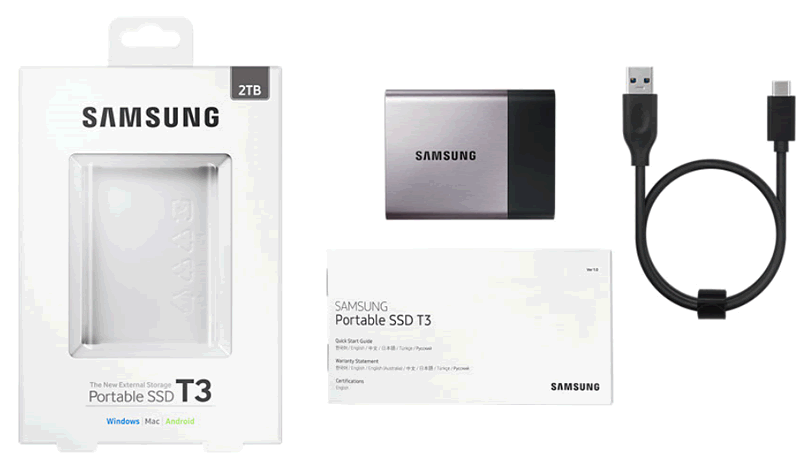
The review sample I received was the retail version.
Included in the package was the Samsung T3 2000GB SSD, installation
instructions, warranty information, and a rather short USB3.1 cable which supplies
power to the Samsung T3, and the USB3.1 (USB C type) data connection.
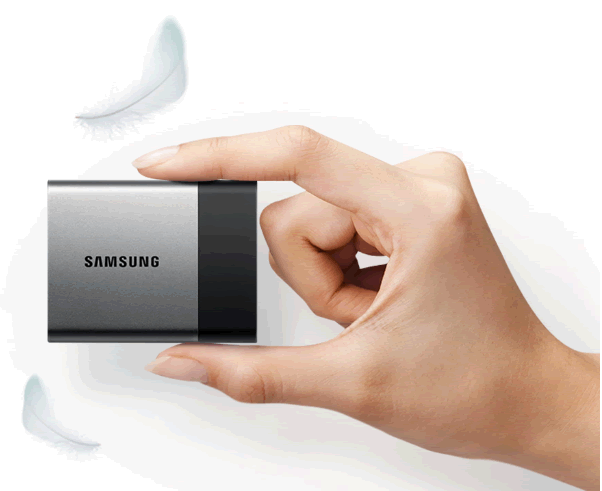
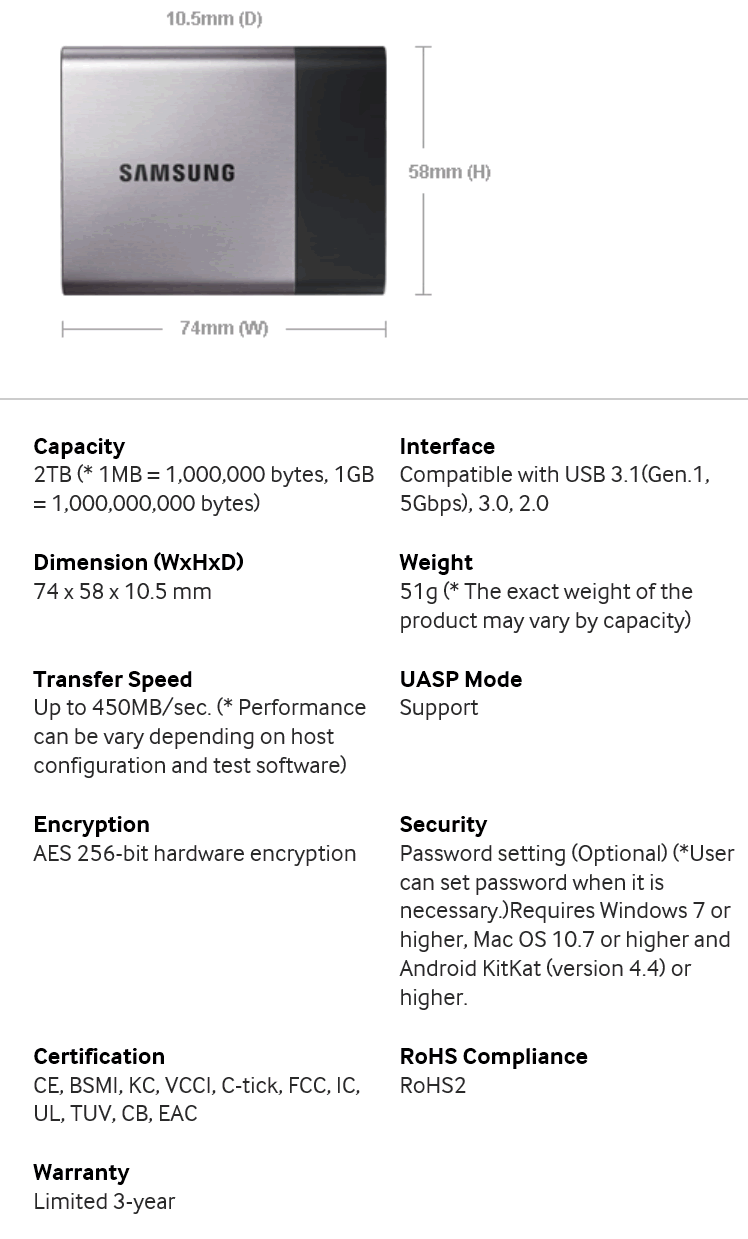
The Samsung T3 weighs in at only 51 grams, and the drive is
tiny, measuring only 74mm in width, 58mm in height, and 10.5mm in depth.
The T3 case is a mixture of metal and plastic, and feels
more solid than the previous T1 model, which I reviewed last year. The metal
part of the case also enhances the thermal performance of the drive,
dissipating heat away from the SSD controller and the NAND.
Inside the Samsung T3 external USB3 SSD, we find a USB3.1 interface
board to connect the T3 to the outside world, a Samsung MGX SSD controller, and
Samsung's own TLC 3D V-NAND. The Samsung T3 also supports USB UASP mode, which
allows NCQ (native command queuing) and queue depth scaling with a UASP enabled
USB3 port on the host PC, which is supported natively from within Windows 8/8.1
and later.
The T3 is also supplied with software to initialise and format
the SSD ready for use. The T3 is formatted using exFAT by default, so it should
be compatible with Windows and Apple based systems. If you wish to use the
Samsung T3 with an Android device, you will need to format the drive as FAT32.
The supplied software allows the T3 to be encrypted with a
user password, and also displays information about the Samsung T3 external USB3
SSD.
Specifications
Let’s head to the next page where we take a look at our
testing methods and the review PC....
Test machine
For this review I will be using a computer with the
following configuration:
Hardware:
· Motherboard: Asus Z170 Deluxe (Intel
Z170 chipset)
· Processor: Intel 6th generation
Core i7 6700K
· CPU cooler: BeQuiet Dark Rock Pro 2
· RAM: 16GB Corsair Vengeance
LPX 2666MHz DDR4 (dual channel)
· GFX: MSI GTX 950 Gaming 2G
· Sound: Onboard Realtek ALC1050
HD audio controller
· Hard disk OS: OCZ Vector 256GB
SSD.
· Case: Antec Performance One
P280
· PSU: Antec True Power modular
550W
· Display: Dell P2715Q 27” 4K
widescreen IPS LCD (HDCP compliant)
· Operating System: Windows 10 Professional
64bit
Samsung T3 SSD was connected to an Intel native USB3 port on
the Z170 motherboard of our review PC and all tests on the drive were carried
out with the drive connected to this port.
The test PC has UASP enabled USB3 ports, and this was
enabled for all the tests in this article.
Test applications
To test the performance of the Samsung T3 SSD, I will be
using the following test applications in this review.
- HD-Tune Pro
- ATTO
- Iometer
- CrystalDiskMark
- Anvil’s
Storage Utilities
Test procedures
The Samsung T3 external SSD's intended use is to be able to
transfer large amounts of data from one PC or laptop to another. I will
therefore run a few synthetic benchmarks so we can see how fast the T3 is
technically. You can take what you wish from these tests, but the 'real world'
tests a little later in this article will give a much better picture of how the
Samsung T3 performs in its intended role in the real world.
I will also compare the Samsung T3 USB SSD with the older T1
model, so you have some comparison data.
Now let's head to the next page, where I look at some
basic benchmarks...
Synthetic Benchmarks
HD Tune Pro
In this benchmark I am checking sequential reading speed at
a block size of 4MB.
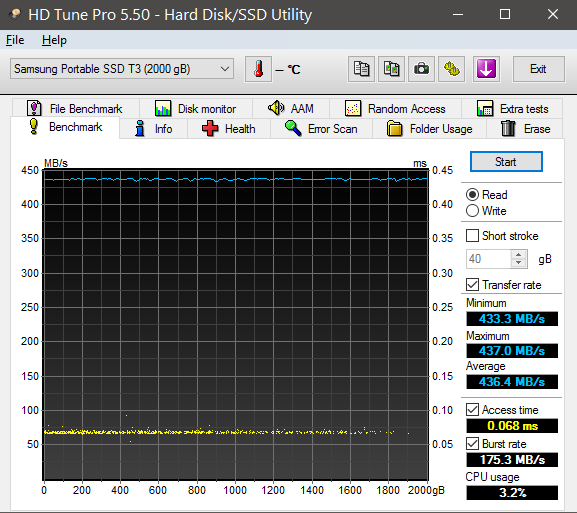
With an average sequential reading speed of 436.4 MB/s, the Samsung
T3 SSD shows a good turn of speed.
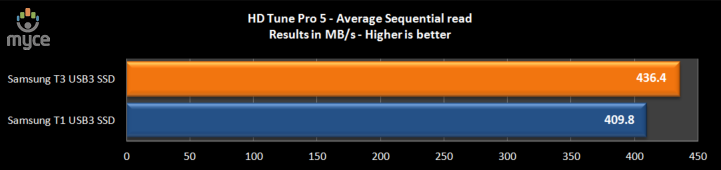
We can see in the above graph that the Samsung T3 is faster
than the T1 in this test.
ATTO disk benchmark
ATTO has become a standard tool for measuring the data
throughput of HDDs and SSDs. It measures the reading and writing performance,
using different file sizes and block sizes.
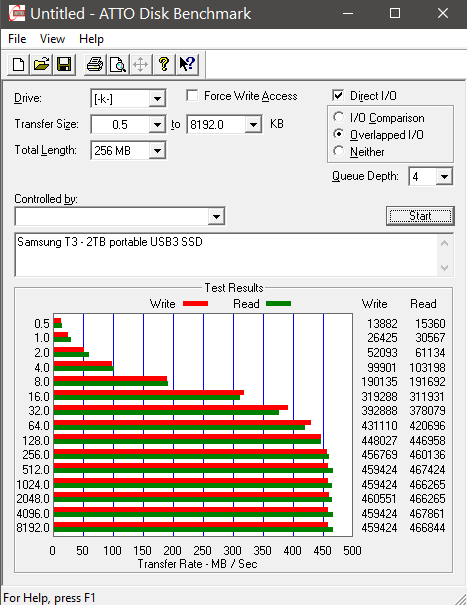
The reading speed results for the Samsung T3 2000GB SSD are
impressive, topping out at over 467 MB/s, which is right on the limits of the
throughput (with overheads) that USB3 can manage. Writing speed tops out at
over 460 MB/s.
CrystalDiskMark 3.0
Crystal Disk Mark is quite a handy benchmarking application.
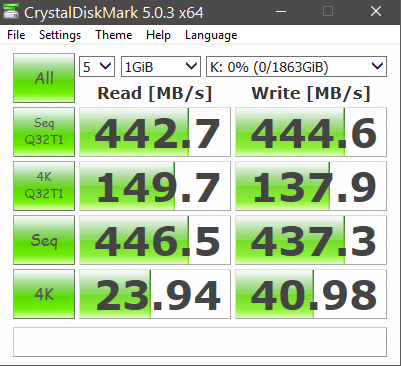
As we can see from the above screenshot, sequential reading and
writing speeds are both very good, also random reading and writing performance
at low and high queue depths is excellent for a USB3 connected device.
Anvil’s Storage Utilities
As well as performing SSD endurance tests. Anvil’s Storage
Utilities has a very nice SSD benchmarking application. The SSD benchmark tests
many different aspects of SSD performance, including 4K random at different
queue depths, and also sequential performance, but more importantly than this,
all using real test data.
Another very nice feature of Anvil’s SSD benchmark is the
fact that you can change the compression levels of the test data. The
compression levels of the datasets used for the tests can be varied from 0%
compression right up to 100% compressed data, and there are even a few data
profiles already included, such as database (8%) compression, and also an
application profile (46%) compression, which is designed to simulate real
application data being read and written to the SSD.
I will include a screenshot of the review drive, and all
comparison results will be presented in the form of graphs. If you would like
to see screenshots of the test results obtained on the other SSDs in this
article, you can do so by following the link here.
100% incompressible
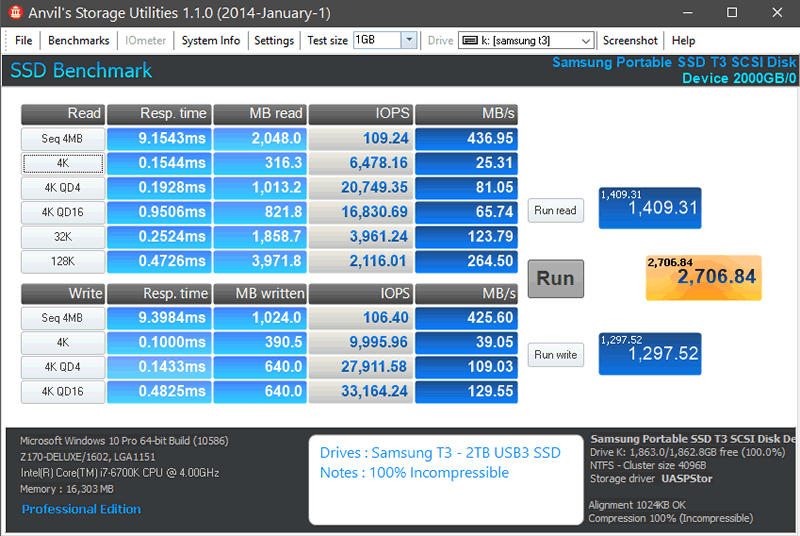
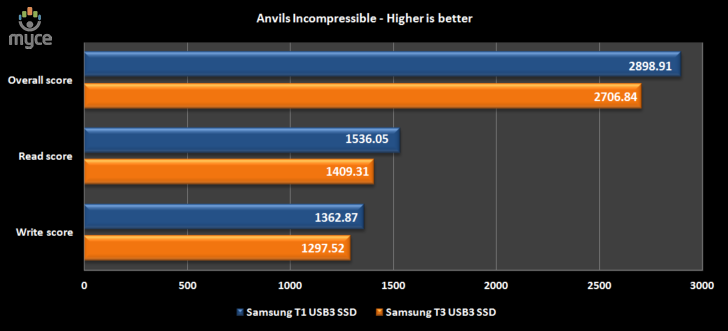
With test data that can't be compressed at all, the Samsung T3
SSD is performing extremely well, although according to Anvil's benchmark, the
T3 is not as fast as the T1.
Summary:
The Samsung T3 2000GB SSD has performed extremely well in
the basic synthetic benchmarks. Random reading and writing performance is very good,
and sequential reading and writing performance is of a very high standard for a
USB3 connected device.
Let's head to the next page for our IOMeter test
results.....
I/O Performance
IOMeter is probably the most versatile of all the synthetic
benchmarks. Its ability to be configured to generate a multitude of different
I/O traffic is unmatched. Another great feature of IOMeter, is the capability
to test any storage metric that you can think of, providing you know how to
configure the assignments. The reviewer also has complete control over things
like queue depth, block size, whether the traffic is random, sequential, or
even a mixture of both.
Partition alignment and sector boundaries
Windows 10, Windows 8.1, Windows 7, and Windows Vista will
automatically align a partition to 4k boundaries during partition creation,
Windows XP won’t. It is imperative that an SSD’s partition is aligned. Windows
XP is also restricted to sector boundaries, while Windows 7 and 8 will use 4k boundaries
if they can. The Samsung T3 SSD is 4k boundary aware, and will use these
boundaries if possible. Of course it will also remap LBAs for compatibility
with the sector boundaries so that the drive can be used with Windows XP.
IOMeter allows us to set the sector boundaries for
conducting the tests, and I have therefore set the sector boundaries at 4K,
which means the IOMeter tests are valid for Windows 7, Windows 8, Windows 10 and
Windows Vista users. XP users will not be able to obtain such results.
All the IOMeter tests create a 10GB data set on the target
drive, and each test is run for a duration of 3 minutes.
IOMeter 4K random write test with repeating data.
The first test involves creating continual 4KB random files
on the target drive with IOMeter. I use a 4KB file size, as it is believed that
Windows will create and modify many of this size of file constantly in the
background during a typical Windows session. It is said that most 4K random
writes take place at a queue depth of only one, and I have been requested to
include this test in my reviews.
Queue depth 1
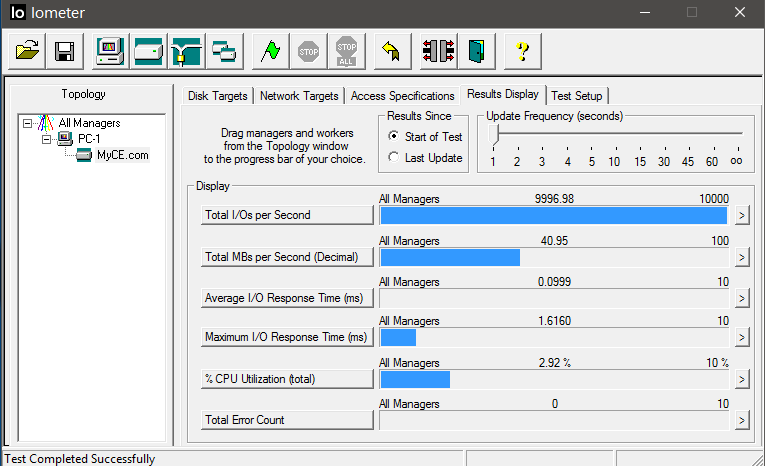
At 40.95 MB/s the Samsung T3 2000GB SSD is excellent for a
USB3 connected SSD.
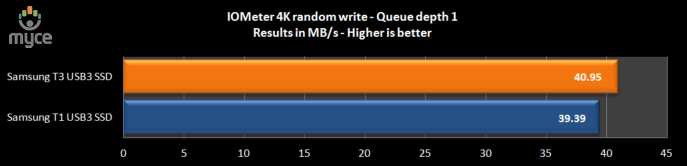
As we can see, the Samsung T3 is faster in this test than
the T1.
Our next test involves creating continual 4KB random files
on the target drive with IOMeter. I use a 4KB file size, as it is believed that
Windows will create and modify many of this size of file constantly in the
background during a typical Windows session. I will use queue depths of 4 and
32 for these tests.
Queue depth 4
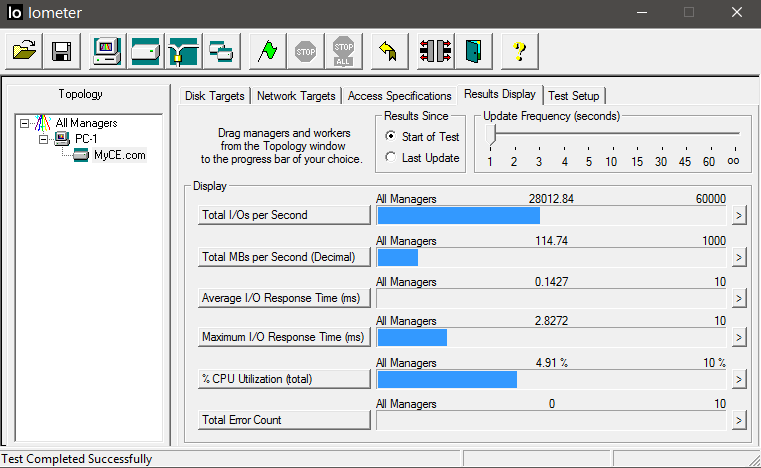
At a queue depth of 4, the Samsung T3 SSD is pretty good,
and we can see that UASP is allowing queue depth scaling.
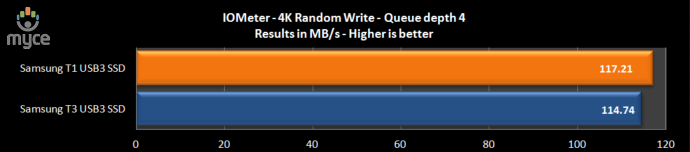
Once again, the Samsung T3 proves to be faster than the T1.
Queue depth 32
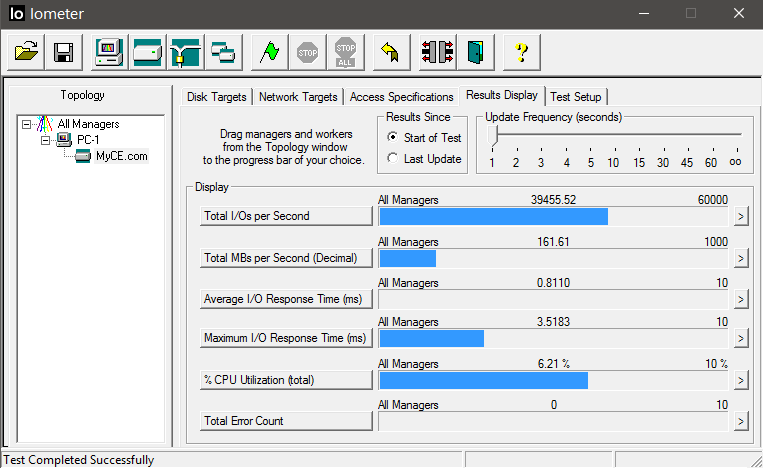
At 161.61 MB/s, the Samsung T3 2000GB SSD is excellent for a
USB3 connected SSD.
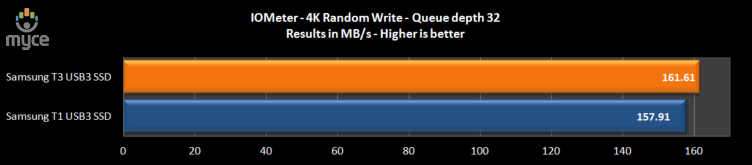
Yet again, the Samsung T3 proves to the faster of the two
tested drives.
4K random write with incompressible data.
In this test, I am testing writing performance with test
data that can’t be compressed.
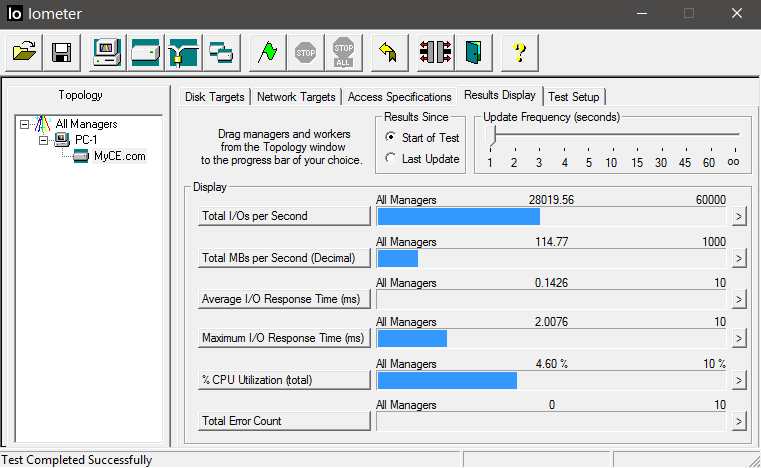
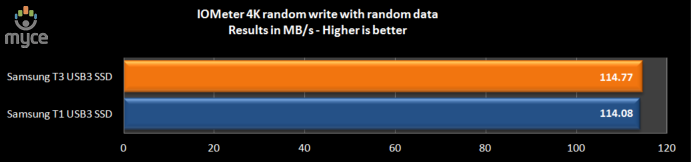
In this test, the Samsung T3 is marginally faster than the
Samsung T1.
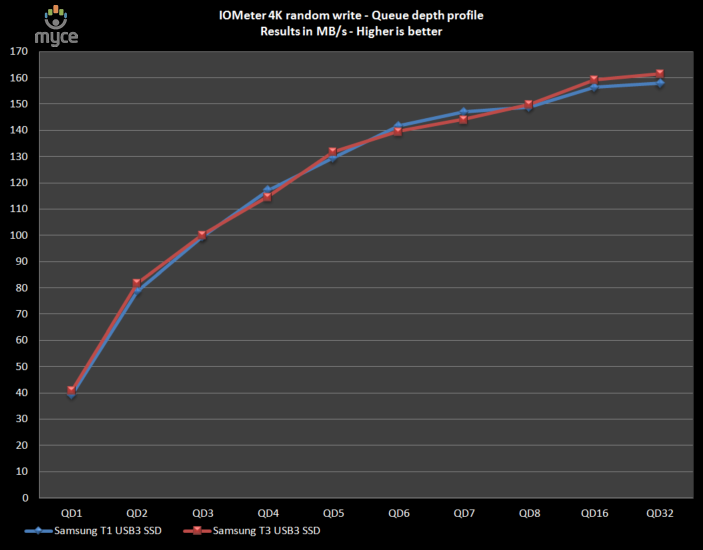
4K random write queue depth profile
The following graph is displaying how the Samsung T3
external USB3 SSD scales with increasing queue depth, and also shows comparison
results obtained from the Samsung T1.
IOMeter 4K random read test.
If there are many 4k files created, then that must also mean
that many 4k files need to be read. This test measures 4k reading performance.
It is said that most 4K random reads take place at a queue
depth of only one, and readers have requested that I include this test in my
reviews.
Queue depth 1
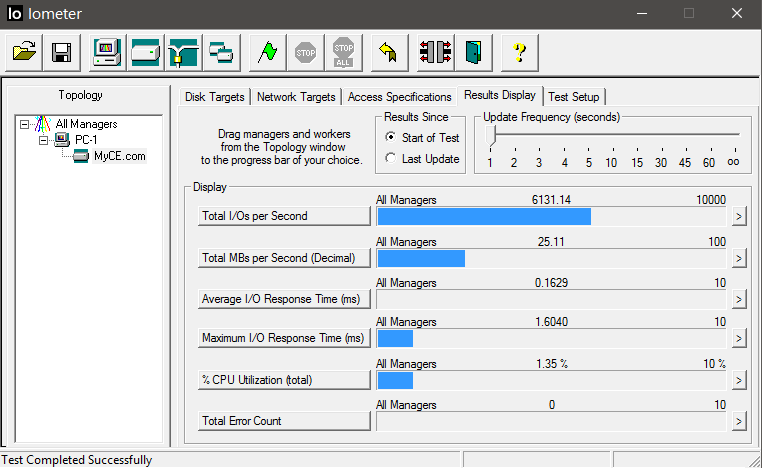
In this test the Samsung T3 SSD delivers very good performance
for a USB3 device.
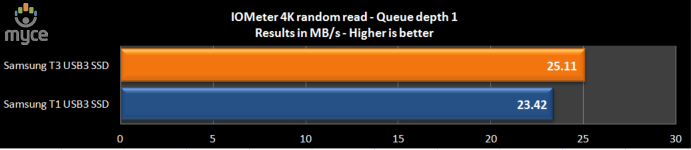
The Samsung T3 is faster than the Samsung T1 in this test.
Queue depth 4
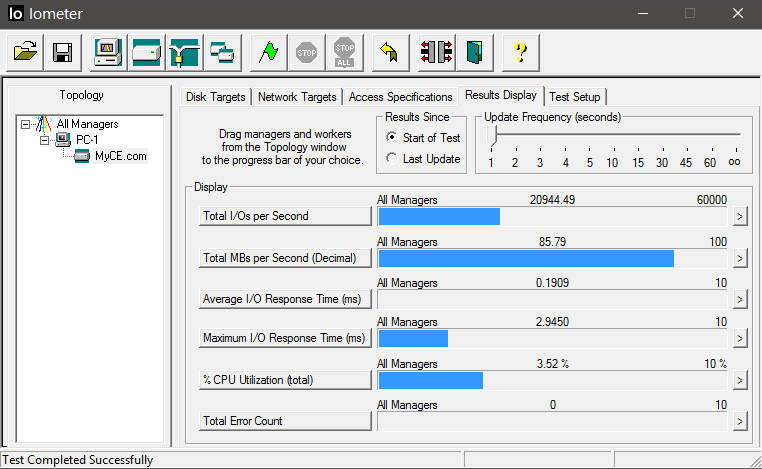
At a queue depth of four, the Samsung T3 is excellent.
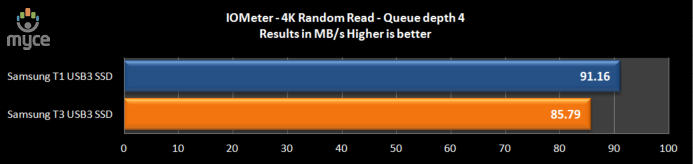
This time the Samsung T1 is faster than the Samsung T3.
Queue depth 32
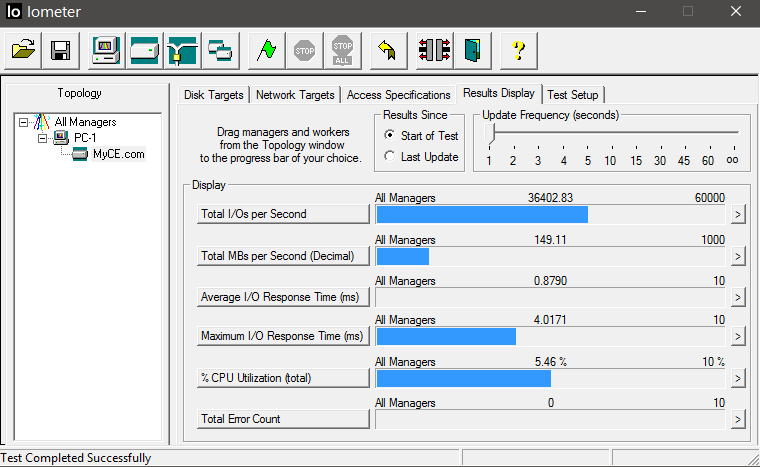
At a queue depth of 32, the Samsung T3 SSD is showing a very
good turn of speed.
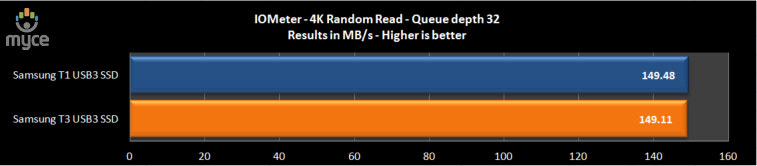
The Samsung T1 is marginally faster than the Samsung T3 in
this test.
4K random read queue depth profile.
This following graph shows how the review drive scales with
increasing queue depths.
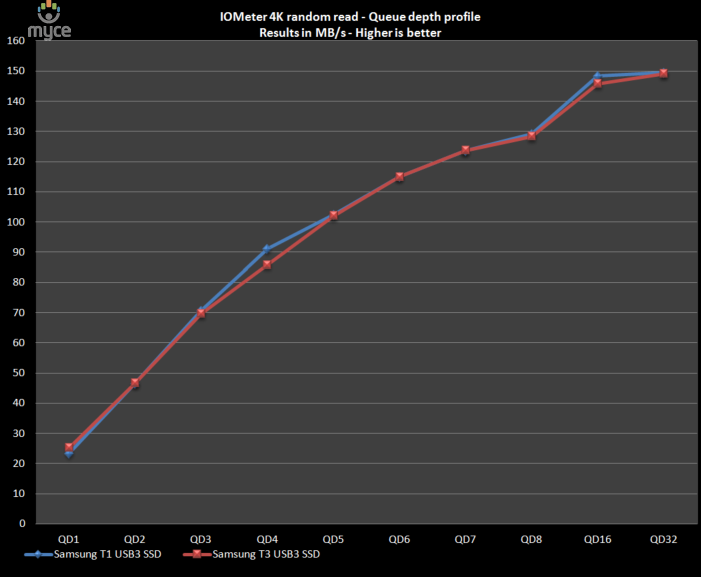
If we look at the Samsung T3 SSD 4K random read performance
in detail, we can see that the T3 scales quite well with increasing queue depths.
IOMeter 512KB sequential write test with repeating data.
Sequential writing performance is very important for a data
storage drive; in this test sequential writing performance is measured.
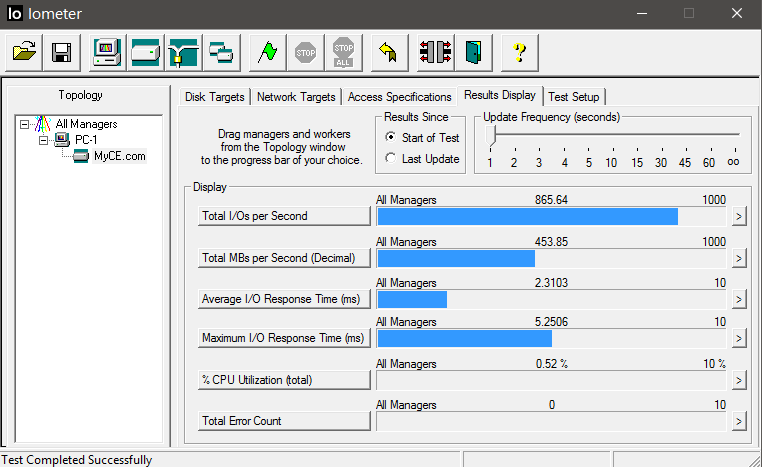
The Samsung T3 SSD shows an excellent turn of speed for a
USB3 connected device.
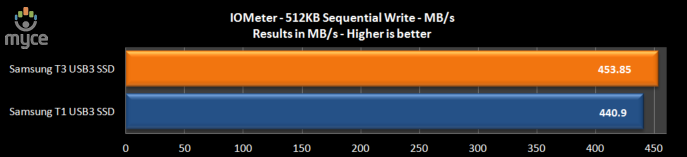
As you can see in the above graph, the Samsung T3 proved to
be faster than the Samsung T1 when writing sequential data.
512KB sequential write test with incompressible data.
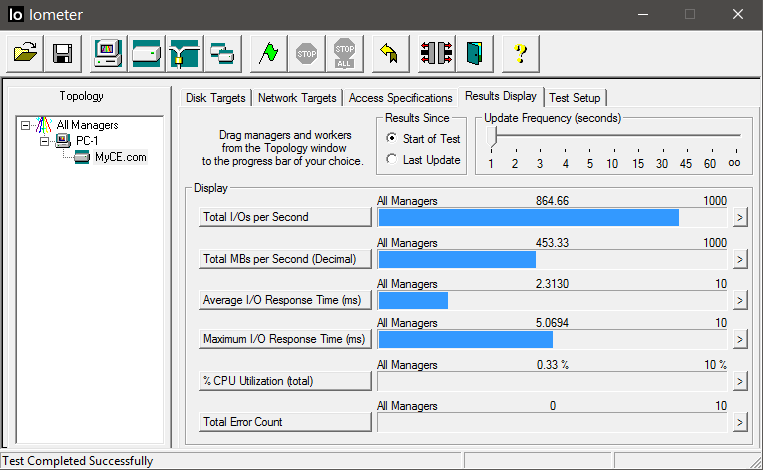
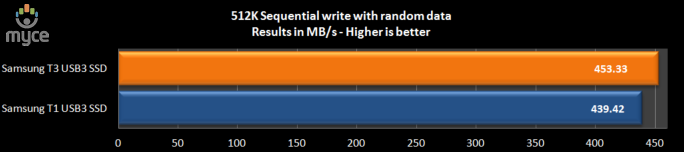
Once again, the Samsung T3 proved to be faster than the
Samsung T1.
512K sequential write - Queue depth profile
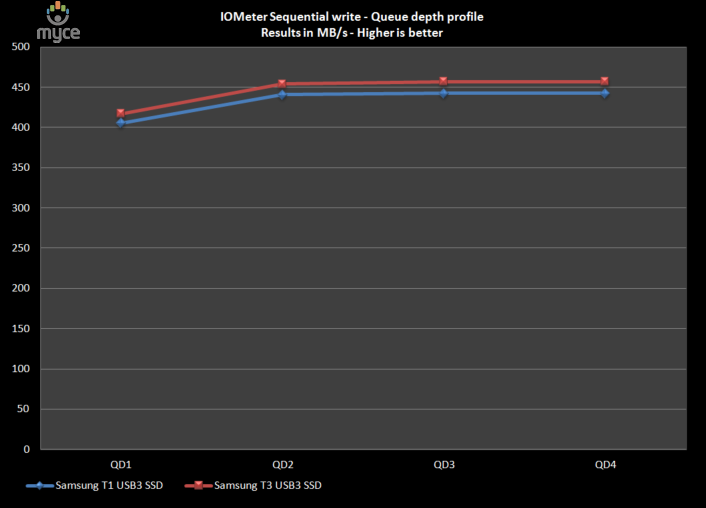
The Samsung T3 SSD series reaches peak performance at a queue
depth of four, where it manages 456.79 MB/s.
IOMeter 512KB sequential read test (dual threaded).
This test measures 512k sequential reading performance QD2.
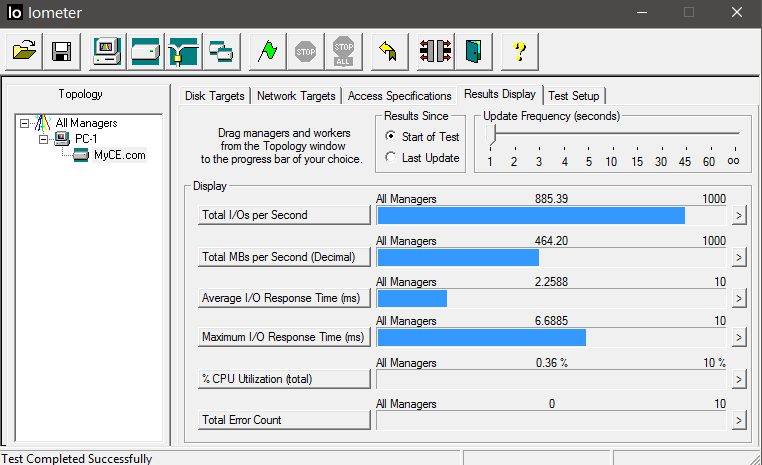
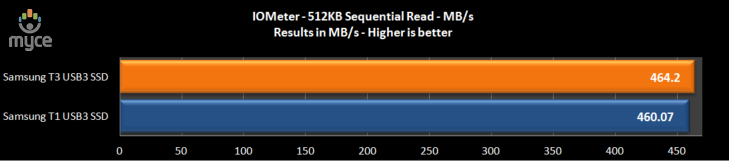
With a sequential reading speed of 464.4 MB/s, the Samsung
T3 is excellent, and is slightly faster than the older Samsung T1.
512K sequential read - Queue depth profile
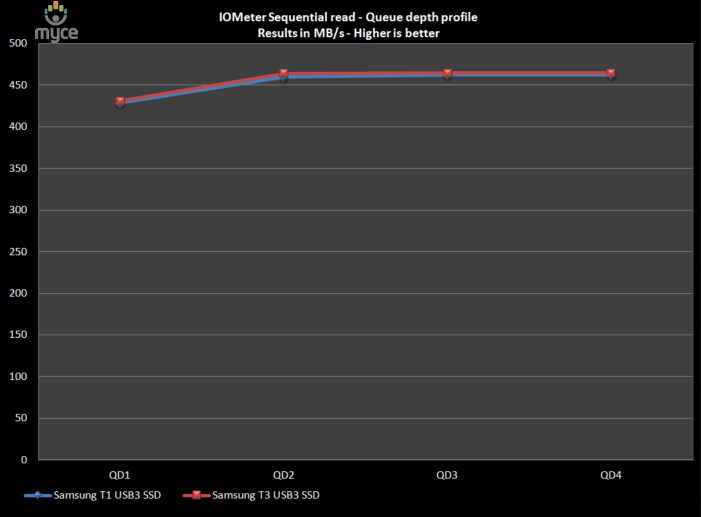
The Samsung T3 SSD reaches maximum sequential reading performance
at a queue depth of four, where it achieves 464.47 MB/s, which is pretty much
on the limits of USB3.
Now let's head to the next page for some real world tests....
Real world copy
tests
I will now conduct a few real world copy tests. These tests
simulate what real people do with their drives. I will be conducting reading
and writing tests, using a large single file, and I will then round off the
tests by copying a folder of MP3 audio files, and also a folder of JPG
pictures.
For the writing tests, the test files are first copied to a
RAMDisk, and then copied to the review drive. For the reading tests, the test
files are copied from the review drive to a RAMDisk.
Single large file writing test (8144.6MB)
For this test I used a single DVD9 ISO file which had been
copied to the RAMDisk. The file was then copied to the Samsung T3.
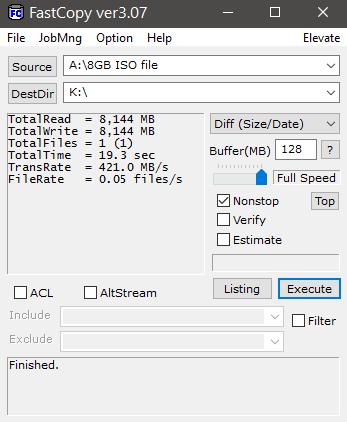
The Samsung T3 SSD has very good sequential writing
performance, and finishes this test in 19.3 seconds, with an average writing
speed of 421 MB/s.
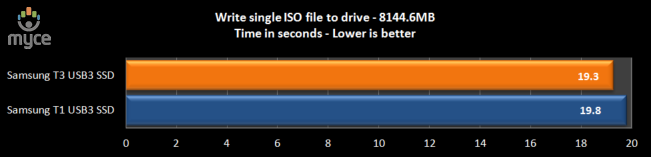
In this test, the Samsung T3 is slightly faster than the T1.
Single large file reading test (8144.6MB)
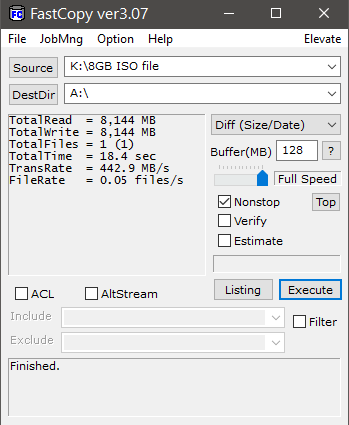
The Samsung T3 has very good sequential reading performance,
and completed the test in 18.4 seconds, with an average reading speed of 442.9
MB/s.
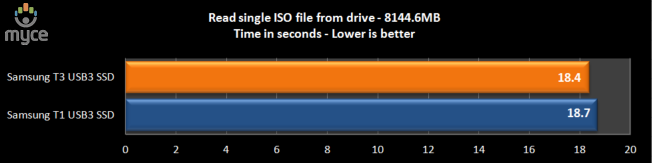
Once again, the Samsung T3 proves to be marginally faster
than the Samsung T1.
Write a folder of JPG picture files.
For this test I copied a folder of JPG picture files from
the RAMDisk to the Samsung T3 SSD. The folder contained 7861 JPG pictures, with
a total capacity of 8410.3MB.
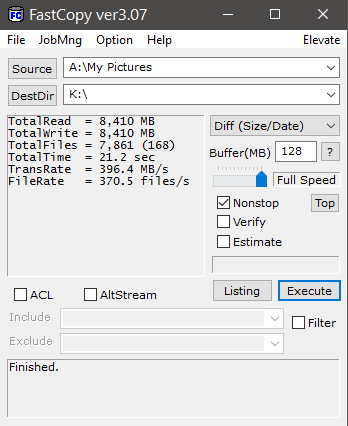
Once again the Samsung T3 is performing very well. The test
completed in 21.2 seconds, with an average writing speed of 396.4 MB/s.
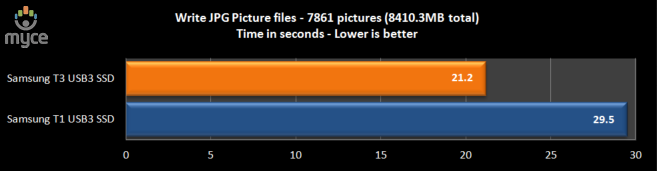
This time the Samsung T3 proved to be much faster than the
older Samsung T1.
Read a folder of JPG picture files.
For this test I copied a folder of JPG picture files from
the Samsung T3 SSD to a RAMDisk. The folder contained 7861 JPG pictures, with a
total capacity of 8410.3MB.
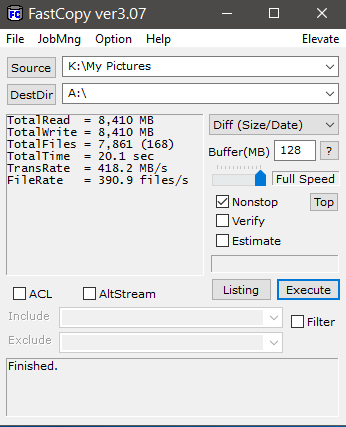
Yet again we can see that the Samsung T3 has very good
sequential reading speed and completed the test in 20.1 seconds, with an
average reading speed of 418.2 MB/s.
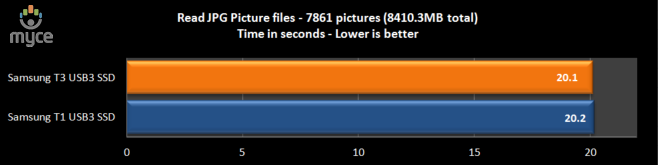
Once again, the Samsung T3 proves to be slightly faster than
the older Samsung T1.
Write a folder of MP3 audio files.
For this test I copied a folder of MP3 audio files from our RAMDisk
to the Samsung T3 SSD. The folder contained 1691 MP3 audio files, with a total
capacity of 9176.5MB.
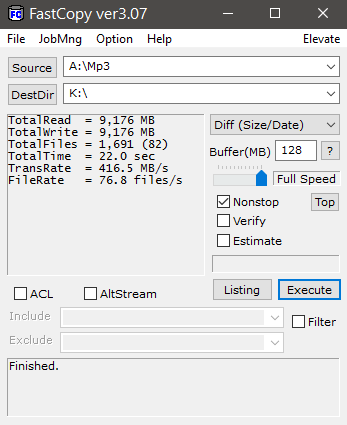
Yet again the Samsung T3 2000GB SSD is performing well, and
completed the test in 22 seconds, with an average writing speed of 416.5 MB/s.
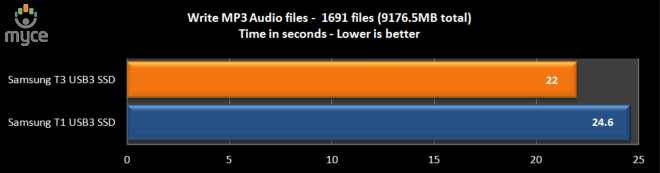
Once more, the Samsung T3 is the fastest.
Read a folder of MP3 audio files.
For this test I copied a folder of MP3 audio files from the
Samsung T3 SSD to a RAMDisk. The folder contained 1691 MP3 audio files, with a
total capacity of 9176.5MB.
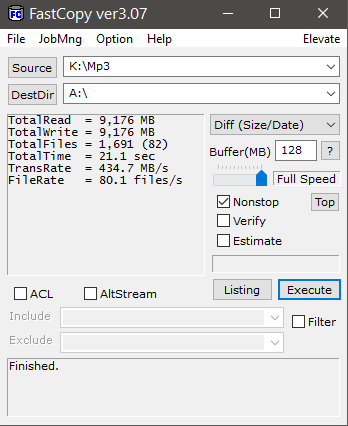
Again sequential reading performance is of a high standard,
with the test completing in 21.1 seconds, and an average reading speed of 434.7
MB/s.
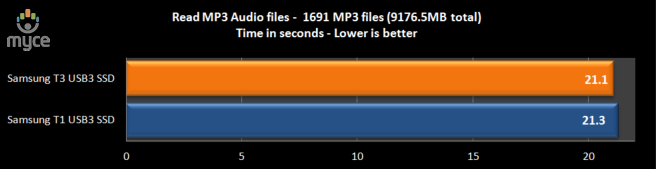
The Samsung T3 is marginally faster than the T1 in this
test.
Summary
With very good sequential reading and writing performance,
the Samsung T3 was always going to do well in these tests, and this is exactly
how things turned out. The Samsung T3 has managed to push USB3 to its limits
and you can't expect much faster than this from any USB3 connected device.
This concludes our review. To read the final thoughts and
conclusion, click the link below....
Final thoughts and the conclusion
As I stated right at the very beginning of this article, you
must test an SSD in its intended usage pattern. The Samsung T3 external USB3
SSD is designed to carry around large amounts of data, in a small lightweight
package, and can transfer these large amounts of data quickly and reliably.
In this usage pattern the Samsung T3 excelled. The Samsung T3
is small, lightweight, robust, and it is certainly fast, pushing USB3 to its
limits.
On my test PC, the Samsung T3 external USB3 SSD performed
at, or above, its official specification, so hats off to Samsung for not
claiming performance specifications that are unobtainable.
Stability
I have only had the Samsung T3 SSD for about two weeks, so
it’s not possible to comment on the drive's long term reliability. What I can
say is that during the testing period, the Samsung T3 has been 100% stable and
has caused no problems whatsoever.
Conclusion:
Let us summarise the most important positive and negative
points below:
Positive:
- Small, extremely lightweight, and robust.
- exFAT file system ensures excellent cross platform
compatibility. - Excellent performance, which pushes USB3 to its limits.
- 3 year limited warranty.
- Reasonably priced.
- Available in very large storage capacities.
Negative:
- The supplied USB connection cable is rather short.
Price and availability
The Samsung T3, 2TB SSD is available now, and I found it at Amazon
UK priced at £589.98 including VAT.
The parting sentence is:
“The Samsung T3 2TB is an outstanding external SSD, aimed
squarely at the user who requires high performance, and needs to be able to
carry around huge amounts of data".
Rating system
The editor rating is based on the following key factors.
- Performance
- Stability (is the device stable?)
- Price
- Warranty
- Supplied accessories (what is included in the package)


Thanks to:
|
|
EFD Software for |
|
|
|
|
|
FutureMark for |


You may comment on this review here.















