
Samsung 840 Pro SSD review
 |
Review: Seagate ST2000DX001 2TB Desktop SSHD |
Welcome to Myce’s review of the Seagate ST2000DX001 2TB
Desktop Solid State Hybrid Drive (‘SSHD’).
We recently reviewed Toshiba’s latest SSHD offerings for
mobile devices, in a 2.5in form factor, and found them to be impressive
performers. Today, we review Seagate’s offering for Desktops in a 3.5in form
factor.
At the heart of the SSHD value proposition is the idea of
marrying the low cost per Gigabyte of a traditional rotating magnetic disk
(HDD) with the speed of NAND Flash Memory to deliver an SSD type user
experience. The key to success is a caching algorithm that intelligently
places a specific user’s most frequently accessed data in NAND memory so that a
higher proportion of data access is performed at SSD like speeds – Seagate
refers to this as its ‘Adaptive Memory technology’.
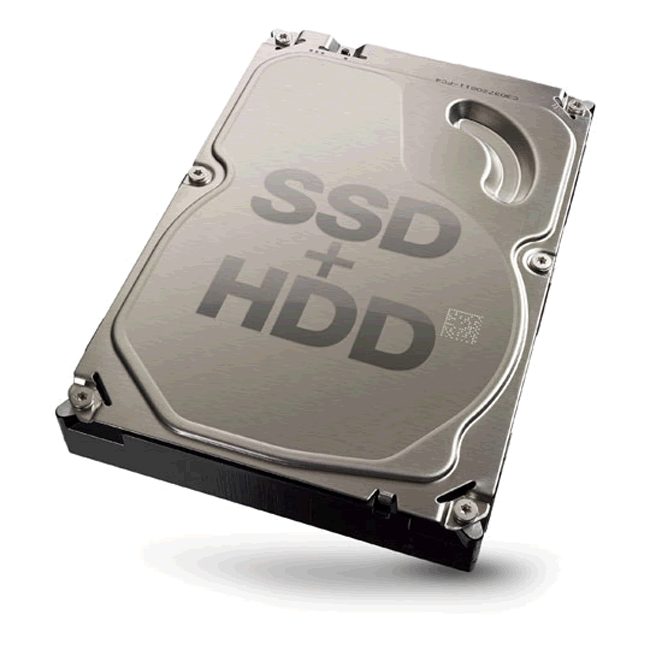
The Seagate Desktop SSHD has 8GB of Toshiba MLC NAND memory
married to an inherently fast Desktop 7200RPM HDD.
Market Positioning and Specification
Market Positioning
This is how Seagate positions their Desktop SSHD –
SSD Performance. HDD capacity. Affordable Price.
SSHDs are now available for
your desktop computer. Get the speed
and kick of an integrated
solid state drive (SSD) with the massive
capacity of a desktop hard
drive – all at a surprisingly low price!
- Up to 4TB of massive storage
capacity - Solid state speed for fast,
responsive system performance - Innovative use of solid
state memory delivers affordable performance and capacity - NAND Flash and HDD
technology work better together to deliver improved reliability
Specification
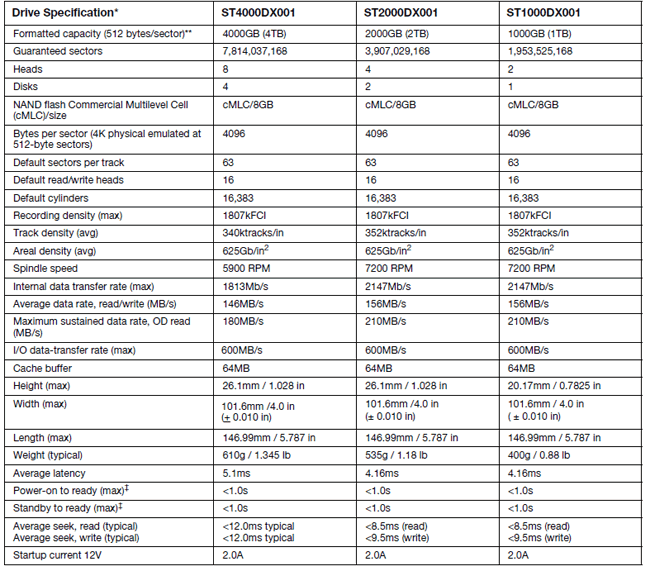
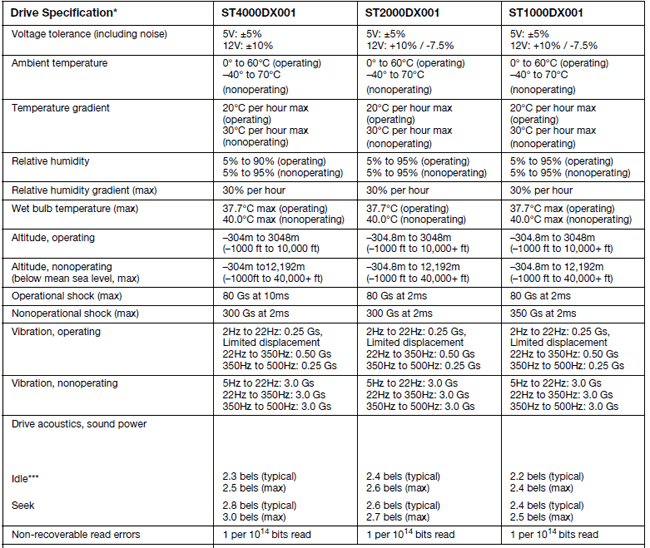
Here is the specification for the STxxxxDX001 series of
drives, which are available in 1000GB, 2000GB and 4,000GB capacities -
Product Images
Here are pictures of the drives that I used for the purposes
of this review –
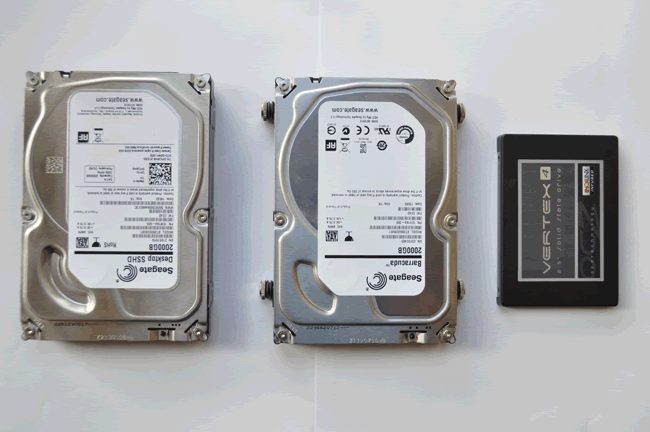
On the left is the 2TB Seagate Desktop SSHD.
For comparison purposes I used a 2TB Seagate Barracuda
(ST2000DM001) traditional HDD (pictured centre above, and hereafter referred to
as the HDD) and an OCZ Vertex 4 256GB SSD (shown right above, and hereafter
referred to as the SSD).
(For interest - I use two Seagate Barracuda 2TB HDDs in my
Z77 Desktop system to hold my first level of regular backups – you can see in
the picture that I have not removed the rubberised screws used to mount the
drive in my Desktop’s chassis)
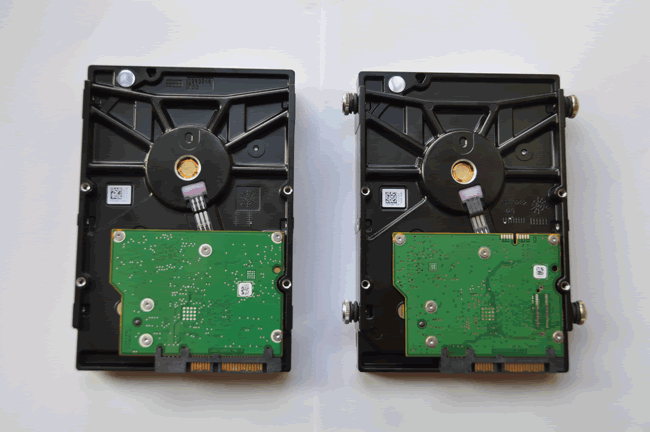
Here is a picture of the underside of the SSHD (left) and
the HDD (right). You can see that there is little or nothing to visually tell
which is which and it is easy to imagine that they rolled off the same
production line.
Now let's head to the next page, to look at the Testing
Approach.....
The test platforms used were:
- Desktop – Mobo: Asus P8Z77 WS; CPU: Core I7-3770K, Memory:
16GB Corsair Dominator Platinum 2400MHz, OS: Windows 7 SP1
The Desktop runs with an
Overclock to 4.5GHz, the C1E power state was disabled in the BIOS, the High
Performance Power Plan was engaged in Windows, and the Intel RST 11.2 SATA
driver was used.
All drives tested were connected
to a native Intel 6Gb/s (Port 0).
- An OakGate Testing Unit (for an overview, please click
here – OakGate
Test Unit)
The approach we adopted is:
Testing the Adaptive Memory Technology
To test the effectiveness of the self-learning algorithm we
focused on the use of two benchmarks:
- BootRacer – to record boot times
- PCMark Vantage, HDD Suite – to test the drives’
performance in running a set of typical consumer applications (i.e.
running - Windows Defender, gaming, importing pictures, start up, video
editing, Windows Media Centre, adding music to Windows Media Player, and
application loading). This is an excellent way to benchmark HDD
performance for ‘real world’ applications.
The procedure followed was –
For the SSHD:
- Restore a Windows 7 system image to the drive (the image
includes an Internet Security solution – Norton IS – so that the boot
times recorded in testing are representative of a typical user’s system;
the same image was used throughout) and all tests were run with the
subject drive as the boot drive. - Then boot repeatedly to see if the self-learning algorithm
learns how to produce faster boot times - Then run PC Mark Vantage, HDD Suite repeatedly to see if
the self-learning algorithm learns how to accommodate the faster
processing of the test applications - Reboot and check if boot times remain fast
- Run a set of typical consumer benchmarks – AS SSD, ATTO
and HD Tune Pro.
For the SSD and HDD comparisons:
- Restore a Windows 7 system image
- Record boot time and PC Mark Vantage, HDD Suite score
- Run a set of typical consumer benchmarks – AS SSD, ATTO,
and HD Tune Pro.
Testing Cached Performance
In this testing we seek to compare the ‘cached’ performance,
when the SSHD only uses its NAND storage, with its regular performance for the
same test.
To force the SSHD to use only its NAND storage, the testing
was constrained so that writes and reads only take place to an LBA range of 4GB
(which is half the total NAND storage range of 8GB). The thinking here is that
limiting the LBA range to only half of the size of the NAND will cause the
Adaptive Memory technology to map all IO activity directly to the NAND storage.
Myce’s OakGate Test Unit, which is normally reserved for
testing Enterprise Solid State Storage solutions, was used for the two tests.
- Random Writes and Reads
Perform 4K random writes for 10
minutes and then perform random 4K reads for 10 minutes, firstly to the Full
LBA range and secondly to a range of only 4GB.
- Sequential Writes and Reads
Perform 512K sequential writes
for 10 minutes and then perform 512K sequential reads for 10 minutes, firstly
to the full LBA range and secondly to a range of only 4GB.
Now let's head to the next page, to look at the results
of Testing the Adaptive Memory technology.....
Here are the results of the Boot Time Testing:

You can see that the boot times for the SSHDs become
significantly faster as the SSHD ‘learns’ how to boot. In Round 6, for
comparison, we include the boot times for the HDD and SSD. It is interesting
to note that the SSHD boots almost as fast as the test SSD – Impressive!
Here are the results of the PCMark Vantage, HDD Suite, testing
–

You can see that the scores gradually increase as the SSHD
learns how to support the faster running of the PCMark Vantage, HDD benchmark.
For comparison purposes we include the scores for the HDD and SSD in Round 6.
Again, impressive!
At this stage I wondered if the SSHD would have forgotten
how to boot quickly.
So I rebooted and found the boot time to be 35.30 seconds.
It had not forgotten – impressive!
For good measure I then reran the PCMark Vantage, HDD Suite
and got a score of 21,934.
Now let's head to the next page, to look at the results
of Testing the ATTO, AS SSD and HD Tune Pro Tests.....
AS SSD
Firstly for the SSHD -

Secondly, for the HDD -

Thirdly, for the SSD -

ATTO
Firstly, for the SSHD -

Secondly, for the HDD -

Thirdly, for the SSD -

HD Tune Pro
Firstly, for the SSHD -

Secondly, for the HDD -

Thirdly, for the SSD -

Now let's head to the next page, to look at the results
of our Cached Performance Tests.....
Random 4K Writes and Reads - Full LBA Range (Uncached)
Here are the results –


Random 4K Writes and Reads – 4GB LBA Range (Cached)
Here are the results –


You can see that, as expected, the cached performance is
massively better than the non-cached performance.
Sequential 512K Writes and Reads - Full LBA Range
(Uncached)
Here are the results –


Sequential 512K Writes and Reads – 4GB LBA Range (Cached)
Here are the results –


You can see that for sequential 512K writes and reads the
cached performance is slightly less than the non-cached performance. This just
goes to show that the sequential performance, of the traditional HDD elements
of the SSHD, is inherently fast.
Now let's head to the next page, to look at the
Conclusions.....
I was impressed by the effectiveness of Seagate’s Adaptive
Memory Technology - the test results were convincing.
The value proposition for an SSHD in a desktop system is
less obvious than for a mobile solution (e.g. laptop), which may only have the
opportunity for one drive to be used. Normally, the Desktop user readily has
the opportunity to use an SSD as the boot drive, and traditional HDDs for data
storage. There are instances where this wont necessarily be the case, for
example, I have on a number of occasions used my legacy desktop parts to build
a powerful media centre solution in a small (living room friendly) case where
there is only room for one 3.5” HDD and in this scenario a very large capacity
Desktop SSHD would be an ideal solution to provide fast booting with a huge
amount of storage.
I found the Seagate Desktop SSHD 2TB available for £87.84 on
scan.co.uk and $119.99 on newegg.com. The price for a Seagate Baracuda 2TB HDD
on scan.co.uk is £59.94.
I am pleased to award the Seagate Desktop SSHD the myce.com/blog
rating of 'Excellent'.
Myce has produced a video to demonstrate how an SSHD can
transform an old sluggish PC and if you'd like to see this please click here.

Thanks to:
Alex
Schepeljanski for AS SSD Benchmark.
FutureMark for
providing a professional license for PC Mark Vantage.
HD Tune for providing a
professional license for HD Tune Pro.















