
 |
Review: Toshiba FlashAir 32GB Wireless LAN SHDC |
Welcome to Myce’s brief review of the Toshiba FlashAir 32GB Wireless
LAN SHDC Memory Card.
Specification
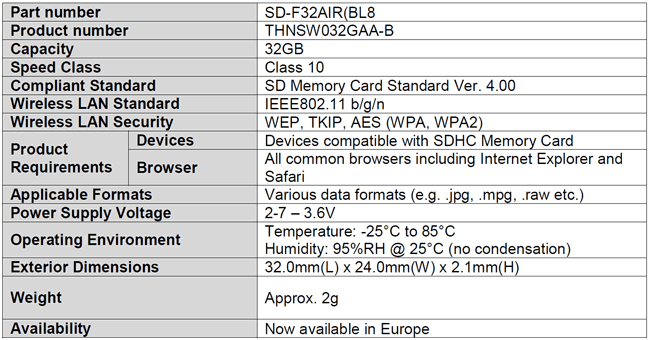
Here is Toshiba’s summary specification for the FlashAir
32GB memory card -
Product Image
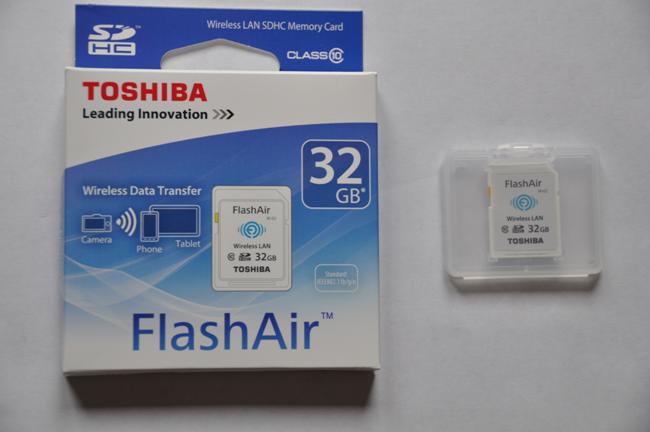
Here is a picture of the card that I tested, and its
packaging.–
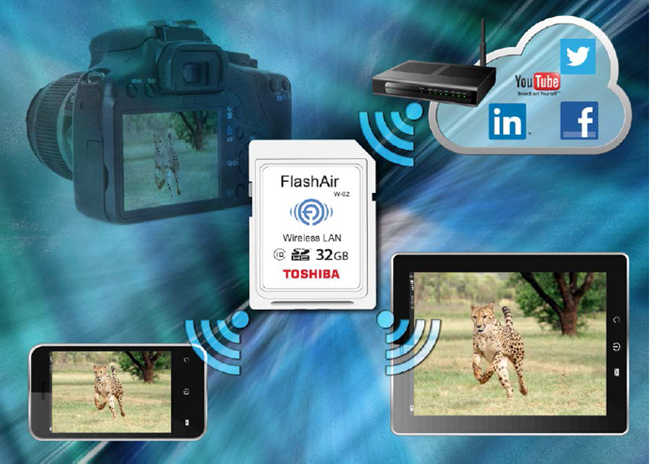
So the card has a fairly large capacity (32GB) and is
reasonably fast (Class 10 – at least 10MB/s sustained write speed). However, the
real differentiating feature is that the FlashAir card allows one to connect to
any appropriate target device (such as a smart phone, notebook or tablet
computer) that supports a WiFi connection so that pictures can be transferred
wirelessly without the need to remove the card from a source device (such as a
camera).
I can't help but feel that it is a miracle of modern
technology that something so small can hold 32GB of NAND storage and a Wi-Fi chip.
When power is supplied to the FlashAir card in a source
device the card puts up its own Wi-Fi network. It is a simple matter of
connecting a target device to this Wi-Fi network to be able to view and copy
the pictures on the card. Essentially, it is as easy as that and there is
little or no need to complicate things by moving away from this basic
understanding.
Now let's head to the next page, to look at Myce’s Testing
of the FlashAir card.....
For testing I used:
Source device: Nikon D90 DSLR
Target device: Dell XPS 17 Laptop (Windows 8.1)
I encountered a problem using the Nikon D90. To preserve
battery life the D90 has a feature which automatically removes power to its
memory card when it is not in use. As a result the Nikon does not continuously
supply sufficient power to its memory card to allow the FlashAir to put up a
reliable network when it is just turned on at its primary power dial. To
overcome this I discovered that it would maintain a reliable network if I left
the camera running in its ‘Live View’ mode. However, this is not ideal as Live
View mode drains the Nikon’s battery supply quite quickly. So, it is wise to
check that one’s intended source device is compatible with the FlashAir card
before making a purchasing decision (A compatibility list can be found here
on Toshiba’s website; please note, I understand the list is not exhaustive and
is being added to by Toshiba). If you do find that when in your chosen target
device the FlashAir card does not put up a Wi-Fi network then you may well find
that there is a similar workaround to the one I found. I understand most
compatibility issues are caused by the same or similar power saving features.
Using a Windows 8 laptop
Once the FlashAir card was powered satisfactorily, a new ‘FlashAir’
network appeared in the Networks sidebar. Please don’t expect the network to
have a long range. I found that if you are in the same room the signal is fine
and provides a healthy connect speed of 48-54 Mb/s.
It is a simple matter of connecting to this network by
entering the default password of ‘12345678’ to gain access to the directories
and photographs on the card. To view the card one then points a browser at the
http://flashair/
URL. Here are examples of the screens that can be seen, as one drills down
into the directories:


Once you have navigated to a picture it is then a simple
matter of right clicking it and electing to ‘Save as a Picture’ or ‘Copy’ it to
the laptop. Saving one or two photos feels quick enough.
So far so good, and everything has been straightforward.
For use with an MS Windows target device, Toshiba supplies
the FlashAirTool to be able to configure a card’s settings (this needs to be
downloaded from the Toshiba support site). To use the FlashAirTool the card
needs to be physically plugged into the target device. When invoked the first
thing the tool does is to check the compatibility of the firmware on the card -

It then presents a list of the functions available -

Here is the help screen for this Main Menu Window, which
outlines what each function does -

Formatting the card using the FlashAirTool is advised
(rather than using one’s camera’s format function) -

The LAN start up mode function allows you to change the Auto
Start Timeout setting -

The Network settings screen allows you to change the name of
the FlashAir network SSID and change its access password. You can also switch
on the redirecting function and name a second network that has an internet
connection. The next time you are connected to the card you may then use the
‘pass through’ capability to connect with social networks, such as Facebook and
Twitter.

I understand that using other target
devices such as an Android tablet or phone, or an Apple tablet is very similar
in approach but also provides the ‘Photoshare’ app which makes transferring
photos to a target device or social site even simpler.
In the event that Toshiba upgrades the
firmware a separate tool will be downloadable from Toshiba’s website (For
example, I believe the previous generation 8GB and 16GB Toshiba FlashAir cards can
be upgraded to add the internet pass through capability.)
Lastly, for interest here is the result of
a Crystal Disk benchmark run on the FlashAir card whilst it was directly
attached to the Dell XPS 17 laptop -

This shows that the write speed is falling
just short of 10 MB/s when tested in the laptop (but in the context of a
camera, without the overhead of a Windows operating system I feel it is most
likely that it would exceed 10 MB/s).
Now let's head to the next page, to look at the
Conclusions of this review.....
The key question is – is it worth paying a significant
premium to get a Wi-Fi enabled memory card?
I found the Toshiba 32GB FlashAir listed on Amazon UK for
£49.95 and one can readily get a standard 32GB Class 10 (or better) card for as
little as £15.00 - £20.00.
So, what are the advantages of a Wi-Fi enabled card?
Well, the single advantage is to be able to share or print
photos quickly without having to remove the card from the camera.
A good example of
this use would be the temporary photo studios that appear at shopping centres
where they photograph people against a backdrop and print the picture right
afterwards. With a Wi-Fi card there would be no need to repetitively hook up
the camera or remove its memory card after each photo, which would otherwise
quickly wear out the connectors.
I must admit that
I did not use the internet pass through capability very much, but the value of this
feature is going to be subjective.
A minor gripe –
the FlashAir card comes with a detailed instruction sheet, but the print is so
small I found it very hard to read.
Final words – the
Toshiba FlashAir card is simple to use and works fine. If you have a need for a
Wi-Fi enabled card the Toshiba is a fine example. It’s good fun.
We are pleased to
award the Toshiba FlashAir 32GB Wireless LAN SHDC Memory Card the Myce 'Very
Good' rating.
















