
|
|
Review: Toshiba MG03ACA400 |
Toshiba is one of the pioneers in the field
of data storage. They have product lines for both consumers and enterprise
users. This review is of a specifically tailored enterprise HDD: The 3.5”
MG03ACA400 4TB Nearline drive.
Let’s start with what the drive is tailored to be. In today’s market, what distinguishes
this drive from the others? Well, it is simply specifically made and optimised for
backup storage. This drive is not made to host an operating system, where random
read and write performance of small files matters, although it could. Its
purpose is solely to sustain sequential writes from a host system more efficiently
than traditional HDDs.
Over the next pages we will take a closer
look at how this drive behaves and performs. This particular line of Toshiba’s enterprise
storage comes in capacities of 1TB, 2TB, 3TB, and 4TB, with either SATA3 or
SAS2 interfaces. Toshiba has been kind enough to send me a 4TB SATA3 version to
review.
Information about Toshiba
For your convenience, here is the link to
Toshiba’s website, where you can find out more about this unit and their considerably
vast variety of electronics:
The Toshiba MG03ACA400 4TB HDD
Let’s have a look at the specifications and packaging of the
drive
Packaging
I received a typical bulk drive which is the most common
packaging for enterprise HDDs. Typically, they come in bulk packaging of 20
drives per box with each drive packed in an antistatic bag or plastic cover.
Here is the review sample we received:
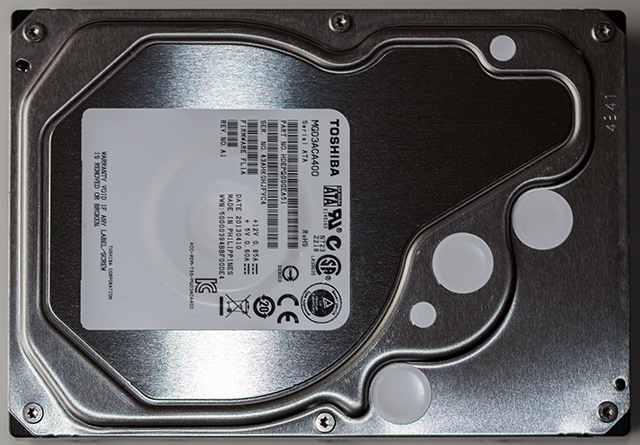
Drive top
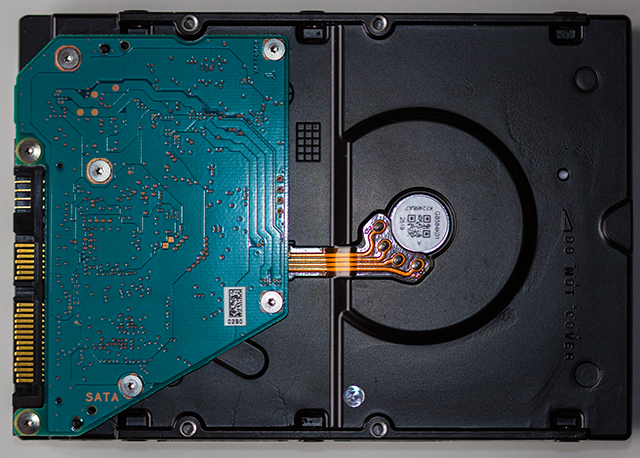
Drive bottom
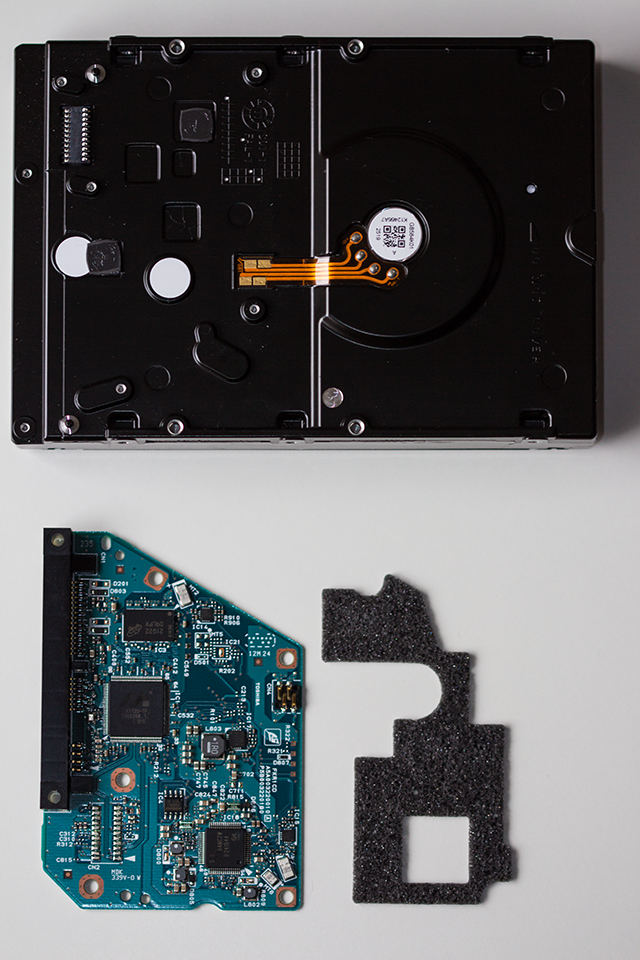
PCB dismantled. To
the bottom right you can see the grey foam padding which serves to absorb
vibration.
Proceed to the next page for detailed specifications and
a deeper dive into the hardware...
Looking closer at the hardware of the Toshiba MG03ACA400 HDD
Let’s have a look at the unit which controls all that goes
on with the drive: the PCB – or Printed Circuit Board:

On HDDs, the only thing that is somewhat safe to remove is
the PCB. The chamber containing the magnetic, spinning, platters, is air sealed.
Even the tiniest speck of dust can cause failure if it finds its way into the
mechanical part of the drive. Never attempt to open that part. Let certified personnel
handle that.
The drive hardware
The drive controller (indicated by the red square) is the Marvell
88i9312, and the Micron module (indicated by the yellow square) is sporting
64MB of DDR3 for caching. The motor driver (shown by the green square) is by
Texas Instruments, and controls the five magnetic platters, each 800GB in size.
The firmware of the sample for this review is FL1A.
Specifications

On the next page we will present the testing methodology
and the test PC...
Test machine
For this review I will be using a computer with the
following configuration:
Hardware:
- Motherboard: Asus Rampage III Black Edition (Intel x58 chipset)
- Processor: Intel 1st generation Core i7 970
- CPU cooler: Custom built liquid cooling with Swiftech APOGEE XT
Rev.2 CPU water block - RAM: 12GB OCZ Gold DDR3 1600MHz (triple channel)
- GFX: Nvidia GTX 580
- Hard disk OS: OCZ Vertex 4 256GB SSD.
- Case: Corsair Obsidian 800D
- PSU: Corsair HX 1000W
- HW RAID controller: LSI 9260-4i
- Display: Dell UltraSharp U2711 27” widescreen IPS
- Operating System: Windows 7 Professional 64bit
The Toshiba HDD was connected to the LSI 9260-4i RAID
controller (port 0) with no other drives connected to the controller. All tests
on the drive were carried out with the drive connected to this port on the LSI
controller.
The LSI controller was used to simulate a typical enterprise
environment. To circumvent the performance boost, a hardware RAID controller
such as the LSI 9260-4i can provide, we need to set it up properly.
To accomplish this it is necessary set the following properties, equivalent to
pass-through:
RAID level: 0
Disk Cache Policy: Enabled
Read Policy: No Read Ahead
IO Policy: Direct IO
Write policy: Write Through
Access policy: Read and Write
SSD caching: Disabled
Then your properties should look like this:

CPU power saving states were disabled in the BIOS for consistency.
Test applications
To test the performance of the Toshiba MG03ACA400 HDD, the
following applications was used.
- HD-Tune Pro
- ATTO
- CrystalDiskMark
- AS SSD
- Iometer
- Anvil’s
Storage Utilities - FastCopy
- Paragon
Backup & Recovery Free 2013
Test procedures
For the purposes of this review I have not made a multitude
of runs with each benchmarking program. Still, it is clear that the performance
of the sample HDD for this review shows consistent results across the board,
granted that the respective benchmarks show slightly different results due to
the differences between them.
Some benchmarks, like AS SSD, run a very incompressible data
pattern which may resemble video files for example. At the other end there are highly
compressible patterns used, as with ATTO, which may resemble files like
documents. Then there are of course some that feature both, in a preset mix or
configurable by the user.
You may notice that some of the software is tailored for SSD
benchmarking. These have been selected in this review as they provide an
overall score for comparison with other drives more easily, and they are as equally
consistent in their performance results as other benchmarks.
Now let’s cut to the chase, and get to the actual results
from the performance tests on the next page
Synthetic Benchmarks
HD Tune Pro
Starting off measuring sequential performance:

This gives us a maximum read speed of just over 172 MB/s
which is very good, but looking at the graph reveals that this is just a
positive spike and does not represent a sustained speed. However, due to the
large capacity, the performance stays around the 150 MB/s mark up to nearly
half the capacity, and that is not bad at all.
Now for the write performance from HD Tune:

Here we can observe that the drive once more delivers a good
performance, this time with a negative spike at the beginning. Getting an
average of nearly 130 MB/s for the 4 Terabytes is good, but the average access time
is significantly better here than with the reads. This is desirable for storage
made for backup purposes, like this one.
ATTO disk benchmark
ATTO has become a standard tool for measuring the data
throughput of HDDs and SSDs. It measures the reading and writing performance,
using different file sizes and block sizes.
First off is a run with the default settings, except for the
size of the test file which is set to 2GB:

ATTO shows very consistent performance from the 8 KB chunks
and larger, which is also very good as both reads and writes average at about
170 MB/s for most chunk sizes above 8 KB.
CrystalDiskMark 3.0.2
Crystal Disk Mark has also become a widely used benchmark.
It measures both sequential and random performance.

Here it becomes clearer what Toshiba has done different with
this model. Sequential performance still shines as expected, but you can see
how 4k random performance suffers. Even multiplying the number of threads by 32
doesn’t make a whole lot of difference here.
AS SSD Benchmark
This benchmark is designed as a tool to measure SSD
performance, but it will also serve well for testing traditional HDDs. Both
sequential and random performance tests are performed, along with
responsiveness in terms of access times, or in other words how long it takes
the drive to access the area to read or write once the command is sent by the
operating system.
In the first line beneath the menu you can choose which
volume to test. AS SSD sees each separate volume, and states which physical
disk each volume is located on.
To the left of the larger read and write columns you can see
(in order) the drive model chosen, along with information about the version of
firmware on the drive or the storage controller (in this case the LSI 9260-4i)
the storage driver relating to the drive, the starting offset of the selected
partition, and finally the total formatted / usable size of the partition. The
green font and the “- OK” means everything is optimal for an SSD, which is also
good for HDDs. If one of them is in a red font and with a “- BAD” at the end,
it means it is not optimal and therefore needs attention.
The line labelled “Seq” displays the sequential speed
measured. The next line, “4K”, displays the random 4 KB single thread
performance, then “4k-64Thrd” displays random 4k 64 threads performance – which
is an excellent pointer towards actual OS performance, then “Acc.time” displays
access times for read and write commands. The bottom line is very useful for
comparing different drives as it gives the overall score of the test. The
access times test is the only one that is not part of the score.
Let’s have a look at the test for our Toshiba review sample:

In consistence with the Crystal Disk Mark test above, we see
the same pattern here. Nice sequential speed, less good on the 4k tests. In
addition we can see that the access time for writes is quite good for a
spinning drive, whilst the read time is somewhat high. Again, this indicates
that Toshiba has tailored the performance of the various areas of the drives quite
exactly. In its intended environment it will need to write quickly and
steadily as the data being backed up is copied to the drive. Hopefully there
will rarely be any need to read back the data from the drive, as it would imply
the host volume has failed.
Now for some additional tests using AS SSD.
IOPS:
This is from the same test as above, but translated into
IOPS:

File copy test:

The 1 GB test files are probably not optimal relative to the
enterprise environment, but they do confirm how tailored this model is.
Summary:
The Toshiba MG03ACA400 has delivered very good performance
in the areas significant to the intended environment for this model.
On the next page we will start with a look at IO Meter...
IO Meter
This particular software stands out from most other drive
benchmarks in the sense that it is much more configurable. This also calls for
some knowledge and skills if specific configuration is required. There is a
selection of preconfigured tests that can be done, although they would still
need some basic boundaries to be set, like starting sector and how much of the
area from there should be tested. This is more useful with an HDD than an SSD,
as performance on a platter decreases the further in towards the centre it gets.
The SSD has no such mechanism and thus has the same performance regardless
where you start to write.
For this test I set the starting disk sector to 0, and
250 000 sectors to use from there – or 10 GB for maximum disk size used.
Number of outstanding targets (or threads) was set to 32 per target, and the
data pattern to repeating bytes.
4K Random read

We continue to see consistency with the previous tests. The
screenshot was taken well into the test when the various measurements seemed to
have reached a stable performance state.
4K Random write

The relatively fast
access times for writes are once more confirmed here.
4K Sequential write

In this test the average access time is outstanding, even
close to SSD performance. The maximum access time is not very flattering but,
as you may have figured out already, it is not representative of the average
performance here.
4K Sequential read

Still an outstanding access time on average, and on par with
the previous results.
Moving to the next page, we will see how the drive stands
up to the tests from Anvil’s Storage Utilities…
Anvil’s Storage Utilities
This is another benchmark tool that is designed mostly for
SSDs. It is quite configurable though, and it features a total score like AS
SSD does. It even uses real test data, which means it is more representative of
real world performance than most alternative software.
Anvil’s Storage Utilities currently has the status of
Release Candidate, and has reached the 6th version as such. The
following tests were performed:
- 0 fill (100% compressible data)
- 100% (incompressible data)
Let’s start from the top:
0 fill test

Toshiba MG03ACA400 4TB HDD (0 fill)
The drive continues to perform quite well with sequential
read and write here. Response times reported seem rather representative of real
world performance.
100% incompressible

Toshiba MG03ACA400 4TB HDD (100% incompressible)
This test carries on to show that there is not much
difference in performance with compressible data.
Summary
It should be obvious that this benchmark is not optimized
for this kind of drive, but nonetheless it shows how it performs in the various
areas. It also seems to prove the accuracy of drive performance in respect of its
intended use.
Now let's head to the next page for some real world tests....
Real world copy
tests
Everyone knows that benchmarks are only a pointer with
regard to how the product performs in the real world, but it is the best method
of distinguishing between products, on a consistent basis, as they are for the
most part performed in the same way. With real world copy tests the files are
different for each reviewer or tester. However, it does bring some sense of correlation
to the actual performance out in the field.
Let’s have a look at some basic file transfers and see how
our drive performs.
Folder of JPG files (8438 MB)

Toshiba MG03ACA400
Copied from an OCZ Revodrive 120GB SSD, this transfer
consisted of 1033 files. Quite acceptable performance here.
Single ISO file transfer.
I proceeded to copy a single large ISO file from the OCZ
RevoDrive SSD to the Toshiba drive. The file was 37,661 MB in size.

Toshiba MG03ACA400
Copied from an OCZ Revodrive 120GB SSD, the performance in
this test is excellent. An average of just over 160 MB/s demonstrates top
transfer rates throughout the test.
Internal copy test
I thought we would also look at how the drive performs when
copying internally. The same folder of JPG’s we used in the first file copy
test was also used here, and it was copied to another folder on the same drive.
Single drive copy test –1033 JPG image files (8438 MB total)

Toshiba MG03ACA400
An operation like this makes the drive read and write
simultaneously, as it reads the source file from the source folder location and
then proceeds to write the identical copy in the destination folder. Most
drives will have transfer rates of about half the speed when copying internally
compared to transfers to or from another drive, which as we see is the case
here.
OS backup test
To demonstrate an actual backup, I decided to make a backup
image of an SSD that holds Windows 8 and some data. Windows 8 resides on an OCZ
Octane 128 GB SSD, and the total space to backup is 44.3 GB.
To perform this backup I used Paragon Backup & Recovery
2013 Free. I timed the actual backup process using a stop watch, and it took 7
minutes and 52 seconds to complete. That translates to an average transfer rate
of 93.85 MB/s, which is rather good.
Summary
The Toshiba MG03ACA400 has performed quite well in our
tests. Particularly, it has demonstrated how well it is engineered towards the
backup environment. In our tests it became clear that the drive performs
extremely well in the areas that are relevant to enterprise backup
environments, and suffers somewhat in the areas more irrelevant to backup
purposes. After our testing and using the drive I’m left with confidence in
this drive as a backup unit.
This concludes our review. To read the final thoughts and
conclusion, click the link below....
Final thoughts and the conclusion
User experience
The Toshiba MG03ACA400 was as easy to install and use as any
other modern HDD. No difficulties were experienced while the drive was in my possession
and it did not produce very much noise either.
Stability
I have had the drive for just over 3 weeks, and as such it
is not possible to give a meaningful conclusion to the drive’s long term
stability. However, it is common knowledge that enterprise model drives
generally have better build quality and a lower fail rate than consumer drives.
Top of the line components are used, hence they are more expensive. The drive
did not show the slightest sign of instability throughout the test period.
Conclusion:
Let’s sum up the positive and negative points:
Positive:
- Excellent sequential reading and writing performance
- Outstanding write access times
- Limited 5 year warranty.
- Competitively priced.
- Quite low noise in use
Negative:
- Read access times are a little high
Some final thoughts:
It seems like Toshiba has produced a quite sensible model
HDD considering the increasingly growing need for backup in the market. Its
strong performance with sequential reading and writing certainly makes it
suitable for large static data storage.
Price
The MG03ACA400 is priced at the lower end of competing
enterprise HDDs. Considering its performance, I would say that this model would
be a wise choice for any business in need of backup storage for a very reasonable
price.
Rating system
The editor rating is based on the following key factors.
- Performance
- Stability (is the device stable?)
- Price
- Warranty
- Supplied accessories (what is included in the package)


Thanks to:
|
|
EFD Software for |
|
|
Alex |
|
|


You may comment on this review below.















