

Verbatim has kindly sent us their new Store 'n' Go Micro
16GB Pro USB Drive for review. This drive features
30MB/s reading and 12MB/s writing along with 256-bit AES hardware encryption.
Company information:

Products
to Meet the Demands of Performance Computing
Since its
beginning in 1969, Verbatim® has been at the forefront of the evolution in data
storage technology. Today, more than 40 years later, Verbatim remains one of
the most recognizable names in the data storage industry. Here is the profile
of Verbatim that you can find on their website.
Page
2
Drive Features:
The specifications of the Verbatim Store 'n' Go Micro
16GB Pro USB Drive were found at the Verbatim website.
Features
·
256
bit AES hardware data encryption secures confidential data
·
V-Safe
Security feature allows you to encrypt privacy zone data, while allowing a
public zone for easy sharing of non-sensitive files.
·
Transfers
even large files/folders fast!...Up to 80X Write (12MB/s) and 200X Read
(30MB/s) speed
·
Retractable
USB Connector - No cap to lose
·
Certified
for Windows Vista™
·
Verbatim
Limited Lifetime Warranty
·
Enhanced
for Windows® ReadyBoost™
What’s inside the Package?
On this page we will take a look at what the Store 'n' Go Pro Drive
came shipped with and take a look at the drive itself.

Front of Package

Back Of Package

Drive Closed

Drive Open
The drive was not supplied with a lanyard.
Test machine:
For
this review we will be using a computer with the following configuration:
Hardware:
·
Motherboard: Asus P5K Deluxe WI-FI/AP
·
Processor: Intel Core 2 Duo E6600 Conroe @3.70 GHz
·
Memory: 4x 2GB A-DATA PC2-6400 DDR2
·
Video: ATI 2600HD Pro HDMI
·
Display: Hanns·G HG-216DPO 21.6" 5ms Widescreen HDMI
LCD
·
Sound: SoundMAX Digital HD Audio (Onboard)
·
Hard Disks: 2x 320GB – 1x 750GB Seagate SATA-II
·
Operating System: Windows Vista Ultimate x64 SP1 is
installed on this machine.
Installation:
We simply
inserted the Store
'n' Go Pro drive into an available USB slot and Vista Ultimate x64 immediately
recognized the drive, installed it and was ready to use within seconds.

Drive ready to use

Device
Manager

My Computer

Verbatim Store 'n' Go
Micro 4GB USB Drive Properties
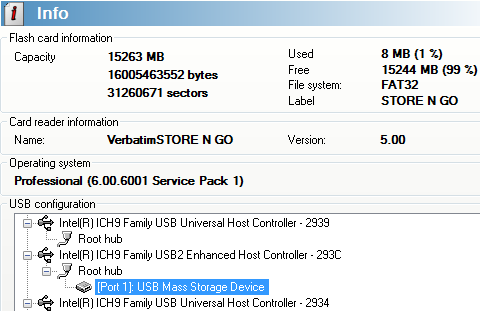
And another capacity
report of the Verbatim Store 'n' Go Micro from Flash Memory Toolkit
Software set-up:
Vista
Ultimate x64 is installed on the computer along with Service Pack 1.
No
drive software was required for this configuration.
We
will be using the following software in this review:
- HD Tune Pro
- HD
Tach - V-Safe 100 Security Software
The
software included on the Verbatim Store 'n' Go Micro 16GB Pro USB Drive is
called the V-Safe 100 Security Application. We have included a brief look at
this software below.
V-Safe 100
Security Application:
This
software is quite simple to use and setup. You will setup a "zone" on
the drive that can only be accessed by using your chosen password.

Installation

Privacy Zone setup

Formatting the Privacy Zone

Formatting in Progress

Format successful

Accessing the Privacy Zone

Success!

Here we can log out of the Privacy
Zone
On
the next page we will take a look at the drive’s performance.
Page 3
Performance:
On this
page we will take a look at the drive’s performance compared to other High
speed USB 2.0 Removable drives.
The
Verbatim Store 'n' Go 16GB Pro USB Drive is High
speed USB 2.0/USB 1.1 compatible.
For these
tests, Write caching was set to Optimize for quick removal. However it is
recommended to read the safe removal notes under the options.

Verbatim Store 'n' Go 16GB Pro USB Drive write caching
options
HD Tach RW:

Options selected for first HD Tach test

Benchmark results
HD
Tach results (8Mb zones)
·
Random
access = 0.8ms
·
CPU
utilization = 4% +/-2%
·
Average
read = 32.7 MB/s
·
Burst
Rate = 35.1 MB/s
For comparison we have made the following table:
|
HD Tach 8Mb Zones |
Random Access |
CPU Utilization |
Average |
Burst Rate |
|
Corsair 2GB Flash Padlock |
1.1ms |
6% |
28.5 MB/s |
29.3 MB/s |
|
Corsair Flash Survivor GT 8GB |
1.1ms |
6% |
32.8 MB/s |
35.0 MB/s |
|
PNY Attache 1GB |
1.2ms |
3% |
9.7 MB/s |
9.9 MB/s |
|
Corsair Flash Voyager Mini 4GB |
0.7ms |
12% |
30.6 MB/s |
31.9 MB/s |
|
Verbatim Store 'n' Go Micro 4GB |
0.6ms |
8% |
30.1 MB/s |
32.8 MB/s |
|
Verbatim Store 'n' Go Pro 16GB |
0.8ms |
4% |
32.7 MB/s |
35.1 MB/s |
The Verbatim Store
'n' Go Pro 16GB offers very fast read speeds

Options selected
for first HD Tach test

Results
HD
Tach results (Full Bench)
·
Random
access = 0.8ms
·
CPU
utilization = 6% +/-2%
·
Average
Read = 33.7 MB/s
·
Average
Write = 19.7 MB/s
·
Burst
Rate = 35.1 MB/s
For comparison we have made the following table:
|
HD Tach 8Mb Zones |
Random Access |
CPU Utilization |
Average |
Burst Rate |
|
Verbatim Store 'n' Go Pro 16GB |
0.8ms |
6% |
19.7 MB/s |
35.1 MB/s |
As we can see the
Verbatim Store 'n' Go Pro 16GB has an Average Write speed of 19.7 MB/s
For
the next test, we will use HD Tune Pro 3 and will conduct a reading benchmark. We
would like to point out that HD Tune Pro results may differ from one system to
another and results could also be operating system dependent.

HD Tune Pro 3
Benchmark
We
present the table below for comparison with other recently tested flash drives.
|
Drive |
Max read speed |
Min read speed |
Average read speed |
Access time |
Burst rate |
|
Maxell |
25.5MB/sec |
15.8MB/sec |
24.9MB/sec |
0.7ms |
21.5MB/sec |
|
Maxell |
13.4 MB/sec |
11.2 MB/sec |
13.2 MB/sec |
0.7ms |
11.9MB/sec |
|
Corsair |
22.7MB/sec |
21.3MB/sec |
22.0MB/sec |
1.2ms |
19.2MB/sec |
|
Corsair |
29.4MB/sec |
26.7MB/sec |
28.5MB/sec |
1.0ms |
24.7MB/sec |
|
Corsair |
29.0MB/sec |
27.6MB/sec |
27.8MB/sec |
0.7ms |
23.3MB/sec |
|
Verbatim |
29.8MB/sec |
27.7MB/sec |
28.5MB/sec |
0.6ms |
25.0MB/sec |
|
Verbatim |
31.5MB/sec |
24.2MB/sec |
31.3MB/sec |
0.7ms |
17.8MB/sec |
The Verbatim Store
'n' Go Pro 16GB has the fastest maximum reading speeds, and very smooth
sustained reading
Let’s
move on to the next page where we test file reading and writing performance...
File reading and writing performance tests:
To
test the file reading and writing performance of the Verbatim Store 'n' Go Pro 16GB,
we used the file benchmarking option in HD Tune Pro using various file sizes
from 32KB to 512MB. The Verbatim Store 'n' Go Pro 16GB was set to “optimized
for quick removal” in device manager. To understand what the file benchmarking
graphs are showing, we present a short explanation. The vertical axis of the
graph shows the reading and writing speed of the device in Megabytes per
second, with the blue color showing reading performance and the orange color
showing writing performance. The horizontal axis of the graph shows the file
block size in Kbytes and, as we can see, various block sizes are used in the test.
A small block size is useful for making the most of the available storage space
on the device (very small files take up less space). The downside of using a
small block size is that performance suffers badly when larger files need to be
stored or read from the device. Using a larger block size will use up more
space on the device when very small files are being stored, however, using a
larger block size will give much better performance when larger files have to
be stored or read from the device.
Below
are our obtained results.

32KB file size

1MB file size

4MB file size

8MB file size

64MB file size

128MB file size

256MB file size

512MB file size
Flash Memory Toolkit file benchmark
For
our final file benchmark, we used Flash Memory Toolkit and ran the file
benchmark.
Our
result is below.

Summary:
We
can notice that as file size increases, the writing performance of the Verbatim
Store 'n' Go Pro 16GB also increases. This is exactly what we would expect from
this type of a device.
Writing and advanced benchmarks
For
these tests we used H2benchw. H2benchw communicates with the Verbatim Store 'n'
Go Pro 16GB at
low level and should therefore, at least in theory be, operating system
independent. This test suite is capable of testing many aspects of a drives
performance, including simulated real world tests. We used the –a option (all
tests) which depending on the drive’s capacity and speed will take over 2 hours
to complete. We will present performance graphs where available. Other test
results will be presented in the form of tables.
Zone writing test

In
our graph above, we can see that the Verbatim Store 'n' Go Pro 16GB had an
average writing speed of 19.3MB/sec (see table for exact measurement).
Zone reading test

In
our graph above, we can see that the Verbatim Store 'n' Go Pro 16GB had an
average reading speed of 32.4MB/sec (see table for exact measurement).
H2benchw reading and writing test results and comparison
tables
Below
we can see the full reading and writing test results from H2benchw, in the form
of tables which display the results of our review drive and, comparison results
from other USB flash drives.
Repetitive and sequential read/write tests
|
H2benchw |
Sequential |
Sequential |
Repetitive |
Sequential |
Sequential |
Repetitive |
|
Corsair |
23276 KB/sec |
23517 KB/sec |
23268 KB/sec |
16601 KB/sec |
12655 KB/sec |
6197 KB/sec |
|
Corsair |
30963 |
30816 |
31983 |
21843 |
21364 |
7702 |
|
Corsair |
29853 KB/sec |
30455 KB/sec |
28563 KB/sec |
28563 KB/sec |
3824 KB/sec |
3705 KB/sec |
|
Verbatim |
31538 KB/sec |
29767 KB/sec |
21326 KB/sec |
8678 KB/sec |
4917 KB/sec |
4760 KB/sec |
The Verbatim Store
'n' Go Pro 16GB has a very good reading performance but writing performance
isn’t so good.
Sustained transfer rate (block size: 128 sectors)
|
H2benchw |
Read |
Write |
|
Corsair |
22951.2 KB/sec |
20989.9 KB/sec |
|
Corsair |
30268.2 KB/sec |
21984.7 KB/sec |
|
Corsair |
29836.7 KB/sec |
6723.1 KB/sec |
|
Verbatim |
32442.1 KB/sec |
19307.1 KB/sec |
Again the Verbatim
Store 'n' Go Pro 16GB shows very good reading and writing performance compared
to our other test drives.
Random read/write access times
|
H2benchw |
Read |
Write |
Read |
Write |
|
Corsair |
1.28ms |
471.77ms |
0.56ms |
456.02ms |
|
Corsair |
1.04ms |
362.97ms |
0.50ms |
352.18ms |
|
Corsair |
0.68ms |
177.57ms |
0.50ms |
174.05ms |
|
Verbatim Store |
0.76ms |
316.20ms |
0.44ms |
301.48ms |
The Verbatim Store
'n' Go Pro 16GB seek times are good.
H2benchw simulated application reading and writing test

In
our graph above, we can see how the Verbatim Store 'n' Go Pro 16GB performed in
our simulated application tests (see table for the combined index score).
We
present the following table for comparison with other USB flash drives:
|
H2benchw |
Swapping |
Installing |
Word |
Photoshop |
Copying |
F-Prot |
Application |
|
Corsair |
2539.2 KB/sec |
497.7 KB/sec |
1125.6 KB/sec |
1813.8 KB/sec |
5378.3 KB/sec |
1688.9 KB/sec |
1.7 |
|
Corsair |
3154.9 |
641.9 |
1364.8 |
2240.2 |
6697.1 |
2172.1 |
2.1 |
|
Corsair |
4386.2 KB/sec |
1966.2 KB/sec |
3045.5 KB/sec |
2840.6 KB/sec |
7214.4 KB/sec |
3576.8 KB/sec |
3.4 |
|
Verbatim Store |
4266.7 KB/sec |
1186.3 KB/sec |
2404.5 KB/sec |
2214.5 KB/sec |
4601.0 KB/sec |
2583.9 KB/sec |
2.6 |
Summary:
Read
speeds seem very good, but write speeds a little slow, on the Verbatim Store
'n' Go Pro 16GB, but we don’t yet have a lot of comparable data to compare with
other flash drives.
On
the next page we will conduct some real world tests....
Real world copy tests
We
will now conduct a few real world copy tests. These tests simulate what real
people do with their drives. We will conduct both read and write tests, using
one large single file and a multiple file copy of various file sizes. We should
point out that this is not a scientific way of measuring performance. These
timings were taken with a stop watch and, we have also found after testing
flash drives on many PC configurations and operating systems that these timings
have more to do with differences in operating systems and setup than they do
with the flash drive itself. Because of the nature of these tests, we will not
be comparing the results with other flash drives, as these results could be
very inaccurate. They are presented only as a guide.
Multiple file
copy writing test
For
this test we copied a folder full of files from our review PC to the Verbatim
Store 'n' Go Pro 16GB

Our test copy
contained 4,961 files, varying in size, with a combined capacity of 663MB.
Our
result is below.
|
Real world |
Number of files |
Combined size |
Time taken |
|
Verbatim |
4,961 |
663MB |
8 min:12s |
Single large
file writing test
For
this test we used a single CD BIN file which had been copied to the Verbatim
Store 'n' Go Pro 16GB.

Our test file was a 629MB BIN file
Our result is below.
|
Real world |
Number of files |
Combined size |
Time taken |
|
Verbatim |
1 |
629MB |
52s |
Multiple file
copy reading test
Before
starting these tests, our review PC was rebooted to make sure the PC’s cache
was cleared. We also allowed Windows Vista to idle for 10 minutes after booting
to conduct the tests.
For
this test, we copied the multiple files we had previously copied to the Verbatim
Store 'n' Go Pro 16GB to desktop folder of our review PC.

Our
result is below.
|
Real world |
Number of files |
Combined size |
Time taken |
|
Verbatim |
4,961 |
663MB |
1 min:03s |
Single large
file reading test
For
this test, we copied the single CD BIN file we had previously copied to the Verbatim
Store 'n' Go Pro 16GB to the desktop of review PC.

Our
result is below.
|
Real world |
Number of files |
Combined size |
Time taken |
|
Verbatim |
1 |
629MB |
22s |
Summary
According
to our obtained results, the Verbatim Store 'n' Go Pro 16GB achieved some very
good reading times, with writing times being somewhat slower.
Video test:
For
this test we simply copied a test AVI ripped from a DVD and VIDEO_TS folder to
our Verbatim
Store 'n' Go Pro 16GB drive. Next we tried playing the video files with Power
DVD to see if the drive could play back the video smoothly. Both video files
played back without a skip or pause!

Video
test files
On the Next page you will find the conclusion...
Positive:
- Large
16GB capacity - Very
Fast flash drive
- USB
Connection for universal compatibility - Drive
is retractable - Blue
LED activity light illuminates through the plastic slide retractor - Works
with Windows, Mac and Linux operating systems - You
don’t need to setup the security software if it’s not needed - Plays
video clips with no skipping
Negative:
·
No
lanyard
Conclusion:
The Verbatim Store 'n' Go Pro 16GB Drive did very good in all our Reading and
Writing tests.
The overall performance of this drive is very good compared to
other manufacturers’ portable storage products and ran very smoothly with no
skipping in our video playback test. The drive has a retractable plug-in that
gives the drive a smaller form factor. If you happen to carry one of these
around in your pocket you'll appreciate not being poked by the data end. The
Blue LED activity light is quite nice, its built in under the Retracting slider
yet shines bright enough to see in any lighting conditions yet not too bright
to annoy the user. Finally the price as tested was $74.70 USD,
which makes this drive a good choice.
 To sum this drive up in one sentence… “The Verbatim
Store 'n' Go Pro 16GB USB Drive is a very fast retractable USB drive with an
unobtrusive Blue LED activity light”.
Because of the performance and quality of the Verbatim Store 'n' Go Pro 16GB drive;
we decided to award the drive our CD Freaks “Safe Buy” award.


Special thanks
to:
 |
Verbatim USA – For |















