
 |
Review: Intel DC P3700 800GB NVMe Enterprise SSD |
Welcome to Myce’s review of the Intel DC P3700 800GB NVMe Enterprise
SSD (hereafter referred to as the Intel P3700).
This is the second NVMe drive we have reviewed and it
follows on from our review of its stable mate the Intel P3700 1.6TB. For an
introduction to NVMe please see the Introduction in our Intel
3700 1.6TB Review.
I must admit that when I tested the 1.6TB drive I was new to
NVMe and I now realise that I made an error by underestimating the
sophistication of our OakGate test unit’s support for NVMe queue configuration.
Let me explain – OakGate’s then default NVMe queue configuration provided
support for up to 32 input/command queue entries. For the SNIA tests I left
the queue depth at 32 as specified by SNIA. For the Myce/OakGate tests I
increased the number of NVMe input/command queues to 128 – however, I neglected
to realise that I also needed to increase the number of output queues supported
to 128 and therefore the results effectively remained limited to a queue depth
of 32 (I should have guessed OakGate would provide separate control over the
number of output queues :o) ).
I have corrected my error in this review and you will see a
higher level of IOPS attained – please remember that the results for the
Myce/OakGate tests in the 1.6TB review can not be directly compared to those in
this review.
Market Positioning and Specification
Market Positioning
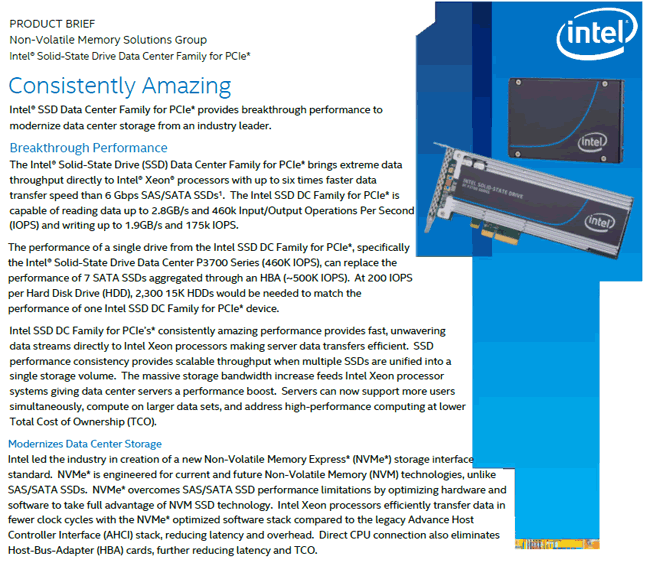
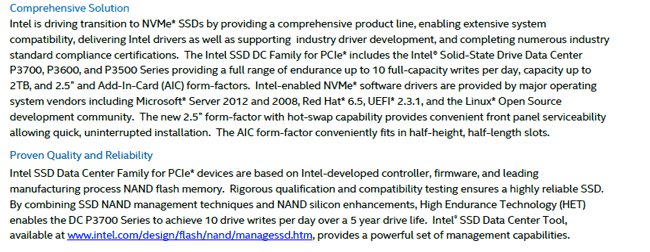
This is how Intel positions the Intel P3700 –
Specification
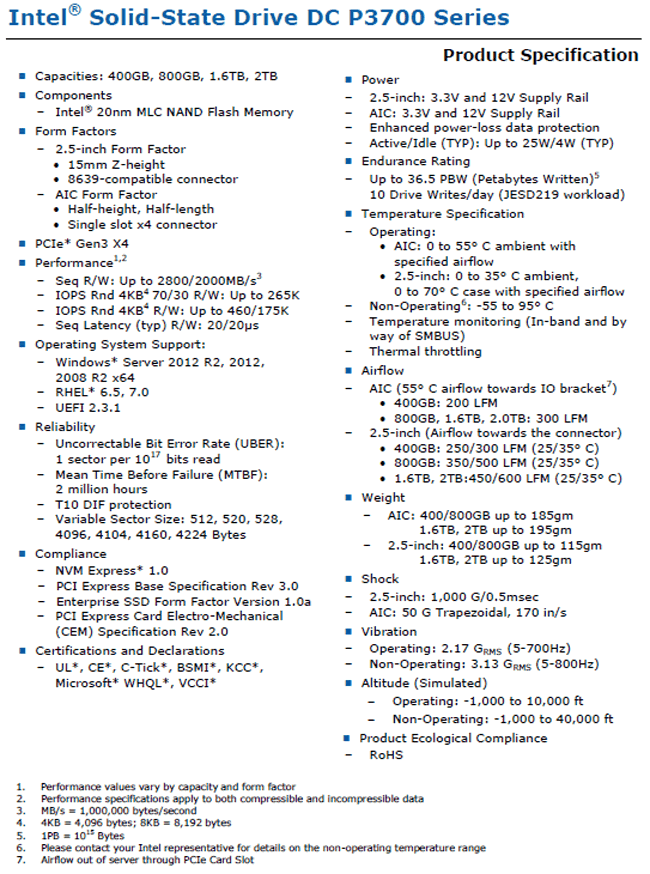
Here is Intel’s specification for the Intel P3700 series –
Product Image
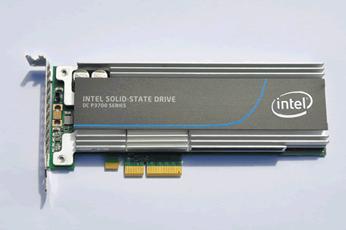
Here are some pictures of the Intel P3700 800GB we tested –
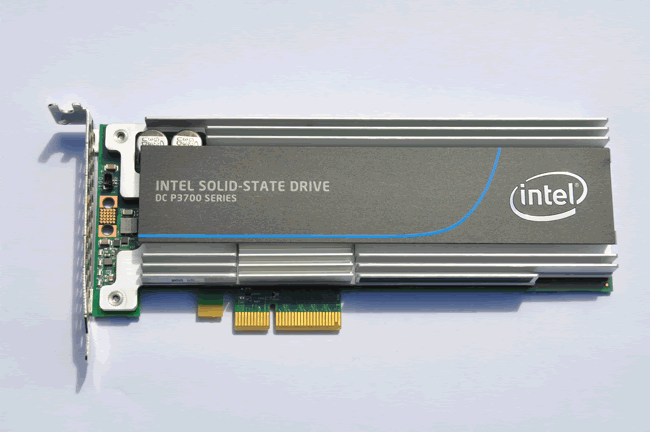
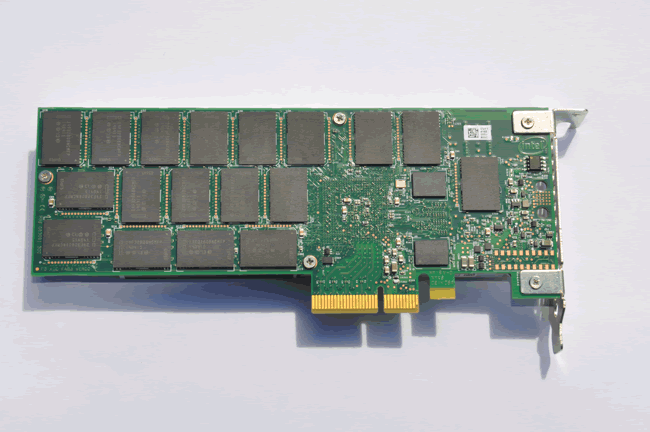
Now let's head to the next page, to look at Myce’s
Enterprise Testing Methodology.....
Please click
here
to view or download a detailed introduction to Myce’s Enterprise Class Solid
State Storage (‘SSS’) Testing Methodology as a PDF.
Put briefly:
All testing is performed on an OakGate Technology test unit
We perform two sets of Performance Tests:
- A full set of the mandatory Storage Network Industry
Association’s (‘SNIA’) tests as specified in their Solid State Storage
Performance Test Specification Enterprise V1.0 – SNIA
SSS PTS Version 1.0. - A set of tests, known as the ‘Myce/OakGate Full
Characterisation Test Set’, that provides readers with a fuller
characterisation of the solution.
We also review other important factors such as Power
Consumption, Data Reliability and Failover features.
A word about SNIA testing – before striking a partnership
with OakGate Technology I spent some time researching how I might implement SNIA
testing using freely available tools such as IOMeter and FIO. I arrived at the
conclusion that whilst it was theoretically possible it was impractical. The
reason for this is as without the automation offered by a test bench, such as
the OakGate Unit, the only way to meet the SSS PTS requirements is to run the
maximum number of test cycles and then to manually look back at the results to
determine when/if steady state has been achieved in the workload specific test
cycle, and then harvest the data from the qualifying Measurement Window. This means
that the test runs would always take a maximum elapsed time, and there would be
a great deal of human effort required to review, gather, and report upon the
data. I empathise with, acknowledge, and respect the efforts of other
reviewers who endeavour to meet the SNIA’s principles in their testing - I am
privileged and thankful to be able to use a superb test bench which automates
the whole process and allows me to meet the SNIA’s specification in full.
Before we move on, let’s remind ourselves of some basics –
When reviewing the performance of an SSS solution there are
three basic metrics that we look at:
1. IOPS – the number of
Input/Output Operations per Second
2. Bandwidth – the number of
bytes transferred per second (usually measured in Megabytes per second, ‘MB/s’)
3. Latency – the amount of time
each IO request will take to complete (usually, in the context of SSS
solutions, measured in Microseconds, which are millionths of a second).
It is true to say that IOPS and Bandwidth had all been
growing rapidly before the advent of SSS solutions, but Latency can only be significantly
decreased by eliminating mechanical devices, and thus Latency is the single
most important aspect that SSS solutions deliver to enhance performance.
Latency in a technical environment is synonymous with delay.
In the context of an SSS solution it is the amount of time between an IO
request being made, and when the request is serviced.
Bandwidth, also commonly referred to as ‘Throughput’, is the
amount of data that can be transferred from a storage device to a host, in a
given amount of time. In the context of SSS solutions it is typically measured
in Megabytes per second (MB/s).
A great enterprise SSS solution
offers an effective balance of all three metrics. High IOPS and Bandwidth is
simply not enough if Latency (the delay in an IO operation) is too high. As we
will see in the test results presented below, as Latency increases IOPS will
inevitably decrease.
Queue Depth is the average amount
of IO requests outstanding. If you are running an application and the Average
Queue Depth is one or higher and CPU utilisation is low, then the application’s
performance is most probably suffering from a ‘Storage Bottleneck’.
Another important factor to
remember is that SSS performance is influenced by previous workloads, not just
the current workload, and especially by what has previously been written to the
drive. As specified in the SNIA SSS PTS the goal of all good Enterprise level
testing is to provide consistent circumstances, so that results can be compared
fairly across different SSS solutions – it is for this reason that all of our
tests start with a purge of the drive, so that it starts in a ‘Fresh Out of the
Box’ (FOB) state. Most tests then have a pre-conditioning phase where the
drive is put into a ‘Steady State’ before the test phase begins. Put briefly, a
‘Steady State’ is achieved when the performance of the drive no longer varies
over time and settles into a consistent level of performance for the workload
in hand. You can find a detailed explanation of ‘Steady State’ and how it is
determined in the SNIA tests in our Enterprise Testing Methodology paper, which
can be viewed or downloaded as a PDF by clicking here.
For interest, here are some
generally accepted assumptions that differentiate the use and therefore the
approach to testing Enterprise/Server and Consumer/Client SSS solutions:
Enterprise/Server SSS
assumptions:
- The drive is always full
- The drive is being accessed 100% of the time (i.e. the
drive gets no idle time) - Failure is catastrophic for many users
- The Enterprise market chooses SSS solutions based on their
performance in steady state, and that steady state, full, and worst case
are not the same thing
Consumer/Client SSS
assumptions:
- The drive typically has less than 50% of its user space
occupied - The drive is accessed around 8 hours per day, 5 days per
week, and typically data is written far less frequently - Failure is catastrophic for a single user
- The consumer/client market generally chooses SSS solutions
based on their performance in the FOB state
Esther
Spanjer, Director, Enterprise Business Development EMEA at Sandisk, said, 'I am
happy to commend Myce for their high level of professionalism and cooperation
during the review process', Ms. Spanjer added, 'I wish them every success in
their partnership with OakGate Technology and their initiative to provide
authoritative performance reviews for the Enterprise Solid State Storage market'
Now let's head to the next page, to look at the results
of our SNIA IOPS (Input/Output Operations per Second) Test.....
IOPS performance will typically
vary greatly depending on the nature of the IO traffic, including the mixture
of Read and Write operations, and the mixture of Block Sizes (the size of the
IO operation’s data packet, also referred to as IO Size). This test is designed
to benchmark the IOPS performance profile for random IO operations for 56
different combinations of Read/Write mix % and Block Sizes when in a Steady
State, which are of interest to most users.
All of the SNIA’s test specifications
define a ‘required’ set of parameters that must be run for the test and then
allow the operator to elect to run additional tests with different parameters
of their choice. It is the mandatory test with the required parameters that we
run. Note that all of the mandatory tests must be conducted with fully random
data
As previously mentioned, a key
principle of SNIA testing is to provide a consistent basis for comparing
different solutions from different manufacturers.
Here are the results -

You can see here a visual confirmation that Steady State
Convergence was determined at the end of Round 5.


Here is a 3D and tabular presentation of the results. Users
can simply refer to the grid to obtain the R/W mix and Block Size value of
interest. For example, Online Transaction Processing applications
typically run at a Block Size of 8K and a Read/Write Mix of 65/35, and users
can quickly understand how the device might perform under Steady State for
these access characteristics.
You can see that the 4K 100% Read IOPS result is 288,119 and
that the 4K 100% Write IOPS result is a simply outstanding 94,942. These
results are simply awesome and are several orders of magnitude greater than for
anything we have reviewed before, except of course the 1.6TB Intel P3700.
Product Comparison
For interest we present a comparison of the 4K 100% Writes
and Reads results with those of the other Enterprise SSDs we have tested -


Simply awesome!
Now let's head to the next page, where we look at the
results of the SNIA Write Saturation Test.....
The objective of this test is
to observe the time evolution of the drive’s performance, as a function of
time, from a ‘factory fresh’, ‘fresh out of the box’ (‘FOB’) state. When a
drive is in a FOB state (e.g. after it has been purged by, for example by a
SATA Secure Erase or SCSI Format), we can expect an initial period of time when
writes can easily be accommodated by clean/empty blocks, but once all of the clean
blocks have been written to once and the drive’s controller must first clean
blocks (with erase write operations) before it can write new data, then we can
expect a slow down. The slow-down is usually quite dramatic and is commonly
referred to as the ‘write cliff’.
The Write Saturation Test is
easy to run as it requires no steady state determination – it can be easily run
in freely available software, such as IOMeter.
Here are the results -

You can see here a significant drop in Write IOPS performance
as the Intel P3700 reaches a Steady State. The fall, that begins at Round 8,
occurs when all of the available NAND has been written to once and the drive
must clean blocks on the fly, in preparation for accommodating further writes –
this is commonly referred to as the ‘Write Cliff’.
Note that the test was halted, as specified in the SNIA SSS
PTS, when 4 x the User Capacity had been written to the drive.
You can see that the Intel P3700 is settling into a steady
state at just under 100,000 IOPS, which is stunning.

You can also see that the latency graph line is a mirror
image of the IOPS graph line.
Now let's head to the next page, to look at the SNIA
Throughput Test.....
The test is designed to measure the sequential Read and
Write IO performance for two IO Sizes, when under Steady State conditions. One
can easily compare the results produced by this test with box-top numbers,
which are usually stated as “Up to xxx MB/S”.
Please note that this test was run with IO sizes of 8K and
128K (as 128K is the largest IO size supported by the Intel P3700).
Here are the results -

You can see here that Steady State was achieved for both
Write IO sizes by the end of Round 5.
-

You can see here that Steady State for both Read IO sizes
was achieved by the end of Round 6.
Here are the average values recorded in the measurement
window –

Again, simply awesome results.
Product Comparison
For interest we present a comparison of the sequential reads
and writes performance in comparison with those of the other Enterprise SSDs we
have tested -


Please note that the Intel P3700’s results are for an IO
size of 128K (as 128K is the largest IO Size it supports). All other the other
drives’ results are for an IO Size of 1024K, which is typically the block size at
which an SSD will achieve its highest level of throughput.
Simply awesome results, again!
Now let's head to the next page, to look at the results
of the SNIA Latency Test.....
The Latency Test measures average and maximum response times
using random IOs at specified Block Sizes and Read/Write mixes, taken under
steady state conditions. The test runs at a Queue Depth of 1 (1 outstanding
IO), thus the results give the baseline response time for a single IO request.
The test also reports maximum latency values, which can be
helpful to see if there might be processes within the drive that may cause max
Latency values to become larger.
Here are the results -

You can see here that Steady State Convergence was achieved
at the end of Round 7.

These are the Average Latency Values observed in the
Measurement Window.

Here is a 3D graph showing, at a glance, the Maximum Latency
values for each combination of Read/Write Mix and IO Size. These results are not
as good as I had imagined they would be, we look at the distribution and
frequency of the maximum latency values in the Myce/Oakgate 4K Read and Write Latency
tests below to check if there could be a quality of service issue lurking.

Here is a 3D graph showing, at a glance, the Average Latency
values for each combination of Read/Write Mix and IO Size. These are awesome
results!
Product Comparison
For interest we present a comparison of the 4K 65% Reads 35%
Writes latency results in comparison with those of the other Enterprise SSDs we
have tested -


Now let's head to the next page, to look at the results
for the Myce/OakGate 4K Read and Write Latency Tests......
These tests steadily increase the random 4K IO demand in
terms of IOPS, and report the drive's response in terms of Average IOPS, Average
Latency and Maximum Latency. It is designed to show a drive’s maximum IOPS
capability and report the all important Latency numbers for each level of IOPS
demanded. The Maximum latency numbers give us an insight into the occurrence
of Latency peaks that could cause an unexpected response from time to time.
Please note that the Myce/Oakgate tests have been run at a
queue depth of 128.
Here are the results –
Firstly, here is a graph showing the result for the initial
Pre-Conditioning step (4K Random Writes) –

As expected we see the P3700 settling in to a steady state at
just below 100,000 IOPS.
4K Latency Read Test

Please note that we have changed the normal scale that we
use here so that results are recorded for increments of 10,000 IOPS (We
normally record in increments of 1,000 IOPS but this was considered impractical
for a drive that can exceed a level of 400,000 IOPS)
You can see that the drive can no longer meet the increase
in IOPS demand at just over 400,000 IOPS – another stunning result. There is a
curious anomaly at the 370,000 IOPS level.

You can see a gradual increase in read latency up to the
maximum IOPS mark. The Read Latency results are outstanding.

You can see that there are some max latency spikes.
Let’s have a close look at the distribution of the Latency
results at the 180,000 IOPS level (at one of the spikes) –

As this is the first time in this review, that we are
looking at a High Resolution Latency Histogram, here’s an explanation – The X
axis at the left is the count of the IOs in the observation period (in a Round)
that had a Latency of the value along the Y axis (please note that the X axis
is logarithmic to allow the low order counts of the huge number of IOs that
have been measured to be visible); the Y axis is the Latency value measured in
Microseconds; The X axis at the right is the % of the Total IOs observed that
have a Latency <= to a given Latency value; the rate of getting to 100% is
highlighted by the red graph line.
You can see that 99% of the Latency values are <= 3.23
Milliseconds, so the quality of service is good and the number of outliers is
relatively low.
4K Latency Write Test

You can see here that the Intel P3700 starts failing to meet
the increase in IOPS demand at around 90,000. An outstanding result!

Here we can see that Average Write Latency stays below 50 microseconds
until a demand of 90,000 IOPS. Another great result!

The maximum write latency results are relatively high.
So let’s have a look at the distribution of the Max Latency
Values at the 80,000 IOPS Mark –

You can see that 99% of the Latency Values are <= 680
microseconds. So, the quality of service is good and the number of outliers is
relatively low.
Now let's head to the next page, to look at the results
for the Myce/Oakgate Reads and Writes Tests.....
The tests are designed to show the Random and Sequential,
Read and Write, performance metrics for different combinations of Queue Depth
and IO size.
As the Intel P3700 is clearly an awesome performer we have
run these tests up to a queue depth of 128 (rather than the normal of 32)
Here are the results -
Random Reads

You can see that increasing the queue depth to 64 and 128
has resulted in a significant increase in performance for the 4K IO Size (over
the result for a queue depth of 32). I also noticed that there is little or no increase
for a queue depth of 128 over that for 64.


Random Writes

Here you can see a distinctive and healthy IOPS peak for the
4K IO Size. Note that again there is no increase for a queue depth of 128 over
that for 64 (Indeed, when I played with the OakGate IO Exerciser I discovered
that for 4K writes there is little or no scaling beyond a queue depth of around
50).


Sequential Reads


Sequential Writes


Now let's head to the next page, to look at the results
for the Myce/Oakgate 4K Mixed Reads/Writes Tests.....
This test is designed to show the performance metrics for
different combinations of Queue Depth and Read/Write mix (the % of Reads and
the % of Writes making up the IO traffic)
4K Mixed R/W Test


Now let's head to the next page, to look at the results
of the Myce/OakGate Entropy Tests.....
These tests are designed to show performance metrics for
different combinations of Queue Depth and Entropy % (Entropy % is the degree to
which the data that is random and therefore incompressible). Testing with
different Entropy % levels has become important with the advent of controllers,
such as those from LSI Sandforce, that compress data before writing it to NAND.
Controllers that compress data can be expected to perform better with highly
compressible data (i.e. data with low Entropy).
The first test performs 5 minutes of Random 4K writes for
each combination of Queue Depth and Entropy %.
The second test does the same thing for a mixture of Read
and Write traffic (70% Reads, 30% Writes).
4K Entropy Write Test

You can see there is little or no variance in performance to
be found in any of the Entropy tests, as the degree of random data increases
(and this comment applies to all of the test results for the Myce/OakGate
Entropy Tests). We can therefore conclude that the Intel P3700 does not
compress data.


4K Entropy 70%_Reads_30%_Writes Test
As we saw no evidence of compression in the 4K Entropy Write
Test, we skip the presentation of the 70/30 entropy results.
Now let's head to the next page, to look at Power
Consumption and Data Reliability.....
Power Consumption
I believe most people know that data centres are already one
of the major consumers of electricity in the industrialised world; indeed it is
estimated that currently 2% of all electricity consumption goes into IT
applications. According to the European Union the energy consumption of data
centres was 46 Terawatt hours in 2006 and is set to rise to 93 TW hrs by 2020. This
is equivalent to one hundred million 100W light bulbs burning 24 hours a day,
365 days a year.
Typically 40% of the power consumed by data centres is for
the IT load and 35% is for cooling the system. Generally speaking, if a drive
consumes more power it will produce more heat – so power consumption is indeed
a double edged sword. It is no surprise then that a significant proportion of
a data centre’s power consumption goes on servers. I understand cloud based
applications, such as Facebook, are the primary cause of the growth in servers
and the demand for storage space.
If you are a Facebook user, like me and the Reynolds sibs, and
you reside in Europe – this is most probably where your data is click here. Some
interesting Facebook statistics – Facebook has more than 1 Billion monthly
active users, it generates 1 Trillion page views per month and more than 219
Billion photos have been uploaded since launch – amazing! Here is an
interesting video showing the remarkable scale of Facebook’s largest North
American data centre click
here.
My thanks to Anna of Intel for pointing me to the following
Info-graphs -


The following graph uses the typical Power Consumption, when
active, as published in the respective manufacturers' specifications. The value
for the Kingston E100 is calculated as the average of 1.2W (TYP) Read and 2.7W
(TYP) Write.

On the face of it the Intel P3700 800GB has terrible power
consumption characteristics, but this is misleading as we must remember that it
is doing the same level of work as the sum of several typical SSDs, so arguably
we should be dividing its power consumption of 25W by 4 or 5 to get a
comparable result. Therefore in reality the Intel P3700 has competitive power
consumption characteristics.
Data Reliability
The 'Unrecoverable Bit Error Rate' (UBER),as defined by
JEDEC, the global leader in developing open standards for the microelectronic
industry, is a metric for data corruption rate equal to the number of data
errors per bit read after applying any specified error correction method. UBER
= number of data errors / number of bits read. JDEC specifies that the maximum
error rate allowable for an Enterprise level SSS solution is one error in every
10^16 bits read.

Intel specifies an UBER of 1 in 10^17 bits read for the
Intel P3700.
The Intel P3700 has a 5 year warranty and is warranted for 10
Drive Writes Per Day (DWPD).
The Intel P3700 has a comprehensive set of Enterprise
features, which includes power failure support.
Now let's head to the next page, to look at the
Conclusions of this review.....
Just like the 1.6TB P3700 the Intel DC P3700 800GB is a
fabulous drive that defines a new level of high performance for solid state
storage solutions. Currently, from amongst the drives we have reviewed to date,
the PC3700 is in a league of its own.
It also has excellent endurance and is a fully featured
enterprise solution. The 800GB version is not as fast as the 1.6TB version,
particularly for Write IOPS, but it is still incredibly fast.
I have been fortunate to be able to test the 800GB drive for
a few months, in a Windows 8.1 machine using the Windows NVMe driver and the
Intel driver. I can report that it has been faultless.
The question of whether enthusiasts will aspire to a P3700
comes to mind (I must admit, I am without doubt a storage enthusiast myself
with a sometimes uncontrollable desire for speed). The P3700 800GB is
available in the UK for GBP 1907.69 and there is a 400GB version available for
£953.81 (from scan.co.uk). So, it is a big ask even for the most extreme enthusiast.
In truth the P3700 is total overkill for a desktop PC where a user will rarely
generate an IO demand beyond a queue depth of 1 or 2. My head tells me that
the enthusiast is best to stick to drives designed to meet their needs,
especially with SATA Express products arriving soon. My heart wants the best
there is and right now this is, in my opinion, the Intel DC P3700.
It is no surprise then that I award the 800GB Intel DC P3700
800GB drive Myce’s top rating of ‘Outstanding’.
















